Course Merge Helper
Versions
Current version
v3.7.0 (2020110900)
v3.7.0
Plugin type: Local plugins
Frankenstyle component name: local_course_merge
Version build number: 2020110900
Version release name: v3.7.0
Maturity: Stable
Supported Moodle versions: 3.10, 3.11, 3.7, 3.8, 3.9, 4.0, 4.1, 4.2, 4.3, 4.4, 4.5, 5.0, 5.1, 5.2
Repository URL (Git): https://github.com/LafColITS/moodle-local_course_merge
Repository branch: main
Repository tag: v3.7.0
Issue/bug tracker URL: https://github.com/LafColITS/moodle-local_course_merge/issues
Moodle Course Merge Helper

This local module allows teachers to create a new course from existing courses using the Course Meta Link enrollment method. The intended use case is a teacher combining multiple sections of a course into a single course while preserving the enrollments of the original courses.
Requirements
- Moodle 3.7 (build 2019052000 or later)
Installation
Copy the course_merge folder into your /local directory and visit your Admin Notification page to complete the installation.
Usage
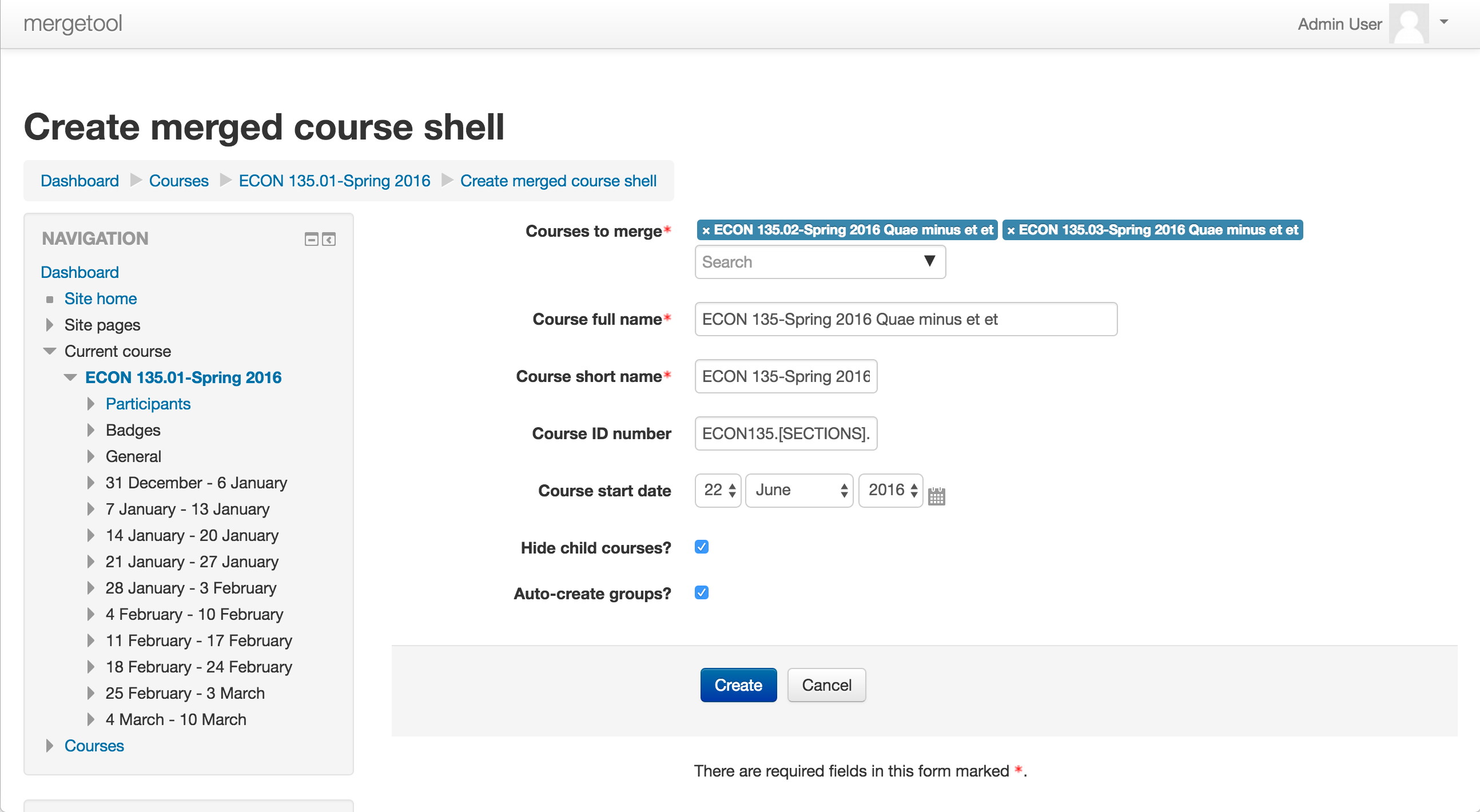
To create a new course go to one of the source courses and click "Create Merged Course" in the Course Administration block. You'll be taken to a page where you can select the other courses to link into the new course, the name and other settings for the new course, and whether to hide the source courses (on by default). Once you've made all your selections click "Create". The plugin will do the following:
- Create the new course with the given settings
- Create a course meta link enrollment between each source course and the new course
- Create a group for each source course in the new course
- Hide the source courses if requested
- Move the source courses into a designated category, if requested
- Take you into the new course
Configuration
The plugin is designed to permit course creation under controlled conditions, especially in environments where editing teachers do not otherwise have the capability to create courses.
Category depth
The plugin can restrict the courses which may be linked into the new course. There are three options:
- Same category: The source course and the target courses must all be in the same category.
- Same parent: The source course and the target courses must all be in either the same category or share the same parent category
- Unlimited: No category-based restrictions. This is not recommended.
Given the following course and category structure:
- All courses
- Fall 2015
- Fall 2016
- English
- English 101.01
- English 101.02
- History
- History 101.01
- History 101.02
- English
With same category selected, a teacher could start with History 101.01 and select History 101.02, but not any courses under the English category. With same parent selected, a teacher could work with courses in both History and English, but not courses outside a given term.
Permissions
The plugin is designed to provide a controlled course-creation capability which doesn't otherwise exist. By default it respects the moodle/course:create capability, but you may choose to override this.
Templates
The plugin allows the site administrator to define naming conventions for created courses. These are defined using a series of regular expressions. See the plugin wiki for examples.
Acknowledgements
This plugin relies heavily on the AJAX course selector and related course meta link interface code developed by Damyon Wiese for the Moodle 3.1 release.
Author
Charles Fulton (fultonc@lafayette.edu)
v3.6.3 (2018112703)
v3.6.3
Plugin type: Local plugins
Frankenstyle component name: local_course_merge
Version build number: 2018112703
Version release name: v3.6.3
Maturity: Stable
Supported Moodle versions: 3.6, 3.7, 3.8, 3.9
Repository URL (Git): https://github.com/LafColITS/moodle-local_course_merge
Repository branch:
Repository tag: v3.6.3
Issue/bug tracker URL: https://github.com/LafColITS/moodle-local_course_merge/issues
Moodle Course Merge Helper

This local module allows teachers to create a new course from existing courses using the Course Meta Link enrollment method. The intended use case is a teacher combining multiple sections of a course into a single course while preserving the enrollments of the original courses.
Requirements
- Moodle 3.6rc1 (build 2018112500.00 or later)
Installation
Copy the course_merge folder into your /local directory and visit your Admin Notification page to complete the installation.
Usage
To create a new course go to one of the source courses and click "Create Merged Course" in the Course Administration block. You'll be taken to a page where you can select the other courses to link into the new course, the name and other settings for the new course, and whether to hide the source courses (on by default). Once you've made all your selections click "Create". The plugin will do the following:
- Create the new course with the given settings
- Create a course meta link enrollment between each source course and the new course
- Create a group for each source course in the new course
- Hide the source courses if requested
- Move the source courses into a designated category, if requested
- Take you into the new course
Configuration
The plugin is designed to permit course creation under controlled conditions, especially in environments where editing teachers do not otherwise have the capability to create courses.
Category depth
The plugin can restrict the courses which may be linked into the new course. There are three options:
- Same category: The source course and the target courses must all be in the same category.
- Same parent: The source course and the target courses must all be in either the same category or share the same parent category
- Unlimited: No category-based restrictions. This is not recommended.
Given the following course and category structure:
- All courses
- Fall 2015
- Fall 2016
- English
- English 101.01
- English 101.02
- History
- History 101.01
- History 101.02
- English
With same category selected, a teacher could start with History 101.01 and select History 101.02, but not any courses under the English category. With same parent selected, a teacher could work with courses in both History and English, but not courses outside a given term.
Permissions
The plugin is designed to provide a controlled course-creation capability which doesn't otherwise exist. By default it respects the moodle/course:create capability, but you may choose to override this.
Templates
The plugin allows the site administrator to define naming conventions for created courses. These are defined using a series of regular expressions. See the plugin wiki for examples.
Marking form fields as advanced
By default, many of the form fields in the "Create a merged course shell" form are marked as advanced, meaning they are hidden at first and a user must click "Show more" to see them. You can remove fields from the advanced block by removing their identifiers from the "Which settings are advanced?" text area on the settings page.
Acknowledgements
This plugin relies heavily on the AJAX course selector and related course meta link interface code developed by Damyon Wiese for the Moodle 3.1 release.
Author
Charles Fulton (fultonc@lafayette.edu)
v3.6.2 (2018112702)
v3.6.2
Plugin type: Local plugins
Frankenstyle component name: local_course_merge
Version build number: 2018112702
Version release name: v3.6.2
Maturity: Stable
Supported Moodle versions: 3.6, 3.7, 3.8, 3.9
Repository URL (Git): https://github.com/LafColITS/moodle-local_course_merge
Repository branch: master
Repository tag: v3.6.2
Issue/bug tracker URL: https://github.com/LafColITS/moodle-local_course_merge/issues
Moodle Course Merge Helper
This local module allows teachers to create a new course from existing courses using the Course Meta Link enrollment method. The intended use case is a teacher combining multiple sections of a course into a single course while preserving the enrollments of the original courses.
Requirements
- Moodle 3.6rc1 (build 2018112500.00 or later)
Installation
Copy the course_merge folder into your /local directory and visit your Admin Notification page to complete the installation.
Usage
To create a new course go to one of the source courses and click "Create Merged Course" in the Course Administration block. You'll be taken to a page where you can select the other courses to link into the new course, the name and other settings for the new course, and whether to hide the source courses (on by default). Once you've made all your selections click "Create". The plugin will do the following:
- Create the new course with the given settings
- Create a course meta link enrollment between each source course and the new course
- Create a group for each source course in the new course
- Hide the source courses if requested
- Move the source courses into a designated category, if requested
- Take you into the new course
Configuration
The plugin is designed to permit course creation under controlled conditions, especially in environments where editing teachers do not otherwise have the capability to create courses.
Category depth
The plugin can restrict the courses which may be linked into the new course. There are three options:
- Same category: The source course and the target courses must all be in the same category.
- Same parent: The source course and the target courses must all be in either the same category or share the same parent category
- Unlimited: No category-based restrictions. This is not recommended.
Given the following course and category structure:
- All courses
- Fall 2015
- Fall 2016
- English
- English 101.01
- English 101.02
- History
- History 101.01
- History 101.02
- English
With same category selected, a teacher could start with History 101.01 and select History 101.02, but not any courses under the English category. With same parent selected, a teacher could work with courses in both History and English, but not courses outside a given term.
Permissions
The plugin is designed to provide a controlled course-creation capability which doesn't otherwise exist. By default it respects the moodle/course:create capability, but you may choose to override this.
Templates
The plugin allows the site administrator to define naming conventions for created courses. These are defined using a series of regular expressions. See the settings page itself for examples.
Acknowledgements
This plugin relies heavily on the AJAX course selector and related course meta link interface code developed by Damyon Wiese for the Moodle 3.1 release.
Author
Charles Fulton (fultonc@lafayette.edu)
v3.6.1 (2018112701)
v3.6.1
Plugin type: Local plugins
Frankenstyle component name: local_course_merge
Version build number: 2018112701
Version release name: v3.6.1
Maturity: Stable
Supported Moodle versions: 3.6, 3.7, 3.8
Repository URL (Git): https://github.com/LafColITS/moodle-local_course_merge
Repository branch: master
Repository tag: v3.6.1
Issue/bug tracker URL: https://github.com/LafColITS/moodle-local_course_merge/issues
Moodle Course Merge Helper
This local module allows teachers to create a new course from existing courses using the Course Meta Link enrollment method. The intended use case is a teacher combining multiple sections of a course into a single course while preserving the enrollments of the original courses.
Requirements
- Moodle 3.6rc1 (build 2018112500.00 or later)
Installation
Copy the course_merge folder into your /local directory and visit your Admin Notification page to complete the installation.
Usage
To create a new course go to one of the source courses and click "Create Merged Course" in the Course Administration block. You'll be taken to a page where you can select the other courses to link into the new course, the name and other settings for the new course, and whether to hide the source courses (on by default). Once you've made all your selections click "Create". The plugin will do the following:
- Create the new course with the given settings
- Create a course meta link enrollment between each source course and the new course
- Create a group for each source course in the new course
- Hide the source courses if requested
- Move the source courses into a designated category, if requested
- Take you into the new course
Configuration
The plugin is designed to permit course creation under controlled conditions, especially in environments where editing teachers do not otherwise have the capability to create courses.
Category depth
The plugin can restrict the courses which may be linked into the new course. There are three options:
- Same category: The source course and the target courses must all be in the same category.
- Same parent: The source course and the target courses must all be in either the same category or share the same parent category
- Unlimited: No category-based restrictions. This is not recommended.
Given the following course and category structure:
- All courses
- Fall 2015
- Fall 2016
- English
- English 101.01
- English 101.02
- History
- History 101.01
- History 101.02
- English
With same category selected, a teacher could start with History 101.01 and select History 101.02, but not any courses under the English category. With same parent selected, a teacher could work with courses in both History and English, but not courses outside a given term.
Permissions
The plugin is designed to provide a controlled course-creation capability which doesn't otherwise exist. By default it respects the moodle/course:create capability, but you may choose to override this.
Templates
The plugin allows the site administrator to define naming conventions for created courses. These are defined using a series of regular expressions. See the settings page itself for examples.
Acknowledgements
This plugin relies heavily on the AJAX course selector and related course meta link interface code developed by Damyon Wiese for the Moodle 3.1 release.
Author
Charles Fulton (fultonc@lafayette.edu)
v3.6.0 (2018112700)
v3.6.0
Plugin type: Local plugins
Frankenstyle component name: local_course_merge
Version build number: 2018112700
Version release name: v3.6.0
Maturity: Stable
Supported Moodle versions: 3.6
Repository URL (Git): https://github.com/LafColITS/moodle-local_course_merge
Repository branch:
Repository tag: v3.6.0
Issue/bug tracker URL: https://github.com/LafColITS/moodle-local_course_merge/issues
Moodle Course Merge Helper
This local module allows teachers to create a new course from existing courses using the Course Meta Link enrollment method. The intended use case is a teacher combining multiple sections of a course into a single course while preserving the enrollments of the original courses.
Requirements
- Moodle 3.6rc1 (build 2018112500.00 or later)
Installation
Copy the course_merge folder into your /local directory and visit your Admin Notification page to complete the installation.
Usage
To create a new course go to one of the source courses and click "Create Merged Course" in the Course Administration block. You'll be taken to a page where you can select the other courses to link into the new course, the name and other settings for the new course, and whether to hide the source courses (on by default). Once you've made all your selections click "Create". The plugin will do the following:
- Create the new course with the given settings
- Create a course meta link enrollment between each source course and the new course
- Create a group for each source course in the new course
- Hide the source courses if requested
- Move the source courses into a designated category, if requested
- Take you into the new course
Configuration
The plugin is designed to permit course creation under controlled conditions, especially in environments where editing teachers do not otherwise have the capability to create courses.
Category depth
The plugin can restrict the courses which may be linked into the new course. There are three options:
- Same category: The source course and the target courses must all be in the same category.
- Same parent: The source course and the target courses must all be in either the same category or share the same parent category
- Unlimited: No category-based restrictions. This is not recommended.
Given the following course and category structure:
- All courses
- Fall 2015
- Fall 2016
- English
- English 101.01
- English 101.02
- History
- History 101.01
- History 101.02
- English
With same category selected, a teacher could start with History 101.01 and select History 101.02, but not any courses under the English category. With same parent selected, a teacher could work with courses in both History and English, but not courses outside a given term.
Permissions
The plugin is designed to provide a controlled course-creation capability which doesn't otherwise exist. By default it respects the moodle/course:create capability, but you may choose to override this.
Templates
The plugin allows the site administrator to define naming conventions for created courses. These are defined using a series of regular expressions. See the settings page itself for examples.
Acknowledgements
This plugin relies heavily on the AJAX course selector and related course meta link interface code developed by Damyon Wiese for the Moodle 3.1 release.
Author
Charles Fulton (fultonc@lafayette.edu)
v3.3.4 (2018011701)
v3.3.4
Plugin type: Local plugins
Frankenstyle component name: local_course_merge
Version build number: 2018011701
Version release name: v3.3.4
Maturity: Stable
Supported Moodle versions: 3.3
Repository URL (Git): https://github.com/LafColITS/moodle-local_course_merge
Repository branch:
Repository tag: v3.3.4
Issue/bug tracker URL: https://github.com/LafColITS/moodle-local_course_merge/issues
Moodle Course Merge Helper

This local module allows teachers to create a new course from existing courses using the Course Meta Link enrollment method. The intended use case is a teacher combining multiple sections of a course into a single course while preserving the enrollments of the original courses.
Requirements
- Moodle 3.3 (build 2017051500 or later)
Installation
Copy the course_merge folder into your /local directory and visit your Admin Notification page to complete the installation.
Usage
To create a new course go to one of the source courses and click "Create Merged Course" in the Course Administration block. You'll be taken to a page where you can select the other courses to link into the new course, the name and other settings for the new course, and whether to hide the source courses (on by default). Once you've made all your selections click "Create". The plugin will do the following:
- Create the new course with the given settings
- Create a course meta link enrollment between each source course and the new course
- Create a group for each source course in the new course
- Hide the source courses if requested
- Move the source courses into a designated category, if requested
- Take you into the new course
Configuration
The plugin is designed to permit course creation under controlled conditions, especially in environments where editing teachers do not otherwise have the capability to create courses.
Category depth
The plugin can restrict the courses which may be linked into the new course. There are three options:
- Same category: The source course and the target courses must all be in the same category.
- Same parent: The source course and the target courses must all be in either the same category or share the same parent category
- Unlimited: No category-based restrictions. This is not recommended.
Given the following course and category structure:
- All courses
- Fall 2015
- Fall 2016
- English
- English 101.01
- English 101.02
- History
- History 101.01
- History 101.02
- English
With same category selected, a teacher could start with History 101.01 and select History 101.02, but not any courses under the English category. With same parent selected, a teacher could work with courses in both History and English, but not courses outside a given term.
Permissions
The plugin is designed to provide a controlled course-creation capability which doesn't otherwise exist. By default it respects the moodle/course:create capability, but you may choose to override this.
Templates
The plugin allows the site administrator to define naming conventions for created courses. These are defined using a series of regular expressions. See the settings page itself for examples.
Acknowledgements
This plugin relies heavily on the AJAX course selector and related course meta link interface code developed by Damyon Wiese for the Moodle 3.1 release.
Author
Charles Fulton (fultonc@lafayette.edu)
v3.4.0 (2018051300)
v3.4.0
Plugin type: Local plugins
Frankenstyle component name: local_course_merge
Version build number: 2018051300
Version release name: v3.4.0
Maturity: Stable
Supported Moodle versions: 3.4, 3.5
Repository URL (Git): https://github.com/LafColITS/moodle-local_course_merge
Repository branch:
Repository tag: v3.4.0
Issue/bug tracker URL: https://github.com/LafColITS/moodle-local_course_merge/issues
Moodle Course Merge Helper
This local module allows teachers to create a new course from existing courses using the Course Meta Link enrollment method. The intended use case is a teacher combining multiple sections of a course into a single course while preserving the enrollments of the original courses.
Requirements
- Moodle 3.4 (build 2017111300 or later)
Installation
Copy the course_merge folder into your /local directory and visit your Admin Notification page to complete the installation.
Usage
To create a new course go to one of the source courses and click "Create Merged Course" in the Course Administration block. You'll be taken to a page where you can select the other courses to link into the new course, the name and other settings for the new course, and whether to hide the source courses (on by default). Once you've made all your selections click "Create". The plugin will do the following:
- Create the new course with the given settings
- Create a course meta link enrollment between each source course and the new course
- Create a group for each source course in the new course
- Hide the source courses if requested
- Move the source courses into a designated category, if requested
- Take you into the new course
Configuration
The plugin is designed to permit course creation under controlled conditions, especially in environments where editing teachers do not otherwise have the capability to create courses.
Category depth
The plugin can restrict the courses which may be linked into the new course. There are three options:
- Same category: The source course and the target courses must all be in the same category.
- Same parent: The source course and the target courses must all be in either the same category or share the same parent category
- Unlimited: No category-based restrictions. This is not recommended.
Given the following course and category structure:
- All courses
- Fall 2015
- Fall 2016
- English
- English 101.01
- English 101.02
- History
- History 101.01
- History 101.02
- English
With same category selected, a teacher could start with History 101.01 and select History 101.02, but not any courses under the English category. With same parent selected, a teacher could work with courses in both History and English, but not courses outside a given term.
Permissions
The plugin is designed to provide a controlled course-creation capability which doesn't otherwise exist. By default it respects the moodle/course:create capability, but you may choose to override this.
Templates
The plugin allows the site administrator to define naming conventions for created courses. These are defined using a series of regular expressions. See the settings page itself for examples.
Acknowledgements
This plugin relies heavily on the AJAX course selector and related course meta link interface code developed by Damyon Wiese for the Moodle 3.1 release.
Author
Charles Fulton (fultonc@lafayette.edu)
v3.3.3 (2018011700)
v3.3.3
Plugin type: Local plugins
Frankenstyle component name: local_course_merge
Version build number: 2018011700
Version release name: v3.3.3
Maturity: Stable
Supported Moodle versions: 3.3, 3.4
Repository URL (Git): https://github.com/LafColITS/moodle-local_course_merge
Repository branch: master
Repository tag: v3.3.3
Issue/bug tracker URL: https://github.com/LafColITS/moodle-local_course_merge/issues
Moodle Course Merge Helper
This local module allows teachers to create a new course from existing courses using the Course Meta Link enrollment method. The intended use case is a teacher combining multiple sections of a course into a single course while preserving the enrollments of the original courses.
Requirements
- Moodle 3.3 (build 2017051500 or later)
Installation
Copy the course_merge folder into your /local directory and visit your Admin Notification page to complete the installation.
Usage
To create a new course go to one of the source courses and click "Create Merged Course" in the Course Administration block. You'll be taken to a page where you can select the other courses to link into the new course, the name and other settings for the new course, and whether to hide the source courses (on by default). Once you've made all your selections click "Create". The plugin will do the following:
- Create the new course with the given settings
- Create a course meta link enrollment between each source course and the new course
- Create a group for each source course in the new course
- Hide the source courses if requested
- Move the source courses into a designated category, if requested
- Take you into the new course
Configuration
The plugin is designed to permit course creation under controlled conditions, especially in environments where editing teachers do not otherwise have the capability to create courses.
Category depth
The plugin can restrict the courses which may be linked into the new course. There are three options:
- Same category: The source course and the target courses must all be in the same category.
- Same parent: The source course and the target courses must all be in either the same category or share the same parent category
- Unlimited: No category-based restrictions. This is not recommended.
Given the following course and category structure:
- All courses
- Fall 2015
- Fall 2016
- English
- English 101.01
- English 101.02
- History
- History 101.01
- History 101.02
- English
With same category selected, a teacher could start with History 101.01 and select History 101.02, but not any courses under the English category. With same parent selected, a teacher could work with courses in both History and English, but not courses outside a given term.
Permissions
The plugin is designed to provide a controlled course-creation capability which doesn't otherwise exist. By default it respects the moodle/course:create capability, but you may choose to override this.
Templates
The plugin allows the site administrator to define naming conventions for created courses. These are defined using a series of regular expressions. See the settings page itself for examples.
Acknowledgements
This plugin relies heavily on the AJAX course selector and related course meta link interface code developed by Damyon Wiese for the Moodle 3.1 release.
Author
Charles Fulton (fultonc@lafayette.edu)
v3.1.1 (2016122102)
v3.1.1
Plugin type: Local plugins
Frankenstyle component name: local_course_merge
Version build number: 2016122102
Version release name: v3.1.1
Maturity: Stable
Supported Moodle versions: 3.1, 3.2
Repository URL (Git): https://github.com/LafColITS/moodle-local_course_merge
Repository branch: MOODLE_31_STABLE
Repository tag: v3.1.1
Issue/bug tracker URL: https://github.com/LafColITS/moodle-local_course_merge/issues
Moodle Course Merge Helper

This local module allows teachers to create a new course from existing courses using the Course Meta Link enrollment method. The intended use case is a teacher combining multiple sections of a course into a single course while preserving the enrollments of the original courses.
Requirements
- Moodle 3.1 (build 2016052300 or later)
Installation
Copy the course_merge folder into your /local directory and visit your Admin Notification page to complete the installation.
Usage
To create a new course go to one of the source courses and click "Create Merged Course" in the Course Administration block. You'll be taken to a page where you can select the other courses to link into the new course, the name and other settings for the new course, and whether to hide the source courses (on by default). Once you've made all your selections click "Create". The plugin will do the following:
- Create the new course with the given settings
- Create a course meta link enrollment between each source course and the new course
- Create a group for each source course in the new course
- Hide the source courses if requested
- Move the source courses into a designated category, if requested
- Take you into the new course
Configuration
The plugin is designed to permit course creation under controlled conditions, especially in environments where editing teachers do not otherwise have the capability to create courses.
Category depth
The plugin can restrict the courses which may be linked into the new course. There are three options:
- Same category: The source course and the target courses must all be in the same category.
- Same parent: The source course and the target courses must all be in either the same category or share the same parent category
- Unlimited: No category-based restrictions. This is not recommended.
Given the following course and category structure:
- All courses
- Fall 2015
- Fall 2016
- English
- English 101.01
- English 101.02
- History
- History 101.01
- History 101.02
- English
With same category selected, a teacher could start with History 101.01 and select History 101.02, but not any courses under the English category. With same parent selected, a teacher could work with courses in both History and English, but not courses outside a given term.
Permissions
The plugin is designed to provide a controlled course-creation capability which doesn't otherwise exist. By default it respects the moodle/course:create capability, but you may choose to override this.
Templates
The plugin allows the site administrator to define naming conventions for created courses. These are defined using a series of regular expressions. See the settings page itself for examples.
Acknowledgements
This plugin relies heavily on the AJAX course selector and related course meta link interface code developed by Damyon Wiese for the Moodle 3.1 release.
Author
Charles Fulton (fultonc@lafayette.edu)
v3.3.2 (2017082500)
v3.3.2
Plugin type: Local plugins
Frankenstyle component name: local_course_merge
Version build number: 2017082500
Version release name: v3.3.2
Maturity: Stable
Supported Moodle versions: 3.3, 3.4
Repository URL (Git): https://github.com/LafColITS/moodle-local_course_merge
Repository branch: master
Repository tag: v3.3.2
Issue/bug tracker URL: https://github.com/LafColITS/moodle-local_course_merge/issues
Moodle Course Merge Helper
This local module allows teachers to create a new course from existing courses using the Course Meta Link enrollment method. The intended use case is a teacher combining multiple sections of a course into a single course while preserving the enrollments of the original courses.
Requirements
- Moodle 3.3 (build 2017051500 or later)
Installation
Copy the course_merge folder into your /local directory and visit your Admin Notification page to complete the installation.
Usage
To create a new course go to one of the source courses and click "Create Merged Course" in the Course Administration block. You'll be taken to a page where you can select the other courses to link into the new course, the name and other settings for the new course, and whether to hide the source courses (on by default). Once you've made all your selections click "Create". The plugin will do the following:
- Create the new course with the given settings
- Create a course meta link enrollment between each source course and the new course
- Create a group for each source course in the new course
- Hide the source courses if requested
- Move the source courses into a designated category, if requested
- Take you into the new course
Configuration
The plugin is designed to permit course creation under controlled conditions, especially in environments where editing teachers do not otherwise have the capability to create courses.
Category depth
The plugin can restrict the courses which may be linked into the new course. There are three options:
- Same category: The source course and the target courses must all be in the same category.
- Same parent: The source course and the target courses must all be in either the same category or share the same parent category
- Unlimited: No category-based restrictions. This is not recommended.
Given the following course and category structure:
- All courses
- Fall 2015
- Fall 2016
- English
- English 101.01
- English 101.02
- History
- History 101.01
- History 101.02
- English
With same category selected, a teacher could start with History 101.01 and select History 101.02, but not any courses under the English category. With same parent selected, a teacher could work with courses in both History and English, but not courses outside a given term.
Permissions
The plugin is designed to provide a controlled course-creation capability which doesn't otherwise exist. By default it respects the moodle/course:create capability, but you may choose to override this.
Templates
The plugin allows the site administrator to define naming conventions for created courses. These are defined using a series of regular expressions. See the settings page itself for examples.
Acknowledgements
This plugin relies heavily on the AJAX course selector and related course meta link interface code developed by Damyon Wiese for the Moodle 3.1 release.
Author
Charles Fulton (fultonc@lafayette.edu)
v3.3.1 (2017072800)
v3.3.1
Plugin type: Local plugins
Frankenstyle component name: local_course_merge
Version build number: 2017072800
Version release name: v3.3.1
Maturity: Stable
Supported Moodle versions: 3.3
Repository URL (Git): https://github.com/mackensen/moodle-local_course_merge
Repository branch: master
Repository tag: v3.3.1
Issue/bug tracker URL: https://github.com/LafColITS/moodle-local_course_merge/issues
Moodle Course Merge Helper

This local module allows teachers to create a new course from existing courses using the Course Meta Link enrollment method. The intended use case is a teacher combining multiple sections of a course into a single course while preserving the enrollments of the original courses.
Requirements
- Moodle 3.3 (build 2017051500 or later)
Installation
Copy the course_merge folder into your /local directory and visit your Admin Notification page to complete the installation.
Usage
To create a new course go to one of the source courses and click "Create Merged Course" in the Course Administration block. You'll be taken to a page where you can select the other courses to link into the new course, the name and other settings for the new course, and whether to hide the source courses (on by default). Once you've made all your selections click "Create". The plugin will do the following:
- Create the new course with the given settings
- Create a course meta link enrollment between each source course and the new course
- Create a group for each source course in the new course
- Hide the source courses if requested
- Move the source courses into a designated category, if requested
- Take you into the new course
Configuration
The plugin is designed to permit course creation under controlled conditions, especially in environments where editing teachers do not otherwise have the capability to create courses.
Category depth
The plugin can restrict the courses which may be linked into the new course. There are three options:
- Same category: The source course and the target courses must all be in the same category.
- Same parent: The source course and the target courses must all be in either the same category or share the same parent category
- Unlimited: No category-based restrictions. This is not recommended.
Given the following course and category structure:
- All courses
- Fall 2015
- Fall 2016
- English
- English 101.01
- English 101.02
- History
- History 101.01
- History 101.02
- English
With same category selected, a teacher could start with History 101.01 and select History 101.02, but not any courses under the English category. With same parent selected, a teacher could work with courses in both History and English, but not courses outside a given term.
Permissions
The plugin is designed to provide a controlled course-creation capability which doesn't otherwise exist. By default it respects the moodle/course:create capability, but you may choose to override this.
Templates
The plugin allows the site administrator to define naming conventions for created courses. These are defined using a series of regular expressions. See the settings page itself for examples.
Acknowledgements
This plugin relies heavily on the AJAX course selector and related course meta link interface code developed by Damyon Wiese for the Moodle 3.1 release.
Author
Charles Fulton (fultonc@lafayette.edu)
v3.1.0 (2016122101)
v3.1.0
Plugin type: Local plugins
Frankenstyle component name: local_course_merge
Version build number: 2016122101
Version release name: v3.1.0
Maturity: Stable
Supported Moodle versions: 3.1, 3.2
Repository URL (Git): https://github.com/mackensen/moodle-local_course_merge
Repository branch: MOODLE_31_STABLE
Repository tag: v3.1.0
Issue/bug tracker URL: https://github.com/LafColITS/moodle-local_course_merge/issues
Moodle Course Merge Helper
This local module allows teachers to create a new course from existing courses using the Course Meta Link enrollment method. The intended use case is a teacher combining multiple sections of a course into a single course while preserving the enrollments of the original courses.
Requirements
- Moodle 3.1 (build 2016052300 or later)
Installation
Copy the course_merge folder into your /local directory and visit your Admin Notification page to complete the installation.
Usage
To create a new course go to one of the source courses and click "Create Merged Course" in the Course Administration block. You'll be taken to a page where you can select the other courses to link into the new course, the name and other settings for the new course, and whether to hide the source courses (on by default). Once you've made all your selections click "Create". The plugin will do the following:
- Create the new course with the given settings
- Create a course meta link enrollment between each source course and the new course
- Create a group for each source course in the new course
- Hide the source courses if requested
- Move the source courses into a designated category, if requested
- Take you into the new course
Configuration
The plugin is designed to permit course creation under controlled conditions, especially in environments where editing teachers do not otherwise have the capability to create courses.
Category depth
The plugin can restrict the courses which may be linked into the new course. There are three options:
- Same category: The source course and the target courses must all be in the same category.
- Same parent: The source course and the target courses must all be in either the same category or share the same parent category
- Unlimited: No category-based restrictions. This is not recommended.
Given the following course and category structure:
- All courses
- Fall 2015
- Fall 2016
- English
- English 101.01
- English 101.02
- History
- History 101.01
- History 101.02
- English
With same category selected, a teacher could start with History 101.01 and select History 101.02, but not any courses under the English category. With same parent selected, a teacher could work with courses in both History and English, but not courses outside a given term.
Permissions
The plugin is designed to provide a controlled course-creation capability which doesn't otherwise exist. By default it respects the moodle/course:create capability, but you may choose to override this.
Templates
The plugin allows the site administrator to define naming conventions for created courses. These are defined using a series of regular expressions. See the settings page itself for examples.
Acknowledgements
This plugin relies heavily on the AJAX course selector and related course meta link interface code developed by Damyon Wiese for the Moodle 3.1 release.
Author
Charles Fulton (fultonc@lafayette.edu)
v3.3.0 (2017062100)
v3.3.0
Plugin type: Local plugins
Frankenstyle component name: local_course_merge
Version build number: 2017062100
Version release name: v3.3.0
Maturity: Stable
Supported Moodle versions: 3.3
Repository URL (Git): https://github.com/mackensen/moodle-local_course_merge
Repository branch: MOODLE_33_STABLE
Repository tag: v3.3.0
Issue/bug tracker URL: https://github.com/LafColITS/moodle-local_course_merge/issues
Moodle Course Merge Helper
This local module allows teachers to create a new course from existing courses using the Course Meta Link enrollment method. The intended use case is a teacher combining multiple sections of a course into a single course while preserving the enrollments of the original courses.
Requirements
- Moodle 3.3 (build 2017042100.00 or later)
Installation
Copy the course_merge folder into your /local directory and visit your Admin Notification page to complete the installation.
Usage
To create a new course go to one of the source courses and click "Create Merged Course" in the Course Administration block. You'll be taken to a page where you can select the other courses to link into the new course, the name and other settings for the new course, and whether to hide the source courses (on by default). Once you've made all your selections click "Create". The plugin will do the following:
- Create the new course with the given settings
- Create a course meta link enrollment between each source course and the new course
- Create a group for each source course in the new course
- Hide the source courses if requested
- Move the source courses into a designated category, if requested
- Take you into the new course
Configuration
The plugin is designed to permit course creation under controlled conditions, especially in environments where editing teachers do not otherwise have the capability to create courses.
Category depth
The plugin can restrict the courses which may be linked into the new course. There are three options:
- Same category: The source course and the target courses must all be in the same category.
- Same parent: The source course and the target courses must all be in either the same category or share the same parent category
- Unlimited: No category-based restrictions. This is not recommended.
Given the following course and category structure:
- All courses
- Fall 2015
- Fall 2016
- English
- English 101.01
- English 101.02
- History
- History 101.01
- History 101.02
- English
With same category selected, a teacher could start with History 101.01 and select History 101.02, but not any courses under the English category. With same parent selected, a teacher could work with courses in both History and English, but not courses outside a given term.
Permissions
The plugin is designed to provide a controlled course-creation capability which doesn't otherwise exist. By default it respects the moodle/course:create capability, but you may choose to override this.
Templates
The plugin allows the site administrator to define naming conventions for created courses. These are defined using a series of regular expressions. See the settings page itself for examples.
Acknowledgements
This plugin relies heavily on the AJAX course selector and related course meta link interface code developed by Damyon Wiese for the Moodle 3.1 release.
Author
Charles Fulton (fultonc@lafayette.edu)
v1.1.2 (2017042401)
v1.1.2
Plugin type: Local plugins
Frankenstyle component name: local_course_merge
Version build number: 2017042401
Version release name: v1.1.2
Maturity: Stable
Supported Moodle versions: 3.3
Repository URL (Git): https://github.com/mackensen/moodle-local_course_merge
Repository branch: MOODLE_33_STABLE
Repository tag: v1.1.2
Issue/bug tracker URL: https://github.com/LafColITS/moodle-local_course_merge/issues
Moodle Course Merge Helper
This local module allows teachers to create a new course from existing courses using the Course Meta Link enrollment method. The intended use case is a teacher combining multiple sections of a course into a single course while preserving the enrollments of the original courses.
Requirements
- Moodle 3.3 (build 2017042100.00 or later)
Installation
Copy the course_merge folder into your /local directory and visit your Admin Notification page to complete the installation.
Usage
To create a new course go to one of the source courses and click "Create Merged Course" in the Course Administration block. You'll be taken to a page where you can select the other courses to link into the new course, the name and other settings for the new course, and whether to hide the source courses (on by default). Once you've made all your selections click "Create". The plugin will do the following:
- Create the new course with the given settings
- Create a course meta link enrollment between each source course and the new course
- Create a group for each source course in the new course
- Hide the source courses if requested
- Take you into the new course
Configuration
The plugin is designed to permit course creation under controlled conditions, especially in environments where editing teachers do not otherwise have the capability to create courses.
Category depth
The plugin can restrict the courses which may be linked into the new course. There are three options:
- Same category: The source course and the target courses must all be in the same category.
- Same parent: The source course and the target courses must all be in either the same category or share the same parent category
- Unlimited: No category-based restrictions. This is not recommended.
Given the following course and category structure:
- All courses
- Fall 2015
- Fall 2016
- English
- English 101.01
- English 101.02
- History
- History 101.01
- History 101.02
- English
With same category selected, a teacher could start with History 101.01 and select History 101.02, but not any courses under the English category. With same parent selected, a teacher could work with courses in both History and English, but not courses outside a given term.
Permissions
The plugin is designed to provide a controlled course-creation capability which doesn't otherwise exist. By default it respects the moodle/course:create capability, but you may choose to override this.
Templates
The plugin allows the site administrator to define naming conventions for created courses. These are defined using a series of regular expressions. See the settings page itself for examples.
Acknowledgements
This plugin relies heavily on the AJAX course selector and related course meta link interface code developed by Damyon Wiese for the Moodle 3.1 release.
Author
Charles Fulton (fultonc@lafayette.edu)
v1.1.0 (2016122100)
v1.1.0
Plugin type: Local plugins
Frankenstyle component name: local_course_merge
Version build number: 2016122100
Version release name: v1.1.0
Maturity: Stable
Supported Moodle versions: 3.1, 3.2
Repository URL (Git): https://github.com/mackensen/moodle-local_course_merge
Repository branch:
Repository tag: v1.1.0
Issue/bug tracker URL: https://github.com/LafColITS/moodle-local_course_merge/issues
Moodle Course Merge Helper
This local module allows teachers to create a new course from existing courses using the Course Meta Link enrollment method. The intended use case is a teacher combining multiple sections of a course into a single course while preserving the enrollments of the original courses.
Requirements
- Moodle 3.1 (build 2016052300 or later)
Installation
Copy the course_merge folder into your /local directory and visit your Admin Notification page to complete the installation.
Usage
To create a new course go to one of the source courses and click "Create Merged Course" in the Course Administration block. You'll be taken to a page where you can select the other courses to link into the new course, the name and other settings for the new course, and whether to hide the source courses (on by default). Once you've made all your selections click "Create". The plugin will do the following:
- Create the new course with the given settings
- Create a course meta link enrollment between each source course and the new course
- Create a group for each source course in the new course
- Hide the source courses if requested
- Take you into the new course
Configuration
The plugin is designed to permit course creation under controlled conditions, especially in environments where editing teachers do not otherwise have the capability to create courses.
Category depth
The plugin can restrict the courses which may be linked into the new course. There are three options:
- Same category: The source course and the target courses must all be in the same category.
- Same parent: The source course and the target courses must all be in either the same category or share the same parent category
- Unlimited: No category-based restrictions. This is not recommended.
Given the following course and category structure:
- All courses
- Fall 2015
- Fall 2016
- English
- English 101.01
- English 101.02
- History
- History 101.01
- History 101.02
- English
With same category selected, a teacher could start with History 101.01 and select History 101.02, but not any courses under the English category. With same parent selected, a teacher could work with courses in both History and English, but not courses outside a given term.
Permissions
The plugin is designed to provide a controlled course-creation capability which doesn't otherwise exist. By default it respects the moodle/course:create capability, but you may choose to override this.
Templates
The plugin allows the site administrator to define naming conventions for created courses. These are defined using a series of regular expressions. See the settings page itself for examples.
Acknowledgements
This plugin relies heavily on the AJAX course selector and related course meta link interface code developed by Damyon Wiese for the Moodle 3.1 release.
Author
Charles Fulton (fultonc@lafayette.edu)
v1.0.1 (2016110800)
v1.0.1
Plugin type: Local plugins
Frankenstyle component name: local_course_merge
Version build number: 2016110800
Version release name: v1.0.1
Maturity: Stable
Supported Moodle versions: 3.1, 3.2
Repository URL (Git): https://github.com/mackensen/moodle-local_course_merge
Repository branch:
Repository tag: v1.0.1
Issue/bug tracker URL: https://github.com/LafColITS/moodle-local_course_merge/issues
Moodle Course Merge Helper
This local module allows teachers to create a new course from existing courses using the Course Meta Link enrollment method. The intended use case is a teacher combining multiple sections of a course into a single course while preserving the enrollments of the original courses.
Requirements
- Moodle 3.1 (build 2016052300 or later)
Installation
Copy the course_merge folder into your /local directory and visit your Admin Notification page to complete the installation.
Usage
To create a new course go to one of the source courses and click "Create Merged Course" in the Course Administration block. You'll be taken to a page where you can select the other courses to link into the new course, the name and other settings for the new course, and whether to hide the source courses (on by default). Once you've made all your selections click "Create". The plugin will do the following:
- Create the new course with the given settings
- Create a course meta link enrollment between each source course and the new course
- Hide the source courses if requested
- Take you into the new course
Configuration
The plugin is designed to permit course creation under controlled conditions, especially in environments where editing teachers do not otherwise have the capability to create courses.
Category depth
The plugin can restrict the courses which may be linked into the new course. There are three options:
- Same category: The source course and the target courses must all be in the same category.
- Same parent: The source course and the target courses must all be in either the same category or share the same parent category
- Unlimited: No category-based restrictions. This is not recommended.
Given the following course and category structure:
- All courses
- Fall 2015
- Fall 2016
- English
- English 101.01
- English 101.02
- History
- History 101.01
- History 101.02
- English
With same category selected, a teacher could start with History 101.01 and select History 101.02, but not any courses under the English category. With same parent selected, a teacher could work with courses in both History and English, but not courses outside a given term.
Permissions
The plugin is designed to provide a controlled course-creation capability which doesn't otherwise exist. By default it respects the moodle/course:create capability, but you may choose to override this.
Templates
The plugin allows the site administrator to define naming conventions for created courses. These are defined using a series of regular expressions. See the settings page itself for examples.
Acknowledgements
This plugin relies heavily on the ajax course selector and related course meta link interface code developed by Damyon Wiese for the Moodle 3.1 release.
Author
Charles Fulton (fultonc@lafayette.edu)
v1.0.0 (2016102700)
v1.0.0
Plugin type: Local plugins
Frankenstyle component name: local_course_merge
Version build number: 2016102700
Version release name: v1.0.0
Maturity: Stable
Supported Moodle versions: 3.1
Repository URL (Git): https://github.com/mackensen/moodle-local_course_merge
Repository branch:
Repository tag: v1.0.0
Issue/bug tracker URL: https://github.com/LafColITS/moodle-local_course_merge/issues
Moodle Course Merge Helper
This local module allows teachers to create a new course from existing courses using the Course Meta Link enrollment method. The intended use case is a teacher combining multiple sections of a course into a single course while preserving the enrollments of the original courses.
Requirements
- Moodle 3.1 (build 2016052300 or later)
Installation
Copy the course_merge folder into your /local directory and visit your Admin Notification page to complete the installation.
Usage
To create a new course go to one of the source courses and click "Create Merged Course" in the Course Administration block. You'll be taken to a page where you can select the other courses to link into the new course, the name and other settings for the new course, and whether to hide the source courses (on by default). Once you've made all your selections click "Create". The plugin will do the following:
- Create the new course with the given settings
- Create a course meta link enrollment between each source course and the new course
- Hide the source courses if requested
- Take you into the new course
Configuration
The plugin is designed to permit course creation under controlled conditions, especially in environments where editing teachers do not otherwise have the capability to create courses.
Category depth
The plugin can restrict the courses which may be linked into the new course. There are three options:
- Same category: The source course and the target courses must all be in the same category.
- Same parent: The source course and the target courses must all be in either the same category or share the same parent category
- Unlimited: No category-based restrictions. This is not recommended.
Given the following course and category structure:
- All courses
- Fall 2015
- Fall 2016
- English
- English 101.01
- English 101.02
- History
- History 101.01
- History 101.02
- English
With same category selected, a teacher could start with History 101.01 and select History 101.02, but not any courses under the English category. With same parent selected, a teacher could work with courses in both History and English, but not courses outside a given term.
Permissions
The plugin is designed to provide a controlled course-creation capability which doesn't otherwise exist. By default it respects the moodle/course:create capability, but you may choose to override this.
Templates
The plugin allows the site administrator to define naming conventions for created courses. These are defined using a series of regular expressions. See the settings page itself for examples.
Acknowledgements
This plugin relies heavily on the ajax course selector and related course meta link interface code developed by Damyon Wiese for the Moodle 3.1 release.
Author
Charles Fulton (fultonc@lafayette.edu)
v0.2.1 (2016080900)
v0.2.1
Plugin type: Local plugins
Frankenstyle component name: local_course_merge
Version build number: 2016080900
Version release name: v0.2.1
Maturity: Alpha
Supported Moodle versions: 3.1
Repository URL (Git): https://github.com/mackensen/moodle-local_course_merge
Repository branch:
Repository tag: v0.2.1
Issue/bug tracker URL: https://github.com/LafColITS/moodle-local_course_merge/issues
Moodle Course Merge Helper
This local module allows teachers to create a new course from existing courses using the Course Meta Link enrollment method. The intended use case is a teacher combining multiple sections of a course into a single course while preserving the enrollments of the original courses.
This is alpha code at present. It has been tested in virtual environments and is feature-complete but further testing is ongoing. We're planning a feature release for July 2016. Please report all issues to GitHub.
Requirements
- Moodle 3.1 (build 2016052300 or later)
Installation
Copy the course_merge folder into your /local directory and visit your Admin Notification page to complete the installation.
Usage
To create a new course go to one of the source courses and click "Create Merged Course" in the Course Administration block. You'll be taken to a page where you can select the other courses to link into the new course, the name and other settings for the new course, and whether to hide the source courses (on by default). Once you've made all your selections click "Create". The plugin will do the following:
- Create the new course with the given settings
- Create a course meta link enrollment between each source course and the new course
- Hide the source courses if requested
- Take you into the new course
Configuration
The plugin is designed to permit course creation under controlled conditions, especially in environments where editing teachers do not otherwise have the capability to create courses.
Category depth
The plugin can restrict the courses which may be linked into the new course. There are three options:
- Same category: The source course and the target courses must all be in the same category.
- Same parent: The source course and the target courses must all be in either the same category or share the same parent category
- Unlimited: No category-based restrictions. This is not recommended.
Given the following course and category structure:
- All courses
- Fall 2015
- Fall 2016
- English
- English 101.01
- English 101.02
- History
- History 101.01
- History 101.02
- English
With same category selected, a teacher could start with History 101.01 and select History 101.02, but not any courses under the English category. With same parent selected, a teacher could work with courses in both History and English, but not courses outside a given term.
Permissions
The plugin is designed to provide a controlled course-creation capability which doesn't otherwise exist. By default it respects the moodle/course:create capability, but you may choose to override this.
Templates
The plugin allows the site administrator to define naming conventions for created courses. These are defined using a series of regular expressions. See the settings page itself for examples.
Acknowledgements
This plugin relies heavily on the ajax course selector and related course meta link interface code developed by Damyon Wiese for the Moodle 3.1 release.
Author
Charles Fulton (fultonc@lafayette.edu)
v0.2.0 (2016062200)
v0.2.0
Plugin type: Local plugins
Frankenstyle component name: local_course_merge
Version build number: 2016062200
Version release name: v0.2.0
Maturity: Alpha
Supported Moodle versions: 3.1
Repository URL (Git): https://github.com/mackensen/moodle-local_course_merge
Repository branch:
Repository tag: v0.2.0
Issue/bug tracker URL: https://github.com/LafColITS/moodle-local_course_merge/issues
Moodle Course Merge Helper
This local module allows teachers to create a new course from existing courses using the Course Meta Link enrollment method. The intended use case is a teacher combining multiple sections of a course into a single course while preserving the enrollments of the original courses.
This is alpha code at present. It has been tested in virtual environments and is feature-complete but further testing is ongoing. We're planning a feature release for July 2016. Please report all issues to GitHub.
Requirements
- Moodle 3.1 (build 2016052300 or later)
Installation
Copy the course_merge folder into your /local directory and visit your Admin Notification page to complete the installation.
Usage
To create a new course go to one of the source courses and click "Create Merged Course" in the Course Administration block. You'll be taken to a page where you can select the other courses to link into the new course, the name and other settings for the new course, and whether to hide the source courses (on by default). Once you've made all your selections click "Create". The plugin will do the following:
- Create the new course with the given settings
- Create a course meta link enrollment between each source course and the new course
- Hide the source courses if requested
- Take you into the new course
Configuration
The plugin is designed to permit course creation under controlled conditions, especially in environments where editing teachers do not otherwise have the capability to create courses.
Category depth
The plugin can restrict the courses which may be linked into the new course. There are three options:
- Same category: The source course and the target courses must all be in the same category.
- Same parent: The source course and the target courses must all be in either the same category or share the same parent category
- Unlimited: No category-based restrictions. This is not recommended.
Given the following course and category structure:
- All courses
- Fall 2015
- Fall 2016
- English
- English 101.01
- English 101.02
- History
- History 101.01
- History 101.02
- English
With same category selected, a teacher could start with History 101.01 and select History 101.02, but not any courses under the English category. With same parent selected, a teacher could work with courses in both History and English, but not courses outside a given term.
Permissions
The plugin is designed to provide a controlled course-creation capability which doesn't otherwise exist. By default it respects the moodle/course:create capability, but you may choose to override this.
Templates
The plugin allows the site administrator to define naming conventions for created courses. These are defined using a series of regular expressions. See the settings page itself for examples.
Acknowledgements
This plugin relies heavily on the ajax course selector and related course meta link interface code developed by Damyon Wiese for the Moodle 3.1 release.
Author
Charles Fulton (fultonc@lafayette.edu)
v0.1.0 (2016040601)
v0.1.0
Plugin type: Local plugins
Frankenstyle component name: local_course_merge
Version build number: 2016040601
Version release name: v0.1.0
Maturity: Alpha
Supported Moodle versions: 3.1
Repository URL (Git): https://github.com/mackensen/moodle-local_course_merge
Repository branch: master
Repository tag: v0.1.0
Issue/bug tracker URL: https://github.com/LafColITS/moodle-local_course_merge/issues
Moodle Course Merge Wizard
This local module allows teachers to create a new course from existing courses using the Course Meta Link enrollment method. The intended use case is a teacher combining multiple sections of a course into a single course while preserving the enrollments of the original courses.
This is alpha code at present. It has been tested in virtual environments and is feature-complete but further testing is ongoing. We're planning a feature release for July 2016. Please report all issues to GitHub.
Requirements
- Moodle 3.1 (build 2016052300 or later)
Installation
Copy the course_merge folder into your /local directory and visit your Admin Notification page to complete the installation.
Usage
To create a new course go to one of the source courses and click "Create Merged Course" in the Course Administration block. You'll be taken to a page where you can select the other courses to link into the new course, the name and other settings for the new course, and whether to hide the source courses (on by default). Once you've made all your selections click "Create". The plugin will do the following:
- Create the new course with the given settings
- Create a course meta link enrollment between each source course and the new course
- Hide the source courses if requested
- Take you into the new course
Configuration
The plugin is designed to permit course creation under controlled conditions, especially in environments where editing teachers do not otherwise have the capability to create courses.
Category depth
The plugin can restrict the courses which may be linked into the new course. There are three options:
- Same category: The source course and the target courses must all be in the same category.
- Same parent: The source course and the target courses must all be in either the same category or share the same parent category
- Unlimited: No category-based restrictions. This is not recommended.
Given the following course and category structure:
- All courses
- Fall 2015
- Fall 2016
- English
- English 101.01
- English 101.02
- History
- History 101.01
- History 101.02
- English
With same category selected, a teacher could start with History 101.01 and select History 101.02, but not any courses under the English category. With same parent selected, a teacher could work with courses in both History and English, but not courses outside a given term.
Permissions
The plugin is designed to provide a controlled course-creation capability which doesn't otherwise exist. You may choose, however, to have it respect the moodle/course:create capability instead of its own local permissions.
Templates
The plugin allows the site administrator to define naming conventions for created courses. These are defined using a series of regular expressions. See the settings page itself for examples.
Acknowledgements
This plugin relies heavily on the ajax course selector and related course meta link interface code developed by Damyon Wiese for the Moodle 3.1 release.
Author
Charles Fulton (fultonc@lafayette.edu)