AJAX Marking Block
Maintained by
Matt Gibson
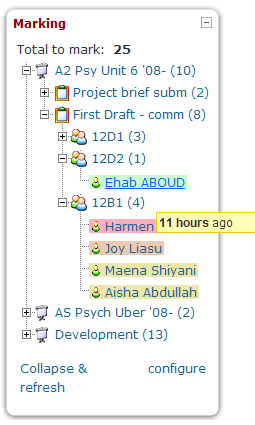
Shows a teacher all of the unmarked work which has been submitted by their students across all of the courses they teach in. It's most useful when placed on the front page, and it allows the work to be viewed and graded through a pop-up interface, which then updates the block once the work is marked.
Comments
Comments are no longer open for new posts. Existing comments remain available to read.
I have reinstalled the block and it now appears correctly... Is there a limit on the number of assignments that can be picked up in one course?? I have one course that has 36 individual assignments but the block only shows approx. half of them.. I have done the checks mentioned such as being in the groups the students are in as teacher, checking the assignments are all the same type and settings, checking that the groups are ticked in the block and that some work has been submitted using the submit button but they still don't appear in the block.... Has anyone else got this working for a course with a large number of assignments??
Any ideas??
Cheers
Jim
I turned on the errors as you said. On the front page there doesnt appear to be any errors but when I go into a course the following errors appear at the top of the screen:
The block ajax_marking does not define the standard capability block/ajax_marking:addinstance
line 598 of \blocks\moodleblock.class.php: call to debugging()
line 576 of \blocks\moodleblock.class.php: call to block_base->has_add_block_capability()
line 236 of \lib\blocklib.php: call to block_base->user_can_addto()
line 1843 of \lib\blocklib.php: call to block_manager->get_addable_blocks()
line 1007 of \lib\blocklib.php: call to block_add_block_ui()
line 353 of \lib\blocklib.php: call to block_manager->ensure_content_created()
line 29 of \theme\zebra\layout\header.php: call to block_manager->region_has_content()
line 25 of \theme\zebra\layout\general.php: call to require_once()
line 804 of \lib\outputrenderers.php: call to include()
line 734 of \lib\outputrenderers.php: call to core_renderer->render_page_layout()
line 240 of \course\view.php: call to core_renderer->header()
I am using the theme ZEBRA for outr system. I tried changing it to the default theme but the same thing happens.
Hope this helps!!!
Cheers
Jim
@Jim Not sure why that would be. I'll try to reproduce it. Can you try with debugging turned up to developer level and display_errors set to on? There may well be a conflict with something.
I've installed it in our moodle site. It seems to work fine, but it shows only three categories: recent, medium and overdue. Is there a "to be marked" notification? (I thought there would be one)
Many Many thanks for doing this - Fabulous block...
Ive installed the block on our system but it doesnt show up in the Add Blocks drop down for any user whether admin or user....
Our moodle version is Moodle 2.4.1+ (Build: 20130131) which Ive recently updated..
The block seemed to install ok and Ive checked the file in blocks area - correctr structure etc. I downloaded it from here and also the github link..
Any ideas??
Cheers
Jim
I love the marking block, unfortunatly it doesn't work in 2.4 any change on a update, or am I the only one having this trouble.
I migrated from 2.3 to 2.4.1, in 2.3 the marking block worked.