AJAX Marking Block
Maintained by
Matt Gibson
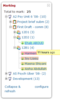
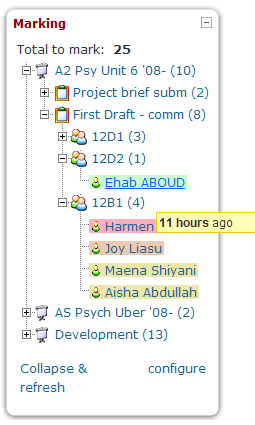
Shows a teacher all of the unmarked work which has been submitted by their students across all of the courses they teach in. It's most useful when placed on the front page, and it allows the work to be viewed and graded through a pop-up interface, which then updates the block once the work is marked.
Comments
Comments are no longer open for new posts. Existing comments remain available to read.
The AJAX marking plugin does not have the English language strings available for translation at AMOS. I contacted David Mudrak for help and this is what he found:
"I looked at the plugins code and this is what caught my eyes:
* https://github.com/mattgibson/moodle-block_ajax_marking/blob/MOODLE_23_STABLE/lang/en/block_ajax_marking.php#L53 - invalid concatenation of strings using the dot operator
I will appreciate if you pass this information to the maintainers of the first two blocks and ask them to release a fix version of their plugin. Thanks for your help!"
I hope that info can point you in the right direction to fix the English language strings of this plugin.
Thanks in advance for your help.
I wanted to translate the AJAX marking block using the Moodle AMOS service (http://lang.moodle.org/), but the English language strings are not available for translation.
Could you please read http://lang.moodle.org/mod/forum/discuss.php?d=2485
Thanks in advance for your help
running vers 2.3.2 and have latest vers of block installed. Users get an error when trying to grade assignments (older versions). Here is the error from apache log. Any ideas?
thx-matt
Apache error log
Call to undefined function get_grading_manager() in /var/www/html/students/blocks/ajax_marking/modules/assignment/block_ajax_marking_assignment.class.php on line 235, referer:
@Mat - Which module is not saving? Assignment? New assignment? Are you using rubrics or ordinary grading?
Loving the block, had no issues installing it what so ever (Moodle 2.3.2) but have found recently that when the teachers go into mark something, it's not saving. They go back again later and it's unmarked. Ideas? What am I doing wrong or what have I missed?
Thanks in advance
'Error reading from database' Debug info 'ERROR: syntax error at or near "." LINE 1: SELECT SQL_NO_CACHE countwrapperquery.id AS courseid, ^ SELECT SQL_NO_CACHE countwrapperquery.id AS courseid, ..........'
Does anyone else have this issue and is there a solution?
Thanks
Basic things to try: Go to notifications screen to make sure the upgrade process triggers; check permissions on the uploaded files (change to 777 temporarily, then visit notifications screen just to make sure); make sure files are in the right folder, with the correct name (blocks/ajax_marking/db, not blocks ajax_marking/ajax_marking/db for example); make sure you have uploaded to the correct Moodle install in case you have more than one on the server (I have actually done this more than once and spent hours wondering why it didn't work).
You can also try setting debugging to developer level and looking in the error log.
I'll try to install on a clean 2.3.1 to make sure it works.
I installed version 2.3 in my Moodle installation version 2.3.1. I uploaded the ajax_marking folder to my blocks folder on the server but I'm getting no notification that the block was installed. All looks well on the server, all 16 files are installed. Any ideas? Other plugin's have installed fine for me. Thanks for any help you can offer.