AJAX Marking Block
Maintained by
Matt Gibson
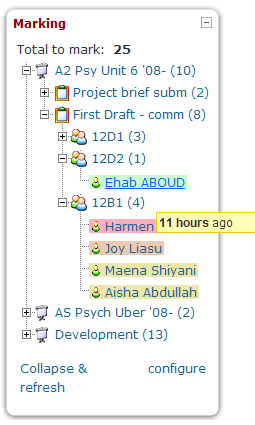
Shows a teacher all of the unmarked work which has been submitted by their students across all of the courses they teach in. It's most useful when placed on the front page, and it allows the work to be viewed and graded through a pop-up interface, which then updates the block once the work is marked.
Comments
Comments are no longer open for new posts. Existing comments remain available to read.
@Christina - That sounds like a normal part of the plugin install process. You should see a 'continue' button underneath, which will allow you to carry on. Please let me know if this is not the case.
Messages sent to you both privately.
I uploaded the Ajax marking block and I am receiving a message AJAX marking block /blocks/ajax_marking Extension 2012060503 To be installed
thank you for any help
Christina
@Brian - This is the intended behaviour, so if you're finding it doesn't do this then it's broken. I did change some code around visibility recently, so maybe that's the issue. I'll take a look and see if I can reproduce it.
@최 병우 - If you'd like to see a Korean version, please fork the project on github, then translate the language strings in /lang/en/block_ajax_marking.php into korean, resave them to /lang/ko/block_ajax_marking.php and send me a pull request. Here's an example: https://github.com/mattgibson/moodle-block_ajax_marking/pull/1 More info here: http://docs.moodle.org/22/en/Translation
@Phillip - What version are you using? I released a new version the day after your message, which I think fixes this. If stilla problem, please file a bug and I'll get right on it.
@Serge - I'll look into this. I thought I'd made 'revert to draft' save any feedback that had been added, which would definitely be the desired behaviour, as you suggest.
The only way this works is if you mark the assessment NYS, and then navigate through your course, to that particular assessment, to revert it back into draft so that the student can resubmit.
Ideally, you would wan't to both, Save the comments/grade, and also have the ability to Revert back to Draft within the same window.
The grading window does not include a "Revert to Draft" button (as seen in the Assignment grading dialog). I don't know if this is a result of the Javascript error or something different. In any case, I would really like to see the Revert to Draft button. I use it frequently.