Iñaki Arenaza
Lead maintainer
This Moodle plugin sends an email notification message to the 'Support email' address every time a new Moodle user account is created via the 'Email signup' authentication plugin. The notification message contains some essential details about the account just created (email address, full name and user account name).
The email is sent when the user signs up, not when the user account is confirmed. So the plugin will notify even about accounts that may never be confirmed.
Supported Moodle VersionsVersions of the plugin up to 1.0.2 works with Moodle 2.7 or later versions. Versions of the plugin from 2.0.0-gdpr-3.6+ onwards only work with Moodle 3.6 or later.
InstallationThis is a standard Moodle Local Plugin, so you can follow the standard installation instructions for Moodle Plugins at https://docs.moodle.org/en/Installing_plugins . Note that if you install this plugin manually at the server, you need to install it inside the 'local' directory at the top of the moodle installation directory.
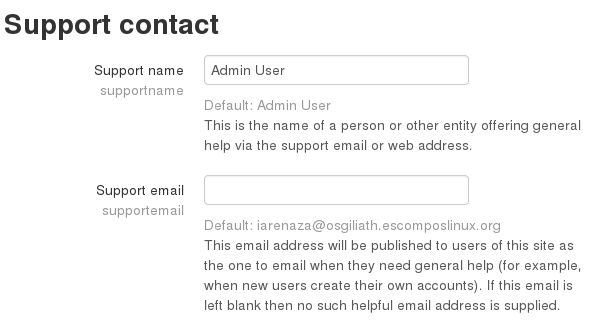
ConfigurationThe only configuration used by the plugin is the Support Contact settings. It uses the 'Support name' and 'Support email' settings as the recipient of the email notification messages it sends.
You can customise the content/wording of the notification messages by
editing the language strings of the plugin, e.g., through the built-in
'Language customisation' mechanism. All the user table fields and
custom profile fields are available in the $a object as
{$a->signup_valuename}. The syntax of valuename depends on whether
the value comes from the user table fields or from the custom profile
fields (this is due to an unfortunate limitation of the Moodle
language strings interpolation syntax).
user table fields, the syntax for valuename is
user_fieldname, where fieldname is one of user table fields like
id, username, auth, firstname, lastname,
etc. The password field does not contain the actual password,
for security reasons.The following examples may help understand the syntax. Assuming we
have two custom profile fields, whose short names are
signupcategory and referralcode, we could use the
following values in the notification message language string (only
some of the user table fields are shown for brevity purposes):
{$a->signup_user_id}: this will be substituted by the account id.{$a->signup_user_username}: this will be substituted by the account username.{$a->signup_user_lastname}: this will be substituted by the account lastname.{$a->signup_user_city}: this will be substituted by the account city.{$a->signup_profile_signupcategory}: this will be substituted by
the content of the custom profile field whose shortname is signupcategory.{$a->signup_profile_referralcode}: this will be substituted by
the content of the custom profile field whose shortname is referralcode.
