
Course Contacts Block
Maintained by
Richard Oelmann, Mark Ward
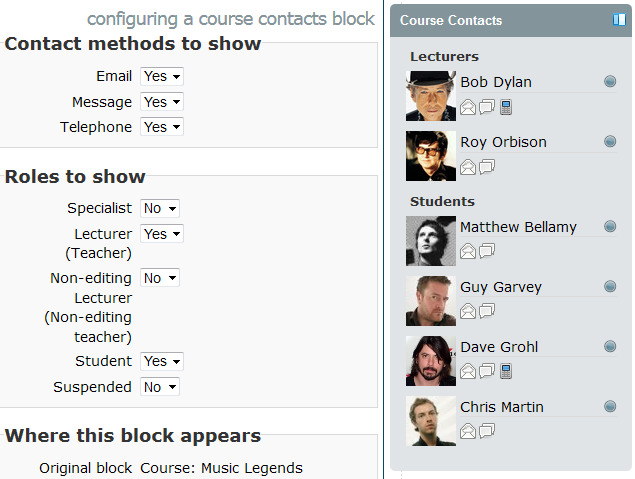
The Course Contacts block displays a list of users on your course, various
methods for communicating with them, and their current activity status.
Comments
Product ratings and reviews are coming to Moodle Marketplace. Until then, existing comments remain available to read, but new posts have been disabled.
I am also happy helping in the testing. We launched new online courses for the September presentation on Friday, so it has been very busy for the last two days.
Please let me know where I could find the beta version. I work for the Medical School of the University of Dundee, we have our own learning platform in Moodle and course contacts is a very popular block among our tutors.
I've cleaned up my SQL builder a little and added your SELECT tweaks. I've also made a modification to handle Mari's request and I have verified that the roles are indeed being printed in the order that is defined within "Define Roles". I'm just waiting to hear back from Mat Canings regarding something he was working on and then I will be able to release an updated version.
I tried that and get the error:
Debug info: Column 'mdl_user.auth' is invalid in the select list because it is not contained in either an aggregate function or the GROUP BY clause.
SELECT mdl_user.*
FROM mdl_user
LEFT JOIN mdl_role_assignments
ON mdl_role_assignments.userid = mdl_user.id
LEFT JOIN mdl_context
ON mdl_context.id=mdl_role_assignments.contextid
WHERE mdl_context.instanceid = ?
AND mdl_context.contextlevel = 50
AND mdl_role_assignments.roleid = ?
GROUP BY mdl_user.id
ORDER BY LOWER(mdl_user.lastname)
I think the problem with the original query was that fields were being pulled in that aren't used - the description field in the user profile is an ntext datatype which stopped distinct working; so I changed the query to explicitly state the fields which the block requires.
Could you give this a try and let me know if it works ok for you:
"SELECT {user}.*
FROM {user}
LEFT JOIN {role_assignments}
ON {role_assignments}.userid = {user}.id
LEFT JOIN {context}
ON {context}.id={role_assignments}.contextid
WHERE {context}.instanceid = ?
AND {context}.contextlevel = 50
AND {role_assignments}.roleid = ?
GROUP BY {user}.id
ORDER BY LOWER({user}.lastname)"
SELECT DISTINCT {user}.id, {user}.lastaccess, {user}.firstname, {user}.lastname, {user}.email, {user}.phone1, {user}.picture, {user}.imagealt
FROM {user}
LEFT JOIN {role_assignments}
ON {role_assignments}.userid = {user}.id
LEFT JOIN {context}
ON {context}.id={role_assignments}.contextid
WHERE {context}.instanceid = ?
AND {context}.contextlevel = 50
AND {role_assignments}.roleid = ?
ORDER BY {user}.lastname
The install works fine, but if I try and add an instance of the block, I get an 'Error reading from database' message and if I turn on debugging, I get the following:
Debug info: The ntext data type cannot be selected as DISTINCT because it is not comparable.
SELECT DISTINCT mdl_user.*
FROM mdl_user
LEFT JOIN mdl_role_assignments
ON mdl_role_assignments.userid = mdl_user.id
LEFT JOIN mdl_context
ON mdl_context.id=mdl_role_assignments.contextid
WHERE mdl_context.instanceid = ?
AND mdl_context.contextlevel = 50
AND mdl_role_assignments.roleid = ?
ORDER BY LOWER(mdl_user.lastname)
[array (
0 => '8',
1 => 3,
)]
Stack trace:
line 394 of \lib\dml\moodle_database.php: dml_read_exception thrown
line 255 of \lib\dml\mssql_native_moodle_database.php: call to moodle_database->query_end()
line 711 of \lib\dml\mssql_native_moodle_database.php: call to mssql_native_moodle_database->query_end()
line 740 of \lib\dml\mssql_native_moodle_database.php: call to mssql_native_moodle_database->get_recordset_sql()
line 70 of \blocks\course_contacts\block_course_contacts.php: call to mssql_native_moodle_database->get_records_sql()
line 280 of \blocks\moodleblock.class.php: call to block_course_contacts->get_content()
line 232 of \blocks\moodleblock.class.php: call to block_base->formatted_contents()
line 926 of \lib\blocklib.php: call to block_base->get_content_for_output()
line 978 of \lib\blocklib.php: call to block_manager->create_block_contents()
line 349 of \lib\blocklib.php: call to block_manager->ensure_content_created()
line 7 of \theme\upstream_fluid\layout\general.php: call to block_manager->region_has_content()
line 654 of \lib\outputrenderers.php: call to include()
line 612 of \lib\outputrenderers.php: call to core_renderer->render_page_layout()
line 206 of \course\view.php: call to core_renderer->header()
Thank you very much for the tip. I personally think that it would be useful if teacher could see their own profile so that they could see the order in which they are displayed in the block.
As for Paul's suggestion: it is a very tricky one. We usually have a main tutor (module lead) and a second tutor who helps with the online teaching.
I thought of playing around with the roles of the main tutor and the secondary tutor to get the effect that you propose.
Mari, the filter is in place in block_course_contacts.php at line 90, but I am happy to change this behaviour in the main block so long as nobody raises an objection.
Thanks for replying. In our case, we have several tutors teaching the same module and the module leads like to see themselves to make sure that they appear as the first contact.
Like Paul has suggested, it would be good if we could set up the order in which tutor appear.
If you can tell me in which part of the code I can disable the filter, I can have a go trying to alter the code myself.
Regard
Our staff usually complain when they DO see a picture of themselves on the page :P
The block has actually always actively filtered out the current user from the results. This is because, as you pointed out, we don't want the user to be sending messages to themselves. I could alter the code to only filter out the messaging icons when the contact is our user if people feel it is a problem?
Glad you are finding it useful!
Mark
First, that you very much for this smart block. I have used it in Moodle 2.0 and when I upgraded our Moodle site to 2.2., I installed the new version (2012052000), teachers have started to complain that they cannot see their own contact profile in their courses.
I looked into this (an yes:'Roles to show->teacher' is active) and it is really weird because students are able to see the contact profiles of ALL the editing teachers in a course, I can be see all the teachers as administrator and each teacher in the course can see THE REST of the editing teachers in the course contacts block, except themselves.
Is it something done on purpose, because a teacher cannot obviously send an email or message to himself? Is it that my teachers are like vampires
Thank you very much for your help.