CSV format
Versions
Current version
5.0 (2025050900)
5.0
Plugin type: Question formats
Frankenstyle component name: qformat_csv
Version build number: 2025050900
Version release name: 5.0
Maturity: Stable
Supported Moodle versions: 3.0, 3.1, 3.10, 3.11, 3.2, 3.3, 3.4, 3.5, 3.6, 3.7, 3.8, 3.9, 4.0, 4.1, 4.2, 4.3, 4.4, 4.5, 5.0, 5.1, 5.2
Repository URL (Git): https://github.com/GopalSharma/moodle-qformat_csv
Repository branch:
Repository tag: v.5.0
Issue/bug tracker URL: https://github.com/GopalSharma/moodle-qformat_csv/issues
This plugin contains support for importing questions from a CSV format file and exporting questions (only multichoices) to a CSV format file.
NEW in 5.0
- FIX: Export question issues for to export multichoice question only and ignore other question.
NEW in 3.11.01
- FIX: Solved the issue with Html tags in questions and answers.
NEW in 3.6.03
- FIX: Solved the issue with Html tags in feedback.
NEW in 3.6.02
- New: Added 'questionname' option in the standard CSV file, total fields/columns are 8 now.
- New: Extended CSV file with many more fields for questionname, answernumbering, correctfeedback, partiallycorrectfeedback, incorrectfeedback and defaultmark, total fields/columns are 13 now.
- NEW: Now, while exporting questions into a CSV file, the CSV file will have 13 fields/columns by default.
NEW in 3.6.01
- FIX: Solved the issue with answers and tested the plugin with Moodle version 3.6.
New in 3.5.04 (Build: 2018091801)
- FIX: Issue related to multiple answers, even single choice answer is getting converted into a multi-choice answer.
- FIX: Solved the issue related to CSV file handling.
- NEW: Implemented functionality to export multichoice question into a CSV file having four options and maximum of two right answers.
Find out more on this link : https://docs.moodle.org/36/en/qformat/csv
Description : Question format import and export plugin
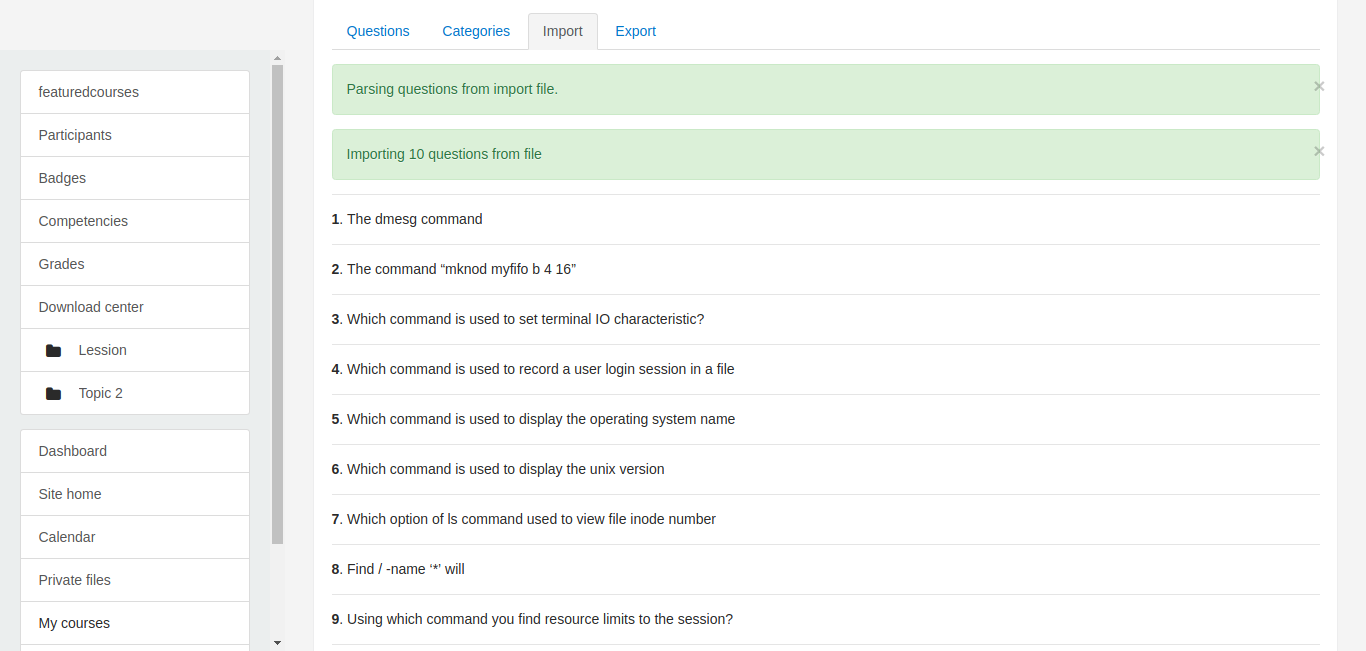
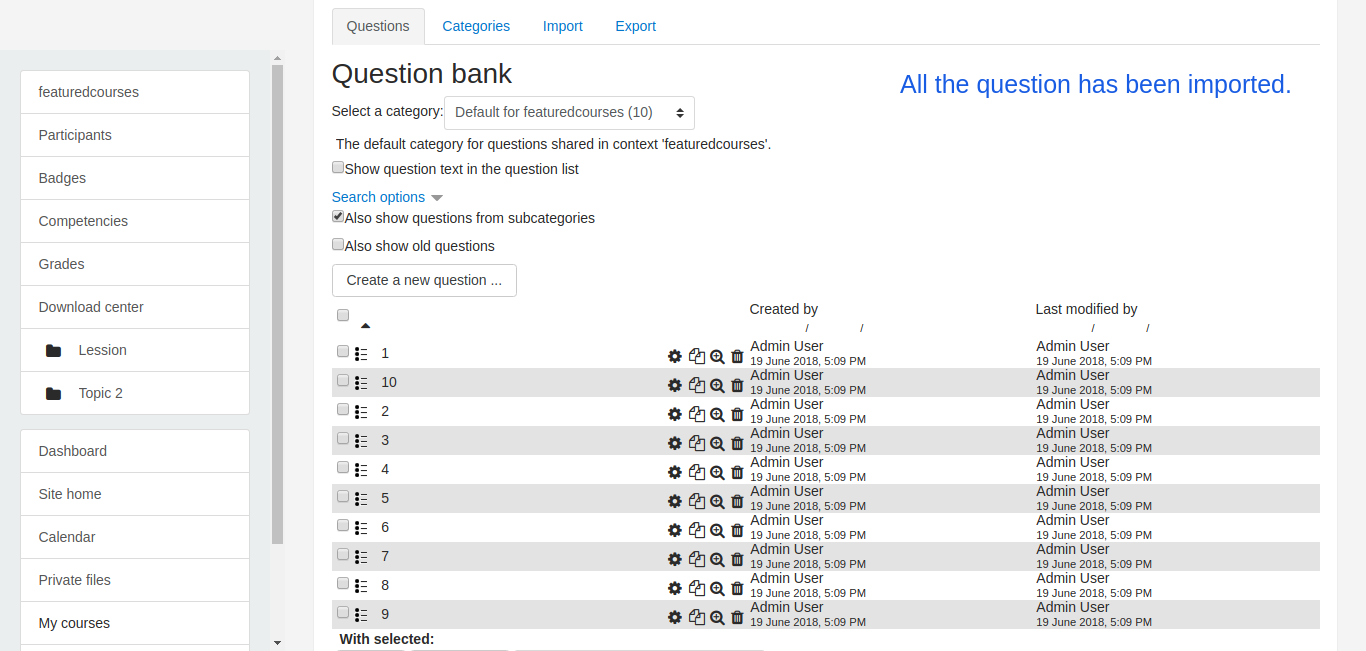
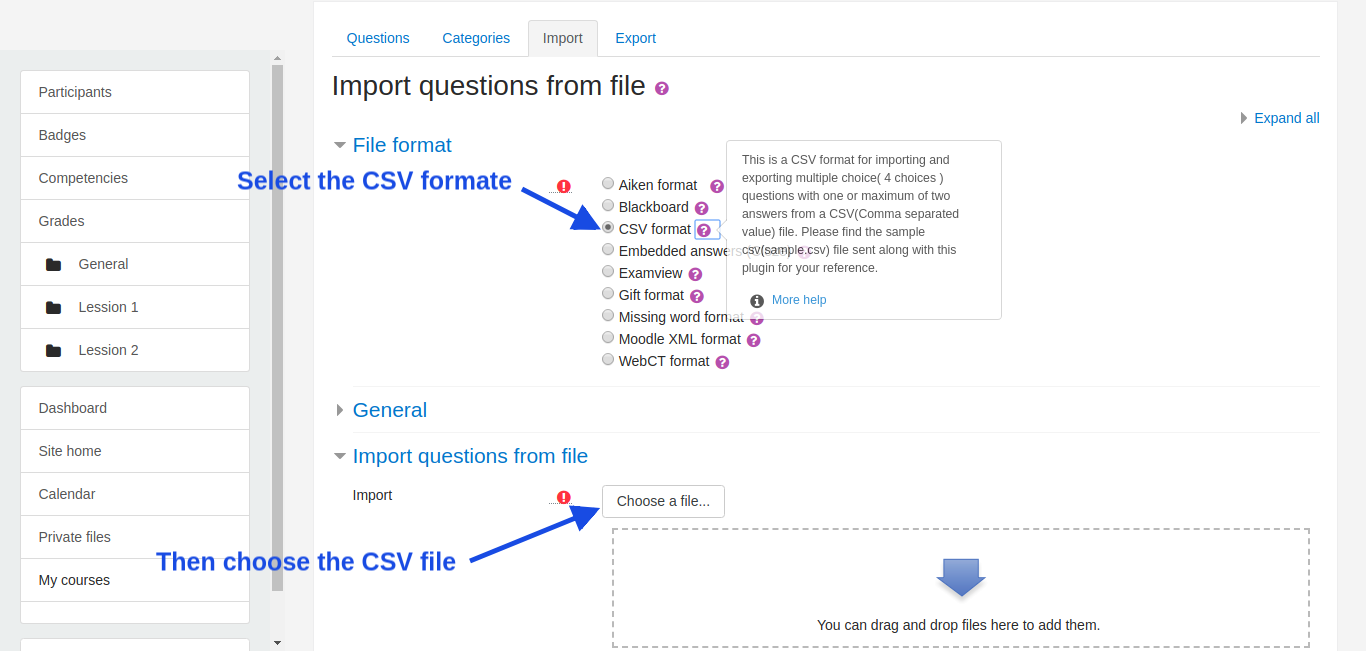
This plugin contains support for importing only multichoice questions in CSV format file in question bank and exporting questions from a question bank in a CSV file.
The CSV format is a very simple way of creating multiple choice questions using a CSV(Comma separated value) file.
The first line of the CSV file must contain the headers separated with commas.
Now, There can be two types of CSV files that can be used
1. Simple CSV :
This one will have same fields what we used to have(only addition is question name in the field)
All the other (except Header) rows/lines contain details about the one question ie. question name, question text, four option, and answer1 , answer2.
Each line will contain the details about the one question.
The simple CSV file used for import should have the following structure :
-A simple CSV file with all questions in comma separated value form with a .csv extension.
-The first line contains the headers separated with commas for example
questionname,questiontext,A,B,C,D,Answer 1,Answer 2
-Next lines contain the details of the question,
each of the line contain one question name, question text, four option, and either one or two answers again all separated by commas.
-Each line contains all the details regarding the one question ie. question name, question text, options, and answer.
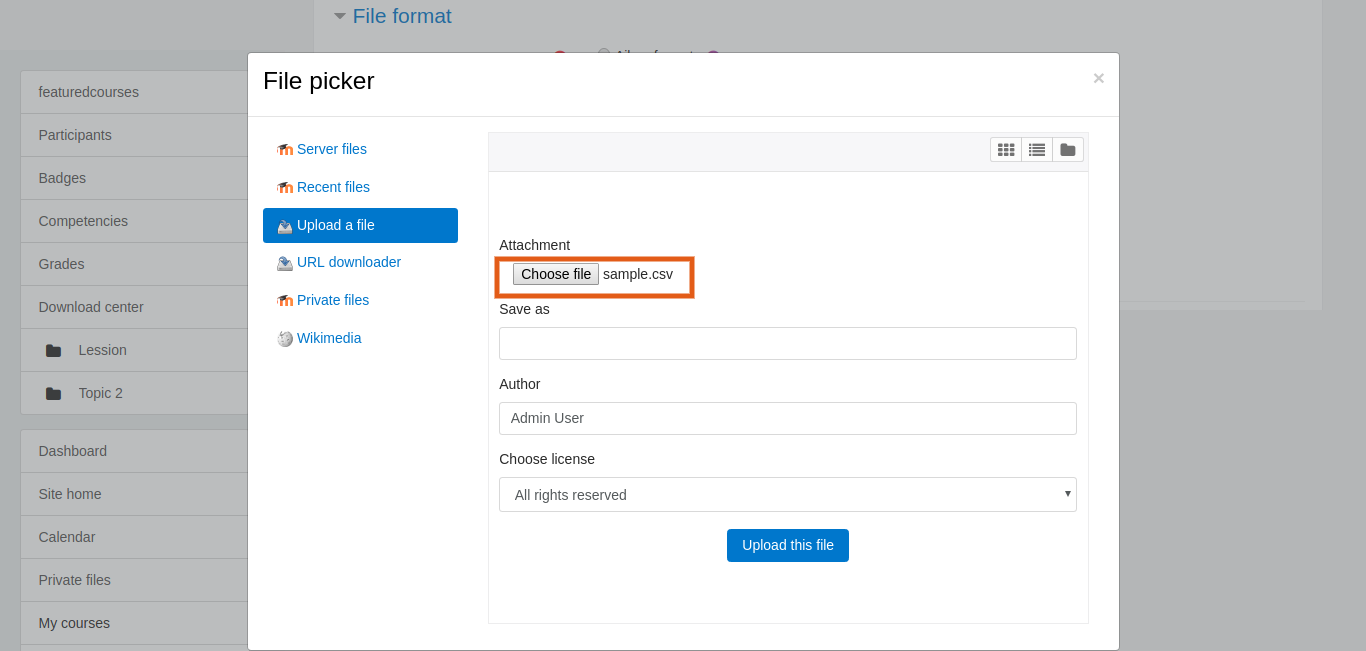
-You can also download the sample CSV(sample.csv) file for your reference.
2. Extended CSV :
This CSV file will have extra fields like answernumbering, correctfeedback, partiallycorrectfeedback, incorrectfeedback and defaultmark.
All the other (except Header) rows/lines contain details about the one question ie. question name, question text, four option, answer1, answer2, answernumbering, correctfeedback, partiallycorrectfeedback, incorrectfeedback and defaultmark.
file with many other options.
Each line will contain the details about the one question.
The CSV file used for import should have the following structure :
-A CSV file with all questions in comma separated value form with a .csv extension.
-The first line contains the headers separated with commas for example
questionname,questiontext,A,B,C,D,Answer 1,Answer 2,answernumbering,correctfeedback,partiallycorrectfeedback,incorrectfeedback,defaultmark
-Next lines contain the details of the question,
each of line contain one question name, question text, four option, answer1, answer2, answernumbering, correctfeedback, partiallycorrectfeedback, incorrectfeedback and defaultmark, again all separated by commas.
-Each line contains all the details regarding the one question ie. question name, question text, four option, answer1, answer2, answernumbering, correctfeedback, partiallycorrectfeedback, incorrectfeedback and defaultmark.
-You can also download the Extended Sample CSV(extended_sample.csv) file for your reference.
IMPORTANT NOTES:
- You have to save the file strictly in csv format. Don't save it as an Excel document or anything like that.
- Non-ASCII characters like 'quotes' can cause import errors.
- Simple CSV file will have 8 Columns/fields.
- Extended CSV file will have 13 Columns/fields.
- To avoid this, always save your text file in UTF-8 format (most text editors, even libre office, will ask you).
- The Header must be as it is shown in the example everything is case sensitive as shown below otherwise, the import will fail.
- "Answer 2" is optional, as of now there can be maximum of two right answers of a question, it should be added with empty value, in case question has only one answer.
- If you want to have comma(,) between the text may be in question text or in options text then
you must include that text between the double quotes(") like below in the 3rd question
where entire question text is included between the double quotes like this "3, 4, 7, 8, 11, 12, ... What number should come next?"
questionname, questiontext, A, B, C, D, Answer 1, Answer 2
Question1,Which command is used to print a file, print, ptr, lpr, none of the mentioned, C,
Question2,Which command is used to display the operating system name?, os, unix, kernal, uname, D,
Question3,"3, 4, 7, 8, 11, 12, ... What number should come next?", 7, 10, 14, 15, D,
Question4,The command "mknod myfifo b 4 16",Will create a block device if user is root, Will create a block device for all users, Will create a FIFO if user is not root, "None ,of the mentioned",A,B
You can also see the 'Answer 2' is optional as 1st, 2nd and the 3rd question has only one answer whereas 4th question has two answers but questions have 'Answer 2' as a blank value.
Similarly for Extended CSv file:-
questionname, questiontext, A, B, C, D, Answer 1, Answer 2, answernumbering, correctfeedback, partiallycorrectfeedback, incorrectfeedback, defaultmark
Question1,The dmesg command,Shows user login logoff attempts,Shows the syslog file for info messages,kernel log messages,Shows the daemon log messages,C,,123,Your answer is correct.,Your answer is partially correct.,Your answer is incorrect.,1
Question2,The command "mknod myfifo b 4 16",Will create a block device if user is root,Will create a block device for all users,Will create a FIFO if user is not root,"None ,of the mentioned",A,B,ABCD,Your answer is correct.,Your answer is partially correct.,Your answer is incorrect.,1
Question3,Which command is used to set terminal IO characteristic?,tty,ctty,ptty,stty,D,,iii,Your answer is correct.,Your answer is partially correct.,Your answer is incorrect.,1
- Please, see the sample csv files for more clarification.
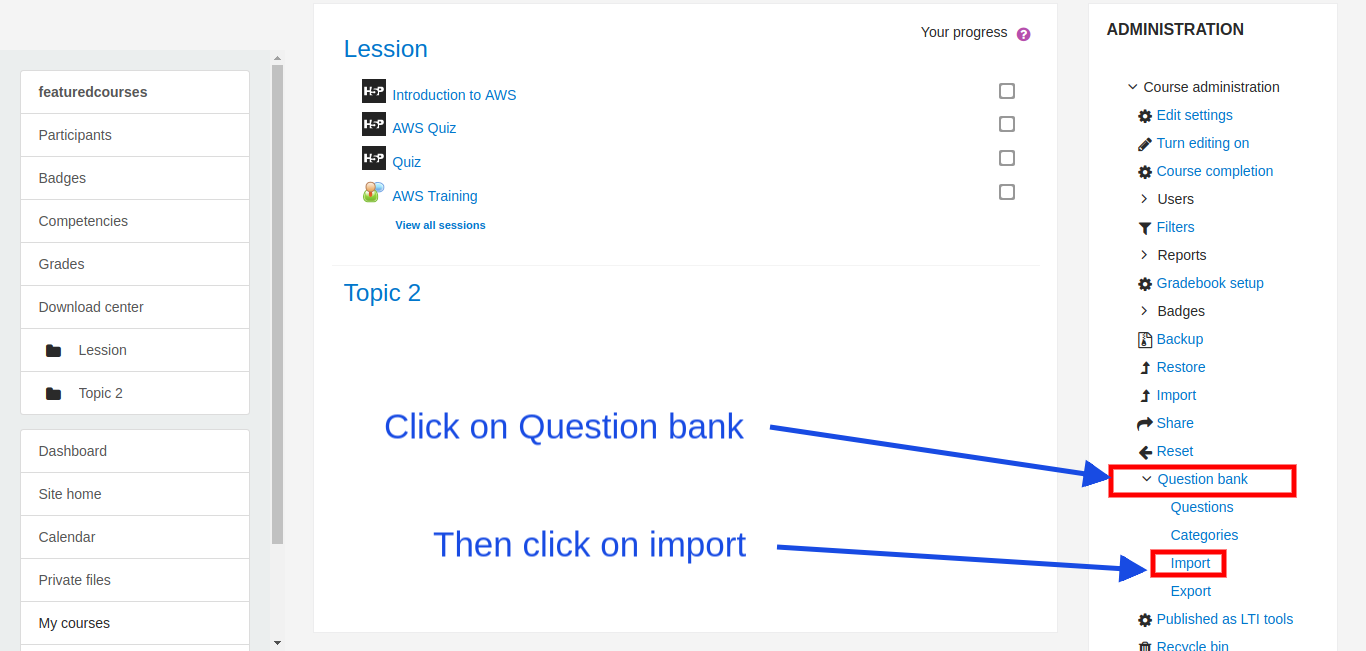
- Questions imported in question bank can also be imported when creating a quiz from the question bank.
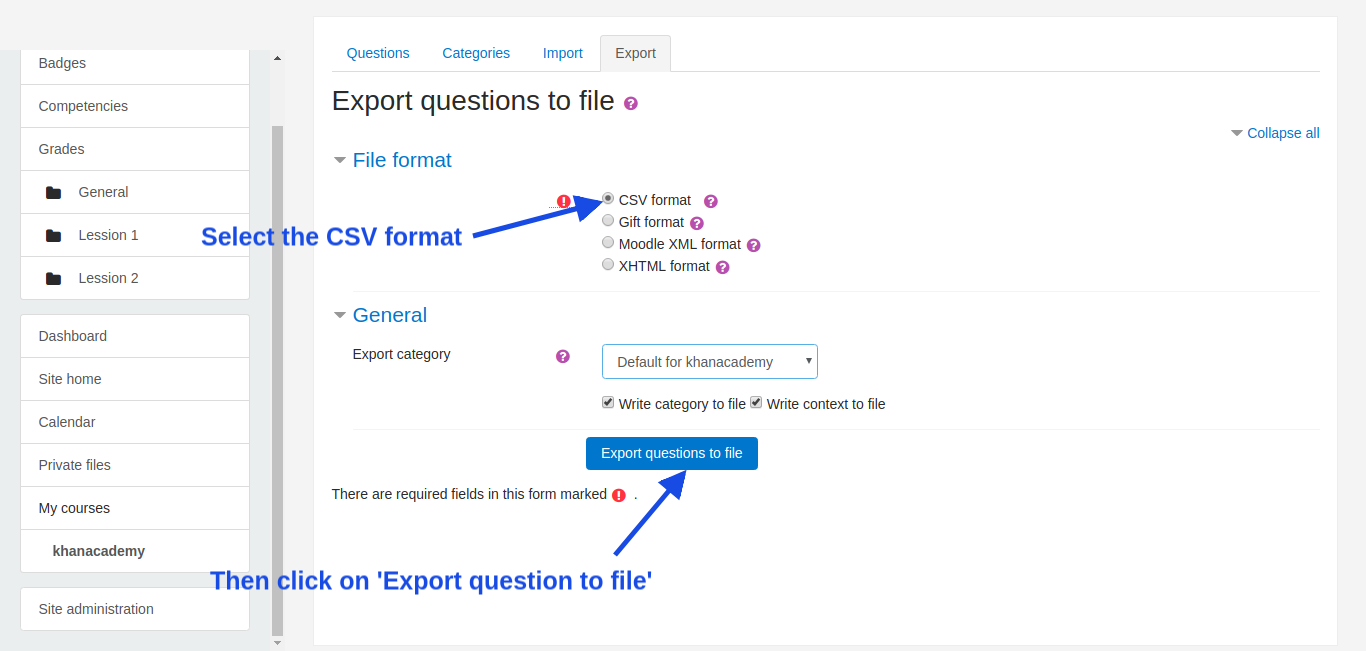
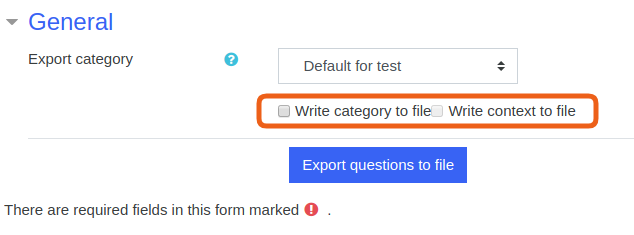
- You can also export questions from question bank into a CSV file.
3.11.01 (Build: 2021100101) (2021100101)
3.11.01 (Build: 2021100101)
Plugin type: Question formats
Frankenstyle component name: qformat_csv
Version build number: 2021100101
Version release name: 3.11.01 (Build: 2021100101)
Maturity: Stable
Supported Moodle versions: 3.0, 3.1, 3.10, 3.11, 3.2, 3.3, 3.4, 3.5, 3.6, 3.7, 3.8, 3.9, 4.0, 4.1, 4.2, 4.3, 4.4, 4.5, 5.0
Repository URL (Git): https://github.com/GopalSharma/moodle-qformat_csv
Repository branch:
Repository tag: v3.11.01
Issue/bug tracker URL: https://github.com/GopalSharma/moodle-qformat_csv/issues
NEW in 3.11.01
FIX: Solved the issue with Html tags in questions and answers.
3.6.03 (Build: 2019031501) (2019031501)
3.6.03 (Build: 2019031501)
Plugin type: Question formats
Frankenstyle component name: qformat_csv
Version build number: 2019031501
Version release name: 3.6.03 (Build: 2019031501)
Maturity: Stable
Supported Moodle versions: 3.0, 3.1, 3.10, 3.11, 3.2, 3.3, 3.4, 3.5, 3.6, 3.7, 3.8, 3.9
Repository URL (Git): https://github.com/GopalSharma/moodle-qformat_csv
Repository branch:
Repository tag: v3.6.03
Issue/bug tracker URL: https://github.com/GopalSharma/moodle-qformat_csv/issues
NEW in 3.6.03
- FIX: Solved the issue with Html tags in feedback.
NEW in 3.6.02
- New: Added 'questionname' option in the standard CSV file, total fields/columns are 8 now.
- New: Extended CSV file with many more fields for questionname, answernumbering, correctfeedback, partiallycorrectfeedback, incorrectfeedback and defaultmark, total fields/columns are 13 now.
- NEW: Now, while exporting questions into a CSV file, the CSV file will have 13 fields/columns by default.
NEW in 3.6.01
- FIX: Solved the issue with answers and tested the plugin with Moodle version 3.6.
New in 3.5.04 (Build: 2018091801)
- FIX: Issue related to multiple answers, even single choice answer is getting converted into a multi-choice answer.
- FIX: Solved the issue related to CSV file handling.
- NEW: Implemented functionality to export multichoice question into a CSV file having four options and maximum of two right answers.
Find out more on this link: https://docs.moodle.org/36/en/qformat/csv
3.6.02 (Build: 2019012401) (2019012401)
3.6.02 (Build: 2019012401)
Plugin type: Question formats
Frankenstyle component name: qformat_csv
Version build number: 2019012401
Version release name: 3.6.02 (Build: 2019012401)
Maturity: Stable
Supported Moodle versions: 3.0, 3.1, 3.2, 3.3, 3.4, 3.5, 3.6
Repository URL (Git): https://github.com/GopalSharma/moodle-qformat_csv
Repository branch:
Repository tag: v3.6.02
Issue/bug tracker URL: https://github.com/GopalSharma/moodle-qformat_csv/issues
NEW in 3.6.02
- New: Added 'questionname' option in the standard CSV file, total fields/columns are 8 now.
- New: Extended CSV file with many more fields for questionname, answernumbering, correctfeedback, partiallycorrectfeedback, incorrectfeedback and defaultmark, total fields/columns are 13 now.
- NEW: Now, while exporting questions into a CSV file, the CSV file will have 13 fields/columns by default.
NEW in 3.6.01
- FIX: Solved the issue with answers and tested the plugin with Moodle version 3.6.
New in 3.5.04 (Build: 2018091801)
- FIX: Issue related to multiple answers, even single choice answer is getting converted into a multi-choice answer.
- FIX: Solved the issue related to CSV file handling.
- NEW: Implemented functionality to export multichoice question into a CSV file having four options and maximum of two right answers.
Find out more on this link : https://docs.moodle.org/36/en/qformat/csv
Description : Question formats import plugin
This plugin contains support for importing only multichoice questions in CSV format file in question bank and exporting questions from a question bank in a CSV file.
The CSV format is a very simple way of creating multiple choice questions using a CSV(Comma separated value) file.
The first line of the CSV file must contain the headers separated with commas.
Now, There can be two types of CSV files that can be used
- Simple CSV :
This one will have same fields what we used to have(only addition is question name in the field)
All the other (except Header) rows/lines contain details about the one question ie. question name, question text, four option, and answer1 , answer2.
Each line will contain the details about the one question.
The simple CSV file used for import should have the following structure :
-A simple CSV file with all questions in comma separated value form with a .csv extension
-The first line contains the headers separated with commas for example
questionname,questiontext,A,B,C,D,Answer 1,Answer 2
-Next lines contain the details of the question,
each of the line contain one question name, question text, four option, and either one or two answers again all separated by commas.
-Each line contains all the details regarding the one question ie. question name, question text, options, and answer.
-You can also download the sample CSV(sample.csv) file for your reference.
- Extended CSV :
This CSV file will have extra fields like answernumbering, correctfeedback, partiallycorrectfeedback, incorrectfeedback and defaultmark.
All the other (except Header) rows/lines contain details about the one question ie. question name, question text, four option, answer1, answer2, answernumbering, correctfeedback, partiallycorrectfeedback, incorrectfeedback and defaultmark.
file with many other options
Each line will contain the details about the one question.
The CSV file used for import should have the following structure :
-A CSV file with all questions in comma separated value form with a .csv extension
-The first line contains the headers separated with commas for example
questionname,questiontext,A,B,C,D,Answer 1,Answer 2,answernumbering,correctfeedback,partiallycorrectfeedback,incorrectfeedback,defaultmark
-Next lines contain the details of the question,
each of line contain one question name, question text, four option, answer1, answer2, answernumbering, correctfeedback, partiallycorrectfeedback, incorrectfeedback and defaultmark, again all separated by commas.
-Each line contains all the details regarding the one question ie. question name, question text, four option, answer1, answer2, answernumbering, correctfeedback, partiallycorrectfeedback, incorrectfeedback and defaultmark.
-You can also download the Extended Sample CSV(extended_sample.csv) file for your reference.
=============================================================================================================================
IMPORTANT NOTES:
- You have to save the file strictly in csv format. Don't save it as an Excel document or anything like that.
- Non-ASCII characters like 'quotes' can cause import errors.
- Simple CSV file will have 8 Columns/fields.
- Extended CSV file will have 13 Columns/fields.
- To avoid this, always save your text file in UTF-8 format (most text editors, even libre office, will ask you).
- The Header must be as it is shown in the example everything is case sensitive as shown below otherwise, the import will fail.
- "Answer 2" is optional, as of now there can be maximum of two right answers of a question, it should be added with empty value, in case question has only one answer.
- If you want to have comma(,) between the text may be in question text or in options text then
you must include that text between the double quotes(") like below in the 3rd question
where entire question text is included between the double quotes like this "3, 4, 7, 8, 11, 12, ... What number should come next?"
questionname, questiontext, A, B, C, D, Answer 1, Answer 2
Question1,Which command is used to print a file, print, ptr, lpr, none of the mentioned, C,
Question2,Which command is used to display the operating system name?, os, unix, kernal, uname, D,
Question3,"3, 4, 7, 8, 11, 12, ... What number should come next?", 7, 10, 14, 15, D,
Question4,The command "mknod myfifo b 4 16",Will create a block device if user is root, Will create a block device for all users, Will create a FIFO if user is not root, "None ,of the mentioned",A,B
You can also see the 'Answer 2' is optional as 1st, 2nd and the 3rd question has only one answer whereas 4th question has two answers but 1st, 2nd and the 3rd questions have 'Answer 2' as a blank value.
Similarly for Extended CSv file:-
questionname,questiontext,A,B,C,D,Answer 1,Answer 2,answernumbering,correctfeedback,partiallycorrectfeedback,incorrectfeedback, defaultmarka
Question1,The dmesg command,Shows user login logoff attempts,Shows the syslog file for info messages,kernel log messages,Shows the daemon log messages,C,,123,Your answer is correct.,Your answer is partially correct.,Your answer is incorrect.,1
Question2,The command "mknod myfifo b 4 16",Will create a block device if user is root,Will create a block device for all users,Will create a FIFO if user is not root,"None ,of the mentioned",A,B,ABCD,Your answer is correct.,Your answer is partially correct.,Your answer is incorrect.,1
Question3,Which command is used to set terminal IO characteristic?,tty,ctty,ptty,stty,D,,iii,Your answer is correct.,Your answer is partially correct.,Your answer is incorrect.,1
- Please, see the sample csv files for more clarification.
- Questions imported in question bank can also be imported when creating a quiz from the question bank.
- You can also export questions from question bank into a CSV file.
3.6.01 (Build: 2018113001) (2018113001)
3.6.01 (Build: 2018113001)
Plugin type: Question formats
Frankenstyle component name: qformat_csv
Version build number: 2018113001
Version release name: 3.6.01 (Build: 2018113001)
Maturity: Stable
Supported Moodle versions: 3.0, 3.1, 3.2, 3.3, 3.4, 3.5, 3.6
Repository URL (Git): https://github.com/GopalSharma/moodle-qformat_csv
Repository branch:
Repository tag: v3.6.01
Issue/bug tracker URL: https://github.com/GopalSharma/moodle-qformat_csv/issues
This plugin contains support for importing questions in CSV format.
The CSV file used for import should have the following structure :
- A CSV file with all questions in comma separated value form with a .csv extension
- The first line contains the headers separated with commas for example
questiontext,A,B,C,D,Answer 1,Answer 2 - Next lines contain the details of the question, each of line contain one question text, four option, and either one or two answers again all separated by commas.
- Each line contains all the details regarding the one question ie. question text, options, and answer.
- You can also download the sample file for your reference.
You can also download the sample file for your reference or a smple file is provided with this plugin.
More option will be added in the future
Questions imported in question bank can also be imported when creating a quiz from the question bank.
3.5.04 (Build: 2018091801) (2018091801)
3.5.04 (Build: 2018091801)
Plugin type: Question formats
Frankenstyle component name: qformat_csv
Version build number: 2018091801
Version release name: 3.5.04 (Build: 2018091801)
Maturity: Stable
Supported Moodle versions: 3.0, 3.1, 3.2, 3.3, 3.4, 3.5
Repository URL (Git): https://github.com/GopalSharma/moodle-qformat_csv
Repository branch:
Repository tag: v3.5.04
Issue/bug tracker URL: https://github.com/GopalSharma/moodle-qformat_csv/issues
New in 3.5.04 (Build: 2018091801)
- FIX: Solved the issue related to CSV file handling.
- NEW: Implemented functionality to export of multichoice question into a CSV file having four options and maximum of two right answers.
3.5.03 (Build: 2018082801) (2018082801)
3.5.03 (Build: 2018082801)
Plugin type: Question formats
Frankenstyle component name: qformat_csv
Version build number: 2018082801
Version release name: 3.5.03 (Build: 2018082801)
Maturity: Stable
Supported Moodle versions: 3.0, 3.1, 3.2, 3.3, 3.4, 3.5
Repository URL (Git): https://github.com/GopalSharma/moodle-qformat_csv
Repository branch:
Repository tag:
Issue/bug tracker URL: https://github.com/GopalSharma/moodle-qformat_csv/issues
Description
Question formats import plugin
==============================
Solved the Code Sniffer errors within the README.txt file.
Remove the unnecessary comments and solved the Code Sniffer errors.
Added 'Frankenstyle component names'.
Solved few language string errors.
Implemented the privacy API.
3.5.02 (Build: 2018082401) (2018082401)
3.5.02 (Build: 2018082401)
Plugin type: Question formats
Frankenstyle component name: qformat_csv
Version build number: 2018082401
Version release name: 3.5.02 (Build: 2018082401)
Maturity: Stable
Supported Moodle versions: 3.0, 3.1, 3.2, 3.3, 3.4, 3.5
Repository URL (Git): https://github.com/GopalSharma/moodle-qformat_csv-master
Repository branch:
Repository tag:
Issue/bug tracker URL: https://github.com/GopalSharma/moodle-qformat_csv/issues
Description
Question formats import plugin
==============================
This plugin contains support for importing of only multichoice questions in CSV format file in question bank.
The CSV format is a very simple way of creating multiple choice questions using a CSV(Comma separated value) file. The first line of CSV file must contain the headers separated with commas. Following all the other (except Header) rows/lines contain details about the one question ie question text, four option, and answer. Each line will contain the details about the one question.
The CSV file used for import should have the following structure :
- A CSV file with all questions in comma separated value form with a .csv extension
- The first line contains the headers separated with commas for example
questiontext,A,B,C,D,Answer 1,Answer 2 - Next lines contain the details of the question, each of line contain one question text, four option, and either one or two answers again all separated by commas.
- Each line contains all the details regarding the one question ie. question text, options, and answer.
- You can also download the sample file for your reference.
IMPORTANT NOTES:
You have to save the file in a csv format. Don't save it as an Excel document or anything like that.
Non-ASCII characters like 'quotes' can cause import errors. To avoid this always save your text file in UTF-8 format (most text editors, even libre office, will ask you).
The Header must be as it is shown in the example everything is case sensitive as shown below otherwise, the import will fail.
"Answer 2" is optional, as of now there can be maximum of two right answers of a question.
If you want have comm(,) between the text may be in question text or in options text then you must include that text between the double quotes(") like below in the 3rd question where entire question is included between the double quotes like this "3, 4, 7, 8, 11, 12, ... What number should come next?"
questiontext, A, B, C, D, Answer 1, Answer 2
Which command is used to print a file, print, ptr, lpr, none of the mentioned, C
The command "mknod myfifo b 4 16", block device root, block device for all users, FIFO if user is not root, None of the mentioned, A, B
"3, 4, 7, 8, 11, 12, ... What number should come next?",7,10,14,15,D
You can also see the 'Answer 2' is optional as 1st and the 3rd question has only one answer whereas 2nd question has two answers.
Questions imported in question bank can also be imported when creating a quiz from the question bank.
3.5.01 (Build: 2018061901) (2018061901)
3.5.01 (Build: 2018061901)
Plugin type: Question formats
Frankenstyle component name: qformat_csv
Version build number: 2018061901
Version release name: 3.5.01 (Build: 2018061901)
Maturity: Stable
Supported Moodle versions: 3.0, 3.1, 3.2, 3.3, 3.4, 3.5
Repository URL (Git): https://github.com/GopalSharma/moodle-qformat_csv-master
Repository branch:
Repository tag:
Issue/bug tracker URL: https://github.com/GopalSharma/moodle-qformat_csv/issues
Description
Question formats import plugin
==============================
This plugin contains support for importing questions in CSV format.
The CSV file used for import question and should have the following structure :
- A CSV file with all questions in comma separated value form with a .csv extension
- The first line contains the headers separated with commas for example
questiontext,A,B,C,D,Answer 1,Answer 2 - Next lines contain the details of the question, each of line contain one question text, four option, and either one or two answers again all separated by commas.
- Each line contains all the details regarding the one question ie. question text, options, and answer.
- You can also download the sample file for your reference.
You can also download the sample file for your reference or a sample file is provided with this plugin.
More option will be added in the future
Questions imported in question bank can also be imported when creating a quiz from the question bank.