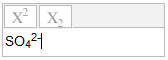
This is a simple text input widget that lets users edit one line of input with superscripts and subscripts, for use with question types like
https://moodle.org/plugins/qtype_pmatch or
https://moodle.org/plugins/qtype_varnumericset.
Users can type input that is plain text, with the addition of just the HTML tags <sup> and <sub>. In a particular case, either sup or sub or both may be allowed. For example in a question about for scientific notation (3x10<sup>8</sup>) only superscripts would be allowed. As well as the toolbar buttons, the up and down arrow keys are keyboard shortcuts for switching in and out of sup and sub mode.
It turns out that web browsers make a big mess out of HTML input, so lots of cleaning is applied to the student's response. For example 2<sup>1</sup><sup>6</sup> -> 2<sup>16</sup>. Also, nested superscripts and subscripts are not allowed.