
Environment bar
Versions
Current version
2025111801 (2025111801)
2025111801
Plugin type: Local plugins
Frankenstyle component name: local_envbar
Version build number: 2025111801
Version release name: 2025111801
Maturity: Stable
Supported Moodle versions: 4.5
Repository URL (Git): https://github.com/catalyst/moodle-local_envbar
Repository branch: MOODLE_405_STABLE
Repository tag:
Issue/bug tracker URL: https://github.com/catalyst/moodle-local_envbar/issues

Environment bar - Moodle local plugin

This displays a prominment header across across the top of your NON PROD Moodle
environments which can be configured to have different colors and messages for
each environent, and also automatically detects and show you when the DB was
last refreshed.
It's very useful when working with lots of different environments to avoid
confusion around where you are, especially when env's can contain hard coded
links and you accidentally jump between environments.
Principals
Showing what environment you are in needs to be reliable and fail safe.
If it doesn't work for any reason then you may as well not have it. The way
this plugin works is that in your production system you specify what your
different environments are. Then after a refresh of production data back to a
staging environment it can auto detect that it is no longer in production and
warn the end user. Further more if there isn't any config at all, then it will
assume you are in a fresh development environment that hasn't been refreshed
and show a default fail safe warning.
It will also automatically detect and show you when the environment was last
refreshed from production, which is a common question testers ask.
Branches
| Moodle version | Totara version | Branch | PHP |
|--------------------|------------------|-------------------|------|
| Moodle 4.5+ | | MOODLE_405_STABLE | 8.1+ |
| Moodle 3.10 to 4.4 | Totara 13 to 17 | VERSION3 | 7.3+ |
| Moodle 3.3 to 3.9 | Totara 12 | VERSION2 | 7.0+ |
| Moodle 2.7 to 3.2 | Totara 2.7 to 11 | VERSION1 | 5.5+ |
Installation
Add the plugin to /local/envbar/
Run the Moodle upgrade.
Configuration
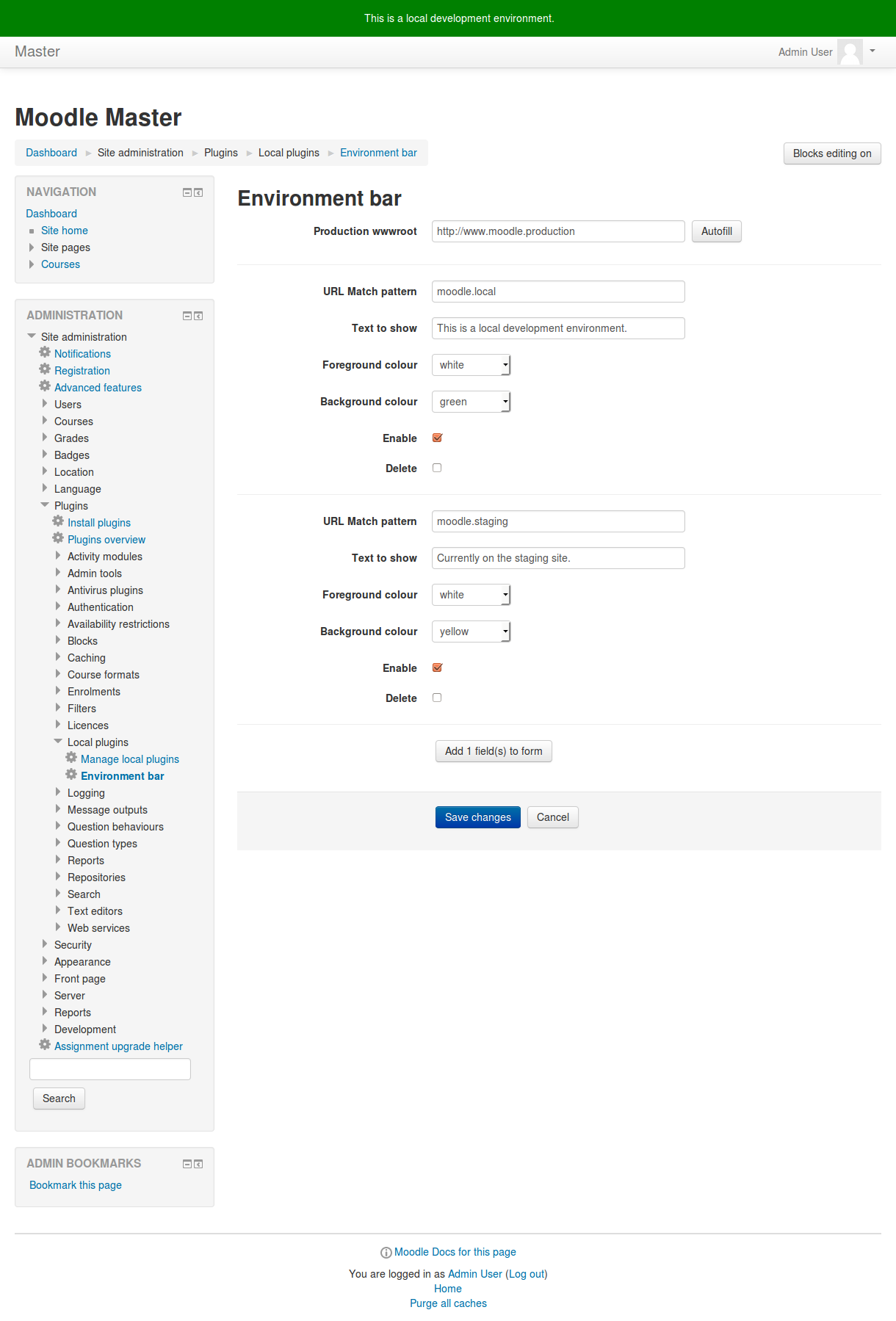
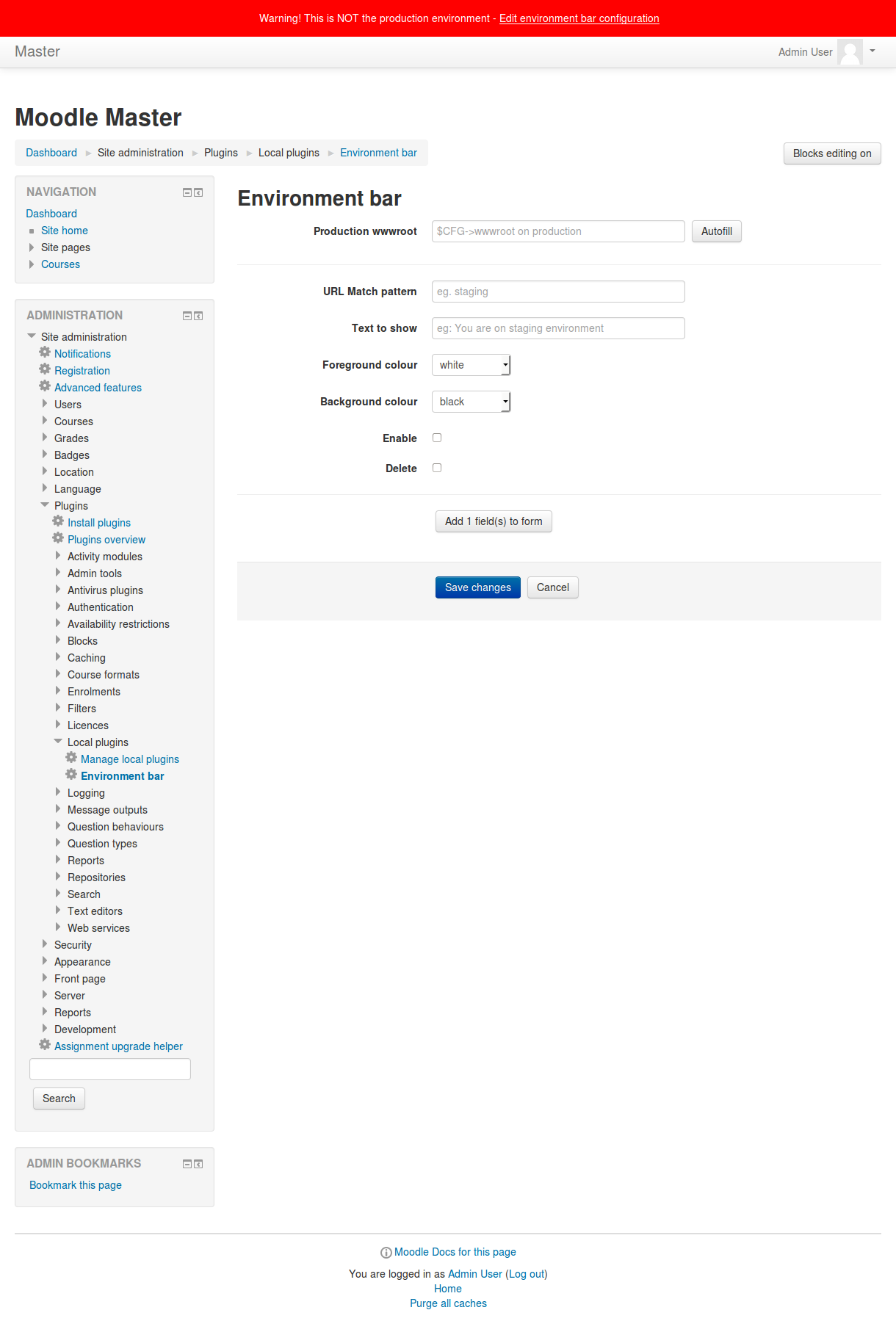
Upon first installation you will see a notification across the screen that prodwwwroot has not been set. There is a convenient link in the bar to:
Site administration > Plugins > Local Plugins > Environment bar
Please set this value to be exactly what your production $CFG->wwwroot is. If you are on the production box then you can click on the 'autofill' button.
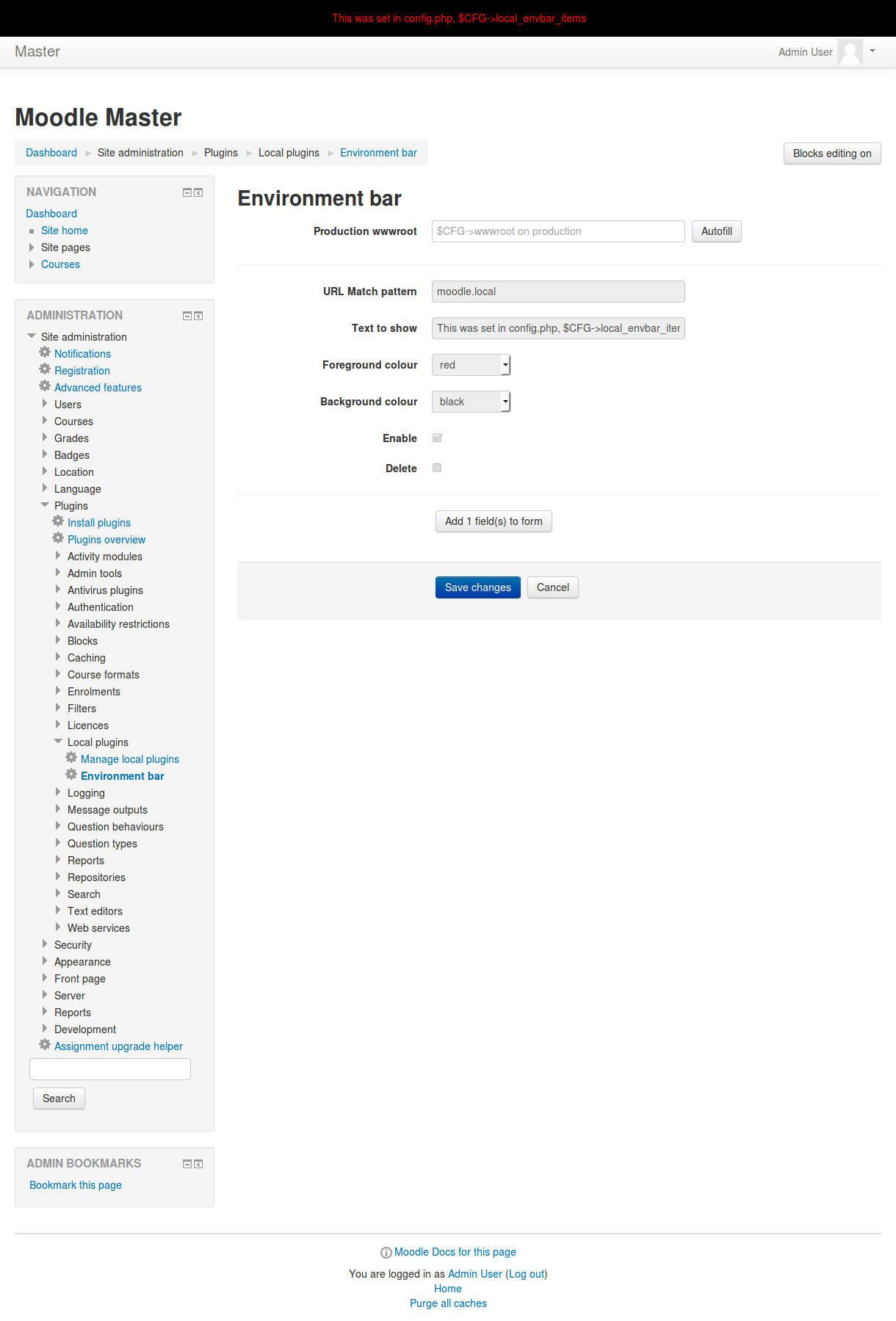
Or you can define the environments and prodwwwroot in config.php:
$CFG->local_envbar_prodwwwroot = 'http://moodle.prod';

$CFG->local_envbar_items = array(

    array(

        'matchpattern' => 'https://staging.moodle.edu',

        'showtext'     => 'Staging environment',

        'colourbg'     => 'orange',

        'colourtext'   => 'white',

        'refreshschedule' => 'third sunday of this month 12 pm',

    ),

    array(

        'matchpattern' => 'https://qa.moodle.edu',

        'showtext'     => 'QA environment',

        'colourbg'     => 'purple',

        'colourtext'   => 'white',

        'refreshschedule' => '2025-03-16 12:00pm',

    ),

    array(

        'matchpattern' => 'http://moodle.local',

        'showtext'     => 'Localhost environment',

        'colourbg'     => 'black',

        'colourtext'   => 'white',

        'refreshschedule' => 1742090400,

    ),

);
In Moodle Workplace, domain-per-tenant is supported.
To enable secondary production URLs, add $CFG->allowmultipledomains = true to config.php.
The related setting will then appear on the plugin’s settings page.
The colours available are,
black

white

red

green

seagreen

yellow

brown

blue

slateblue

chocolate

crimson

orange

darkorange
Please configure a secret key which is needed to let the environments talk to each other. If no secret key is set,
the non production environments won't be able to detect their last reset time. Please set it to some random alphanumeric string
of your choice or press the 'Generate' button.
Or you can define the secret key in config.php:
$CFG->local_envbar_secretkey = 'SomeRandomAlphanumericalString';
In your non production environments it is also useful to inform your users when the
next refresh will be. This time can be set via the environment refresh schedule.
2025111800 (2025111800)
2025111800
Plugin type: Local plugins
Frankenstyle component name: local_envbar
Version build number: 2025111800
Version release name: 2025111800
Maturity: Stable
Supported Moodle versions: 4.5
Repository URL (Git): https://github.com/catalyst/moodle-local_envbar
Repository branch: MOODLE_405_STABLE
Repository tag:
Issue/bug tracker URL: https://github.com/catalyst/moodle-local_envbar/issues
Environment bar - Moodle local plugin
This displays a prominment header across across the top of your NON PROD Moodle
environments which can be configured to have different colors and messages for
each environent, and also automatically detects and show you when the DB was
last refreshed.
It's very useful when working with lots of different environments to avoid
confusion around where you are, especially when env's can contain hard coded
links and you accidentally jump between environments.
Principals
Showing what environment you are in needs to be reliable and fail safe.
If it doesn't work for any reason then you may as well not have it. The way
this plugin works is that in your production system you specify what your
different environments are. Then after a refresh of production data back to a
staging environment it can auto detect that it is no longer in production and
warn the end user. Further more if there isn't any config at all, then it will
assume you are in a fresh development environment that hasn't been refreshed
and show a default fail safe warning.
It will also automatically detect and show you when the environment was last
refreshed from production, which is a common question testers ask.
Branches
| Moodle version | Totara version | Branch | PHP |
|--------------------|------------------|-------------------|------|
| Moodle 4.5+ | | MOODLE_405_STABLE | 8.1+ |
| Moodle 3.10 to 4.4 | Totara 13 to 17 | VERSION3 | 7.3+ |
| Moodle 3.3 to 3.9 | Totara 12 | VERSION2 | 7.0+ |
| Moodle 2.7 to 3.2 | Totara 2.7 to 11 | VERSION1 | 5.5+ |
Installation
Add the plugin to /local/envbar/
Run the Moodle upgrade.
Configuration
Upon first installation you will see a notification across the screen that prodwwwroot has not been set. There is a convenient link in the bar to:
Site administration > Plugins > Local Plugins > Environment bar
Please set this value to be exactly what your production $CFG->wwwroot is. If you are on the production box then you can click on the 'autofill' button.
Or you can define the environments and prodwwwroot in config.php:
$CFG->local_envbar_prodwwwroot = 'http://moodle.prod';

$CFG->local_envbar_items = array(

    array(

        'matchpattern' => 'https://staging.moodle.edu',

        'showtext'     => 'Staging environment',

        'colourbg'     => 'orange',

        'colourtext'   => 'white',

        'refreshschedule' => 'third sunday of this month 12 pm',

    ),

    array(

        'matchpattern' => 'https://qa.moodle.edu',

        'showtext'     => 'QA environment',

        'colourbg'     => 'purple',

        'colourtext'   => 'white',

        'refreshschedule' => '2025-03-16 12:00pm',

    ),

    array(

        'matchpattern' => 'http://moodle.local',

        'showtext'     => 'Localhost environment',

        'colourbg'     => 'black',

        'colourtext'   => 'white',

        'refreshschedule' => 1742090400,

    ),

);
In Moodle Workplace, domain-per-tenant is supported.
To enable secondary production URLs, add $CFG->allowmultipledomains = true to config.php.
The related setting will then appear on the plugin’s settings page.
The colours available are,
black

white

red

green

seagreen

yellow

brown

blue

slateblue

chocolate

crimson

orange

darkorange
Please configure a secret key which is needed to let the environments talk to each other. If no secret key is set,
the non production environments won't be able to detect their last reset time. Please set it to some random alphanumeric string
of your choice or press the 'Generate' button.
Or you can define the secret key in config.php:
$CFG->local_envbar_secretkey = 'SomeRandomAlphanumericalString';
In your non production environments it is also useful to inform your users when the
next refresh will be. This time can be set via the environment refresh schedule.
2025091600 (2025091600)
2025091600
Plugin type: Local plugins
Frankenstyle component name: local_envbar
Version build number: 2025091600
Version release name: 2025091600
Maturity: Stable
Supported Moodle versions: 4.5
Repository URL (Git): https://github.com/catalyst/moodle-local_envbar
Repository branch: MOODLE_405_STABLE
Repository tag:
Issue/bug tracker URL: https://github.com/catalyst/moodle-local_envbar/issues
Environment bar - Moodle local plugin
This displays a prominment header across across the top of your NON PROD Moodle
environments which can be configured to have different colors and messages for
each environent, and also automatically detects and show you when the DB was
last refreshed.
It's very useful when working with lots of different environments to avoid
confusion around where you are, especially when env's can contain hard coded
links and you accidentally jump between environments.
Principals
Showing what environment you are in needs to be reliable and fail safe.
If it doesn't work for any reason then you may as well not have it. The way
this plugin works is that in your production system you specify what your
different environments are. Then after a refresh of production data back to a
staging environment it can auto detect that it is no longer in production and
warn the end user. Further more if there isn't any config at all, then it will
assume you are in a fresh development environment that hasn't been refreshed
and show a default fail safe warning.
It will also automatically detect and show you when the environment was last
refreshed from production, which is a common question testers ask.
Branches
| Moodle version | Totara version | Branch | PHP |
|--------------------|------------------|-------------------|------|
| Moodle 4.5+ | | MOODLE_405_STABLE | 8.1+ |
| Moodle 3.10 to 4.4 | Totara 13 to 17 | VERSION3 | 7.3+ |
| Moodle 3.3 to 3.9 | Totara 12 | VERSION2 | 7.0+ |
| Moodle 2.7 to 3.2 | Totara 2.7 to 11 | VERSION1 | 5.5+ |
Installation
Add the plugin to /local/envbar/
Run the Moodle upgrade.
Configuration
Upon first installation you will see a notification across the screen that prodwwwroot has not been set. There is a convenient link in the bar to:
Site administration > Plugins > Local Plugins > Environment bar
Please set this value to be exactly what your production $CFG->wwwroot is. If you are on the production box then you can click on the 'autofill' button.
Or you can define the environments and prodwwwroot in config.php:
$CFG->local_envbar_prodwwwroot = 'http://moodle.prod';

$CFG->local_envbar_items = array(

    array(

        'matchpattern' => 'https://staging.moodle.edu',

        'showtext'     => 'Staging environment',

        'colourbg'     => 'orange',

        'colourtext'   => 'white',

        'refreshschedule' => 'third sunday of this month 12 pm',

    ),

    array(

        'matchpattern' => 'https://qa.moodle.edu',

        'showtext'     => 'QA environment',

        'colourbg'     => 'purple',

        'colourtext'   => 'white',

        'refreshschedule' => '2025-03-16 12:00pm',

    ),

    array(

        'matchpattern' => 'http://moodle.local',

        'showtext'     => 'Localhost environment',

        'colourbg'     => 'black',

        'colourtext'   => 'white',

        'refreshschedule' => 1742090400,

    ),

);
In Moodle Workplace, domain-per-tenant is supported.
To enable secondary production URLs, add $CFG->allowmultipledomains = true to config.php.
The related setting will then appear on the plugin’s settings page.
The colours available are,
black

white

red

green

seagreen

yellow

brown

blue

slateblue

chocolate

crimson

orange

darkorange
Please configure a secret key which is needed to let the environments talk to each other. If no secret key is set,
the non production environments won't be able to detect their last reset time. Please set it to some random alphanumeric string
of your choice or press the 'Generate' button.
Or you can define the secret key in config.php:
$CFG->local_envbar_secretkey = 'SomeRandomAlphanumericalString';
In your non production environments it is also useful to inform your users when the
next refresh will be. This time can be set via the environment refresh schedule.
2025091000 (2025091000)
2025091000
Plugin type: Local plugins
Frankenstyle component name: local_envbar
Version build number: 2025091000
Version release name: 2025091000
Maturity: Stable
Supported Moodle versions: 4.5
Repository URL (Git): https://github.com/catalyst/moodle-local_envbar
Repository branch: MOODLE_405_STABLE
Repository tag:
Issue/bug tracker URL: https://github.com/catalyst/moodle-local_envbar/issues
Environment bar - Moodle local plugin
This displays a prominment header across across the top of your NON PROD Moodle
environments which can be configured to have different colors and messages for
each environent, and also automatically detects and show you when the DB was
last refreshed.
It's very useful when working with lots of different environments to avoid
confusion around where you are, especially when env's can contain hard coded
links and you accidentally jump between environments.
Principals
Showing what environment you are in needs to be reliable and fail safe.
If it doesn't work for any reason then you may as well not have it. The way
this plugin works is that in your production system you specify what your
different environments are. Then after a refresh of production data back to a
staging environment it can auto detect that it is no longer in production and
warn the end user. Further more if there isn't any config at all, then it will
assume you are in a fresh development environment that hasn't been refreshed
and show a default fail safe warning.
It will also automatically detect and show you when the environment was last
refreshed from production, which is a common question testers ask.
Branches
| Moodle version | Totara version | Branch | PHP |
|--------------------|------------------|-------------------|------|
| Moodle 4.5+ | | MOODLE_405_STABLE | 8.1+ |
| Moodle 3.10 to 4.4 | Totara 13 to 17 | VERSION3 | 7.3+ |
| Moodle 3.3 to 3.9 | Totara 12 | VERSION2 | 7.0+ |
| Moodle 2.7 to 3.2 | Totara 2.7 to 11 | VERSION1 | 5.5+ |
Installation
Add the plugin to /local/envbar/
Run the Moodle upgrade.
Configuration
Upon first installation you will see a notification across the screen that prodwwwroot has not been set. There is a convenient link in the bar to:
Site administration > Plugins > Local Plugins > Environment bar
Please set this value to be exactly what your production $CFG->wwwroot is. If you are on the production box then you can click on the 'autofill' button.
Or you can define the environments and prodwwwroot in config.php:
$CFG->local_envbar_prodwwwroot = 'http://moodle.prod';

$CFG->local_envbar_items = array(

    array(

        'matchpattern' => 'https://staging.moodle.edu',

        'showtext'     => 'Staging environment',

        'colourbg'     => 'orange',

        'colourtext'   => 'white',

        'refreshschedule' => 'third sunday of this month 12 pm',

    ),

    array(

        'matchpattern' => 'https://qa.moodle.edu',

        'showtext'     => 'QA environment',

        'colourbg'     => 'purple',

        'colourtext'   => 'white',

        'refreshschedule' => '2025-03-16 12:00pm',

    ),

    array(

        'matchpattern' => 'http://moodle.local',

        'showtext'     => 'Localhost environment',

        'colourbg'     => 'black',

        'colourtext'   => 'white',

        'refreshschedule' => 1742090400,

    ),

);
In Moodle Workplace, domain-per-tenant is supported.
To enable secondary production URLs, add $CFG->allowmultipledomains = true to config.php.
The related setting will then appear on the plugin’s settings page.
The colours available are,
black

white

red

green

seagreen

yellow

brown

blue

slateblue

chocolate

crimson

orange

darkorange
Please configure a secret key which is needed to let the environments talk to each other. If no secret key is set,
the non production environments won't be able to detect their last reset time. Please set it to some random alphanumeric string
of your choice or press the 'Generate' button.
Or you can define the secret key in config.php:
$CFG->local_envbar_secretkey = 'SomeRandomAlphanumericalString';
In your non production environments it is also useful to inform your users when the
next refresh will be. This time can be set via the environment refresh schedule.
2025080500 (2025080500)
2025080500
Plugin type: Local plugins
Frankenstyle component name: local_envbar
Version build number: 2025080500
Version release name: 2025080500
Maturity: Stable
Supported Moodle versions: 4.5
Repository URL (Git): https://github.com/catalyst/moodle-local_envbar
Repository branch: MOODLE_405_STABLE
Repository tag:
Issue/bug tracker URL: https://github.com/catalyst/moodle-local_envbar/issues
Environment bar - Moodle local plugin
This displays a prominment header across across the top of your NON PROD Moodle
environments which can be configured to have different colors and messages for
each environent, and also automatically detects and show you when the DB was
last refreshed.
It's very useful when working with lots of different environments to avoid
confusion around where you are, especially when env's can contain hard coded
links and you accidentally jump between environments.
Principals
Showing what environment you are in needs to be reliable and fail safe.
If it doesn't work for any reason then you may as well not have it. The way
this plugin works is that in your production system you specify what your
different environments are. Then after a refresh of production data back to a
staging environment it can auto detect that it is no longer in production and
warn the end user. Further more if there isn't any config at all, then it will
assume you are in a fresh development environment that hasn't been refreshed
and show a default fail safe warning.
It will also automatically detect and show you when the environment was last
refreshed from production, which is a common question testers ask.
Branches
| Moodle version | Totara version | Branch | PHP |
|--------------------|------------------|-------------------|------|
| Moodle 4.5+ | | MOODLE_405_STABLE | 8.1+ |
| Moodle 3.10 to 4.4 | Totara 13 to 17 | VERSION3 | 7.3+ |
| Moodle 3.3 to 3.9 | Totara 12 | VERSION2 | 7.0+ |
| Moodle 2.7 to 3.2 | Totara 2.7 to 11 | VERSION1 | 5.5+ |
Installation
Add the plugin to /local/envbar/
Run the Moodle upgrade.
Configuration
Upon first installation you will see a notification across the screen that prodwwwroot has not been set. There is a convenient link in the bar to:
Site administration > Plugins > Local Plugins > Environment bar
Please set this value to be exactly what your production $CFG->wwwroot is. If you are on the production box then you can click on the 'autofill' button.
Or you can define the environments and prodwwwroot in config.php:
$CFG->local_envbar_prodwwwroot = 'http://moodle.prod';

$CFG->local_envbar_items = array(

    array(

        'matchpattern' => 'https://staging.moodle.edu',

        'showtext'     => 'Staging environment',

        'colourbg'     => 'orange',

        'colourtext'   => 'white',

        'refreshschedule' => 'third sunday of this month 12 pm',

    ),

    array(

        'matchpattern' => 'https://qa.moodle.edu',

        'showtext'     => 'QA environment',

        'colourbg'     => 'purple',

        'colourtext'   => 'white',

        'refreshschedule' => '2025-03-16 12:00pm',

    ),

    array(

        'matchpattern' => 'http://moodle.local',

        'showtext'     => 'Localhost environment',

        'colourbg'     => 'black',

        'colourtext'   => 'white',

        'refreshschedule' => 1742090400,

    ),

);
The colours available are,
black

white

red

green

seagreen

yellow

brown

blue

slateblue

chocolate

crimson

orange

darkorange
Please configure a secret key which is needed to let the environments talk to each other. If no secret key is set,
the non production environments won't be able to detect their last reset time. Please set it to some random alphanumeric string
of your choice or press the 'Generate' button.
Or you can define the secret key in config.php:
$CFG->local_envbar_secretkey = 'SomeRandomAlphanumericalString';
In your non production environments it is also useful to inform your users when the
next refresh will be. This time can be set via the environment refresh schedule.
2025033100 (2025033100)
2025033100
Plugin type: Local plugins
Frankenstyle component name: local_envbar
Version build number: 2025033100
Version release name: 2025033100
Maturity: Stable
Supported Moodle versions: 4.5
Repository URL (Git): https://github.com/catalyst/moodle-local_envbar
Repository branch: MOODLE_405_STABLE
Repository tag:
Issue/bug tracker URL: https://github.com/catalyst/moodle-local_envbar/issues
Environment bar - Moodle local plugin
This displays a prominment header across across the top of your NON PROD Moodle
environments which can be configured to have different colors and messages for
each environent, and also automatically detects and show you when the DB was
last refreshed.
It's very useful when working with lots of different environments to avoid
confusion around where you are, especially when env's can contain hard coded
links and you accidentally jump between environments.
Principals
Showing what environment you are in needs to be reliable and fail safe.
If it doesn't work for any reason then you may as well not have it. The way
this plugin works is that in your production system you specify what your
different environments are. Then after a refresh of production data back to a
staging environment it can auto detect that it is no longer in production and
warn the end user. Further more if there isn't any config at all, then it will
assume you are in a fresh development environment that hasn't been refreshed
and show a default fail safe warning.
It will also automatically detect and show you when the environment was last
refreshed from production, which is a common question testers ask.
Branches
| Moodle version | Totara version | Branch | PHP |
|--------------------|------------------|-------------------|------|
| Moodle 4.5+ | | MOODLE_405_STABLE | 8.1+ |
| Moodle 3.10 to 4.4 | Totara 13 to 17 | VERSION3 | 7.3+ |
| Moodle 3.3 to 3.9 | Totara 12 | VERSION2 | 7.0+ |
| Moodle 2.7 to 3.2 | Totara 2.7 to 11 | VERSION1 | 5.5+ |
Installation
Add the plugin to /local/envbar/
Run the Moodle upgrade.
Configuration
Upon first installation you will see a notification across the screen that prodwwwroot has not been set. There is a convenient link in the bar to:
Site administration > Plugins > Local Plugins > Environment bar
Please set this value to be exactly what your production $CFG->wwwroot is. If you are on the production box then you can click on the 'autofill' button.
Or you can define the environments and prodwwwroot in config.php:
$CFG->local_envbar_prodwwwroot = 'http://moodle.prod';

$CFG->local_envbar_items = array(

    array(

        'matchpattern' => 'https://staging.moodle.edu',

        'showtext'     => 'Staging environment',

        'colourbg'     => 'orange',

        'colourtext'   => 'white',

        'refreshschedule' => 'third sunday of this month 12 pm',

    ),

    array(

        'matchpattern' => 'https://qa.moodle.edu',

        'showtext'     => 'QA environment',

        'colourbg'     => 'purple',

        'colourtext'   => 'white',

        'refreshschedule' => '2025-03-16 12:00pm',

    ),

    array(

        'matchpattern' => 'http://moodle.local',

        'showtext'     => 'Localhost environment',

        'colourbg'     => 'black',

        'colourtext'   => 'white',

        'refreshschedule' => 1742090400,

    ),

);
The colours available are,
black

white

red

green

seagreen

yellow

brown

blue

slateblue

chocolate

crimson

orange

darkorange
Please configure a secret key which is needed to let the environments talk to each other. If no secret key is set,
the non production environments won't be able to detect their last reset time. Please set it to some random alphanumeric string
of your choice or press the 'Generate' button.
Or you can define the secret key in config.php:
$CFG->local_envbar_secretkey = 'SomeRandomAlphanumericalString';
In your non production environments it is also useful to inform your users when the
next refresh will be. This time can be set via the environment refresh schedule.
2025011700 (2025030700)
2025011700
Plugin type: Local plugins
Frankenstyle component name: local_envbar
Version build number: 2025030700
Version release name: 2025011700
Maturity: Stable
Supported Moodle versions: 4.5
Repository URL (Git): https://github.com/catalyst/moodle-local_envbar
Repository branch: MOODLE_405_STABLE
Repository tag:
Issue/bug tracker URL: https://github.com/catalyst/moodle-local_envbar/issues
Environment bar - Moodle local plugin
This displays a prominment header across across the top of your NON PROD Moodle
environments which can be configured to have different colors and messages for
each environent, and also automatically detects and show you when the DB was
last refreshed.
It's very useful when working with lots of different environments to avoid
confusion around where you are, especially when env's can contain hard coded
links and you accidentally jump between environments.
Principals
Showing what environment you are in needs to be reliable and fail safe.
If it doesn't work for any reason then you may as well not have it. The way
this plugin works is that in your production system you specify what your
different environments are. Then after a refresh of production data back to a
staging environment it can auto detect that it is no longer in production and
warn the end user. Further more if there isn't any config at all, then it will
assume you are in a fresh development environment that hasn't been refreshed
and show a default fail safe warning.
It will also automatically detect and show you when the environment was last
refreshed from production, which is a common question testers ask.
Branches
| Moodle version | Totara version | Branch | PHP |
|--------------------|------------------|-------------------|------|
| Moodle 4.5+ | | MOODLE_405_STABLE | 8.1+ |
| Moodle 3.10 to 4.4 | Totara 13 to 17 | VERSION3 | 7.3+ |
| Moodle 3.3 to 3.9 | Totara 12 | VERSION2 | 7.0+ |
| Moodle 2.7 to 3.2 | Totara 2.7 to 11 | VERSION1 | 5.5+ |
Installation
Add the plugin to /local/envbar/
Run the Moodle upgrade.
Configuration
Upon first installation you will see a notification across the screen that prodwwwroot has not been set. There is a convenient link in the bar to:
Site administration > Plugins > Local Plugins > Environment bar
Please set this value to be exactly what your production $CFG->wwwroot is. If you are on the production box then you can click on the 'autofill' button.
Or you can define the environments and prodwwwroot in config.php:
$CFG->local_envbar_prodwwwroot = 'http://moodle.prod';

$CFG->local_envbar_items = array(

    array(

        'matchpattern' => 'https://staging.moodle.edu',

        'showtext'     => 'Staging environment',

        'colourbg'     => 'orange',

        'colourtext'   => 'white',

    ),

    array(

        'matchpattern' => 'https://qa.moodle.edu',

        'showtext'     => 'QA environment',

        'colourbg'     => 'purple',

        'colourtext'   => 'white',

    ),

    array(

        'matchpattern' => 'http://moodle.local',

        'showtext'     => 'Localhost environment',

        'colourbg'     => 'black',

        'colourtext'   => 'white',

    ),

);
The colours available are,
black

white

red

green

seagreen

yellow

brown

blue

slateblue

chocolate

crimson

orange

darkorange
Please configure a secret key which is needed to let the environments talk to each other. If no secret key is set,
the non production environments won't be able to detect their last reset time. Please set it to some random alphanumeric string
of your choice or press the 'Generate' button.
Or you can define the secret key in config.php:
$CFG->local_envbar_secretkey = 'SomeRandomAlphanumericalString';
In your non production environments it is also useful to inform your users when the
next refresh will be. This time can be set via the settings page or via config.php
and can be flexibly set in a variety of ways:
// A unix timestamp:

$CFG->forced_plugin_settings['local_envbar']['nextrefresh'] = 1490946920;


// Any date string:

$CFG->forced_plugin_settings['local_envbar']['nextrefresh'] = '2017-04-03 4:00pm';


// Any valid strtotime string eg 2am every night:

$CFG->forced_plugin_settings['local_envbar']['nextrefresh'] = '2:00am';
2025011700 (2025030600)
2025011700
Plugin type: Local plugins
Frankenstyle component name: local_envbar
Version build number: 2025030600
Version release name: 2025011700
Maturity: Stable
Supported Moodle versions: 4.5
Repository URL (Git): https://github.com/catalyst/moodle-local_envbar
Repository branch: MOODLE_405_STABLE
Repository tag:
Issue/bug tracker URL: https://github.com/catalyst/moodle-local_envbar/issues
Environment bar - Moodle local plugin
This displays a prominment header across across the top of your NON PROD Moodle
environments which can be configured to have different colors and messages for
each environent, and also automatically detects and show you when the DB was
last refreshed.
It's very useful when working with lots of different environments to avoid
confusion around where you are, especially when env's can contain hard coded
links and you accidentally jump between environments.
Principals
Showing what environment you are in needs to be reliable and fail safe.
If it doesn't work for any reason then you may as well not have it. The way
this plugin works is that in your production system you specify what your
different environments are. Then after a refresh of production data back to a
staging environment it can auto detect that it is no longer in production and
warn the end user. Further more if there isn't any config at all, then it will
assume you are in a fresh development environment that hasn't been refreshed
and show a default fail safe warning.
It will also automatically detect and show you when the environment was last
refreshed from production, which is a common question testers ask.
Branches
| Moodle version | Totara version | Branch | PHP |
|--------------------|------------------|-------------------|------|
| Moodle 4.5+ | | MOODLE_405_STABLE | 8.1+ |
| Moodle 3.10 to 4.4 | Totara 13 to 17 | VERSION3 | 7.3+ |
| Moodle 3.3 to 3.9 | Totara 12 | VERSION2 | 7.0+ |
| Moodle 2.7 to 3.2 | Totara 2.7 to 11 | VERSION1 | 5.5+ |
Installation
Add the plugin to /local/envbar/
Run the Moodle upgrade.
Configuration
Upon first installation you will see a notification across the screen that prodwwwroot has not been set. There is a convenient link in the bar to:
Site administration > Plugins > Local Plugins > Environment bar
Please set this value to be exactly what your production $CFG->wwwroot is. If you are on the production box then you can click on the 'autofill' button.
Or you can define the environments and prodwwwroot in config.php:
$CFG->local_envbar_prodwwwroot = 'http://moodle.prod';

$CFG->local_envbar_items = array(

    array(

        'matchpattern' => 'https://staging.moodle.edu',

        'showtext'     => 'Staging environment',

        'colourbg'     => 'orange',

        'colourtext'   => 'white',

    ),

    array(

        'matchpattern' => 'https://qa.moodle.edu',

        'showtext'     => 'QA environment',

        'colourbg'     => 'purple',

        'colourtext'   => 'white',

    ),

    array(

        'matchpattern' => 'http://moodle.local',

        'showtext'     => 'Localhost environment',

        'colourbg'     => 'black',

        'colourtext'   => 'white',

    ),

);
The colours available are,
black

white

red

green

seagreen

yellow

brown

blue

slateblue

chocolate

crimson

orange

darkorange
Please configure a secret key which is needed to let the environments talk to each other. If no secret key is set,
the non production environments won't be able to detect their last reset time. Please set it to some random alphanumeric string
of your choice or press the 'Generate' button.
Or you can define the secret key in config.php:
$CFG->local_envbar_secretkey = 'SomeRandomAlphanumericalString';
In your non production environments it is also useful to inform your users when the
next refresh will be. This time can be set via the settings page or via config.php
and can be flexibly set in a variety of ways:
// A unix timestamp:

$CFG->forced_plugin_settings['local_envbar']['nextrefresh'] = 1490946920;


// Any date string:

$CFG->forced_plugin_settings['local_envbar']['nextrefresh'] = '2017-04-03 4:00pm';


// Any valid strtotime string eg 2am every night:

$CFG->forced_plugin_settings['local_envbar']['nextrefresh'] = '2:00am';
2025011700 (2025011700)
2025011700
Plugin type: Local plugins
Frankenstyle component name: local_envbar
Version build number: 2025011700
Version release name: 2025011700
Maturity: Stable
Supported Moodle versions: 4.5
Repository URL (Git): https://github.com/catalyst/moodle-local_envbar
Repository branch: MOODLE_405_STABLE
Repository tag:
Issue/bug tracker URL: https://github.com/catalyst/moodle-local_envbar/issues
Environment bar - Moodle local plugin
This displays a prominment header across across the top of your NON PROD Moodle
environments which can be configured to have different colors and messages for
each environent, and also automatically detects and show you when the DB was
last refreshed.
It's very useful when working with lots of different environments to avoid
confusion around where you are, especially when env's can contain hard coded
links and you accidentally jump between environments.
Principals
Showing what environment you are in needs to be reliable and fail safe.
If it doesn't work for any reason then you may as well not have it. The way
this plugin works is that in your production system you specify what your
different environments are. Then after a refresh of production data back to a
staging environment it can auto detect that it is no longer in production and
warn the end user. Further more if there isn't any config at all, then it will
assume you are in a fresh development environment that hasn't been refreshed
and show a default fail safe warning.
It will also automatically detect and show you when the environment was last
refreshed from production, which is a common question testers ask.
Branches
| Moodle version | Totara version | Branch | PHP |
|--------------------|------------------|-------------------|------|
| Moodle 4.5+ | | MOODLE_405_STABLE | 8.1+ |
| Moodle 3.10 to 4.4 | Totara 13 to 17 | VERSION3 | 7.3+ |
| Moodle 3.3 to 3.9 | Totara 12 | VERSION2 | 7.0+ |
| Moodle 2.7 to 3.2 | Totara 2.7 to 11 | VERSION1 | 5.5+ |
Installation
Add the plugin to /local/envbar/
Run the Moodle upgrade.
Configuration
Upon first installation you will see a notification across the screen that prodwwwroot has not been set. There is a convenient link in the bar to:
Site administration > Plugins > Local Plugins > Environment bar
Please set this value to be exactly what your production $CFG->wwwroot is. If you are on the production box then you can click on the 'autofill' button.
Or you can define the environments and prodwwwroot in config.php:
$CFG->local_envbar_prodwwwroot = 'http://moodle.prod';

$CFG->local_envbar_items = array(

    array(

        'matchpattern' => 'https://staging.moodle.edu',

        'showtext'     => 'Staging environment',

        'colourbg'     => 'orange',

        'colourtext'   => 'white',

    ),

    array(

        'matchpattern' => 'https://qa.moodle.edu',

        'showtext'     => 'QA environment',

        'colourbg'     => 'purple',

        'colourtext'   => 'white',

    ),

    array(

        'matchpattern' => 'http://moodle.local',

        'showtext'     => 'Localhost environment',

        'colourbg'     => 'black',

        'colourtext'   => 'white',

    ),

);
The colours available are,
black

white

red

green

seagreen

yellow

brown

blue

slateblue

chocolate

crimson

orange

darkorange
Please configure a secret key which is needed to let the environments talk to each other. If no secret key is set,
the non production environments won't be able to detect their last reset time. Please set it to some random alphanumeric string
of your choice or press the 'Generate' button.
Or you can define the secret key in config.php:
$CFG->local_envbar_secretkey = 'SomeRandomAlphanumericalString';
In your non production environments it is also useful to inform your users when the
next refresh will be. This time can be injected into the DB or set via config.php
and can be flexibly set in a variety of ways:
// A unix timestamp:

$CFG->forced_plugin_settings['local_envbar']['nextrefresh'] = 1490946920;


// Any date string:

$CFG->forced_plugin_settings['local_envbar']['nextrefresh'] = '2017-04-03 4:00pm';


// Any valid strtotime string eg 2am every night:

$CFG->forced_plugin_settings['local_envbar']['nextrefresh'] = '2:00am';
2024052400 (2024052400)
2024052400
Plugin type: Local plugins
Frankenstyle component name: local_envbar
Version build number: 2024052400
Version release name: 2024052400
Maturity: Stable
Supported Moodle versions: 3.10, 3.11, 4.0, 4.1, 4.2, 4.3, 4.4
Repository URL (Git): https://github.com/catalyst/moodle-local_envbar
Repository branch: VERSION3
Repository tag:
Issue/bug tracker URL: https://github.com/catalyst/moodle-local_envbar/issues

Environment bar - Moodle local plugin
This displays a prominment header across across the top of your NON PROD Moodle
environments which can be configured to have different colors and messages for
each environent, and also automatically detects and show you when the DB was
last refreshed.
It's very useful when working with lots of different environments to avoid
confusion around where you are, especially when env's can contain hard coded
links and you accidentally jump between environments.
Principals
Showing what environment you are in needs to be reliable and fail safe.
If it doesn't work for any reason then you may as well not have it. The way
this plugin works is that in your production system you specify what your
different environments are. Then after a refresh of production data back to a
staging environment it can auto detect that it is no longer in production and
warn the end user. Further more if there isn't any config at all, then it will
assume you are in a fresh development environment that hasn't been refreshed
and show a default fail safe warning.
It will also automatically detect and show you when the environment was last
refreshed from production, which is a common question testers ask.
Branches
| Moodle version | Totara version | Branch | PHP |
| ----------------- | ---------------- | -------- | ---- |
| Moodle 2.7 to 3.2 | Totara 2.7 to 11 | VERSION1 | 5.5+ |
| Moodle 3.3 to 3.9 | Totara 12 | VERSION2 | 7.0+ |
| Moodle 3.10+ | Totara 13 | VERSION3 | 7.3+ |
Installation
Add the plugin to /local/envbar/
Run the Moodle upgrade.
Configuration
Upon first installation you will see a notification across the screen that prodwwwroot has not been set. There is a convenient link in the bar to:
Site administration > Plugins > Local Plugins > Environment bar
Please set this value to be exactly what your production $CFG->wwwroot is. If you are on the production box then you can click on the 'autofill' button.
Or you can define the environments and prodwwwroot in config.php:
$CFG->local_envbar_prodwwwroot = 'http://moodle.prod';

$CFG->local_envbar_items = array(

    array(

        'matchpattern' => 'https://staging.moodle.edu',

        'showtext'     => 'Staging environment',

        'colourbg'     => 'orange',

        'colourtext'   => 'white',

    ),

    array(

        'matchpattern' => 'https://qa.moodle.edu',

        'showtext'     => 'QA environment',

        'colourbg'     => 'purple',

        'colourtext'   => 'white',

    ),

    array(

        'matchpattern' => 'http://moodle.local',

        'showtext'     => 'Localhost environment',

        'colourbg'     => 'black',

        'colourtext'   => 'white',

    ),

);
The colours available are,
black

white

red

green

seagreen

yellow

brown

blue

slateblue

chocolate

crimson

orange

darkorange
Please configure a secret key which is needed to let the environments talk to each other. If no secret key is set,
the non production environments won't be able to detect their last reset time. Please set it to some random alphanumeric string
of your choice or press the 'Generate' button.
Or you can define the secret key in config.php:
$CFG->local_envbar_secretkey = 'SomeRandomAlphanumericalString';
In your non production environments it is also useful to inform your users when the
next refresh will be. This time can be injected into the DB or set via config.php
and can be flexibly set in a variety of ways:
// A unix timestamp:

$CFG->forced_plugin_settings['local_envbar']['nextrefresh'] = 1490946920;


// Any date string:

$CFG->forced_plugin_settings['local_envbar']['nextrefresh'] = '2017-04-03 4:00pm';


// Any valid strtotime string eg 2am every night:

$CFG->forced_plugin_settings['local_envbar']['nextrefresh'] = '2:00am';
2024052000 (2024052000)
2024052000
Plugin type: Local plugins
Frankenstyle component name: local_envbar
Version build number: 2024052000
Version release name: 2024052000
Maturity: Stable
Supported Moodle versions: 3.10, 3.11, 4.0, 4.1, 4.2, 4.3, 4.4
Repository URL (Git): https://github.com/catalyst/moodle-local_envbar
Repository branch: VERSION3
Repository tag:
Issue/bug tracker URL: https://github.com/catalyst/moodle-local_envbar/issues
Environment bar - Moodle local plugin
This displays a prominment header across across the top of your NON PROD Moodle
environments which can be configured to have different colors and messages for
each environent, and also automatically detects and show you when the DB was
last refreshed.
It's very useful when working with lots of different environments to avoid
confusion around where you are, especially when env's can contain hard coded
links and you accidentally jump between environments.
Principals
Showing what environment you are in needs to be reliable and fail safe.
If it doesn't work for any reason then you may as well not have it. The way
this plugin works is that in your production system you specify what your
different environments are. Then after a refresh of production data back to a
staging environment it can auto detect that it is no longer in production and
warn the end user. Further more if there isn't any config at all, then it will
assume you are in a fresh development environment that hasn't been refreshed
and show a default fail safe warning.
It will also automatically detect and show you when the environment was last
refreshed from production, which is a common question testers ask.
Branches
| Moodle version | Totara version | Branch | PHP |
| ----------------- | ---------------- | -------- | ---- |
| Moodle 2.7 to 3.2 | Totara 2.7 to 11 | VERSION1 | 5.5+ |
| Moodle 3.3 to 3.9 | Totara 12 | VERSION2 | 7.0+ |
| Moodle 3.10+ | Totara 13 | VERSION3 | 7.3+ |
Installation
Add the plugin to /local/envbar/
Run the Moodle upgrade.
Configuration
Upon first installation you will see a notification across the screen that prodwwwroot has not been set. There is a convenient link in the bar to:
Site administration > Plugins > Local Plugins > Environment bar
Please set this value to be exactly what your production $CFG->wwwroot is. If you are on the production box then you can click on the 'autofill' button.
Or you can define the environments and prodwwwroot in config.php:
$CFG->local_envbar_prodwwwroot = 'http://moodle.prod';

$CFG->local_envbar_items = array(

    array(

        'matchpattern' => 'https://staging.moodle.edu',

        'showtext'     => 'Staging environment',

        'colourbg'     => 'orange',

        'colourtext'   => 'white',

    ),

    array(

        'matchpattern' => 'https://qa.moodle.edu',

        'showtext'     => 'QA environment',

        'colourbg'     => 'purple',

        'colourtext'   => 'white',

    ),

    array(

        'matchpattern' => 'http://moodle.local',

        'showtext'     => 'Localhost environment',

        'colourbg'     => 'black',

        'colourtext'   => 'white',

    ),

);
The colours available are,
black

white

red

green

seagreen

yellow

brown

blue

slateblue

chocolate

crimson

orange

darkorange
Please configure a secret key which is needed to let the environments talk to each other. If no secret key is set,
the non production environments won't be able to detect their last reset time. Please set it to some random alphanumeric string
of your choice or press the 'Generate' button.
Or you can define the secret key in config.php:
$CFG->local_envbar_secretkey = 'SomeRandomAlphanumericalString';
In your non production environments it is also useful to inform your users when the
next refresh will be. This time can be injected into the DB or set via config.php
and can be flexibly set in a variety of ways:
// A unix timestamp:

$CFG->forced_plugin_settings['local_envbar']['nextrefresh'] = 1490946920;


// Any date string:

$CFG->forced_plugin_settings['local_envbar']['nextrefresh'] = '2017-04-03 4:00pm';


// Any valid strtotime string eg 2am every night:

$CFG->forced_plugin_settings['local_envbar']['nextrefresh'] = '2:00am';
2021073002 (2021073002)
2021073002
Plugin type: Local plugins
Frankenstyle component name: local_envbar
Version build number: 2021073002
Version release name: 2021073002
Maturity: Stable
Supported Moodle versions: 3.3, 3.4, 3.5, 3.6, 3.7, 3.8, 3.9
Repository URL (Git): https://github.com/catalyst/moodle-local_envbar
Repository branch: VERSION2
Repository tag:
Issue/bug tracker URL: https://github.com/catalyst/moodle-local_envbar/issues

Environment bar - Moodle local plugin
This displays a prominment header across across the top of your NON PROD Moodle
environments which can be configured to have different colors and messages for
each environent, and also automatically detects and show you when the DB was
last refreshed.
It's very useful when working with lots of different environments to avoid
confusion around where you are, especially when env's can contain hard coded
links and you accidentally jump between environments.
Principals
Showing what environment you are in needs to be reliable and fail safe.
If it doesn't work for any reason then you may as well not have it. The way
this plugin works is that in your production system you specify what your
different environments are. Then after a refresh of production data back to a
staging environment it can auto detect that it is no longer in production and
warn the end user. Further more if there isn't any config at all, then it will
assume you are in a fresh development environment that hasn't been refreshed
and show a default fail safe warning.
It will also automatically detect and show you when the environment was last
refreshed from production, which is a common question testers ask.
Branches
| Moodle version | Totara version | Branch | PHP |
| ----------------- | ---------------- | -------- | ---- |
| Moodle 2.7 to 3.2 | Totara 2.7 to 11 | VERSION1 | 5.5+ |
| Moodle 3.3 to 3.9 | Totara 12 | VERSION2 | 7.0+ |
| Moodle 3.10+ | Totara 13 | VERSION3 | 7.3+ |
Installation
Add the plugin to /local/envbar/
Run the Moodle upgrade.
Configuration
Upon first installation you will see a notification across the screen that prodwwwroot has not been set. There is a convenient link in the bar to:
Site administration > Plugins > Local Plugins > Environment bar
Please set this value to be exactly what your production $CFG->wwwroot is. If you are on the production box then you can click on the 'autofill' button.
Or you can define the environments and prodwwwroot in config.php:
$CFG->local_envbar_prodwwwroot = 'http://moodle.prod';

$CFG->local_envbar_items = array(

    array(

        'matchpattern' => 'https://staging.moodle.edu',

        'showtext'     => 'Staging environment',

        'colourbg'     => 'orange',

        'colourtext'   => 'white',

    ),

    array(

        'matchpattern' => 'https://qa.moodle.edu',

        'showtext'     => 'QA environment',

        'colourbg'     => 'purple',

        'colourtext'   => 'white',

    ),

    array(

        'matchpattern' => 'http://moodle.local',

        'showtext'     => 'Localhost environment',

        'colourbg'     => 'black',

        'colourtext'   => 'white',

    ),

);
The colours available are,
black

white

red

green

seagreen

yellow

brown

blue

slateblue

chocolate

crimson

orange

darkorange
Please configure a secret key which is needed to let the environments talk to each other. If no secret key is set,
the non production environments won't be able to detect their last reset time. Please set it to some random alphanumeric string
of your choice or press the 'Generate' button.
Or you can define the secret key in config.php:
$CFG->local_envbar_secretkey = 'SomeRandomAlphanumericalString';
In your non production environments it is also useful to inform your users when the
next refresh will be. This time can be injected into the DB or set via config.php
and can be flexibly set in a variety of ways:
// A unix timestamp:

$CFG->forced_plugin_settings['local_envbar']['nextrefresh'] = 1490946920;


// Any date string:

$CFG->forced_plugin_settings['local_envbar']['nextrefresh'] = '2017-04-03 4:00pm';


// Any valid strtotime string eg 2am every night:

$CFG->forced_plugin_settings['local_envbar']['nextrefresh'] = '2:00am';
2023060900 (2023060900)
2023060900
Plugin type: Local plugins
Frankenstyle component name: local_envbar
Version build number: 2023060900
Version release name: 2023060900
Maturity: Stable
Supported Moodle versions: 3.10, 3.11, 4.0, 4.1
Repository URL (Git): https://github.com/catalyst/moodle-local_envbar
Repository branch: VERSION3
Repository tag:
Issue/bug tracker URL: https://github.com/catalyst/moodle-local_envbar/issues
Environment bar - Moodle local plugin
This displays a prominment header across across the top of your NON PROD Moodle
environments which can be configured to have different colors and messages for
each environent, and also automatically detects and show you when the DB was
last refreshed.
It's very useful when working with lots of different environments to avoid
confusion around where you are, especially when env's can contain hard coded
links and you accidentally jump between environments.
Principals
Showing what environment you are in needs to be reliable and fail safe.
If it doesn't work for any reason then you may as well not have it. The way
this plugin works is that in your production system you specify what your
different environments are. Then after a refresh of production data back to a
staging environment it can auto detect that it is no longer in production and
warn the end user. Further more if there isn't any config at all, then it will
assume you are in a fresh development environment that hasn't been refreshed
and show a default fail safe warning.
It will also automatically detect and show you when the environment was last
refreshed from production, which is a common question testers ask.
Branches
| Moodle version | Totara version | Branch | PHP |
| ----------------- | ---------------- | -------- | ---- |
| Moodle 2.7 to 3.2 | Totara 2.7 to 11 | VERSION1 | 5.5+ |
| Moodle 3.3 to 3.9 | Totara 12 | VERSION2 | 7.0+ |
| Moodle 3.10+ | Totara 13 | VERSION3 | 7.3+ |
Installation
Add the plugin to /local/envbar/
Run the Moodle upgrade.
Configuration
Upon first installation you will see a notification across the screen that prodwwwroot has not been set. There is a convenient link in the bar to:
Site administration > Plugins > Local Plugins > Environment bar
Please set this value to be exactly what your production $CFG->wwwroot is. If you are on the production box then you can click on the 'autofill' button.
Or you can define the environments and prodwwwroot in config.php:
$CFG->local_envbar_prodwwwroot = 'http://moodle.prod';

$CFG->local_envbar_items = array(

    array(

        'matchpattern' => 'https://staging.moodle.edu',

        'showtext'     => 'Staging environment',

        'colourbg'     => 'orange',

        'colourtext'   => 'white',

    ),

    array(

        'matchpattern' => 'https://qa.moodle.edu',

        'showtext'     => 'QA environment',

        'colourbg'     => 'purple',

        'colourtext'   => 'white',

    ),

    array(

        'matchpattern' => 'http://moodle.local',

        'showtext'     => 'Localhost environment',

        'colourbg'     => 'black',

        'colourtext'   => 'white',

    ),

);
The colours available are,
black

white

red

green

seagreen

yellow

brown

blue

slateblue

chocolate

crimson

orange

darkorange
Please configure a secret key which is needed to let the environments talk to each other. If no secret key is set,
the non production environments won't be able to detect their last reset time. Please set it to some random alphanumeric string
of your choice or press the 'Generate' button.
Or you can define the secret key in config.php:
$CFG->local_envbar_secretkey = 'SomeRandomAlphanumericalString';
In your non production environments it is also useful to inform your users when the
next refresh will be. This time can be injected into the DB or set via config.php
and can be flexibly set in a variety of ways:
// A unix timestamp:

$CFG->forced_plugin_settings['local_envbar']['nextrefresh'] = 1490946920;


// Any date string:

$CFG->forced_plugin_settings['local_envbar']['nextrefresh'] = '2017-04-03 4:00pm';


// Any valid strtotime string eg 2am every night:

$CFG->forced_plugin_settings['local_envbar']['nextrefresh'] = '2:00am';
2023022800 (2023022800)
2023022800
Plugin type: Local plugins
Frankenstyle component name: local_envbar
Version build number: 2023022800
Version release name: 2023022800
Maturity: Stable
Supported Moodle versions: 3.10, 3.11, 4.0, 4.1
Repository URL (Git): https://github.com/catalyst/moodle-local_envbar
Repository branch: VERSION3
Repository tag:
Issue/bug tracker URL: https://github.com/catalyst/moodle-local_envbar/issues
Environment bar - Moodle local plugin
This displays a prominment header across across the top of your NON PROD Moodle
environments which can be configured to have different colors and messages for
each environent, and also automatically detects and show you when the DB was
last refreshed.
It's very useful when working with lots of different environments to avoid
confusion around where you are, especially when env's can contain hard coded
links and you accidentally jump between environments.
Principals
Showing what environment you are in needs to be reliable and fail safe.
If it doesn't work for any reason then you may as well not have it. The way
this plugin works is that in your production system you specify what your
different environments are. Then after a refresh of production data back to a
staging environment it can auto detect that it is no longer in production and
warn the end user. Further more if there isn't any config at all, then it will
assume you are in a fresh development environment that hasn't been refreshed
and show a default fail safe warning.
It will also automatically detect and show you when the environment was last
refreshed from production, which is a common question testers ask.
Branches
| Moodle version | Totara version | Branch | PHP |
| ----------------- | ---------------- | -------- | ---- |
| Moodle 2.7 to 3.2 | Totara 2.7 to 11 | VERSION1 | 5.5+ |
| Moodle 3.3 to 3.9 | Totara 12 | VERSION2 | 7.0+ |
| Moodle 3.10+ | Totara 13 | VERSION3 | 7.3+ |
Installation
Add the plugin to /local/envbar/
Run the Moodle upgrade.
Configuration
Upon first installation you will see a notification across the screen that prodwwwroot has not been set. There is a convenient link in the bar to:
Site administration > Plugins > Local Plugins > Environment bar
Please set this value to be exactly what your production $CFG->wwwroot is. If you are on the production box then you can click on the 'autofill' button.
Or you can define the environments and prodwwwroot in config.php:
$CFG->local_envbar_prodwwwroot = 'http://moodle.prod';

$CFG->local_envbar_items = array(

    array(

        'matchpattern' => 'https://staging.moodle.edu',

        'showtext'     => 'Staging environment',

        'colourbg'     => 'orange',

        'colourtext'   => 'white',

    ),

    array(

        'matchpattern' => 'https://qa.moodle.edu',

        'showtext'     => 'QA environment',

        'colourbg'     => 'purple',

        'colourtext'   => 'white',

    ),

    array(

        'matchpattern' => 'http://moodle.local',

        'showtext'     => 'Localhost environment',

        'colourbg'     => 'black',

        'colourtext'   => 'white',

    ),

);
The colours available are,
black

white

red

green

seagreen

yellow

brown

blue

slateblue

chocolate

crimson

orange

darkorange
Please configure a secret key which is needed to let the environments talk to each other. If no secret key is set,
the non production environments won't be able to detect their last reset time. Please set it to some random alphanumeric string
of your choice or press the 'Generate' button.
Or you can define the secret key in config.php:
$CFG->local_envbar_secretkey = 'SomeRandomAlphanumericalString';
In your non production environments it is also useful to inform your users when the
next refresh will be. This time can be injected into the DB or set via config.php
and can be flexibly set in a variety of ways:
// A unix timestamp:

$CFG->forced_plugin_settings['local_envbar']['nextrefresh'] = 1490946920;


// Any date string:

$CFG->forced_plugin_settings['local_envbar']['nextrefresh'] = '2017-04-03 4:00pm';


// Any valid strtotime string eg 2am every night:

$CFG->forced_plugin_settings['local_envbar']['nextrefresh'] = '2:00am';
2023010900 (2023010900)
2023010900
Plugin type: Local plugins
Frankenstyle component name: local_envbar
Version build number: 2023010900
Version release name: 2023010900
Maturity: Stable
Supported Moodle versions: 3.10, 3.11, 4.0, 4.1
Repository URL (Git): https://github.com/catalyst/moodle-local_envbar
Repository branch: VERSION3
Repository tag:
Issue/bug tracker URL: https://github.com/catalyst/moodle-local_envbar/issues
Environment bar - Moodle local plugin
This displays a prominment header across across the top of your NON PROD Moodle
environments which can be configured to have different colors and messages for
each environent, and also automatically detects and show you when the DB was
last refreshed.
It's very useful when working with lots of different environments to avoid
confusion around where you are, especially when env's can contain hard coded
links and you accidentally jump between environments.
Principals
Showing what environment you are in needs to be reliable and fail safe.
If it doesn't work for any reason then you may as well not have it. The way
this plugin works is that in your production system you specify what your
different environments are. Then after a refresh of production data back to a
staging environment it can auto detect that it is no longer in production and
warn the end user. Further more if there isn't any config at all, then it will
assume you are in a fresh development environment that hasn't been refreshed
and show a default fail safe warning.
It will also automatically detect and show you when the environment was last
refreshed from production, which is a common question testers ask.
Branches
| Moodle version | Totara version | Branch | PHP |
| ----------------- | ---------------- | -------- | ---- |
| Moodle 2.7 to 3.2 | Totara 2.7 to 11 | VERSION1 | 5.5+ |
| Moodle 3.3 to 3.9 | Totara 12 | VERSION2 | 7.0+ |
| Moodle 3.10+ | Totara 13 | VERSION3 | 7.3+ |
Installation
Add the plugin to /local/envbar/
Run the Moodle upgrade.
Configuration
Upon first installation you will see a notification across the screen that prodwwwroot has not been set. There is a convenient link in the bar to:
Site administration > Plugins > Local Plugins > Environment bar
Please set this value to be exactly what your production $CFG->wwwroot is. If you are on the production box then you can click on the 'autofill' button.
Or you can define the environments and prodwwwroot in config.php:
$CFG->local_envbar_prodwwwroot = 'http://moodle.prod';

$CFG->local_envbar_items = array(

    array(

        'matchpattern' => 'https://staging.moodle.edu',

        'showtext'     => 'Staging environment',

        'colourbg'     => 'orange',

        'colourtext'   => 'white',

    ),

    array(

        'matchpattern' => 'https://qa.moodle.edu',

        'showtext'     => 'QA environment',

        'colourbg'     => 'purple',

        'colourtext'   => 'white',

    ),

    array(

        'matchpattern' => 'http://moodle.local',

        'showtext'     => 'Localhost environment',

        'colourbg'     => 'black',

        'colourtext'   => 'white',

    ),

);
The colours available are,
black

white

red

green

seagreen

yellow

brown

blue

slateblue

chocolate

crimson

orange

darkorange
Please configure a secret key which is needed to let the environments talk to each other. If no secret key is set,
the non production environments won't be able to detect their last reset time. Please set it to some random alphanumeric string
of your choice or press the 'Generate' button.
Or you can define the secret key in config.php:
$CFG->local_envbar_secretkey = 'SomeRandomAlphanumericalString';
In your non production environments it is also useful to inform your users when the
next refresh will be. This time can be injected into the DB or set via config.php
and can be flexibly set in a variety of ways:
// A unix timestamp:

$CFG->forced_plugin_settings['local_envbar']['nextrefresh'] = 1490946920;


// Any date string:

$CFG->forced_plugin_settings['local_envbar']['nextrefresh'] = '2017-04-03 4:00pm';


// Any valid strtotime string eg 2am every night:

$CFG->forced_plugin_settings['local_envbar']['nextrefresh'] = '2:00am';
2022011401 (2022011401)
2022011401
Plugin type: Local plugins
Frankenstyle component name: local_envbar
Version build number: 2022011401
Version release name: 2022011401
Maturity: Stable
Supported Moodle versions: 3.10, 3.11
Repository URL (Git): https://github.com/catalyst/moodle-local_envbar
Repository branch: VERSION3
Repository tag:
Issue/bug tracker URL: https://github.com/catalyst/moodle-local_envbar/issues

Environment bar - Moodle local plugin
This displays a prominment header across across the top of your NON PROD Moodle
environments which can be configured to have different colors and messages for
each environent, and also automatically detects and show you when the DB was
last refreshed.
It's very useful when working with lots of different environments to avoid
confusion around where you are, especially when env's can contain hard coded
links and you accidentally jump between environments.
Principals
Showing what environment you are in needs to be reliable and fail safe.
If it doesn't work for any reason then you may as well not have it. The way
this plugin works is that in your production system you specify what your
different environments are. Then after a refresh of production data back to a
staging environment it can auto detect that it is no longer in production and
warn the end user. Further more if there isn't any config at all, then it will
assume you are in a fresh development environment that hasn't been refreshed
and show a default fail safe warning.
It will also automatically detect and show you when the environment was last
refreshed from production, which is a common question testers ask.
Branches
| Moodle version | Totara version | Branch | PHP |
| ----------------- | ---------------- | -------- | ---- |
| Moodle 2.7 to 3.2 | Totara 2.7 to 11 | VERSION1 | 5.5+ |
| Moodle 3.3 to 3.9 | Totara 12 | VERSION2 | 7.0+ |
| Moodle 3.10+ | Totara 13 | VERSION3 | 7.3+ |
Installation
Add the plugin to /local/envbar/
Run the Moodle upgrade.
Configuration
Upon first installation you will see a notification across the screen that prodwwwroot has not been set. There is a convenient link in the bar to:
Site administration > Plugins > Local Plugins > Environment bar
Please set this value to be exactly what your production $CFG->wwwroot is. If you are on the production box then you can click on the 'autofill' button.
Or you can define the environments and prodwwwroot in config.php:
$CFG->local_envbar_prodwwwroot = 'http://moodle.prod';

$CFG->local_envbar_items = array(

    array(

        'matchpattern' => 'https://staging.moodle.edu',

        'showtext'     => 'Staging environment',

        'colourbg'     => 'orange',

        'colourtext'   => 'white',

    ),

    array(

        'matchpattern' => 'https://qa.moodle.edu',

        'showtext'     => 'QA environment',

        'colourbg'     => 'purple',

        'colourtext'   => 'white',

    ),

    array(

        'matchpattern' => 'http://moodle.local',

        'showtext'     => 'Localhost environment',

        'colourbg'     => 'black',

        'colourtext'   => 'white',

    ),

);
The colours available are,
black

white

red

green

seagreen

yellow

brown

blue

slateblue

chocolate

crimson

orange

darkorange
Please configure a secret key which is needed to let the environments talk to each other. If no secret key is set,
the non production environments won't be able to detect their last reset time. Please set it to some random alphanumeric string
of your choice or press the 'Generate' button.
Or you can define the secret key in config.php:
$CFG->local_envbar_secretkey = 'SomeRandomAlphanumericalString';
In your non production environments it is also useful to inform your users when the
next refresh will be. This time can be injected into the DB or set via config.php
and can be flexibly set in a variety of ways:
// A unix timestamp:

$CFG->forced_plugin_settings['local_envbar']['nextrefresh'] = 1490946920;


// Any date string:

$CFG->forced_plugin_settings['local_envbar']['nextrefresh'] = '2017-04-03 4:00pm';


// Any valid strtotime string eg 2am every night:

$CFG->forced_plugin_settings['local_envbar']['nextrefresh'] = '2:00am';
2016120702 (2016120702)
2016120702
Plugin type: Local plugins
Frankenstyle component name: local_envbar
Version build number: 2016120702
Version release name: 2016120702
Maturity: Stable
Supported Moodle versions: 2.7, 2.8, 2.9, 3.0, 3.1, 3.2
Repository URL (Git): https://github.com/catalyst/moodle-local_envbar
Repository branch: VERSION1
Repository tag:
Issue/bug tracker URL: https://github.com/catalyst/moodle-local_envbar/issues
Environment bar - Moodle local plugin
This displays a prominment header across across the top of your NON PROD Moodle
environments which can be configured to have different colors and messages for
each environent, and also automatically detects and show you when the DB was
last refreshed.
It's very useful when working with lots of different environments to avoid
confusion around where you are, especially when env's can contain hard coded
links and you accidentally jump between environments.
Principals
Showing what environment you are in needs to be reliable and fail safe.
If it doesn't work for any reason then you may as well not have it. The way
this plugin works is that in your production system you specify what your
different environments are. Then after a refresh of production data back to a
staging environment it can auto detect that it is no longer in production and
warn the end user. Further more if there isn't any config at all, then it will
assume you are in a fresh development environment that hasn't been refreshed
and show a default fail safe warning.
It will also automatically detect and show you when the environment was last
refreshed from production, which is a common question testers ask.
Branches
| Moodle version | Totara version | Branch | PHP |
| ----------------- | ---------------- | -------- | ---- |
| Moodle 2.7 to 3.2 | Totara 2.7 to 11 | VERSION1 | 5.5+ |
| Moodle 3.3 to 3.9 | Totara 12 | VERSION2 | 7.0+ |
| Moodle 3.10+ | Totara 13 | VERSION3 | 7.3+ |
Installation
Add the plugin to /local/envbar/
Run the Moodle upgrade.
Configuration
Upon first installation you will see a notification across the screen that prodwwwroot has not been set. There is a convenient link in the bar to:
Site administration > Plugins > Local Plugins > Environment bar
Please set this value to be exactly what your production $CFG->wwwroot is. If you are on the production box then you can click on the 'autofill' button.
Or you can define the environments and prodwwwroot in config.php:
    $CFG->local_envbar_prodwwwroot = 'http://moodle.prod';

    $CFG->local_envbar_items = array(

        array(

            'matchpattern' => 'https://staging.moodle.edu',

            'showtext'     => 'Staging environment',

            'colourbg'     => 'orange',

            'colourtext'   => 'white',

        ),

        array(

            'matchpattern' => 'https://qa.moodle.edu',

            'showtext'     => 'QA environment',

            'colourbg'     => 'purple',

            'colourtext'   => 'white',

        ),

        array(

            'matchpattern' => 'http://moodle.local',

            'showtext'     => 'Localhost environment',

            'colourbg'     => 'black',

            'colourtext'   => 'white',

        ),

    );
The colours available are,
black

white

red

green

seagreen

yellow

brown

blue

slateblue

chocolate

crimson

orange

darkorange
2022011400 (2022011400)
2022011400
Plugin type: Local plugins
Frankenstyle component name: local_envbar
Version build number: 2022011400
Version release name: 2022011400
Maturity: Stable
Supported Moodle versions: 3.10, 3.11
Repository URL (Git): https://github.com/catalyst/moodle-local_envbar
Repository branch: VERSION3
Repository tag:
Issue/bug tracker URL: https://github.com/catalyst/moodle-local_envbar/issues
Environment bar - Moodle local plugin
This displays a prominment header across across the top of your NON PROD Moodle
environments which can be configured to have different colors and messages for
each environent, and also automatically detects and show you when the DB was
last refreshed.
It's very useful when working with lots of different environments to avoid
confusion around where you are, especially when env's can contain hard coded
links and you accidentally jump between environments.
Principals
Showing what environment you are in needs to be reliable and fail safe.
If it doesn't work for any reason then you may as well not have it. The way
this plugin works is that in your production system you specify what your
different environments are. Then after a refresh of production data back to a
staging environment it can auto detect that it is no longer in production and
warn the end user. Further more if there isn't any config at all, then it will
assume you are in a fresh development environment that hasn't been refreshed
and show a default fail safe warning.
It will also automatically detect and show you when the environment was last
refreshed from production, which is a common question testers ask.
Branches
| Moodle version | Totara version | Branch | PHP |
| ----------------- | ---------------- | -------- | ---- |
| Moodle 2.7 to 3.2 | Totara 2.7 to 11 | VERSION1 | 5.5+ |
| Moodle 3.3 to 3.9 | Totara 12 | VERSION2 | 7.0+ |
| Moodle 3.10+ | Totara 13 | VERSION3 | 7.3+ |
Installation
Add the plugin to /local/envbar/
Run the Moodle upgrade.
Configuration
Upon first installation you will see a notification across the screen that prodwwwroot has not been set. There is a convenient link in the bar to:
Site administration > Plugins > Local Plugins > Environment bar
Please set this value to be exactly what your production $CFG->wwwroot is. If you are on the production box then you can click on the 'autofill' button.
Or you can define the environments and prodwwwroot in config.php:
$CFG->local_envbar_prodwwwroot = 'http://moodle.prod';

$CFG->local_envbar_items = array(

    array(

        'matchpattern' => 'https://staging.moodle.edu',

        'showtext'     => 'Staging environment',

        'colourbg'     => 'orange',

        'colourtext'   => 'white',

    ),

    array(

        'matchpattern' => 'https://qa.moodle.edu',

        'showtext'     => 'QA environment',

        'colourbg'     => 'purple',

        'colourtext'   => 'white',

    ),

    array(

        'matchpattern' => 'http://moodle.local',

        'showtext'     => 'Localhost environment',

        'colourbg'     => 'black',

        'colourtext'   => 'white',

    ),

);
The colours available are,
black

white

red

green

seagreen

yellow

brown

blue

slateblue

chocolate

crimson

orange

darkorange
Please configure a secret key which is needed to let the environments talk to each other. If no secret key is set,
the non production environments won't be able to detect their last reset time. Please set it to some random alphanumeric string
of your choice or press the 'Generate' button.
Or you can define the secret key in config.php:
$CFG->local_envbar_secretkey = 'SomeRandomAlphanumericalString';
In your non production environments it is also useful to inform your users when the
next refresh will be. This time can be injected into the DB or set via config.php
and can be flexibly set in a variety of ways:
// A unix timestamp:

$CFG->forced_plugin_settings['local_envbar']['nextrefresh'] = 1490946920;


// Any date string:

$CFG->forced_plugin_settings['local_envbar']['nextrefresh'] = '2017-04-03 4:00pm';


// Any valid strtotime string eg 2am every night:

$CFG->forced_plugin_settings['local_envbar']['nextrefresh'] = '2:00am';
2021073000 (2021073001)
2021073000
Plugin type: Local plugins
Frankenstyle component name: local_envbar
Version build number: 2021073001
Version release name: 2021073000
Maturity: Stable
Supported Moodle versions: 3.3, 3.4, 3.5, 3.6, 3.7, 3.8, 3.9
Repository URL (Git): https://github.com/catalyst/moodle-local_envbar
Repository branch: VERSION2
Repository tag:
Issue/bug tracker URL: https://github.com/catalyst/moodle-local_envbar/issues
Environment bar - Moodle local plugin
This displays a prominment header across across the top of your NON PROD Moodle
environments which can be configured to have different colors and messages for
each environent, and also automatically detects and show you when the DB was
last refreshed.
It's very useful when working with lots of different environments to avoid
confusion around where you are, especially when env's can contain hard coded
links and you accidentally jump between environments.
Principals
Showing what environment you are in needs to be reliable and fail safe.
If it doesn't work for any reason then you may as well not have it. The way
this plugin works is that in your production system you specify what your
different environments are. Then after a refresh of production data back to a
staging environment it can auto detect that it is no longer in production and
warn the end user. Further more if there isn't any config at all, then it will
assume you are in a fresh development environment that hasn't been refreshed
and show a default fail safe warning.
It will also automatically detect and show you when the environment was last
refreshed from production, which is a common question testers ask.
Branches
| Moodle version | Totara version | Branch | PHP |
| ----------------- | ---------------- | -------- | ---- |
| Moodle 2.7 to 3.2 | Totara 2.7 to 11 | VERSION1 | 5.5+ |
| Moodle 3.3 to 3.9 | Totara 12 | VERSION2 | 7.0+ |
| Moodle 3.10+ | Totara 13 | VERSION3 | 7.3+ |
Installation
Add the plugin to /local/envbar/
Run the Moodle upgrade.
Configuration
Upon first installation you will see a notification across the screen that prodwwwroot has not been set. There is a convenient link in the bar to:
Site administration > Plugins > Local Plugins > Environment bar
Please set this value to be exactly what your production $CFG->wwwroot is. If you are on the production box then you can click on the 'autofill' button.
Or you can define the environments and prodwwwroot in config.php:
$CFG->local_envbar_prodwwwroot = 'http://moodle.prod';

$CFG->local_envbar_items = array(

    array(

        'matchpattern' => 'https://staging.moodle.edu',

        'showtext'     => 'Staging environment',

        'colourbg'     => 'orange',

        'colourtext'   => 'white',

    ),

    array(

        'matchpattern' => 'https://qa.moodle.edu',

        'showtext'     => 'QA environment',

        'colourbg'     => 'purple',

        'colourtext'   => 'white',

    ),

    array(

        'matchpattern' => 'http://moodle.local',

        'showtext'     => 'Localhost environment',

        'colourbg'     => 'black',

        'colourtext'   => 'white',

    ),

);
The colours available are,
black

white

red

green

seagreen

yellow

brown

blue

slateblue

chocolate

crimson

orange

darkorange
Please configure a secret key which is needed to let the environments talk to each other. If no secret key is set,
the non production environments won't be able to detect their last reset time. Please set it to some random alphanumeric string
of your choice or press the 'Generate' button.
Or you can define the secret key in config.php:
$CFG->local_envbar_secretkey = 'SomeRandomAlphanumericalString';
In your non production environments it is also useful to inform your users when the
next refresh will be. This time can be injected into the DB or set via config.php
and can be flexibly set in a variety of ways:
// A unix timestamp:

$CFG->forced_plugin_settings['local_envbar']['nextrefresh'] = 1490946920;


// Any date string:

$CFG->forced_plugin_settings['local_envbar']['nextrefresh'] = '2017-04-03 4:00pm';


// Any valid strtotime string eg 2am every night:

$CFG->forced_plugin_settings['local_envbar']['nextrefresh'] = '2:00am';
2020092800 (2020092800)
2020092800
Plugin type: Local plugins
Frankenstyle component name: local_envbar
Version build number: 2020092800
Version release name: 2020092800
Maturity: Stable
Supported Moodle versions: 2.7, 2.8, 2.9, 3.0, 3.1, 3.2, 3.3, 3.4, 3.5, 3.6, 3.7, 3.8, 3.9
Repository URL (Git): https://github.com/catalyst/moodle-local_envbar
Repository branch:
Repository tag:
Issue/bug tracker URL: https://github.com/catalyst/moodle-local_envbar/issues

Environment bar - Moodle local plugin
This displays a prominment header across across the top of your NON PROD Moodle
environments which can be configured to have different colors and messages for
each environent, and also automatically detects and show you when the DB was
last refreshed.
It's very useful when working with lots of different environments to avoid
confusion around where you are, especially when env's can contain hard coded
links and you accidentally jump between environments.
Principals
Showing what environment you are in needs to be reliable and fail safe.
If it doesn't work for any reason then you may as well not have it. The way
this plugin works is that in your production system you specify what your
different environments are. Then after a refresh of production data back to a
staging environment it can auto detect that it is no longer in production and
warn the end user. Further more if there isn't any config at all, then it will
assume you are in a fresh development environment that hasn't been refreshed
and show a default fail safe warning.
It will also automatically detect and show you when the environment was last
refreshed from production, which is a common question testers ask.
Installation
Add the plugin to /local/envbar/
Run the Moodle upgrade.
Configuration
Upon first installation you will see a notification across the screen that prodwwwroot has not been set. There is a convenient link in the bar to:
Site administration > Plugins > Local Plugins > Environment bar
Please set this value to be exactly what your production $CFG->wwwroot is. If you are on the production box then you can click on the 'autofill' button.
Or you can define the environments and prodwwwroot in config.php:
$CFG->local_envbar_prodwwwroot = 'http://moodle.prod';

$CFG->local_envbar_items = array(

    array(

        'matchpattern' => 'https://staging.moodle.edu',

        'showtext'     => 'Staging environment',

        'colourbg'     => 'orange',

        'colourtext'   => 'white',

    ),

    array(

        'matchpattern' => 'https://qa.moodle.edu',

        'showtext'     => 'QA environment',

        'colourbg'     => 'purple',

        'colourtext'   => 'white',

    ),

    array(

        'matchpattern' => 'http://moodle.local',

        'showtext'     => 'Localhost environment',

        'colourbg'     => 'black',

        'colourtext'   => 'white',

    ),

);
The colours available are,
black

white

red

green

seagreen

yellow

brown

blue

slateblue

chocolate

crimson

orange

darkorange
Please configure a secret key which is needed to let the environments talk to each other. If no secret key is set,
the non production environments won't be able to detect their last reset time. Please set it to some random alphanumeric string
of your choice or press the 'Generate' button.
Or you can define the secret key in config.php:
$CFG->local_envbar_secretkey = 'SomeRandomAlphanumericalString';
In your non production environments it is also useful to inform your users when the
next refresh will be. This time can be injected into the DB or set via config.php
and can be flexibly set in a variety of ways:
// A unix timestamp:

$CFG->forced_plugin_settings['local_envbar']['nextrefresh'] = 1490946920;


// Any date string:

$CFG->forced_plugin_settings['local_envbar']['nextrefresh'] = '2017-04-03 4:00pm';


// Any valid strtotime string eg 2am every night:

$CFG->forced_plugin_settings['local_envbar']['nextrefresh'] = '2:00am';
2020081000 (2020081000)
2020081000
Plugin type: Local plugins
Frankenstyle component name: local_envbar
Version build number: 2020081000
Version release name: 2020081000
Maturity: Stable
Supported Moodle versions: 2.7, 2.8, 2.9, 3.0, 3.1, 3.2, 3.3, 3.4, 3.5, 3.6, 3.7, 3.8, 3.9
Repository URL (Git): https://github.com/catalyst/moodle-local_envbar
Repository branch:
Repository tag:
Issue/bug tracker URL: https://github.com/catalyst/moodle-local_envbar/issues
Environment bar - Moodle local plugin
This displays a prominment header across across the top of your NON PROD Moodle
environments which can be configured to have different colors and messages for
each environent, and also automatically detects and show you when the DB was
last refreshed.
It's very useful when working with lots of different environments to avoid
confusion around where you are, especially when env's can contain hard coded
links and you accidentally jump between environments.
Principals
Showing what environment you are in needs to be reliable and fail safe.
If it doesn't work for any reason then you may as well not have it. The way
this plugin works is that in your production system you specify what your
different environments are. Then after a refresh of production data back to a
staging environment it can auto detect that it is no longer in production and
warn the end user. Further more if there isn't any config at all, then it will
assume you are in a fresh development environment that hasn't been refreshed
and show a default fail safe warning.
It will also automatically detect and show you when the environment was last
refreshed from production, which is a common question testers ask.
Installation
Add the plugin to /local/envbar/
Run the Moodle upgrade.
Configuration
Upon first installation you will see a notification across the screen that prodwwwroot has not been set. There is a convenient link in the bar to:
Site administration > Plugins > Local Plugins > Environment bar
Please set this value to be exactly what your production $CFG->wwwroot is. If you are on the production box then you can click on the 'autofill' button.
Or you can define the environments and prodwwwroot in config.php:
$CFG->local_envbar_prodwwwroot = 'http://moodle.prod';

$CFG->local_envbar_items = array(

    array(

        'matchpattern' => 'https://staging.moodle.edu',

        'showtext'     => 'Staging environment',

        'colourbg'     => 'orange',

        'colourtext'   => 'white',

    ),

    array(

        'matchpattern' => 'https://qa.moodle.edu',

        'showtext'     => 'QA environment',

        'colourbg'     => 'purple',

        'colourtext'   => 'white',

    ),

    array(

        'matchpattern' => 'http://moodle.local',

        'showtext'     => 'Localhost environment',

        'colourbg'     => 'black',

        'colourtext'   => 'white',

    ),

);
The colours available are,
black

white

red

green

seagreen

yellow

brown

blue

slateblue

chocolate

crimson

orange

darkorange
Please configure a secret key which is needed to let the environments talk to each other. If no secret key is set,
the non production environments won't be able to detect their last reset time. Please set it to some random alphanumeric string
of your choice or press the 'Generate' button.
Or you can define the secret key in config.php:
$CFG->local_envbar_secretkey = 'SomeRandomAlphanumericalString';
In your non production environments it is also useful to inform your users when the
next refresh will be. This time can be injected into the DB or set via config.php
and can be flexibly set in a variety of ways:
// A unix timestamp:

$CFG->forced_plugin_settings['local_envbar']['nextrefresh'] = 1490946920;


// Any date string:

$CFG->forced_plugin_settings['local_envbar']['nextrefresh'] = '2017-04-03 4:00pm';


// Any valid strtotime string eg 2am every night:

$CFG->forced_plugin_settings['local_envbar']['nextrefresh'] = '2:00am';
2018110800 (2018110800)
2018110800
Plugin type: Local plugins
Frankenstyle component name: local_envbar
Version build number: 2018110800
Version release name: 2018110800
Maturity: Stable
Supported Moodle versions: 2.7, 2.8, 2.9, 3.0, 3.1, 3.2, 3.3, 3.4, 3.5
Repository URL (Git): https://github.com/catalyst/moodle-local_envbar
Repository branch:
Repository tag: 2018110800
Issue/bug tracker URL: https://github.com/catalyst/moodle-local_envbar/issues
2018080900 (2018080900)
2018080900
Plugin type: Local plugins
Frankenstyle component name: local_envbar
Version build number: 2018080900
Version release name: 2018080900
Maturity: Stable
Supported Moodle versions: 2.7, 2.8, 2.9, 3.0, 3.1, 3.2, 3.3, 3.4, 3.5
Repository URL (Git): https://github.com/catalyst/moodle-local_envbar
Repository branch:
Repository tag: 2018080900
Issue/bug tracker URL: https://github.com/catalyst/moodle-local_envbar/issues