
Datalynx
Versions
Current version
v502.1-DataDream (2026051700)
v502.1-DataDream
Plugin type: Activities
Frankenstyle component name: mod_datalynx
Version build number: 2026051700
Version release name: v502.1-DataDream
Maturity: Stable
Supported Moodle versions: 4.5, 5.0, 5.1, 5.2
Repository URL (Git): https://github.com/Wunderbyte-GmbH/moodle-mod_datalynx
Repository branch:
Repository tag: v502.1-DataDream
Issue/bug tracker URL: https://github.com/Wunderbyte-GmbH/moodle-mod_datalynx/issues
mod_datalynx changes
2026-04-20
- Updated the bundled PDF.js third-party library to 5.6.205.
- Added
thirdpartylibs.xmlandpdfjs/readme_moodle.txtto document the
vendored PDF.js library and its upgrade process.
v502.0-DataDream (2026050101)
v502.0-DataDream
Plugin type: Activities
Frankenstyle component name: mod_datalynx
Version build number: 2026050101
Version release name: v502.0-DataDream
Maturity: Stable
Supported Moodle versions: 4.5, 5.0, 5.1, 5.2
Repository URL (Git): https://github.com/Wunderbyte-GmbH/moodle-mod_datalynx
Repository branch:
Repository tag: v502.0-DataDream
Issue/bug tracker URL: https://github.com/Wunderbyte-GmbH/moodle-mod_datalynx/issues
mod_datalynx changes
2026-04-20
- Updated the bundled PDF.js third-party library to 5.6.205.
- Added
thirdpartylibs.xmlandpdfjs/readme_moodle.txtto document the
vendored PDF.js library and its upgrade process.
v501.1-DataDream (2026042000)
v501.1-DataDream
Plugin type: Activities
Frankenstyle component name: mod_datalynx
Version build number: 2026042000
Version release name: v501.1-DataDream
Maturity: Stable
Supported Moodle versions: 4.5, 5.0, 5.1
Repository URL (Git): https://github.com/Wunderbyte-GmbH/moodle-mod_datalynx
Repository branch:
Repository tag: v501.1-DataDream
Issue/bug tracker URL: https://github.com/Wunderbyte-GmbH/moodle-mod_datalynx/issues
mod_datalynx changes
2026-04-20
- Updated the bundled PDF.js third-party library to 5.6.205.
- Added
thirdpartylibs.xmlandpdfjs/readme_moodle.txtto document the
vendored PDF.js library and its upgrade process.
v5.1-DataResilience (2025022700)
v5.1-DataResilience
Plugin type: Activities
Frankenstyle component name: mod_datalynx
Version build number: 2025022700
Version release name: v5.1-DataResilience
Maturity: Stable
Supported Moodle versions: 4.1, 4.2, 4.3, 4.4, 4.5
Repository URL (Git): https://github.com/Wunderbyte-GmbH/moodle-mod_datalynx
Repository branch:
Repository tag: v5.1-DataResilience
Issue/bug tracker URL: https://github.com/Wunderbyte-GmbH/moodle-mod_datalynx/issues
Moodle datalynx Module (mod_datalynx)

This Moodle plugin is a powerful data management tool that allows you to create digital workflows for data management. Example usecases of this module are:
- Education program management: Manage online courses, communicate with lecturers provide infos and keep an overview of ongoing, future and past courses.
- Provide an application workflow for online applications (Submit application, Review application, Change status, Add comments)
- Provide a course catalog
- Manage conferences (Conference call, participants registration, paper submission etc.)
This is a professional tool. You can explore its potential the best way, when you are contracting edulabs.org for creating your personal digital workflow.
Please contact info@edulabs.org for improvements bug reports etc.
What Does It Do?
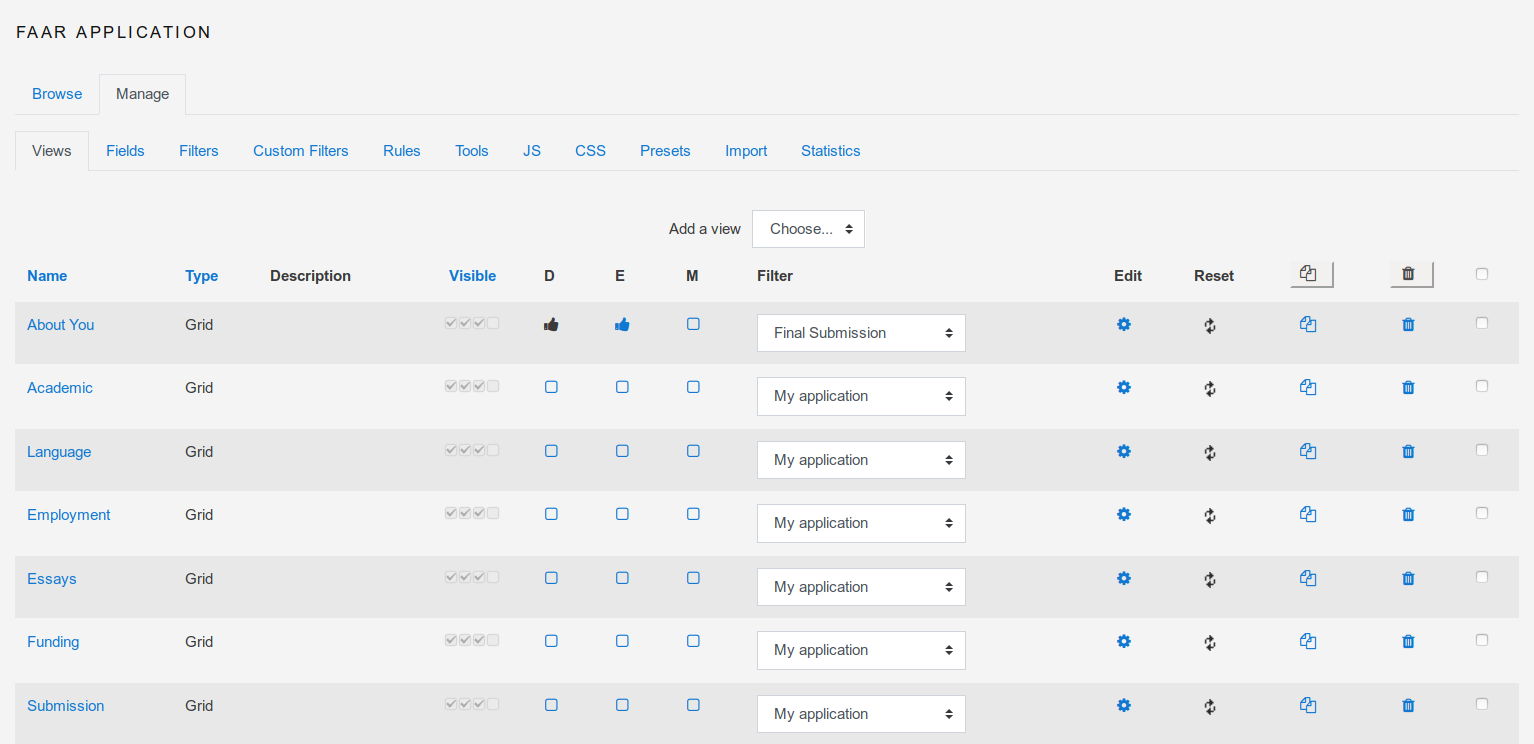
The datalynx module provides possibilities to collect structured data and to process, display and export that data. You can create forms visible to ceratain users and
views to display data for administration or for teachers. You can set fields and views visible or invisible for certain roles. You can also defines behaviours of fields
and renderers for fields and views. Custom filters provide the possibility to filter and search data.
Interested in more features? Contact us for a quote.
Features
- More then 20 different data types for structured data (from text to date to teammembers)
- Create views visible to certain roles
- Filter data with powerful filtering and search methods including a custom filter and an advanced filter
- Create renderers in order to display your data the way you want it
- Define notifications to be sent to certain roles triggered by events like "comment added"
- Export your data to CSV, PDF
- Import data via CSV
- Create templates
- Create views for administration, export, overview, etc..
- Create field behaviours like required fields
- Create renderers for fields
Documentation
Visit Moodle docs wiki for documentation. Installation documentation see installation
Communication
Contributing to the datalynx module
Contact me on github (see above)
Troubleshooting, Bugs, and Feedback
- To report a bug, please GitHub Issues.
- To provide feedback, please use the GitHub Issues.
License
 The Moodle datalynx module is licensed under the GNU General Public License, Version 3.
Contributors
Main contributers are David Bogner, Itamar Tzadok, Michael Niedermayer, Michael Pollak, Ivan Sầkiĉ, and many others.
v5.0-DataResilience (2025022500)
v5.0-DataResilience
Plugin type: Activities
Frankenstyle component name: mod_datalynx
Version build number: 2025022500
Version release name: v5.0-DataResilience
Maturity: Stable
Supported Moodle versions: 4.1, 4.2, 4.3, 4.4, 4.5
Repository URL (Git): https://github.com/Wunderbyte-GmbH/moodle-mod_datalynx
Repository branch:
Repository tag: v5.0-DataResilience
Issue/bug tracker URL: https://github.com/Wunderbyte-GmbH/moodle-mod_datalynx/issues
Moodle datalynx Module (mod_datalynx)
This Moodle plugin is a powerful data management tool that allows you to create digital workflows for data management. Example usecases of this module are:
- Education program management: Manage online courses, communicate with lecturers provide infos and keep an overview of ongoing, future and past courses.
- Provide an application workflow for online applications (Submit application, Review application, Change status, Add comments)
- Provide a course catalog
- Manage conferences (Conference call, participants registration, paper submission etc.)
This is a professional tool. You can explore its potential the best way, when you are contracting edulabs.org for creating your personal digital workflow.
Please contact info@edulabs.org for improvements bug reports etc.
What Does It Do?
The datalynx module provides possibilities to collect structured data and to process, display and export that data. You can create forms visible to ceratain users and
views to display data for administration or for teachers. You can set fields and views visible or invisible for certain roles. You can also defines behaviours of fields
and renderers for fields and views. Custom filters provide the possibility to filter and search data.
Interested in more features? Contact us for a quote.
Features
- More then 20 different data types for structured data (from text to date to teammembers)
- Create views visible to certain roles
- Filter data with powerful filtering and search methods including a custom filter and an advanced filter
- Create renderers in order to display your data the way you want it
- Define notifications to be sent to certain roles triggered by events like "comment added"
- Export your data to CSV, PDF
- Import data via CSV
- Create templates
- Create views for administration, export, overview, etc..
- Create field behaviours like required fields
- Create renderers for fields
Documentation
Visit Moodle docs wiki for documentation. Installation documentation see installation
Communication
Contributing to the datalynx module
Contact me on github (see above)
Troubleshooting, Bugs, and Feedback
- To report a bug, please GitHub Issues.
- To provide feedback, please use the GitHub Issues.
License
The Moodle datalynx module is licensed under the GNU General Public License, Version 3.
Contributors
Main contributers are David Bogner, Itamar Tzadok, Michael Niedermayer, Michael Pollak, Ivan Sầkiĉ, and many others.
v4.9-DataTreasure (2025011301)
v4.9-DataTreasure
Plugin type: Activities
Frankenstyle component name: mod_datalynx
Version build number: 2025011301
Version release name: v4.9-DataTreasure
Maturity: Stable
Supported Moodle versions: 4.1, 4.2, 4.3, 4.4, 4.5
Repository URL (Git): https://github.com/Wunderbyte-GmbH/moodle-mod_datalynx
Repository branch:
Repository tag: v4.9-DataTreasure
Issue/bug tracker URL: https://github.com/Wunderbyte-GmbH/moodle-mod_datalynx/issues
Moodle datalynx Module (mod_datalynx)
This Moodle plugin is a powerful data management tool that allows you to create digital workflows for data management. Example usecases of this module are:
- Education program management: Manage online courses, communicate with lecturers provide infos and keep an overview of ongoing, future and past courses.
- Provide an application workflow for online applications (Submit application, Review application, Change status, Add comments)
- Provide a course catalog
- Manage conferences (Conference call, participants registration, paper submission etc.)
This is a professional tool. You can explore its potential the best way, when you are contracting edulabs.org for creating your personal digital workflow.
Please contact info@edulabs.org for improvements bug reports etc.
What Does It Do?
The datalynx module provides possibilities to collect structured data and to process, display and export that data. You can create forms visible to ceratain users and
views to display data for administration or for teachers. You can set fields and views visible or invisible for certain roles. You can also defines behaviours of fields
and renderers for fields and views. Custom filters provide the possibility to filter and search data.
Interested in more features? Contact us for a quote.
Features
- More then 20 different data types for structured data (from text to date to teammembers)
- Create views visible to certain roles
- Filter data with powerful filtering and search methods including a custom filter and an advanced filter
- Create renderers in order to display your data the way you want it
- Define notifications to be sent to certain roles triggered by events like "comment added"
- Export your data to CSV, PDF
- Import data via CSV
- Create templates
- Create views for administration, export, overview, etc..
- Create field behaviours like required fields
- Create renderers for fields
Documentation
Visit Moodle docs wiki for documentation. Installation documentation see installation
Communication
Contributing to the datalynx module
Contact me on github (see above)
Troubleshooting, Bugs, and Feedback
- To report a bug, please GitHub Issues.
- To provide feedback, please use the GitHub Issues.
License
The Moodle datalynx module is licensed under the GNU General Public License, Version 3.
Contributors
Main contributers are David Bogner, Itamar Tzadok, Michael Niedermayer, Michael Pollak, Ivan Sầkiĉ, and many others.
v4.8-DataTreasure (2024092000)
v4.8-DataTreasure
Plugin type: Activities
Frankenstyle component name: mod_datalynx
Version build number: 2024092000
Version release name: v4.8-DataTreasure
Maturity: Stable
Supported Moodle versions: 4.1, 4.2, 4.3, 4.4
Repository URL (Git): https://github.com/Wunderbyte-GmbH/moodle-mod_datalynx
Repository branch:
Repository tag: v4.8-DataTreasure
Issue/bug tracker URL: https://github.com/Wunderbyte-GmbH/moodle-mod_datalynx/issues
Moodle datalynx Module (mod_datalynx)
This Moodle plugin is a powerful data management tool that allows you to create digital workflows for data management. Example usecases of this module are:
- Education program management: Manage online courses, communicate with lecturers provide infos and keep an overview of ongoing, future and past courses.
- Provide an application workflow for online applications (Submit application, Review application, Change status, Add comments)
- Provide a course catalog
- Manage conferences (Conference call, participants registration, paper submission etc.)
This is a professional tool. You can explore its potential the best way, when you are contracting edulabs.org for creating your personal digital workflow.
Please contact info@edulabs.org for improvements bug reports etc.
What Does It Do?
The datalynx module provides possibilities to collect structured data and to process, display and export that data. You can create forms visible to ceratain users and
views to display data for administration or for teachers. You can set fields and views visible or invisible for certain roles. You can also defines behaviours of fields
and renderers for fields and views. Custom filters provide the possibility to filter and search data.
Interested in more features? Contact us for a quote.
Features
- More then 20 different data types for structured data (from text to date to teammembers)
- Create views visible to certain roles
- Filter data with powerful filtering and search methods including a custom filter and an advanced filter
- Create renderers in order to display your data the way you want it
- Define notifications to be sent to certain roles triggered by events like "comment added"
- Export your data to CSV, PDF
- Import data via CSV
- Create templates
- Create views for administration, export, overview, etc..
- Create field behaviours like required fields
- Create renderers for fields
Documentation
Visit Moodle docs wiki for documentation. Installation documentation see installation
Communication
Contributing to the datalynx module
Contact me on github (see above)
Troubleshooting, Bugs, and Feedback
- To report a bug, please GitHub Issues.
- To provide feedback, please use the GitHub Issues.
License
The Moodle datalynx module is licensed under the GNU General Public License, Version 3.
Contributors
Main contributers are David Bogner, Itamar Tzadok, Michael Niedermayer, Michael Pollak, Ivan Sầkiĉ, and many others.
v4.7-DataTreasure (2024091800)
v4.7-DataTreasure
Plugin type: Activities
Frankenstyle component name: mod_datalynx
Version build number: 2024091800
Version release name: v4.7-DataTreasure
Maturity: Stable
Supported Moodle versions: 4.1, 4.2, 4.3, 4.4
Repository URL (Git): https://github.com/Wunderbyte-GmbH/moodle-mod_datalynx
Repository branch:
Repository tag: v4.7-DataTreasure
Issue/bug tracker URL: https://github.com/Wunderbyte-GmbH/moodle-mod_datalynx/issues
Moodle datalynx Module (mod_datalynx)
This Moodle plugin is a powerful data management tool that allows you to create digital workflows for data management. Example usecases of this module are:
- Education program management: Manage online courses, communicate with lecturers provide infos and keep an overview of ongoing, future and past courses.
- Provide an application workflow for online applications (Submit application, Review application, Change status, Add comments)
- Provide a course catalog
- Manage conferences (Conference call, participants registration, paper submission etc.)
This is a professional tool. You can explore its potential the best way, when you are contracting edulabs.org for creating your personal digital workflow.
Please contact info@edulabs.org for improvements bug reports etc.
What Does It Do?
The datalynx module provides possibilities to collect structured data and to process, display and export that data. You can create forms visible to ceratain users and
views to display data for administration or for teachers. You can set fields and views visible or invisible for certain roles. You can also defines behaviours of fields
and renderers for fields and views. Custom filters provide the possibility to filter and search data.
Interested in more features? Contact us for a quote.
Features
- More then 20 different data types for structured data (from text to date to teammembers)
- Create views visible to certain roles
- Filter data with powerful filtering and search methods including a custom filter and an advanced filter
- Create renderers in order to display your data the way you want it
- Define notifications to be sent to certain roles triggered by events like "comment added"
- Export your data to CSV, PDF
- Import data via CSV
- Create templates
- Create views for administration, export, overview, etc..
- Create field behaviours like required fields
- Create renderers for fields
Documentation
Visit Moodle docs wiki for documentation. Installation documentation see installation
Communication
Contributing to the datalynx module
Contact me on github (see above)
Troubleshooting, Bugs, and Feedback
- To report a bug, please GitHub Issues.
- To provide feedback, please use the GitHub Issues.
License
The Moodle datalynx module is licensed under the GNU General Public License, Version 3.
Contributors
Main contributers are David Bogner, Itamar Tzadok, Michael Niedermayer, Michael Pollak, Ivan Sầkiĉ, and many others.
v4.6-DataTreasure (2024091200)
v4.6-DataTreasure
Plugin type: Activities
Frankenstyle component name: mod_datalynx
Version build number: 2024091200
Version release name: v4.6-DataTreasure
Maturity: Stable
Supported Moodle versions: 4.1, 4.2, 4.3, 4.4
Repository URL (Git): https://github.com/Wunderbyte-GmbH/moodle-mod_datalynx
Repository branch:
Repository tag: v4.6-DataTreasure
Issue/bug tracker URL: https://github.com/Wunderbyte-GmbH/moodle-mod_datalynx/issues
Moodle datalynx Module (mod_datalynx)
This Moodle plugin is a powerful data management tool that allows you to create digital workflows for data management. Example usecases of this module are:
- Education program management: Manage online courses, communicate with lecturers provide infos and keep an overview of ongoing, future and past courses.
- Provide an application workflow for online applications (Submit application, Review application, Change status, Add comments)
- Provide a course catalog
- Manage conferences (Conference call, participants registration, paper submission etc.)
This is a professional tool. You can explore its potential the best way, when you are contracting edulabs.org for creating your personal digital workflow.
Please contact info@edulabs.org for improvements bug reports etc.
What Does It Do?
The datalynx module provides possibilities to collect structured data and to process, display and export that data. You can create forms visible to ceratain users and
views to display data for administration or for teachers. You can set fields and views visible or invisible for certain roles. You can also defines behaviours of fields
and renderers for fields and views. Custom filters provide the possibility to filter and search data.
Interested in more features? Contact us for a quote.
Features
- More then 20 different data types for structured data (from text to date to teammembers)
- Create views visible to certain roles
- Filter data with powerful filtering and search methods including a custom filter and an advanced filter
- Create renderers in order to display your data the way you want it
- Define notifications to be sent to certain roles triggered by events like "comment added"
- Export your data to CSV, PDF
- Import data via CSV
- Create templates
- Create views for administration, export, overview, etc..
- Create field behaviours like required fields
- Create renderers for fields
Documentation
Visit Moodle docs wiki for documentation. Installation documentation see installation
Communication
Contributing to the datalynx module
Contact me on github (see above)
Troubleshooting, Bugs, and Feedback
- To report a bug, please GitHub Issues.
- To provide feedback, please use the GitHub Issues.
License
The Moodle datalynx module is licensed under the GNU General Public License, Version 3.
Contributors
Main contributers are David Bogner, Itamar Tzadok, Michael Niedermayer, Michael Pollak, Ivan Sầkiĉ, and many others.
v4.5-DataTreasure (2024090600)
v4.5-DataTreasure
Plugin type: Activities
Frankenstyle component name: mod_datalynx
Version build number: 2024090600
Version release name: v4.5-DataTreasure
Maturity: Stable
Supported Moodle versions: 4.1, 4.2, 4.3, 4.4
Repository URL (Git): https://github.com/Wunderbyte-GmbH/moodle-mod_datalynx
Repository branch:
Repository tag: v4.5-DataTreasure
Issue/bug tracker URL: https://github.com/Wunderbyte-GmbH/moodle-mod_datalynx/issues
Moodle datalynx Module (mod_datalynx)
This Moodle plugin is a powerful data management tool that allows you to create digital workflows for data management. Example usecases of this module are:
- Education program management: Manage online courses, communicate with lecturers provide infos and keep an overview of ongoing, future and past courses.
- Provide an application workflow for online applications (Submit application, Review application, Change status, Add comments)
- Provide a course catalog
- Manage conferences (Conference call, participants registration, paper submission etc.)
This is a professional tool. You can explore its potential the best way, when you are contracting edulabs.org for creating your personal digital workflow.
Please contact info@edulabs.org for improvements bug reports etc.
What Does It Do?
The datalynx module provides possibilities to collect structured data and to process, display and export that data. You can create forms visible to ceratain users and
views to display data for administration or for teachers. You can set fields and views visible or invisible for certain roles. You can also defines behaviours of fields
and renderers for fields and views. Custom filters provide the possibility to filter and search data.
Interested in more features? Contact us for a quote.
Features
- More then 20 different data types for structured data (from text to date to teammembers)
- Create views visible to certain roles
- Filter data with powerful filtering and search methods including a custom filter and an advanced filter
- Create renderers in order to display your data the way you want it
- Define notifications to be sent to certain roles triggered by events like "comment added"
- Export your data to CSV, PDF
- Import data via CSV
- Create templates
- Create views for administration, export, overview, etc..
- Create field behaviours like required fields
- Create renderers for fields
Documentation
Visit Moodle docs wiki for documentation. Installation documentation see installation
Communication
Contributing to the datalynx module
Contact me on github (see above)
Troubleshooting, Bugs, and Feedback
- To report a bug, please GitHub Issues.
- To provide feedback, please use the GitHub Issues.
License
The Moodle datalynx module is licensed under the GNU General Public License, Version 3.
Contributors
Main contributers are David Bogner, Itamar Tzadok, Michael Niedermayer, Michael Pollak, Ivan Sầkiĉ, and many others.
v4.4-DataTreasure (2024090500)
v4.4-DataTreasure
Plugin type: Activities
Frankenstyle component name: mod_datalynx
Version build number: 2024090500
Version release name: v4.4-DataTreasure
Maturity: Stable
Supported Moodle versions: 4.1, 4.2, 4.3, 4.4
Repository URL (Git): https://github.com/Wunderbyte-GmbH/moodle-mod_datalynx
Repository branch:
Repository tag: v4.4-DataTreasure
Issue/bug tracker URL: https://github.com/Wunderbyte-GmbH/moodle-mod_datalynx/issues
Moodle datalynx Module (mod_datalynx)
This Moodle plugin is a powerful data management tool that allows you to create digital workflows for data management. Example usecases of this module are:
- Education program management: Manage online courses, communicate with lecturers provide infos and keep an overview of ongoing, future and past courses.
- Provide an application workflow for online applications (Submit application, Review application, Change status, Add comments)
- Provide a course catalog
- Manage conferences (Conference call, participants registration, paper submission etc.)
This is a professional tool. You can explore its potential the best way, when you are contracting edulabs.org for creating your personal digital workflow.
Please contact info@edulabs.org for improvements bug reports etc.
What Does It Do?
The datalynx module provides possibilities to collect structured data and to process, display and export that data. You can create forms visible to ceratain users and
views to display data for administration or for teachers. You can set fields and views visible or invisible for certain roles. You can also defines behaviours of fields
and renderers for fields and views. Custom filters provide the possibility to filter and search data.
Interested in more features? Contact us for a quote.
Features
- More then 20 different data types for structured data (from text to date to teammembers)
- Create views visible to certain roles
- Filter data with powerful filtering and search methods including a custom filter and an advanced filter
- Create renderers in order to display your data the way you want it
- Define notifications to be sent to certain roles triggered by events like "comment added"
- Export your data to CSV, PDF
- Import data via CSV
- Create templates
- Create views for administration, export, overview, etc..
- Create field behaviours like required fields
- Create renderers for fields
Documentation
Visit Moodle docs wiki for documentation. Installation documentation see installation
Communication
Contributing to the datalynx module
Contact me on github (see above)
Troubleshooting, Bugs, and Feedback
- To report a bug, please GitHub Issues.
- To provide feedback, please use the GitHub Issues.
License
The Moodle datalynx module is licensed under the GNU General Public License, Version 3.
Contributors
Main contributers are David Bogner, Itamar Tzadok, Michael Niedermayer, Michael Pollak, Ivan Sầkiĉ, and many others.
v4.3-DataTreasure (2024082900)
v4.3-DataTreasure
Plugin type: Activities
Frankenstyle component name: mod_datalynx
Version build number: 2024082900
Version release name: v4.3-DataTreasure
Maturity: Stable
Supported Moodle versions: 4.1, 4.2, 4.3, 4.4
Repository URL (Git): https://github.com/Wunderbyte-GmbH/moodle-mod_datalynx
Repository branch:
Repository tag: v4.3-DataTreasure
Issue/bug tracker URL: https://github.com/Wunderbyte-GmbH/moodle-mod_datalynx/issues
Moodle datalynx Module (mod_datalynx)
This Moodle plugin is a powerful data management tool that allows you to create digital workflows for data management. Example usecases of this module are:
- Education program management: Manage online courses, communicate with lecturers provide infos and keep an overview of ongoing, future and past courses.
- Provide an application workflow for online applications (Submit application, Review application, Change status, Add comments)
- Provide a course catalog
- Manage conferences (Conference call, participants registration, paper submission etc.)
This is a professional tool. You can explore its potential the best way, when you are contracting edulabs.org for creating your personal digital workflow.
Please contact info@edulabs.org for improvements bug reports etc.
What Does It Do?
The datalynx module provides possibilities to collect structured data and to process, display and export that data. You can create forms visible to ceratain users and
views to display data for administration or for teachers. You can set fields and views visible or invisible for certain roles. You can also defines behaviours of fields
and renderers for fields and views. Custom filters provide the possibility to filter and search data.
Interested in more features? Contact us for a quote.
Features
- More then 20 different data types for structured data (from text to date to teammembers)
- Create views visible to certain roles
- Filter data with powerful filtering and search methods including a custom filter and an advanced filter
- Create renderers in order to display your data the way you want it
- Define notifications to be sent to certain roles triggered by events like "comment added"
- Export your data to CSV, PDF
- Import data via CSV
- Create templates
- Create views for administration, export, overview, etc..
- Create field behaviours like required fields
- Create renderers for fields
Documentation
Visit Moodle docs wiki for documentation. Installation documentation see installation
Communication
Contributing to the datalynx module
Contact me on github (see above)
Troubleshooting, Bugs, and Feedback
- To report a bug, please GitHub Issues.
- To provide feedback, please use the GitHub Issues.
License
The Moodle datalynx module is licensed under the GNU General Public License, Version 3.
Contributors
Main contributers are David Bogner, Itamar Tzadok, Michael Niedermayer, Michael Pollak, Ivan Sầkiĉ, and many others.
v4.2-DataTreasure (2024082800)
v4.2-DataTreasure
Plugin type: Activities
Frankenstyle component name: mod_datalynx
Version build number: 2024082800
Version release name: v4.2-DataTreasure
Maturity: Stable
Supported Moodle versions: 4.1, 4.2, 4.3, 4.4
Repository URL (Git): https://github.com/Wunderbyte-GmbH/moodle-mod_datalynx
Repository branch:
Repository tag: v4.2-DataTreasure
Issue/bug tracker URL: https://github.com/Wunderbyte-GmbH/moodle-mod_datalynx/issues
Moodle datalynx Module (mod_datalynx)
This Moodle plugin is a powerful data management tool that allows you to create digital workflows for data management. Example usecases of this module are:
- Education program management: Manage online courses, communicate with lecturers provide infos and keep an overview of ongoing, future and past courses.
- Provide an application workflow for online applications (Submit application, Review application, Change status, Add comments)
- Provide a course catalog
- Manage conferences (Conference call, participants registration, paper submission etc.)
This is a professional tool. You can explore its potential the best way, when you are contracting edulabs.org for creating your personal digital workflow.
Please contact info@edulabs.org for improvements bug reports etc.
What Does It Do?
The datalynx module provides possibilities to collect structured data and to process, display and export that data. You can create forms visible to ceratain users and
views to display data for administration or for teachers. You can set fields and views visible or invisible for certain roles. You can also defines behaviours of fields
and renderers for fields and views. Custom filters provide the possibility to filter and search data.
Interested in more features? Contact us for a quote.
Features
- More then 20 different data types for structured data (from text to date to teammembers)
- Create views visible to certain roles
- Filter data with powerful filtering and search methods including a custom filter and an advanced filter
- Create renderers in order to display your data the way you want it
- Define notifications to be sent to certain roles triggered by events like "comment added"
- Export your data to CSV, PDF
- Import data via CSV
- Create templates
- Create views for administration, export, overview, etc..
- Create field behaviours like required fields
- Create renderers for fields
Documentation
Visit Moodle docs wiki for documentation. Installation documentation see installation
Communication
Contributing to the datalynx module
Contact me on github (see above)
Troubleshooting, Bugs, and Feedback
- To report a bug, please GitHub Issues.
- To provide feedback, please use the GitHub Issues.
License
The Moodle datalynx module is licensed under the GNU General Public License, Version 3.
Contributors
Main contributers are David Bogner, Itamar Tzadok, Michael Niedermayer, Michael Pollak, Ivan Sầkiĉ, and many others.
v4.1-DataTreasure (2024082100)
v4.1-DataTreasure
Plugin type: Activities
Frankenstyle component name: mod_datalynx
Version build number: 2024082100
Version release name: v4.1-DataTreasure
Maturity: Stable
Supported Moodle versions: 4.1, 4.2, 4.3, 4.4
Repository URL (Git): https://github.com/Wunderbyte-GmbH/moodle-mod_datalynx
Repository branch:
Repository tag: v4.1-DataTreasure
Issue/bug tracker URL: https://github.com/Wunderbyte-GmbH/moodle-mod_datalynx/issues
Moodle datalynx Module (mod_datalynx)
This Moodle plugin is a powerful data management tool that allows you to create digital workflows for data management. Example usecases of this module are:
- Education program management: Manage online courses, communicate with lecturers provide infos and keep an overview of ongoing, future and past courses.
- Provide an application workflow for online applications (Submit application, Review application, Change status, Add comments)
- Provide a course catalog
- Manage conferences (Conference call, participants registration, paper submission etc.)
This is a professional tool. You can explore its potential the best way, when you are contracting edulabs.org for creating your personal digital workflow.
Please contact info@edulabs.org for improvements bug reports etc.
What Does It Do?
The datalynx module provides possibilities to collect structured data and to process, display and export that data. You can create forms visible to ceratain users and
views to display data for administration or for teachers. You can set fields and views visible or invisible for certain roles. You can also defines behaviours of fields
and renderers for fields and views. Custom filters provide the possibility to filter and search data.
Interested in more features? Contact us for a quote.
Features
- More then 20 different data types for structured data (from text to date to teammembers)
- Create views visible to certain roles
- Filter data with powerful filtering and search methods including a custom filter and an advanced filter
- Create renderers in order to display your data the way you want it
- Define notifications to be sent to certain roles triggered by events like "comment added"
- Export your data to CSV, PDF
- Import data via CSV
- Create templates
- Create views for administration, export, overview, etc..
- Create field behaviours like required fields
- Create renderers for fields
Documentation
Visit Moodle docs wiki for documentation. Installation documentation see installation
Communication
Contributing to the datalynx module
Contact me on github (see above)
Troubleshooting, Bugs, and Feedback
- To report a bug, please GitHub Issues.
- To provide feedback, please use the GitHub Issues.
License
The Moodle datalynx module is licensed under the GNU General Public License, Version 3.
Contributors
Main contributers are David Bogner, Itamar Tzadok, Michael Niedermayer, Michael Pollak, Ivan Sầkiĉ, and many others.
v4.0-DataTreasure (2024061400)
v4.0-DataTreasure
Plugin type: Activities
Frankenstyle component name: mod_datalynx
Version build number: 2024061400
Version release name: v4.0-DataTreasure
Maturity: Stable
Supported Moodle versions: 4.1, 4.2, 4.3, 4.4
Repository URL (Git): https://github.com/Wunderbyte-GmbH/moodle-mod_datalynx
Repository branch:
Repository tag: v4.0-DataTreasure
Issue/bug tracker URL: https://github.com/Wunderbyte-GmbH/moodle-mod_datalynx/issues
Moodle datalynx Module (mod_datalynx)
This Moodle plugin is a powerful data management tool that allows you to create digital workflows for data management. Example usecases of this module are:
- Education program management: Manage online courses, communicate with lecturers provide infos and keep an overview of ongoing, future and past courses.
- Provide an application workflow for online applications (Submit application, Review application, Change status, Add comments)
- Provide a course catalog
- Manage conferences (Conference call, participants registration, paper submission etc.)
This is a professional tool. You can explore its potential the best way, when you are contracting edulabs.org for creating your personal digital workflow.
Please contact info@edulabs.org for improvements bug reports etc.
What Does It Do?
The datalynx module provides possibilities to collect structured data and to process, display and export that data. You can create forms visible to ceratain users and
views to display data for administration or for teachers. You can set fields and views visible or invisible for certain roles. You can also defines behaviours of fields
and renderers for fields and views. Custom filters provide the possibility to filter and search data.
Interested in more features? Contact us for a quote.
Features
- More then 20 different data types for structured data (from text to date to teammembers)
- Create views visible to certain roles
- Filter data with powerful filtering and search methods including a custom filter and an advanced filter
- Create renderers in order to display your data the way you want it
- Define notifications to be sent to certain roles triggered by events like "comment added"
- Export your data to CSV, PDF
- Import data via CSV
- Create templates
- Create views for administration, export, overview, etc..
- Create field behaviours like required fields
- Create renderers for fields
Documentation
Visit Moodle docs wiki for documentation. Installation documentation see installation
Communication
Contributing to the datalynx module
Contact me on github (see above)
Troubleshooting, Bugs, and Feedback
- To report a bug, please GitHub Issues.
- To provide feedback, please use the GitHub Issues.
License
The Moodle datalynx module is licensed under the GNU General Public License, Version 3.
Contributors
Main contributers are David Bogner, Itamar Tzadok, Michael Niedermayer, Michael Pollak, Ivan Sầkiĉ, and many others.
v3.9-DataIntelligence (2024041800)
v3.9-DataIntelligence
Plugin type: Activities
Frankenstyle component name: mod_datalynx
Version build number: 2024041800
Version release name: v3.9-DataIntelligence
Maturity: Stable
Supported Moodle versions: 4.1, 4.2, 4.3, 4.4
Repository URL (Git): https://github.com/Wunderbyte-GmbH/moodle-mod_datalynx
Repository branch:
Repository tag: v3.9-DataIntelligence
Issue/bug tracker URL: https://github.com/Wunderbyte-GmbH/moodle-mod_datalynx/issues
Moodle datalynx Module (mod_datalynx)
This Moodle plugin is a powerful data management tool that allows you to create digital workflows for data management. Example usecases of this module are:
- Education program management: Manage online courses, communicate with lecturers provide infos and keep an overview of ongoing, future and past courses.
- Provide an application workflow for online applications (Submit application, Review application, Change status, Add comments)
- Provide a course catalog
- Manage conferences (Conference call, participants registration, paper submission etc.)
This is a professional tool. You can explore its potential the best way, when you are contracting edulabs.org for creating your personal digital workflow.
Please contact info@edulabs.org for improvements bug reports etc.
What Does It Do?
The datalynx module provides possibilities to collect structured data and to process, display and export that data. You can create forms visible to ceratain users and
views to display data for administration or for teachers. You can set fields and views visible or invisible for certain roles. You can also defines behaviours of fields
and renderers for fields and views. Custom filters provide the possibility to filter and search data.
Interested in more features? Contact us for a quote.
Features
- More then 20 different data types for structured data (from text to date to teammembers)
- Create views visible to certain roles
- Filter data with powerful filtering and search methods including a custom filter and an advanced filter
- Create renderers in order to display your data the way you want it
- Define notifications to be sent to certain roles triggered by events like "comment added"
- Export your data to CSV, PDF
- Import data via CSV
- Create templates
- Create views for administration, export, overview, etc..
- Create field behaviours like required fields
- Create renderers for fields
Documentation
Visit Moodle docs wiki for documentation. Installation documentation see installation
Communication
Contributing to the datalynx module
Contact me on github (see above)
Troubleshooting, Bugs, and Feedback
- To report a bug, please GitHub Issues.
- To provide feedback, please use the GitHub Issues.
License
The Moodle datalynx module is licensed under the GNU General Public License, Version 3.
Contributors
Main contributers are David Bogner, Itamar Tzadok, Michael Niedermayer, Michael Pollak, Ivan Sầkiĉ, and many others.
v3.8-DataIntelligence (2024022700)
v3.8-DataIntelligence
Plugin type: Activities
Frankenstyle component name: mod_datalynx
Version build number: 2024022700
Version release name: v3.8-DataIntelligence
Maturity: Stable
Supported Moodle versions: 4.1, 4.2, 4.3
Repository URL (Git): https://github.com/dasistwas/moodle-mod_datalynx
Repository branch:
Repository tag: v3.8-DataIntelligence
Issue/bug tracker URL: https://github.com/Wunderbyte-GmbH/moodle-mod_datalynx/issues
Moodle datalynx Module (mod_datalynx)
This Moodle plugin is a powerful data management tool that allows you to create digital workflows for data management. Example usecases of this module are:
- Education program management: Manage online courses, communicate with lecturers provide infos and keep an overview of ongoing, future and past courses.
- Provide an application workflow for online applications (Submit application, Review application, Change status, Add comments)
- Provide a course catalog
- Manage conferences (Conference call, participants registration, paper submission etc.)
This is a professional tool. You can explore its potential the best way, when you are contracting edulabs.org for creating your personal digital workflow.
Please contact info@edulabs.org for improvements bug reports etc.
What Does It Do?
The datalynx module provides possibilities to collect structured data and to process, display and export that data. You can create forms visible to ceratain users and
views to display data for administration or for teachers. You can set fields and views visible or invisible for certain roles. You can also defines behaviours of fields
and renderers for fields and views. Custom filters provide the possibility to filter and search data.
Interested in more features? Contact us for a quote.
Features
- More then 20 different data types for structured data (from text to date to teammembers)
- Create views visible to certain roles
- Filter data with powerful filtering and search methods including a custom filter and an advanced filter
- Create renderers in order to display your data the way you want it
- Define notifications to be sent to certain roles triggered by events like "comment added"
- Export your data to CSV, PDF
- Import data via CSV
- Create templates
- Create views for administration, export, overview, etc..
- Create field behaviours like required fields
- Create renderers for fields
Documentation
Visit Moodle docs wiki for documentation. Installation documentation see installation
Communication
Contributing to the datalynx module
Contact me on github (see above)
Troubleshooting, Bugs, and Feedback
- To report a bug, please GitHub Issues.
- To provide feedback, please use the GitHub Issues.
License
The Moodle datalynx module is licensed under the GNU General Public License, Version 3.
Contributors
Main contributers are David Bogner, Itamar Tzadok, Michael Niedermayer, Michael Pollak, Ivan Sầkiĉ, and many others.
v3.7-DataIntelligence (2024022100)
v3.7-DataIntelligence
Plugin type: Activities
Frankenstyle component name: mod_datalynx
Version build number: 2024022100
Version release name: v3.7-DataIntelligence
Maturity: Stable
Supported Moodle versions: 4.1, 4.2, 4.3
Repository URL (Git): https://github.com/dasistwas/moodle-mod_datalynx
Repository branch:
Repository tag: v3.7-DataIntelligence
Issue/bug tracker URL: https://github.com/Wunderbyte-GmbH/moodle-mod_datalynx/issues
Moodle datalynx Module (mod_datalynx)
This Moodle plugin is a powerful data management tool that allows you to create digital workflows for data management. Example usecases of this module are:
- Education program management: Manage online courses, communicate with lecturers provide infos and keep an overview of ongoing, future and past courses.
- Provide an application workflow for online applications (Submit application, Review application, Change status, Add comments)
- Provide a course catalog
- Manage conferences (Conference call, participants registration, paper submission etc.)
This is a professional tool. You can explore its potential the best way, when you are contracting edulabs.org for creating your personal digital workflow.
Please contact info@edulabs.org for improvements bug reports etc.
What Does It Do?
The datalynx module provides possibilities to collect structured data and to process, display and export that data. You can create forms visible to ceratain users and
views to display data for administration or for teachers. You can set fields and views visible or invisible for certain roles. You can also defines behaviours of fields
and renderers for fields and views. Custom filters provide the possibility to filter and search data.
Interested in more features? Contact us for a quote.
Features
- More then 20 different data types for structured data (from text to date to teammembers)
- Create views visible to certain roles
- Filter data with powerful filtering and search methods including a custom filter and an advanced filter
- Create renderers in order to display your data the way you want it
- Define notifications to be sent to certain roles triggered by events like "comment added"
- Export your data to CSV, PDF
- Import data via CSV
- Create templates
- Create views for administration, export, overview, etc..
- Create field behaviours like required fields
- Create renderers for fields
Documentation
Visit Moodle docs wiki for documentation. Installation documentation see installation
Communication
Contributing to the datalynx module
Contact me on github (see above)
Troubleshooting, Bugs, and Feedback
- To report a bug, please GitHub Issues.
- To provide feedback, please use the GitHub Issues.
License
The Moodle datalynx module is licensed under the GNU General Public License, Version 3.
Contributors
Main contributers are David Bogner, Itamar Tzadok, Michael Niedermayer, Michael Pollak, Ivan Sầkiĉ, and many others.
v3.6-DataIntelligence (2024021500)
v3.6-DataIntelligence
Plugin type: Activities
Frankenstyle component name: mod_datalynx
Version build number: 2024021500
Version release name: v3.6-DataIntelligence
Maturity: Stable
Supported Moodle versions: 4.1, 4.2, 4.3
Repository URL (Git): https://github.com/dasistwas/moodle-mod_datalynx
Repository branch:
Repository tag: v3.6-DataIntelligence
Issue/bug tracker URL: https://github.com/Wunderbyte-GmbH/moodle-mod_datalynx/issues
Moodle datalynx Module (mod_datalynx)
This Moodle plugin is a powerful data management tool that allows you to create digital workflows for data management. Example usecases of this module are:
- Education program management: Manage online courses, communicate with lecturers provide infos and keep an overview of ongoing, future and past courses.
- Provide an application workflow for online applications (Submit application, Review application, Change status, Add comments)
- Provide a course catalog
- Manage conferences (Conference call, participants registration, paper submission etc.)
This is a professional tool. You can explore its potential the best way, when you are contracting edulabs.org for creating your personal digital workflow.
Please contact info@edulabs.org for improvements bug reports etc.
What Does It Do?
The datalynx module provides possibilities to collect structured data and to process, display and export that data. You can create forms visible to ceratain users and
views to display data for administration or for teachers. You can set fields and views visible or invisible for certain roles. You can also defines behaviours of fields
and renderers for fields and views. Custom filters provide the possibility to filter and search data.
Interested in more features? Contact us for a quote.
Features
- More then 20 different data types for structured data (from text to date to teammembers)
- Create views visible to certain roles
- Filter data with powerful filtering and search methods including a custom filter and an advanced filter
- Create renderers in order to display your data the way you want it
- Define notifications to be sent to certain roles triggered by events like "comment added"
- Export your data to CSV, PDF
- Import data via CSV
- Create templates
- Create views for administration, export, overview, etc..
- Create field behaviours like required fields
- Create renderers for fields
Documentation
Visit Moodle docs wiki for documentation. Installation documentation see installation
Communication
Contributing to the datalynx module
Contact me on github (see above)
Troubleshooting, Bugs, and Feedback
- To report a bug, please GitHub Issues.
- To provide feedback, please use the GitHub Issues.
License
The Moodle datalynx module is licensed under the GNU General Public License, Version 3.
Contributors
Main contributers are David Bogner, Itamar Tzadok, Michael Niedermayer, Michael Pollak, Ivan Sầkiĉ, and many others.
v3.5-DataIntelligence (2024021300)
v3.5-DataIntelligence
Plugin type: Activities
Frankenstyle component name: mod_datalynx
Version build number: 2024021300
Version release name: v3.5-DataIntelligence
Maturity: Stable
Supported Moodle versions: 4.1, 4.2, 4.3
Repository URL (Git): https://github.com/dasistwas/moodle-mod_datalynx
Repository branch:
Repository tag: v3.5-DataIntelligence
Issue/bug tracker URL: https://github.com/Wunderbyte-GmbH/moodle-mod_datalynx/issues
Moodle datalynx Module (mod_datalynx)
This Moodle plugin is a powerful data management tool that allows you to create digital workflows for data management. Example usecases of this module are:
- Education program management: Manage online courses, communicate with lecturers provide infos and keep an overview of ongoing, future and past courses.
- Provide an application workflow for online applications (Submit application, Review application, Change status, Add comments)
- Provide a course catalog
- Manage conferences (Conference call, participants registration, paper submission etc.)
This is a professional tool. You can explore its potential the best way, when you are contracting edulabs.org for creating your personal digital workflow.
Please contact info@edulabs.org for improvements bug reports etc.
What Does It Do?
The datalynx module provides possibilities to collect structured data and to process, display and export that data. You can create forms visible to ceratain users and
views to display data for administration or for teachers. You can set fields and views visible or invisible for certain roles. You can also defines behaviours of fields
and renderers for fields and views. Custom filters provide the possibility to filter and search data.
Interested in more features? Contact us for a quote.
Features
- More then 20 different data types for structured data (from text to date to teammembers)
- Create views visible to certain roles
- Filter data with powerful filtering and search methods including a custom filter and an advanced filter
- Create renderers in order to display your data the way you want it
- Define notifications to be sent to certain roles triggered by events like "comment added"
- Export your data to CSV, PDF
- Import data via CSV
- Create templates
- Create views for administration, export, overview, etc..
- Create field behaviours like required fields
- Create renderers for fields
Documentation
Visit Moodle docs wiki for documentation. Installation documentation see installation
Communication
Contributing to the datalynx module
Contact me on github (see above)
Troubleshooting, Bugs, and Feedback
- To report a bug, please GitHub Issues.
- To provide feedback, please use the GitHub Issues.
License
The Moodle datalynx module is licensed under the GNU General Public License, Version 3.
Contributors
Main contributers are David Bogner, Itamar Tzadok, Michael Niedermayer, Michael Pollak, Ivan Sầkiĉ, and many others.
v3.4-DataIntelligence (2024020500)
v3.4-DataIntelligence
Plugin type: Activities
Frankenstyle component name: mod_datalynx
Version build number: 2024020500
Version release name: v3.4-DataIntelligence
Maturity: Stable
Supported Moodle versions: 4.1, 4.2, 4.3
Repository URL (Git): https://github.com/dasistwas/moodle-mod_datalynx
Repository branch:
Repository tag: v3.4-DataIntelligence
Issue/bug tracker URL: https://github.com/Wunderbyte-GmbH/moodle-mod_datalynx/issues
Moodle datalynx Module (mod_datalynx)
This Moodle plugin is a powerful data management tool that allows you to create digital workflows for data management. Example usecases of this module are:
- Education program management: Manage online courses, communicate with lecturers provide infos and keep an overview of ongoing, future and past courses.
- Provide an application workflow for online applications (Submit application, Review application, Change status, Add comments)
- Provide a course catalog
- Manage conferences (Conference call, participants registration, paper submission etc.)
This is a professional tool. You can explore its potential the best way, when you are contracting edulabs.org for creating your personal digital workflow.
Please contact info@edulabs.org for improvements bug reports etc.
What Does It Do?
The datalynx module provides possibilities to collect structured data and to process, display and export that data. You can create forms visible to ceratain users and
views to display data for administration or for teachers. You can set fields and views visible or invisible for certain roles. You can also defines behaviours of fields
and renderers for fields and views. Custom filters provide the possibility to filter and search data.
Interested in more features? Contact us for a quote.
Features
- More then 20 different data types for structured data (from text to date to teammembers)
- Create views visible to certain roles
- Filter data with powerful filtering and search methods including a custom filter and an advanced filter
- Create renderers in order to display your data the way you want it
- Define notifications to be sent to certain roles triggered by events like "comment added"
- Export your data to CSV, PDF
- Import data via CSV
- Create templates
- Create views for administration, export, overview, etc..
- Create field behaviours like required fields
- Create renderers for fields
Documentation
Visit Moodle docs wiki for documentation. Installation documentation see installation
Communication
Contributing to the datalynx module
Contact me on github (see above)
Troubleshooting, Bugs, and Feedback
- To report a bug, please GitHub Issues.
- To provide feedback, please use the GitHub Issues.
License
The Moodle datalynx module is licensed under the GNU General Public License, Version 3.
Contributors
Main contributers are David Bogner, Itamar Tzadok, Michael Niedermayer, Michael Pollak, Ivan Sầkiĉ, and many others.
v3.3-DataIntelligence (2024012502)
v3.3-DataIntelligence
Plugin type: Activities
Frankenstyle component name: mod_datalynx
Version build number: 2024012502
Version release name: v3.3-DataIntelligence
Maturity: Stable
Supported Moodle versions: 4.1, 4.2, 4.3
Repository URL (Git): https://github.com/dasistwas/moodle-mod_datalynx
Repository branch:
Repository tag: v3.3-DataIntelligence
Issue/bug tracker URL: https://github.com/Wunderbyte-GmbH/moodle-mod_datalynx/issues
Moodle datalynx Module (mod_datalynx)
This Moodle plugin is a powerful data management tool that allows you to create digital workflows for data management. Example usecases of this module are:
- Education program management: Manage online courses, communicate with lecturers provide infos and keep an overview of ongoing, future and past courses.
- Provide an application workflow for online applications (Submit application, Review application, Change status, Add comments)
- Provide a course catalog
- Manage conferences (Conference call, participants registration, paper submission etc.)
This is a professional tool. You can explore its potential the best way, when you are contracting edulabs.org for creating your personal digital workflow.
Please contact info@edulabs.org for improvements bug reports etc.
What Does It Do?
The datalynx module provides possibilities to collect structured data and to process, display and export that data. You can create forms visible to ceratain users and
views to display data for administration or for teachers. You can set fields and views visible or invisible for certain roles. You can also defines behaviours of fields
and renderers for fields and views. Custom filters provide the possibility to filter and search data.
Interested in more features? Contact us for a quote.
Features
- More then 20 different data types for structured data (from text to date to teammembers)
- Create views visible to certain roles
- Filter data with powerful filtering and search methods including a custom filter and an advanced filter
- Create renderers in order to display your data the way you want it
- Define notifications to be sent to certain roles triggered by events like "comment added"
- Export your data to CSV, PDF
- Import data via CSV
- Create templates
- Create views for administration, export, overview, etc..
- Create field behaviours like required fields
- Create renderers for fields
Documentation
Visit Moodle docs wiki for documentation. Installation documentation see installation
Communication
Contributing to the datalynx module
Contact me on github (see above)
Troubleshooting, Bugs, and Feedback
- To report a bug, please GitHub Issues.
- To provide feedback, please use the GitHub Issues.
License
The Moodle datalynx module is licensed under the GNU General Public License, Version 3.
Contributors
Main contributers are David Bogner, Itamar Tzadok, Michael Niedermayer, Michael Pollak, Ivan Sầkiĉ, and many others.
v3.2-DataIntelligence (2023121900)
v3.2-DataIntelligence
Plugin type: Activities
Frankenstyle component name: mod_datalynx
Version build number: 2023121900
Version release name: v3.2-DataIntelligence
Maturity: Stable
Supported Moodle versions: 4.1
Repository URL (Git): https://github.com/dasistwas/moodle-mod_datalynx
Repository branch: master
Repository tag: v3.2-DataIntelligence
Issue/bug tracker URL: https://github.com/Wunderbyte-GmbH/moodle-mod_datalynx/issues
Moodle datalynx Module (mod_datalynx)
This Moodle plugin is a powerful data management tool that allows you to create digital workflows for data management. Example usecases of this module are:
- Education program management: Manage online courses, communicate with lecturers provide infos and keep an overview of ongoing, future and past courses.
- Provide an application workflow for online applications (Submit application, Review application, Change status, Add comments)
- Provide a course catalog
- Manage conferences (Conference call, participants registration, paper submission etc.)
This is a professional tool. You can explore its potential the best way, when you are contracting edulabs.org for creating your personal digital workflow.
Please contact info@edulabs.org for improvements bug reports etc.
What Does It Do?
The datalynx module provides possibilities to collect structured data and to process, display and export that data. You can create forms visible to ceratain users and
views to display data for administration or for teachers. You can set fields and views visible or invisible for certain roles. You can also defines behaviours of fields
and renderers for fields and views. Custom filters provide the possibility to filter and search data.
Interested in more features? Contact us for a quote.
Features
- More then 20 different data types for structured data (from text to date to teammembers)
- Create views visible to certain roles
- Filter data with powerful filtering and search methods including a custom filter and an advanced filter
- Create renderers in order to display your data the way you want it
- Define notifications to be sent to certain roles triggered by events like "comment added"
- Export your data to CSV, PDF
- Import data via CSV
- Create templates
- Create views for administration, export, overview, etc..
- Create field behaviours like required fields
- Create renderers for fields
Documentation
Visit Moodle docs wiki for documentation. Installation documentation see installation
Communication
Contributing to the datalynx module
Contact me on github (see above)
Troubleshooting, Bugs, and Feedback
- To report a bug, please GitHub Issues.
- To provide feedback, please use the GitHub Issues.
License
The Moodle datalynx module is licensed under the GNU General Public License, Version 3.
Contributors
Main contributers are David Bogner, Itamar Tzadok, Michael Niedermayer, Michael Pollak, Ivan Sầkiĉ, and many others.
v3.0-DataIntelligence (2023082300)
v3.0-DataIntelligence
Plugin type: Activities
Frankenstyle component name: mod_datalynx
Version build number: 2023082300
Version release name: v3.0-DataIntelligence
Maturity: Stable
Supported Moodle versions: 4.1
Repository URL (Git): https://github.com/dasistwas/moodle-mod_datalynx
Repository branch: master
Repository tag: v3.0-DataIntelligence
Issue/bug tracker URL: https://github.com/Wunderbyte-GmbH/moodle-mod_datalynx/issues
Moodle datalynx Module (mod_datalynx)
This Moodle plugin is a powerful data management tool that allows you to create digital workflows for data management. Example usecases of this module are:
- Education program management: Manage online courses, communicate with lecturers provide infos and keep an overview of ongoing, future and past courses.
- Provide an application workflow for online applications (Submit application, Review application, Change status, Add comments)
- Provide a course catalog
- Manage conferences (Conference call, participants registration, paper submission etc.)
This is a professional tool. You can explore its potential the best way, when you are contracting edulabs.org for creating your personal digital workflow.
Please contact info@edulabs.org for improvements bug reports etc.
What Does It Do?
The datalynx module provides possibilities to collect structured data and to process, display and export that data. You can create forms visible to ceratain users and
views to display data for administration or for teachers. You can set fields and views visible or invisible for certain roles. You can also defines behaviours of fields
and renderers for fields and views. Custom filters provide the possibility to filter and search data.
Interested in more features? Contact us for a quote.
Features
- More then 20 different data types for structured data (from text to date to teammembers)
- Create views visible to certain roles
- Filter data with powerful filtering and search methods including a custom filter and an advanced filter
- Create renderers in order to display your data the way you want it
- Define notifications to be sent to certain roles triggered by events like "comment added"
- Export your data to CSV, PDF
- Import data via CSV
- Create templates
- Create views for administration, export, overview, etc..
- Create field behaviours like required fields
- Create renderers for fields
Documentation
Visit Moodle docs wiki for documentation. Installation documentation see installation
Communication
Contributing to the datalynx module
Contact me on github (see above)
Troubleshooting, Bugs, and Feedback
- To report a bug, please GitHub Issues.
- To provide feedback, please use the GitHub Issues.
License
The Moodle datalynx module is licensed under the GNU General Public License, Version 3.
Contributors
Main contributers are David Bogner, Itamar Tzadok, Michael Niedermayer, Michael Pollak, Ivan Sầkiĉ, and many others.
v2.9-DataMystery (2023081100)
v2.9-DataMystery
Plugin type: Activities
Frankenstyle component name: mod_datalynx
Version build number: 2023081100
Version release name: v2.9-DataMystery
Maturity: Stable
Supported Moodle versions: 4.1
Repository URL (Git): https://github.com/dasistwas/moodle-mod_datalynx
Repository branch: master
Repository tag: v2.9-DataMystery
Issue/bug tracker URL: https://github.com/Wunderbyte-GmbH/moodle-mod_datalynx/issues
Moodle datalynx Module (mod_datalynx)
This Moodle plugin is a powerful data management tool that allows you to create digital workflows for data management. Example usecases of this module are:
- Education program management: Manage online courses, communicate with lecturers provide infos and keep an overview of ongoing, future and past courses.
- Provide an application workflow for online applications (Submit application, Review application, Change status, Add comments)
- Provide a course catalog
- Manage conferences (Conference call, participants registration, paper submission etc.)
This is a professional tool. You can explore its potential the best way, when you are contracting edulabs.org for creating your personal digital workflow.
Please contact info@edulabs.org for improvements bug reports etc.
What Does It Do?
The datalynx module provides possibilities to collect structured data and to process, display and export that data. You can create forms visible to ceratain users and
views to display data for administration or for teachers. You can set fields and views visible or invisible for certain roles. You can also defines behaviours of fields
and renderers for fields and views. Custom filters provide the possibility to filter and search data.
Interested in more features? Contact us for a quote.
Features
- More then 20 different data types for structured data (from text to date to teammembers)
- Create views visible to certain roles
- Filter data with powerful filtering and search methods including a custom filter and an advanced filter
- Create renderers in order to display your data the way you want it
- Define notifications to be sent to certain roles triggered by events like "comment added"
- Export your data to CSV, PDF
- Import data via CSV
- Create templates
- Create views for administration, export, overview, etc..
- Create field behaviours like required fields
- Create renderers for fields
Documentation
Visit Moodle docs wiki for documentation. Installation documentation see installation
Communication
Contributing to the datalynx module
Contact me on github (see above)
Troubleshooting, Bugs, and Feedback
- To report a bug, please GitHub Issues.
- To provide feedback, please use the GitHub Issues.
License
The Moodle datalynx module is licensed under the GNU General Public License, Version 3.
Contributors
Main contributers are David Bogner, Itamar Tzadok, Michael Niedermayer, Michael Pollak, Ivan Sầkiĉ, and many others.
v2.8-DataMystery (2023071900)
v2.8-DataMystery
Plugin type: Activities
Frankenstyle component name: mod_datalynx
Version build number: 2023071900
Version release name: v2.8-DataMystery
Maturity: Stable
Supported Moodle versions: 4.0, 4.1, 4.2
Repository URL (Git): https://github.com/dasistwas/moodle-mod_datalynx
Repository branch:
Repository tag: v2.8-DataMystery
Issue/bug tracker URL: https://github.com/Wunderbyte-GmbH/moodle-mod_datalynx/issues
Moodle datalynx Module (mod_datalynx)
This Moodle plugin is a powerful data management tool that allows you to create digital workflows for data management. Example usecases of this module are:
- Education program management: Manage online courses, communicate with lecturers provide infos and keep an overview of ongoing, future and past courses.
- Provide an application workflow for online applications (Submit application, Review application, Change status, Add comments)
- Provide a course catalog
- Manage conferences (Conference call, participants registration, paper submission etc.)
This is a professional tool. You can explore its potential the best way, when you are contracting edulabs.org for creating your personal digital workflow.
Please contact info@edulabs.org for improvements bug reports etc.
What Does It Do?
The datalynx module provides possibilities to collect structured data and to process, display and export that data. You can create forms visible to ceratain users and
views to display data for administration or for teachers. You can set fields and views visible or invisible for certain roles. You can also defines behaviours of fields
and renderers for fields and views. Custom filters provide the possibility to filter and search data.
Interested in more features? Contact us for a quote.
Features
- More then 20 different data types for structured data (from text to date to teammembers)
- Create views visible to certain roles
- Filter data with powerful filtering and search methods including a custom filter and an advanced filter
- Create renderers in order to display your data the way you want it
- Define notifications to be sent to certain roles triggered by events like "comment added"
- Export your data to CSV, PDF
- Import data via CSV
- Create templates
- Create views for administration, export, overview, etc..
- Create field behaviours like required fields
- Create renderers for fields
Documentation
Visit Moodle docs wiki for documentation. Installation documentation see installation
Communication
Contributing to the datalynx module
Contact me on github (see above)
Troubleshooting, Bugs, and Feedback
- To report a bug, please GitHub Issues.
- To provide feedback, please use the GitHub Issues.
License
The Moodle datalynx module is licensed under the GNU General Public License, Version 3.
Contributors
Main contributers are David Bogner, Itamar Tzadok, Michael Niedermayer, Michael Pollak, Ivan Sầkiĉ, and many others.
v2.7-DataMystery (2023051800)
v2.7-DataMystery
Plugin type: Activities
Frankenstyle component name: mod_datalynx
Version build number: 2023051800
Version release name: v2.7-DataMystery
Maturity: Stable
Supported Moodle versions: 4.1, 4.2
Repository URL (Git): https://github.com/dasistwas/moodle-mod_datalynx
Repository branch:
Repository tag: v2.7-DataMystery
Issue/bug tracker URL: https://github.com/Wunderbyte-GmbH/moodle-mod_datalynx/issues
Moodle datalynx Module (mod_datalynx)
This Moodle plugin is a powerful data management tool that allows you to create digital workflows for data management. Example usecases of this module are:
- Education program management: Manage online courses, communicate with lecturers provide infos and keep an overview of ongoing, future and past courses.
- Provide an application workflow for online applications (Submit application, Review application, Change status, Add comments)
- Provide a course catalog
- Manage conferences (Conference call, participants registration, paper submission etc.)
This is a professional tool. You can explore its potential the best way, when you are contracting edulabs.org for creating your personal digital workflow.
Please contact info@edulabs.org for improvements bug reports etc.
What Does It Do?
The datalynx module provides possibilities to collect structured data and to process, display and export that data. You can create forms visible to ceratain users and
views to display data for administration or for teachers. You can set fields and views visible or invisible for certain roles. You can also defines behaviours of fields
and renderers for fields and views. Custom filters provide the possibility to filter and search data.
Interested in more features? Contact us for a quote.
Features
- More then 20 different data types for structured data (from text to date to teammembers)
- Create views visible to certain roles
- Filter data with powerful filtering and search methods including a custom filter and an advanced filter
- Create renderers in order to display your data the way you want it
- Define notifications to be sent to certain roles triggered by events like "comment added"
- Export your data to CSV, PDF
- Import data via CSV
- Create templates
- Create views for administration, export, overview, etc..
- Create field behaviours like required fields
- Create renderers for fields
Documentation
Visit Moodle docs wiki for documentation. Installation documentation see installation
Communication
Contributing to the datalynx module
Contact me on github (see above)
Troubleshooting, Bugs, and Feedback
- To report a bug, please GitHub Issues.
- To provide feedback, please use the GitHub Issues.
License
The Moodle datalynx module is licensed under the GNU General Public License, Version 3.
Contributors
Main contributers are David Bogner, Itamar Tzadok, Michael Niedermayer, Michael Pollak, Ivan Sầkiĉ, and many others.
v2.6-DataMystery (2022111140)
v2.6-DataMystery
Plugin type: Activities
Frankenstyle component name: mod_datalynx
Version build number: 2022111140
Version release name: v2.6-DataMystery
Maturity: Stable
Supported Moodle versions: 4.0
Repository URL (Git): https://github.com/dasistwas/moodle-mod_datalynx
Repository branch:
Repository tag:
Issue/bug tracker URL: https://github.com/Wunderbyte-GmbH/moodle-mod_datalynx/issues
Moodle datalynx Module (mod_datalynx)
This Moodle plugin is a powerful data management tool that allows you to create digital workflows for data management. Example usecases of this module are:
- Education program management: Manage online courses, communicate with lecturers provide infos and keep an overview of ongoing, future and past courses.
- Provide an application workflow for online applications (Submit application, Review application, Change status, Add comments)
- Provide a course catalog
- Manage conferences (Conference call, participants registration, paper submission etc.)
This is a professional tool. You can explore its potential the best way, when you are contracting edulabs.org for creating your personal digital workflow.
Please contact info@edulabs.org for improvements bug reports etc.
What Does It Do?
The datalynx module provides possibilities to collect structured data and to process, display and export that data. You can create forms visible to ceratain users and
views to display data for administration or for teachers. You can set fields and views visible or invisible for certain roles. You can also defines behaviours of fields
and renderers for fields and views. Custom filters provide the possibility to filter and search data.
Interested in more features? Contact us for a quote.
Features
- More then 20 different data types for structured data (from text to date to teammembers)
- Create views visible to certain roles
- Filter data with powerful filtering and search methods including a custom filter and an advanced filter
- Create renderers in order to display your data the way you want it
- Define notifications to be sent to certain roles triggered by events like "comment added"
- Export your data to CSV, PDF
- Import data via CSV
- Create templates
- Create views for administration, export, overview, etc..
- Create field behaviours like required fields
- Create renderers for fields
Documentation
Visit Moodle docs wiki for documentation. Installation documentation see installation
Communication
Contributing to the datalynx module
Contact me on github (see above)
Troubleshooting, Bugs, and Feedback
- To report a bug, please GitHub Issues.
- To provide feedback, please use the GitHub Issues.
License
The Moodle datalynx module is licensed under the GNU General Public License, Version 3.
Contributors
Main contributers are David Bogner, Itamar Tzadok, Michael Niedermayer, Michael Pollak, Ivan Sầkiĉ, and many others.
v2.5-DataMystery (2022111100)
v2.5-DataMystery
Plugin type: Activities
Frankenstyle component name: mod_datalynx
Version build number: 2022111100
Version release name: v2.5-DataMystery
Maturity: Stable
Supported Moodle versions: 4.0
Repository URL (Git): https://github.com/dasistwas/moodle-mod_datalynx
Repository branch: master
Repository tag:
Issue/bug tracker URL: https://github.com/Wunderbyte-GmbH/moodle-mod_datalynx/issues
Moodle datalynx Module (mod_datalynx)
This Moodle plugin is a powerful data management tool that allows you to create digital workflows for data management. Example usecases of this module are:
- Education program management: Manage online courses, communicate with lecturers provide infos and keep an overview of ongoing, future and past courses.
- Provide an application workflow for online applications (Submit application, Review application, Change status, Add comments)
- Provide a course catalog
- Manage conferences (Conference call, participants registration, paper submission etc.)
This is a professional tool. You can explore its potential the best way, when you are contracting edulabs.org for creating your personal digital workflow.
Please contact info@edulabs.org for improvements bug reports etc.
What Does It Do?
The datalynx module provides possibilities to collect structured data and to process, display and export that data. You can create forms visible to ceratain users and
views to display data for administration or for teachers. You can set fields and views visible or invisible for certain roles. You can also defines behaviours of fields
and renderers for fields and views. Custom filters provide the possibility to filter and search data.
Interested in more features? Contact us for a quote.
Features
- More then 20 different data types for structured data (from text to date to teammembers)
- Create views visible to certain roles
- Filter data with powerful filtering and search methods including a custom filter and an advanced filter
- Create renderers in order to display your data the way you want it
- Define notifications to be sent to certain roles triggered by events like "comment added"
- Export your data to CSV, PDF
- Import data via CSV
- Create templates
- Create views for administration, export, overview, etc..
- Create field behaviours like required fields
- Create renderers for fields
Documentation
Visit Moodle docs wiki for documentation. Installation documentation see installation
Communication
Contributing to the datalynx module
Contact me on github (see above)
Troubleshooting, Bugs, and Feedback
- To report a bug, please GitHub Issues.
- To provide feedback, please use the GitHub Issues.
License
The Moodle datalynx module is licensed under the GNU General Public License, Version 3.
Contributors
Main contributers are David Bogner, Itamar Tzadok, Michael Niedermayer, Michael Pollak, Ivan Sầkiĉ, and many others.
v2.4-DataMystery (2022103000)
v2.4-DataMystery
Plugin type: Activities
Frankenstyle component name: mod_datalynx
Version build number: 2022103000
Version release name: v2.4-DataMystery
Maturity: Stable
Supported Moodle versions: 4.0
Repository URL (Git): https://github.com/dasistwas/moodle-mod_datalynx
Repository branch: master
Repository tag:
Issue/bug tracker URL: https://github.com/Wunderbyte-GmbH/moodle-mod_datalynx/issues
Moodle datalynx Module (mod_datalynx)
This Moodle plugin is a powerful data management tool that allows you to create digital workflows for data management. Example usecases of this module are:
- Education program management: Manage online courses, communicate with lecturers provide infos and keep an overview of ongoing, future and past courses.
- Provide an application workflow for online applications (Submit application, Review application, Change status, Add comments)
- Provide a course catalog
- Manage conferences (Conference call, participants registration, paper submission etc.)
This is a professional tool. You can explore its potential the best way, when you are contracting edulabs.org for creating your personal digital workflow.
Please contact info@edulabs.org for improvements bug reports etc.
What Does It Do?
The datalynx module provides possibilities to collect structured data and to process, display and export that data. You can create forms visible to ceratain users and
views to display data for administration or for teachers. You can set fields and views visible or invisible for certain roles. You can also defines behaviours of fields
and renderers for fields and views. Custom filters provide the possibility to filter and search data.
Interested in more features? Contact us for a quote.
Features
- More then 20 different data types for structured data (from text to date to teammembers)
- Create views visible to certain roles
- Filter data with powerful filtering and search methods including a custom filter and an advanced filter
- Create renderers in order to display your data the way you want it
- Define notifications to be sent to certain roles triggered by events like "comment added"
- Export your data to CSV, PDF
- Import data via CSV
- Create templates
- Create views for administration, export, overview, etc..
- Create field behaviours like required fields
- Create renderers for fields
Documentation
Visit Moodle docs wiki for documentation. Installation documentation see installation
Communication
Contributing to the datalynx module
Contact me on github (see above)
Troubleshooting, Bugs, and Feedback
- To report a bug, please GitHub Issues.
- To provide feedback, please use the GitHub Issues.
License
The Moodle datalynx module is licensed under the GNU General Public License, Version 3.
Contributors
Main contributers are David Bogner, Itamar Tzadok, Michael Niedermayer, Michael Pollak, Ivan Sầkiĉ, and many others.
v2.3-DataMystery (2022080800)
v2.3-DataMystery
Plugin type: Activities
Frankenstyle component name: mod_datalynx
Version build number: 2022080800
Version release name: v2.3-DataMystery
Maturity: Stable
Supported Moodle versions: 3.11
Repository URL (Git): https://github.com/dasistwas/moodle-mod_datalynx
Repository branch: master
Repository tag:
Issue/bug tracker URL: https://github.com/Wunderbyte-GmbH/moodle-mod_datalynx/issues
Moodle datalynx Module (mod_datalynx)
This Moodle plugin is a powerful data management tool that allows you to create digital workflows for data management. Example usecases of this module are:
- Education program management: Manage online courses, communicate with lecturers provide infos and keep an overview of ongoing, future and past courses.
- Provide an application workflow for online applications (Submit application, Review application, Change status, Add comments)
- Provide a course catalog
- Manage conferences (Conference call, participants registration, paper submission etc.)
This is a professional tool. You can explore its potential the best way, when you are contracting edulabs.org for creating your personal digital workflow.
Please contact info@edulabs.org for improvements bug reports etc.
What Does It Do?
The datalynx module provides possibilities to collect structured data and to process, display and export that data. You can create forms visible to ceratain users and
views to display data for administration or for teachers. You can set fields and views visible or invisible for certain roles. You can also defines behaviours of fields
and renderers for fields and views. Custom filters provide the possibility to filter and search data.
Interested in more features? Contact us for a quote.
Features
- More then 20 different data types for structured data (from text to date to teammembers)
- Create views visible to certain roles
- Filter data with powerful filtering and search methods including a custom filter and an advanced filter
- Create renderers in order to display your data the way you want it
- Define notifications to be sent to certain roles triggered by events like "comment added"
- Export your data to CSV, PDF
- Import data via CSV
- Create templates
- Create views for administration, export, overview, etc..
- Create field behaviours like required fields
- Create renderers for fields
Documentation
Visit Moodle docs wiki for documentation. Installation documentation see installation
Communication
Contributing to the datalynx module
Contact me on github (see above)
Troubleshooting, Bugs, and Feedback
- To report a bug, please GitHub Issues.
- To provide feedback, please use the GitHub Issues.
License
The Moodle datalynx module is licensed under the GNU General Public License, Version 3.
Contributors
Main contributers are David Bogner, Itamar Tzadok, Michael Niedermayer, Michael Pollak, Ivan Sầkiĉ, and many others.
v2.0-DataMystery (2020040100)
v2.0-DataMystery
Plugin type: Activities
Frankenstyle component name: mod_datalynx
Version build number: 2020040100
Version release name: v2.0-DataMystery
Maturity: Stable
Supported Moodle versions: 3.5, 3.6, 3.7, 3.8
Repository URL (Git): https://github.com/dasistwas/moodle-mod_datalynx
Repository branch:
Repository tag: v2.0-DataMystery
Issue/bug tracker URL: https://github.com/Wunderbyte-GmbH/moodle-mod_datalynx/issues
Moodle datalynx Module (mod_datalynx)
This Moodle plugin is a powerful data management tool that allows you to create digital workflows for data management. Example usecases of this module are:
- Education program management: Manage online courses, communicate with lecturers provide infos and keep an overview of ongoing, future and past courses.
- Provide an application workflow for online applications (Submit application, Review application, Change status, Add comments)
- Provide a course catalog
- Manage conferences (Conference call, participants registration, paper submission etc.)
This is a professional tool. You can explore its potential the best way, when you are contracting edulabs.org for creating your personal digital workflow.
Please contact info@edulabs.org for improvements bug reports etc.
What Does It Do?
The datalynx module provides possibilities to collect structured data and to process, display and export that data. You can create forms visible to ceratain users and
views to display data for administration or for teachers. You can set fields and views visible or invisible for certain roles. You can also defines behaviours of fields
and renderers for fields and views. Custom filters provide the possibility to filter and search data.
Interested in more features? Contact us for a quote.
Features
- More then 20 different data types for structured data (from text to date to teammembers)
- Create views visible to certain roles
- Filter data with powerful filtering and search methods including a custom filter and an advanced filter
- Create renderers in order to display your data the way you want it
- Define notifications to be sent to certain roles triggered by events like "comment added"
- Export your data to CSV, PDF
- Import data via CSV
- Create templates
- Create views for administration, export, overview, etc..
- Create field behaviours like required fields
- Create renderers for fields
Documentation
Visit Moodle docs wiki for documentation. Installation documentation see installation
Communication
Contributing to the datalynx module
Contact me on github (see above)
Troubleshooting, Bugs, and Feedback
- To report a bug, please GitHub Issues.
- To provide feedback, please use the GitHub Issues.
License
The Moodle datalynx module is licensed under the GNU General Public License, Version 3.
Contributors
Main contributers are David Bogner, Itamar Tzadok, Michael Niedermayer, Michael Pollak, Ivan Sầkiĉ, and many others.
v1.9-DataScience (2020022600)
v1.9-DataScience
Plugin type: Activities
Frankenstyle component name: mod_datalynx
Version build number: 2020022600
Version release name: v1.9-DataScience
Maturity: Stable
Supported Moodle versions: 3.5, 3.6, 3.7, 3.8
Repository URL (Git): https://github.com/dasistwas/moodle-mod_datalynx
Repository branch:
Repository tag: v1.9-DataScience
Issue/bug tracker URL: https://github.com/Wunderbyte-GmbH/moodle-mod_datalynx/issues
Moodle datalynx Module (mod_datalynx)
This Moodle plugin is a powerful data management tool that allows you to create digital workflows for data management. Example usecases of this module are:
- Education program management: Manage online courses, communicate with lecturers provide infos and keep an overview of ongoing, future and past courses.
- Provide an application workflow for online applications (Submit application, Review application, Change status, Add comments)
- Provide a course catalog
- Manage conferences (Conference call, participants registration, paper submission etc.)
This is a professional tool. You can explore its potential the best way, when you are contracting edulabs.org for creating your personal digital workflow.
Please contact info@edulabs.org for improvements bug reports etc.
What Does It Do?
The datalynx module provides possibilities to collect structured data and to process, display and export that data. You can create forms visible to ceratain users and
views to display data for administration or for teachers. You can set fields and views visible or invisible for certain roles. You can also defines behaviours of fields
and renderers for fields and views. Custom filters provide the possibility to filter and search data.
Interested in more features? Contact us for a quote.
Features
- More then 20 different data types for structured data (from text to date to teammembers)
- Create views visible to certain roles
- Filter data with powerful filtering and search methods including a custom filter and an advanced filter
- Create renderers in order to display your data the way you want it
- Define notifications to be sent to certain roles triggered by events like "comment added"
- Export your data to CSV, PDF
- Import data via CSV
- Create templates
- Create views for administration, export, overview, etc..
- Create field behaviours like required fields
- Create renderers for fields
Documentation
Visit Moodle docs wiki for documentation. Installation documentation see installation
Communication
Contributing to the datalynx module
Contact me on github (see above)
Troubleshooting, Bugs, and Feedback
- To report a bug, please GitHub Issues.
- To provide feedback, please use the GitHub Issues.
License
The Moodle datalynx module is licensed under the GNU General Public License, Version 3.
Contributors
Main contributers are David Bogner, Itamar Tzadok, Michael Niedermayer, Michael Pollak, Ivan Sầkiĉ, and many others.
v1.8-Data Science (2019092000)
v1.8-Data Science
Plugin type: Activities
Frankenstyle component name: mod_datalynx
Version build number: 2019092000
Version release name: v1.8-Data Science
Maturity: Stable
Supported Moodle versions: 3.5, 3.6, 3.7
Repository URL (Git): https://github.com/dasistwas/moodle-mod_datalynx
Repository branch: master
Repository tag: v1.8-DataScience
Issue/bug tracker URL: https://github.com/Wunderbyte-GmbH/moodle-mod_datalynx/issues
Moodle datalynx Module (mod_datalynx)
This Moodle plugin is a powerful data management tool that allows you to create digital workflows for data management. Example usecases of this module are:
- Education program management: Manage online courses, communicate with lecturers provide infos and keep an overview of ongoing, future and past courses.
- Provide an application workflow for online applications (Submit application, Review application, Change status, Add comments)
- Provide a course catalog
- Manage conferences (Conference call, participants registration, paper submission etc.)
This is a professional tool. You can explore its potential the best way, when you are contracting edulabs.org for creating your personal digital workflow.
Please contact info@edulabs.org for improvements bug reports etc.
What Does It Do?
The datalynx module provides possibilities to collect structured data and to process, display and export that data. You can create forms visible to ceratain users and
views to display data for administration or for teachers. You can set fields and views visible or invisible for certain roles. You can also defines behaviours of fields
and renderers for fields and views. Custom filters provide the possibility to filter and search data.
Interested in more features? Contact us for a quote.
Features
- More then 20 different data types for structured data (from text to date to teammembers)
- Create views visible to certain roles
- Filter data with powerful filtering and search methods including a custom filter and an advanced filter
- Create renderers in order to display your data the way you want it
- Define notifications to be sent to certain roles triggered by events like "comment added"
- Export your data to CSV, PDF
- Import data via CSV
- Create templates
- Create views for administration, export, overview, etc..
- Create field behaviours like required fields
- Create renderers for fields
Documentation
Visit Moodle docs wiki for documentation. Installation documentation see installation
Communication
Contributing to the datalynx module
Contact me on github (see above)
Troubleshooting, Bugs, and Feedback
- To report a bug, please GitHub Issues.
- To provide feedback, please use the GitHub Issues.
License
The Moodle datalynx module is licensed under the GNU General Public License, Version 3.
Contributors
Main contributers are David Bogner, Itamar Tzadok, Michael Niedermayer, Michael Pollak, Ivan Sầkiĉ, and many others.
1.7 Data Science (2019082000)
1.7 Data Science
Plugin type: Activities
Frankenstyle component name: mod_datalynx
Version build number: 2019082000
Version release name: 1.7 Data Science
Maturity: Stable
Supported Moodle versions: 3.5, 3.6, 3.7
Repository URL (Git): https://github.com/dasistwas/moodle-mod_datalynx
Repository branch: master
Repository tag: v1.7-DataScience
Issue/bug tracker URL: https://github.com/Wunderbyte-GmbH/moodle-mod_datalynx/issues
Moodle datalynx Module (mod_datalynx)
This Moodle plugin is a powerful data management tool that allows you to create digital workflows for data management. Example usecases of this module are:
- Education program management: Manage online courses, communicate with lecturers provide infos and keep an overview of ongoing, future and past courses.
- Provide an application workflow for online applications (Submit application, Review application, Change status, Add comments)
- Provide a course catalog
- Manage conferences (Conference call, participants registration, paper submission etc.)
This is a professional tool. You can explore its potential the best way, when you are contracting edulabs.org for creating your personal digital workflow.
Please contact info@edulabs.org for improvements bug reports etc.
What Does It Do?
The datalynx module provides possibilities to collect structured data and to process, display and export that data. You can create forms visible to ceratain users and
views to display data for administration or for teachers. You can set fields and views visible or invisible for certain roles. You can also defines behaviours of fields
and renderers for fields and views. Custom filters provide the possibility to filter and search data.
Interested in more features? Contact us for a quote.
Features
- More then 20 different data types for structured data (from text to date to teammembers)
- Create views visible to certain roles
- Filter data with powerful filtering and search methods including a custom filter and an advanced filter
- Create renderers in order to display your data the way you want it
- Define notifications to be sent to certain roles triggered by events like "comment added"
- Export your data to CSV, PDF
- Import data via CSV
- Create templates
- Create views for administration, export, overview, etc..
- Create field behaviours like required fields
- Create renderers for fields
Documentation
Visit Moodle docs wiki for documentation. Installation documentation see installation
Communication
Contributing to the datalynx module
Contact me on github (see above)
Troubleshooting, Bugs, and Feedback
- To report a bug, please GitHub Issues.
- To provide feedback, please use the GitHub Issues.
License
The Moodle datalynx module is licensed under the GNU General Public License, Version 3.
Contributors
Main contributers are David Bogner, Itamar Tzadok, Michael Niedermayer, Michael Pollak, Ivan Sầkiĉ, and many others.
1.6.0 Kim Wexler (2018092000)
1.6.0 Kim Wexler
Plugin type: Activities
Frankenstyle component name: mod_datalynx
Version build number: 2018092000
Version release name: 1.6.0 Kim Wexler
Maturity: Stable
Supported Moodle versions: 3.4, 3.5
Repository URL (Git): https://github.com/dasistwas/moodle-mod_datalynx
Repository branch: master
Repository tag:
Issue/bug tracker URL: https://github.com/Wunderbyte-GmbH/moodle-mod_datalynx/issues
Moodle datalynx Module (mod_datalynx)
This Moodle plugin is a powerful data management tool that allows you to create digital workflows for data management. Example usecases of this module are:
- Education program management: Manage online courses, communicate with lecturers provide infos and keep an overview of ongoing, future and past courses.
- Provide an application workflow for online applications (Submit application, Review application, Change status, Add comments)
- Provide a course catalog
- Manage conferences (Conference call, participants registration, paper submission etc.)
This is a professional tool. You can explore its potential the best way, when you are contracting edulabs.org for creating your personal digital workflow.
Please contact info@edulabs.org for improvements bug reports etc.
What Does It Do?
The datalynx module provides possibilities to collect structured data and to process, display and export that data. You can create forms visible to ceratain users and
views to display data for administration or for teachers. You can set fields and views visible or invisible for certain roles. You can also defines behaviours of fields
and renderers for fields and views. Custom filters provide the possibility to filter and search data.
Interested in more features? Contact us for a quote.
Features
- More then 20 different data types for structured data (from text to date to teammembers)
- Create views visible to certain roles
- Filter data with powerful filtering and search methods including a custom filter and an advanced filter
- Create renderers in order to display your data the way you want it
- Define notifications to be sent to certain roles triggered by events like "comment added"
- Export your data to CSV, PDF
- Import data via CSV
- Create templates
- Create views for administration, export, overview, etc..
- Create field behaviours like required fields
- Create renderers for fields
Documentation
Visit Moodle docs wiki for documentation. Installation documentation see installation
Communication
Contributing to the datalynx module
Contact me on github (see above)
Troubleshooting, Bugs, and Feedback
- To report a bug, please GitHub Issues.
- To provide feedback, please use the GitHub Issues.
License
The Moodle datalynx module is licensed under the GNU General Public License, Version 3.
Contributors
Main contributers are David Bogner, Itamar Tzadok, Michael Niedermayer, Michael Pollak, Ivan Sầkiĉ, and many others.