
Stripe Payment with SCA and Coupon
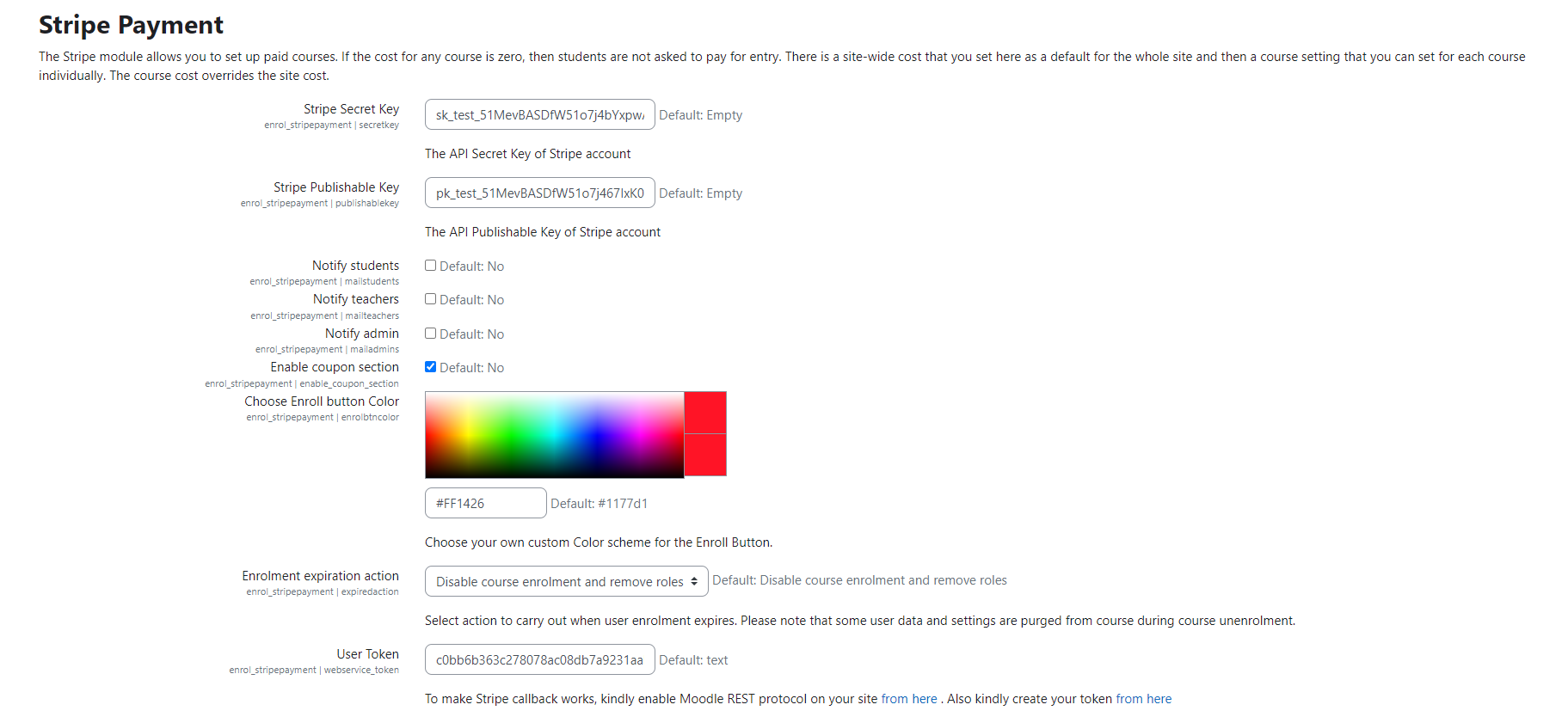
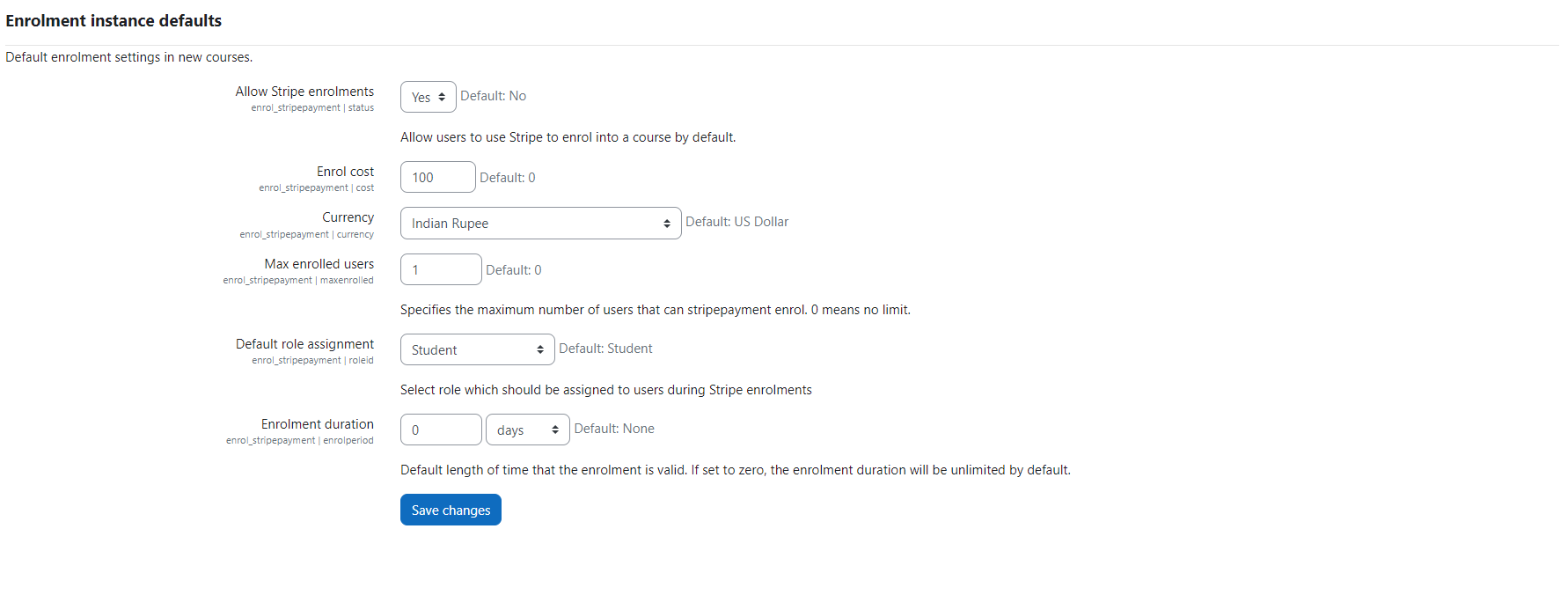
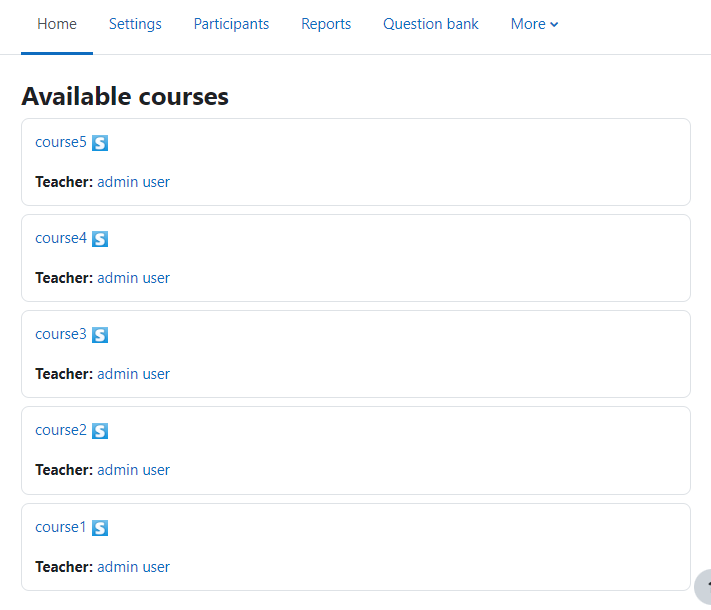
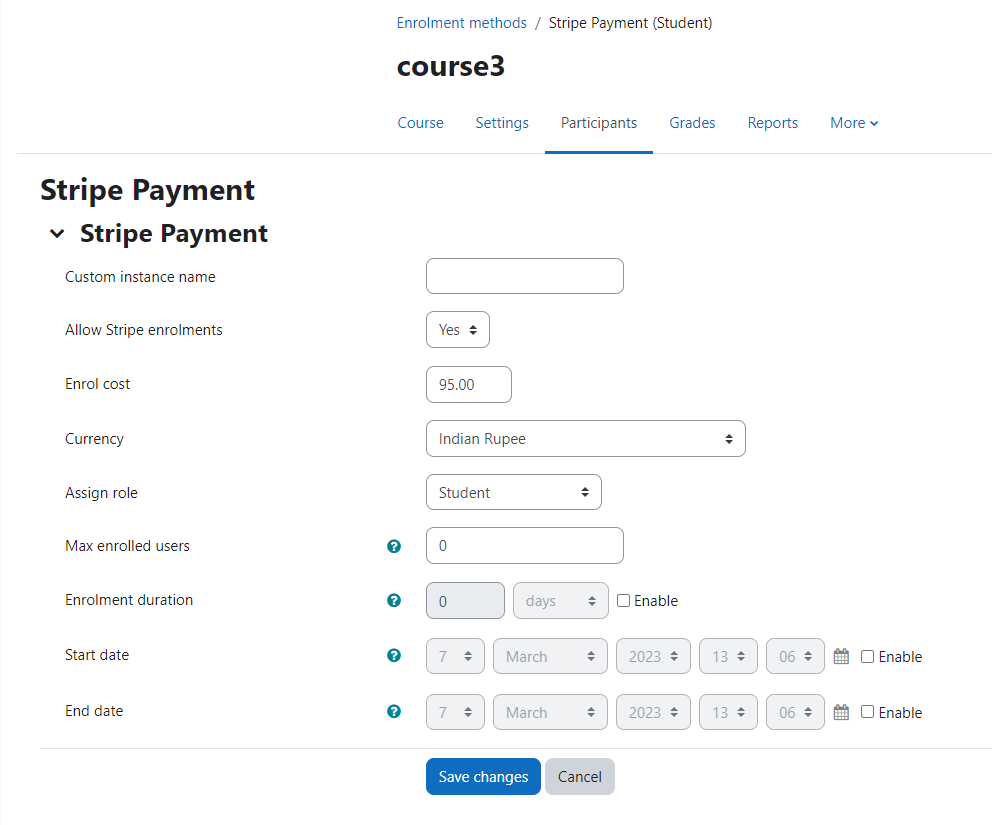
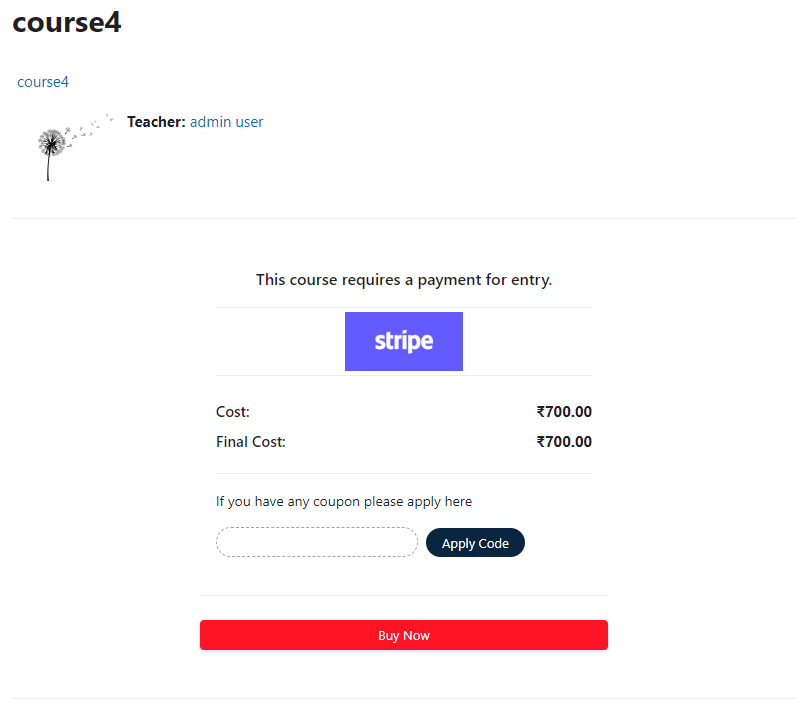
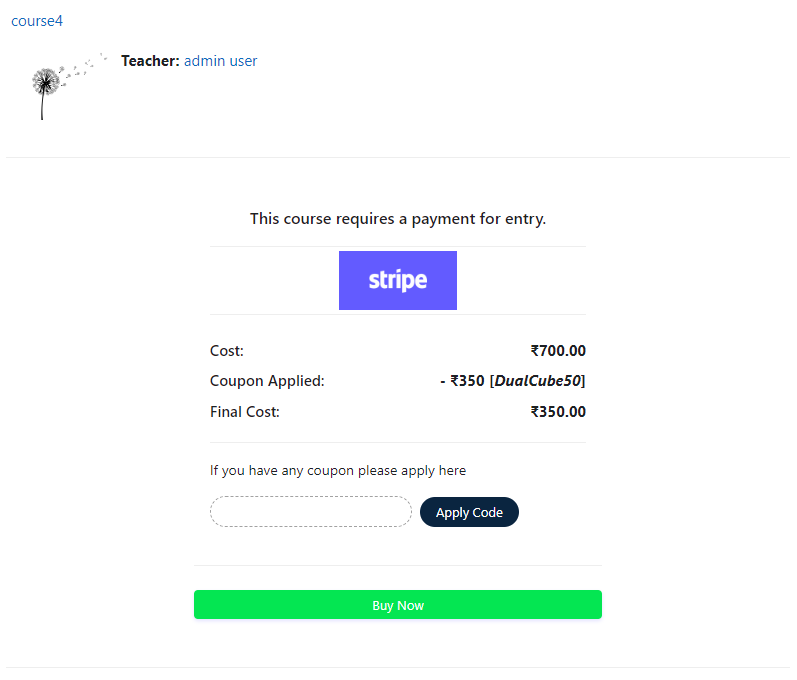
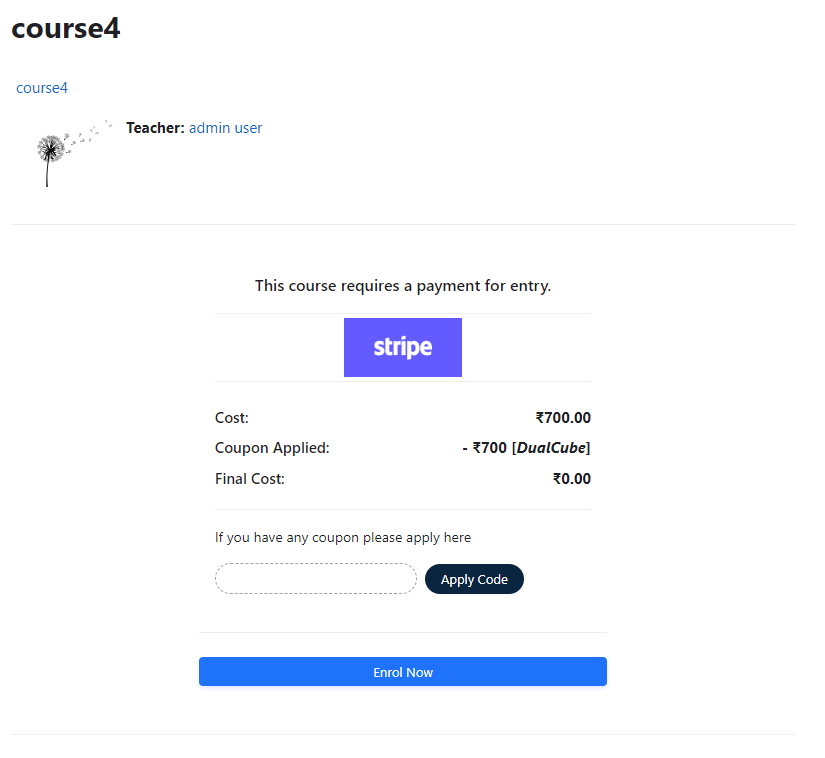
Versions
Current version
3.6.0 (2025082100)
3.6.0
Plugin type: Enrolment
Frankenstyle component name: enrol_stripepayment
Version build number: 2025082100
Version release name: 3.6.0
Maturity: Stable
Supported Moodle versions: 5.0
Repository URL (Git): https://github.com/dualcube/moodle-enrol_stripepayment
Repository branch:
Repository tag:
Issue/bug tracker URL: https://github.com/dualcube/moodle-enrol_stripepayment/issues
##Stripe Payment Moodle Plugin Change Log
3.6.0 (2025082100)
- Added: Multiple instance supporton null.
- Added: Compatibility with Moodle 5.
- Added : UI enhancement to clearly indicate Live mode vs Test mode.
3.4.8 (2024082100)
- Fixed : Error notice Call to a member function js_call_amd() on null.
- Fixed : Multiple redemptions of coupon not prevented in free enrollment case.
- Updated : Stripe library.
3.4.7 (2024081400)
- Revamped : Refactored core code for improved loading times and reduced server load.
3.4.6 (2024041800)
- Fixed the stripe checkout page displays the last email address of the customer.
3.4.5 (2024030600)
- Fixed purchases with coupon getting redeemed twice.
3.4.4 (2023101400)
- Fixed cost in float number #133.
- Fived UI #133.
- Added Metadata attached with stripe
3.4.3 (2023101000)
- Added Moodle 4.3 supports.
3.4.2 (2023060200)
- Fixed Missing Instance name #124.
- Fixed Free enrol - coupon id and user id arguments swapped #125.
- Fixed Successful Enrolment - Exception Error Message (stdClass undefined) #126.
- Added Script library 10.14.0.
3.4.1 (2023042500)
- Added compatibility of Moodle 4.2+.
- Fixed compatibility issue with 3.9+ #122.
3.4.0 (2023042200)
- Added Token fild required issue #120.
- Code optimized.
3.3.5 (2023022500)
- Added compatibility of Moodle 4.1+.
- Added Script library 10.7.0.
- Fixed Chackout error.
- Fixed Expired Coupon Faild silently.
- Fixed Payment description no stripe dashboard not shows.
- Fixed coupon apply resister in Stripe.
- Fixed internal error.
3.3.4 (2022070702)
- Added compatibility of Moodle 4.0.1+.
- Fixed error on 100% counpon discount.
- Fixed internal error.
3.3.3 (2022050602)
- Added compatibility of Moodle 4.0+.
3.3.2 (2022032402)
- Added compatibility of Moodle 3.11.6+.
- Fixed error on the plugin settings page.
3.3.1 (2021111802)
- Fixed 100% discount issue #89.
- Fixed New error upon adding the plugin #86
- Fixed error on the plugin settings page.
- Added Some Country on the list
3.3.0 (2021080601)
- Make the plugin Moodle Stanard
- Fixed the plugin settings page.
3.2.1 (2020121401)
- Fixed the issue of wrong variable causing critical bug
- Fixed the issue of full price taken by stripe upon payment using a coupon.
3.2 (202010270200)
- Fixing the issue of payments record not getting through stripe dashboard
- Changed the Course Stripe Enrolment Setting
3.1 (2020102001)
- Showing the Stripe error code on unsuccessful payment
- Fixing the issue that payment are done Twice
- Fixing the issue of Secret Key leak on JS
3.0 (2020080600)
- 100+ currencies are added
- 100% discount coupon error fixed: If the discount coupon waves off the actual price, making it a free product, self enrolment method will be activated for the user to use and proceed
- Card Information input fields are hard to spot: Fixed
- Stripe Receipt: Code added. You can also opt for automatic receipts to be sent upon any completed transaction. To do this => Log in to your Stripe dashboard => Go to 'Business Settings' > 'Email Receipts' => Tick the boxes for 'Successful Payments' => Click 'Save'. Note: Not applicable for sandbox accounts.
- Automatic false transaction request generated each time the Stripe Payment page reloads : Fixed
- Something else happened, completely unrelated to Stripe - fixed
- Mail not send - fixed
2.0 (2019121201)
1.0 (2015112807)
3.5.1 (Build: 2025052900) (2025052900)
3.5.1 (Build: 2025052900)
Plugin type: Enrolment
Frankenstyle component name: enrol_stripepayment
Version build number: 2025052900
Version release name: 3.5.1 (Build: 2025052900)
Maturity: Stable
Supported Moodle versions: 4.4, 4.5, 5.0
Repository URL (Git): https://github.com/dualcube/moodle-enrol_stripepayment
Repository branch:
Repository tag:
Issue/bug tracker URL: https://github.com/dualcube/moodle-enrol_stripepayment/issues
##Stripe Payment Moodle Plugin Change Log
3.4.8 (2024082100)
- Fixed : Error notice Call to a member function js_call_amd() on null.
- Fixed : Multiple redemptions of coupon not prevented in free enrollment case.
- Updated : Stripe library.
3.4.7 (2024081400)
- Revamped : Refactored core code for improved loading times and reduced server load.
3.4.6 (2024041800)
- Fixed the stripe checkout page displays the last email address of the customer.
3.4.5 (2024030600)
- Fixed purchases with coupon getting redeemed twice.
3.4.4 (2023101400)
- Fixed cost in float number #133.
- Fived UI #133.
- Added Metadata attached with stripe
3.4.3 (2023101000)
- Added Moodle 4.3 supports.
3.4.2 (2023060200)
- Fixed Missing Instance name #124.
- Fixed Free enrol - coupon id and user id arguments swapped #125.
- Fixed Successful Enrolment - Exception Error Message (stdClass undefined) #126.
- Added Script library 10.14.0.
3.4.1 (2023042500)
- Added compatibility of Moodle 4.2+.
- Fixed compatibility issue with 3.9+ #122.
3.4.0 (2023042200)
- Added Token fild required issue #120.
- Code optimized.
3.3.5 (2023022500)
- Added compatibility of Moodle 4.1+.
- Added Script library 10.7.0.
- Fixed Chackout error.
- Fixed Expired Coupon Faild silently.
- Fixed Payment description no stripe dashboard not shows.
- Fixed coupon apply resister in Stripe.
- Fixed internal error.
3.3.4 (2022070702)
- Added compatibility of Moodle 4.0.1+.
- Fixed error on 100% counpon discount.
- Fixed internal error.
3.3.3 (2022050602)
- Added compatibility of Moodle 4.0+.
3.3.2 (2022032402)
- Added compatibility of Moodle 3.11.6+.
- Fixed error on the plugin settings page.
3.3.1 (2021111802)
- Fixed 100% discount issue #89.
- Fixed New error upon adding the plugin #86
- Fixed error on the plugin settings page.
- Added Some Country on the list
3.3.0 (2021080601)
- Make the plugin Moodle Stanard
- Fixed the plugin settings page.
3.2.1 (2020121401)
- Fixed the issue of wrong variable causing critical bug
- Fixed the issue of full price taken by stripe upon payment using a coupon.
3.2 (202010270200)
- Fixing the issue of payments record not getting through stripe dashboard
- Changed the Course Stripe Enrolment Setting
3.1 (2020102001)
- Showing the Stripe error code on unsuccessful payment
- Fixing the issue that payment are done Twice
- Fixing the issue of Secret Key leak on JS
3.0 (2020080600)
- 100+ currencies are added
- 100% discount coupon error fixed: If the discount coupon waves off the actual price, making it a free product, self enrolment method will be activated for the user to use and proceed
- Card Information input fields are hard to spot: Fixed
- Stripe Receipt: Code added. You can also opt for automatic receipts to be sent upon any completed transaction. To do this => Log in to your Stripe dashboard => Go to 'Business Settings' > 'Email Receipts' => Tick the boxes for 'Successful Payments' => Click 'Save'. Note: Not applicable for sandbox accounts.
- Automatic false transaction request generated each time the Stripe Payment page reloads : Fixed
- Something else happened, completely unrelated to Stripe - fixed
- Mail not send - fixed
2.0 (2019121201)
1.0 (2015112807)
3.5.0 (Build: 2025051900) (2025051900)
3.5.0 (Build: 2025051900)
Plugin type: Enrolment
Frankenstyle component name: enrol_stripepayment
Version build number: 2025051900
Version release name: 3.5.0 (Build: 2025051900)
Maturity: Stable
Supported Moodle versions: 4.4, 4.5, 5.0
Repository URL (Git): https://github.com/dualcube/moodle-enrol_stripepayment
Repository branch:
Repository tag:
Issue/bug tracker URL: https://github.com/dualcube/moodle-enrol_stripepayment/issues
##Stripe Payment Moodle Plugin Change Log
3.5.0 (2025051900)
- Added Moodle 5.0 support
- Fixed : Input fields in red text
- Fixed : Coupon redemption fails after expiry time
3.4.8 (2024082100)
- Fixed : Error notice Call to a member function js_call_amd() on null.
- Fixed : Multiple redemptions of coupon not prevented in free enrollment case.
- Updated : Stripe library.
3.4.7 (2024081400)
- Revamped : Refactored core code for improved loading times and reduced server load.
3.4.6 (2024041800)
- Fixed the stripe checkout page displays the last email address of the customer.
3.4.5 (2024030600)
- Fixed purchases with coupon getting redeemed twice.
3.4.4 (2023101400)
- Fixed cost in float number #133.
- Fived UI #133.
- Added Metadata attached with stripe
3.4.3 (2023101000)
- Added Moodle 4.3 supports.
3.4.2 (2023060200)
- Fixed Missing Instance name #124.
- Fixed Free enrol - coupon id and user id arguments swapped #125.
- Fixed Successful Enrolment - Exception Error Message (stdClass undefined) #126.
- Added Script library 10.14.0.
3.4.1 (2023042500)
- Added compatibility of Moodle 4.2+.
- Fixed compatibility issue with 3.9+ #122.
3.4.0 (2023042200)
- Added Token fild required issue #120.
- Code optimized.
3.3.5 (2023022500)
- Added compatibility of Moodle 4.1+.
- Added Script library 10.7.0.
- Fixed Chackout error.
- Fixed Expired Coupon Faild silently.
- Fixed Payment description no stripe dashboard not shows.
- Fixed coupon apply resister in Stripe.
- Fixed internal error.
3.3.4 (2022070702)
- Added compatibility of Moodle 4.0.1+.
- Fixed error on 100% counpon discount.
- Fixed internal error.
3.3.3 (2022050602)
- Added compatibility of Moodle 4.0+.
3.3.2 (2022032402)
- Added compatibility of Moodle 3.11.6+.
- Fixed error on the plugin settings page.
3.3.1 (2021111802)
- Fixed 100% discount issue #89.
- Fixed New error upon adding the plugin #86
- Fixed error on the plugin settings page.
- Added Some Country on the list
3.3.0 (2021080601)
- Make the plugin Moodle Stanard
- Fixed the plugin settings page.
3.2.1 (2020121401)
- Fixed the issue of wrong variable causing critical bug
- Fixed the issue of full price taken by stripe upon payment using a coupon.
3.2 (202010270200)
- Fixing the issue of payments record not getting through stripe dashboard
- Changed the Course Stripe Enrolment Setting
3.1 (2020102001)
- Showing the Stripe error code on unsuccessful payment
- Fixing the issue that payment are done Twice
- Fixing the issue of Secret Key leak on JS
3.0 (2020080600)
- 100+ currencies are added
- 100% discount coupon error fixed: If the discount coupon waves off the actual price, making it a free product, self enrolment method will be activated for the user to use and proceed
- Card Information input fields are hard to spot: Fixed
- Stripe Receipt: Code added. You can also opt for automatic receipts to be sent upon any completed transaction. To do this => Log in to your Stripe dashboard => Go to 'Business Settings' > 'Email Receipts' => Tick the boxes for 'Successful Payments' => Click 'Save'. Note: Not applicable for sandbox accounts.
- Automatic false transaction request generated each time the Stripe Payment page reloads : Fixed
- Something else happened, completely unrelated to Stripe - fixed
- Mail not send - fixed
2.0 (2019121201)
1.0 (2015112807)
3.4.9 (Build: 2025010900) (2025010900)
3.4.9 (Build: 2025010900)
Plugin type: Enrolment
Frankenstyle component name: enrol_stripepayment
Version build number: 2025010900
Version release name: 3.4.9 (Build: 2025010900)
Maturity: Stable
Supported Moodle versions: 4.3, 4.4, 4.5
Repository URL (Git): https://github.com/dualcube/moodle-enrol_stripepayment
Repository branch:
Repository tag:
Issue/bug tracker URL: https://github.com/dualcube/moodle-enrol_stripepayment/issues
##Stripe Payment Moodle Plugin Change Log
3.4.8 (2024082100)
- Fixed : Error notice Call to a member function js_call_amd() on null.
- Fixed : Multiple redemptions of coupon not prevented in free enrollment case.
- Updated : Stripe library.
3.4.7 (2024081400)
- Revamped : Refactored core code for improved loading times and reduced server load.
3.4.6 (2024041800)
- Fixed the stripe checkout page displays the last email address of the customer.
3.4.5 (2024030600)
- Fixed purchases with coupon getting redeemed twice.
3.4.4 (2023101400)
- Fixed cost in float number #133.
- Fived UI #133.
- Added Metadata attached with stripe
3.4.3 (2023101000)
- Added Moodle 4.3 supports.
3.4.2 (2023060200)
- Fixed Missing Instance name #124.
- Fixed Free enrol - coupon id and user id arguments swapped #125.
- Fixed Successful Enrolment - Exception Error Message (stdClass undefined) #126.
- Added Script library 10.14.0.
3.4.1 (2023042500)
- Added compatibility of Moodle 4.2+.
- Fixed compatibility issue with 3.9+ #122.
3.4.0 (2023042200)
- Added Token fild required issue #120.
- Code optimized.
3.3.5 (2023022500)
- Added compatibility of Moodle 4.1+.
- Added Script library 10.7.0.
- Fixed Chackout error.
- Fixed Expired Coupon Faild silently.
- Fixed Payment description no stripe dashboard not shows.
- Fixed coupon apply resister in Stripe.
- Fixed internal error.
3.3.4 (2022070702)
- Added compatibility of Moodle 4.0.1+.
- Fixed error on 100% counpon discount.
- Fixed internal error.
3.3.3 (2022050602)
- Added compatibility of Moodle 4.0+.
3.3.2 (2022032402)
- Added compatibility of Moodle 3.11.6+.
- Fixed error on the plugin settings page.
3.3.1 (2021111802)
- Fixed 100% discount issue #89.
- Fixed New error upon adding the plugin #86
- Fixed error on the plugin settings page.
- Added Some Country on the list
3.3.0 (2021080601)
- Make the plugin Moodle Stanard
- Fixed the plugin settings page.
3.2.1 (2020121401)
- Fixed the issue of wrong variable causing critical bug
- Fixed the issue of full price taken by stripe upon payment using a coupon.
3.2 (202010270200)
- Fixing the issue of payments record not getting through stripe dashboard
- Changed the Course Stripe Enrolment Setting
3.1 (2020102001)
- Showing the Stripe error code on unsuccessful payment
- Fixing the issue that payment are done Twice
- Fixing the issue of Secret Key leak on JS
3.0 (2020080600)
- 100+ currencies are added
- 100% discount coupon error fixed: If the discount coupon waves off the actual price, making it a free product, self enrolment method will be activated for the user to use and proceed
- Card Information input fields are hard to spot: Fixed
- Stripe Receipt: Code added. You can also opt for automatic receipts to be sent upon any completed transaction. To do this => Log in to your Stripe dashboard => Go to 'Business Settings' > 'Email Receipts' => Tick the boxes for 'Successful Payments' => Click 'Save'. Note: Not applicable for sandbox accounts.
- Automatic false transaction request generated each time the Stripe Payment page reloads : Fixed
- Something else happened, completely unrelated to Stripe - fixed
- Mail not send - fixed
2.0 (2019121201)
1.0 (2015112807)
3.4.8 (Build: 2024082100) (2024082100)
3.4.8 (Build: 2024082100)
Plugin type: Enrolment
Frankenstyle component name: enrol_stripepayment
Version build number: 2024082100
Version release name: 3.4.8 (Build: 2024082100)
Maturity: Stable
Supported Moodle versions: 4.3, 4.4
Repository URL (Git): https://github.com/dualcube/moodle-enrol_stripepayment
Repository branch:
Repository tag:
Issue/bug tracker URL: https://github.com/dualcube/moodle-enrol_stripepayment/issues
##Stripe Payment Moodle Plugin Change Log
3.4.8 (2024082100)
- Fixed : Error notice Call to a member function js_call_amd() on null.
- Fixed : Multiple redemptions of coupon not prevented in free enrollment case.
- Updated : Stripe library.
3.4.7 (2024081400)
- Revamped : Refactored core code for improved loading times and reduced server load.
3.4.6 (2024041800)
- Fixed the stripe checkout page displays the last email address of the customer.
3.4.5 (2024030600)
- Fixed purchases with coupon getting redeemed twice.
3.4.4 (2023101400)
- Fixed cost in float number #133.
- Fived UI #133.
- Added Metadata attached with stripe
3.4.3 (2023101000)
- Added Moodle 4.3 supports.
3.4.2 (2023060200)
- Fixed Missing Instance name #124.
- Fixed Free enrol - coupon id and user id arguments swapped #125.
- Fixed Successful Enrolment - Exception Error Message (stdClass undefined) #126.
- Added Script library 10.14.0.
3.4.1 (2023042500)
- Added compatibility of Moodle 4.2+.
- Fixed compatibility issue with 3.9+ #122.
3.4.0 (2023042200)
- Added Token fild required issue #120.
- Code optimized.
3.3.5 (2023022500)
- Added compatibility of Moodle 4.1+.
- Added Script library 10.7.0.
- Fixed Chackout error.
- Fixed Expired Coupon Faild silently.
- Fixed Payment description no stripe dashboard not shows.
- Fixed coupon apply resister in Stripe.
- Fixed internal error.
3.3.4 (2022070702)
- Added compatibility of Moodle 4.0.1+.
- Fixed error on 100% counpon discount.
- Fixed internal error.
3.3.3 (2022050602)
- Added compatibility of Moodle 4.0+.
3.3.2 (2022032402)
- Added compatibility of Moodle 3.11.6+.
- Fixed error on the plugin settings page.
3.3.1 (2021111802)
- Fixed 100% discount issue #89.
- Fixed New error upon adding the plugin #86
- Fixed error on the plugin settings page.
- Added Some Country on the list
3.3.0 (2021080601)
- Make the plugin Moodle Stanard
- Fixed the plugin settings page.
3.2.1 (2020121401)
- Fixed the issue of wrong variable causing critical bug
- Fixed the issue of full price taken by stripe upon payment using a coupon.
3.2 (202010270200)
- Fixing the issue of payments record not getting through stripe dashboard
- Changed the Course Stripe Enrolment Setting
3.1 (2020102001)
- Showing the Stripe error code on unsuccessful payment
- Fixing the issue that payment are done Twice
- Fixing the issue of Secret Key leak on JS
3.0 (2020080600)
- 100+ currencies are added
- 100% discount coupon error fixed: If the discount coupon waves off the actual price, making it a free product, self enrolment method will be activated for the user to use and proceed
- Card Information input fields are hard to spot: Fixed
- Stripe Receipt: Code added. You can also opt for automatic receipts to be sent upon any completed transaction. To do this => Log in to your Stripe dashboard => Go to 'Business Settings' > 'Email Receipts' => Tick the boxes for 'Successful Payments' => Click 'Save'. Note: Not applicable for sandbox accounts.
- Automatic false transaction request generated each time the Stripe Payment page reloads : Fixed
- Something else happened, completely unrelated to Stripe - fixed
- Mail not send - fixed
2.0 (2019121201)
1.0 (2015112807)
3.4.7 (Build: 2024081400) (2024081400)
3.4.7 (Build: 2024081400)
Plugin type: Enrolment
Frankenstyle component name: enrol_stripepayment
Version build number: 2024081400
Version release name: 3.4.7 (Build: 2024081400)
Maturity: Stable
Supported Moodle versions: 4.3, 4.4
Repository URL (Git): https://github.com/dualcube/moodle-enrol_stripepayment
Repository branch:
Repository tag:
Issue/bug tracker URL: https://github.com/dualcube/moodle-enrol_stripepayment/issues
##Stripe Payment Moodle Plugin Change Log
3.4.7 (2024081400)
- Revamped : Refactored core code for improved loading times and reduced server load.
3.4.6 (2024041800)
- Fixed the stripe checkout page displays the last email address of the customer.
3.4.5 (2024030600)
- Fixed purchases with coupon getting redeemed twice.
3.4.4 (2023101400)
- Fixed cost in float number #133.
- Fived UI #133.
- Added Metadata attached with stripe
3.4.3 (2023101000)
- Added Moodle 4.3 supports.
3.4.2 (2023060200)
- Fixed Missing Instance name #124.
- Fixed Free enrol - coupon id and user id arguments swapped #125.
- Fixed Successful Enrolment - Exception Error Message (stdClass undefined) #126.
- Added Script library 10.14.0.
3.4.1 (2023042500)
- Added compatibility of Moodle 4.2+.
- Fixed compatibility issue with 3.9+ #122.
3.4.0 (2023042200)
- Added Token fild required issue #120.
- Code optimized.
3.3.5 (2023022500)
- Added compatibility of Moodle 4.1+.
- Added Script library 10.7.0.
- Fixed Chackout error.
- Fixed Expired Coupon Faild silently.
- Fixed Payment description no stripe dashboard not shows.
- Fixed coupon apply resister in Stripe.
- Fixed internal error.
3.3.4 (2022070702)
- Added compatibility of Moodle 4.0.1+.
- Fixed error on 100% counpon discount.
- Fixed internal error.
3.3.3 (2022050602)
- Added compatibility of Moodle 4.0+.
3.3.2 (2022032402)
- Added compatibility of Moodle 3.11.6+.
- Fixed error on the plugin settings page.
3.3.1 (2021111802)
- Fixed 100% discount issue #89.
- Fixed New error upon adding the plugin #86
- Fixed error on the plugin settings page.
- Added Some Country on the list
3.3.0 (2021080601)
- Make the plugin Moodle Stanard
- Fixed the plugin settings page.
3.2.1 (2020121401)
- Fixed the issue of wrong variable causing critical bug
- Fixed the issue of full price taken by stripe upon payment using a coupon.
3.2 (202010270200)
- Fixing the issue of payments record not getting through stripe dashboard
- Changed the Course Stripe Enrolment Setting
3.1 (2020102001)
- Showing the Stripe error code on unsuccessful payment
- Fixing the issue that payment are done Twice
- Fixing the issue of Secret Key leak on JS
3.0 (2020080600)
- 100+ currencies are added
- 100% discount coupon error fixed: If the discount coupon waves off the actual price, making it a free product, self enrolment method will be activated for the user to use and proceed
- Card Information input fields are hard to spot: Fixed
- Stripe Receipt: Code added. You can also opt for automatic receipts to be sent upon any completed transaction. To do this => Log in to your Stripe dashboard => Go to 'Business Settings' > 'Email Receipts' => Tick the boxes for 'Successful Payments' => Click 'Save'. Note: Not applicable for sandbox accounts.
- Automatic false transaction request generated each time the Stripe Payment page reloads : Fixed
- Something else happened, completely unrelated to Stripe - fixed
- Mail not send - fixed
2.0 (2019121201)
1.0 (2015112807)
3.4.6 (Build: 2024041800) (2024041800)
3.4.6 (Build: 2024041800)
Plugin type: Enrolment
Frankenstyle component name: enrol_stripepayment
Version build number: 2024041800
Version release name: 3.4.6 (Build: 2024041800)
Maturity: Stable
Supported Moodle versions: 4.0, 4.1, 4.2, 4.3, 4.4
Repository URL (Git): https://github.com/dualcube/moodle-enrol_stripepayment
Repository branch:
Repository tag:
Issue/bug tracker URL: https://github.com/dualcube/moodle-enrol_stripepayment/issues
##Stripe Payment Moodle Plugin Change Log
3.4.6 (2024041800)
- Fixed the stripe checkout page displays the last email address of the customer.
3.4.5 (2024030600)
- Fixed purchases with coupon getting redeemed twice.
3.4.4 (2023101400)
- Fixed cost in float number #133.
- Fived UI #133.
- Added Metadata attached with stripe
3.4.3 (2023101000)
- Added Moodle 4.3 supports.
3.4.2 (2023060200)
- Fixed Missing Instance name #124.
- Fixed Free enrol - coupon id and user id arguments swapped #125.
- Fixed Successful Enrolment - Exception Error Message (stdClass undefined) #126.
- Added Script library 10.14.0.
3.4.1 (2023042500)
- Added compatibility of Moodle 4.2+.
- Fixed compatibility issue with 3.9+ #122.
3.4.0 (2023042200)
- Added Token fild required issue #120.
- Code optimized.
3.3.5 (2023022500)
- Added compatibility of Moodle 4.1+.
- Added Script library 10.7.0.
- Fixed Chackout error.
- Fixed Expired Coupon Faild silently.
- Fixed Payment description no stripe dashboard not shows.
- Fixed coupon apply resister in Stripe.
- Fixed internal error.
3.3.4 (2022070702)
- Added compatibility of Moodle 4.0.1+.
- Fixed error on 100% counpon discount.
- Fixed internal error.
3.3.3 (2022050602)
- Added compatibility of Moodle 4.0+.
3.3.2 (2022032402)
- Added compatibility of Moodle 3.11.6+.
- Fixed error on the plugin settings page.
3.3.1 (2021111802)
- Fixed 100% discount issue #89.
- Fixed New error upon adding the plugin #86
- Fixed error on the plugin settings page.
- Added Some Country on the list
3.3.0 (2021080601)
- Make the plugin Moodle Stanard
- Fixed the plugin settings page.
3.2.1 (2020121401)
- Fixed the issue of wrong variable causing critical bug
- Fixed the issue of full price taken by stripe upon payment using a coupon.
3.2 (202010270200)
- Fixing the issue of payments record not getting through stripe dashboard
- Changed the Course Stripe Enrolment Setting
3.1 (2020102001)
- Showing the Stripe error code on unsuccessful payment
- Fixing the issue that payment are done Twice
- Fixing the issue of Secret Key leak on JS
3.0 (2020080600)
- 100+ currencies are added
- 100% discount coupon error fixed: If the discount coupon waves off the actual price, making it a free product, self enrolment method will be activated for the user to use and proceed
- Card Information input fields are hard to spot: Fixed
- Stripe Receipt: Code added. You can also opt for automatic receipts to be sent upon any completed transaction. To do this => Log in to your Stripe dashboard => Go to 'Business Settings' > 'Email Receipts' => Tick the boxes for 'Successful Payments' => Click 'Save'. Note: Not applicable for sandbox accounts.
- Automatic false transaction request generated each time the Stripe Payment page reloads : Fixed
- Something else happened, completely unrelated to Stripe - fixed
- Mail not send - fixed
2.0 (2019121201)
1.0 (2015112807)
3.4.5 (Build: 2024030600) (2024030600)
3.4.5 (Build: 2024030600)
Plugin type: Enrolment
Frankenstyle component name: enrol_stripepayment
Version build number: 2024030600
Version release name: 3.4.5 (Build: 2024030600)
Maturity: Stable
Supported Moodle versions: 3.10, 3.11, 3.9, 4.0, 4.1, 4.2, 4.3
Repository URL (Git): https://github.com/dualcube/moodle-enrol_stripepayment
Repository branch:
Repository tag:
Issue/bug tracker URL: https://github.com/dualcube/moodle-enrol_stripepayment/issues
##Stripe Payment Moodle Plugin Change Log
3.4.5(2024030600)
- Fixed cost in float number #139.
3.4.4 (2023101400)
- Fixed cost in float number #133.
- Fived UI #133.
- Added Metadata attached with stripe
3.4.3 (2023101000)
- Added Moodle 4.3 supports.
3.4.2 (2023060200)
- Fixed Missing Instance name #124.
- Fixed Free enrol - coupon id and user id arguments swapped #125.
- Fixed Successful Enrolment - Exception Error Message (stdClass undefined) #126.
- Added Script library 10.14.0.
3.4.1 (2023042500)
- Added compatibility of Moodle 4.2+.
- Fixed compatibility issue with 3.9+ #122.
3.4.0 (2023042200)
- Added Token fild required issue #120.
- Code optimized.
3.3.5 (2023022500)
- Added compatibility of Moodle 4.1+.
- Added Script library 10.7.0.
- Fixed Chackout error.
- Fixed Expired Coupon Faild silently.
- Fixed Payment description no stripe dashboard not shows.
- Fixed coupon apply resister in Stripe.
- Fixed internal error.
3.3.4 (2022070702)
- Added compatibility of Moodle 4.0.1+.
- Fixed error on 100% counpon discount.
- Fixed internal error.
3.3.3 (2022050602)
- Added compatibility of Moodle 4.0+.
3.3.2 (2022032402)
- Added compatibility of Moodle 3.11.6+.
- Fixed error on the plugin settings page.
3.3.1 (2021111802)
- Fixed 100% discount issue #89.
- Fixed New error upon adding the plugin #86
- Fixed error on the plugin settings page.
- Added Some Country on the list
3.3.0 (2021080601)
- Make the plugin Moodle Stanard
- Fixed the plugin settings page.
3.2.1 (2020121401)
- Fixed the issue of wrong variable causing critical bug
- Fixed the issue of full price taken by stripe upon payment using a coupon.
3.2 (202010270200)
- Fixing the issue of payments record not getting through stripe dashboard
- Changed the Course Stripe Enrolment Setting
3.1 (2020102001)
- Showing the Stripe error code on unsuccessful payment
- Fixing the issue that payment are done Twice
- Fixing the issue of Secret Key leak on JS
3.0 (2020080600)
- 100+ currencies are added
- 100% discount coupon error fixed: If the discount coupon waves off the actual price, making it a free product, self enrolment method will be activated for the user to use and proceed
- Card Information input fields are hard to spot: Fixed
- Stripe Receipt: Code added. You can also opt for automatic receipts to be sent upon any completed transaction. To do this => Log in to your Stripe dashboard => Go to 'Business Settings' > 'Email Receipts' => Tick the boxes for 'Successful Payments' => Click 'Save'. Note: Not applicable for sandbox accounts.
- Automatic false transaction request generated each time the Stripe Payment page reloads : Fixed
- Something else happened, completely unrelated to Stripe - fixed
- Mail not send - fixed
2.0 (2019121201)
1.0 (2015112807)
3.4.4 (Build: 2023101400) (2023101400)
3.4.4 (Build: 2023101400)
Plugin type: Enrolment
Frankenstyle component name: enrol_stripepayment
Version build number: 2023101400
Version release name: 3.4.4 (Build: 2023101400)
Maturity: Stable
Supported Moodle versions: 3.10, 3.11, 3.9, 4.0, 4.1, 4.2, 4.3
Repository URL (Git): https://github.com/dualcube/moodle-enrol_stripepayment
Repository branch:
Repository tag:
Issue/bug tracker URL: https://github.com/dualcube/moodle-enrol_stripepayment/issues
##Stripe Payment Moodle Plugin Change Log
3.4.4 (2023101400)
- Fixed cost in float number #133.
- Fived UI #133.
- Added Metadata attached with stripe
3.4.3 (2023101000)
- Added Moodle 4.3 supports.
3.4.2 (2023060200)
- Fixed Missing Instance name #124.
- Fixed Free enrol - coupon id and user id arguments swapped #125.
- Fixed Successful Enrolment - Exception Error Message (stdClass undefined) #126.
- Added Script library 10.14.0.
3.4.1 (2023042500)
- Added compatibility of Moodle 4.2+.
- Fixed compatibility issue with 3.9+ #122.
3.4.0 (2023042200)
- Added Token fild required issue #120.
- Code optimized.
3.3.5 (2023022500)
- Added compatibility of Moodle 4.1+.
- Added Script library 10.7.0.
- Fixed Chackout error.
- Fixed Expired Coupon Faild silently.
- Fixed Payment description no stripe dashboard not shows.
- Fixed coupon apply resister in Stripe.
- Fixed internal error.
3.3.4 (2022070702)
- Added compatibility of Moodle 4.0.1+.
- Fixed error on 100% counpon discount.
- Fixed internal error.
3.3.3 (2022050602)
- Added compatibility of Moodle 4.0+.
3.3.2 (2022032402)
- Added compatibility of Moodle 3.11.6+.
- Fixed error on the plugin settings page.
3.3.1 (2021111802)
- Fixed 100% discount issue #89.
- Fixed New error upon adding the plugin #86
- Fixed error on the plugin settings page.
- Added Some Country on the list
3.3.0 (2021080601)
- Make the plugin Moodle Stanard
- Fixed the plugin settings page.
3.2.1 (2020121401)
- Fixed the issue of wrong variable causing critical bug
- Fixed the issue of full price taken by stripe upon payment using a coupon.
3.2 (202010270200)
- Fixing the issue of payments record not getting through stripe dashboard
- Changed the Course Stripe Enrolment Setting
3.1 (2020102001)
- Showing the Stripe error code on unsuccessful payment
- Fixing the issue that payment are done Twice
- Fixing the issue of Secret Key leak on JS
3.0 (2020080600)
- 100+ currencies are added
- 100% discount coupon error fixed: If the discount coupon waves off the actual price, making it a free product, self enrolment method will be activated for the user to use and proceed
- Card Information input fields are hard to spot: Fixed
- Stripe Receipt: Code added. You can also opt for automatic receipts to be sent upon any completed transaction. To do this => Log in to your Stripe dashboard => Go to 'Business Settings' > 'Email Receipts' => Tick the boxes for 'Successful Payments' => Click 'Save'. Note: Not applicable for sandbox accounts.
- Automatic false transaction request generated each time the Stripe Payment page reloads : Fixed
- Something else happened, completely unrelated to Stripe - fixed
- Mail not send - fixed
2.0 (2019121201)
1.0 (2015112807)
3.4.3 (Build: 2023101000) (2023101000)
3.4.3 (Build: 2023101000)
Plugin type: Enrolment
Frankenstyle component name: enrol_stripepayment
Version build number: 2023101000
Version release name: 3.4.3 (Build: 2023101000)
Maturity: Stable
Supported Moodle versions: 3.10, 3.11, 3.9, 4.0, 4.1, 4.2, 4.3
Repository URL (Git): https://github.com/dualcube/moodle-enrol_stripepayment
Repository branch:
Repository tag:
Issue/bug tracker URL: https://github.com/dualcube/moodle-enrol_stripepayment/issues
##Stripe Payment Moodle Plugin Change Log
3.4.3 (2023101000)
- Added Moodle 4.3 supports.
3.4.2 (2023060200)
- Fixed Missing Instance name #124.
- Fixed Free enrol - coupon id and user id arguments swapped #125.
- Fixed Successful Enrolment - Exception Error Message (stdClass undefined) #126.
- Added Script library 10.14.0.
3.4.1 (2023042500)
- Added compatibility of Moodle 4.2+.
- Fixed compatibility issue with 3.9+ #122.
3.4.0 (2023042200)
- Added Token fild required issue #120.
- Code optimized.
3.3.5 (2023022500)
- Added compatibility of Moodle 4.1+.
- Added Script library 10.7.0.
- Fixed Chackout error.
- Fixed Expired Coupon Faild silently.
- Fixed Payment description no stripe dashboard not shows.
- Fixed coupon apply resister in Stripe.
- Fixed internal error.
3.3.4 (2022070702)
- Added compatibility of Moodle 4.0.1+.
- Fixed error on 100% counpon discount.
- Fixed internal error.
3.3.3 (2022050602)
- Added compatibility of Moodle 4.0+.
3.3.2 (2022032402)
- Added compatibility of Moodle 3.11.6+.
- Fixed error on the plugin settings page.
3.3.1 (2021111802)
- Fixed 100% discount issue #89.
- Fixed New error upon adding the plugin #86
- Fixed error on the plugin settings page.
- Added Some Country on the list
3.3.0 (2021080601)
- Make the plugin Moodle Stanard
- Fixed the plugin settings page.
3.2.1 (2020121401)
- Fixed the issue of wrong variable causing critical bug
- Fixed the issue of full price taken by stripe upon payment using a coupon.
3.2 (202010270200)
- Fixing the issue of payments record not getting through stripe dashboard
- Changed the Course Stripe Enrolment Setting
3.1 (2020102001)
- Showing the Stripe error code on unsuccessful payment
- Fixing the issue that payment are done Twice
- Fixing the issue of Secret Key leak on JS
3.0 (2020080600)
- 100+ currencies are added
- 100% discount coupon error fixed: If the discount coupon waves off the actual price, making it a free product, self enrolment method will be activated for the user to use and proceed
- Card Information input fields are hard to spot: Fixed
- Stripe Receipt: Code added. You can also opt for automatic receipts to be sent upon any completed transaction. To do this => Log in to your Stripe dashboard => Go to 'Business Settings' > 'Email Receipts' => Tick the boxes for 'Successful Payments' => Click 'Save'. Note: Not applicable for sandbox accounts.
- Automatic false transaction request generated each time the Stripe Payment page reloads : Fixed
- Something else happened, completely unrelated to Stripe - fixed
- Mail not send - fixed
2.0 (2019121201)
1.0 (2015112807)
3.4.2 (Build: 2023060200) (2023060200)
3.4.2 (Build: 2023060200)
Plugin type: Enrolment
Frankenstyle component name: enrol_stripepayment
Version build number: 2023060200
Version release name: 3.4.2 (Build: 2023060200)
Maturity: Stable
Supported Moodle versions: 3.10, 3.11, 3.9, 4.0, 4.1, 4.2
Repository URL (Git): https://github.com/dualcube/moodle-enrol_stripepayment
Repository branch:
Repository tag:
Issue/bug tracker URL: https://github.com/dualcube/moodle-enrol_stripepayment/issues
##Stripe Payment Moodle Plugin Change Log
3.4.2 (2023060200)
- Fixed Missing Instance name #124.
- Fixed Free enrol - coupon id and user id arguments swapped #125.
- Fixed Successful Enrolment - Exception Error Message (stdClass undefined) #126.
- Added Script library 10.14.0.
3.4.1 (2023042500)
- Added compatibility of Moodle 4.2+.
- Fixed compatibility issue with 3.9+ #122.
3.4.0 (2023042200)
- Added Token fild required issue #120.
- Code optimized.
3.3.5 (2023022500)
- Added compatibility of Moodle 4.1+.
- Added Script library 10.7.0.
- Fixed Chackout error.
- Fixed Expired Coupon Faild silently.
- Fixed Payment description no stripe dashboard not shows.
- Fixed coupon apply resister in Stripe.
- Fixed internal error.
3.3.4 (2022070702)
- Added compatibility of Moodle 4.0.1+.
- Fixed error on 100% counpon discount.
- Fixed internal error.
3.3.3 (2022050602)
- Added compatibility of Moodle 4.0+.
3.3.2 (2022032402)
- Added compatibility of Moodle 3.11.6+.
- Fixed error on the plugin settings page.
3.3.1 (2021111802)
- Fixed 100% discount issue #89.
- Fixed New error upon adding the plugin #86
- Fixed error on the plugin settings page.
- Added Some Country on the list
3.3.0 (2021080601)
- Make the plugin Moodle Stanard
- Fixed the plugin settings page.
3.2.1 (2020121401)
- Fixed the issue of wrong variable causing critical bug
- Fixed the issue of full price taken by stripe upon payment using a coupon.
3.2 (202010270200)
- Fixing the issue of payments record not getting through stripe dashboard
- Changed the Course Stripe Enrolment Setting
3.1 (2020102001)
- Showing the Stripe error code on unsuccessful payment
- Fixing the issue that payment are done Twice
- Fixing the issue of Secret Key leak on JS
3.0 (2020080600)
- 100+ currencies are added
- 100% discount coupon error fixed: If the discount coupon waves off the actual price, making it a free product, self enrolment method will be activated for the user to use and proceed
- Card Information input fields are hard to spot: Fixed
- Stripe Receipt: Code added. You can also opt for automatic receipts to be sent upon any completed transaction. To do this => Log in to your Stripe dashboard => Go to 'Business Settings' > 'Email Receipts' => Tick the boxes for 'Successful Payments' => Click 'Save'. Note: Not applicable for sandbox accounts.
- Automatic false transaction request generated each time the Stripe Payment page reloads : Fixed
- Something else happened, completely unrelated to Stripe - fixed
- Mail not send - fixed
2.0 (2019121201)
1.0 (2015112807)
3.4.1 (Build: 2023042500) (2023042500)
3.4.1 (Build: 2023042500)
Plugin type: Enrolment
Frankenstyle component name: enrol_stripepayment
Version build number: 2023042500
Version release name: 3.4.1 (Build: 2023042500)
Maturity: Stable
Supported Moodle versions: 3.10, 3.11, 3.9, 4.0, 4.1, 4.2
Repository URL (Git): https://github.com/dualcube/moodle-enrol_stripepayment
Repository branch:
Repository tag:
Issue/bug tracker URL: https://github.com/dualcube/moodle-enrol_stripepayment/issues
##Stripe Payment Moodle Plugin Change Log
3.4.1 (2023042500)
- Added compatibility of Moodle 4.2+.
- Fixed compatibility issue with 3.9+ #122
3.4.0 (2023042200)
- Added Token fild required issue #120
- Code optimized.
3.3.5 (2023022500)
- Added compatibility of Moodle 4.1+.
- Added Script library 10.7.0.
- Fixed Chackout error.
- Fixed Expired Coupon Faild silently.
- Fixed Payment description no stripe dashboard not shows.
- Fixed coupon apply resister in Stripe.
- Fixed internal error.
3.3.4 (2022070702)
- Added compatibility of Moodle 4.0.1+.
- Fixed error on 100% counpon discount.
- Fixed internal error.
3.3.3 (2022050602)
- Added compatibility of Moodle 4.0+.
3.3.2 (2022032402)
- Added compatibility of Moodle 3.11.6+.
- Fixed error on the plugin settings page.
3.3.1 (2021111802)
- Fixed 100% discount issue #89.
- Fixed New error upon adding the plugin #86
- Fixed error on the plugin settings page.
- Added Some Country on the list
3.3.0 (2021080601)
- Make the plugin Moodle Stanard
- Fixed the plugin settings page.
3.2.1 (2020121401)
- Fixed the issue of wrong variable causing critical bug
- Fixed the issue of full price taken by stripe upon payment using a coupon.
3.2 (202010270200)
- Fixing the issue of payments record not getting through stripe dashboard
- Changed the Course Stripe Enrolment Setting
3.1 (2020102001)
- Showing the Stripe error code on unsuccessful payment
- Fixing the issue that payment are done Twice
- Fixing the issue of Secret Key leak on JS
3.0 (2020080600)
- 100+ currencies are added
- 100% discount coupon error fixed: If the discount coupon waves off the actual price, making it a free product, self enrolment method will be activated for the user to use and proceed
- Card Information input fields are hard to spot: Fixed
- Stripe Receipt: Code added. You can also opt for automatic receipts to be sent upon any completed transaction. To do this => Log in to your Stripe dashboard => Go to 'Business Settings' > 'Email Receipts' => Tick the boxes for 'Successful Payments' => Click 'Save'. Note: Not applicable for sandbox accounts.
- Automatic false transaction request generated each time the Stripe Payment page reloads : Fixed
- Something else happened, completely unrelated to Stripe - fixed
- Mail not send - fixed
2.0 (2019121201)
1.0 (2015112807)
3.4.0 (Build: 2023042200) (2023042200)
3.4.0 (Build: 2023042200)
Plugin type: Enrolment
Frankenstyle component name: enrol_stripepayment
Version build number: 2023042200
Version release name: 3.4.0 (Build: 2023042200)
Maturity: Stable
Supported Moodle versions: 3.0, 3.1, 3.10, 3.11, 3.2, 3.3, 3.4, 3.5, 3.6, 3.7, 3.8, 3.9, 4.0, 4.1, 4.2
Repository URL (Git): https://github.com/dualcube/moodle-enrol_stripepayment
Repository branch:
Repository tag:
Issue/bug tracker URL: https://github.com/dualcube/moodle-enrol_stripepayment/issues
##Stripe Payment Moodle Plugin Change Log
3.4.0 (2023042200)
- Added Token fild required issue #120
- Code optimized.
3.3.5 (2023022500)
- Added compatibility of Moodle 4.1+.
- Added Script library 10.7.0.
- Fixed Chackout error.
- Fixed Expired Coupon Faild silently.
- Fixed Payment description no stripe dashboard not shows.
- Fixed coupon apply resister in Stripe.
- Fixed internal error.
3.3.4 (2022070702)
- Added compatibility of Moodle 4.0.1+.
- Fixed error on 100% counpon discount.
- Fixed internal error.
3.3.3 (2022050602)
- Added compatibility of Moodle 4.0+.
3.3.2 (2022032402)
- Added compatibility of Moodle 3.11.6+.
- Fixed error on the plugin settings page.
3.3.1 (2021111802)
- Fixed 100% discount issue #89.
- Fixed New error upon adding the plugin #86
- Fixed error on the plugin settings page.
- Added Some Country on the list
3.3.0 (2021080601)
- Make the plugin Moodle Stanard
- Fixed the plugin settings page.
3.2.1 (2020121401)
- Fixed the issue of wrong variable causing critical bug
- Fixed the issue of full price taken by stripe upon payment using a coupon.
3.2 (202010270200)
- Fixing the issue of payments record not getting through stripe dashboard
- Changed the Course Stripe Enrolment Setting
3.1 (2020102001)
- Showing the Stripe error code on unsuccessful payment
- Fixing the issue that payment are done Twice
- Fixing the issue of Secret Key leak on JS
3.0 (2020080600)
- 100+ currencies are added
- 100% discount coupon error fixed: If the discount coupon waves off the actual price, making it a free product, self enrolment method will be activated for the user to use and proceed
- Card Information input fields are hard to spot: Fixed
- Stripe Receipt: Code added. You can also opt for automatic receipts to be sent upon any completed transaction. To do this => Log in to your Stripe dashboard => Go to 'Business Settings' > 'Email Receipts' => Tick the boxes for 'Successful Payments' => Click 'Save'. Note: Not applicable for sandbox accounts.
- Automatic false transaction request generated each time the Stripe Payment page reloads : Fixed
- Something else happened, completely unrelated to Stripe - fixed
- Mail not send - fixed
2.0 (2019121201)
1.0 (2015112807)
3.3.5 (Build: 2023030700) (2023030700)
3.3.5 (Build: 2023030700)
Plugin type: Enrolment
Frankenstyle component name: enrol_stripepayment
Version build number: 2023030700
Version release name: 3.3.5 (Build: 2023030700)
Maturity: Stable
Supported Moodle versions: 3.0, 3.1, 3.10, 3.11, 3.2, 3.3, 3.4, 3.5, 3.6, 3.7, 3.8, 3.9, 4.0, 4.1
Repository URL (Git): https://github.com/dualcube/moodle-enrol_stripepayment
Repository branch:
Repository tag:
Issue/bug tracker URL: https://github.com/dualcube/moodle-enrol_stripepayment/issues
##Stripe Payment Moodle Plugin Change Log
3.3.5 (2023022500)
- Added compatibility of Moodle 4.1+.
- Added Script library 10.7.0.
- Fixed Chackout error.
- Fixed Expired Coupon Faild silently.
- Fixed Payment description no stripe dashboard not shows.
- Fixed coupon apply resister in Stripe.
- Fixed internal error.
3.3.4 (2022070702)
- Added compatibility of Moodle 4.0.1+.
- Fixed error on 100% counpon discount.
- Fixed internal error.
3.3.3 (2022050602)
- Added compatibility of Moodle 4.0+.
3.3.2 (2022032402)
- Added compatibility of Moodle 3.11.6+.
- Fixed error on the plugin settings page.
3.3.1 (2021111802)
- Fixed 100% discount issue #89.
- Fixed New error upon adding the plugin #86
- Fixed error on the plugin settings page.
- Added Some Country on the list
3.3.0 (2021080601)
- Make the plugin Moodle Stanard
- Fixed the plugin settings page.
3.2.1 (2020121401)
- Fixed the issue of wrong variable causing critical bug
- Fixed the issue of full price taken by stripe upon payment using a coupon.
3.2 (202010270200)
- Fixing the issue of payments record not getting through stripe dashboard
- Changed the Course Stripe Enrolment Setting
3.1 (2020102001)
- Showing the Stripe error code on unsuccessful payment
- Fixing the issue that payment are done Twice
- Fixing the issue of Secret Key leak on JS
3.0 (2020080600)
- 100+ currencies are added
- 100% discount coupon error fixed: If the discount coupon waves off the actual price, making it a free product, self enrolment method will be activated for the user to use and proceed
- Card Information input fields are hard to spot: Fixed
- Stripe Receipt: Code added. You can also opt for automatic receipts to be sent upon any completed transaction. To do this => Log in to your Stripe dashboard => Go to 'Business Settings' > 'Email Receipts' => Tick the boxes for 'Successful Payments' => Click 'Save'. Note: Not applicable for sandbox accounts.
- Automatic false transaction request generated each time the Stripe Payment page reloads : Fixed
- Something else happened, completely unrelated to Stripe - fixed
- Mail not send - fixed
2.0 (2019121201)
1.0 (2015112807)
3.3.4 (Build: 2022070702) (2022070702)
3.3.4 (Build: 2022070702)
Plugin type: Enrolment
Frankenstyle component name: enrol_stripepayment
Version build number: 2022070702
Version release name: 3.3.4 (Build: 2022070702)
Maturity: Stable
Supported Moodle versions: 3.0, 3.1, 3.10, 3.11, 3.2, 3.3, 3.4, 3.5, 3.6, 3.7, 3.8, 3.9, 4.0
Repository URL (Git): https://github.com/dualcube/moodle-enrol_stripepayment
Repository branch:
Repository tag:
Issue/bug tracker URL: https://github.com/dualcube/moodle-enrol_stripepayment/issues
##Stripe Payment Moodle Plugin Change Log
3.3.4 (2022070702)
- Added compatibility of Moodle 4.0.1+.
- Fixed error on 100% counpon discount.
- Fixed internal error.
3.3.3 (2022050602)
- Added compatibility of Moodle 4.0+.
3.3.2 (2022032402)
- Added compatibility of Moodle 3.11.6+.
- Fixed error on the plugin settings page.
3.3.1 (2021111802)
- Fixed 100% discount issue #89.
- Fixed New error upon adding the plugin #86
- Fixed error on the plugin settings page.
- Added Some Country on the list
3.3.0 (2021080601)
- Make the plugin Moodle Stanard
- Fixed the plugin settings page.
3.2.1 (2020121401)
- Fixed the issue of wrong variable causing critical bug
- Fixed the issue of full price taken by stripe upon payment using a coupon.
3.2 (202010270200)
- Fixing the issue of payments record not getting through stripe dashboard
- Changed the Course Stripe Enrolment Setting
3.1 (2020102001)
- Showing the Stripe error code on unsuccessful payment
- Fixing the issue that payment are done Twice
- Fixing the issue of Secret Key leak on JS
3.0 (2020080600)
- 100+ currencies are added
- 100% discount coupon error fixed: If the discount coupon waves off the actual price, making it a free product, self enrolment method will be activated for the user to use and proceed
- Card Information input fields are hard to spot: Fixed
- Stripe Receipt: Code added. You can also opt for automatic receipts to be sent upon any completed transaction. To do this => Log in to your Stripe dashboard => Go to 'Business Settings' > 'Email Receipts' => Tick the boxes for 'Successful Payments' => Click 'Save'. Note: Not applicable for sandbox accounts.
- Automatic false transaction request generated each time the Stripe Payment page reloads : Fixed
- Something else happened, completely unrelated to Stripe - fixed
- Mail not send - fixed
2.0 (2019121201)
1.0 (2015112807)
3.3.3 (Build: 2022050602) (2022050602)
3.3.3 (Build: 2022050602)
Plugin type: Enrolment
Frankenstyle component name: enrol_stripepayment
Version build number: 2022050602
Version release name: 3.3.3 (Build: 2022050602)
Maturity: Stable
Supported Moodle versions: 3.0, 3.1, 3.10, 3.11, 3.2, 3.3, 3.4, 3.5, 3.6, 3.7, 3.8, 3.9, 4.0
Repository URL (Git): https://github.com/dualcube/moodle-enrol_stripepayment
Repository branch:
Repository tag:
Issue/bug tracker URL: https://github.com/dualcube/moodle-enrol_stripepayment/issues
##Stripe Payment Moodle Plugin Change Log
3.3.3 (2022050602)
- Added compatibility of Moodle 4.0+.
3.3.2 (2022032402)
- Added compatibility of Moodle 3.11.6+.
- Fixed error on the plugin settings page.
3.3.1 (2021111802)
- Fixed 100% discount issue #89.
- Fixed New error upon adding the plugin #86
- Fixed error on the plugin settings page.
- Added Some Country on the list
3.3.0 (2021080601)
- Make the plugin Moodle Stanard
- Fixed the plugin settings page.
3.2.1 (2020121401)
- Fixed the issue of wrong variable causing critical bug
- Fixed the issue of full price taken by stripe upon payment using a coupon.
3.2 (202010270200)
- Fixing the issue of payments record not getting through stripe dashboard
- Changed the Course Stripe Enrolment Setting
3.1 (2020102001)
- Showing the Stripe error code on unsuccessful payment
- Fixing the issue that payment are done Twice
- Fixing the issue of Secret Key leak on JS
3.0 (2020080600)
- 100+ currencies are added
- 100% discount coupon error fixed: If the discount coupon waves off the actual price, making it a free product, self enrolment method will be activated for the user to use and proceed
- Card Information input fields are hard to spot: Fixed
- Stripe Receipt: Code added. You can also opt for automatic receipts to be sent upon any completed transaction. To do this => Log in to your Stripe dashboard => Go to 'Business Settings' > 'Email Receipts' => Tick the boxes for 'Successful Payments' => Click 'Save'. Note: Not applicable for sandbox accounts.
- Automatic false transaction request generated each time the Stripe Payment page reloads : Fixed
- Something else happened, completely unrelated to Stripe - fixed
- Mail not send - fixed
2.0 (2019121201)
1.0 (2015112807)
3.3.2 (Build: 2022040502) (2022040502)
3.3.2 (Build: 2022040502)
Plugin type: Enrolment
Frankenstyle component name: enrol_stripepayment
Version build number: 2022040502
Version release name: 3.3.2 (Build: 2022040502)
Maturity: Stable
Supported Moodle versions: 3.0, 3.1, 3.10, 3.11, 3.2, 3.3, 3.4, 3.5, 3.6, 3.7, 3.8, 3.9, 4.0
Repository URL (Git): https://github.com/dualcube/moodle-enrol_stripepayment
Repository branch:
Repository tag:
Issue/bug tracker URL: https://github.com/dualcube/moodle-enrol_stripepayment/issues
##Stripe Payment Moodle Plugin Change Log
3.3.2 (2022032402)
- Added compatibility of Moodle 3.11.6+.
- Fixed error on the plugin settings page.
3.3.1 (2021111802)
- Fixed 100% discount issue #89.
- Fixed New error upon adding the plugin #86
- Fixed error on the plugin settings page.
- Added Some Country on the list
3.3.0 (2021080601)
- Make the plugin Moodle Stanard
- Fixed the plugin settings page.
3.2.1 (2020121401)
- Fixed the issue of wrong variable causing critical bug
- Fixed the issue of full price taken by stripe upon payment using a coupon.
3.2 (202010270200)
- Fixing the issue of payments record not getting through stripe dashboard
- Changed the Course Stripe Enrolment Setting
3.1 (2020102001)
- Showing the Stripe error code on unsuccessful payment
- Fixing the issue that payment are done Twice
- Fixing the issue of Secret Key leak on JS
3.0 (2020080600)
- 100+ currencies are added
- 100% discount coupon error fixed: If the discount coupon waves off the actual price, making it a free product, self enrolment method will be activated for the user to use and proceed
- Card Information input fields are hard to spot: Fixed
- Stripe Receipt: Code added. You can also opt for automatic receipts to be sent upon any completed transaction. To do this => Log in to your Stripe dashboard => Go to 'Business Settings' > 'Email Receipts' => Tick the boxes for 'Successful Payments' => Click 'Save'. Note: Not applicable for sandbox accounts.
- Automatic false transaction request generated each time the Stripe Payment page reloads : Fixed
- Something else happened, completely unrelated to Stripe - fixed
- Mail not send - fixed
2.0 (2019121201)
1.0 (2015112807)
3.3.2 (Build: 2022032402) (2022032402)
3.3.2 (Build: 2022032402)
Plugin type: Enrolment
Frankenstyle component name: enrol_stripepayment
Version build number: 2022032402
Version release name: 3.3.2 (Build: 2022032402)
Maturity: Stable
Supported Moodle versions: 3.0, 3.1, 3.10, 3.11, 3.2, 3.3, 3.4, 3.5, 3.6, 3.7, 3.8, 3.9, 4.0
Repository URL (Git): https://github.com/dualcube/moodle-enrol_stripepayment
Repository branch:
Repository tag:
Issue/bug tracker URL: https://github.com/dualcube/moodle-enrol_stripepayment/issues
##Stripe Payment Moodle Plugin Change Log
3.3.2 (2022032402)
- Added compatibility of Moodle 3.11.6+.
- Fixed error on the plugin settings page.
3.3.1 (2021111802)
- Fixed 100% discount issue #89.
- Fixed New error upon adding the plugin #86
- Fixed error on the plugin settings page.
- Added Some Country on the list
3.3.0 (2021080601)
- Make the plugin Moodle Stanard
- Fixed the plugin settings page.
3.2.1 (2020121401)
- Fixed the issue of wrong variable causing critical bug
- Fixed the issue of full price taken by stripe upon payment using a coupon.
3.2 (202010270200)
- Fixing the issue of payments record not getting through stripe dashboard
- Changed the Course Stripe Enrolment Setting
3.1 (2020102001)
- Showing the Stripe error code on unsuccessful payment
- Fixing the issue that payment are done Twice
- Fixing the issue of Secret Key leak on JS
3.0 (2020080600)
- 100+ currencies are added
- 100% discount coupon error fixed: If the discount coupon waves off the actual price, making it a free product, self enrolment method will be activated for the user to use and proceed
- Card Information input fields are hard to spot: Fixed
- Stripe Receipt: Code added. You can also opt for automatic receipts to be sent upon any completed transaction. To do this => Log in to your Stripe dashboard => Go to 'Business Settings' > 'Email Receipts' => Tick the boxes for 'Successful Payments' => Click 'Save'. Note: Not applicable for sandbox accounts.
- Automatic false transaction request generated each time the Stripe Payment page reloads : Fixed
- Something else happened, completely unrelated to Stripe - fixed
- Mail not send - fixed
2.0 (2019121201)
1.0 (2015112807)
3.3.1 (Build: 2021111802) (2021111802)
3.3.1 (Build: 2021111802)
Plugin type: Enrolment
Frankenstyle component name: enrol_stripepayment
Version build number: 2021111802
Version release name: 3.3.1 (Build: 2021111802)
Maturity: Stable
Supported Moodle versions: 3.0, 3.1, 3.10, 3.11, 3.2, 3.3, 3.4, 3.5, 3.6, 3.7, 3.8, 3.9
Repository URL (Git): https://github.com/dualcube/moodle-enrol_stripepayment
Repository branch:
Repository tag:
Issue/bug tracker URL: https://github.com/dualcube/moodle-enrol_stripepayment/issues
##Stripe Payment Moodle Plugin Change Log
3.3.1 (2021111802)
- Added Some Country on the list
- Fixed minor issues.
3.2.1 (2020121401)
- Fixed the issue of wrong variable causing critical bug
- Fixed the issue of full price taken by stripe upon payment using a coupon.
3.2 (202010270200)
- Fixing the issue of payments record not getting through stripe dashboard
- Changed the Course Stripe Enrolment Setting
3.1 (2020102001)
- Showing the Stripe error code on unsuccessful payment
- Fixing the issue that payment are done Twice
- Fixing the issue of Secret Key leak on JS
3.0 (2020080600)
- 100+ currencies are added
- 100% discount coupon error fixed: If the discount coupon waves off the actual price, making it a free product, self enrolment method will be activated for the user to use and proceed
- Card Information input fields are hard to spot: Fixed
- Stripe Receipt: Code added. You can also opt for automatic receipts to be sent upon any completed transaction. To do this => Log in to your Stripe dashboard => Go to 'Business Settings' > 'Email Receipts' => Tick the boxes for 'Successful Payments' => Click 'Save'. Note: Not applicable for sandbox accounts.
- Automatic false transaction request generated each time the Stripe Payment page reloads : Fixed
- Something else happened, completely unrelated to Stripe - fixed
- Mail not send - fixed
2.0 (2019121201)
1.0 (2015112807)
3.3.0 (Build: 2021080601) (2021080601)
3.3.0 (Build: 2021080601)
Plugin type: Enrolment
Frankenstyle component name: enrol_stripepayment
Version build number: 2021080601
Version release name: 3.3.0 (Build: 2021080601)
Maturity: Stable
Supported Moodle versions: 3.0, 3.1, 3.10, 3.11, 3.2, 3.3, 3.4, 3.5, 3.6, 3.7, 3.8, 3.9
Repository URL (Git): https://github.com/dualcube/moodle-enrol_stripepayment
Repository branch:
Repository tag:
Issue/bug tracker URL: https://github.com/dualcube/moodle-enrol_stripepayment/issues
##Stripe Payment Moodle Plugin Change Log
3.3.0 (2021080601)
- Fixed Stripe Library
- Revamped the plugin structure
- Added coupon settings.
3.2.1 (2020121401)
- Fixed the issue of wrong variable causing critical bug
- Fixed the issue of full price taken by stripe upon payment using a coupon.
3.2 (202010270200)
- Fixing the issue of payments record not getting through stripe dashboard
- Changed the Course Stripe Enrolment Setting
3.1 (2020102001)
- Showing the Stripe error code on unsuccessful payment
- Fixing the issue that payment are done Twice
- Fixing the issue of Secret Key leak on JS
3.0 (2020080600)
- 100+ currencies are added
- 100% discount coupon error fixed: If the discount coupon waves off the actual price, making it a free product, self enrolment method will be activated for the user to use and proceed
- Card Information input fields are hard to spot: Fixed
- Stripe Receipt: Code added. You can also opt for automatic receipts to be sent upon any completed transaction. To do this => Log in to your Stripe dashboard => Go to 'Business Settings' > 'Email Receipts' => Tick the boxes for 'Successful Payments' => Click 'Save'. Note: Not applicable for sandbox accounts.
- Automatic false transaction request generated each time the Stripe Payment page reloads : Fixed
- Something else happened, completely unrelated to Stripe - fixed
- Mail not send - fixed
2.0 (2019121201)
1.0 (2015112807)
3.2.1 (Build: 2020013100) (2020121401)
3.2.1 (Build: 2020013100)
Plugin type: Enrolment
Frankenstyle component name: enrol_stripepayment
Version build number: 2020121401
Version release name: 3.2.1 (Build: 2020013100)
Maturity: Stable
Supported Moodle versions: 3.10, 3.6, 3.7, 3.8, 3.9
Repository URL (Git): https://github.com/dualcube/moodle-enrol_stripepayment
Repository branch:
Repository tag:
Issue/bug tracker URL: https://github.com/dualcube/moodle-enrol_stripepayment/issues
Stripe Payment:
Introducing the newest offering from Team Dualcube: Stripe Payment!
Now avail of the much-awaited coupon functionality while enrolling students in Moodle courses using
The Stripe payment gateway for paid courses with Strong customer authentication (SCA).
This plugin will help the admins and webmasters to offer their students a percent-off or amount-off discount for the paid courses.
Stripe Payment:
Registered users can log in to the Moodle site and happily apply the promo codes for a discount before payment.
On successful payment, they can access the course.
Admins and Webmasters, now, can create, manage, and keep track of all promotional codes directly in their Stripe dashboard.
Strong customer authentication (SCA) implemented with 4 layers of complex security to comply with the EU Revised Directive on Payment Services (PSD2) on payment service providers within the European Economic Area.
The first of it's kind to use the Payment intent method for Stripe-coupon.
Works with all stable versions of Moodle till v 3.10
Latest Stripe SDK
Stripe Payment Documentation:
This plugin has all the settings for development as well as for production usage. It's easy to install, set up, and effective.
Creating a Merchant Account :
Create an account at https://stripe.com.
Complete your merchant profile details from https://dashboard.stripe.com/account.
Now set up the secret key and publisher's key at https://dashboard.stripe.com/account/apikeys.
For test mode use test API keys and for live mode use live API keys.
Now you are done with the merchant account set up.
Installation Guidance :
Log in to your Moodle site as an "admin user" and follow the steps.
Upload the zip package from Site administration > Plugins > Install plugins. Choose Plugin type 'Enrolment method (enrol)'.
Upload the ZIP package, check the acknowledgment and install.
Go to Enrolments > Manage enrol plugins > Enable 'Stripe' from the list
Click 'Settings' which will lead to the settings page of the plugin
Provide merchant credentials for Stripe. Note that, you will get all the details from your merchant account.
Now select the checkbox as per requirement. Save the settings.
Select any course from the course listing page.
Go to Course administration > Users > Enrolment methods > Add method 'Stripe' from the dropdown.
Set 'Custom instance name', 'Enrol cost' etc and add the method.
Adding coupons:
Go to your Stripe Dashboard > Product > Coupons > Create a coupon.
Type in the coupon’s name: it can be anything and for your reference only.
Type in the Coupon’s ID: This is the Coupon code that your students will need to enter if they want to avail of the discount.
Choose Coupon Type:
- Percentage discount: offers % off on the course price
- Fixed amount discount: Offers a fixed amount off on the course price.
Duration: For the duration, when using the value repeating, also specify the duration in months
as the number of months for which the coupon should repeatedly apply.
Otherwise, the coupon can be set to apply only to a single invoice or to them all.
Redemption: The max_redemptions and redeem_by values apply to the coupon across every customer you have.
For example, you can restrict a coupon to the first 50 customers that use it, or you can make a coupon expire by a certain date.
If you do the latter, this only impacts when the coupon can be applied to a customer.
If you set a coupon to last forever when used by a customer, but have it expire on January 1st,
any customer is given that coupon will have that coupon’s discount forever,
but no new customers can apply the coupon after January 1st.
If a coupon has a max_redemptions value of 50, it can only be applied among all your customers a total of 50 times,
although there’s nothing preventing a single customer from using it multiple times.
(You can always use logic on your end to prevent that from occurring.)
This completes all the steps from the administrator end.
Now registered users can log in to the Moodle site and view the course
after successful payment of the discounted price.
3.2 (Build: 2020013100) (2020103102)
3.2 (Build: 2020013100)
Plugin type: Enrolment
Frankenstyle component name: enrol_stripepayment
Version build number: 2020103102
Version release name: 3.2 (Build: 2020013100)
Maturity: Stable
Supported Moodle versions: 3.10, 3.6, 3.7, 3.8, 3.9
Repository URL (Git): https://github.com/dualcube/moodle-enrol_stripepayment
Repository branch:
Repository tag:
Issue/bug tracker URL: https://github.com/dualcube/moodle-enrol_stripepayment/issues
Stripe Payment:
Introducing the newest offering from Team Dualcube: Stripe Payment!
Now avail of the much-awaited coupon functionality while enrolling students in Moodle courses using
The stripe payment gateway for paid courses with Strong customer authentication (SCA).
This plugin will help the admins and webmasters to offer their students a percent-off or amount-off discount for the paid courses.
Stripe Payment:
Registered users can log in to the Moodle site and happily apply the promo codes for a discount before payment.
On successful payment, they can access the course.
Admins and Webmasters, now, can create, manage and keep track of all promotional codes directly in their Stripe dashboard.
Strong customer authentication (SCA) implemented with 4 layers of complex security to comply with EU Revised Directive on
Payment Services (PSD2) on payment service providers within the European Economic Area.
The first of it's kind to use the Payment intent method for Stripe-coupon.
Works with all stable versions of Moodle till v 3.8.1
Latest Stripe SDK
Stripe Payment Documentation:
This plugin has all the settings for development as well as for production usage. It's easy to install, set up, and effective.
Creating a Merchant Account :
Create an account at https://stripe.com.
Complete your merchant profile details from https://dashboard.stripe.com/account.
Now set up the secret key and publishers key at https://dashboard.stripe.com/account/apikeys.
For test mode use test API keys and for live mode use live API keys.
Now you are done with the merchant account set up.
Installation Guidance :
Login to your Moodle site as an "admin user" and follow the steps.
Upload the zip package from Site administration > Plugins > Install plugins. Choose Plugin type 'Enrolment method (enrol)'.
Upload the ZIP package, check the acknowledgment and install.
Go to Enrolments > Manage enrol plugins > Enable 'Stripe' from the list
Click 'Settings' which will lead to the settings page of the plugin
Provide merchant credentials for Stripe. Note that, you will get all the details from your merchant account.
Now select the checkbox as per requirement. Save the settings.
Select any course from the course listing page.
Go to Course administration > Users > Enrolment methods > Add method 'Stripe' from the dropdown.
Set 'Custom instance name', 'Enrol cost' etc and add the method.
Adding coupons:
Go to your Stripe Dashboard > Product > Coupons > Create a coupon.
Type in the coupon’s name: it can be anything and for your reference only.
Type in the Coupon’s ID: This is the Coupon code which your students will need to enter if they want to avail the discount.
Choose Coupon Type:
- Percentage discount: offers % off on the course price
- Fixed amount discount: Offers a fixed amount off on the course price.
Duration: For the duration, when using the value repeating, also specify the duration in months
as the number of months for which the coupon should repeatedly apply.
Otherwise, the coupon can be set to apply only to a single invoice or to them all.
Redemption: The max_redemptions and redeem_by values apply to the coupon across every customer you have.
For example, you can restrict a coupon to the first 50 customers that use it, or you can make a coupon expire by a certain date.
If you do the latter, this only impacts when the coupon can be applied to a customer.
If you set a coupon to last forever when used by a customer, but have it expire on January 1st,
any customer is given that coupon will have that coupon’s discount forever,
but no new customers can apply the coupon after January 1st.
If a coupon has a max_redemptions value of 50, it can only be applied among all your customers a total of 50 times,
although there’s nothing preventing a single customer from using it multiple times.
(You can always use logic on your end to prevent that from occurring.)
This completes all the steps from the administrator's end.
Now registered users can log in to the Moodle site and view the course
after successful payment of the discounted price.
3.1 (Build: 2020013100) (2020102001)
3.1 (Build: 2020013100)
Plugin type: Enrolment
Frankenstyle component name: enrol_stripepayment
Version build number: 2020102001
Version release name: 3.1 (Build: 2020013100)
Maturity: Stable
Supported Moodle versions: 3.5, 3.6, 3.7, 3.8, 3.9
Repository URL (Git): https://github.com/dualcube/moodle-enrol_stripepayment
Repository branch:
Repository tag:
Issue/bug tracker URL: https://github.com/dualcube/moodle-enrol_stripepayment/issues
Stripe Payment:
Introducing the newest offering from Team Dualcube. Stripe Payment!
Now avail of the much-awaited coupon functionality while enrolling students in Moodle courses using a Stripe payment gateway for paid courses with Strong customer authentication (SCA).
This plugin will help the admins and webmasters to offer their students a percent-off or amount-off discount for the paid courses.
Stripe Payment:
Registered users can log in to the Moodle site and happily apply the promo codes for a discount before payment. On successful payment, they can access the course.
Admins and Webmasters, now, can create, manage and keep track of all promotional codes directly in their Stripe dashboard.
Strong customer authentication (SCA) implemented with 4 layers of complex security to comply with EU Revised Directive on Payment Services (PSD2) on payment service providers within the European Economic Area.
The first among it's kind to use the Payment intent method for Stripe-coupon.
Stripe Receipt sent to customers for any successful transaction.
Works with all stable versions of Moodle till v 3.8.3
Dedicated support.
Stripe Payment Documentation:
This plugin has all the settings for development as well as for production usage. It's easy to install, set up, and effective.
Creating a Merchant Account :
Create an account at https://stripe.com.
Complete your merchant profile details from https://dashboard.stripe.com/account.
Now set up the secret key and publishers key at https://dashboard.stripe.com/account/apikeys.
For test mode use test API keys and for live mode use live API keys.
Now you are done with the merchant account set up.
Installation Guidence :
Log in to your Moodle site as an "admin user" and follow the steps.
Upload the zip package from Site administration > Plugins > Install plugins. Choose Plugin type 'Enrolment method (enrol)'. Upload the ZIP package, check the acknowledgment and install.
Go to Enrolments > Manage enrol plugins > Enable 'Stripe' from the list
Click 'Settings' which will lead to the settings page of the plugin
Provide merchant credentials for Stripe. Note that, you will get all the details from your merchant account. Now select the checkbox as per requirement. Save the settings.
Select any course from the course listing page.
Go to Course administration > Users > Enrolment methods > Add method 'Stripe' from the dropdown. Set 'Custom instance name', 'Enrol cost' etc and add the method.
Adding coupons:
Go to your Stripe Dashboard > Billing > Coupons > Create a coupon.
Type in the coupon’s name: it can be anything and for your reference only.
Type in the Coupon’s ID: This is the Coupon code which your students will need to enter if they want to avail of the discount.
Choose Coupon Type:
- Percentage discount: offers % off on the course price
- Fixed amount discount: Offers a fixed amount off on the course price.
Duration: For the duration, when using the value repeating, also specify the duration in months as the number of months for which the coupon should repeatedly apply. Otherwise, the coupon can be set to apply only to a single invoice or to them all.
Redemption: The max_redemptions and redeem_by values apply to the coupon across every customer you have. For example, you can restrict a coupon to the first 50 customers that use it, or you can make a coupon expire by a certain date. If you do the latter, this only impacts when the coupon can be applied to a customer. If you set a coupon to last forever when used by a customer but have it expire on January 1st, any customer is given that coupon will have that coupon’s discount forever, but no new customers can apply the coupon after January 1st.
If a coupon has a max_redemptions value of 50, it can only be applied among all your customers a total of 50 times, although there’s nothing preventing a single customer from using it multiple times. (You can always use logic on your end to prevent that from occurring.)
This completes all the steps from the administrator's end. Now registered users can log in to the Moodle site and view the course after successful payment of the discounted price.
Changelog :
- Showing the Stripe error code on unsuccessful payment
- Fixing the issue that payment is done Twice
- Fixing the issue of Secret Key leak on JS
3.0 (Build: 2020013100) (2020081100)
3.0 (Build: 2020013100)
Plugin type: Enrolment
Frankenstyle component name: enrol_stripepayment
Version build number: 2020081100
Version release name: 3.0 (Build: 2020013100)
Maturity: Stable
Supported Moodle versions: 3.5, 3.6, 3.7, 3.8, 3.9
Repository URL (Git): https://github.com/dualcube/moodle-enrol_stripepayment
Repository branch:
Repository tag:
Issue/bug tracker URL: https://github.com/dualcube/moodle-enrol_stripepayment/issues
Stripe Payment:
Introducing the newest offering from Team Dualcube. Stripe Payment!
Now avail the much-awaited coupon functionality while enrolling students in Moodle courses using Stripe payment gateway for paid courses with Strong customer authentication (SCA).
This plugin will help the admins and webmasters to offer their students a percent-off or amount-off discount for the paid courses.
Stripe Payment:
Registered users can login to the Moodle site and happily apply the promo codes for a discount before payment. On successful payment, they can access the course.
Admins and Webmasters, now, can create, manage and keep track of all promotional codes directly in their Stripe dashboard.
Strong customer authentication (SCA) implemented with 4 layers of complex security to comply with EU Revised Directive on Payment Services (PSD2) on payment service providers within the European Economic Area.
The first among it's kind to use Payment intent method for Stripe-coupon.
Stripe Receipt sent to customers for any successful transaction.
Works with all stable versions of Moodle till v 3.8.3
Dedicated support.
Stripe Payment Documentation:
This plugin has all the settings for development as well as for production usage. Its easy to install, set up and effective.
Creating Merchant Account :
Create account at https://stripe.com.
Complete your merchant profile details from https://dashboard.stripe.com/account.
Now set up secret key and publishers key at https://dashboard.stripe.com/account/apikeys.
For test mode use test api keys and for live mode use live api keys.
Now you are done with merchant account set up.
Installation Guidence :
Login to your moodle site as an "admin user" and follow the steps.
Upload the zip package from Site administration > Plugins > Install plugins. Choose Plugin type 'Enrolment method (enrol)'. Upload the ZIP package, check the acknowledgement and install.
Go to Enrolments > Manage enrol plugins > Enable 'Stripe' from list
Click 'Settings' which will lead to the settings page of the plugin
Provide merchant credentials for Stripe. Note that, you will get all the details from your merchant account. Now select the checkbox as per requirement. Save the settings.
Select any course from course listing page.
Go to Course administration > Users > Enrolment methods > Add method 'Stripe' from the dropdown. Set 'Custom instance name', 'Enrol cost' etc and add the method.
Adding coupons:
Go to your Stripe Dashboard > Billing > Coupons > Create a coupon.
Type in the coupon’s name: it can be anything and for your reference only.
Type in the Coupon’s ID : This is the Coupon code which your students will need to enter if they want to avail the discount.
Choose Coupon Type:
- Percentage discount : offers % off on the course price
- Fixed amount discount : Offers a fixed amount off on the course price.
Duration: For duration, when using the value repeating, also specify duration in months as the number of months for which the coupon should repeatedly apply. Otherwise the coupon can be set to apply only to a single invoice or to them all.
Redemption : The max_redemptions and redeem_by values apply to the coupon across every customer you have. For example, you can restrict a coupon to the first 50 customers that use it, or you can make a coupon expire by a certain date. If you do the latter, this only impacts when the coupon can be applied to a customer. If you set a coupon to last forever when used by a customer, but have it expire on January 1st, any customer given that coupon will have that coupon’s discount forever, but no new customers can apply the coupon after January 1st.
If a coupon has a max_redemptions value of 50, it can only be applied among all your customers a total of 50 times, although there’s nothing preventing a single customer from using it multiple times. (You can always use logic on your end to prevent that from occurring.)
This completes all the steps from the administrator end. Now registered users can login to the Moodle site and view the course after a successful payment of the discounted price.
Change log :
100+ currencies are added.
100% discount coupon error fixed: If the discount coupon waves off the actual price, making it a free product, self enrolment method will be activated for the user to use and proceed.
Card Information input fields are hard to spot: Fixed
Stripe Receipt: Code added.
You can also opt for automatic receipts to be sent upon any completed transaction.
To do this;
Log in to your Stripe dashboard
Go to 'Business Settings' > 'Email Receipts'
Tick the boxes for 'Successful Payments'
Click 'Save'
Note: Not applicable for sandbox accounts.
Automatic false transaction request generated each time the Stripe Payment page reloads : Fixed.
Something else happened, completely unrelated to Stripe - fixed
Mail not send - fixed
3.0 (Build: 2020013100) (2020080600)
3.0 (Build: 2020013100)
Plugin type: Enrolment
Frankenstyle component name: enrol_stripepayment
Version build number: 2020080600
Version release name: 3.0 (Build: 2020013100)
Maturity: Stable
Supported Moodle versions: 3.5, 3.6, 3.7, 3.8, 3.9
Repository URL (Git): https://github.com/dualcube/moodle-enrol_stripepayment
Repository branch:
Repository tag:
Issue/bug tracker URL: https://github.com/dualcube/moodle-enrol_stripepayment/issues
Stripe Payment:
Introducing the newest offering from Team Dualcube. Stripe Payment!
Now avail the much-awaited coupon functionality while enrolling students in Moodle courses using Stripe payment gateway for paid courses with Strong customer authentication (SCA).
This plugin will help the admins and webmasters to offer their students a percent-off or amount-off discount for the paid courses.
Stripe Payment:
Registered users can login to the Moodle site and happily apply the promo codes for a discount before payment. On successful payment, they can access the course.
Admins and Webmasters, now, can create, manage and keep track of all promotional codes directly in their Stripe dashboard.
Strong customer authentication (SCA) implemented with 4 layers of complex security to comply with EU Revised Directive on Payment Services (PSD2) on payment service providers within the European Economic Area.
The first among it's kind to use Payment intent method for Stripe-coupon.
Stripe Receipt sent to customers for any successful transaction.
Works with all stable versions of Moodle till v 3.8.3
Dedicated support.
Stripe Payment Documentation:
This plugin has all the settings for development as well as for production usage. Its easy to install, set up and effective.
Creating Merchant Account :
Create account at https://stripe.com.
Complete your merchant profile details from https://dashboard.stripe.com/account.
Now set up secret key and publishers key at https://dashboard.stripe.com/account/apikeys.
For test mode use test api keys and for live mode use live api keys.
Now you are done with merchant account set up.
Installation Guidence :
Login to your moodle site as an "admin user" and follow the steps.
Upload the zip package from Site administration > Plugins > Install plugins. Choose Plugin type 'Enrolment method (enrol)'. Upload the ZIP package, check the acknowledgement and install.
Go to Enrolments > Manage enrol plugins > Enable 'Stripe' from list
Click 'Settings' which will lead to the settings page of the plugin
Provide merchant credentials for Stripe. Note that, you will get all the details from your merchant account. Now select the checkbox as per requirement. Save the settings.
Select any course from course listing page.
Go to Course administration > Users > Enrolment methods > Add method 'Stripe' from the dropdown. Set 'Custom instance name', 'Enrol cost' etc and add the method.
Adding coupons:
Go to your Stripe Dashboard > Billing > Coupons > Create a coupon.
Type in the coupon’s name: it can be anything and for your reference only.
Type in the Coupon’s ID : This is the Coupon code which your students will need to enter if they want to avail the discount.
Choose Coupon Type:
- Percentage discount : offers % off on the course price
- Fixed amount discount : Offers a fixed amount off on the course price.
Duration: For duration, when using the value repeating, also specify duration in months as the number of months for which the coupon should repeatedly apply. Otherwise the coupon can be set to apply only to a single invoice or to them all.
Redemption : The max_redemptions and redeem_by values apply to the coupon across every customer you have. For example, you can restrict a coupon to the first 50 customers that use it, or you can make a coupon expire by a certain date. If you do the latter, this only impacts when the coupon can be applied to a customer. If you set a coupon to last forever when used by a customer, but have it expire on January 1st, any customer given that coupon will have that coupon’s discount forever, but no new customers can apply the coupon after January 1st.
If a coupon has a max_redemptions value of 50, it can only be applied among all your customers a total of 50 times, although there’s nothing preventing a single customer from using it multiple times. (You can always use logic on your end to prevent that from occurring.)
This completes all the steps from the administrator end. Now registered users can login to the Moodle site and view the course after a successful payment of the discounted price.
Change log :
100+ currencies are added.
100% discount coupon error fixed: If the discount coupon waves off the actual price, making it a free product, self enrolment method will be activated for the user to use and proceed.
Card Information input fields are hard to spot: Fixed
Stripe Receipt: Code added.
You can also opt for automatic receipts to be sent upon any completed transaction.
To do this;
Log in to your Stripe dashboard
Go to 'Business Settings' > 'Email Receipts'
Tick the boxes for 'Successful Payments'
Click 'Save'
Note: Not applicable for sandbox accounts.
Automatic false transaction request generated each time the Stripe Payment page reloads : Fixed.
Something else happened, completely unrelated to Stripe - fixed
Mail not send - fixed
3.0 (Build: 2020013100) (2020072200)
3.0 (Build: 2020013100)
Plugin type: Enrolment
Frankenstyle component name: enrol_stripepayment
Version build number: 2020072200
Version release name: 3.0 (Build: 2020013100)
Maturity: Stable
Supported Moodle versions: 3.5, 3.6, 3.7, 3.8, 3.9
Repository URL (Git): https://github.com/dualcube/moodle-enrol_stripepayment
Repository branch:
Repository tag:
Issue/bug tracker URL: https://github.com/dualcube/moodle-enrol_stripepayment/issues
Stripe Payment:
Introducing the newest offering from Team Dualcube. Stripe Payment!
Now avail the much-awaited coupon functionality while enrolling students in Moodle courses using Stripe payment gateway for paid courses with Strong customer authentication (SCA).
This plugin will help the admins and webmasters to offer their students a percent-off or amount-off discount for the paid courses.
Stripe Payment:
Registered users can login to the Moodle site and happily apply the promo codes for a discount before payment. On successful payment, they can access the course.
Admins and Webmasters, now, can create, manage and keep track of all promotional codes directly in their Stripe dashboard.
Strong customer authentication (SCA) implemented with 4 layers of complex security to comply with EU Revised Directive on Payment Services (PSD2) on payment service providers within the European Economic Area.
The first among it's kind to use Payment intent method for Stripe-coupon.
Stripe Receipt sent to customers for any successful transaction.
Works with all stable versions of Moodle till v 3.8.3
Dedicated support.
Stripe Payment Documentation:
This plugin has all the settings for development as well as for production usage. Its easy to install, set up and effective.
Creating Merchant Account :
Create account at https://stripe.com.
Complete your merchant profile details from https://dashboard.stripe.com/account.
Now set up secret key and publishers key at https://dashboard.stripe.com/account/apikeys.
For test mode use test api keys and for live mode use live api keys.
Now you are done with merchant account set up.
Installation Guidence :
Login to your moodle site as an "admin user" and follow the steps.
Upload the zip package from Site administration > Plugins > Install plugins. Choose Plugin type 'Enrolment method (enrol)'. Upload the ZIP package, check the acknowledgement and install.
Go to Enrolments > Manage enrol plugins > Enable 'Stripe' from list
Click 'Settings' which will lead to the settings page of the plugin
Provide merchant credentials for Stripe. Note that, you will get all the details from your merchant account. Now select the checkbox as per requirement. Save the settings.
Select any course from course listing page.
Go to Course administration > Users > Enrolment methods > Add method 'Stripe' from the dropdown. Set 'Custom instance name', 'Enrol cost' etc and add the method.
Adding coupons:
Go to your Stripe Dashboard > Billing > Coupons > Create a coupon.
Type in the coupon’s name: it can be anything and for your reference only.
Type in the Coupon’s ID : This is the Coupon code which your students will need to enter if they want to avail the discount.
Choose Coupon Type:
- Percentage discount : offers % off on the course price
- Fixed amount discount : Offers a fixed amount off on the course price.
Duration: For duration, when using the value repeating, also specify duration in months as the number of months for which the coupon should repeatedly apply. Otherwise the coupon can be set to apply only to a single invoice or to them all.
Redemption : The max_redemptions and redeem_by values apply to the coupon across every customer you have. For example, you can restrict a coupon to the first 50 customers that use it, or you can make a coupon expire by a certain date. If you do the latter, this only impacts when the coupon can be applied to a customer. If you set a coupon to last forever when used by a customer, but have it expire on January 1st, any customer given that coupon will have that coupon’s discount forever, but no new customers can apply the coupon after January 1st.
If a coupon has a max_redemptions value of 50, it can only be applied among all your customers a total of 50 times, although there’s nothing preventing a single customer from using it multiple times. (You can always use logic on your end to prevent that from occurring.)
This completes all the steps from the administrator end. Now registered users can login to the Moodle site and view the course after a successful payment of the discounted price.
Change log :
Payment processing status fixed.
100+ currencies are added.
100% discount coupon error fixed: If the discount coupon waves off the actual price, making it a free product, self enrolment method will be activated for the user to use and proceed.
Card Information input fields are hard to spot: Fixed
Stripe Receipt: Code added.
You can also opt for automatic receipts to be sent upon any completed transaction.
To do this;
Log in to your Stripe dashboard
Go to 'Business Settings' > 'Email Receipts'
Tick the boxes for 'Successful Payments'
Click 'Save'
Note: Not applicable for sandbox accounts.
Automatic false transaction request generated each time the Stripe Payment page reloads : Fixed.
Something else happened, completely unrelated to Stripe - fixed
Mail not send - fixed
3.0 (Build: 2020013100) (2020052800)
3.0 (Build: 2020013100)
Plugin type: Enrolment
Frankenstyle component name: enrol_stripepayment
Version build number: 2020052800
Version release name: 3.0 (Build: 2020013100)
Maturity: Stable
Supported Moodle versions: 3.5, 3.6, 3.7, 3.8, 3.9
Repository URL (Git): https://github.com/dualcube/moodle-enrol_stripepayment
Repository branch:
Repository tag:
Issue/bug tracker URL: https://github.com/dualcube/moodle-enrol_stripepayment/issues
Stripe Payment:
Introducing the newest offering from Team Dualcube. Stripe Payment!
Now avail the much-awaited coupon functionality while enrolling students in Moodle courses using Stripe payment gateway for paid courses with Strong customer authentication (SCA).
This plugin will help the admins and webmasters to offer their students a percent-off or amount-off discount for the paid courses.
Stripe Payment:
Registered users can login to the Moodle site and happily apply the promo codes for a discount before payment. On successful payment, they can access the course.
Admins and Webmasters, now, can create, manage and keep track of all promotional codes directly in their Stripe dashboard.
Strong customer authentication (SCA) implemented with 4 layers of complex security to comply with EU Revised Directive on Payment Services (PSD2) on payment service providers within the European Economic Area.
The first among it's kind to use Payment intent method for Stripe-coupon.
Stripe Receipt sent to customers for any successful transaction.
Works with all stable versions of Moodle till v 3.9.1
Dedicated support.
Stripe Payment Documentation:
This plugin has all the settings for development as well as for production usage. Its easy to install, set up and effective.
Creating Merchant Account :
Create account at https://stripe.com.
Complete your merchant profile details from https://dashboard.stripe.com/account.
Now set up secret key and publishers key at https://dashboard.stripe.com/account/apikeys.
For test mode use test api keys and for live mode use live api keys.
Now you are done with merchant account set up.
Installation Guidence :
Login to your moodle site as an "admin user" and follow the steps.
Upload the zip package from Site administration > Plugins > Install plugins. Choose Plugin type 'Enrolment method (enrol)'. Upload the ZIP package, check the acknowledgement and install.
Go to Enrolments > Manage enrol plugins > Enable 'Stripe' from list
Click 'Settings' which will lead to the settings page of the plugin
Provide merchant credentials for Stripe. Note that, you will get all the details from your merchant account. Now select the checkbox as per requirement. Save the settings.
Select any course from course listing page.
Go to Course administration > Users > Enrolment methods > Add method 'Stripe' from the dropdown. Set 'Custom instance name', 'Enrol cost' etc and add the method.
Adding coupons:
Go to your Stripe Dashboard > Billing > Coupons > Create a coupon.
Type in the coupon’s name: it can be anything and for your reference only.
Type in the Coupon’s ID : This is the Coupon code which your students will need to enter if they want to avail the discount.
Choose Coupon Type:
- Percentage discount : offers % off on the course price
- Fixed amount discount : Offers a fixed amount off on the course price.
Duration: For duration, when using the value repeating, also specify duration in months as the number of months for which the coupon should repeatedly apply. Otherwise the coupon can be set to apply only to a single invoice or to them all.
Redemption : The max_redemptions and redeem_by values apply to the coupon across every customer you have. For example, you can restrict a coupon to the first 50 customers that use it, or you can make a coupon expire by a certain date. If you do the latter, this only impacts when the coupon can be applied to a customer. If you set a coupon to last forever when used by a customer, but have it expire on January 1st, any customer given that coupon will have that coupon’s discount forever, but no new customers can apply the coupon after January 1st.
If a coupon has a max_redemptions value of 50, it can only be applied among all your customers a total of 50 times, although there’s nothing preventing a single customer from using it multiple times. (You can always use logic on your end to prevent that from occurring.)
This completes all the steps from the administrator end. Now registered users can login to the Moodle site and view the course after a successful payment of the discounted price.
Change log :
100+ currencies are added.
100% discount coupon error fixed: If the discount coupon waves off the actual price, making it a free product, self enrolment method will be activated for the user to use and proceed.
Card Information input fields are hard to spot: Fixed
Stripe Receipt: Code added.
You can also opt for automatic receipts to be sent upon any completed transaction.
To do this;
Log in to your Stripe dashboard
Go to 'Business Settings' > 'Email Receipts'
Tick the boxes for 'Successful Payments'
Click 'Save'
Note: Not applicable for sandbox accounts.
Automatic false transaction request generated each time the Stripe Payment page reloads : Fixed.
Something else happened, completely unrelated to Stripe - fixed
Mail not send - fixed
3.0 (Build: 2020013100) (2020051200)
3.0 (Build: 2020013100)
Plugin type: Enrolment
Frankenstyle component name: enrol_stripepayment
Version build number: 2020051200
Version release name: 3.0 (Build: 2020013100)
Maturity: Stable
Supported Moodle versions: 3.5, 3.6, 3.7, 3.8
Repository URL (Git): https://github.com/dualcube/moodle-enrol_stripepayment
Repository branch:
Repository tag:
Issue/bug tracker URL: https://github.com/dualcube/moodle-enrol_stripepayment/issues
Stripe Payment:
Introducing the newest offering from Team Dualcube. Stripe Payment!
Now avail the much-awaited coupon functionality while enrolling students in Moodle courses using Stripe payment gateway for paid courses with Strong customer authentication (SCA).
This plugin will help the admins and webmasters to offer their students a percent-off or amount-off discount for the paid courses.
Stripe Payment:
Registered users can login to the Moodle site and happily apply the promo codes for a discount before payment. On successful payment, they can access the course.
Admins and Webmasters, now, can create, manage and keep track of all promotional codes directly in their Stripe dashboard.
Strong customer authentication (SCA) implemented with 4 layers of complex security to comply with EU Revised Directive on Payment Services (PSD2) on payment service providers within the European Economic Area.
The first among it's kind to use Payment intent method for Stripe-coupon.
Stripe Receipt sent to customers for any successful transaction.
Works with all stable versions of Moodle till v 3.8.3
Dedicated support.
Stripe Payment Documentation:
This plugin has all the settings for development as well as for production usage. Its easy to install, set up and effective.
Creating Merchant Account :
Create account at https://stripe.com.
Complete your merchant profile details from https://dashboard.stripe.com/account.
Now set up secret key and publishers key at https://dashboard.stripe.com/account/apikeys.
For test mode use test api keys and for live mode use live api keys.
Now you are done with merchant account set up.
Installation Guidence :
Login to your moodle site as an "admin user" and follow the steps.
Upload the zip package from Site administration > Plugins > Install plugins. Choose Plugin type 'Enrolment method (enrol)'. Upload the ZIP package, check the acknowledgement and install.
Go to Enrolments > Manage enrol plugins > Enable 'Stripe' from list
Click 'Settings' which will lead to the settings page of the plugin
Provide merchant credentials for Stripe. Note that, you will get all the details from your merchant account. Now select the checkbox as per requirement. Save the settings.
Select any course from course listing page.
Go to Course administration > Users > Enrolment methods > Add method 'Stripe' from the dropdown. Set 'Custom instance name', 'Enrol cost' etc and add the method.
Adding coupons:
Go to your Stripe Dashboard > Billing > Coupons > Create a coupon.
Type in the coupon’s name: it can be anything and for your reference only.
Type in the Coupon’s ID : This is the Coupon code which your students will need to enter if they want to avail the discount.
Choose Coupon Type:
- Percentage discount : offers % off on the course price
- Fixed amount discount : Offers a fixed amount off on the course price.
Duration: For duration, when using the value repeating, also specify duration in months as the number of months for which the coupon should repeatedly apply. Otherwise the coupon can be set to apply only to a single invoice or to them all.
Redemption : The max_redemptions and redeem_by values apply to the coupon across every customer you have. For example, you can restrict a coupon to the first 50 customers that use it, or you can make a coupon expire by a certain date. If you do the latter, this only impacts when the coupon can be applied to a customer. If you set a coupon to last forever when used by a customer, but have it expire on January 1st, any customer given that coupon will have that coupon’s discount forever, but no new customers can apply the coupon after January 1st.
If a coupon has a max_redemptions value of 50, it can only be applied among all your customers a total of 50 times, although there’s nothing preventing a single customer from using it multiple times. (You can always use logic on your end to prevent that from occurring.)
This completes all the steps from the administrator end. Now registered users can login to the Moodle site and view the course after a successful payment of the discounted price.
Change log :
100% discount coupon error fixed: If the discount coupon waves off the actual price, making it a free product, self enrolment method will be activated for the user to use and proceed.
Card Information input fields are hard to spot: Fixed
Stripe Receipt: Code added.
You can also opt for automatic receipts to be sent upon any completed transaction.
To do this;
Log in to your Stripe dashboard
Go to 'Business Settings' > 'Email Receipts'
Tick the boxes for 'Successful Payments'
Click 'Save'
Note: Not applicable for sandbox accounts.
Automatic false transaction request generated each time the Stripe Payment page reloads : Fixed.
Something else happened, completely unrelated to Stripe - fixed
Mail not send - fixed
3.0 (Build: 2020013100) (2020031900)
3.0 (Build: 2020013100)
Plugin type: Enrolment
Frankenstyle component name: enrol_stripepayment
Version build number: 2020031900
Version release name: 3.0 (Build: 2020013100)
Maturity: Stable
Supported Moodle versions: 3.5, 3.6, 3.7, 3.8
Repository URL (Git): https://github.com/dualcube/moodle-enrol_stripepayment
Repository branch:
Repository tag:
Issue/bug tracker URL: https://github.com/dualcube/moodle-enrol_stripepayment/issues
Stripe Payment:
Introducing the newest offering from Team Dualcube. Stripe Payment!
Now avail the much-awaited coupon functionality while enrolling students in Moodle courses using Stripe payment gateway for paid courses with Strong customer authentication (SCA).
This plugin will help the admins and webmasters to offer their students a percent-off or amount-off discount for the paid courses.
Stripe Payment:
Registered users can login to the Moodle site and happily apply the promo codes for a discount before payment. On successful payment, they can access the course.
Admins and Webmasters, now, can create, manage and keep track of all promotional codes directly in their Stripe dashboard.
Strong customer authentication (SCA) implemented with 4 layers of complex security to comply with EU Revised Directive on Payment Services (PSD2) on payment service providers within the European Economic Area.
The first among it's kind to use Payment intent method for Stripe-coupon.
Works with all stable versions of Moodle till v 3.8.1
Dedicated support.
Stripe Payment Documentation:
This plugin has all the settings for development as well as for production usage. Its easy to install, set up and effective.
Creating Merchant Account :
Create account at https://stripe.com.
Complete your merchant profile details from https://dashboard.stripe.com/account.
Now set up secret key and publishers key at https://dashboard.stripe.com/account/apikeys.
For test mode use test api keys and for live mode use live api keys.
Now you are done with merchant account set up.
Installation Guidence :
Login to your moodle site as an "admin user" and follow the steps.
Upload the zip package from Site administration > Plugins > Install plugins. Choose Plugin type 'Enrolment method (enrol)'. Upload the ZIP package, check the acknowledgement and install.
Go to Enrolments > Manage enrol plugins > Enable 'Stripe' from list
Click 'Settings' which will lead to the settings page of the plugin
Provide merchant credentials for Stripe. Note that, you will get all the details from your merchant account. Now select the checkbox as per requirement. Save the settings.
Select any course from course listing page.
Go to Course administration > Users > Enrolment methods > Add method 'Stripe' from the dropdown. Set 'Custom instance name', 'Enrol cost' etc and add the method.
Adding coupons:
Go to your Stripe Dashboard > Billing > Coupons > Create a coupon.
Type in the coupon’s name: it can be anything and for your reference only.
Type in the Coupon’s ID : This is the Coupon code which your students will need to enter if they want to avail the discount.
Choose Coupon Type:
- Percentage discount : offers % off on the course price
- Fixed amount discount : Offers a fixed amount off on the course price.
Duration: For duration, when using the value repeating, also specify duration in months as the number of months for which the coupon should repeatedly apply. Otherwise the coupon can be set to apply only to a single invoice or to them all.
Redemption : The max_redemptions and redeem_by values apply to the coupon across every customer you have. For example, you can restrict a coupon to the first 50 customers that use it, or you can make a coupon expire by a certain date. If you do the latter, this only impacts when the coupon can be applied to a customer. If you set a coupon to last forever when used by a customer, but have it expire on January 1st, any customer given that coupon will have that coupon’s discount forever, but no new customers can apply the coupon after January 1st.
If a coupon has a max_redemptions value of 50, it can only be applied among all your customers a total of 50 times, although there’s nothing preventing a single customer from using it multiple times. (You can always use logic on your end to prevent that from occurring.)
This completes all the steps from the administrator end. Now registered users can login to the Moodle site and view the course after a successful payment of the discounted price.
Change log :
- Something else happened, completely unrelated to Stripe - fixed
- Mail not send - fixed
3.0 (Build: 2020013100) (2020031401)
3.0 (Build: 2020013100)
Plugin type: Enrolment
Frankenstyle component name: enrol_stripepayment
Version build number: 2020031401
Version release name: 3.0 (Build: 2020013100)
Maturity: Stable
Supported Moodle versions: 3.5, 3.6, 3.7, 3.8
Repository URL (Git): https://github.com/dualcube/moodle-enrol_stripepayment
Repository branch:
Repository tag:
Issue/bug tracker URL: https://github.com/dualcube/moodle-enrol_stripepayment/issues
Stripe Payment:
Introducing the newest offering from Team Dualcube. Stripe Payment!
Now avail the much-awaited coupon functionality while enrolling students in Moodle courses using Stripe payment gateway for paid courses with Strong customer authentication (SCA).
This plugin will help the admins and webmasters to offer their students a percent-off or amount-off discount for the paid courses.
Stripe Payment:
Registered users can login to the Moodle site and happily apply the promo codes for a discount before payment. On successful payment, they can access the course.
Admins and Webmasters, now, can create, manage and keep track of all promotional codes directly in their Stripe dashboard.
Strong customer authentication (SCA) implemented with 4 layers of complex security to comply with EU Revised Directive on Payment Services (PSD2) on payment service providers within the European Economic Area.
The first among it's kind to use Payment intent method for Stripe-coupon.
Works with all stable versions of Moodle till v 3.8.1
Dedicated support.
Stripe Payment Documentation:
This plugin has all the settings for development as well as for production usage. Its easy to install, set up and effective.
Creating Merchant Account :
Create account at https://stripe.com.
Complete your merchant profile details from https://dashboard.stripe.com/account.
Now set up secret key and publishers key at https://dashboard.stripe.com/account/apikeys.
For test mode use test api keys and for live mode use live api keys.
Now you are done with merchant account set up.
Installation Guidence :
Login to your moodle site as an "admin user" and follow the steps.
Upload the zip package from Site administration > Plugins > Install plugins. Choose Plugin type 'Enrolment method (enrol)'. Upload the ZIP package, check the acknowledgement and install.
Go to Enrolments > Manage enrol plugins > Enable 'Stripe' from list
Click 'Settings' which will lead to the settings page of the plugin
Provide merchant credentials for Stripe. Note that, you will get all the details from your merchant account. Now select the checkbox as per requirement. Save the settings.
Select any course from course listing page.
Go to Course administration > Users > Enrolment methods > Add method 'Stripe' from the dropdown. Set 'Custom instance name', 'Enrol cost' etc and add the method.
Adding coupons:
Go to your Stripe Dashboard > Billing > Coupons > Create a coupon.
Type in the coupon’s name: it can be anything and for your reference only.
Type in the Coupon’s ID : This is the Coupon code which your students will need to enter if they want to avail the discount.
Choose Coupon Type:
- Percentage discount : offers % off on the course price
- Fixed amount discount : Offers a fixed amount off on the course price.
Duration: For duration, when using the value repeating, also specify duration in months as the number of months for which the coupon should repeatedly apply. Otherwise the coupon can be set to apply only to a single invoice or to them all.
Redemption : The max_redemptions and redeem_by values apply to the coupon across every customer you have. For example, you can restrict a coupon to the first 50 customers that use it, or you can make a coupon expire by a certain date. If you do the latter, this only impacts when the coupon can be applied to a customer. If you set a coupon to last forever when used by a customer, but have it expire on January 1st, any customer given that coupon will have that coupon’s discount forever, but no new customers can apply the coupon after January 1st.
If a coupon has a max_redemptions value of 50, it can only be applied among all your customers a total of 50 times, although there’s nothing preventing a single customer from using it multiple times. (You can always use logic on your end to prevent that from occurring.)
This completes all the steps from the administrator end. Now registered users can login to the Moodle site and view the course after a successful payment of the discounted price.
Change log :
- Something else happened, completely unrelated to Stripe - fixed
- Mail not send - fixed
3.0 (Build: 2020013100) (2020031400)
3.0 (Build: 2020013100)
Plugin type: Enrolment
Frankenstyle component name: enrol_stripepayment
Version build number: 2020031400
Version release name: 3.0 (Build: 2020013100)
Maturity: Stable
Supported Moodle versions: 3.5, 3.6, 3.7, 3.8
Repository URL (Git): https://github.com/dualcube/moodle-enrol_stripepayment
Repository branch:
Repository tag:
Issue/bug tracker URL: https://github.com/dualcube/moodle-enrol_stripepayment/issues
Stripe Payment:
Introducing the newest offering from Team Dualcube. Stripe Payment!
Now avail the much-awaited coupon functionality while enrolling students in Moodle courses using Stripe payment gateway for paid courses with Strong customer authentication (SCA).
This plugin will help the admins and webmasters to offer their students a percent-off or amount-off discount for the paid courses.
Stripe Payment:
Registered users can login to the Moodle site and happily apply the promo codes for a discount before payment. On successful payment, they can access the course.
Admins and Webmasters, now, can create, manage and keep track of all promotional codes directly in their Stripe dashboard.
Strong customer authentication (SCA) implemented with 4 layers of complex security to comply with EU Revised Directive on Payment Services (PSD2) on payment service providers within the European Economic Area.
The first among it's kind to use Payment intent method for Stripe-coupon.
Works with all stable versions of Moodle till v 3.8.1
Dedicated support.
Stripe Payment Documentation:
This plugin has all the settings for development as well as for production usage. Its easy to install, set up and effective.
Creating Merchant Account :
Create account at https://stripe.com.
Complete your merchant profile details from https://dashboard.stripe.com/account.
Now set up secret key and publishers key at https://dashboard.stripe.com/account/apikeys.
For test mode use test api keys and for live mode use live api keys.
Now you are done with merchant account set up.
Installation Guidence :
Login to your moodle site as an "admin user" and follow the steps.
Upload the zip package from Site administration > Plugins > Install plugins. Choose Plugin type 'Enrolment method (enrol)'. Upload the ZIP package, check the acknowledgement and install.
Go to Enrolments > Manage enrol plugins > Enable 'Stripe' from list
Click 'Settings' which will lead to the settings page of the plugin
Provide merchant credentials for Stripe. Note that, you will get all the details from your merchant account. Now select the checkbox as per requirement. Save the settings.
Select any course from course listing page.
Go to Course administration > Users > Enrolment methods > Add method 'Stripe' from the dropdown. Set 'Custom instance name', 'Enrol cost' etc and add the method.
Adding coupons:
Go to your Stripe Dashboard > Billing > Coupons > Create a coupon.
Type in the coupon’s name: it can be anything and for your reference only.
Type in the Coupon’s ID : This is the Coupon code which your students will need to enter if they want to avail the discount.
Choose Coupon Type:
- Percentage discount : offers % off on the course price
- Fixed amount discount : Offers a fixed amount off on the course price.
Duration: For duration, when using the value repeating, also specify duration in months as the number of months for which the coupon should repeatedly apply. Otherwise the coupon can be set to apply only to a single invoice or to them all.
Redemption : The max_redemptions and redeem_by values apply to the coupon across every customer you have. For example, you can restrict a coupon to the first 50 customers that use it, or you can make a coupon expire by a certain date. If you do the latter, this only impacts when the coupon can be applied to a customer. If you set a coupon to last forever when used by a customer, but have it expire on January 1st, any customer given that coupon will have that coupon’s discount forever, but no new customers can apply the coupon after January 1st.
If a coupon has a max_redemptions value of 50, it can only be applied among all your customers a total of 50 times, although there’s nothing preventing a single customer from using it multiple times. (You can always use logic on your end to prevent that from occurring.)
This completes all the steps from the administrator end. Now registered users can login to the Moodle site and view the course after a successful payment of the discounted price.
Change log :
- Something else happened, completely unrelated to Stripe - fixed
- Mail not send - fixed
3.0 (Build: 2020013100) (2020020401)
3.0 (Build: 2020013100)
Plugin type: Enrolment
Frankenstyle component name: enrol_stripepayment
Version build number: 2020020401
Version release name: 3.0 (Build: 2020013100)
Maturity: Stable
Supported Moodle versions: 3.5, 3.6, 3.7, 3.8
Repository URL (Git): https://github.com/dualcube/moodle-enrol_stripepayment
Repository branch:
Repository tag:
Issue/bug tracker URL: https://github.com/dualcube/moodle-enrol_stripepayment/issues
Stripe Payment:
Introducing the newest offering from Team Dualcube. Stripe Payment!
Now avail the much-awaited coupon functionality while enrolling students in Moodle courses using Stripe payment gateway for paid courses with Strong customer authentication (SCA).
This plugin will help the admins and webmasters to offer their students a percent-off or amount-off discount for the paid courses.
Stripe Payment:
Registered users can login to the Moodle site and happily apply the promo codes for a discount before payment. On successful payment, they can access the course.
Admins and Webmasters, now, can create, manage and keep track of all promotional codes directly in their Stripe dashboard.
Strong customer authentication (SCA) implemented with 4 layers of complex security to comply with EU Revised Directive on Payment Services (PSD2) on payment service providers within the European Economic Area.
The first among it's kind to use Payment intent method for Stripe-coupon.
Works with all stable versions of Moodle till v 3.8.1
Dedicated support.
Stripe Payment Documentation:
This plugin has all the settings for development as well as for production usage. Its easy to install, set up and effective.
Creating Merchant Account :
Create account at https://stripe.com.
Complete your merchant profile details from https://dashboard.stripe.com/account.
Now set up secret key and publishers key at https://dashboard.stripe.com/account/apikeys.
For test mode use test api keys and for live mode use live api keys.
Now you are done with merchant account set up.
Installation Guidence :
Login to your moodle site as an "admin user" and follow the steps.
Upload the zip package from Site administration > Plugins > Install plugins. Choose Plugin type 'Enrolment method (enrol)'. Upload the ZIP package, check the acknowledgement and install.
Go to Enrolments > Manage enrol plugins > Enable 'Stripe' from list
Click 'Settings' which will lead to the settings page of the plugin
Provide merchant credentials for Stripe. Note that, you will get all the details from your merchant account. Now select the checkbox as per requirement. Save the settings.
Select any course from course listing page.
Go to Course administration > Users > Enrolment methods > Add method 'Stripe' from the dropdown. Set 'Custom instance name', 'Enrol cost' etc and add the method.
Adding coupons:
Go to your Stripe Dashboard > Billing > Coupons > Create a coupon.
Type in the coupon’s name: it can be anything and for your reference only.
Type in the Coupon’s ID : This is the Coupon code which your students will need to enter if they want to avail the discount.
Choose Coupon Type:
- Percentage discount : offers % off on the course price
- Fixed amount discount : Offers a fixed amount off on the course price.
Duration: For duration, when using the value repeating, also specify duration in months as the number of months for which the coupon should repeatedly apply. Otherwise the coupon can be set to apply only to a single invoice or to them all.
Redemption : The max_redemptions and redeem_by values apply to the coupon across every customer you have. For example, you can restrict a coupon to the first 50 customers that use it, or you can make a coupon expire by a certain date. If you do the latter, this only impacts when the coupon can be applied to a customer. If you set a coupon to last forever when used by a customer, but have it expire on January 1st, any customer given that coupon will have that coupon’s discount forever, but no new customers can apply the coupon after January 1st.
If a coupon has a max_redemptions value of 50, it can only be applied among all your customers a total of 50 times, although there’s nothing preventing a single customer from using it multiple times. (You can always use logic on your end to prevent that from occurring.)
This completes all the steps from the administrator end. Now registered users can login to the Moodle site and view the course after a successful payment of the discounted price.
2.0 (Build: 2019121200) (2019121201)
2.0 (Build: 2019121200)
Plugin type: Enrolment
Frankenstyle component name: enrol_stripepayment
Version build number: 2019121201
Version release name: 2.0 (Build: 2019121200)
Maturity: Stable
Supported Moodle versions: 3.6, 3.7, 3.8
Repository URL (Git): https://github.com/dualcube/moodle-enrol_stripepayment
Repository branch:
Repository tag:
Issue/bug tracker URL: https://github.com/dualcube/moodle-enrol_stripepayment/issues
Enrolment in Moodle using Stripe payment gateway for paid courses
This plugin helps admins and webmasters use Stripe as the payment gateway. Stripe is one of the populer payment gateways. This plugin has all the settings for development as well as for production usage. Its easy to install, set up and effective.
Creating Merchant Account :
Create account at https://stripe.com.
Complete your merchant profile details from https://dashboard.stripe.com/account.
Now set up secret key and publishers key at https://dashboard.stripe.com/account/apikeys.
For test mode use test api keys and for live mode use live api keys.
Now you are done with merchant account set up.
Installation Guidence :
Login to your moodle site as an "admin user" and follow the steps.
Upload the zip package from Site administration > Plugins > Install plugins. Choose Plugin type 'Enrolment method (enrol)'. Upload the ZIP package, check the acknowledgement and install.
Go to Enrolments > Manage enrol plugins > Enable 'Stripe' from list
Click 'Settings' which will lead to the settings page of the plugin
Provide merchant credentials for Stripe. Note that, you will get all the details from your merchant account. Now select the checkbox as per requirement. Save the settings.
Select any course from course listing page.
Go to Course administration > Users > Enrolment methods > Add method 'Stripe' from the dropdown. Set 'Custom instance name', 'Enrol cost' etc and add the method.
This completes all the steps from the administrator end. Now registered users can login to the Moodle site and view the course after a successful payment.
2.0 (Build: 2019121200) (2019121200)
2.0 (Build: 2019121200)
Plugin type: Enrolment
Frankenstyle component name: enrol_stripepayment
Version build number: 2019121200
Version release name: 2.0 (Build: 2019121200)
Maturity: Stable
Supported Moodle versions: 3.6, 3.7, 3.8
Repository URL (Git): https://github.com/dualcube/moodle-enrol_stripepayment
Repository branch:
Repository tag:
Issue/bug tracker URL: https://github.com/dualcube/moodle-enrol_stripepayment/issues
Enrolment in Moodle using Stripe payment gateway with Strong Customer Authentication (SCA) enabled for paid courses
This plugin helps admins and webmasters use Stripe as the payment gateway. Stripe is one of the populer payment gateways. This plugin has all the settings for development as well as for production usage. Its easy to install, set up and effective.
Creating Merchant Account :
Create account at https://stripe.com.
Complete your merchant profile details from https://dashboard.stripe.com/account.
Now set up secret key and publishers key at https://dashboard.stripe.com/account/apikeys.
For test mode use test api keys and for live mode use live api keys.
Now you are done with merchant account set up.
Installation Guidance :
Login to your moodle site as an "admin user" and follow the steps.
Upload the zip package from Site administration > Plugins > Install plugins. Choose Plugin type 'Enrolment method (enrol)'. Upload the ZIP package, check the acknowledgement and install.
Go to Enrolments > Manage enrol plugins > Enable 'Stripe' from list
Click 'Settings' which will lead to the settings page of the plugin
Provide merchant credentials for Stripe. Note that, you will get all the details from your merchant account. Now select the checkbox as per requirement. Save the settings.
Select any course from course listing page.
Go to Course administration > Users > Enrolment methods > Add method 'Stripe' from the dropdown. Set 'Custom instance name', 'Enrol cost' etc and add the method.
This completes all the steps from the administrator end. Now registered users can login to the Moodle site and view the course after a successful payment.
1.0 (Build: 2015112818) (2019071100)
1.0 (Build: 2015112818)
Plugin type: Enrolment
Frankenstyle component name: enrol_stripepayment
Version build number: 2019071100
Version release name: 1.0 (Build: 2015112818)
Maturity: Stable
Supported Moodle versions: 2.5, 2.6, 2.7, 2.8, 2.9, 3.0, 3.1, 3.2, 3.3, 3.4, 3.5, 3.6, 3.7
Repository URL (Git): https://github.com/dualcube/moodle-enrol_stripepayment
Repository branch:
Repository tag:
Issue/bug tracker URL: https://github.com/dualcube/moodle-enrol_stripepayment/issues
Enrolment in Moodle using Stripe payment gateway for paid courses
This plugin helps admins and webmasters use Stripe as the payment gateway. Stripe is one of the populer payment gateways. This plugin has all the settings for development as well as for production usage. Its easy to install, set up and effective.
Creating Merchant Account :
Create account at https://stripe.com.
Complete your merchant profile details from https://dashboard.stripe.com/account.
Now set up secret key and publishers key at https://dashboard.stripe.com/account/apikeys.
For test mode use test api keys and for live mode use live api keys.
Now you are done with merchant account set up.
Installation Guidence :
Login to your moodle site as an "admin user" and follow the steps.
Upload the zip package from Site administration > Plugins > Install plugins. Choose Plugin type 'Enrolment method (enrol)'. Upload the ZIP package, check the acknowledgement and install.
Go to Enrolments > Manage enrol plugins > Enable 'Stripe' from list
Click 'Settings' which will lead to the settings page of the plugin
Provide merchant credentials for Stripe. Note that, you will get all the details from your merchant account. Now select the checkbox as per requirement. Save the settings.
Select any course from course listing page.
Go to Course administration > Users > Enrolment methods > Add method 'Stripe' from the dropdown. Set 'Custom instance name', 'Enrol cost' etc and add the method.
This completes all the steps from the administrator end. Now registered users can login to the Moodle site and view the course after a successful payment.
1.0 (Build: 2015112818) (2015112807)
1.0 (Build: 2015112818)
Plugin type: Enrolment
Frankenstyle component name: enrol_stripepayment
Version build number: 2015112807
Version release name: 1.0 (Build: 2015112818)
Maturity: Stable
Supported Moodle versions: 3.5, 3.6
Repository URL (Git): https://github.com/dualcube/moodle-enrol_stripepayment
Repository branch:
Repository tag:
Issue/bug tracker URL: https://github.com/dualcube/moodle-enrol_stripepayment/issues
Enrolment in Moodle using Stripe payment gateway for paid courses
This plugin helps admins and webmasters use Stripe as the payment gateway. Stripe is one of the populer payment gateways. This plugin has all the settings for development as well as for production usage. Its easy to install, set up and effective.
Creating Merchant Account :
Create account at https://stripe.com.
Complete your merchant profile details from https://dashboard.stripe.com/account.
Now set up secret key and publishers key at https://dashboard.stripe.com/account/apikeys.
For test mode use test api keys and for live mode use live api keys.
Now you are done with merchant account set up.
Installation Guidence :
Login to your moodle site as an "admin user" and follow the steps.
Upload the zip package from Site administration > Plugins > Install plugins. Choose Plugin type 'Enrolment method (enrol)'. Upload the ZIP package, check the acknowledgement and install.
Go to Enrolments > Manage enrol plugins > Enable 'Stripe' from list
Click 'Settings' which will lead to the settings page of the plugin
Provide merchant credentials for Stripe. Note that, you will get all the details from your merchant account. Now select the checkbox as per requirement. Save the settings.
Select any course from course listing page.
Go to Course administration > Users > Enrolment methods > Add method 'Stripe' from the dropdown. Set 'Custom instance name', 'Enrol cost' etc and add the method.
This completes all the steps from the administrator end. Now registered users can login to the Moodle site and view the course after a successful payment.