
H5P Filter icon

H5P Filter

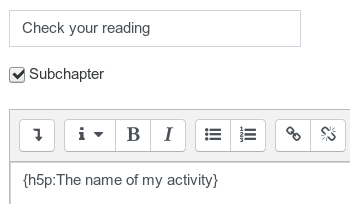
This filter adds the possibility to get h5p content being automatically embedded in textfields based on the activityname.
Price option: Free

Supports Moodle 3.0-3.11 See all versions
Latest release: 5 years ago
Installations: 878
Downloads (last 90 days): 76

Frankenstyle name: filter_h5p
Filters

Comments

Comments are no longer open for new posts. Existing comments remain available to read.

Hi,
I get the error ''H5P filter cannot be used, it may not be installed'' after I installed it and activated it. Ive tried putting it above the ''non-linking'' filter, no result.
I use Moodle version 3.5.10., any thoughts on how I could make this filter work?
Hello, if you have issues please use the bugtracker on github https://github.com/rschrenk/moodle-filter_h5p/issues. As for the particular problem I would need more information. Do you have a screenshot or something? Unfortuanetly Microsoft Edge is not the best browser out there and will be dropped by Microsoft in favor of Edge Chromium that uses the Open Source implementation of Chrome as Webkit. This new browser will be rolled out by Microsoft by January via the Windows Update and will replace most of running Edge-Browserversions. Maybe the problem is not worth to cope with...
We love this filter but have encountered a problem in Microsoft Edge 44.18362.449.0 - embedded activities are not resizing properly, background images not resizing and all content height limited so showing vertical scroll bar.. most annoying!
Sounds as if another filter is executed prior to h5p_filter.
hello, installed and placed it above the 'Activity names auto-linking' filter, but it appears as link only
any help or idea?
Hello, this would indeed be nice.
It would be awesome if there could be an H5P button in the Atto editor, and it allowed you to choose which type of H5P activity to create and embedd.
ok - did so.
@Robert,
I'm sorry I had missed "...ensure that it is listed above the "link activites"-filter" in your instructions. I am pleased to report that your filter works fine, just as expected!
Actually, your instructions should read "...ensure that it is listed above the 'Activity names auto-linking' filter"
Thanks for a very useful filter/plugin!
@Robert, I expect each method has its own advantages & drawbacks. And I have not experimented with gradings & conditions...
What I mean is that, if you use your filter to insert a link to an H5P content inside e.g. a Moodle page, once you have clicked on that link you navigate away from that page and there is no obvious way to come back.
Hello, if you embed the H5P-Content in a text as a static URL (e.g. in a book) and you copy the resource to another course then the URL will not change. This is problematic if you use the H5P together with gradings and conditions. The filter only ensures that the H5P-Resource is taken from the correct (the current) course. Therefore it really has an advantage wink What do you mean by "all connection with the original page is lost"? Kind regards
Hi Robert,
I do not see the advantage of your filter plugin over the embedding method. Your filter only places a link to an H5P content inside a textfield. Once the link is clicked, all connection with the original page is lost.
IMHO the embedding method is much better.
Hello, no big deal. I added Version 1.1 that fixes this.
A very useful filter. Is there a simple way to remove the frameborder around the embed?
Excellent filter. Many thanks for this. It solves an important problem when using H5P. Combined with stealth activities it is very powerful.