
Trema



Versions
Current version
5.2.1.0 (2026061800)
5.2.1.0
Plugin type: Themes
Frankenstyle component name: theme_trema
Version build number: 2026061800
Version release name: 5.2.1.0
Maturity: Stable
Supported Moodle versions: 4.1, 4.2, 4.3, 4.4, 4.5, 5.0, 5.1, 5.2
Repository URL (Git): https://github.com/trema-tech/moodle-theme_trema
Repository branch:
Repository tag: v5.2.1.0
Issue/bug tracker URL: https://github.com/trema-tech/moodle-theme_trema/issues
Important
Notice: Release 5.2.0.0 drops support for Moodle 4.0. Minimum supported version is now Moodle 4.1 LTS. Sites on 4.0 must upgrade Moodle LMS before installing this version of Trema.
What's New in 5.2.1.0
New Features
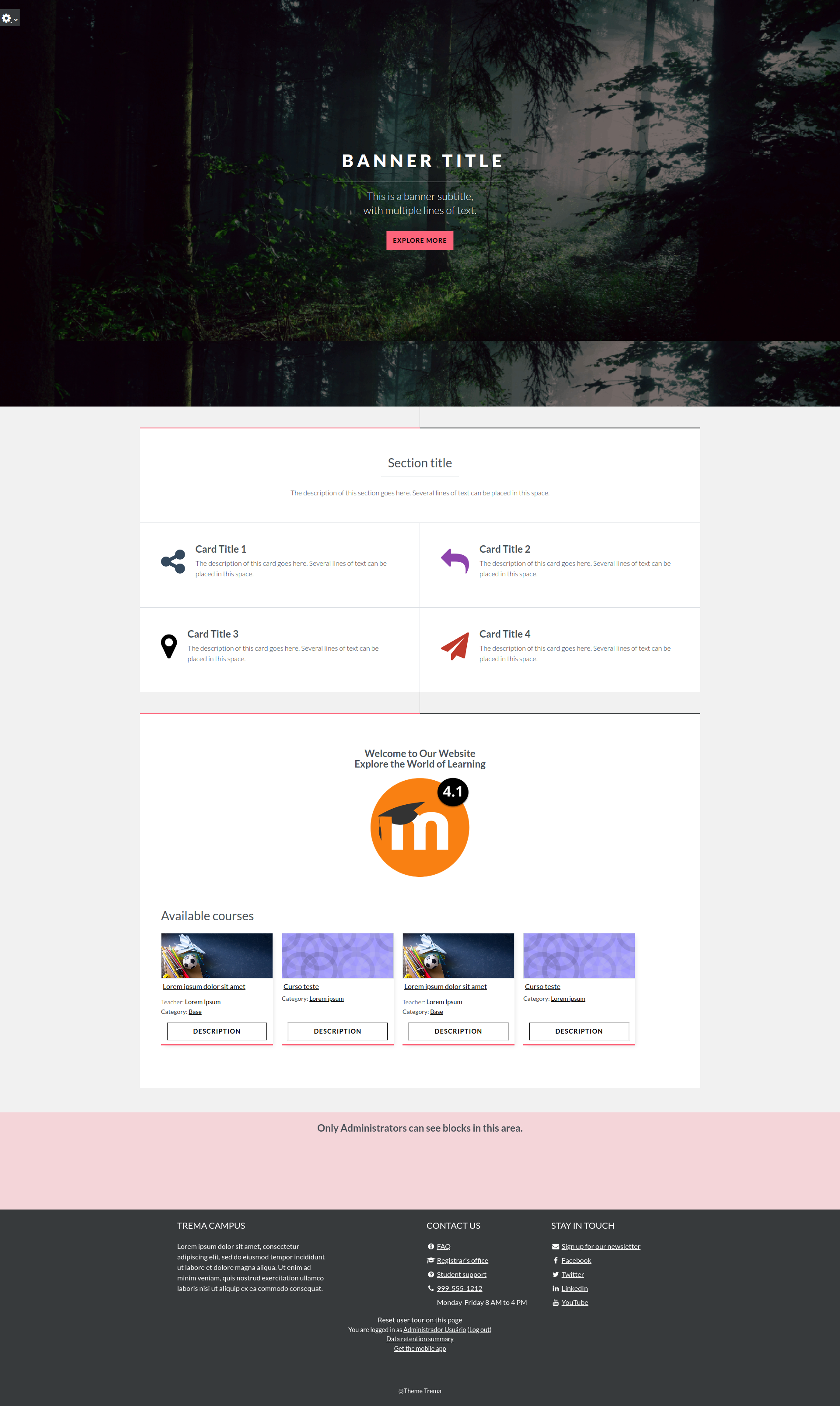
- You can now swipe touch screen left/right on frontpage banner in Moodle 4.1 to 5.2 (was only 5.x)
- Frontpage banner subtitle can now supports line breaks & basic formatting.
- Docs: Added FAQ on recommended front-page banner image size.
- Removed borders of front-page cards. Text no longer wraps below the icon.
Fixes/Updates
- Fix: Compatibility with Composer installer 2.x.
- Remove leftover Moodle 4.0 backward-compatibility checks.
- Fix: Frontpage cards without an icon now align correctly.
- Fix: Banner/carousel startup on older supported Moodle versions.
- Fix #223: Remove duplicate carousel navigation buttons for screen reader accessibility.
- Fix #223: Banner images no longer appear zoomed in when dark overlay is enabled. The parallax scrolling effect is now disabled in banner images (this was the cause of the problem).
- Fix: Carousel slide image jumping/snapping in Firefox.
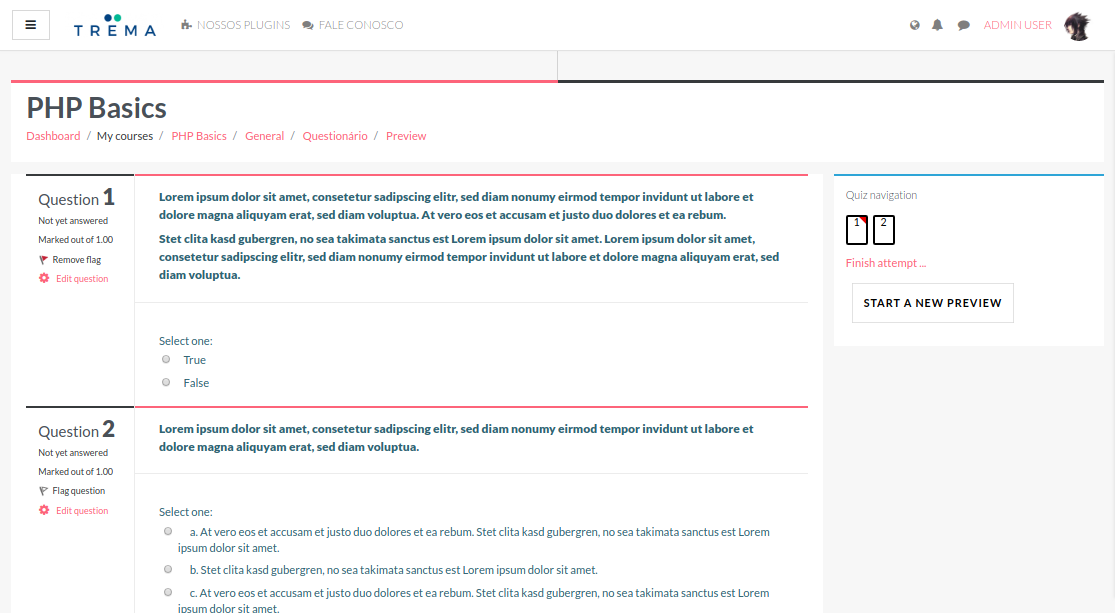
- Fix #234: Quiz formatting of left column.
- Fix: Admin Dashboard cards wrapping onto multiple lines.
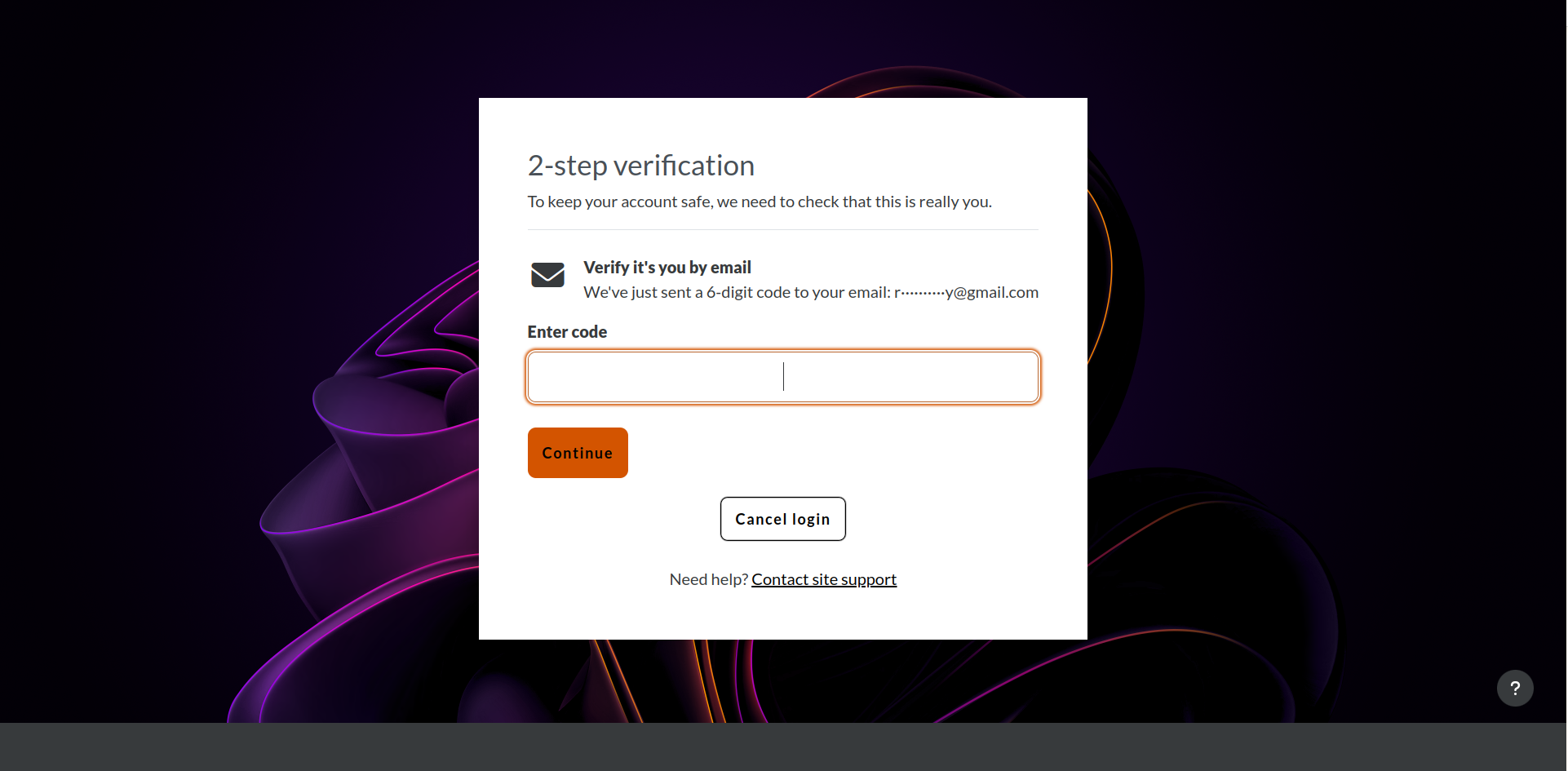
- Fix: Remove footer and added support for background on Multi-factor Authentication (MFA) pages.
What's New in 5.2.0.0
New features
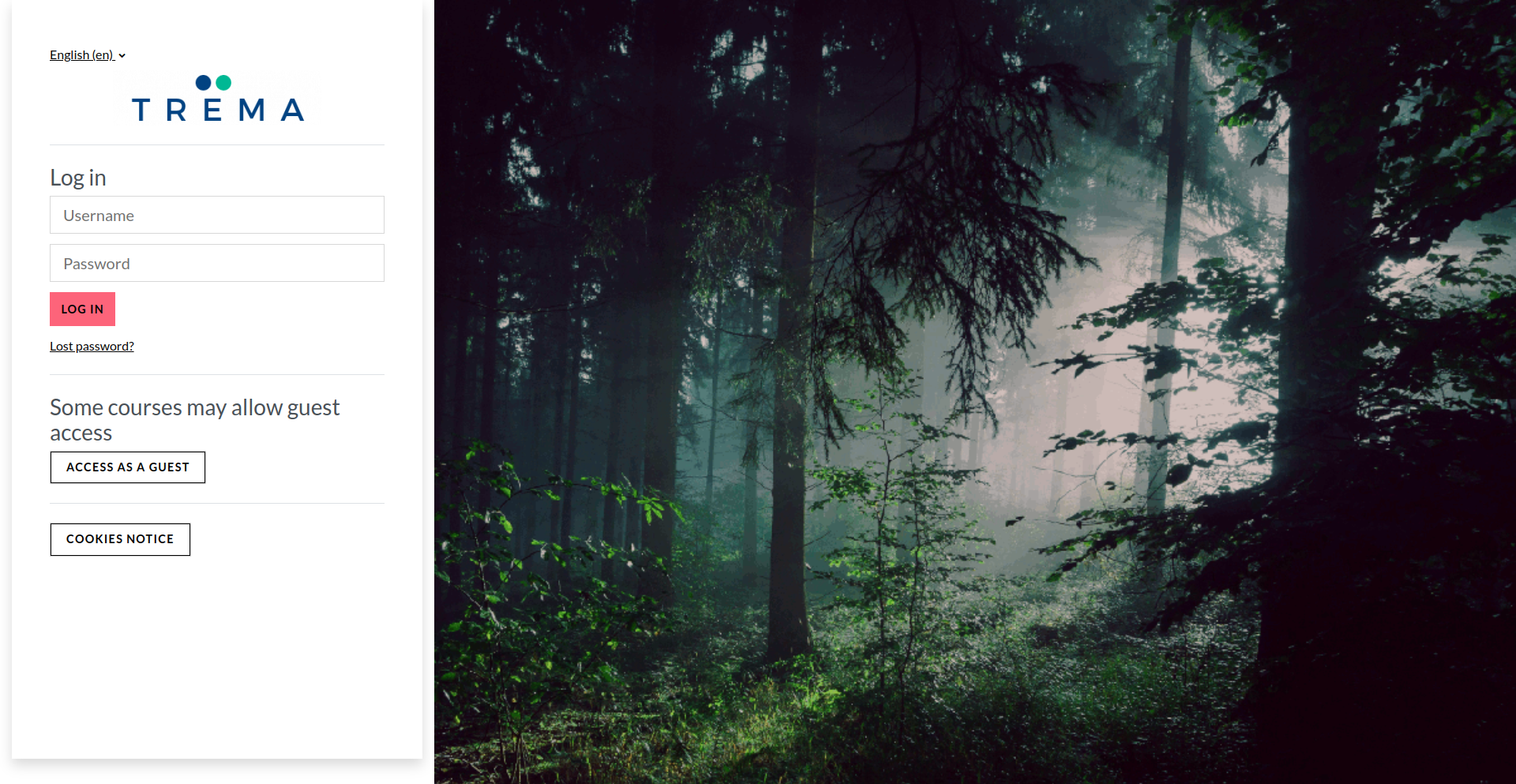
- Added Half Left and Half Right layout options for the login page.
- Added default background image for login page.
- Added FAQ entry recommending image sizes and formats for course images.
Fixes/updates
- Now compatible with Moodle LMS 4.1 LTS to 5.2.
- Bumped minimum supported Moodle LMS version to 4.1 LTS.
- Fix course card layout on Dashboard.
- Fix admin dashboard icon spacing and overall layout.
- Login Instructions now compatible with Moodle 5.2+.
- Moved Lost Password link directly below password field.
- Increased button width for login, IdP login, signup, and guest login.
- Carousel fix: auto-advance now works.
- Carousel fix: added default images.
- Fix favicon fallback when none is specified.
- Fix header image alignment on the login page.
- Fix login page rendering for Moodle 5.2 LMS.
- Fix Home, My Home, and My courses enabled check on 5.2 settings.
- Fix drawer popup message when debugging is enabled.
- Fix dashboard enrolments cache key mismatch (cache was never hit).
- Updated SCSS selectors for Bootstrap 4 & 5 compatibility.
- Updated Mustache templates for Bootstrap 4 & 5 compatibility.
- Fixed login page CSS for Bootstrap 4 & 5 compatibility.
- Added PHP 8 null-safe access for theme settings and layout variables.
- Added null-safe guard in upgrade script for user tour config data.
- Updated privacy provider test for PHPUnit 11 compatibility.
- Fixes for moodle-plugin-ci.
- Removed MoodleNet Profile setting for Moodle 5.2+ compatibility.
- Updated copyright notice for 2026.
Moodle LMS Theme - Trema 5.2.0.0 (2026051100)
Moodle LMS Theme - Trema 5.2.0.0
Plugin type: Themes
Frankenstyle component name: theme_trema
Version build number: 2026051100
Version release name: Moodle LMS Theme - Trema 5.2.0.0
Maturity: Stable
Supported Moodle versions: 4.1, 4.2, 4.3, 4.4, 4.5, 5.0, 5.1, 5.2
Repository URL (Git): https://github.com/trema-tech/moodle-theme_trema
Repository branch:
Repository tag: 5.2.0.0
Issue/bug tracker URL: https://github.com/trema-tech/moodle-theme_trema/issues
Important
Notice: This release drops support for Moodle 4.0. Minimum supported version is now Moodle 4.1 LTS. Sites on 4.0 must upgrade Moodle LMS before installing this version of Trema.
New features
- Added Half Left and Half Right layout options for the login page.
- Added default background image for login page.
- Added FAQ entry recommending image sizes and formats for course images.
Fixes/updates
- Now compatible with Moodle LMS 4.1 LTS to 5.2.
- Bumped minimum supported Moodle LMS version to 4.1 LTS.
- Fix course card layout on Dashboard.
- Fix admin dashboard icon spacing and overall layout.
- Login Instructions now compatible with Moodle 5.2+.
- Moved Lost Password link directly below password field.
- Increased button width for login, IdP login, signup, and guest login.
- Carousel fix: auto-advance now works.
- Carousel fix: added default images.
- Fix favicon fallback when none is specified.
- Fix header image alignment on the login page.
- Fix login page rendering for Moodle 5.2 LMS.
- Fix Home, My Home, and My courses enabled check on 5.2 settings.
- Fix drawer popup message when debugging is enabled.
- Fix dashboard enrolments cache key mismatch (cache was never hit).
- Updated SCSS selectors for Bootstrap 4 & 5 compatibility.
- Updated Mustache templates for Bootstrap 4 & 5 compatibility.
- Fixed login page CSS for Bootstrap 4 & 5 compatibility.
- Added PHP 8 null-safe access for theme settings and layout variables.
- Added null-safe guard in upgrade script for user tour config data.
- Updated privacy provider test for PHPUnit 11 compatibility.
- Fixes for moodle-plugin-ci.
- Removed MoodleNet Profile setting for Moodle 5.2+ compatibility.
- Updated copyright notice for 2026.
5.1.0.0 (2025100900)
5.1.0.0
Plugin type: Themes
Frankenstyle component name: theme_trema
Version build number: 2025100900
Version release name: 5.1.0.0
Maturity: Stable
Supported Moodle versions: 4.0, 4.1, 4.2, 4.3, 4.4, 4.5, 5.0, 5.1
Repository URL (Git): https://github.com/trema-tech/moodle-theme_trema
Repository branch: main
Repository tag: 5.1.0.0
Issue/bug tracker URL: https://github.com/trema-tech/moodle-theme_trema/issues
What's New in 5.1.0.0
New Features
- Moodle 5.1 support.
- Admin Dashboard is now configurable.
- Add moodle-ci GitHub workflow support for 4.5 and 5.0.
- Add new settings to enforce required profile fields by admins
- Add new setting to open the frontpage drawer by default
- reCAPTCHA now appears on login page when enabled in Moodle.
Fixes/updates
- Updated screenshots in settings.
- Fix for compatibility with envbar and similar plugins.
- UI fixes
- Fix footer overflow
- Add margin to login button
- Fix minors code styling issues
- Fix show/hide for idnumber and profile description
- Improved appearance of Configurable Reports.
Thanks @michael-milette, for the hard work on Trema lol
Kind regards,
Rodrigo Mady
5.0.0.2 (2025052200)
5.0.0.2
Plugin type: Themes
Frankenstyle component name: theme_trema
Version build number: 2025052200
Version release name: 5.0.0.2
Maturity: Stable
Supported Moodle versions: 4.0, 4.1, 4.2, 4.3, 4.4, 4.5, 5.0
Repository URL (Git): https://github.com/trema-tech/moodle-theme_trema
Repository branch:
Repository tag: 5.0.0.2
Issue/bug tracker URL: https://github.com/trema-tech/moodle-theme_trema/issues
What's New in 5.0.0.2
Fixes/updates
- Fixed some Moodle coding guideline issues.
- Updated moodle-ci GitHub workflow.
- Right-align the Search Courses form in Manage Courses and Categories.
- Fixed Blocks drawer now works on the frontpage.
- Fixed JavaScript errors.
- Make the pop-up calendar always appear above other elements.
- Fix modal overlay override on TinyMCE editor (source code view).
- Fix minor issues with the styling of the course list page.
- Fix mod assign grading overflow.
- Fix warning and error on Trema installation from scratch.
New features
- Added gruntfile.js.
- Add moodle-ci GitHub workflow support for 4.5 and 5.0.
What's New in 5.0.0.0
New Features
- Moodle 5.0 support
Fixes/updates
- Update bootstrap data for data-bs references for Moodle 5.0
- Fix minor issue on mod assign embed view
- Fix user menu for Moodle 5.0
Thank you very much @michael-milette for helping me to improve and update Trema!
Kind regards,
Rodrigo Mady
5.0.0.0 (2025041500)
5.0.0.0
Plugin type: Themes
Frankenstyle component name: theme_trema
Version build number: 2025041500
Version release name: 5.0.0.0
Maturity: Stable
Supported Moodle versions: 4.0, 4.1, 4.2, 4.3, 4.4, 4.5, 5.0
Repository URL (Git): https://github.com/trema-tech/moodle-theme_trema
Repository branch:
Repository tag: 5.0.0.0
Issue/bug tracker URL: https://github.com/trema-tech/moodle-theme_trema/issues
What's New in 5.0.0.0
New Features
- Moodle 5.0 support
Fixes/updates
- Update bootstrap data for data-bs references for Moodle 5.0
- Fix minor issue on mod assign embed view
- Fix user menu for Moodle 5.0
Thank you very much @michael-milette for helping me to improve and update Trema!
Kind regards,
Rodrigo Mady
4.5.0.3 (2024111400)
4.5.0.3
Plugin type: Themes
Frankenstyle component name: theme_trema
Version build number: 2024111400
Version release name: 4.5.0.3
Maturity: Stable
Supported Moodle versions: 4.0, 4.1, 4.2, 4.3, 4.4, 4.5
Repository URL (Git): https://github.com/trema-tech/moodle-theme_trema
Repository branch:
Repository tag: 4.5.0.3
Issue/bug tracker URL: https://github.com/trema-tech/moodle-theme_trema/issues
What's New in 4.5.0.3
New Features
- #208: Add toggle password to login form
Fixes/updates
- Fix minors coding style issues
- Fix reports' layout width
- #207 Fix minor bug on frontpage cards for mobile
What's New in 4.5.0.2
Fixes/updates
- #205: Fixed Class theme_trema\output\filter_manager not found.
What's New in 4.5.0.1
New Features
- #201 / #204: Show more content on some pages with wide tables.
Fixes/updates
- Fix minors bugs on header and report builder
- Fixed compatibility with Moodle 4.0.
- #202: Fix arrow on usermenu dropdown
- Fix stylelint warnings and errors
What's New in 4.5.0.0
New Features
- Clean-up when printing pages.
- Streamlined filtering of custom menu.
- Added support for Appearance/Logo/Favicon in Moodle 4.1+.
- Renamed Primary Colour field to Brand Colour.
Fixes/updates
- Fixed parent category button on add category.
- Fixed width of Quiz report.
- Clarified actions to be taken for number of front page images.
- Clarified actions to be taken for number of front page front page cards.
- #200: Add border to file upload cards
- Fix message and notification pages
- Fix assignment overflow
- Fix layout for Report Builder
You are awesome @michael-milette!
You make me feel we can build the world with one more open-source approach. I hope we can keep building our projects and sharing this knowledge with people worldwide. Thank you for your contrib and hard work in the new version of Trema.
Let's start the animation like they do in WordPress themes.
Kind regards,
Rodrigo Mady
4.5.0.2 (2024101401)
4.5.0.2
Plugin type: Themes
Frankenstyle component name: theme_trema
Version build number: 2024101401
Version release name: 4.5.0.2
Maturity: Stable
Supported Moodle versions: 4.0, 4.1, 4.2, 4.3, 4.4, 4.5
Repository URL (Git): https://github.com/trema-tech/moodle-theme_trema
Repository branch:
Repository tag: 4.5.0.2
Issue/bug tracker URL: https://github.com/trema-tech/moodle-theme_trema/issues
What's New in 4.5.0.2
Fixes/updates
- Fix minors coding style issues
- Fix reports' layout width
- #207 Fix minor bug on frontpage cards for mobile
What's New in 4.5.0.1
- #208: Add toggle password to login form
New Features
- #201 / #204: Show more content on some pages with wide tables.
Fixes/updates
- Fix minors bugs on header and report builder
- Fixed compatibility with Moodle 4.0.
- #202: Fix arrow on usermenu dropdown
- Fix stylelint warnings and errors
What's New in 4.5.0.0
New Features
- Clean-up when printing pages.
- Streamlined filtering of custom menu.
- Added support for Appearance/Logo/Favicon in Moodle 4.1+.
- Renamed Primary Colour field to Brand Colour.
Fixes/updates
- Fixed parent category button on add category.
- Fixed width of Quiz report.
- Clarified actions to be taken for number of front page images.
- Clarified actions to be taken for number of front page front page cards.
- #200: Add border to file upload cards
- Fix message and notification pages
- Fix assignment overflow
- Fix layout for Report Builder
You are awesome @michael-milette!
You make me feel we can build the world with one more open-source approach. I hope we can keep building our projects and sharing this knowledge with people worldwide. Thank you for your contrib and hard work in the new version of Trema.
Let's start the animation like they do in WordPress themes.
Kind regards,
Rodrigo Mady
4.5.0.1 (2024101400)
4.5.0.1
Plugin type: Themes
Frankenstyle component name: theme_trema
Version build number: 2024101400
Version release name: 4.5.0.1
Maturity: Stable
Supported Moodle versions: 4.0, 4.1, 4.2, 4.3, 4.4, 4.5
Repository URL (Git): https://github.com/trema-tech/moodle-theme_trema
Repository branch:
Repository tag: 4.5.0.1
Issue/bug tracker URL: https://github.com/trema-tech/moodle-theme_trema/issues
What's New in 4.5.0.1
New Features
- #201 / #204: Show more content on some pages with wide tables.
Fixes/updates
- Fix minors bugs on header and report builder
- Fixed compatibility with Moodle 4.0.
- #202: Fix arrow on usermenu dropdown
- Fix stylelint warnings and errors
What's New in 4.5.0.0
New Features
- Clean-up when printing pages.
- Streamlined filtering of custom menu.
- Added support for Appearance/Logo/Favicon in Moodle 4.1+.
- Renamed Primary Colour field to Brand Colour.
Fixes/updates
- Fixed parent category button on add category.
- Fixed width of Quiz report.
- Clarified actions to be taken for number of front page images.
- Clarified actions to be taken for number of front page front page cards.
- #200: Add border to file upload cards
- Fix message and notification pages
- Fix assignment overflow
- Fix layout for Report Builder
You are awesome @michael-milette!
You make me feel we can build the world with one more open-source approach. I hope we can keep building our projects and sharing this knowledge with people worldwide. Thank you for your contrib and hard work in the new version of Trema.
Let's start the animation like they do in WordPress themes.
Kind regards,
Rodrigo Mady
4.5.0.0 (2024100700)
4.5.0.0
Plugin type: Themes
Frankenstyle component name: theme_trema
Version build number: 2024100700
Version release name: 4.5.0.0
Maturity: Stable
Supported Moodle versions: 4.0, 4.1, 4.2, 4.3, 4.4, 4.5
Repository URL (Git): https://github.com/trema-tech/moodle-theme_trema
Repository branch:
Repository tag: 4.5.0.0
Issue/bug tracker URL: https://github.com/trema-tech/moodle-theme_trema/issues
What's New in 4.5.0.0
New Features
- Clean-up when printing pages.
- Streamlined filtering of custom menu.
- Added support for Appearance/Logo/Favicon in Moodle 4.1+.
- Renamed Primary Colour field to Brand Colour.
Fixes/updates
- Fixed parent category button on add category.
- Fixed width of Quiz report.
- Clarified actions to be taken for number of front page images.
- Clarified actions to be taken for number of front page front page cards.
- #200: Add border to file upload cards
- Fix message and notification pages
- Fix assignment overflow
- Fix layout for Report Builder
You are awesome @michael-milette!
You make me feel we can build the world with one more open-source approach. I hope we can keep building our projects and sharing this knowledge with people worldwide. Thank you for your contrib and hard work in the new version of Trema.
Let's start the animation like they do in WordPress themes.
Kind regards,
Rodrigo Mady
4.4.0.7 (2024090700)
4.4.0.7
Plugin type: Themes
Frankenstyle component name: theme_trema
Version build number: 2024090700
Version release name: 4.4.0.7
Maturity: Stable
Supported Moodle versions: 4.0, 4.1, 4.2, 4.3, 4.4
Repository URL (Git): https://github.com/trema-tech/moodle-theme_trema
Repository branch:
Repository tag: 4.4.0.7
Issue/bug tracker URL: https://github.com/trema-tech/moodle-theme_trema/issues
What's New in 4.4.0.7
New Features
- Add new settings for login box
- Added caching for retrieval of favicon url.
- Added caching for retrieval of compact logo url.
- Added a new setting to enable filtering of primary navigation.
- Added support for {} filters in Moodle Additional HTML fields.
- Added links to alerts in Style Guide
Fixes/updates
- Fixed colours and layout of Quiz navigation block.
- Fix lang order in de file
- Improved custom menu filtering compatibility with Moodle.
- Fixed color contrast and links in alerts.
- Fixed background color and size of btn classes.
- Fixed hover colour of danger-text class.
- Minor edit of text.
- Removed dead code relating to rendering custom_menu.
- Fix #196: Fixed button alignment/height issue on My Courses page.
- Fix #196: Center button icon on My Courses page..
- Updated documentation to reflect compatibilty with PHP 8.3.
What's New in 4.4.0.5
New Features
- Add new settings for login box
- Added caching for retrieval of favicon url.
- Added caching for retrieval of compact logo url.
- Added new setting to enable filtering of primary navigation.
- Added support for {} filters in Moodle Additional HTML fields.
- Added links to alerts in Style Guide
Fixes/updates
- Fixed colours and layout of Quiz navigation block.
- Fix lang order in de file
- Improved custom menu filtering compatibility with Moodle.
- Fixed color contrast and links in alerts.
- Fixed background color and size of btn classes.
- Fixed hover colour of danger-text class.
- Minor edit of text.
- Removed dead code relating to rendering custom_menu.
- Fix #196: Fixed button alignment/height issue on My Courses page.
- Fix #196: Center button icon on My Courses page..
- Updated documentation to reflect compatibilty with PHP 8.3.
What's New in 4.4.0.4
New Features
- Setting to select the height of the front page banner/carousel from 50% to 100% (SCSS: $banner-height).
- Improved compatibility with popular 3rd party course formats.
- Setting to select for banner title font.
- Frontpage banner text colour is now settable in Raw initial SCSS as $banner-font-color.
- Default class for buttons in a carousel.
- Badges and pills examples to Trema Style tables.
- Text alignment setting for the banner to left, middle, or right.
Fixes/updates
- Fixed #193 - Grades > Filter by Name now wraps properly.
- Mobile drawer and Navbar logo automatically resize if they do not fit in available space.
- Long site name (text) now wraps multiple lines and shrinks font size if it doesn't fit in the header.
- Increase the size and correct alignment of banner buttons.
- Carousel now slides instead of fading to white during the transition.
- Fix #191: Expanded height of mobile drawer.
- Fix #37: Removed Enable Trema Course Style for Topics setting.
- First sort of language strings.
- Sort of language strings.
- Compliance fix for Moodle coding standards.
- Fixed default links for buttons in the banner/carousel.
- Updated Trema Style Guide.
- Clarified some settings on the Frontpage settings tab.
- Fixed issues with some fonts.
- Corrected typo in Trema style guide.
- Fixed display of full-page course enrolment format.
- Fixed display of Bootstrap badges and pills.
- Moved course enrolment icon over course image.
- Removed 'You are logged in as...' from the top navbar.
- Corrected typos in documentation and theme.
- Update navbar font weight.
- Delete the box shadow in the login container from the login page.
- Fix minor bugs in the front page image/carrousel.
What's New in 4.4.0.3
New Features
- Improved compatibility with popular 3rd party course formats.
- Added new setting to select for banner title font.
- Frontpage banner text color now settable in Raw initial SCSS as $bann…
- Added default class for buttons in carrousel.
- Added badges and pills examples to Trema Style tables.
- Added text alignment setting for the banner to left, middle, or right.
Fixes/updates
- Fix #191: Expanded height of mobile drawer.
- Fix #37: Removed Enable Trema Course Style for Topics setting.
- First sort of language strings.
- Sort of language strings.
- Compliance fix for Moodle coding standards.
- Fixed default links for buttons in banner/carousel.
- Updated Trema Style Guide
- Clarified some settings on Frontpage settings tab.
- Fixed issues with some fonts.
- Corrected typo in Trema style guide.
- Fixed display of Full Page course enrolment format.
- Fixed display of Bootstrap badges and pills
- Moved course enrolment icon over course image.
- dev (rc) 2024050905.
- Removed 'You are logged in as...' from top navbar.
- Corrected typos.
- Update navbar font-weight
- Delete box shadow in login container from login page
- Fix minor bugs in frontpage image/carrousel
What's New in 4.4.0.2
New Features
- Course activity icons now appear on the course page.
- #188: Fix Frontpage slideshow bugs and add the option of overlay to it
Fixes/updates
- Updated default color to blue.
- Fixed alignment of activity names with icons.
- Removed modal dialogue box outline/shadow (Moodle 4.4+ issue).
- Fixed alignment of expand/collapse '>' buttons in course settings.
- Moved SCSS presets to the Advanced tab.
What's New in 4.4.0.1
Fixes/updates
- Fix overflows on mobile navbar and header
- Fixed most coding style compliance issues.
- Fixed most recent savepoint.
- Fixed duplicate footer when Trema footer is disabled.
- Fixed footer margins on mobile devices.
- Fixed icon for select tags.
- Updated privacy collection policy because we store state of drawers.
- Removed testing for PHP 7.3 - not supported by moodle_plugin_ci.
- Fixed Moodle install error by renaming trema.scss to default.scss.
What's New in 4.4.0.0
New Features
- Added a new toggle setting to round the corners of some visual elements, like buttons, to make the theme less harsh looking.
- Added some initial PHPUnit and Behat tests.
- Added setting to upload a page background image.
- Added setting to upload additional theme preset files.
- Added setting for Unaddable blocks.
- Added setting to show/hide log out link in user menu.
- Added setting to show/hide links to page activities on Frontpage.
- Added setting to show/hide Moodle branding.
- Added new setting to show/hide activity icons in courses.
- Added new settings tab to show/hide some profile fields.
- Added setting option to hide summary button in course cards.
- Added setting to show/hide course contacts in course cards.
Fixes/updates
- Refactored code for configurable settings.
- Fix #175: Enabled wrapping of text in buttons.
- Fixed alignment and spacing of fields and buttons in multiple locations.
- Improved style guide - more examples and accessibility.
- Hide secondary navigation on Frontpage when editing is off.
- Removed guest access message from page header.
- Updated layout of login page form.
- Fixed site name text colour in page header when no logo used.
- Fixed text colour of guest login and role in usermenu.
- Adjusted location of language dropdown menu when logged out.
- Fixed colour contrast on notification page.
- Restored page title on Notifications page.
- Updated link to FontAwesome 6.x.
- Course drawer now compatible with Moodle 4.3.
- Show page title on Messages page.
- Refactored some code relating to theme settings.
- Refactored some code relating to show/hide login form.
- Default footer HTML now comes from language file.
- Split Content Settings page to Frontpage and Course Settings.
- Renamed 'General settings' tab to 'General'.
- Renamed 'Advanced settings' tab to 'Advanced'.
- Moved course cards to their own settings tab.
- MFA styling
- Reset tour fixes
- Much more, check it out.
Thank you @michael-milette for your contrib and hard work in the new version of Trema lol
Kind regards,
Rodrigo Mady
4.4.0.5 (2024071600)
4.4.0.5
Plugin type: Themes
Frankenstyle component name: theme_trema
Version build number: 2024071600
Version release name: 4.4.0.5
Maturity: Stable
Supported Moodle versions: 4.0, 4.1, 4.2, 4.3, 4.4
Repository URL (Git): https://github.com/trema-tech/moodle-theme_trema
Repository branch:
Repository tag: 4.4.0.5
Issue/bug tracker URL: https://github.com/trema-tech/moodle-theme_trema/issues
What's New in 4.4.0.5
New Features
- Add new settings for login box
- Added caching for retrieval of favicon url.
- Added caching for retrieval of compact logo url.
- Added new setting to enable filtering of primary navigation.
- Added support for {} filters in Moodle Additional HTML fields.
- Added links to alerts in Style Guide
Fixes/updates
- Fixed colours and layout of Quiz navigation block.
- Fix lang order in de file
- Improved custom menu filtering compatibility with Moodle.
- Fixed color contrast and links in alerts.
- Fixed background color and size of btn classes.
- Fixed hover colour of danger-text class.
- Minor edit of text.
- Removed dead code relating to rendering custom_menu.
- Fix #196: Fixed button alignment/height issue on My Courses page.
- Fix #196: Center button icon on My Courses page..
- Updated documentation to reflect compatibilty with PHP 8.3.
What's New in 4.4.0.4
New Features
- Setting to select the height of the front page banner/carousel from 50% to 100% (SCSS: $banner-height).
- Improved compatibility with popular 3rd party course formats.
- Setting to select for banner title font.
- Frontpage banner text colour is now settable in Raw initial SCSS as $banner-font-color.
- Default class for buttons in a carousel.
- Badges and pills examples to Trema Style tables.
- Text alignment setting for the banner to left, middle, or right.
Fixes/updates
- Fixed #193 - Grades > Filter by Name now wraps properly.
- Mobile drawer and Navbar logo automatically resize if they do not fit in available space.
- Long site name (text) now wraps multiple lines and shrinks font size if it doesn't fit in the header.
- Increase the size and correct alignment of banner buttons.
- Carousel now slides instead of fading to white during the transition.
- Fix #191: Expanded height of mobile drawer.
- Fix #37: Removed Enable Trema Course Style for Topics setting.
- First sort of language strings.
- Sort of language strings.
- Compliance fix for Moodle coding standards.
- Fixed default links for buttons in the banner/carousel.
- Updated Trema Style Guide.
- Clarified some settings on the Frontpage settings tab.
- Fixed issues with some fonts.
- Corrected typo in Trema style guide.
- Fixed display of full-page course enrolment format.
- Fixed display of Bootstrap badges and pills.
- Moved course enrolment icon over course image.
- Removed 'You are logged in as...' from the top navbar.
- Corrected typos in documentation and theme.
- Update navbar font weight.
- Delete the box shadow in the login container from the login page.
- Fix minor bugs in the front page image/carrousel.
What's New in 4.4.0.3
New Features
- Improved compatibility with popular 3rd party course formats.
- Added new setting to select for banner title font.
- Frontpage banner text color now settable in Raw initial SCSS as $bann…
- Added default class for buttons in carrousel.
- Added badges and pills examples to Trema Style tables.
- Added text alignment setting for the banner to left, middle, or right.
Fixes/updates
- Fix #191: Expanded height of mobile drawer.
- Fix #37: Removed Enable Trema Course Style for Topics setting.
- First sort of language strings.
- Sort of language strings.
- Compliance fix for Moodle coding standards.
- Fixed default links for buttons in banner/carousel.
- Updated Trema Style Guide
- Clarified some settings on Frontpage settings tab.
- Fixed issues with some fonts.
- Corrected typo in Trema style guide.
- Fixed display of Full Page course enrolment format.
- Fixed display of Bootstrap badges and pills
- Moved course enrolment icon over course image.
- dev (rc) 2024050905.
- Removed 'You are logged in as...' from top navbar.
- Corrected typos.
- Update navbar font-weight
- Delete box shadow in login container from login page
- Fix minor bugs in frontpage image/carrousel
What's New in 4.4.0.2
New Features
- Course activity icons now appear on the course page.
- #188: Fix Frontpage slideshow bugs and add the option of overlay to it
Fixes/updates
- Updated default color to blue.
- Fixed alignment of activity names with icons.
- Removed modal dialogue box outline/shadow (Moodle 4.4+ issue).
- Fixed alignment of expand/collapse '>' buttons in course settings.
- Moved SCSS presets to the Advanced tab.
What's New in 4.4.0.1
Fixes/updates
- Fix overflows on mobile navbar and header
- Fixed most coding style compliance issues.
- Fixed most recent savepoint.
- Fixed duplicate footer when Trema footer is disabled.
- Fixed footer margins on mobile devices.
- Fixed icon for select tags.
- Updated privacy collection policy because we store state of drawers.
- Removed testing for PHP 7.3 - not supported by moodle_plugin_ci.
- Fixed Moodle install error by renaming trema.scss to default.scss.
What's New in 4.4.0.0
New Features
- Added a new toggle setting to round the corners of some visual elements, like buttons, to make the theme less harsh looking.
- Added some initial PHPUnit and Behat tests.
- Added setting to upload a page background image.
- Added setting to upload additional theme preset files.
- Added setting for Unaddable blocks.
- Added setting to show/hide log out link in user menu.
- Added setting to show/hide links to page activities on Frontpage.
- Added setting to show/hide Moodle branding.
- Added new setting to show/hide activity icons in courses.
- Added new settings tab to show/hide some profile fields.
- Added setting option to hide summary button in course cards.
- Added setting to show/hide course contacts in course cards.
Fixes/updates
- Refactored code for configurable settings.
- Fix #175: Enabled wrapping of text in buttons.
- Fixed alignment and spacing of fields and buttons in multiple locations.
- Improved style guide - more examples and accessibility.
- Hide secondary navigation on Frontpage when editing is off.
- Removed guest access message from page header.
- Updated layout of login page form.
- Fixed site name text colour in page header when no logo used.
- Fixed text colour of guest login and role in usermenu.
- Adjusted location of language dropdown menu when logged out.
- Fixed colour contrast on notification page.
- Restored page title on Notifications page.
- Updated link to FontAwesome 6.x.
- Course drawer now compatible with Moodle 4.3.
- Show page title on Messages page.
- Refactored some code relating to theme settings.
- Refactored some code relating to show/hide login form.
- Default footer HTML now comes from language file.
- Split Content Settings page to Frontpage and Course Settings.
- Renamed 'General settings' tab to 'General'.
- Renamed 'Advanced settings' tab to 'Advanced'.
- Moved course cards to their own settings tab.
- MFA styling
- Reset tour fixes
- Much more, check it out.
Thank you @michael-milette for your contrib and hard work in the new version of Trema lol
Kind regards,
Rodrigo Mady
4.4.0.4 (2024052601)
4.4.0.4
Plugin type: Themes
Frankenstyle component name: theme_trema
Version build number: 2024052601
Version release name: 4.4.0.4
Maturity: Stable
Supported Moodle versions: 4.0, 4.1, 4.2, 4.3, 4.4
Repository URL (Git): https://github.com/trema-tech/moodle-theme_trema
Repository branch:
Repository tag: 4.4.0.4
Issue/bug tracker URL: https://github.com/trema-tech/moodle-theme_trema/issues
What's New in 4.4.0.4
New Features
- Setting to select the height of the front page banner/carousel from 50% to 100% (SCSS: $banner-height).
- Improved compatibility with popular 3rd party course formats.
- Setting to select for banner title font.
- Frontpage banner text colour is now settable in Raw initial SCSS as $banner-font-color.
- Default class for buttons in a carousel.
- Badges and pills examples to Trema Style tables.
- Text alignment setting for the banner to left, middle, or right.
Fixes/updates
- Fixed #193 - Grades > Filter by Name now wraps properly.
- Mobile drawer and Navbar logo automatically resize if they do not fit in available space.
- Long site name (text) now wraps multiple lines and shrinks font size if it doesn't fit in the header.
- Increase the size and correct alignment of banner buttons.
- Carousel now slides instead of fading to white during the transition.
- Fix #191: Expanded height of mobile drawer.
- Fix #37: Removed Enable Trema Course Style for Topics setting.
- First sort of language strings.
- Sort of language strings.
- Compliance fix for Moodle coding standards.
- Fixed default links for buttons in the banner/carousel.
- Updated Trema Style Guide.
- Clarified some settings on the Frontpage settings tab.
- Fixed issues with some fonts.
- Corrected typo in Trema style guide.
- Fixed display of full-page course enrolment format.
- Fixed display of Bootstrap badges and pills.
- Moved course enrolment icon over course image.
- Removed 'You are logged in as...' from the top navbar.
- Corrected typos in documentation and theme.
- Update navbar font weight.
- Delete the box shadow in the login container from the login page.
- Fix minor bugs in the front page image/carrousel.
What's New in 4.4.0.3
New Features
- Improved compatibility with popular 3rd party course formats.
- Added new setting to select for banner title font.
- Frontpage banner text color now settable in Raw initial SCSS as $bann…
- Added default class for buttons in carrousel.
- Added badges and pills examples to Trema Style tables.
- Added text alignment setting for the banner to left, middle, or right.
Fixes/updates
- Fix #191: Expanded height of mobile drawer.
- Fix #37: Removed Enable Trema Course Style for Topics setting.
- First sort of language strings.
- Sort of language strings.
- Compliance fix for Moodle coding standards.
- Fixed default links for buttons in banner/carousel.
- Updated Trema Style Guide
- Clarified some settings on Frontpage settings tab.
- Fixed issues with some fonts.
- Corrected typo in Trema style guide.
- Fixed display of Full Page course enrolment format.
- Fixed display of Bootstrap badges and pills
- Moved course enrolment icon over course image.
- dev (rc) 2024050905.
- Removed 'You are logged in as...' from top navbar.
- Corrected typos.
- Update navbar font-weight
- Delete box shadow in login container from login page
- Fix minor bugs in frontpage image/carrousel
What's New in 4.4.0.2
New Features
- Course activity icons now appear on the course page.
- #188: Fix Frontpage slideshow bugs and add the option of overlay to it
Fixes/updates
- Updated default color to blue.
- Fixed alignment of activity names with icons.
- Removed modal dialogue box outline/shadow (Moodle 4.4+ issue).
- Fixed alignment of expand/collapse '>' buttons in course settings.
- Moved SCSS presets to the Advanced tab.
What's New in 4.4.0.1
Fixes/updates
- Fix overflows on mobile navbar and header
- Fixed most coding style compliance issues.
- Fixed most recent savepoint.
- Fixed duplicate footer when Trema footer is disabled.
- Fixed footer margins on mobile devices.
- Fixed icon for select tags.
- Updated privacy collection policy because we store state of drawers.
- Removed testing for PHP 7.3 - not supported by moodle_plugin_ci.
- Fixed Moodle install error by renaming trema.scss to default.scss.
What's New in 4.4.0.0
New Features
- Added a new toggle setting to round the corners of some visual elements, like buttons, to make the theme less harsh looking.
- Added some initial PHPUnit and Behat tests.
- Added setting to upload a page background image.
- Added setting to upload additional theme preset files.
- Added setting for Unaddable blocks.
- Added setting to show/hide log out link in user menu.
- Added setting to show/hide links to page activities on Frontpage.
- Added setting to show/hide Moodle branding.
- Added new setting to show/hide activity icons in courses.
- Added new settings tab to show/hide some profile fields.
- Added setting option to hide summary button in course cards.
- Added setting to show/hide course contacts in course cards.
Fixes/updates
- Refactored code for configurable settings.
- Fix #175: Enabled wrapping of text in buttons.
- Fixed alignment and spacing of fields and buttons in multiple locations.
- Improved style guide - more examples and accessibility.
- Hide secondary navigation on Frontpage when editing is off.
- Removed guest access message from page header.
- Updated layout of login page form.
- Fixed site name text colour in page header when no logo used.
- Fixed text colour of guest login and role in usermenu.
- Adjusted location of language dropdown menu when logged out.
- Fixed colour contrast on notification page.
- Restored page title on Notifications page.
- Updated link to FontAwesome 6.x.
- Course drawer now compatible with Moodle 4.3.
- Show page title on Messages page.
- Refactored some code relating to theme settings.
- Refactored some code relating to show/hide login form.
- Default footer HTML now comes from language file.
- Split Content Settings page to Frontpage and Course Settings.
- Renamed 'General settings' tab to 'General'.
- Renamed 'Advanced settings' tab to 'Advanced'.
- Moved course cards to their own settings tab.
- MFA styling
- Reset tour fixes
- Much more, check it out.
Thank you @michael-milette for your contrib and hard work in the new version of Trema lol
Kind regards,
Rodrigo Mady
4.4.0.3 (2024052300)
4.4.0.3
Plugin type: Themes
Frankenstyle component name: theme_trema
Version build number: 2024052300
Version release name: 4.4.0.3
Maturity: Stable
Supported Moodle versions: 4.0, 4.1, 4.2, 4.3, 4.4
Repository URL (Git): https://github.com/trema-tech/moodle-theme_trema
Repository branch:
Repository tag: 4.4.0.3
Issue/bug tracker URL: https://github.com/trema-tech/moodle-theme_trema/issues
4.4.0.3
New Features
- Improved compatibility with popular 3rd party course formats.
- Added new setting to select for banner title font.
- Frontpage banner text color now settable in Raw initial SCSS as $bann…
- Added default class for buttons in carrousel.
- Added badges and pills examples to Trema Style tables.
- Added text alignment setting for the banner to left, middle, or right.
Fixes/updates
- Fix #191: Expanded height of mobile drawer.
- Fix #37: Removed Enable Trema Course Style for Topics setting.
- First sort of language strings.
- Sort of language strings.
- Compliance fix for Moodle coding standards.
- Fixed default links for buttons in banner/carousel.
- Updated Trema Style Guide
- Clarified some settings on Frontpage settings tab.
- Fixed issues with some fonts.
- Corrected typo in Trema style guide.
- Fixed display of Full Page course enrolment format.
- Fixed display of Bootstrap badges and pills
- Moved course enrolment icon over course image.
- dev (rc) 2024050905.
- Removed 'You are logged in as...' from top navbar.
- Corrected typos.
- Update navbar font-weight
- Delete box shadow in login container from login page
- Fix minor bugs in frontpage image/carrousel
4.4.0.2
New Features
- Course activity icons now appear on the course page.
- #188: Fix Frontpage slideshow bugs and add the option of overlay to it
Fixes/updates
- Updated default color to blue.
- Fixed alignment of activity names with icons.
- Removed modal dialogue box outline/shadow (Moodle 4.4+ issue).
- Fixed alignment of expand/collapse '>' buttons in course settings.
- Moved SCSS presets to the Advanced tab.
4.4.0.1
Fixes/updates
- Fix overflows on mobile navbar and header
- Fixed most coding style compliance issues.
- Fixed most recent savepoint.
- Fixed duplicate footer when Trema footer is disabled.
- Fixed footer margins on mobile devices.
- Fixed icon for select tags.
- Updated privacy collection policy because we store state of drawers.
- Removed testing for PHP 7.3 - not supported by moodle_plugin_ci.
- Fixed Moodle install error by renaming trema.scss to default.scss.
4.4.0.0
New Features
- Added a new toggle setting to round the corners of some visual elements, like buttons, to make the theme less harsh looking.
- Added some initial PHPUnit and Behat tests.
- Added setting to upload a page background image.
- Added setting to upload additional theme preset files.
- Added setting for Unaddable blocks.
- Added setting to show/hide log out link in user menu.
- Added setting to show/hide links to page activities on Frontpage.
- Added setting to show/hide Moodle branding.
- Added new setting to show/hide activity icons in courses.
- Added new settings tab to show/hide some profile fields.
- Added setting option to hide summary button in course cards.
- Added setting to show/hide course contacts in course cards.
Fixes/updates
- Refactored code for configurable settings.
- Fix #175: Enabled wrapping of text in buttons.
- Fixed alignment and spacing of fields and buttons in multiple locations.
- Improved style guide - more examples and accessibility.
- Hide secondary navigation on Frontpage when editing is off.
- Removed guest access message from page header.
- Updated layout of login page form.
- Fixed site name text colour in page header when no logo used.
- Fixed text colour of guest login and role in usermenu.
- Adjusted location of language dropdown menu when logged out.
- Fixed colour contrast on notification page.
- Restored page title on Notifications page.
- Updated link to FontAwesome 6.x.
- Course drawer now compatible with Moodle 4.3.
- Show page title on Messages page.
- Refactored some code relating to theme settings.
- Refactored some code relating to show/hide login form.
- Default footer HTML now comes from language file.
- Split Content Settings page to Frontpage and Course Settings.
- Renamed 'General settings' tab to 'General'.
- Renamed 'Advanced settings' tab to 'Advanced'.
- Moved course cards to their own settings tab.
- MFA styling
- Reset tour fixes
- Much more, check it out.
Thank you @michael-milette for your contrib and hard work in the new version of Trema lol
Kind regards,
Rodrigo Mady
4.4.0.2 (2024050900)
4.4.0.2
Plugin type: Themes
Frankenstyle component name: theme_trema
Version build number: 2024050900
Version release name: 4.4.0.2
Maturity: Stable
Supported Moodle versions: 4.0, 4.1, 4.2, 4.3, 4.4
Repository URL (Git): https://github.com/trema-tech/moodle-theme_trema
Repository branch:
Repository tag: 4.4.0.2
Issue/bug tracker URL: https://github.com/trema-tech/moodle-theme_trema/issues
4.4.0.2
New Features
- Course activity icons now appear on the course page.
- #188: Fix Frontpage slideshow bugs and add the option of overlay to it
Fixes/updates
- Updated default color to blue.
- Fixed alignment of activity names with icons.
- Removed modal dialogue box outline/shadow (Moodle 4.4+ issue).
- Fixed alignment of expand/collapse '>' buttons in course settings.
- Moved SCSS presets to the Advanced tab.
4.4.0.1
Fixes/updates
- Fix overflows on mobile navbar and header
- Fixed most coding style compliance issues.
- Fixed most recent savepoint.
- Fixed duplicate footer when Trema footer is disabled.
- Fixed footer margins on mobile devices.
- Fixed icon for select tags.
- Updated privacy collection policy because we store state of drawers.
- Removed testing for PHP 7.3 - not supported by moodle_plugin_ci.
- Fixed Moodle install error by renaming trema.scss to default.scss.
4.4.0.0
New Features
- Added a new toggle setting to round the corners of some visual elements, like buttons, to make the theme less harsh looking.
- Added some initial PHPUnit and Behat tests.
- Added setting to upload a page background image.
- Added setting to upload additional theme preset files.
- Added setting for Unaddable blocks.
- Added setting to show/hide log out link in user menu.
- Added setting to show/hide links to page activities on Frontpage.
- Added setting to show/hide Moodle branding.
- Added new setting to show/hide activity icons in courses.
- Added new settings tab to show/hide some profile fields.
- Added setting option to hide summary button in course cards.
- Added setting to show/hide course contacts in course cards.
Fixes/updates
- Refactored code for configurable settings.
- Fix #175: Enabled wrapping of text in buttons.
- Fixed alignment and spacing of fields and buttons in multiple locations.
- Improved style guide - more examples and accessibility.
- Hide secondary navigation on Frontpage when editing is off.
- Removed guest access message from page header.
- Updated layout of login page form.
- Fixed site name text colour in page header when no logo used.
- Fixed text colour of guest login and role in usermenu.
- Adjusted location of language dropdown menu when logged out.
- Fixed colour contrast on notification page.
- Restored page title on Notifications page.
- Updated link to FontAwesome 6.x.
- Course drawer now compatible with Moodle 4.3.
- Show page title on Messages page.
- Refactored some code relating to theme settings.
- Refactored some code relating to show/hide login form.
- Default footer HTML now comes from language file.
- Split Content Settings page to Frontpage and Course Settings.
- Renamed 'General settings' tab to 'General'.
- Renamed 'Advanced settings' tab to 'Advanced'.
- Moved course cards to their own settings tab.
- MFA styling
- Reset tour fixes
- Much more, check it out.
Thank you @michael-milette and @PTSdeveloper007 for your contrib to the new version of Trema lol
Kind regards,
Rodrigo Mady
4.4.0.1 (2024042900)
4.4.0.1
Plugin type: Themes
Frankenstyle component name: theme_trema
Version build number: 2024042900
Version release name: 4.4.0.1
Maturity: Stable
Supported Moodle versions: 4.0, 4.1, 4.2, 4.3, 4.4
Repository URL (Git): https://github.com/trema-tech/moodle-theme_trema
Repository branch:
Repository tag: 4.4.0.1
Issue/bug tracker URL: https://github.com/trema-tech/moodle-theme_trema/issues
Trema Theme for Moodle LMS





Table of Contents
- Trema Theme for Moodle LMS
- Table of Contents
- Basic Overview
- Requirements
- Download Trema for Moodle LMS
- Installation
- Usage
- Updating
- Uninstallation
- Limitations
- Language Support
- FAQ
- Motivation for this theme
- License
- Donate
Basic Overview
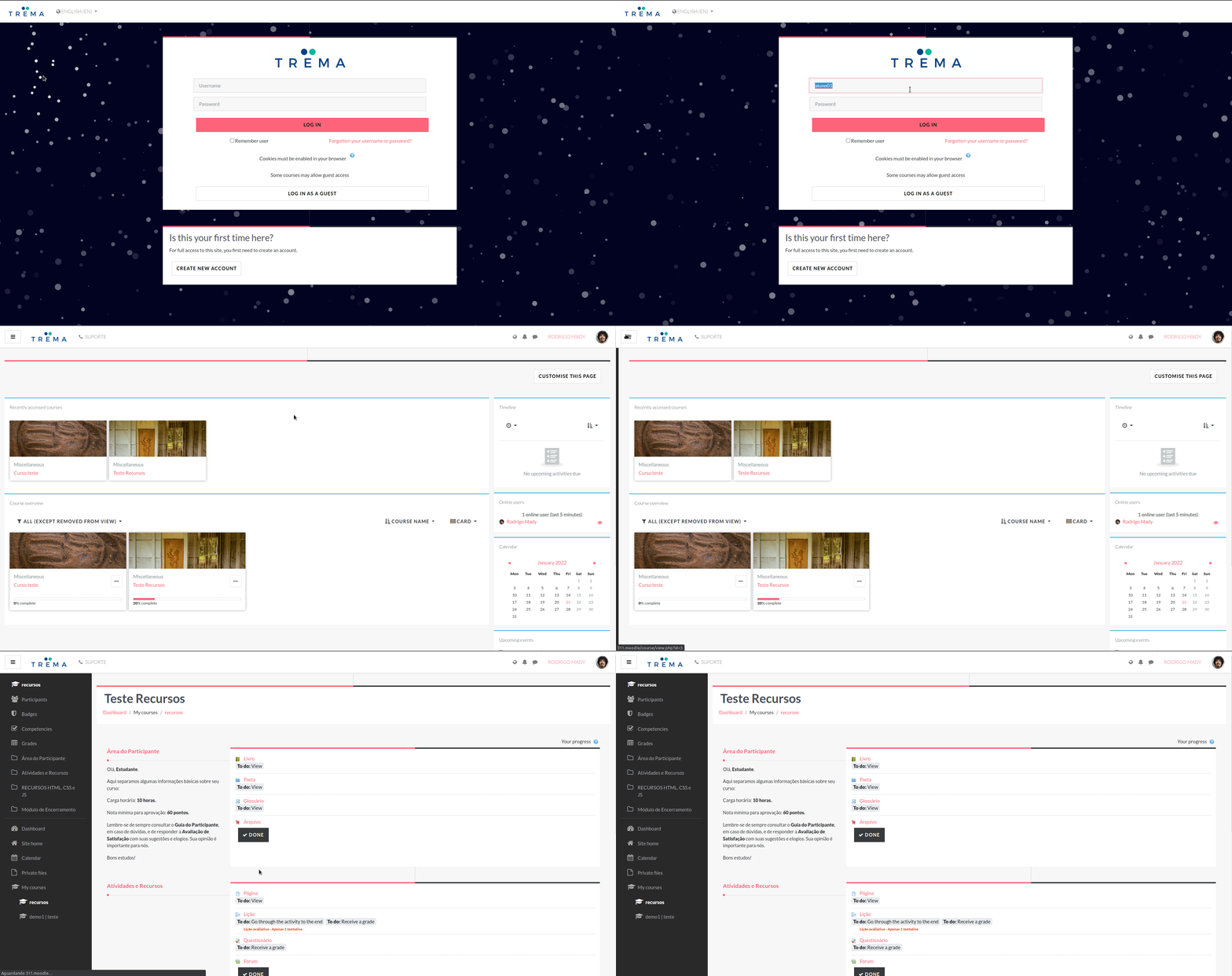
The Trema theme focused on simplicity, usability and beauty. To achieve this, we work hard to make it clean and easy to use for everyone. The main goal for this theme is to have it provide the basics you need for both your Moodle LMS and information/advertising/marketing without needing a separate website.
Trema Features:
- Based on the boost theme: So it will continue to be compatible with Moodle LMS well into the future.
- Customizable frontpage. You can change the image banner, create up to six beautiful cards with custom content and add custom HTML content with no restrictions.
- Customize the login page: Add your own background image.
- Leverages Bootstrap to make the theme fully responsive.
- Highly customizable footer.
- Special footer area blocks used by the site administrator.
- The colour scheme can be changed in the theme settings.
- 15 different font families to choose from for your site base font, front page banner title and the headings.
- Customizable Primary Navigation including support for FilterCodes filters.
- Admin panel on the Dashboard page, so that they can see information about your Moodle site in real time.
Requirements
This theme requires Moodle LMS 4.0+ from https://moodle.org/.
Download Trema for Moodle LMS
The most recent STABLE release of Trema for Moodle LMS is available from:
https://moodle.org/plugins/theme_trema
The most recent DEVELOPMENT release can be found at:
https://github.com/trema-tech/moodle-theme_trema
Installation
Ensure you have a supported version of Moodle LMS as stated above in Requirements. This is necessary as the theme relies on underlying core code.
Install the theme, like any other theme, to the following folder:
/theme/trema
See https://docs.moodle.org/en/Installing_plugins for details on installing Moodle plugins.
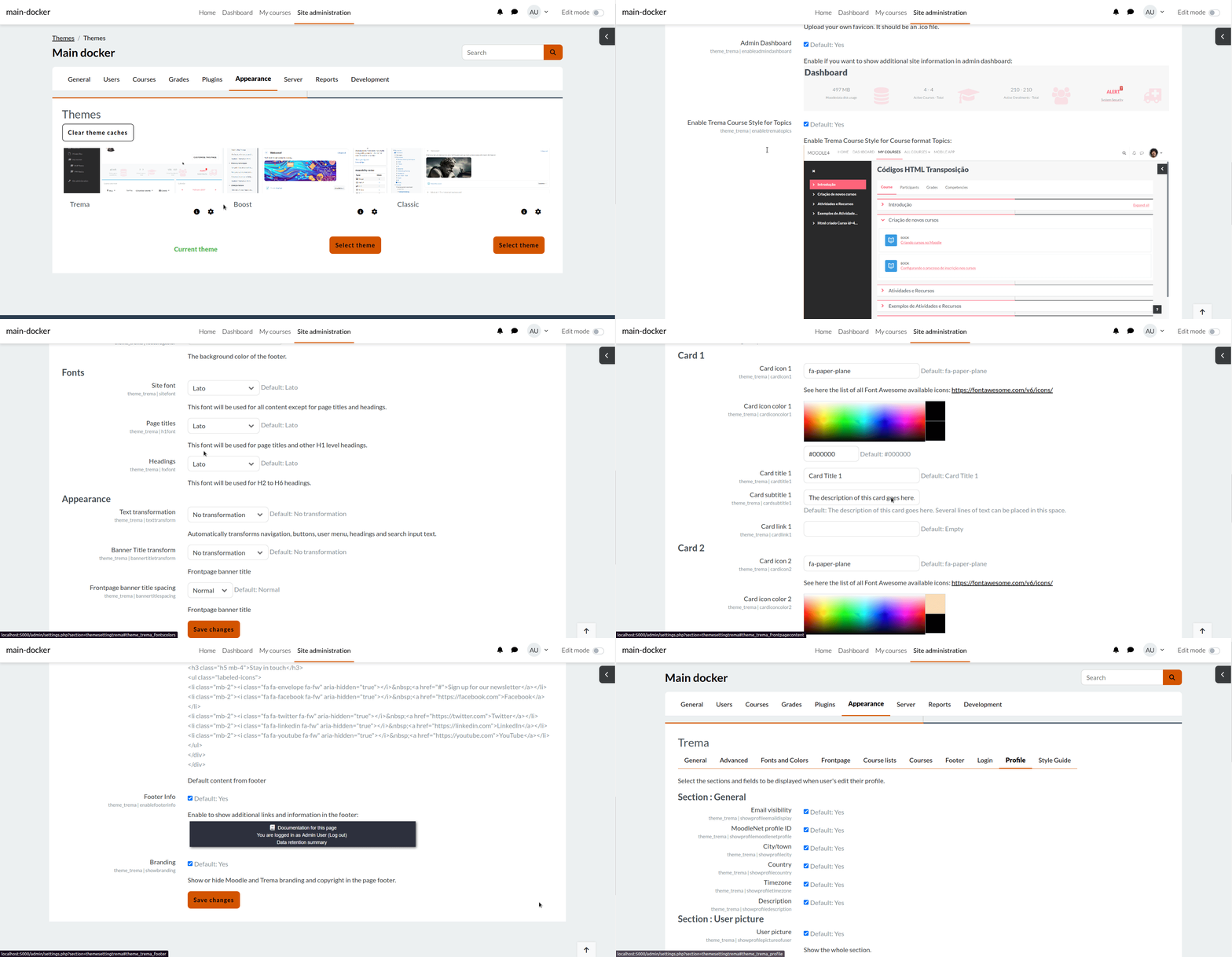
To activate the theme, navigate to Site Administration > Appearance > Themes (section) > Theme selector. In recent versions of Moodle LMS, you need only locate the Trema theme and click the associated Use Theme button.
Usage
IMPORTANT: This STABLE release has been tested on many Moodle sites. Although we expect everything to work, if you find a problem, please help by reporting it in the Bug Tracker.
You can customize the theme by navigating to Site Administration > Appearance > Themes (section) > Trema
In addition, you can customize additional settings by overriding SCSS variables in the theme's settings. See the complete list.
Updating
There are no special considerations required for updating the plugin.
Note: The theme will not be upgradable from within Moodle LMS if you installed it using Git. To enable upgrading, simply delete the .git folder in the /theme/trema/ directory.
Uninstallation
Before you can uninstall Trema, be sure to switch to a different theme.
Then uninstall the theme by navigating to Site Administration > Plugins > Plugins (section) > Plugins Overview. Scroll down to the Themes section and Uninstall. If you don't see the uninstall link, it is because you did not first switch Moodle LMS to a different theme. Follow the prompts to complete the uninstallation process. Note that you may also need to manually delete the following folder if your web server does not have the required permissions:
/theme/trema
Note that, once uninstalled, any customizations that were part of the Trema theme will no longer be displayed.
Limitations
There are no known limitations at this time.
Language Support
This plugin includes support for the English language.
However, it has been translated into about 20 other languages in AMOS by the Moodle community. If you need a different language that is not yet supported, please feel free to contribute using the Moodle AMOS Translation Toolkit.
This plugin has not been tested for right-to-left (RTL) language support although it has been used successfully in languages like Arabic.
FAQ
Answers to Frequently Asked Questions
IMPORTANT: Although we expect everything to work, this release has not been fully tested in every possible situation. If you find a problem, please help by reporting it in the Bug Tracker.
Are there any security considerations?
There are no known security considerations at this time.
How can I get answers to other questions?
Got a burning question that is not covered here? If you can't find your answer, submit your question in the Moodle forums or open a new issue on Github at:
https://github.com/trema-tech/moodle-theme_trema/issues
Contributors
Rodrigo Mady - Lead Developer/Maintainer | Moodle profile | GitHub
Michael Milette - Developer/Maintainer - TNG Consulting Inc. | Moodle profile | GItHub
Big thank you to everyone who has contributed to the development of Trema over the years.
Thank you also to all the people who have requested features, tested and reported bugs.
Motivation for this theme
The development of this theme was motivated by our own experience in Moodle LMS development, features requested by our clients and topics discussed in the Moodle forums.
License
Copyright © 2019-2024 Rodrigo Mady and TNG Consulting Inc.
This file is part of Moodle - http://moodle.org/
Moodle is free software: you can redistribute it and/or modify
it under the terms of the GNU General Public License as published by
the Free Software Foundation, either version 3 of the License, or
(at your option) any later version.
Moodle is distributed in the hope that it will be useful,
but WITHOUT ANY WARRANTY; without even the implied warranty of
MERCHANTABILITY or FITNESS FOR A PARTICULAR PURPOSE. See the
GNU General Public License for more details.
You should have received a copy of the GNU General Public License
along with Moodle. If not, see http://www.gnu.org/licenses/.
Donate
Please donate to help us to improve Theme Trema:

4.4.0.0 (2024042200)
4.4.0.0
Plugin type: Themes
Frankenstyle component name: theme_trema
Version build number: 2024042200
Version release name: 4.4.0.0
Maturity: Stable
Supported Moodle versions: 4.0, 4.1, 4.2, 4.3, 4.4
Repository URL (Git): https://github.com/trema-tech/moodle-theme_trema
Repository branch:
Repository tag: 4.4.0.0
Issue/bug tracker URL: https://github.com/trema-tech/moodle-theme_trema/issues
Trema Theme for Moodle LMS

Table of Contents
- Trema Theme for Moodle LMS
- Table of Contents
- Basic Overview
- Requirements
- Download Trema for Moodle LMS
- Installation
- Usage
- Updating
- Uninstallation
- Limitations
- Language Support
- FAQ
- Motivation for this theme
- License
- Donate
Basic Overview
The Trema theme focused on simplicity, usability and beauty. To achieve this, we work hard to make it clean and easy to use for everyone. The main goal for this theme is to have it provide the basics you need for both your Moodle LMS and information/advertising/marketing without needing a separate website.
Trema Features:
- Based on the boost theme: So it will continue to be compatible with Moodle LMS well into the future.
- Customizable frontpage. You can change the image banner, create up to six beautiful cards with custom content and add custom HTML content with no restrictions.
- Customize the login page: Add your own background image.
- Leverages Bootstrap to make the theme fully responsive.
- Highly customizable footer.
- Special footer area blocks used by the site administrator.
- The colour scheme can be changed in the theme settings.
- 15 different font families to choose from for your site base font, front page banner title and the headings.
- Customizable Primary Navigation including support for FilterCodes filters.
- Admin panel on the Dashboard page, so that they can see information about your Moodle site in real time.
Requirements
This theme requires Moodle LMS 4.0+ from https://moodle.org/.
Download Trema for Moodle LMS
The most recent STABLE release of Trema for Moodle LMS is available from:
https://moodle.org/plugins/theme_trema
The most recent DEVELOPMENT release can be found at:
https://github.com/trema-tech/moodle-theme_trema
Installation
Ensure you have a supported version of Moodle LMS as stated above in Requirements. This is necessary as the theme relies on underlying core code.
Install the theme, like any other theme, to the following folder:
/theme/trema
See https://docs.moodle.org/en/Installing_plugins for details on installing Moodle plugins.
To activate the theme, navigate to Site Administration > Appearance > Themes (section) > Theme selector. In recent versions of Moodle LMS, you need only locate the Trema theme and click the associated Use Theme button.
Usage
IMPORTANT: This STABLE release has been tested on many Moodle sites. Although we expect everything to work, if you find a problem, please help by reporting it in the Bug Tracker.
You can customize the theme by navigating to Site Administration > Appearance > Themes (section) > Trema
In addition, you can customize additional settings by overriding SCSS variables in the theme's settings. See the complete list.
Updating
There are no special considerations required for updating the plugin.
Note: The theme will not be upgradable from within Moodle LMS if you installed it using Git. To enable upgrading, simply delete the .git folder in the /theme/trema/ directory.
Uninstallation
Before you can uninstall Trema, be sure to switch to a different theme.
Then uninstall the theme by navigating to Site Administration > Plugins > Plugins (section) > Plugins Overview. Scroll down to the Themes section and Uninstall. If you don't see the uninstall link, it is because you did not first switch Moodle LMS to a different theme. Follow the prompts to complete the uninstallation process. Note that you may also need to manually delete the following folder if your web server does not have the required permissions:
/theme/trema
Note that, once uninstalled, any customizations that were part of the Trema theme will no longer be displayed.
Limitations
There are no known limitations at this time.
Language Support
This plugin includes support for the English language.
However, it has been translated into about 20 other languages in AMOS by the Moodle community. If you need a different language that is not yet supported, please feel free to contribute using the Moodle AMOS Translation Toolkit.
This plugin has not been tested for right-to-left (RTL) language support although it has been used successfully in languages like Arabic.
FAQ
Answers to Frequently Asked Questions
IMPORTANT: Although we expect everything to work, this release has not been fully tested in every possible situation. If you find a problem, please help by reporting it in the Bug Tracker.
Are there any security considerations?
There are no known security considerations at this time.
How can I get answers to other questions?
Got a burning question that is not covered here? If you can't find your answer, submit your question in the Moodle forums or open a new issue on Github at:
https://github.com/trema-tech/moodle-theme_trema/issues
Contributors
Rodrigo Mady - Lead Developer/Maintainer | Moodle profile | GitHub
Michael Milette - Developer/Maintainer - TNG Consulting Inc. | Moodle profile | GItHub
Big thank you to everyone who has contributed to the development of Trema over the years.
Thank you also to all the people who have requested features, tested and reported bugs.
Motivation for this theme
The development of this theme was motivated by our own experience in Moodle LMS development, features requested by our clients and topics discussed in the Moodle forums.
License
Copyright © 2019-2024 Rodrigo Mady and TNG Consulting Inc.
This file is part of Moodle - http://moodle.org/
Moodle is free software: you can redistribute it and/or modify
it under the terms of the GNU General Public License as published by
the Free Software Foundation, either version 3 of the License, or
(at your option) any later version.
Moodle is distributed in the hope that it will be useful,
but WITHOUT ANY WARRANTY; without even the implied warranty of
MERCHANTABILITY or FITNESS FOR A PARTICULAR PURPOSE. See the
GNU General Public License for more details.
You should have received a copy of the GNU General Public License
along with Moodle. If not, see http://www.gnu.org/licenses/.
Donate
Please donate to help us improve Theme Trema:
4.3.0.0 (2023111400)
4.3.0.0
Plugin type: Themes
Frankenstyle component name: theme_trema
Version build number: 2023111400
Version release name: 4.3.0.0
Maturity: Stable
Supported Moodle versions: 4.1, 4.2, 4.3
Repository URL (Git): https://github.com/trema-tech/moodle-theme_trema
Repository branch:
Repository tag: 4.3.0.0
Issue/bug tracker URL: https://github.com/trema-tech/moodle-theme_trema/issues
The "Trema" Moodle Theme
The theme trema is focused in usability and beauty.
In order to acheive this, our developers worked hard to
make it clean and easy to use for everyone.
The main goal for this theme is that the Moodle site will not need
another site for information/advertising/marketing.
Nice features in trema:
- It's based in the boost theme, so it will continue to be compatible with Moodle
for a long time. - The frontpage is fully customized. It's possible to change the image
banner. You can create up to six beautiful cards with custom contents and
you can add custom HTML content with no restrictions. - The login page is awesome with Particles lib.
- We really use Bootstrap to make the theme fully responsive.
- The footer is highly customizable and we have an exclusive admin area
block that can be seen and accessed only by the site administrator. - Thinking a little more about the administrators we made the admin
dashboard area, so that they can see in real time some data about their Moodle. - The colours scheme can be changed in the theme settings.
Theme Trema release 4.3.0.0:
- Add Michael Milette as maintainer lol
- Fix minors bugs in the layout of login, badges, secondary navigation margin, login username placeholder and some minors
- Fix minors bugs in code checker
- Fix CSS style lint errors
- Add settings for body background color
- #168: Fix status access for environment issues
- #173: Fixed deprecation of user_preference_allow_ajax_update
- #163: Fixed css on age of consent verification.
- #150: Fixed primary menu vertial alignment.
- #140: Fixed alignment of search form in Site Administration.
Developed and maintained by
Rodrigo Mady
Moodle profile: https://moodle.org/user/profile.php?id=2435964
Web profile: https://github.com/rmady
Michael Milette
Moodle profile: https://moodle.org/user/profile.php?id=1615960
Web profile: https://github.com/michael-milette
Support
As Trema is licensed under the GNU GPLv3 License it comes with NO support. So if you need some help
talk to us in 'Moodle profile' in 'Developed and maintained by' above and we can discuss some improvements.
To inform errors access Github Issues.
Installation
Ensure you have the version of Moodle as stated above in 'Required version of Moodle'. This is
necessary as the theme relies on underlying core code.
Move the folder trema to /theme/ folder from your Moodle installation.
Access the Moodle Administration page (/admin) for do the necessary updates in your database.
Git
Download the stable version of theme in:
git clone https://github.com/trema-tech/moodle-theme_trema trema
For uninstalling trema you must change the theme. And in /theme/ remove the folder trema.
See the demo site
A demo site showing all available features of Theme Trema.
Documentation
Documentation is available in Theme Trema.
Particles.js is deprecated!
Trema will no longer support particles in version 4.4.
Donate
Please, donate for helping us to improve Theme Trema:
https://www.paypal.com/donate/?hosted_button_id=6FBZMX8PFPS3Y&source=qr
4.1.0.0 (2023042100)
4.1.0.0
Plugin type: Themes
Frankenstyle component name: theme_trema
Version build number: 2023042100
Version release name: 4.1.0.0
Maturity: Stable
Supported Moodle versions: 4.1, 4.2
Repository URL (Git): https://github.com/trema-tech/moodle-theme_trema
Repository branch:
Repository tag: 4.1.0.0
Issue/bug tracker URL: https://github.com/trema-tech/moodle-theme_trema/issues
The "Trema" Moodle Theme
The theme trema is focused on usability and beauty.
In order to achieve this, our developers worked hard to
make it clean and easy to use for everyone.
The main goal for this theme is that the Moodle site will not need
another site for information/advertising/marketing.
Nice features in trema:
- It's based on the boost theme, so it will continue to be compatible with Moodle
for a long time. - The frontpage is fully customized. It's possible to change the image
banner. You can create up to six beautiful cards with custom contents and
you can add custom HTML content with no restrictions. - The login page is awesome with Particles lib.
- We really use Bootstrap to make the theme fully responsive.
- The footer is highly customizable and we have an exclusive admin area
block that can be seen and accessed only by the site administrator. - Thinking a little more about the administrators we made the admin
dashboard area, so that they can see in real-time some data about their Moodle. - The colour scheme can be changed in the theme settings.
Developed and maintained by
Rodrigo Mady
Moodle profile: https://moodle.org/user/profile.php?id=2435964
Web profile: https://github.com/rmady
Support
As Trema is licensed under the GNU GPLv3 License it comes with NO support. So if you need some help
talk to us in 'Moodle profile' in 'Developed and maintained by' above and we can discuss some improvements.
To inform errors access Github Issues.
Installation
Ensure you have the version of Moodle as stated above in 'Required version of Moodle'. This is
necessary as the theme relies on underlying core code.
Move the folder trema to /theme/ folder from your Moodle installation.
Access the Moodle Administration page (/admin) for do the necessary updates in your database.
Git
Download the stable version of theme in:
git clone https://github.com/trema-tech/moodle-theme_trema trema
For uninstalling trema you must change the theme. And in /theme/ remove the folder trema.
See the demo site
A demo site showing all available features of Theme Trema.
Documentation
Documentation is available in Theme Trema.
Particles.js
The theme trema use the particles.js a lightweight
JavaScript library for creating particles in login.
Donate
Please, donate for helping us to improve Theme Trema:
https://www.paypal.com/donate/?hosted_button_id=6FBZMX8PFPS3Y&source=qr
4.0.0.2 (2022082500)
4.0.0.2
Plugin type: Themes
Frankenstyle component name: theme_trema
Version build number: 2022082500
Version release name: 4.0.0.2
Maturity: Stable
Supported Moodle versions: 4.0
Repository URL (Git): https://github.com/trema-tech/moodle-theme_trema
Repository branch:
Repository tag: 4.0.0.2
Issue/bug tracker URL: https://github.com/trema-tech/moodle-theme_trema/issues
The "Trema" Moodle Theme
The theme trema is focused in usability and beauty.
In order to acheive this, our developers worked hard to
make it clean and easy to use for everyone.
The main goal for this theme is that the Moodle site will not need
another site for information/advertising/marketing.
Nice features in trema:
- It's based in the boost theme, so it will continue to be compatible with Moodle
for a long time. - The frontpage is fully customized. It's possible to change the image
banner. You can create up to six beautiful cards with custom contents and
you can add custom HTML content with no restrictions. - The login page is awesome with Particles lib.
- We really use Bootstrap to make the theme fully responsive.
- The footer is highly customizable and we have an exclusive admin area
block that can be seen and accessed only by the site administrator. - Thinking a little more about the administrators we made the admin
dashboard area so that they can see in real-time some data about their Moodle. - The colour scheme can be changed in the theme settings.
Theme Trema release 4.0.0.2
- Add purge caches to dark overlay and fix default value for full width enroll card settings
- Fix SCSS indentation and PHP docs
- Fix 137: Corrected some typos in the English language file (@michael-milette)
- Fix 124: Added option to show course description on enrolment page (@michael-milette)
- Fix-103: New setting to show categories on front page course cards (@michael-milette)
- Fix-134: Style Guide Password field now of type password (@michael-milette)
- Added class aalink to coursenamelink in coursecards (@michael-milette and @dermuck)
- Fix_#105: Fixed accessibility issues with course image in coursecards (@michael-milette and @dermuck)
- Fix-101 Fixed link for Dashboard Alert security icon (@michael-milette)
- Fix-125: Added option to add/remove shading on front page banner (@michael-milette)
- Fix-109: Added setting option for no background on login page (@michael-milette)
- Fix-91: Added ability to disable frontpage banner/carousel (@michael-milette)
- Fix-86: Frontpage now has hidden H1 only read by screen readers (@michael-milette)
- Fix-122: defaultfrontpagebody not included when empty (@michael-milette)
Developed and maintained by
Rodrigo Mady
Moodle profile: https://moodle.org/user/profile.php?id=2435964
Web profile: https://github.com/rmady
Trevor Furtado
Moodle profile: https://moodle.org/user/profile.php?id=1192335
Web profile: https://github.com/trevorfurtado
Support
As Trema is licensed under the GNU GPLv3 License it comes with NO support. So if you need some help
talk to us in 'Moodle profile' in 'Developed and maintained by' above and we can discuss some improvements.
To inform errors access Github Issues.
Installation
Ensure you have the version of Moodle as stated above in 'Required version of Moodle'. This is
necessary as the theme relies on underlying core code.
Move the folder trema to /theme/ folder from your Moodle installation.
Access the Moodle Administration page (/admin) for do the necessary updates in your database.
Git
Download the stable version of theme in:
git clone https://github.com/trema-tech/moodle-theme_trema trema
For uninstalling trema you must change the theme. And in /theme/ remove the folder trema.
See the demo site
A demo site showing all available features of Theme Trema.
Documentation
Documentation is available in Theme Trema.
Particles.js
The theme trema uses the particles.js a lightweight
JavaScript library for creating particles in login.
Donate
Please, donate for helping us to improve Theme Trema:
https://www.paypal.com/donate/?hosted_button_id=6FBZMX8PFPS3Y&source=qr
4.0.0.1 (2022071900)
4.0.0.1
Plugin type: Themes
Frankenstyle component name: theme_trema
Version build number: 2022071900
Version release name: 4.0.0.1
Maturity: Stable
Supported Moodle versions: 4.0
Repository URL (Git): https://github.com/trema-tech/moodle-theme_trema
Repository branch:
Repository tag: 4.0.0.1
Issue/bug tracker URL: https://github.com/trema-tech/moodle-theme_trema/issues
The "Trema" Moodle Theme
The theme trema is focused in usability and beauty.
In order to acheive this, our developers worked hard to
make it clean and easy to use for everyone.
The main goal for this theme is that the Moodle site will not need
another site for information/advertising/marketing.
Nice features in trema:
- It's based in the boost theme, so it will continue to be compatible with Moodle
for a long time. - The frontpage is fully customized. It's possible to change the image
banner. You can create up to six beautiful cards with custom contents and
you can add custom HTML content with no restrictions. - The login page is awesome with Particles lib.
- We really use Bootstrap to make the theme fully responsive.
- The footer is highly customizable and we have an exclusive admin area
block that can be seen and accessed only by the site administrator. - Thinking a little more about the administrators we made the admin
dashboard area, so that they can see in real time some data about their Moodle. - The colours scheme can be changed in the theme settings.
Developed and maintained by
Rodrigo Mady
Moodle profile: https://moodle.org/user/profile.php?id=2435964
Web profile: https://github.com/rmady
Trevor Furtado
Moodle profile: https://moodle.org/user/profile.php?id=1192335
Web profile: https://github.com/trevorfurtado
Support
As Trema is licensed under the GNU GPLv3 License it comes with NO support. So if you need some help
talk to us in 'Moodle profile' in 'Developed and maintained by' above and we can discuss some improvements.
To inform errors access Github Issues.
Installation
Ensure you have the version of Moodle as stated above in 'Required version of Moodle'. This is
necessary as the theme relies on underlying core code.
Move the folder trema to /theme/ folder from your Moodle installation.
Access the Moodle Administration page (/admin) for do the necessary updates in your database.
Git
Download the stable version of theme in:
git clone https://github.com/trema-tech/moodle-theme_trema trema
For uninstalling trema you must change the theme. And in /theme/ remove the folder trema.
See the demo site
A demo site showing all available features of Theme Trema.
Documentation
Documentation is available in Theme Trema.
Particles.js
The theme trema use the particles.js a lightweight
JavaScript library for creating particles in login.
Donate
Please, donate for helping us to improve Theme Trema:
https://www.paypal.com/donate/?hosted_button_id=6FBZMX8PFPS3Y&source=qr
4.0.0.0 (2022050400)
4.0.0.0
Plugin type: Themes
Frankenstyle component name: theme_trema
Version build number: 2022050400
Version release name: 4.0.0.0
Maturity: Stable
Supported Moodle versions: 4.0
Repository URL (Git): https://github.com/trema-tech/moodle-theme_trema
Repository branch:
Repository tag: 4.0.0.0
Issue/bug tracker URL: https://github.com/trema-tech/moodle-theme_trema/issues
The "Trema" Moodle Theme
The theme trema is focused in usability and beauty.
In order to acheive this, our developers worked hard to
make it clean and easy to use for everyone.
The main goal for this theme is that the Moodle site will not need
another site for information/advertising/marketing.
Nice features in trema:
- It's based in the boost theme, so it will continue to be compatible with Moodle for a long time.
- The frontpage is fully customized. It's possible to change the image
banner. You can create up to six beautiful cards with custom contents and
you can add custom HTML content with no restrictions. - The login page is awesome with Particles lib.
- We really use Bootstrap to make the theme fully responsive.
- The footer is highly customizable and we have an exclusive admin area
block that can be seen and accessed only by the site administrator. - Thinking a little more about the administrators we made the admin
dashboard area, so that they can see in real time some data about their Moodle. - The colours scheme can be changed in the theme settings.
Developed and maintained by
Rodrigo Mady
Moodle profile: https://moodle.org/user/profile.php?id=2435964
Web profile: https://github.com/rmady
Trevor Furtado
Moodle profile: https://moodle.org/user/profile.php?id=1192335
Web profile: https://github.com/trevorfurtado
Support
As Trema is licensed under the GNU GPLv3 License it comes with NO support. So if you need some help
talk to us in 'Moodle profile' in 'Developed and maintained by' above and we can discuss some improvements.
To inform errors access Github Issues.
Installation
Ensure you have the version of Moodle as stated above in 'Required version of Moodle'. This is
necessary as the theme relies on underlying core code.
Move the folder trema to /theme/ folder from your Moodle installation.
Access the Moodle Administration page (/admin) for do the necessary updates in your database.
Git
Download the stable version of theme in:
git clone https://github.com/trema-tech/moodle-theme_trema trema
For uninstalling trema you must change the theme. And in /theme/ remove the folder trema.
See the demo site
A demo site showing all available features of Theme Trema.
Documentation
Documentation is available in Theme Trema.
Particles.js
The theme trema use the particles.js a lightweight
JavaScript library for creating particles in login.
Donate
Please, donate for helping us to improve Theme Trema:
https://www.paypal.com/donate/?hosted_button_id=6FBZMX8PFPS3Y&source=qr
3.11.0.5 (2022012100)
3.11.0.5
Plugin type: Themes
Frankenstyle component name: theme_trema
Version build number: 2022012100
Version release name: 3.11.0.5
Maturity: Stable
Supported Moodle versions: 3.10, 3.11, 3.9
Repository URL (Git): https://github.com/trema-tech/moodle-theme_trema
Repository branch:
Repository tag: 3.11.0.5
Issue/bug tracker URL: https://github.com/trema-tech/moodle-theme_trema/issues
The "Trema" Moodle Theme
The theme trema is focused in usability and beauty.
In order to acheive this, our developers worked hard to
make it clean and easy to use for everyone.
The main goal for this theme is that the Moodle site will not need
another site for information/advertising/marketing.
Nice features in release 3.11.0.5:
- add setting to display create account box first - by @danielneis
- Fix-80,83,92,93 - Fix language issues on front page - by @michael-milette
- Fix-95: Footer is now processed through Moodle filters - by @michael-milette
- Fix-86: Frontpage now has hidden H1 only read by screen readers - by @michael-milette
- Fix minors bugs in layout
Nice features in trema:
- It's based in the boost theme, so it will continue to be compatible with Moodle
for a long time. - The frontpage is fully customized. It's possible to change the image
banner. You can create up to six beautiful cards with custom contents and
you can add custom HTML content with no restrictions. - The login page is awesome with Particles lib.
- We really use Bootstrap to make the theme fully responsive.
- The footer is highly customizable and we have an exclusive admin area
block that can be seen and accessed only by the site administrator. - Thinking a little more about the administrators we made the admin
dashboard area, so that they can see in real time some data about their Moodle. - The colours scheme can be changed in the theme settings.
Developed and maintained by
Rodrigo Mady
Moodle profile: https://moodle.org/user/profile.php?id=2435964
Web profile: https://github.com/rmady
Trevor Furtado
Moodle profile: https://moodle.org/user/profile.php?id=1192335
Web profile: https://github.com/trevorfurtado
Support
As Trema is licensed under the GNU GPLv3 License it comes with NO support. So if you need some help
talk to us in 'Moodle profile' in 'Developed and maintained by' above and we can discuss some improvements.
To inform errors access Github Issues.
Installation
Ensure you have the version of Moodle as stated above in 'Required version of Moodle'. This is
necessary as the theme relies on underlying core code.
Move the folder trema to /theme/ folder from your Moodle installation.
Access the Moodle Administration page (/admin) for do the necessary updates in your database.
Git
Download the stable version of theme in:
git clone https://github.com/trema-tech/moodle-theme_trema trema
For uninstalling trema you must change the theme. And in /theme/ remove the folder trema.
See the demo site
A demo site showing all available features of Theme Trema.
Documentation
Documentation is available in Theme Trema.
Particles.js
The theme trema use the particles.js a lightweight
JavaScript library for creating particles in login.
3.11.0.4 (2021110700)
3.11.0.4
Plugin type: Themes
Frankenstyle component name: theme_trema
Version build number: 2021110700
Version release name: 3.11.0.4
Maturity: Stable
Supported Moodle versions: 3.10, 3.11, 3.9
Repository URL (Git): https://github.com/trema-tech/moodle-theme_trema
Repository branch:
Repository tag: 3.11.0.4
Issue/bug tracker URL: https://github.com/trema-tech/moodle-theme_trema/issues
The "Trema" Moodle Theme
The super @michael-milette improvements in Trema.
- Fix-81: Enable compatibility of custom_menu_flat in Moodle core
- Improve layout for login page with navbar
- Added .gitignore file
- Changed site name on Login page to H1
- Language menu is now accessible and added on login page
- Added tooltip to language selection icon
- Dropdown arrow now in correct place for search
- Particles.json now read directly instead of via http
- Fix search icon on mobile devices and accessibility issues
- Enable compatibility of custom menu with Moodle core
- Languages in dropdown menu now includes lang attribute
The theme trema is focused in usability and beauty.
In order to acheive this, our developers worked hard to
make it clean and easy to use for everyone.
The main goal for this theme is that the Moodle site will not need
another site for information/advertising/marketing.
Nice features in trema:
- It's based in the boost theme, so it will continue to be compatible with Moodle
for a long time. - The frontpage is fully customized. It's possible to change the image
banner. You can create up to six beautiful cards with custom contents and
you can add custom HTML content with no restrictions. - The login page is awesome with Particles lib.
- We really use Bootstrap to make the theme fully responsive.
- The footer is highly customizable and we have an exclusive admin area
block that can be seen and accessed only by the site administrator. - Thinking a little more about the administrators we made the admin
dashboard area, so that they can see in real time some data about their Moodle. - The colours scheme can be changed in the theme settings.
Developed and maintained by
Rodrigo Mady
Moodle profile: https://moodle.org/user/profile.php?id=2435964
Web profile: https://github.com/rmady
Trevor Furtado
Moodle profile: https://moodle.org/user/profile.php?id=1192335
Web profile: https://github.com/trevorfurtado
Support
As Trema is licensed under the GNU GPLv3 License it comes with NO support. So if you need some help
talk to us in 'Moodle profile' in 'Developed and maintained by' above and we can discuss some improvements.
To inform errors access Github Issues.
Installation
Ensure you have the version of Moodle as stated above in 'Required version of Moodle'. This is
necessary as the theme relies on underlying core code.
Move the folder trema to /theme/ folder from your Moodle installation.
Access the Moodle Administration page (/admin) for do the necessary updates in your database.
Git
Download the stable version of theme in:
git clone https://github.com/trema-tech/moodle-theme_trema trema
For uninstalling trema you must change the theme. And in /theme/ remove the folder trema.
See the demo site
A demo site showing all available features of Theme Trema.
Documentation
Documentation is available in Theme Trema.
Particles.js
The theme trema use the particles.js a lightweight
JavaScript library for creating particles in login.
3.11.0.3 (2021102000)
3.11.0.3
Plugin type: Themes
Frankenstyle component name: theme_trema
Version build number: 2021102000
Version release name: 3.11.0.3
Maturity: Stable
Supported Moodle versions: 3.10, 3.11, 3.9
Repository URL (Git): https://github.com/trema-tech/moodle-theme_trema
Repository branch:
Repository tag: 3.11.0.3
Issue/bug tracker URL: https://github.com/trema-tech/moodle-theme_trema/issues
The "Trema" Moodle Theme
The theme trema is focused in usability and beauty.
In order to acheive this, our developers worked hard to
make it clean and easy to use for everyone.
The main goal for this theme is that the Moodle site will not need
another site for information/advertising/marketing.
Nice features in trema:
- It's based in the boost theme, so it will continue to be compatible with Moodle
for a long time. - The frontpage is fully customized. It's possible to change the image
banner. You can create up to six beautiful cards with custom contents and
you can add custom HTML content with no restrictions. - The login page is awesome with Particles lib.
- We really use Bootstrap to make the theme fully responsive.
- The footer is highly customizable and we have an exclusive admin area
block that can be seen and accessed only by the site administrator. - Thinking a little more about the administrators we made the admin
dashboard area, so that they can see in real time some data about their Moodle. - The colours scheme can be changed in the theme settings.
New features in Trema:
- fix-56 Login form: 'Log in using your account on:' should be h3, not h6'
- Made 'Skip to content' link visible on focus.
- Added link to Moodle docs in footer.
- Fix for Moodle version requirement.
Developed and maintained by
Rodrigo Mady
Moodle profile: https://moodle.org/user/profile.php?id=2435964
Web profile: https://github.com/rmady
Trevor Furtado
Moodle profile: https://moodle.org/user/profile.php?id=1192335
Web profile: https://github.com/trevorfurtado
Support
As Trema is licensed under the GNU GPLv3 License it comes with NO support. So if you need some help
talk to us in 'Moodle profile' in 'Developed and maintained by' above and we can discuss some improvements.
To inform errors access Github Issues.
Installation
Ensure you have the version of Moodle as stated above in 'Required version of Moodle'. This is
necessary as the theme relies on underlying core code.
Move the folder trema to /theme/ folder from your Moodle installation.
Access the Moodle Administration page (/admin) for do the necessary updates in your database.
Git
Download the stable version of theme in:
git clone https://github.com/trema-tech/moodle-theme_trema trema
For uninstalling trema you must change the theme. And in /theme/ remove the folder trema.
See the demo site
A demo site showing all available features of Theme Trema.
Documentation
Documentation is available in Theme Trema.
Particles.js
The theme trema use the particles.js a lightweight
JavaScript library for creating particles in login.
3.11.0.2 (2021080900)
3.11.0.2
Plugin type: Themes
Frankenstyle component name: theme_trema
Version build number: 2021080900
Version release name: 3.11.0.2
Maturity: Stable
Supported Moodle versions: 3.10, 3.11, 3.9
Repository URL (Git): https://github.com/trema-tech/moodle-theme_trema
Repository branch:
Repository tag: 3.11.0.2
Issue/bug tracker URL: https://github.com/trema-tech/moodle-theme_trema/issues
The "Trema" Moodle Theme
The theme trema is focused in usability and beauty.
In order to acheive this, our developers worked hard to
make it clean and easy to use for everyone.
The main goal for this theme is that the Moodle site will not need
another site for information/advertising/marketing.
Nice features in trema:
- It's based in the boost theme, so it will continue to be compatible with Moodle
for a long time. - The frontpage is fully customized. It's possible to change the image
banner. You can create up to six beautiful cards with custom contents and
you can add custom HTML content with no restrictions. - The login page is awesome with Particles lib.
- We really use Bootstrap to make the theme fully responsive.
- The footer is highly customizable and we have an exclusive admin area
block that can be seen and accessed only by the site administrator. - Thinking a little more about the administrators we made the admin
dashboard area, so that they can see in real time some data about their Moodle. - The colours scheme can be changed in the theme settings.
Developed and maintained by
Fábio Rocha
Rodrigo Mady
Moodle profile: https://moodle.org/user/profile.php?id=2435964
Web profile: https://github.com/rmady
Trevor Furtado
Moodle profile: https://moodle.org/user/profile.php?id=1192335
Web profile: https://github.com/trevorfurtado
Support
As Trema is licensed under the GNU GPLv3 License it comes with NO support. So if you need some help
talk to us in 'Moodle profile' in 'Developed and maintained by' above and we can discuss some improvements.
To inform errors access Github Issues.
Installation
Ensure you have the version of Moodle as stated above in 'Required version of Moodle'. This is
necessary as the theme relies on underlying core code.
Move the folder trema to /theme/ folder from your Moodle installation.
Access the Moodle Administration page (/admin) for do the necessary updates in your database.
Git
Download the stable version of theme in:
git clone https://github.com/trema-tech/moodle-theme_trema trema
For uninstalling trema you must change the theme. And in /theme/ remove the folder trema.
See the demo site
A demo site showing all available features of Theme Trema.
Documentation
Documentation is available in Theme Trema.
Particles.js
The theme trema use the particles.js a lightweight
JavaScript library for creating particles in login.
3.11.0.1 (2021060900)
3.11.0.1
Plugin type: Themes
Frankenstyle component name: theme_trema
Version build number: 2021060900
Version release name: 3.11.0.1
Maturity: Stable
Supported Moodle versions: 3.10, 3.11, 3.9
Repository URL (Git): https://github.com/trema-tech/moodle-theme_trema
Repository branch:
Repository tag: 3.11.0.1
Issue/bug tracker URL: https://github.com/trema-tech/moodle-theme_trema/issues
The "Trema" Moodle Theme
The theme trema is focused in usability and beauty.
In order to acheive this, our developers worked hard to
make it clean and easy to use for everyone.
The main goal for this theme is that the Moodle site will not need
another site for information/advertising/marketing.
Nice features in trema:
- It's based in the boost theme, so it will continue to be compatible with Moodle
for a long time. - The frontpage is fully customized. It's possible to change the image
banner. You can create up to six beautiful cards with custom contents and
you can add custom HTML content with no restrictions. - The login page is awesome with Particles lib.
- We really use Bootstrap to make the theme fully responsive.
- The footer is highly customizable and we have an exclusive admin area
block that can be seen and accessed only by the site administrator. - Thinking a little more about the administrators we made the admin
dashboard area, so that they can see in real time some data about their Moodle. - The colours scheme can be changed in the theme settings.
Developed and maintained by
Rodrigo Mady
Moodle profile: https://moodle.org/user/profile.php?id=2435964
Web profile: https://github.com/rmady
Trevor Furtado
Moodle profile: https://moodle.org/user/profile.php?id=1192335
Web profile: https://github.com/trevorfurtado
Support
As Trema is licensed under the GNU GPLv3 License it comes with NO support. So if you need some help
talk to us in 'Moodle profile' in 'Developed and maintained by' above and we can discuss some improvements.
To inform errors access Github Issues.
Release Notes
Theme Trema release 3.11.0.1:
- Add new settings for enable format topics style;
- Fix bug in navbar logo and name;
- Fix minors bugs in mobile.
Installation
Ensure you have the version of Moodle as stated above in 'Required version of Moodle'. This is
necessary as the theme relies on underlying core code.
Move the folder trema to /theme/ folder from your Moodle installation.
Access the Moodle Administration page (/admin) for do the necessary updates in your database.
Git
Download the stable version of theme in:
git clone https://github.com/trema-tech/moodle-theme_trema trema
For uninstalling trema you must change the theme. And in /theme/ remove the folder trema.
See the demo site
A demo site showing all available features of Theme Trema.
Documentation
Documentation is available in Theme Trema.
Particles.js
The theme trema use the particles.js a lightweight
JavaScript library for creating particles in login.
3.11.0.0 (2021052701)
3.11.0.0
Plugin type: Themes
Frankenstyle component name: theme_trema
Version build number: 2021052701
Version release name: 3.11.0.0
Maturity: Stable
Supported Moodle versions: 3.10, 3.11, 3.9
Repository URL (Git): https://github.com/trema-tech/moodle-theme_trema
Repository branch:
Repository tag: 3.11.0.0
Issue/bug tracker URL: https://github.com/trema-tech/moodle-theme_trema/issues
The "Trema" Moodle Theme
The theme trema is focused in usability and beauty.
In order to acheive this, our developers worked hard to
make it clean and easy to use for everyone.
The main goal for this theme is that the Moodle site will not need
another site for information/advertising/marketing.
Nice features in trema:
- It's based in the boost theme, so it will continue to be compatible with Moodle
for a long time. - The frontpage is fully customized. It's possible to change the image
banner. You can create up to six beautiful cards with custom contents and
you can add custom HTML content with no restrictions. - The login page is awesome with Particles lib.
- We really use Bootstrap to make the theme fully responsive.
- The footer is highly customizable and we have an exclusive admin area
block that can be seen and accessed only by the site administrator. - Thinking a little more about the administrators we made the admin
dashboard area, so that they can see in real time some data about their Moodle. - The colours scheme can be changed in the theme settings.
Developed and maintained by
Rodrigo Mady
Moodle profile: https://moodle.org/user/profile.php?id=2435964
Web profile: https://github.com/rmady
Trevor Furtado
Moodle profile: https://moodle.org/user/profile.php?id=1192335
Web profile: https://github.com/trevorfurtado
Support
As Trema is licensed under the GNU GPLv3 License it comes with NO support. So if you need some help
talk to us in 'Moodle profile' in 'Developed and maintained by' above and we can discuss some improvements.
To inform errors access Github Issues.
Installation
Ensure you have the version of Moodle as stated above in 'Required version of Moodle'. This is
necessary as the theme relies on underlying core code.
Move the folder trema to /theme/ folder from your Moodle installation.
Access the Moodle Administration page (/admin) for do the necessary updates in your database.
Git
Download the stable version of theme in:
git clone https://github.com/trema-tech/moodle-theme_trema trema
For uninstalling trema you must change the theme. And in /theme/ remove the folder trema.
See the demo site
A demo site showing all available features of Theme Trema.
Documentation
Documentation is available in Theme Trema.
Particles.js
The theme trema use the particles.js a lightweight
JavaScript library for creating particles in login.
3.10.0.1 (2021050400)
3.10.0.1
Plugin type: Themes
Frankenstyle component name: theme_trema
Version build number: 2021050400
Version release name: 3.10.0.1
Maturity: Stable
Supported Moodle versions: 3.10, 3.9
Repository URL (Git): https://github.com/trema-tech/moodle-theme_trema
Repository branch:
Repository tag: 3.10.0.1
Issue/bug tracker URL: https://github.com/trema-tech/moodle-theme_trema/issues
The "Trema" Moodle Theme
The theme trema is focused in usability and beauty.
In order to acheive this, our developers worked hard to
make it clean and easy to use for everyone.
The main goal for this theme is that the Moodle site will not need
another site for information/advertising/marketing.
Nice features in trema:
- It's based in the boost theme, so it will continue to be compatible with Moodle
for a long time. - The frontpage is fully customized. It's possible to change the image
banner. You can create up to six beautiful cards with custom contents and
you can add custom HTML content with no restrictions. - The login page is awesome with Particles lib.
- We really use Bootstrap to make the theme fully responsive.
- The footer is highly customizable and we have an exclusive admin area
block that can be seen and accessed only by the site administrator. - Thinking a little more about the administrators we made the admin
dashboard area, so that they can see in real time some data about their Moodle. - The colours scheme can be changed in the theme settings.
Developed and maintained by
Rodrigo Mady
Moodle profile: https://moodle.org/user/profile.php?id=2435964
Web profile: https://github.com/rmady
Trevor Furtado
Moodle profile: https://moodle.org/user/profile.php?id=1192335
Web profile: https://github.com/trevorfurtado
Support
As Trema is licensed under the GNU GPLv3 License it comes with NO support. So if you need some help
talk to us in 'Moodle profile' in 'Developed and maintained by' above and we can discuss some improvements.
To inform errors access Github Issues.
Installation
Ensure you have the version of Moodle as stated above in 'Required version of Moodle'. This is
necessary as the theme relies on underlying core code.
Move the folder trema to /theme/ folder from your Moodle installation.
Access the Moodle Administration page (/admin) for do the necessary updates in your database.
Git
Download the stable version of theme in:
git clone https://github.com/trema-tech/moodle-theme_trema trema
For uninstalling trema you must change the theme. And in /theme/ remove the folder trema.
See the demo site
A demo site showing all available features of Theme Trema.
Documentation
Documentation is available in Theme Trema.
Particles.js
The theme trema use the particles.js a lightweight
JavaScript library for creating particles in login.
3.10.0.0 (2021042600)
3.10.0.0
Plugin type: Themes
Frankenstyle component name: theme_trema
Version build number: 2021042600
Version release name: 3.10.0.0
Maturity: Stable
Supported Moodle versions: 3.10, 3.9
Repository URL (Git): https://github.com/trema-tech/moodle-theme_trema
Repository branch:
Repository tag: 3.10.0.0
Issue/bug tracker URL: https://github.com/trema-tech/moodle-theme_trema/issues
The "Trema" Moodle Theme
The theme trema is focused in usability and beauty.
In order to acheive this, our developers worked hard to
make it clean and easy to use for everyone.
The main goal for this theme is that the Moodle site will not need
another site for information/advertising/marketing.
Nice features in trema:
- It's based in the boost theme, so it will continue to be compatible with Moodle
for a long time. - The frontpage is fully customized. It's possible to change the image
banner. You can create up to six beautiful cards with custom contents and
you can add custom HTML content with no restrictions. - The login page is awesome with Particles lib.
- We really use Bootstrap to make the theme fully responsive.
- The footer is highly customizable and we have an exclusive admin area
block that can be seen and accessed only by the site administrator. - Thinking a little more about the administrators we made the admin
dashboard area, so that they can see in real time some data about their Moodle. - The colours scheme can be changed in the theme settings.
Developed and maintained by
Rodrigo Mady
Moodle profile: https://moodle.org/user/profile.php?id=2435964
Web profile: https://github.com/rmady
Trevor Furtado
Moodle profile: https://moodle.org/user/profile.php?id=1192335
Web profile: https://github.com/trevorfurtado
Support
As Trema is licensed under the GNU GPLv3 License it comes with NO support. So if you need some help
talk to us in 'Moodle profile' in 'Developed and maintained by' above and we can discuss some improvements.
To inform errors access Github Issues.
Installation
Ensure you have the version of Moodle as stated above in 'Required version of Moodle'. This is
necessary as the theme relies on underlying core code.
Move the folder trema to /theme/ folder from your Moodle installation.
Access the Moodle Administration page (/admin) for do the necessary updates in your database.
Git
Download the stable version of theme in:
git clone https://github.com/trema-tech/moodle-theme_trema trema
For uninstalling trema you must change the theme. And in /theme/ remove the folder trema.
See the demo site
A demo site showing all available features of Theme Trema.
Documentation
Documentation is available in Theme Trema.
Particles.js
The theme trema use the particles.js a lightweight
JavaScript library for creating particles in login.
3.9.0.1 (2020062200)
3.9.0.1
Plugin type: Themes
Frankenstyle component name: theme_trema
Version build number: 2020062200
Version release name: 3.9.0.1
Maturity: Stable
Supported Moodle versions: 3.9
Repository URL (Git): https://github.com/trema-tech/moodle-theme_trema
Repository branch:
Repository tag: 3.9.0.1
Issue/bug tracker URL: https://github.com/trema-tech/moodle-theme_trema/issues
The "Trema" Moodle Theme
The theme trema is focused in usability and beauty.
In order to acheive this, our developers worked hard to
make it clean and easy to use for everyone.
The main goal for this theme is that the Moodle site will not need
another site for information/advertising/marketing.
Nice features in trema:
- It's based in the boost theme, so it will continue to be compatible with Moodle
for a long time. - The frontpage is fully customized. It's possible to change the image
banner. You can create up to six beautiful cards with custom contents and
you can add custom HTML content with no restrictions. - The login page is awesome with Particles lib.
- We really use Bootstrap to make the theme fully responsive.
- The footer is highly customizable and we have an exclusive admin area
block that can be seen and accessed only by the site administrator. - Thinking a little more about the administrators we made the admin
dashboard area, so that they can see in real time some data about their Moodle. - The colours scheme can be changed in the theme settings.
Developed and maintained by
Rodrigo Mady
Moodle profile: https://moodle.org/user/profile.php?id=2435964
Web profile: https://github.com/rmady
Trevor Furtado
Moodle profile: https://moodle.org/user/profile.php?id=1192335
Web profile: https://github.com/trevorfurtado
Support
As Trema is licensed under the GNU GPLv3 License it comes with NO support. So if you need some help
talk to us in 'Moodle profile' in 'Developed and maintained by' above and we can discuss some improvements.
To inform errors access Github Issues.
Installation
Ensure you have the version of Moodle as stated above in 'Required version of Moodle'. This is
necessary as the theme relies on underlying core code.
Move the folder trema to /theme/ folder from your Moodle installation.
Access the Moodle Administration page (/admin) for do the necessary updates in your database.
Git
Download the stable version of theme in:
git clone https://github.com/trema-tech/moodle-theme_trema trema
For uninstalling trema you must change the theme. And in /theme/ remove the folder trema.
See the demo site
A demo site showing all available features of Theme Trema.
Documentation
Documentation is available in Theme Trema.
Particles.js
The theme trema use the particles.js a lightweight
JavaScript library for creating particles in login.
3.8.0.3 (2020062100)
3.8.0.3
Plugin type: Themes
Frankenstyle component name: theme_trema
Version build number: 2020062100
Version release name: 3.8.0.3
Maturity: Stable
Supported Moodle versions: 3.6, 3.7, 3.8
Repository URL (Git): https://github.com/trema-tech/moodle-theme_trema
Repository branch:
Repository tag: 3.8.0.3
Issue/bug tracker URL: https://github.com/trema-tech/moodle-theme_trema/issues
The "Trema" Moodle Theme
The theme trema is focused in usability and beauty.
In order to acheive this, our developers worked hard to
make it clean and easy to use for everyone.
The main goal for this theme is that the Moodle site will not need
another site for information/advertising/marketing.
Nice features in trema:
- It's based in the boost theme, so it will continue to be compatible with Moodle
for a long time. - The frontpage is fully customized. It's possible to change the image
banner. You can create up to six beautiful cards with custom contents and
you can add custom HTML content with no restrictions. - The login page is awesome with Particles lib.
- We really use Bootstrap to make the theme fully responsive.
- The footer is highly customizable and we have an exclusive admin area
block that can be seen and accessed only by the site administrator. - Thinking a little more about the administrators we made the admin
dashboard area, so that they can see in real time some data about their Moodle. - The colours scheme can be changed in the theme settings.
Developed and maintained by
Rodrigo Mady
Moodle profile: https://moodle.org/user/profile.php?id=2435964
Web profile: https://github.com/rmady
Trevor Furtado
Moodle profile: https://moodle.org/user/profile.php?id=1192335
Web profile: https://github.com/trevorfurtado
Support
As Trema is licensed under the GNU GPLv3 License it comes with NO support. So if you need some help
talk to us in 'Moodle profile' in 'Developed and maintained by' above and we can discuss some improvements.
To inform errors access Github Issues.
Installation
Ensure you have the version of Moodle as stated above in 'Required version of Moodle'. This is
necessary as the theme relies on underlying core code.
Move the folder trema to /theme/ folder from your Moodle installation.
Access the Moodle Administration page (/admin) for do the necessary updates in your database.
Git
Download the stable version of theme in:
git clone https://github.com/trema-tech/moodle-theme_trema trema
For uninstalling trema you must change the theme. And in /theme/ remove the folder trema.
See the demo site
A demo site showing all available features of Theme Trema.
Documentation
Documentation is available in Theme Trema.
Particles.js
The theme trema use the particles.js a lightweight
JavaScript library for creating particles in login.
3.9.0.0 (2020061900)
3.9.0.0
Plugin type: Themes
Frankenstyle component name: theme_trema
Version build number: 2020061900
Version release name: 3.9.0.0
Maturity: Stable
Supported Moodle versions: 3.9
Repository URL (Git): https://github.com/trema-tech/moodle-theme_trema
Repository branch:
Repository tag: 3.9.0.0
Issue/bug tracker URL: https://github.com/trema-tech/moodle-theme_trema/issues
The "Trema" Moodle Theme
The theme trema is focused in usability and beauty.
In order to acheive this, our developers worked hard to
make it clean and easy to use for everyone.
The main goal for this theme is that the Moodle site will not need
another site for information/advertising/marketing.
Nice features in trema:
- It's based in the boost theme, so it will continue to be compatible with Moodle
for a long time. - The frontpage is fully customized. It's possible to change the image
banner. You can create up to six beautiful cards with custom contents and
you can add custom HTML content with no restrictions. - The login page is awesome with Particles lib.
- We really use Bootstrap to make the theme fully responsive.
- The footer is highly customizable and we have an exclusive admin area
block that can be seen and accessed only by the site administrator. - Thinking a little more about the administrators we made the admin
dashboard area, so that they can see in real time some data about their Moodle. - The colours scheme can be changed in the theme settings.
Developed and maintained by
Rodrigo Mady
Moodle profile: https://moodle.org/user/profile.php?id=2435964
Web profile: https://github.com/rmady
Trevor Furtado
Moodle profile: https://moodle.org/user/profile.php?id=1192335
Web profile: https://github.com/trevorfurtado
Support
As Trema is licensed under the GNU GPLv3 License it comes with NO support. So if you need some help
talk to us in 'Moodle profile' in 'Developed and maintained by' above and we can discuss some improvements.
To inform errors access Github Issues.
Installation
Ensure you have the version of Moodle as stated above in 'Required version of Moodle'. This is
necessary as the theme relies on underlying core code.
Move the folder trema to /theme/ folder from your Moodle installation.
Access the Moodle Administration page (/admin) for do the necessary updates in your database.
Git
Download the stable version of theme in:
git clone https://github.com/trema-tech/moodle-theme_trema trema
For uninstalling trema you must change the theme. And in /theme/ remove the folder trema.
See the demo site
A demo site showing all available features of Theme Trema.
Documentation
Documentation is available in Theme Trema.
Particles.js
The theme trema use the particles.js a lightweight
JavaScript library for creating particles in login.
3.8.0.2 (2020061800)
3.8.0.2
Plugin type: Themes
Frankenstyle component name: theme_trema
Version build number: 2020061800
Version release name: 3.8.0.2
Maturity: Stable
Supported Moodle versions: 3.7, 3.8
Repository URL (Git): https://github.com/trema-tech/moodle-theme_trema
Repository branch: MOODLE_38_STABLE
Repository tag: 3.8.0.2
Issue/bug tracker URL: https://github.com/trema-tech/moodle-theme_trema/issues
The "Trema" Moodle Theme
The theme trema is focused in usability and beauty.
In order to acheive this, our developers worked hard to
make it clean and easy to use for everyone.
The main goal for this theme is that the Moodle site will not need
another site for information/advertising/marketing.
Nice features in trema:
- It's based in the boost theme, so it will continue to be compatible with Moodle
for a long time. - The frontpage is fully customized. It's possible to change the image
banner. You can create up to six beautiful cards with custom contents and
you can add custom HTML content with no restrictions. - The login page is awesome with Particles lib.
- We really use Bootstrap to make the theme fully responsive.
- The footer is highly customizable and we have an exclusive admin area
block that can be seen and accessed only by the site administrator. - Thinking a little more about the administrators we made the admin
dashboard area, so that they can see in real time some data about their Moodle. - The colours scheme can be changed in the theme settings.
Developed and maintained by
Rodrigo Mady
Moodle profile: https://moodle.org/user/profile.php?id=2435964
Web profile: https://github.com/rmady
Trevor Furtado
Moodle profile: https://moodle.org/user/profile.php?id=1192335
Web profile: https://github.com/trevorfurtado
Support
As Trema is licensed under the GNU GPLv3 License it comes with NO support. So if you need some help
talk to us in 'Moodle profile' in 'Developed and maintained by' above and we can discuss some improvements.
To inform errors access Github Issues.
Installation
Ensure you have the version of Moodle as stated above in 'Required version of Moodle'. This is
necessary as the theme relies on underlying core code.
Move the folder trema to /theme/ folder from your Moodle installation.
Access the Moodle Administration page (/admin) for do the necessary updates in your database.
Git
Download the stable version of theme in:
git clone https://github.com/trema-tech/moodle-theme_trema trema
For uninstalling trema you must change the theme. And in /theme/ remove the folder trema.
See the demo site
A demo site showing all available features of Theme Trema.
Documentation
Documentation is available in Theme Trema.
Particles.js
The theme trema use the particles.js a lightweight
JavaScript library for creating particles in login.
3.8.0.1 (2020041700)
3.8.0.1
Plugin type: Themes
Frankenstyle component name: theme_trema
Version build number: 2020041700
Version release name: 3.8.0.1
Maturity: Stable
Supported Moodle versions: 3.6, 3.7, 3.8
Repository URL (Git): https://github.com/trema-tech/moodle-theme_trema
Repository branch: master
Repository tag: 3.8.0.1
Issue/bug tracker URL: https://github.com/trema-tech/moodle-theme_trema/issues
The "Trema" Moodle Theme
The theme trema is focused in usability and beauty.
In order to acheive this, our developers worked hard to
make it clean and easy to use for everyone.
The main goal for this theme is that the Moodle site will not need
another site for information/advertising/marketing.
Nice features in trema:
- It's based in the boost theme, so it will continue to be compatible with Moodle
for a long time. - The frontpage is fully customized. It's possible to change the image
banner. You can create up to six beautiful cards with custom contents and
you can add custom HTML content with no restrictions. - The login page is awesome with Particles lib.
- We really use Bootstrap to make the theme fully responsive.
- The footer is highly customizable and we have an exclusive admin area
block that can be seen and accessed only by the site administrator. - Thinking a little more about the administrators we made the admin
dashboard area, so that they can see in real time some data about their Moodle. - The colours scheme can be changed in the theme settings.
Developed and maintained by
Rodrigo Mady
Moodle profile: https://moodle.org/user/profile.php?id=2435964
Web profile: https://github.com/rmady
Trevor Furtado
Moodle profile: https://moodle.org/user/profile.php?id=1192335
Web profile: https://github.com/trevorfurtado
Support
As Trema is licensed under the GNU GPLv3 License it comes with NO support. So if you need some help
talk to us in 'Moodle profile' in 'Developed and maintained by' above and we can discuss some improvements.
To inform errors access Github Issues.
Installation
Ensure you have the version of Moodle as stated above in 'Required version of Moodle'. This is
necessary as the theme relies on underlying core code.
Move the folder trema to /theme/ folder from your Moodle installation.
Access the Moodle Administration page (/admin) for do the necessary updates in your database.
Git
Download the stable version of theme in:
git clone https://github.com/trema-tech/moodle-theme_trema trema
For uninstalling trema you must change the theme. And in /theme/ remove the folder trema.
See the demo site
A demo site showing all available features of Theme Trema.
Documentation
Documentation is available in Theme Trema.
Particles.js
The theme trema use the particles.js a lightweight
JavaScript library for creating particles in login.
3.8.0.0 (2020012800)
3.8.0.0
Plugin type: Themes
Frankenstyle component name: theme_trema
Version build number: 2020012800
Version release name: 3.8.0.0
Maturity: Stable
Supported Moodle versions: 3.6, 3.7, 3.8
Repository URL (Git): https://github.com/trema-tech/moodle-theme_trema
Repository branch: master
Repository tag: 3.8.0.0
Issue/bug tracker URL: https://github.com/trema-tech/moodle-theme_trema/issues
The "Trema" Moodle Theme
The theme trema is focused in usability and beauty.
In order to acheive this, our developers worked hard to
make it clean and easy to use for everyone.
The main goal for this theme is that the Moodle site will not need
another site for information/advertising/marketing.
Nice features in trema:
- It's based in the boost theme, so it will continue to be compatible with Moodle
for a long time. - The frontpage is fully customized. It's possible to change the image
banner. You can create up to six beautiful cards with custom contents and
you can add custom HTML content with no restrictions. - The login page is awesome with Particles lib.
- We really use Bootstrap to make the theme fully responsive.
- The footer is highly customizable and we have an exclusive admin area
block that can be seen and accessed only by the site administrator. - Thinking a little more about the administrators we made the admin
dashboard area, so that they can see in real time some data about their Moodle. - The colours scheme can be changed in the theme settings.
Developed and maintained by
Rodrigo Mady
Moodle profile: https://moodle.org/user/profile.php?id=2435964
Web profile: https://github.com/rmady
Trevor Furtado
Moodle profile: https://moodle.org/user/profile.php?id=1192335
Web profile: https://github.com/trevorfurtado
Support
As Trema is licensed under the GNU GPLv3 License it comes with NO support. So if you need some help
talk to us in 'Moodle profile' in 'Developed and maintained by' above and we can discuss some improvements.
To inform errors access Github Issues.
Installation
Ensure you have the version of Moodle as stated above in 'Required version of Moodle'. This is
necessary as the theme relies on underlying core code.
Move the folder trema to /theme/ folder from your Moodle installation.
Access the Moodle Administration page (/admin) for do the necessary updates in your database.
Git
Download the stable version of theme in:
git clone https://github.com/trema-tech/moodle-theme_trema trema
For uninstalling trema you must change the theme. And in /theme/ remove the folder trema.
See the demo site
A demo site showing all available features of Theme Trema.
Documentation
Documentation is available in Theme Trema.
Particles.js
The theme trema use the particles.js a lightweight
JavaScript library for creating particles in login.
3.7.0.1 (2019081400)
3.7.0.1
Plugin type: Themes
Frankenstyle component name: theme_trema
Version build number: 2019081400
Version release name: 3.7.0.1
Maturity: Stable
Supported Moodle versions: 3.6, 3.7
Repository URL (Git): https://github.com/trema-tech/moodle-theme_trema
Repository branch: master
Repository tag: 3.7.0.1
Issue/bug tracker URL: https://github.com/trema-tech/moodle-theme_trema/issues
The "Trema" Moodle Theme
The theme trema is focused in usability and beauty.
In order to acheive this, our developers worked hard to
make it clean and easy to use for everyone.
The main goal for this theme is that the Moodle site will not need
another site for information/advertising/marketing.
Nice features in trema:
- It's based in the boost theme, so it will continue to be compatible with Moodle
for a long time. - The frontpage is fully customized. It's possible to change the image
banner. You can create up to six beautiful cards with custom contents and
you can add custom HTML content with no restrictions. - The login page is awesome with Particles lib.
- We really use Bootstrap to make the theme fully responsive.
- The footer is highly customizable and we have an exclusive admin area
block that can be seen and accessed only by the site administrator. - Thinking a little more about the administrators we made the admin
dashboard area, so that they can see in real time some data about their Moodle. - The colours scheme can be changed in the theme settings.
Developed and maintained by
Rodrigo Mady
Moodle profile: https://moodle.org/user/profile.php?id=2435964
Web profile: https://github.com/rmady
Trevor Furtado
Moodle profile: https://moodle.org/user/profile.php?id=1192335
Web profile: https://github.com/trevorfurtado
Support
As Trema is licensed under the GNU GPLv3 License it comes with NO support. So if you need some help
talk to us in 'Moodle profile' in 'Developed and maintained by' above and we can discuss some improvements.
To inform errors access Github Issues.
Installation
Ensure you have the version of Moodle as stated above in 'Required version of Moodle'. This is
necessary as the theme relies on underlying core code.
Move the folder trema to /theme/ folder from your Moodle installation.
Access the Moodle Administration page (/admin) for do the necessary updates in your database.
Git
Download the stable version of theme in:
git clone https://github.com/trema-tech/moodle-theme_trema trema
For uninstalling trema you must change the theme. And in /theme/ remove the folder trema.
See the demo site
A demo site showing all available features of Theme Trema.
Documentation
Documentation is available in Theme Trema.
Particles.js
The theme trema use the particles.js a lightweight
JavaScript library for creating particles in login.
3.7.0.0 (2019051700)
3.7.0.0
Plugin type: Themes
Frankenstyle component name: theme_trema
Version build number: 2019051700
Version release name: 3.7.0.0
Maturity: Stable
Supported Moodle versions: 3.6, 3.7
Repository URL (Git): https://github.com/trema-tech/moodle-theme_trema
Repository branch: master
Repository tag:
Issue/bug tracker URL: https://github.com/trema-tech/moodle-theme_trema/issues
The "Trema" Moodle Theme
The theme trema is focused in usability and beauty.
In order to acheive this, our developers worked hard to
make it clean and easy to use for everyone.
The main goal for this theme is that the Moodle site will not need
another site for information/advertising/marketing.
Nice features in trema:
- It's based in the boost theme, so it will continue to be compatible with Moodle
for a long time. - The frontpage is fully customized. It's possible to change the image
banner. You can create up to six beautiful cards with custom contents and
you can add custom HTML content with no restrictions. - The login page is awesome with Particles lib.
- We really use Bootstrap to make the theme fully responsive.
- The footer is highly customizable and we have an exclusive admin area
block that can be seen and accessed only by the site administrator. - Thinking a little more about the administrators we made the admin
dashboard area, so that they can see in real time some data about their Moodle. - The colours scheme can be changed in the theme settings.
Developed and maintained by
Rodrigo Mady
Moodle profile: https://moodle.org/user/profile.php?id=2435964
Web profile: https://github.com/rmady
Trevor Furtado
Moodle profile: https://moodle.org/user/profile.php?id=1192335
Web profile: https://github.com/trevorfurtado
Support
As Trema is licensed under the GNU GPLv3 License it comes with NO support. So if you need some help
talk to us in 'Moodle profile' in 'Developed and maintained by' above and we can discuss some improvements.
To inform errors access Github Issues.
Installation
Ensure you have the version of Moodle as stated above in 'Required version of Moodle'. This is
necessary as the theme relies on underlying core code.
Move the folder trema to /theme/ folder from your Moodle installation.
Access the Moodle Administration page (/admin) for do the necessary updates in your database.
Git
Download the stable version of theme in:
git clone https://github.com/trema-tech/moodle-theme_trema trema
For uninstalling trema you must change the theme. And in /theme/ remove the folder trema.
See the demo site
A demo site showing all available features of Theme Trema.
Documentation
Documentation is available in Theme Trema.
Particles.js
The theme trema use the particles.js a lightweight
JavaScript library for creating particles in login.
3.5.0.2 (2019041500)
3.5.0.2
Plugin type: Themes
Frankenstyle component name: theme_trema
Version build number: 2019041500
Version release name: 3.5.0.2
Maturity: Stable
Supported Moodle versions: 3.5
Repository URL (Git): https://github.com/trema-tech/moodle-theme_trema
Repository branch:
Repository tag: 3.5.0.2
Issue/bug tracker URL: https://github.com/trema-tech/moodle-theme_trema/issues
The "Trema" Moodle Theme
The theme trema is focused in usability and beauty.
In order to acheive this, our developers worked hard to
make it clean and easy to use for everyone.
The main goal for this theme is that the Moodle site will not need
another site for information/advertising/marketing.
Nice features in trema:
- It's based in the boost theme, so it will continue to be compatible with Moodle
for a long time. - The frontpage is fully customized. It's possible to change the image
banner. You can create up to six beautiful cards with custom contents and
you can add custom HTML content with no restrictions. - The login page is awesome with Particles lib.
- We really use Bootstrap to make the theme fully responsive.
- The footer is highly customizable and we have an exclusive admin area
block that can be seen and accessed only by the site administrator. - Thinking a little more about the administrators we made the admin
dashboard area, so that they can see in real time some data about their Moodle. - The colours scheme can be changed in the theme settings.
Developed and maintained by
Rodrigo Mady
Moodle profile: https://moodle.org/user/profile.php?id=2435964
Web profile: https://github.com/rmady
Trevor Furtado
Moodle profile: https://moodle.org/user/profile.php?id=1192335
Web profile: https://github.com/trevorfurtado
Support
As Trema is licensed under the GNU GPLv3 License it comes with NO support. So if you need some help
talk to us in 'Moodle profile' in 'Developed and maintained by' above and we can discuss some improvements.
To inform errors access Github Issues.
Installation
Ensure you have the version of Moodle as stated above in 'Required version of Moodle'. This is
necessary as the theme relies on underlying core code.
Move the folder trema to /theme/ folder from your Moodle installation.
Access the Moodle Administration page (/admin) for do the necessary updates in your database.
Git
Download the stable version of theme in:
git clone https://github.com/trema-tech/moodle-theme_trema trema
For uninstalling trema you must change the theme. And in /theme/ remove the folder trema.
See the demo site
A demo site showing all available features of Theme Trema.
Documentation
Documentation is available in Theme Trema.
Particles.js
The theme trema use the particles.js a lightweight
JavaScript library for creating particles in login.
3.6.0.1 (2019030800)
3.6.0.1
Plugin type: Themes
Frankenstyle component name: theme_trema
Version build number: 2019030800
Version release name: 3.6.0.1
Maturity: Stable
Supported Moodle versions: 3.6
Repository URL (Git): https://github.com/trema-tech/moodle-theme_trema
Repository branch: master
Repository tag: 3.6.0.1
Issue/bug tracker URL: https://github.com/trema-tech/moodle-theme_trema/issues
The "Trema" Moodle Theme
The theme trema has a focus on usability and beauty, so for that to became real the developers have tried to make something clean and usable for everyone in the community.
The main goal for this theme is that the Moodle site will not need another site for information/advertising/marketing.
Nice features in trema:
It's based in the boost theme, so it will continue to be compatible with Moodle
for a long time.
The frontpage is fully customized. It's possible to change the image
banner. You can create up to six beautiful cards with custom contents and
you can add custom HTML content with no restrictions.
The login page is awesome with Particles lib.
We really use Bootstrap to make the theme fully responsive.
The footer is highly customizable and we have an exclusive admin area
block that can be seen and accessed only by the site administrator.
Thinking a little more about the administrators we made the admin
dashboard area, so that they can see in real time some data about their Moodle.
The colours scheme can be changed in the theme settings.
Developed and maintained by
Rodrigo Mady
Moodle profile: https://moodle.org/user/profile.php?id=2435964
Web profile: https://github.com/rmady
Trevor Furtado
Moodle profile: https://moodle.org/user/profile.php?id=1192335
Web profile: https://github.com/trevorfurtado
Support
As Trema is licensed under the GNU GPLv3 License it comes with NO support. So if you need some help
talk to us in 'Moodle profile' in 'Developed and maintained by' above and we can discuss some improvements.
To inform errors access Github Issues.
Installation
Ensure you have the version of Moodle as stated above in 'Required version of Moodle'. This is
necessary as the theme relies on underlying core code.
Move the folder trema to /theme/ folder from your Moodle installation.
Access the Moodle Administration page (/admin) for do the necessary updates in your database.
Git
Download the stable version of theme in:
git clone https://github.com/trema-tech/moodle-theme_trema trema
For uninstalling trema you must change the theme. And in /theme/ remove the folder trema.
See the demo site
A demo site showing all available features of Theme Trema.
Documentation
Documentation is available in Theme Trema.
Particles.js
The theme trema use the particles.js a lightweight
JavaScript library for creating particles in login.
3.5.0.0 (2019022800)
3.5.0.0
Plugin type: Themes
Frankenstyle component name: theme_trema
Version build number: 2019022800
Version release name: 3.5.0.0
Maturity: Stable
Supported Moodle versions: 3.5
Repository URL (Git): https://github.com/trema-tech/moodle-theme_trema
Repository branch:
Repository tag: 3.5.0
Issue/bug tracker URL: https://github.com/trema-tech/moodle-theme_trema/issues
The "Trema" Moodle Theme
The theme trema has a focus on usability and beauty, so for that to became real the developers have tried to make something clean and usable for everyone in the community.
Nice features in trema:
- It's based in theme boost, so will continue compatible with Moodle
for a long time. - The frontpage is fully customized. It's possible to change the image
banner, you can create up to six beautiful cards with custom contents and
you can add custom HTML content with no restrictions. - The login page is awesome with Particles lib.
- We really use Bootstrap to make theme fully responsive.
- The footer is pretty customizable and we have a exclusive admin area
block that just one administrator of Moodle can see and access. - Thinking a litte more about the administrators we made the admin
dashboard area. So they can see in real time some infos about their Moodle.
- The colors scheme can be changed in theme settings.
Developed and maintained by
Rodrigo Mady
Moodle profile: https://moodle.org/user/profile.php?id=2435964
Web profile: https://github.com/rmady
Trevor Furtado
Moodle profile: https://moodle.org/user/profile.php?id=1192335
Web profile: https://github.com/trevorfurtado
Support
As Trema is licensed under the GNU GPLv3 License it comes with NO support. So if you need some help
talk to us in 'Moodle profile' in 'Developed and maintained by' above and we can discuss some improvements.
To inform errors access Github Issues.
Installation
Ensure you have the version of Moodle as stated above in 'Required version of Moodle'. This is
necessary as the theme relies on underlying core code.
Move the folder trema to /theme/ folder from your Moodle installation.
Access the Moodle Administration page (/admin) for do the necessary updates in your database.
Git
Download the stable version of theme in:
git clone https://github.com/trema-tech/moodle-theme_trema trema
For uninstalling trema you must change the theme. And in /theme/ remove the folder trema.
See the demo site
A demo site showing all available features of Theme Trema.
Documentation
Documentation is available in Theme Trema.
Particles.js
The theme trema use the particles.js a lightweight
JavaScript library for creating particles in login.
v1.0 (2019022500)
v1.0
Plugin type: Themes
Frankenstyle component name: theme_trema
Version build number: 2019022500
Version release name: v1.0
Maturity: Stable
Supported Moodle versions: 3.5, 3.6
Repository URL (Git): https://github.com/trema-tech/moodle-theme_trema
Repository branch:
Repository tag:
Issue/bug tracker URL: https://github.com/trema-tech/moodle-theme_trema/issues
The "Trema" Moodle Theme
The theme trema focus in usability and beauty, so for that became real the developers try to make something clean and usable for everyone in community.
The main idea from this theme is use Moodle not necessarily with other site for divulgation.
Nice features in trema:
- It's based in theme boost, so will continue compatible with Moodle for a long time.
- The frontpage is fully customized. It's possible to change the image banner, you can create up to six beautiful cards with custom contents and you can add custom HTML content with no restrictions.
- The login page is awesome with Particles lib.
- We really use Bootstrap to make theme fully responsive.
- The footer is pretty customizable and we have a exclusive admin area block that just one administrator of Moodle can see and access.
- Thinking a little more about the administrators we made the admin dashboard area. So they can see some infos about their Moodle.
- The colors scheme can be changed in theme settings.
Developed and maintained by
Rodrigo Mady
Moodle profile: https://moodle.org/user/profile.php?id=2435964
Web profile: https://github.com/rmady
Trevor Furtado
Moodle profile: https://moodle.org/user/profile.php?id=1192335
Web profile: https://github.com/trevorfurtado
Support
As Trema is licensed under the GNU GPLv3 License it comes with NO support. So if you need some help
talk to us in 'Moodle profile' in 'Developed and maintained by' above and we can discuss some improvements.
To inform errors access Github Issues.
Installation
Ensure you have the version of Moodle as stated above in 'Required version of Moodle'. This is
necessary as the theme relies on underlying core code.
Move the folder trema to /theme/ folder from your Moodle installation.
Access the Moodle Administration page (/admin) for do the necessary updates in your database.
Git
Download the stable version of theme in:
git clone https://github.com/trema-tech/moodle-theme_trema trema
For uninstalling trema you must change the theme. And in /theme/ remove the folder trema.
See the demo site
A demo site showing all available features of Theme Trema.
Documentation
Documentation is available in Theme Trema.
Particles.js
The theme trema use the particles.js a lightweight
JavaScript library for creating particles in login.