
Inactive User Cleanup
Versions
Current version
2.7.6 (Build: 2025051900) (2025051900)
2.7.6 (Build: 2025051900)
Plugin type: Administration tools
Frankenstyle component name: tool_inactive_user_cleanup
Version build number: 2025051900
Version release name: 2.7.6 (Build: 2025051900)
Maturity: Stable
Supported Moodle versions: 4.4, 4.5, 5.0
Repository URL (Git): https://github.com/dualcube/moodle-tool_inactive_user_cleanup
Repository branch:
Repository tag:
Issue/bug tracker URL: https://tracker.moodle.org/browse/CONTRIB-5229
Admin Tool: Inactive User Cleanup
Installation
- Go to Site administration > Plugins > Install plugins and upload or drag & drop the downloaded ZIP file.
- To install, place all downloaded files in
/admin/tool/inactive_user_cleanupand visit/admin/index.phpin your browser. - This block is developed by DualCube admin@dualcube.com.
Overview
This plugin deletes inactive user accounts after a certain number of days set by the admin, and sends a mail to the user for login before the deletion date. This cleanup process runs with Moodle cron job.
Setup
- Set the number of days of inactivity in the first step, which determines when users receive an email after that many days of inactivity. (If set to "0", the cleanup process will be disabled)
- Next, set the "Days Before Deletion," which is the notice period for inactive users before deletion. (If set to "0", then deletion will be disabled)
- Draft notification emails for all users from Site administration > Reports > Inactive User Cleanup.
- If an inactive user is found, they receive the notification email of their removal.
Clean up
- After receiving the notification email, if the user still has not accessed the Moodle site, the deletion process starts.
- The particular inactive user account entry is removed with the next run of this cleanup process.
- This is automatically or manually run by the cron process.
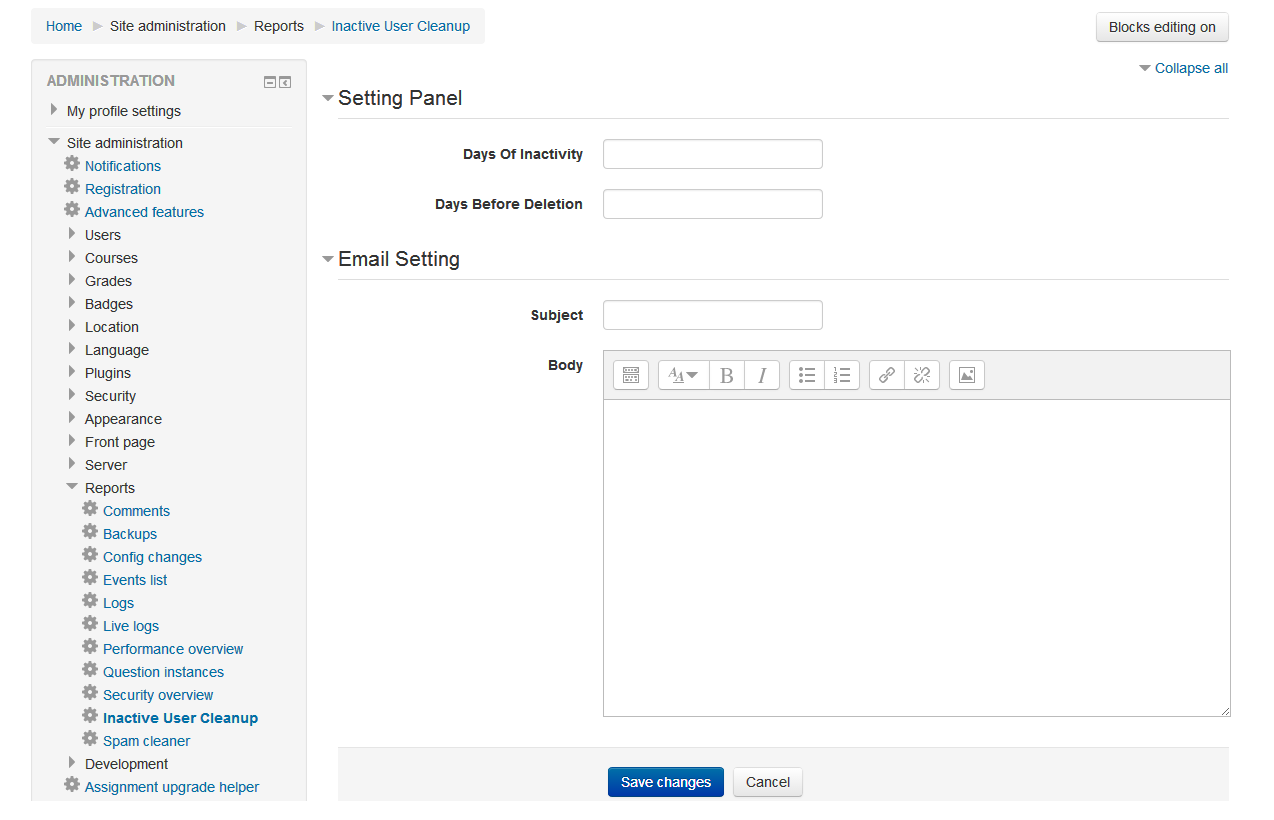
Setting Panel
If you want to directly access, you can use this link: [www.yoursitename/admin/tool/inactive_user_cleanup/index.php]
Or follow this procedure: Site administration > Reports > Inactive User Cleanup
- If settings are required for this cleanup process.
- Days of Inactivity is set by the admin user.
- Days Before Deletion is set to zero when the admin just wants to notify the inactive user to access the site in the first step. After that, when the user wants to run the cleanup process, Days Before Deletion will be set by the admin user.
Email Setting
- Admin user must set the subject and body text of the email, which the notified inactive user can receive the mail with correct words.
Cron Process
- Admin user runs the cron job manually after setting the password for manual cron on Administration > Security > Site security settings > Cron password for remote access from https://site.example.com/admin/cron.php?password=opensesame (replace "opensesame" with your cron password)
Uninstall
- Admin can uninstall this admin tool from Site administration > Plugins > Admin tools > Manage Admin Tools [Inactive User Cleanup]
2.7.5 (Build: 2025010900) (2025010900)
2.7.5 (Build: 2025010900)
Plugin type: Administration tools
Frankenstyle component name: tool_inactive_user_cleanup
Version build number: 2025010900
Version release name: 2.7.5 (Build: 2025010900)
Maturity: Stable
Supported Moodle versions: 4.1, 4.2, 4.3, 4.4, 4.5
Repository URL (Git): https://github.com/dualcube/moodle-tool_inactive_user_cleanup
Repository branch:
Repository tag:
Issue/bug tracker URL: https://tracker.moodle.org/browse/CONTRIB-5229
Admin Tool: Inactive User Cleanup
Installation
- Go to Site administration > Plugins > Install plugins and upload or drag & drop the downloaded ZIP file.
- To install, place all downloaded files in
/admin/tool/inactive_user_cleanupand visit/admin/index.phpin your browser. - This block is developed by DualCube admin@dualcube.com.
Overview
This plugin deletes inactive user accounts after a certain number of days set by the admin, and sends a mail to the user for login before the deletion date. This cleanup process runs with Moodle cron job.
Setup
- Set the number of days of inactivity in the first step, which determines when users receive an email after that many days of inactivity. (If set to "0", the cleanup process will be disabled)
- Next, set the "Days Before Deletion," which is the notice period for inactive users before deletion. (If set to "0", then deletion will be disabled)
- Draft notification emails for all users from Site administration > Reports > Inactive User Cleanup.
- If an inactive user is found, they receive the notification email of their removal.
Clean up
- After receiving the notification email, if the user still has not accessed the Moodle site, the deletion process starts.
- The particular inactive user account entry is removed with the next run of this cleanup process.
- This is automatically or manually run by the cron process.
Setting Panel
If you want to directly access, you can use this link: [www.yoursitename/admin/tool/inactive_user_cleanup/index.php]
Or follow this procedure: Site administration > Reports > Inactive User Cleanup
- If settings are required for this cleanup process.
- Days of Inactivity is set by the admin user.
- Days Before Deletion is set to zero when the admin just wants to notify the inactive user to access the site in the first step. After that, when the user wants to run the cleanup process, Days Before Deletion will be set by the admin user.
Email Setting
- Admin user must set the subject and body text of the email, which the notified inactive user can receive the mail with correct words.
Cron Process
- Admin user runs the cron job manually after setting the password for manual cron on Administration > Security > Site security settings > Cron password for remote access from https://site.example.com/admin/cron.php?password=opensesame (replace "opensesame" with your cron password)
Uninstall
- Admin can uninstall this admin tool from Site administration > Plugins > Admin tools > Manage Admin Tools [Inactive User Cleanup]
2.7.4 (Build: 2024052900) (2024052900)
2.7.4 (Build: 2024052900)
Plugin type: Administration tools
Frankenstyle component name: tool_inactive_user_cleanup
Version build number: 2024052900
Version release name: 2.7.4 (Build: 2024052900)
Maturity: Stable
Supported Moodle versions: 4.0, 4.1, 4.2, 4.3, 4.4
Repository URL (Git): https://github.com/dualcube/moodle-tool_inactive_user_cleanup
Repository branch:
Repository tag:
Issue/bug tracker URL: https://tracker.moodle.org/browse/CONTRIB-5229
Admin Tool: Inactive User Cleanup
Installation
- Go to Site administration > Plugins > Install plugins and upload or drag & drop the downloaded ZIP file.
- To install, place all downloaded files in
/admin/tool/inactive_user_cleanupand visit/admin/index.phpin your browser. - This block is developed by DualCube admin@dualcube.com.
Overview
This plugin deletes inactive user accounts after a certain number of days set by the admin, and sends a mail to the user for login before the deletion date. This cleanup process runs with Moodle cron job.
Setup
- Set the number of days of inactivity in the first step, which determines when users receive an email after that many days of inactivity. (If set to "0", the cleanup process will be disabled)
- Next, set the "Days Before Deletion," which is the notice period for inactive users before deletion. (If set to "0", then deletion will be disabled)
- Draft notification emails for all users from Site administration > Reports > Inactive User Cleanup.
- If an inactive user is found, they receive the notification email of their removal.
Clean up
- After receiving the notification email, if the user still has not accessed the Moodle site, the deletion process starts.
- The particular inactive user account entry is removed with the next run of this cleanup process.
- This is automatically or manually run by the cron process.
Setting Panel
If you want to directly access, you can use this link: [www.yoursitename/admin/tool/inactive_user_cleanup/index.php]
Or follow this procedure: Site administration > Reports > Inactive User Cleanup
- If settings are required for this cleanup process.
- Days of Inactivity is set by the admin user.
- Days Before Deletion is set to zero when the admin just wants to notify the inactive user to access the site in the first step. After that, when the user wants to run the cleanup process, Days Before Deletion will be set by the admin user.
Email Setting
- Admin user must set the subject and body text of the email, which the notified inactive user can receive the mail with correct words.
Cron Process
- Admin user runs the cron job manually after setting the password for manual cron on Administration > Security > Site security settings > Cron password for remote access from https://site.example.com/admin/cron.php?password=opensesame (replace "opensesame" with your cron password)
Uninstall
- Admin can uninstall this admin tool from Site administration > Plugins > Admin tools > Manage Admin Tools [Inactive User Cleanup]
2.7.3 (Build: 2024050800) (2024050800)
2.7.3 (Build: 2024050800)
Plugin type: Administration tools
Frankenstyle component name: tool_inactive_user_cleanup
Version build number: 2024050800
Version release name: 2.7.3 (Build: 2024050800)
Maturity: Stable
Supported Moodle versions: 4.0, 4.1, 4.2, 4.3, 4.4
Repository URL (Git): https://github.com/dualcube/moodle-tool_inactive_user_cleanup
Repository branch:
Repository tag:
Issue/bug tracker URL: https://tracker.moodle.org/browse/CONTRIB-5229
Admin Tool: Inactive User Cleanup
Installation
- Go to Site administration > Plugins > Install plugins and upload or drag & drop the downloaded ZIP file.
- To install, place all downloaded files in
/admin/tool/inactive_user_cleanupand visit/admin/index.phpin your browser. - This block is developed by DualCube admin@dualcube.com.
Overview
This plugin deletes inactive user accounts after a certain number of days set by the admin, and sends a mail to the user for login before the deletion date. This cleanup process runs with Moodle cron job.
Setup
- Set the number of days of inactivity in the first step, which determines when users receive an email after that many days of inactivity. (If set to "0", the cleanup process will be disabled)
- Next, set the "Days Before Deletion," which is the notice period for inactive users before deletion. (If set to "0", then deletion will be disabled)
- Draft notification emails for all users from Site administration > Reports > Inactive User Cleanup.
- If an inactive user is found, they receive the notification email of their removal.
Clean up
- After receiving the notification email, if the user still has not accessed the Moodle site, the deletion process starts.
- The particular inactive user account entry is removed with the next run of this cleanup process.
- This is automatically or manually run by the cron process.
Setting Panel
If you want to directly access, you can use this link: [www.yoursitename/admin/tool/inactive_user_cleanup/index.php]
Or follow this procedure: Site administration > Reports > Inactive User Cleanup
- If settings are required for this cleanup process.
- Days of Inactivity is set by the admin user.
- Days Before Deletion is set to zero when the admin just wants to notify the inactive user to access the site in the first step. After that, when the user wants to run the cleanup process, Days Before Deletion will be set by the admin user.
Email Setting
- Admin user must set the subject and body text of the email, which the notified inactive user can receive the mail with correct words.
Cron Process
- Admin user runs the cron job manually after setting the password for manual cron on Administration > Security > Site security settings > Cron password for remote access from https://site.example.com/admin/cron.php?password=opensesame (replace "opensesame" with your cron password)
Uninstall
- Admin can uninstall this admin tool from Site administration > Plugins > Admin tools > Manage Admin Tools [Inactive User Cleanup]
2.7.2 (Build: 2023101000) (2023101000)
2.7.2 (Build: 2023101000)
Plugin type: Administration tools
Frankenstyle component name: tool_inactive_user_cleanup
Version build number: 2023101000
Version release name: 2.7.2 (Build: 2023101000)
Maturity: Stable
Supported Moodle versions: 2.7, 2.8, 2.9, 3.0, 3.1, 3.2, 3.3, 3.4, 3.5, 3.6, 3.7, 3.8, 3.9, 3.10, 3.11, 4.0, 4.1, 4.2, 4.3
Repository URL (Git): https://github.com/dualcube/moodle-tool_inactive_user_cleanup
Repository branch:
Repository tag:
Issue/bug tracker URL: https://tracker.moodle.org/browse/CONTRIB-5229
Admin Tool Inactive User Cleanup
Installation
Go to [ Site administration > Plugins(Plugins) > Install plugins ] and just upload or drag & drop downloaed ZIP file.
To install, place all downloaded files in /admin/tool/inactive_user_cleanup and visit /admin/index.php in your browser.
This block is written by DualCubeadmin@dulacube.com.
Overview
This plugin deletes inactive user accounts after the days which admin decided on setting and send a mail to user for login before deletion date. This cleanup process runs with Moodle cron job.
Setup
In the first step admin user of the site setup days of inactivity, which decided the users can get mail after that days of inactivity.(if it set to "0" the clean up process will be disable)
Next set "Days Before Deletion" which is the notice period for inactive user before deletion.(if it set to "0" then deletion will be disable)
Then drafting notification mail for all users from the Site administration > Reports > Inactive User Cleanup.
If an inactive user is found he/she gets the notification mail.
Clean up
After getting notification mail, if the user still has not accessed the moodle site,then the deletion process starts.
The particular inactive user account entry is removed with next run of this cleanup process.
This is automatically or manually run by cron process.
Setting Panel
[www.yoursitename/admin/tool/inactive_user_cleanup/index.php] / [Site administration > Reports(Reports) > Inactive User Cleanup
If setting is require for this cleanup process.
Days of Inactivity is set by the admin user.
Days Before Deletion is set with zero when admin just wants to notify the inactive user for access the site i.e. in first step.
After that when user wants to run cleanup process then Days Before Deletion will set by the admin user.
Email setting
Admin user must set the subject and body text of the email. Which the notified inactive user can get the mail with correct words.
Cron process
Admin user run cron job manually after set password for manual cron on [ Administration > Security > Site security settings > Cron password for remote access ] from https://site.example.com/admin/cron.php?password=opensesame (replace "opensesame" with your cron password)
Uninstall
Admin can uninstall this admin tool from- Site administration > Plugins > Admin tools > Manage Admin Tools [ Inactive User Cleanup ]
2.7.1 (Build: 2023091300) (2023091300)
2.7.1 (Build: 2023091300)
Plugin type: Administration tools
Frankenstyle component name: tool_inactive_user_cleanup
Version build number: 2023091300
Version release name: 2.7.1 (Build: 2023091300)
Maturity: Stable
Supported Moodle versions: 2.7, 2.8, 2.9, 3.0, 3.1, 3.2, 3.3, 3.4, 3.5, 3.6, 3.7, 3.8, 3.9, 3.10, 3.11, 4.0, 4.1, 4.2
Repository URL (Git): https://github.com/dualcube/moodle-tool_inactive_user_cleanup
Repository branch:
Repository tag:
Issue/bug tracker URL: https://tracker.moodle.org/browse/CONTRIB-5229
Admin Tool Inactive User Cleanup
Installation
Go to [ Site administration > Plugins(Plugins) > Install plugins ] and just upload or drag & drop downloaed ZIP file.
To install, place all downloaded files in /admin/tool/inactive_user_cleanup and visit /admin/index.php in your browser.
This block is written by DualCubeadmin@dulacube.com.
Overview
This plugin deletes inactive user accounts after the days which admin decided on setting and send a mail to user for login before deletion date. This cleanup process runs with Moodle cron job.
Setup
In the first step admin user of the site setup days of inactivity, which decided the users can get mail after that days of inactivity.(if it set to "0" the clean up process will be disable)
Next set "Days Before Deletion" which is the notice period for inactive user before deletion.(if it set to "0" then deletion will be disable)
Then drafting notification mail for all users from the Site administration > Reports > Inactive User Cleanup.
If an inactive user is found he/she gets the notification mail.
Clean up
After getting notification mail, if the user still has not accessed the moodle site,then the deletion process starts.
The particular inactive user account entry is removed with next run of this cleanup process.
This is automatically or manually run by cron process.
Setting Panel
[www.yoursitename/admin/tool/inactive_user_cleanup/index.php] / [Site administration > Reports(Reports) > Inactive User Cleanup
If setting is require for this cleanup process.
Days of Inactivity is set by the admin user.
Days Before Deletion is set with zero when admin just wants to notify the inactive user for access the site i.e. in first step.
After that when user wants to run cleanup process then Days Before Deletion will set by the admin user.
Email setting
Admin user must set the subject and body text of the email. Which the notified inactive user can get the mail with correct words.
Cron process
Admin user run cron job manually after set password for manual cron on [ Administration > Security > Site security settings > Cron password for remote access ] from https://site.example.com/admin/cron.php?password=opensesame (replace "opensesame" with your cron password)
Uninstall
Admin can uninstall this admin tool from- Site administration > Plugins > Admin tools > Manage Admin Tools [ Inactive User Cleanup ]
2.7 (Build: 2023042500) (2023042500)
2.7 (Build: 2023042500)
Plugin type: Administration tools
Frankenstyle component name: tool_inactive_user_cleanup
Version build number: 2023042500
Version release name: 2.7 (Build: 2023042500)
Maturity: Stable
Supported Moodle versions: 2.7, 2.8, 2.9, 3.0, 3.1, 3.2, 3.3, 3.4, 3.5, 3.6, 3.7, 3.8, 3.9, 3.10, 3.11, 4.0, 4.1, 4.2
Repository URL (Git): https://github.com/dualcube/moodle-tool_inactive_user_cleanup
Repository branch:
Repository tag:
Issue/bug tracker URL: https://tracker.moodle.org/browse/CONTRIB-5229
Admin Tool Inactive User Cleanup
Installation
Go to [ Site administration > Plugins(Plugins) > Install plugins ] and just upload or drag & drop downloaed ZIP file.
To install, place all downloaded files in /admin/tool/inactive_user_cleanup and visit /admin/index.php in your browser.
This block is written by DualCubeadmin@dulacube.com.
Overview
This plugin deletes inactive user accounts after the days which admin decided on setting and send a mail to user for login before deletion date. This cleanup process runs with Moodle cron job.
Setup
In the first step admin user of the site setup days of inactivity, which decided the users can get mail after that days of inactivity.(if it set to "0" the clean up process will be disable)
Next set "Days Before Deletion" which is the notice period for inactive user before deletion.(if it set to "0" then deletion will be disable)
Then drafting notification mail for all users from the Site administration > Reports > Inactive User Cleanup.
If an inactive user is found he/she gets the notification mail.
Clean up
After getting notification mail, if the user still has not accessed the moodle site,then the deletion process starts.
The particular inactive user account entry is removed with next run of this cleanup process.
This is automatically or manually run by cron process.
Setting Panel
[www.yoursitename/admin/tool/inactive_user_cleanup/index.php] / [Site administration > Reports(Reports) > Inactive User Cleanup
If setting is require for this cleanup process.
Days of Inactivity is set by the admin user.
Days Before Deletion is set with zero when admin just wants to notify the inactive user for access the site i.e. in first step.
After that when user wants to run cleanup process then Days Before Deletion will set by the admin user.
Email setting
Admin user must set the subject and body text of the email. Which the notified inactive user can get the mail with correct words.
Cron process
Admin user run cron job manually after set password for manual cron on [ Administration > Security > Site security settings > Cron password for remote access ] from https://site.example.com/admin/cron.php?password=opensesame (replace "opensesame" with your cron password)
Uninstall
Admin can uninstall this admin tool from- Site administration > Plugins > Admin tools > Manage Admin Tools [ Inactive User Cleanup ]
2.6 (Build: 2022122500) (2023010200)
2.6 (Build: 2022122500)
Plugin type: Administration tools
Frankenstyle component name: tool_inactive_user_cleanup
Version build number: 2023010200
Version release name: 2.6 (Build: 2022122500)
Maturity: Stable
Supported Moodle versions: 2.7, 2.8, 2.9, 3.0, 3.1, 3.2, 3.3, 3.4, 3.5, 3.6, 3.7, 3.8, 3.9, 3.10, 3.11, 4.0, 4.1
Repository URL (Git): https://github.com/dualcube/moodle-tool_inactive_user_cleanup
Repository branch:
Repository tag:
Issue/bug tracker URL: https://tracker.moodle.org/browse/CONTRIB-5229
Admin Tool Inactive User Cleanup
Installation
Go to [ Site administration > Plugins(Plugins) > Install plugins ] and just upload or drag & drop downloaed ZIP file.
To install, place all downloaded files in /admin/tool/inactive_user_cleanup and visit /admin/index.php in your browser.
This block is written by DualCubeadmin@dulacube.com.
Overview
This plugin deletes inactive user accounts after the days which admin decided on setting and send a mail to user for login before deletion date. This cleanup process runs with Moodle cron job.
Setup
In the first step admin user of the site setup days of inactivity, which decided the users can get mail after that days of inactivity.(if it set to "0" the clean up process will be disable)
Next set "Days Before Deletion" which is the notice period for inactive user before deletion.(if it set to "0" then deletion will be disable)
Then drafting notification mail for all users from the Site administration > Reports > Inactive User Cleanup.
If an inactive user is found he/she gets the notification mail.
Clean up
After getting notification mail, if the user still has not accessed the moodle site,then the deletion process starts.
The particular inactive user account entry is removed with next run of this cleanup process.
This is automatically or manually run by cron process.
Setting Panel
[www.yoursitename/admin/tool/inactive_user_cleanup/index.php] / [Site administration > Reports(Reports) > Inactive User Cleanup
If setting is require for this cleanup process.
Days of Inactivity is set by the admin user.
Days Before Deletion is set with zero when admin just wants to notify the inactive user for access the site i.e. in first step.
After that when user wants to run cleanup process then Days Before Deletion will set by the admin user.
Email setting
Admin user must set the subject and body text of the email. Which the notified inactive user can get the mail with correct words.
Cron process
Admin user run cron job manually after set password for manual cron on [ Administration > Security > Site security settings > Cron password for remote access ] from https://site.example.com/admin/cron.php?password=opensesame (replace "opensesame" with your cron password)
Uninstall
Admin can uninstall this admin tool from- Site administration > Plugins > Admin tools > Manage Admin Tools [ Inactive User Cleanup ]
2.4 (Build: 2014080501) (2019112600)
2.4 (Build: 2014080501)
Plugin type: Administration tools
Frankenstyle component name: tool_inactive_user_cleanup
Version build number: 2019112600
Version release name: 2.4 (Build: 2014080501)
Maturity: Stable
Supported Moodle versions: 2.5, 2.6, 2.7, 2.8, 2.9, 3.0, 3.1, 3.2, 3.3, 3.4, 3.5, 3.6, 3.7, 3.8
Repository URL (Git): https://github.com/dualcube/moodle-tool_inactive_user_cleanup
Repository branch:
Repository tag:
Issue/bug tracker URL: https://tracker.moodle.org/browse/CONTRIB-5229
This plugin deletes inactive user accounts. This cleanup process runs with Moodle cron job.
Admin Tool Inactive User Cleanup
Overview
This plugin deletes inactive user accounts. This cleanup process runs with Moodle cron job.
In the first step admin user of the site setup days of inactivity.
Then drafting notification mail for all users from the Site administration > Reports > Inactive User Cleanup.
If an inactive user is found he/she gets a notification mail.
In second step if the user still has not accessed the moodle site within the time span which is mentioned in the notification mail.
Then the deletion process starts.
The particular inactive user account entry is removed with next run of this cleanup process.
This is automatically or manually run by cron process.
Some setting is require for this cleanup process.
� Setting Panel
Days of Inactivity is set by the admin user.
Days Before Deletion is set with zero when admin just wants to notify the inactive user for access the site i.e. in first step.
After that when user wants to run cleanup process then Days Before Deletion will set by the admin user.
� Email setting
Admin user must set the subject and body text of the email.
Cron process
Admin user run cron job manually from http://
To install, place all files in /admin/tool/inactive_user_cleanup and visit /admin/index.php in your browser.
This block is written by Dualcubeadmin@dulacube.com.
2.4 (Build: 2014080501) (2019071100)
2.4 (Build: 2014080501)
Plugin type: Administration tools
Frankenstyle component name: tool_inactive_user_cleanup
Version build number: 2019071100
Version release name: 2.4 (Build: 2014080501)
Maturity: Stable
Supported Moodle versions: 2.4, 2.5, 2.6, 2.7, 2.8, 2.9, 3.0, 3.1, 3.2, 3.3, 3.4, 3.5, 3.6, 3.7
Repository URL (Git): https://github.com/dualcube/moodle-tool_inactive_user_cleanup
Repository branch:
Repository tag:
Issue/bug tracker URL: https://tracker.moodle.org/browse/CONTRIB-5229
This plugin deletes inactive user accounts. This cleanup process runs with Moodle cron job.
Admin Tool Inactive User Cleanup
Overview
This plugin deletes inactive user accounts. This cleanup process runs with Moodle cron job.
In the first step admin user of the site setup days of inactivity.
Then drafting notification mail for all users from the Site administration > Reports > Inactive User Cleanup.
If an inactive user is found he/she gets a notification mail.
In second step if the user still has not accessed the moodle site within the time span which is mentioned in the notification mail.
Then the deletion process starts.
The particular inactive user account entry is removed with next run of this cleanup process.
This is automatically or manually run by cron process.
Some setting is require for this cleanup process.
� Setting Panel
Days of Inactivity is set by the admin user.
Days Before Deletion is set with zero when admin just wants to notify the inactive user for access the site i.e. in first step.
After that when user wants to run cleanup process then Days Before Deletion will set by the admin user.
� Email setting
Admin user must set the subject and body text of the email.
Cron process
Admin user run cron job manually from http://
To install, place all files in /admin/tool/inactive_user_cleanup and visit /admin/index.php in your browser.
This block is written by Dualcubeadmin@dulacube.com.
2.4 (Build: 2014080501) (2015091009)
2.4 (Build: 2014080501)
Plugin type: Administration tools
Frankenstyle component name: tool_inactive_user_cleanup
Version build number: 2015091009
Version release name: 2.4 (Build: 2014080501)
Maturity: Stable
Supported Moodle versions: 3.5, 3.6
Repository URL (Git): https://github.com/dualcube/moodle-tool_inactive_user_cleanup
Repository branch:
Repository tag:
Issue/bug tracker URL: https://tracker.moodle.org/browse/CONTRIB-5229
This plugin deletes inactive user accounts. This cleanup process runs with Moodle cron job.
Admin Tool Inactive User Cleanup
Overview
This plugin deletes inactive user accounts. This cleanup process runs with Moodle cron job.
In the first step admin user of the site setup days of inactivity.
Then drafting notification mail for all users from the Site administration > Reports > Inactive User Cleanup.
If an inactive user is found he/she gets a notification mail.
In second step if the user still has not accessed the moodle site within the time span which is mentioned in the notification mail.
Then the deletion process starts.
The particular inactive user account entry is removed with next run of this cleanup process.
This is automatically or manually run by cron process.
Some setting is require for this cleanup process.
� Setting Panel
Days of Inactivity is set by the admin user.
Days Before Deletion is set with zero when admin just wants to notify the inactive user for access the site i.e. in first step.
After that when user wants to run cleanup process then Days Before Deletion will set by the admin user.
� Email setting
Admin user must set the subject and body text of the email.
Cron process
Admin user run cron job manually from http://
To install, place all files in /admin/tool/inactive_user_cleanup and visit /admin/index.php in your browser.
This block is written by Dualcubeadmin@dulacube.com.