
BLC Modules

Versions
Current version
4.5.13 (2026010700)
4.5.13
Plugin type: Blocks
Frankenstyle component name: block_blc_modules
Version build number: 2026010700
Version release name: 4.5.13
Maturity: Stable
Supported Moodle versions: 4.5
Repository URL (Git): https://github.com/teruselearning/moodle-block_blcmodules
Repository branch:
Repository tag:
Issue/bug tracker URL: https://github.com/teruselearning/moodle-block_blcmodules/issues
Detailed Changes Compared to blocks/blc_modules
This document summarizes the detailed changes in the blocks/blc_modules directory.
1. CHANGELOG.md
- New file: Added a changelog file summarizing all major changes and improvements in the codebase.
2. add_doc.php
- Namespace & Use: Added
namespace block_blc_modules\helper;and relevantusestatements for better code organization and autoloading. - SQL Improvements: Changed SQL queries to use parameterized queries for better security and maintainability.
- Class Name Fix: Fixed typo from
stdclasstostdClass.
3. amd/build/module.min.js
- Update: Minified JS updated to reflect changes in the source, including new dependencies and logic improvements.
- Dependency: Now includes
core/ajaxas a dependency.
4. scorm_report.php
- Refactor: Major refactor to use a renderer and a new output class
scorm_report_pagefor rendering the report page, replacing direct HTML output and table generation. - Template: Now uses a Mustache template for rendering the report.
5. settings.php
- Best Practice: Replaced
new lang_stringwithget_stringfor all admin setting labels and descriptions, following Moodle best practices.
6. templates/scorm_report_page.mustache
- New file: Added a Mustache template for rendering the SCORM report page, improving separation of logic and presentation.
7. templates/update_scorm_page.mustache
- New file: Added a Mustache template for the SCORM update results page, providing a modern and user-friendly UI for update feedback.
8. templates/validate_settings_page.mustache
- New file: Added a Mustache template for the BLC settings validation page, improving clarity and maintainability.
9. update_scorm.php
- Refactor: Major refactor to use a renderer and a new output class
update_scorm_pagefor rendering the update results, replacing procedural logic and direct file operations. - Security: Added permission checks and parameter validation.
- UI: Now uses a Mustache template for output.
10. validate_settings.php
- Refactor: Major refactor to use a renderer and a new output class
validate_settings_pagefor rendering the validation results, replacing procedural logic and direct HTML output. - UI: Now uses a Mustache template for output.
11. version.php
- Update: Bumped plugin version from
2024071100to2024071119.
12. version_check.php
- Namespace & Use: Added
namespace block_blc_modules\helper;anduse stdClass;for better code organization and autoloading.
Summary of Key Improvements
- Modernization: Migration to Mustache templates and output classes for all major UI, improving maintainability and separation of concerns.
- Security: Improved SQL handling and added permission checks.
- Code Quality: Adoption of namespaces, autoloading, and best practices for Moodle plugin development.
- User Experience: Enhanced UI for reports, updates, and validation pages.
For further details on any specific file or change, please request a focused explanation.
5.0.1 (2025011505)
5.0.1
Plugin type: Blocks
Frankenstyle component name: block_blc_modules
Version build number: 2025011505
Version release name: 5.0.1
Maturity: Stable
Supported Moodle versions: 5.0
Repository URL (Git): https://github.com/teruselearning/moodle-block_blcmodules
Repository branch:
Repository tag:
Issue/bug tracker URL: https://github.com/teruselearning/moodle-block_blcmodules/issues
Detailed Changes Compared to blocks/blc_modules
This document summarizes the detailed changes in the blocks/blc_modules directory.
1. CHANGELOG.md
- New file: Added a changelog file summarizing all major changes and improvements in the codebase.
2. add_doc.php
- Namespace & Use: Added
namespace block_blc_modules\helper;and relevantusestatements for better code organization and autoloading. - SQL Improvements: Changed SQL queries to use parameterized queries for better security and maintainability.
- Class Name Fix: Fixed typo from
stdclasstostdClass.
3. amd/build/module.min.js
- Update: Minified JS updated to reflect changes in the source, including new dependencies and logic improvements.
- Dependency: Now includes
core/ajaxas a dependency.
4. scorm_report.php
- Refactor: Major refactor to use a renderer and a new output class
scorm_report_pagefor rendering the report page, replacing direct HTML output and table generation. - Template: Now uses a Mustache template for rendering the report.
5. settings.php
- Best Practice: Replaced
new lang_stringwithget_stringfor all admin setting labels and descriptions, following Moodle best practices.
6. templates/scorm_report_page.mustache
- New file: Added a Mustache template for rendering the SCORM report page, improving separation of logic and presentation.
7. templates/update_scorm_page.mustache
- New file: Added a Mustache template for the SCORM update results page, providing a modern and user-friendly UI for update feedback.
8. templates/validate_settings_page.mustache
- New file: Added a Mustache template for the BLC settings validation page, improving clarity and maintainability.
9. update_scorm.php
- Refactor: Major refactor to use a renderer and a new output class
update_scorm_pagefor rendering the update results, replacing procedural logic and direct file operations. - Security: Added permission checks and parameter validation.
- UI: Now uses a Mustache template for output.
10. validate_settings.php
- Refactor: Major refactor to use a renderer and a new output class
validate_settings_pagefor rendering the validation results, replacing procedural logic and direct HTML output. - UI: Now uses a Mustache template for output.
11. version.php
- Update: Bumped plugin version from
2024071100to2024071119.
12. version_check.php
- Namespace & Use: Added
namespace block_blc_modules\helper;anduse stdClass;for better code organization and autoloading.
Summary of Key Improvements
- Modernization: Migration to Mustache templates and output classes for all major UI, improving maintainability and separation of concerns.
- Security: Improved SQL handling and added permission checks.
- Code Quality: Adoption of namespaces, autoloading, and best practices for Moodle plugin development.
- User Experience: Enhanced UI for reports, updates, and validation pages.
For further details on any specific file or change, please request a focused explanation.
4.5.10 (2025110600)
4.5.10
Plugin type: Blocks
Frankenstyle component name: block_blc_modules
Version build number: 2025110600
Version release name: 4.5.10
Maturity: Stable
Supported Moodle versions: 4.5
Repository URL (Git): https://github.com/teruselearning/moodle-block_blcmodules
Repository branch:
Repository tag:
Issue/bug tracker URL: https://github.com/teruselearning/moodle-block_blcmodules/issues
Detailed Changes Compared to blocks/blc_modules
This document summarizes the detailed changes in the blocks/blc_modules directory.
1. CHANGELOG.md
- New file: Added a changelog file summarizing all major changes and improvements in the codebase.
2. add_doc.php
- Namespace & Use: Added
namespace block_blc_modules\helper;and relevantusestatements for better code organization and autoloading. - SQL Improvements: Changed SQL queries to use parameterized queries for better security and maintainability.
- Class Name Fix: Fixed typo from
stdclasstostdClass.
3. amd/build/module.min.js
- Update: Minified JS updated to reflect changes in the source, including new dependencies and logic improvements.
- Dependency: Now includes
core/ajaxas a dependency.
4. scorm_report.php
- Refactor: Major refactor to use a renderer and a new output class
scorm_report_pagefor rendering the report page, replacing direct HTML output and table generation. - Template: Now uses a Mustache template for rendering the report.
5. settings.php
- Best Practice: Replaced
new lang_stringwithget_stringfor all admin setting labels and descriptions, following Moodle best practices.
6. templates/scorm_report_page.mustache
- New file: Added a Mustache template for rendering the SCORM report page, improving separation of logic and presentation.
7. templates/update_scorm_page.mustache
- New file: Added a Mustache template for the SCORM update results page, providing a modern and user-friendly UI for update feedback.
8. templates/validate_settings_page.mustache
- New file: Added a Mustache template for the BLC settings validation page, improving clarity and maintainability.
9. update_scorm.php
- Refactor: Major refactor to use a renderer and a new output class
update_scorm_pagefor rendering the update results, replacing procedural logic and direct file operations. - Security: Added permission checks and parameter validation.
- UI: Now uses a Mustache template for output.
10. validate_settings.php
- Refactor: Major refactor to use a renderer and a new output class
validate_settings_pagefor rendering the validation results, replacing procedural logic and direct HTML output. - UI: Now uses a Mustache template for output.
11. version.php
- Update: Bumped plugin version from
2024071100to2024071119.
12. version_check.php
- Namespace & Use: Added
namespace block_blc_modules\helper;anduse stdClass;for better code organization and autoloading.
Summary of Key Improvements
- Modernization: Migration to Mustache templates and output classes for all major UI, improving maintainability and separation of concerns.
- Security: Improved SQL handling and added permission checks.
- Code Quality: Adoption of namespaces, autoloading, and best practices for Moodle plugin development.
- User Experience: Enhanced UI for reports, updates, and validation pages.
For further details on any specific file or change, please request a focused explanation.
4.5.2 (2024111101)
4.5.2
Plugin type: Blocks
Frankenstyle component name: block_blc_modules
Version build number: 2024111101
Version release name: 4.5.2
Maturity: Stable
Supported Moodle versions: 4.3, 4.4
Repository URL (Git): https://github.com/teruselearning/moodle-block_blcmodules
Repository branch:
Repository tag:
Issue/bug tracker URL: https://github.com/teruselearning/moodle-block_blcmodules/issues
Blended Learning Consortium Modules
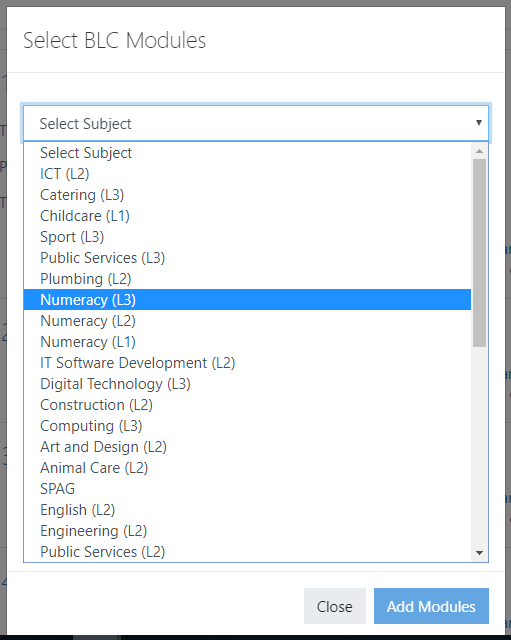
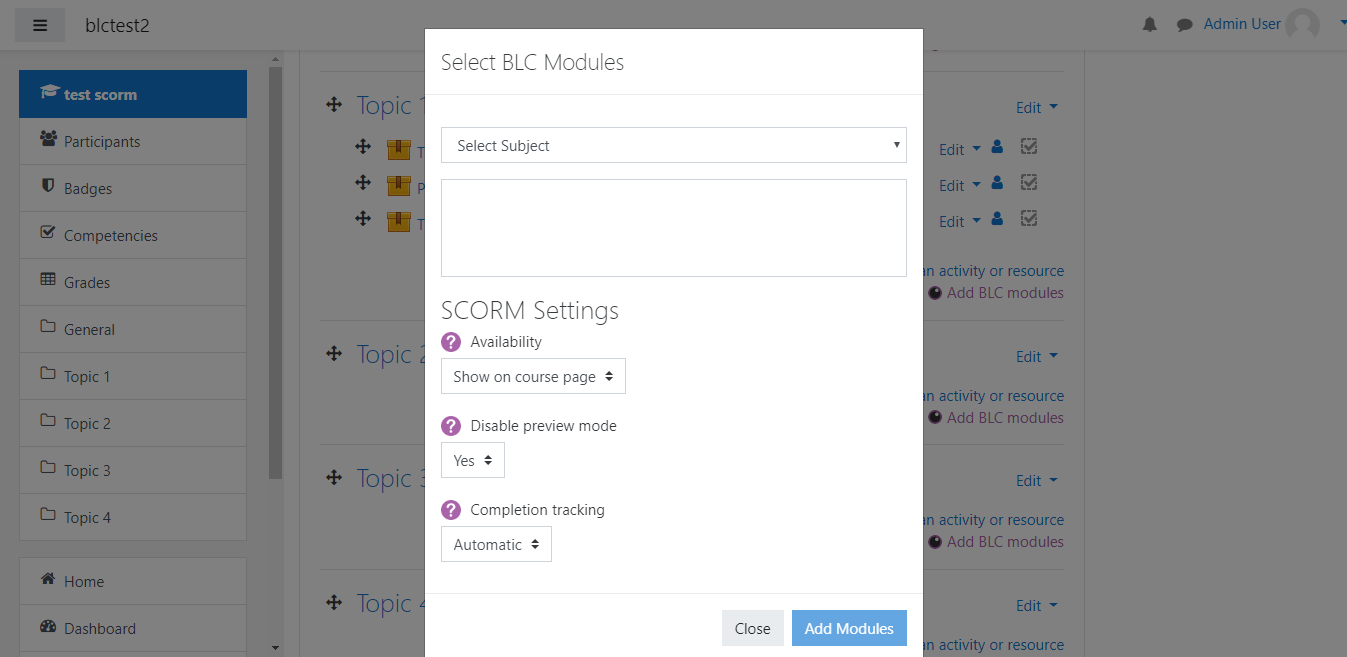
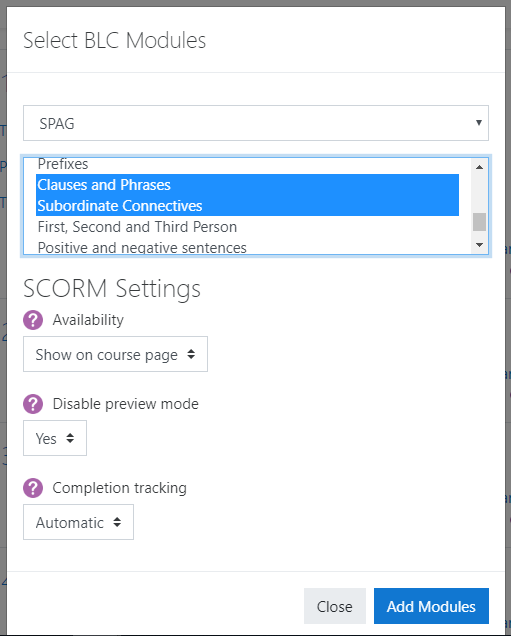
This plugin serves as a tool to easily browse and add SCORM packages from the Blended Learning Consortium repository.
Please note this plugin requires a subscription to the blended learning consortium.
Samples of BLC Modules can be found, and enquiries made through the BLC website:
http://blc-fe.org
Before you get started
In order for this plugin to function, you will need to register to use the plugin with the BLC and go through an administration step. This involves registering your Moodle URL and receiving an API key for use when configuring the plugin.
There are video demonstrations and a instructions on administering the plugin available to registered users.
A PDF/Video guide on using the plugin for teachers is also available via the BLC.
Prerequisites
In order for the plugin to function properly, the SCORM setting 'Enable downloaded package type' (scorm | allowtypelocalsync)must be enabled. This setting can be found by searching site administration for 'downloadable' or navigating to the following settings page:
Site administration / Plugins / Activity modules / SCORM package
Installation
This is a standard Moodle block, there are two options for installing:
Option 1: In more modern versions of Moodle, a site administrator can install this plugin using the tool at Site Administration / Plugins / Install Plugins.
Option 2: The plugin can also be installed manually by placing the (unzipped version) in the 'blocks' directory of your Moodle.
You will be prompted to enter your API key upon Installation. There is also a tool on the plugin settings page which allows you to check both your API key and URL.
Updating this plugin
The guidance for updating is similar to the guidance for installation.
Option 1: In more modern versions of Moodle, a site administrator can install this plugin using the tool at site administration / Plugins / Install Plugins.
Option 2: The plugin can also be installed manually by overwriting the existing plugin in the 'blocks' directory of your Moodle.
4.5.1 (2024071100)
4.5.1
Plugin type: Blocks
Frankenstyle component name: block_blc_modules
Version build number: 2024071100
Version release name: 4.5.1
Maturity: Stable
Supported Moodle versions: 4.5
Repository URL (Git): https://github.com/terus-technology/moodle-block_blcmodules/
Repository branch:
Repository tag:
Issue/bug tracker URL: https://github.com/teruselearning/moodle-block_blcmodules/issues
Blended Learning Consortium Modules
This plugin serves as a tool to easily browse and add SCORM packages from the Blended Learning Consortium repository.
Please note this plugin requires a subscription to the blended learning consortium.
Samples of BLC Modules can be found, and enquiries made through the BLC website:
http://blc-fe.org
Before you get started
In order for this plugin to function, you will need to register to use the plugin with the BLC and go through an administration step. This involves registering your Moodle URL and receiving an API key for use when configuring the plugin.
There are video demonstrations and a instructions on administering the plugin available to registered users.
A PDF/Video guide on using the plugin for teachers is also available via the BLC.
Prerequisites
In order for the plugin to function properly, the SCORM setting 'Enable downloaded package type' (scorm | allowtypelocalsync)must be enabled. This setting can be found by searching site administration for 'downloadable' or navigating to the following settings page:
Site administration / Plugins / Activity modules / SCORM package
Installation
This is a standard Moodle block, there are two options for installing:
Option 1: In more modern versions of Moodle, a site administrator can install this plugin using the tool at Site Administration / Plugins / Install Plugins.
Option 2: The plugin can also be installed manually by placing the (unzipped version) in the 'blocks' directory of your Moodle.
You will be prompted to enter your API key upon Installation. There is also a tool on the plugin settings page which allows you to check both your API key and URL.
Updating this plugin
The guidance for updating is similar to the guidance for installation.
Option 1: In more modern versions of Moodle, a site administrator can install this plugin using the tool at site administration / Plugins / Install Plugins.
Option 2: The plugin can also be installed manually by overwriting the existing plugin in the 'blocks' directory of your Moodle.
4.1.1 (2023091800)
4.1.1
Plugin type: Blocks
Frankenstyle component name: block_blc_modules
Version build number: 2023091800
Version release name: 4.1.1
Maturity: Stable
Supported Moodle versions: 3.1, 3.10, 3.11, 3.2, 3.3, 3.4, 3.5, 3.6, 3.7, 3.8, 3.9, 4.0, 4.1, 4.2
Repository URL (Git): https://github.com/teruselearning/moodle-block_blcmodules
Repository branch:
Repository tag:
Issue/bug tracker URL: https://github.com/teruselearning/moodle-block_blcmodules/issues
Blended Learning Consortium Modules
This plugin serves as a tool to easily browse and add SCORM packages from the Blended Learning Consortium repository.
Please note this plugin requires a subscription to the blended learning consortium.
Samples of BLC Modules can be found, and enquiries made through the BLC website:
http://blc-fe.org
Before you get started
In order for this plugin to function, you will need to register to use the plugin with the BLC and go through an administration step. This involves registering your Moodle URL and receiving an API key for use when configuring the plugin.
There are video demonstrations and a instructions on administering the plugin available to registered users.
A PDF/Video guide on using the plugin for teachers is also available via the BLC.
Prerequisites
In order for the plugin to function properly, the SCORM setting 'Enable downloaded package type' (scorm | allowtypelocalsync)must be enabled. This setting can be found by searching site administration for 'downloadable' or navigating to the following settings page:
Site administration / Plugins / Activity modules / SCORM package
Installation
This is a standard Moodle block, there are two options for installing:
Option 1: In more modern versions of Moodle, a site administrator can install this plugin using the tool at Site Administration / Plugins / Install Plugins.
Option 2: The plugin can also be installed manually by placing the (unzipped version) in the 'blocks' directory of your Moodle.
You will be prompted to enter your API key upon Installation. There is also a tool on the plugin settings page which allows you to check both your API key and URL.
Updating this plugin
The guidance for updating is similar to the guidance for installation.
Option 1: In more modern versions of Moodle, a site administrator can install this plugin using the tool at site administration / Plugins / Install Plugins.
Option 2: The plugin can also be installed manually by overwriting the existing plugin in the 'blocks' directory of your Moodle.
4.1.0 (2023081001)
4.1.0
Plugin type: Blocks
Frankenstyle component name: block_blc_modules
Version build number: 2023081001
Version release name: 4.1.0
Maturity: Stable
Supported Moodle versions: 4.1, 4.2
Repository URL (Git): https://github.com/teruselearning/moodle-block_blcmodules
Repository branch:
Repository tag:
Issue/bug tracker URL: https://github.com/teruselearning/moodle-block_blcmodules/issues
Blended Learning Consortium Modules
This plugin serves as a tool to easily browse and add SCORM packages from the Blended Learning Consortium repository.
Please note this plugin requires a subscription to the blended learning consortium.
Samples of BLC Modules can be found, and enquiries made through the BLC website:
http://blc-fe.org
Before you get started
In order for this plugin to function, you will need to register to use the plugin with the BLC and go through an administration step. This involves registering your Moodle URL and receiving an API key for use when configuring the plugin.
There are video demonstrations and a instructions on administering the plugin available to registered users.
A PDF/Video guide on using the plugin for teachers is also available via the BLC.
Prerequisites
In order for the plugin to function properly, the SCORM setting 'Enable downloaded package type' (scorm | allowtypelocalsync)must be enabled. This setting can be found by searching site administration for 'downloadable' or navigating to the following settings page:
Site administration / Plugins / Activity modules / SCORM package
Installation
This is a standard Moodle block, there are two options for installing:
Option 1: In more modern versions of Moodle, a site administrator can install this plugin using the tool at Site Administration / Plugins / Install Plugins.
Option 2: The plugin can also be installed manually by placing the (unzipped version) in the 'blocks' directory of your Moodle.
You will be prompted to enter your API key upon Installation. There is also a tool on the plugin settings page which allows you to check both your API key and URL.
Updating this plugin
The guidance for updating is similar to the guidance for installation.
Option 1: In more modern versions of Moodle, a site administrator can install this plugin using the tool at site administration / Plugins / Install Plugins.
Option 2: The plugin can also be installed manually by overwriting the existing plugin in the 'blocks' directory of your Moodle.
4.0.2 (2022051801)
4.0.2
Plugin type: Blocks
Frankenstyle component name: block_blc_modules
Version build number: 2022051801
Version release name: 4.0.2
Maturity: Stable
Supported Moodle versions: 3.10, 3.11, 3.9, 4.0, 4.1
Repository URL (Git): https://github.com/teruselearning/moodle-block_blcmodules
Repository branch:
Repository tag:
Issue/bug tracker URL: https://github.com/teruselearning/moodle-block_blcmodules/issues
Blended Learning Consortium Modules
This plugin serves as a tool to easily browse and add SCORM packages from the Blended Learning Consortium repository.
Please note this plugin requires a subscription to the blended learning consortium.
Samples of BLC Modules can be found, and enquiries made through the BLC website:
http://blc-fe.org
Before you get started
In order for this plugin to function, you will need to register to use the plugin with the BLC and go through an administration step. This involves registering your Moodle URL and receiving an API key for use when configuring the plugin.
There are video demonstrations and a instructions on administering the plugin available to registered users.
A PDF/Video guide on using the plugin for teachers is also available via the BLC.
Prerequisites
In order for the plugin to function properly, the SCORM setting 'Enable downloaded package type' (scorm | allowtypelocalsync)must be enabled. This setting can be found by searching site administration for 'downloadable' or navigating to the following settings page:
Site administration / Plugins / Activity modules / SCORM package
Installation
This is a standard Moodle block, there are two options for installing:
Option 1: In more modern versions of Moodle, a site administrator can install this plugin using the tool at Site Administration / Plugins / Install Plugins.
Option 2: The plugin can also be installed manually by placing the (unzipped version) in the 'blocks' directory of your Moodle.
You will be prompted to enter your API key upon Installation. There is also a tool on the plugin settings page which allows you to check both your API key and URL.
Updating this plugin
The guidance for updating is similar to the guidance for installation.
Option 1: In more modern versions of Moodle, a site administrator can install this plugin using the tool at site administration / Plugins / Install Plugins.
Option 2: The plugin can also be installed manually by overwriting the existing plugin in the 'blocks' directory of your Moodle.
4.0.1 (2022050302)
4.0.1
Plugin type: Blocks
Frankenstyle component name: block_blc_modules
Version build number: 2022050302
Version release name: 4.0.1
Maturity: Stable
Supported Moodle versions: 3.11, 4.0
Repository URL (Git): https://github.com/teruselearning/moodle-block_blcmodules
Repository branch:
Repository tag:
Issue/bug tracker URL: https://github.com/teruselearning/moodle-block_blcmodules/issues
Blended Learning Consortium Modules
This plugin serves as a tool to easily browse and add SCORM packages from the Blended Learning Consortium repository.
Please note this plugin requires a subscription to the blended learning consortium.
Samples of BLC Modules can be found, and enquiries made through the BLC website:
http://blc-fe.org
Before you get started
In order for this plugin to function, you will need to register to use the plugin with the BLC and go through an administration step. This involves registering your Moodle URL and receiving an API key for use when configuring the plugin.
There are video demonstrations and a instructions on administering the plugin available to registered users.
A PDF/Video guide on using the plugin for teachers is also available via the BLC.
Prerequisites
In order for the plugin to function properly, the SCORM setting 'Enable downloaded package type' (scorm | allowtypelocalsync)must be enabled. This setting can be found by searching site administration for 'downloadable' or navigating to the following settings page:
Site administration / Plugins / Activity modules / SCORM package
Installation
This is a standard Moodle block, there are two options for installing:
Option 1: In more modern versions of Moodle, a site administrator can install this plugin using the tool at Site Administration / Plugins / Install Plugins.
Option 2: The plugin can also be installed manually by placing the (unzipped version) in the 'blocks' directory of your Moodle.
You will be prompted to enter your API key upon Installation. There is also a tool on the plugin settings page which allows you to check both your API key and URL.
Updating this plugin
The guidance for updating is similar to the guidance for installation.
Option 1: In more modern versions of Moodle, a site administrator can install this plugin using the tool at site administration / Plugins / Install Plugins.
Option 2: The plugin can also be installed manually by overwriting the existing plugin in the 'blocks' directory of your Moodle.
3.10 (2020121701)
3.10
Plugin type: Blocks
Frankenstyle component name: block_blc_modules
Version build number: 2020121701
Version release name: 3.10
Maturity: Stable
Supported Moodle versions: 3.10, 3.11, 3.8, 3.9
Repository URL (Git): https://github.com/teruselearning/moodle-block_blcmodules
Repository branch:
Repository tag:
Issue/bug tracker URL: https://github.com/teruselearning/moodle-block_blcmodules/issues
Blended Learning Consortium Modules
This plugin serves as a tool to easily browse and add SCORM packages from the Blended Learning Consortium repository.
Please note this plugin requires a subscription to the blended learning consortium.
Samples of BLC Modules can be found, and enquiries made through the BLC website:
http://blc-fe.org
Before you get started
In order for this plugin to function, you will need to register to use the plugin with the BLC and go through an administration step. This involves registering your Moodle URL and receiving an API key for use when configuring the plugin.
There are video demonstrations and a instructions on administering the plugin available to registered users.
A PDF/Video guide on using the plugin for teachers is also available via the BLC.
Prerequisites
In order for the plugin to function properly, the SCORM setting 'Enable downloaded package type' (scorm | allowtypelocalsync)must be enabled. This setting can be found by searching site administration for 'downloadable' or navigating to the following settings page:
Site administration / Plugins / Activity modules / SCORM package
Installation
This is a standard Moodle block, there are two options for installing:
Option 1: In more modern versions of Moodle, a site administrator can install this plugin using the tool at Site Administration / Plugins / Install Plugins.
Option 2: The plugin can also be installed manually by placing the (unzipped version) in the 'blocks' directory of your Moodle.
You will be prompted to enter your API key upon Installation. There is also a tool on the plugin settings page which allows you to check both your API key and URL.
Updating this plugin
The guidance for updating is similar to the guidance for installation.
Option 1: In more modern versions of Moodle, a site administrator can install this plugin using the tool at site administration / Plugins / Install Plugins.
Option 2: The plugin can also be installed manually by overwriting the existing plugin in the 'blocks' directory of your Moodle.
3.9.4 (2020110502)
3.9.4
Plugin type: Blocks
Frankenstyle component name: block_blc_modules
Version build number: 2020110502
Version release name: 3.9.4
Maturity: Stable
Supported Moodle versions: 3.8, 3.9
Repository URL (Git): https://github.com/teruselearning/moodle-block_blcmodules
Repository branch:
Repository tag:
Issue/bug tracker URL: https://github.com/teruselearning/moodle-block_blcmodules/issues
Blended Learning Consortium Modules
This plugin serves as a tool to easily browse and add SCORM packages from the Blended Learning Consortium repository.
Please note this plugin requires a subscription to the blended learning consortium.
Samples of BLC Modules can be found, and enquiries made through the BLC website:
http://blc-fe.org
Before you get started
In order for this plugin to function, you will need to register to use the plugin with the BLC and go through an administration step. This involves registering your Moodle URL and receiving an API key for use when configuring the plugin.
There are video demonstrations and a instructions on administering the plugin available to registered users.
A PDF/Video guide on using the plugin for teachers is also available via the BLC.
Prerequisites
In order for the plugin to function properly, the SCORM setting 'Enable downloaded package type' (scorm | allowtypelocalsync)must be enabled. This setting can be found by searching site administration for 'downloadable' or navigating to the following settings page:
Site administration / Plugins / Activity modules / SCORM package
Installation
This is a standard Moodle block, there are two options for installing:
Option 1: In more modern versions of Moodle, a site administrator can install this plugin using the tool at Site Administration / Plugins / Install Plugins.
Option 2: The plugin can also be installed manually by placing the (unzipped version) in the 'blocks' directory of your Moodle.
You will be prompted to enter your API key upon Installation. There is also a tool on the plugin settings page which allows you to check both your API key and URL.
Updating this plugin
The guidance for updating is similar to the guidance for installation.
Option 1: In more modern versions of Moodle, a site administrator can install this plugin using the tool at site administration / Plugins / Install Plugins.
Option 2: The plugin can also be installed manually by overwriting the existing plugin in the 'blocks' directory of your Moodle.
New with version 3.9.4
This version differs from 3.9 in that it delivers various bug fixes related to BLC modules not downloading, and includes a report of BLC modules added through the plugin. This report is available via the plugin settings page.
3.9.3 (2020101502)
3.9.3
Plugin type: Blocks
Frankenstyle component name: block_blc_modules
Version build number: 2020101502
Version release name: 3.9.3
Maturity: Stable
Supported Moodle versions: 3.8, 3.9
Repository URL (Git): https://github.com/teruselearning/moodle-block_blcmodules
Repository branch:
Repository tag:
Issue/bug tracker URL: https://github.com/teruselearning/moodle-block_blcmodules/issues
Blended Learning Consortium Modules
This plugin serves as a tool to easily browse and add SCORM packages from the Blended Learning Consortium repository.
Please note this plugin requires a subscription to the blended learning consortium.
Samples of BLC Modules can be found, and enquiries made through the BLC website:
http://blc-fe.org
Before you get started
In order for this plugin to function, you will need to register to use the plugin with the BLC and go through an administration step. This involves registering your Moodle URL and receiving an API key for use when configuring the plugin.
There are video demonstrations and a instructions on administering the plugin available to registered users.
A PDF/Video guide on using the plugin for teachers is also available via the BLC.
Prerequisites
In order for the plugin to function properly, the SCORM setting 'Enable downloaded package type' (scorm | allowtypelocalsync)must be enabled. This setting can be found by searching site administration for 'downloadable' or navigating to the following settings page:
Site administration / Plugins / Activity modules / SCORM package
Installation
This is a standard Moodle block, there are two options for installing:
Option 1: In more modern versions of Moodle, a site administrator can install this plugin using the tool at Site Administration / Plugins / Install Plugins.
Option 2: The plugin can also be installed manually by placing the (unzipped version) in the 'blocks' directory of your Moodle.
You will be prompted to enter your API key upon Installation. There is also a tool on the plugin settings page which allows you to check both your API key and URL.
Updating this plugin
The guidance for updating is similar to the guidance for installation.
Option 1: In more modern versions of Moodle, a site administrator can install this plugin using the tool at site administration / Plugins / Install Plugins.
Option 2: The plugin can also be installed manually by overwriting the existing plugin in the 'blocks' directory of your Moodle.
3.9 (2020071701)
3.9
Plugin type: Blocks
Frankenstyle component name: block_blc_modules
Version build number: 2020071701
Version release name: 3.9
Maturity: Stable
Supported Moodle versions: 3.2, 3.3, 3.4, 3.5, 3.6, 3.7, 3.8, 3.9
Repository URL (Git): https://github.com/teruselearning/moodle-block_blcmodules
Repository branch:
Repository tag:
Issue/bug tracker URL: https://github.com/teruselearning/moodle-block_blcmodules/issues
Blended Learning Consortium Modules
This plugin serves as a tool to easily browse and add SCORM packages from the Blended Learning Consortium repository.
Please note this plugin requires a subscription to the blended learning consortium.
Samples of BLC Modules can be found, and enquiries made through the BLC website:
http://blc-fe.org
Before you get started
In order for this plugin to function, you will need to register to use the plugin with the BLC and go through an administration step. This involves registering your Moodle URL and receiving an API key for use when configuring the plugin.
There are video demonstrations and a instructions on administering the plugin available to registered users.
A PDF/Video guide on using the plugin for teachers is also available via the BLC.
Prerequisites
In order for the plugin to function properly, the SCORM setting 'Enable downloaded package type' (scorm | allowtypelocalsync)must be enabled. This setting can be found by searching site administration for 'downloadable' or navigating to the following settings page:
Site administration / Plugins / Activity modules / SCORM package
Installation
This is a standard Moodle block, there are two options for installing:
Option 1: In more modern versions of Moodle, a site administrator can install this plugin using the tool at Site Administration / Plugins / Install Plugins.
Option 2: The plugin can also be installed manually by placing the (unzipped version) in the 'blocks' directory of your Moodle.
You will be prompted to enter your API key upon Installation. There is also a tool on the plugin settings page which allows you to check both your API key and URL.
Updating this plugin
The guidance for updating is similar to the guidance for installation.
Option 1: In more modern versions of Moodle, a site administrator can install this plugin using the tool at site administration / Plugins / Install Plugins.
Option 2: The plugin can also be installed manually by overwriting the existing plugin in the 'blocks' directory of your Moodle.
3.6.1 (2019040501)
3.6.1
Plugin type: Blocks
Frankenstyle component name: block_blc_modules
Version build number: 2019040501
Version release name: 3.6.1
Maturity: Stable
Supported Moodle versions: 3.1, 3.2, 3.3, 3.4, 3.5, 3.6, 3.7, 3.8
Repository URL (Git): https://github.com/teruselearning/moodle-block_blcmodules
Repository branch:
Repository tag:
Issue/bug tracker URL: https://github.com/teruselearning/moodle-block_blcmodules/issues
Blended Learning Consortium Modules
This plugin serves as a tool to easily browse and add SCORM packages from the Blended Learning Consortium repository.
Please note this plugin requires a subscription to the blended learning consortium.
Samples of BLC Modules can be found, and enquiries made through the BLC website:
http://blc-fe.org
Before you get started
In order for this plugin to function, you will need to register to use the plugin with the BLC and go through an administration step. This involves registering your Moodle URL and receiving an API key for use when configuring the plugin.
There are video demonstrations and a instructions on administering the plugin available to registered users.
A PDF/Video guide on using the plugin for teachers is also available via the BLC.
Prerequisites
In order for the plugin to function properly, the SCORM setting 'Enable downloaded package type' (scorm | allowtypelocalsync)must be enabled. This setting can be found by searching site administration for 'downloadable' or navigating to the following settings page:
Site administration / Plugins / Activity modules / SCORM package
Installation
This is a standard Moodle block, there are two options for installing:
Option 1: In more modern versions of Moodle, a site administrator can install this plugin using the tool at site administration / Plugins / Install Plugins.
Option 2: The plugin can also be installed manually by placing the (unzipped version) in the 'blocks' directory of your Moodle.
You will be prompted to enter your API key upon Installation. There is also a tool on the plugin settings page which allows you to check both your API key and URL.