
Availability restriction by IP address
Maintained by
Luuk Verhoeven (Ldesign Media), Vincent Cornelis, hamza tamyachte
Enhance activity security by restricting access based on IP address. This plugin allows you to control the availability of any chosen activity, making it accessible only to users from specified IP addresses.
Comments
Product ratings and reviews are coming to Moodle Marketplace. Until then, existing comments remain available to read, but new posts have been disabled.
we've added the feature to the latest release (5.0.2) of the plug-in.
Based on the first quick test, it's perfect.
This is exactly the solution I had in mind.
Thank you very much for your work!
Csaba
we've taken your suggestion and implemented it in our plug-in.
It's available for testing in the main branch in our GitHub:
https://github.com/LdesignMedia/moodle-availability_ipaddress
Please let us know if this works as expected. Once confirmed, we'll prepare the version for release on Moodle.org
Thank you for the suggestion!
Many teachers have problems using IP address ranges. This plugin (quiz access rule) offers a solution to this problem, as it is sufficient to select a location from a list and not need to know the exact IP range:
https://moodle.org/plugins/quizaccess_ipaddresslist
Would a similar solution be possible with this plugin? You would have to choose from a predefined list of locations/IP ranges set by the administrator and not have to enter them manually.
The answer of your first question. No there is no way for now to change the ip addresses for all activity modules restriction in bulk, maybe in the future.
And about your second question. Yes you can make the changes if you want. you can search by course id in course modules database table in the availability column.
Best regards.
I have questionnaires restricted by IP in many courses, my provider has changed my IP and I have to change the IP in all the courses. Is there a way to make this change in bulk?
In which database table is the IP value stored to change it?
Thank you
For answering the question of @stefano federici and for clarify .
"192.168.1.0/24":
192.168.1.0 is the ip address part it can be (IPv4 or IPv6).
24 is the number of bits in the net mask.
2^8 = 256 possible ip adresses.
In the case of submitting this value '192.168.1.0/24' in the input. only the users who connected by the ip addresses from
192.168.1.0 to 192.168.1.255 can have the access to the activity.
Example 1 : "134.145.3.1/16":
2^16 = 65536 possible ip adresses.
In this case only the users who had ip addresses from 134.145.0.1 to 134.145.255.255 can view the activity.
Example 2 : "134.145.0.1/29":
2^3 = 6 possible ip adresses.
In this case only the users who had ip addresses from 134.145.0.1 to 134.145.0.6 can view the activity.
Thanks.
This very basic restriction plugin;
1. Add or edit an activity in a Moodle course.
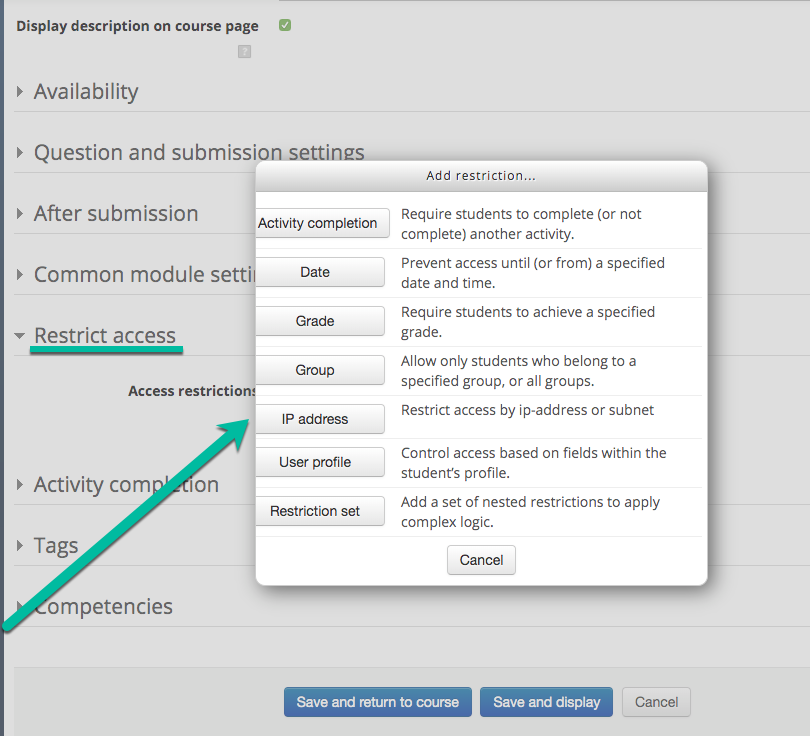
2. Go to the section "Restrict access"
3. Select IP address in the modal
4. There's a new input field that supports a list of comma separated ip address e.g. 127.0.0.1, 192.168.1.0/24
4.1 The users with matching ip addresses can view the activity.
5. Save the activity
is there a documentation for this plugin?
Cheers Kasia