
Availability restriction by IP address
Versions
Current version
5.1.0 (2026030300)
5.1.0
Plugin type: Availability restriction
Frankenstyle component name: availability_ipaddress
Version build number: 2026030300
Version release name: 5.1.0
Maturity: Stable
Supported Moodle versions: 4.0, 4.1, 4.2, 4.3, 4.4, 4.5, 5.0, 5.1
Repository URL (Git): https://github.com/LdesignMedia/moodle-availability_ipaddress
Repository branch:
Repository tag: 5.1.0
Issue/bug tracker URL: https://github.com/LdesignMedia/moodle-availability_ipaddress
Changelog
5.1.0 (2026030300)
- Tested and verified on Moodle 5.1
5.0.2 (2025080401)
- Added support for pre-configuring IP ranges by admins
5.0.1 (2025052200)
- Tested on Moodle 5.0
4.5.0 (2025040400)
- Tested on Moodle 4.5
4.4.0 (2024072000)
- Tested on Moodle 4.4
4.0.3 (2022052801)
- Test in Moodle 4.0 @hamzatamyachte
4.0.2 (2022052800)
- Fixed the issue 6 @hamzatamyachte
4.0.1 (2022021100)
- Thanks for adding ip-range support @juacas
5.0.2 (2025080401)
5.0.2
Plugin type: Availability restriction
Frankenstyle component name: availability_ipaddress
Version build number: 2025080401
Version release name: 5.0.2
Maturity: Stable
Supported Moodle versions: 4.0, 4.1, 4.2, 4.3, 4.4, 4.5, 5.0
Repository URL (Git): https://github.com/LdesignMedia/moodle-availability_ipaddress
Repository branch:
Repository tag:
Issue/bug tracker URL: https://github.com/LdesignMedia/moodle-availability_ipaddress
Moodle - availability ip address plugin
Enhance activity security by restricting access based on IP address. This plugin allows you to control the availability of any chosen
activity, making it accessible only to users from specified IP addresses.
Author
- Author: Luuk Verhoeven, ldesignmedia.nl
- Author: Vincent Cornelis, ldesignmedia.nl
- Min. required: Moodle 4.0
- Supports PHP: 7.4
List of features
- Supports comma separate list of ip-addresses
- Subnet support, eg 192.168.1.0/24
- Inline ip-address validation
- Turning on/off with eye icon, without losing the input value.
Installation
- Copy this plugin to the
availability\condition\ipaddressfolder on the server - Login as administrator
- Go to Site Administrator > Notification
- Install the plugin
Usage
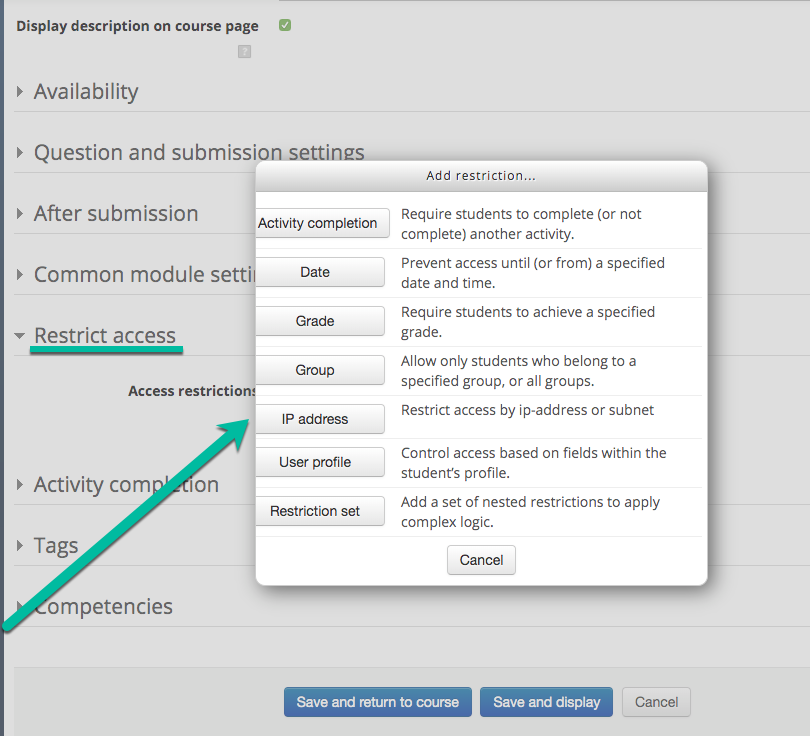
- Add or edit an activity in a Moodle course.
- Go to the section "Restrict access"
- Click IP address in the modal
- There's a new input field that supports a list of comma separated ip address e.g. 127.0.0.1, 192.168.1.0/24
- The users with matching ip addresses can view the activity.
- Save the activity
TODO
- Behat tests ip validation
Security
If you discover any security related issues, please email luuk@ldesignmedia.nl instead of using the issue tracker.
License
The GNU GENERAL PUBLIC LICENSE. Please see License File for more information.
Contributing
Contributions are welcome and will be fully credited. We accept contributions via Pull Requests on Github.
Changelog
- 2024080401 Added support for pre-configuring IP ranges by admins
- 2025052200 Tested on Moodle 5.0
- 2025040400 Tested on Moodle 4.5
- 2024072000 Tested on Moodle 4.4
- 2022021100 Thanks for adding ip-range support @juacas
- 2022052800 Fixed the issue 6 @hamzatamyachte
- 2022052801 Test in Moodle 4.0 @hamzatamyachte
5.0.0 (2025052100)
5.0.0
Plugin type: Availability restriction
Frankenstyle component name: availability_ipaddress
Version build number: 2025052100
Version release name: 5.0.0
Maturity: Stable
Supported Moodle versions: 4.0, 4.1, 4.2, 4.3, 4.4, 4.5, 5.0
Repository URL (Git): https://github.com/MFreakNL/moodle-availability_ipaddress
Repository branch:
Repository tag: 5.0.0
Issue/bug tracker URL: https://github.com/LdesignMedia/moodle-availability_ipaddress
Moodle - availability ip address plugin
Enhance activity security by restricting access based on IP address. This plugin allows you to control the availability of any chosen
activity, making it accessible only to users from specified IP addresses.
Author

- Author: Luuk Verhoeven, ldesignmedia.nl
- Min. required: Moodle 4.0
- Supports PHP: 7.4
List of features
- Supports comma separate list of ip-addresses
- Subnet support, eg 192.168.1.0/24
- Inline ip-address validation
- Turning on/off with eye icon, without lossing the input value.
Installation
- Copy this plugin to the
availability\condition\ipaddressfolder on the server - Login as administrator
- Go to Site Administrator > Notification
- Install the plugin
Usage
- Add or edit an activity in a Moodle course.
- Go to the section "Restrict access"
- Click IP address in the modal
- There's a new input field that supports a list of comma separated ip address e.g. 127.0.0.1, 192.168.1.0/24
- The users with matching ip addresses can view the activity.
- Save the activity
TODO
- Behat tests ip validation
Security
If you discover any security related issues, please email luuk@ldesignmedia.nl instead of using the issue tracker.
License
The GNU GENERAL PUBLIC LICENSE. Please see License File for more information.
Contributing
Contributions are welcome and will be fully credited. We accept contributions via Pull Requests on Github.
Changelog
- 2025040400 Tested on Moodle 4.5
- 2024072000 Tested on Moodle 4.4
- 2022021100 Thanks for adding ip-range support @juacas
- 2022052800 Fixed the issue 6 @hamzatamyachte
- 2022052801 Test in Moodle 4.0 @hamzatamyachte
4.5.1 (2025040401)
4.5.1
Plugin type: Availability restriction
Frankenstyle component name: availability_ipaddress
Version build number: 2025040401
Version release name: 4.5.1
Maturity: Stable
Supported Moodle versions: 4.0, 4.1, 4.2, 4.3, 4.4, 4.5
Repository URL (Git): https://github.com/LdesignMedia/moodle-availability_ipaddress
Repository branch: main
Repository tag:
Issue/bug tracker URL: https://github.com/LdesignMedia/moodle-availability_ipaddress
Moodle - availability ip address plugin
Enhance activity security by restricting access based on IP address. This plugin allows you to control the availability of any chosen
activity, making it accessible only to users from specified IP addresses.
Author

- Author: Luuk Verhoeven, ldesignmedia.nl
- Min. required: Moodle 4.0
- Supports PHP: 7.4
List of features
- Supports comma separate list of ip-addresses
- Subnet support, eg 192.168.1.0/24
- Inline ip-address validation
- Turning on/off with eye icon, without lossing the input value.
Installation
- Copy this plugin to the
availability\condition\ipaddressfolder on the server - Login as administrator
- Go to Site Administrator > Notification
- Install the plugin
Usage
- Add or edit an activity in a Moodle course.
- Go to the section "Restrict access"
- Click IP address in the modal
- There's a new input field that supports a list of comma separated ip address e.g. 127.0.0.1, 192.168.1.0/24
- The users with matching ip addresses can view the activity.
- Save the activity
TODO
- Behat tests ip validation
Security
If you discover any security related issues, please email luuk@ldesignmedia.nl instead of using the issue tracker.
License
The GNU GENERAL PUBLIC LICENSE. Please see License File for more information.
Contributing
Contributions are welcome and will be fully credited. We accept contributions via Pull Requests on Github.
Changelog
- 2025040400 Tested on Moodle 4.5
- 2024072000 Tested on Moodle 4.4
- 2022021100 Thanks for adding ip-range support @juacas
- 2022052800 Fixed the issue 6 @hamzatamyachte
- 2022052801 Test in Moodle 4.0 @hamzatamyachte
4.5.0 (2025040400)
4.5.0
Plugin type: Availability restriction
Frankenstyle component name: availability_ipaddress
Version build number: 2025040400
Version release name: 4.5.0
Maturity: Stable
Supported Moodle versions: 4.0, 4.1, 4.2, 4.3, 4.4, 4.5
Repository URL (Git): https://github.com/LdesignMedia/moodle-availability_ipaddress
Repository branch: main
Repository tag:
Issue/bug tracker URL: https://github.com/LdesignMedia/moodle-availability_ipaddress
Moodle - availability ip address plugin
Enhance activity security by restricting access based on IP address. This plugin allows you to control the availability of any chosen
activity, making it accessible only to users from specified IP addresses.
Author

- Author: Luuk Verhoeven, ldesignmedia.nl
- Min. required: Moodle 4.0
- Supports PHP: 7.4
List of features
- Supports comma separate list of ip-addresses
- Subnet support, eg 192.168.1.0/24
- Inline ip-address validation
- Turning on/off with eye icon, without lossing the input value.
Installation
- Copy this plugin to the
availability\condition\ipaddressfolder on the server - Login as administrator
- Go to Site Administrator > Notification
- Install the plugin
Usage
- Add or edit an activity in a Moodle course.
- Go to the section "Restrict access"
- Click IP address in the modal
- There's a new input field that supports a list of comma separated ip address e.g. 127.0.0.1, 192.168.1.0/24
- The users with matching ip addresses can view the activity.
- Save the activity
TODO
- Behat tests ip validation
Security
If you discover any security related issues, please email luuk@ldesignmedia.nl instead of using the issue tracker.
License
The GNU GENERAL PUBLIC LICENSE. Please see License File for more information.
Contributing
Contributions are welcome and will be fully credited. We accept contributions via Pull Requests on Github.
Changelog
- 2025040400 Tested on Moodle 4.5
- 2024072000 Tested on Moodle 4.4
- 2022021100 Thanks for adding ip-range support @juacas
- 2022052800 Fixed the issue 6 @hamzatamyachte
- 2022052801 Test in Moodle 4.0 @hamzatamyachte
4.4.1 (2024072001)
4.4.1
Plugin type: Availability restriction
Frankenstyle component name: availability_ipaddress
Version build number: 2024072001
Version release name: 4.4.1
Maturity: Stable
Supported Moodle versions: 4.0, 4.1, 4.2, 4.3, 4.4
Repository URL (Git): https://github.com/LdesignMedia/moodle-availability_ipaddress
Repository branch: main
Repository tag:
Issue/bug tracker URL: https://github.com/LdesignMedia/moodle-availability_ipaddress
Moodle - availability ip address plugin
Enhance activity security by restricting access based on IP address. This plugin allows you to control the availability of any chosen
activity, making it accessible only to users from specified IP addresses.
Author

- Author: Luuk Verhoeven, ldesignmedia.nl
- Min. required: Moodle 4.0
- Supports PHP: 7.4
List of features
- Supports comma separate list of ip-addresses
- Subnet support, eg 192.168.1.0/24
- Inline ip-address validation
- Turning on/off with eye icon, without lossing the input value.
Installation
- Copy this plugin to the
availability\condition\ipaddressfolder on the server - Login as administrator
- Go to Site Administrator > Notification
- Install the plugin
Usage
- Add or edit an activity in a Moodle course.
- Go to the section "Restrict access"
- Click IP address in the modal
- There's a new input field that supports a list of comma separated ip address e.g. 127.0.0.1, 192.168.1.0/24
- The users with matching ip addresses can view the activity.
- Save the activity
TODO
- Behat tests ip validation
Security
If you discover any security related issues, please email luuk@ldesignmedia.nl instead of using the issue tracker.
License
The GNU GENERAL PUBLIC LICENSE. Please see License File for more information.
Contributing
Contributions are welcome and will be fully credited. We accept contributions via Pull Requests on Github.
Changelog
- 2024072000 Tested on Moodle 4.4
- 2022021100 Thanks for adding ip-range support @juacas
- 2022052800 Fixed the issue 6 @hamzatamyachte
- 2022052801 Test in Moodle 4.0 @hamzatamyachte
3.11.2 (2022052801)
3.11.2
Plugin type: Availability restriction
Frankenstyle component name: availability_ipaddress
Version build number: 2022052801
Version release name: 3.11.2
Maturity: Stable
Supported Moodle versions: 3.2, 3.3, 3.4, 3.5, 3.6, 3.7, 3.8, 3.9, 3.10, 3.11, 4.0, 4.1, 4.2
Repository URL (Git): https://github.com/MFreakNL/moodle-availability_ipaddress
Repository branch:
Repository tag: 3.11.2
Issue/bug tracker URL: https://github.com/LdesignMedia/moodle-availability_ipaddress
Moodle - availability ip address plugin
Restrict access to any activity by ip-address. This plugin can be used to make any chosen activity unavailable based on the user's IP.
Author

- Author: Luuk Verhoeven, MFreak.nl
- Min. required: Moodle 3.5.x
- Supports PHP: 7.2
List of features
- Supports comma separate list of ip-addresses
- Subnet support, eg 192.168.1.0/24
- Inline ip-address validation
- Turning on/off with eye icon, without lossing the input value.
Installation
- Copy this plugin to the
availability\condition\ipaddressfolder on the server - Login as administrator
- Go to Site Administrator > Notification
- Install the plugin
Usage
- Add or edit an activity in a Moodle course.
- Go to the section "Restrict access"
- Click IP address in the modal
- There's a new input field that supports a list of comma separated ip address e.g. 127.0.0.1, 192.168.1.0/24
- The users with matching ip addresses can view the activity.
- Save the activity
TODO
- Behat tests ip validation
Security
If you discover any security related issues, please email luuk@MFreak.nl instead of using the issue tracker.
License
The GNU GENERAL PUBLIC LICENSE. Please see License File for more information.
Contributing
Contributions are welcome and will be fully credited. We accept contributions via Pull Requests on Github.
Changelog
- 2022021100 Thanks for adding ip-range support @juacas
- 2022052800 Fixed the issue 6 @hamzatamyachte
- 2022052801 Test in Moodle 4.0 @hamzatamyachte
3.11.0 (2022021100)
3.11.0
Plugin type: Availability restriction
Frankenstyle component name: availability_ipaddress
Version build number: 2022021100
Version release name: 3.11.0
Maturity: Stable
Supported Moodle versions: 3.2, 3.3, 3.4, 3.5, 3.6, 3.7, 3.8, 3.9, 3.10, 3.11
Repository URL (Git): https://github.com/MFreakNL/moodle-availability_ipaddress
Repository branch:
Repository tag: 3.11.1
Issue/bug tracker URL: https://github.com/LdesignMedia/moodle-availability_ipaddress
Moodle - availability ip address plugin
Restrict access to any activity by ip-address. This plugin can be used to make any chosen activity unavailable based on the user's IP.
Author

- Author: Luuk Verhoeven, MFreak.nl
- Min. required: Moodle 3.5.x
- Supports PHP: 7.2

List of features
- Supports comma separate list of ip-addresses
- Subnet support, eg 192.168.1.0/24
- Inline ip-address validation
- Turning on/off with eye icon, without lossing the input value.
Installation
- Copy this plugin to the
availability\condition\ipaddressfolder on the server - Login as administrator
- Go to Site Administrator > Notification
- Install the plugin
Usage
- Add or edit an activity in a Moodle course.
- Go to the section "Restrict access"
- Click IP address in the modal
- There's a new input field that supports a list of comma separated ip address e.g. 127.0.0.1, 192.168.1.0/24
- The users with matching ip addresses can view the activity.
- Save the activity
TODO
- Behat tests ip validation
Security
If you discover any security related issues, please email luuk@MFreak.nl instead of using the issue tracker.
License
The GNU GENERAL PUBLIC LICENSE. Please see License File for more information.
Contributing
Contributions are welcome and will be fully credited. We accept contributions via Pull Requests on Github.
3.11.0 (2021121500)
3.11.0
Plugin type: Availability restriction
Frankenstyle component name: availability_ipaddress
Version build number: 2021121500
Version release name: 3.11.0
Maturity: Stable
Supported Moodle versions: 3.2, 3.3, 3.4, 3.5, 3.6, 3.7, 3.8, 3.9, 3.10, 3.11
Repository URL (Git): https://github.com/MFreakNL/moodle-availability_ipaddress
Repository branch:
Repository tag: 3.11.0
Issue/bug tracker URL: https://github.com/LdesignMedia/moodle-availability_ipaddress
Moodle - availability ip address plugin
Restrict access to any activity by ip-address. This plugin can be used to make any chosen activity unavailable based on the user's IP.
Author

- Author: Luuk Verhoeven, MFreak.nl
- Min. required: Moodle 3.5.x
- Supports PHP: 7.2

List of features
- Supports comma separate list of ip-addresses
- Subnet support, eg 192.168.1.0/24
- Inline ip-address validation
- Turning on/off with eye icon, without lossing the input value.
Installation
- Copy this plugin to the
availability\condition\ipaddressfolder on the server - Login as administrator
- Go to Site Administrator > Notification
- Install the plugin
Usage
- Add or edit an activity in a Moodle course.
- Go to the section "Restrict access"
- Click IP address in the modal
- There's a new input field that supports a list of comma separated ip address e.g. 127.0.0.1, 192.168.1.0/24
- The users with matching ip addresses can view the activity.
- Save the activity
TODO
- Behat tests ip validation
Security
If you discover any security related issues, please email luuk@MFreak.nl instead of using the issue tracker.
License
The GNU GENERAL PUBLIC LICENSE. Please see License File for more information.
Contributing
Contributions are welcome and will be fully credited. We accept contributions via Pull Requests on Github.
3.10.0 (2020111800)
3.10.0
Plugin type: Availability restriction
Frankenstyle component name: availability_ipaddress
Version build number: 2020111800
Version release name: 3.10.0
Maturity: Stable
Supported Moodle versions: 3.5, 3.6, 3.7, 3.8, 3.9, 3.10
Repository URL (Git): https://github.com/MFreakNL/moodle-availability_ipaddress
Repository branch:
Repository tag: 3.10
Issue/bug tracker URL: https://github.com/LdesignMedia/moodle-availability_ipaddress
Moodle - availability ip address plugin
Restrict access to any activity by ip-address. This plugin can be used to make any chosen activity unavailable based on the user's IP.
Author

- Author: Luuk Verhoeven, MFreak.nl
- Min. required: Moodle 3.5.x
- Supports PHP: 7.2

List of features
- Supports comma separate list of ip-addresses
- Subnet support, eg 192.168.1.0/24
- Inline ip-address validation
- Turning on/off with eye icon, without lossing the input value.
Installation
- Copy this plugin to the
availability\condition\ipaddressfolder on the server - Login as administrator
- Go to Site Administrator > Notification
- Install the plugin
Usage
- Add or edit an activity in a Moodle course.
- Go to the section "Restrict access"
- Click IP address in the modal
- There's a new input field that supports a list of comma separated ip address e.g. 127.0.0.1, 192.168.1.0/24
- The users with matching ip addresses can view the activity.
- Save the activity
TODO
- Behat tests ip validation
Security
If you discover any security related issues, please email luuk@MFreak.nl instead of using the issue tracker.
License
The GNU GENERAL PUBLIC LICENSE. Please see License File for more information.
Contributing
Contributions are welcome and will be fully credited. We accept contributions via Pull Requests on Github.
3.9.0 (2020061500)
3.9.0
Plugin type: Availability restriction
Frankenstyle component name: availability_ipaddress
Version build number: 2020061500
Version release name: 3.9.0
Maturity: Beta
Supported Moodle versions: 3.5, 3.6, 3.7, 3.8, 3.9
Repository URL (Git): https://github.com/MFreakNL/moodle-availability_ipaddress
Repository branch:
Repository tag: 3.9.0
Issue/bug tracker URL: https://github.com/LdesignMedia/moodle-availability_ipaddress
Moodle - availability ip address plugin
Restrict access to any activity by ip-address. This plugin can be used to make any chosen activity unavailable based on the user's IP.
Author

- Author: Luuk Verhoeven, MFreak.nl
- Min. required: Moodle 3.2.x
- Supports PHP: 7.0 | 7.1

List of features
- Supports comma separate list of ip-addresses
- Subnet support, eg 192.168.1.0/24
- Inline ip-address validation
- Turning on/off with eye icon, without lossing the input value.
Installation
- Copy this plugin to the
availability\condition\ipaddressfolder on the server - Login as administrator
- Go to Site Administrator > Notification
- Install the plugin
TODO
- Behat tests ip validation
Security
If you discover any security related issues, please email luuk@MFreak.nl instead of using the issue tracker.
License
The GNU GENERAL PUBLIC LICENSE. Please see License File for more information.
Contributing
Contributions are welcome and will be fully credited. We accept contributions via Pull Requests on Github.
3.8.0 (2019111400)
3.8.0
Plugin type: Availability restriction
Frankenstyle component name: availability_ipaddress
Version build number: 2019111400
Version release name: 3.8.0
Maturity: Beta
Supported Moodle versions: 3.5, 3.6, 3.7, 3.8
Repository URL (Git): https://github.com/MFreakNL/moodle-availability_ipaddress
Repository branch:
Repository tag: 3.8
Issue/bug tracker URL: https://github.com/LdesignMedia/moodle-availability_ipaddress
Moodle - availability ip address plugin
Restrict access to any activity by ip-address. Most activities don't support this feature.
Author

- Author: Luuk Verhoeven, MFreak.nl
- Min. required: Moodle 3.2.x
- Supports PHP: 7.0 | 7.1

List of features
- Supports comma separate list of ip-addresses
- Subnet support, eg 192.168.1.0/24
- Inline ip-address validation
- Turning on/off with eye icon, without lossing the input value.
Installation
- Copy this plugin to the
availability\condition\ipaddressfolder on the server - Login as administrator
- Go to Site Administrator > Notification
- Install the plugin
TODO
- Behat tests ip validation
Security
If you discover any security related issues, please email luuk@MFreak.nl instead of using the issue tracker.
License
The GNU GENERAL PUBLIC LICENSE. Please see License File for more information.
Contributing
Contributions are welcome and will be fully credited. We accept contributions via Pull Requests on Github.
v3.5.2 (2019052100)
v3.5.2
Plugin type: Availability restriction
Frankenstyle component name: availability_ipaddress
Version build number: 2019052100
Version release name: v3.5.2
Maturity: Beta
Supported Moodle versions: 3.2, 3.3, 3.4, 3.5, 3.6, 3.7
Repository URL (Git): https://github.com/MFreakNL/moodle-availability_ipaddress
Repository branch:
Repository tag:
Issue/bug tracker URL: https://github.com/LdesignMedia/moodle-availability_ipaddress
Moodle - availability ip address plugin
Restrict access to any activity by ip-address. Most activities don't support this feature.
Author

- Author: Luuk Verhoeven, MFreak.nl
- Min. required: Moodle 3.2.x
- Supports PHP: 7.0 | 7.1

List of features
- Supports comma separate list of ip-addresses
- Subnet support, eg 192.168.1.0/24
- Inline ip-address validation
- Turning on/off with eye icon, without lossing the input value.
Installation
- Copy this plugin to the
availability\condition\ipaddressfolder on the server - Login as administrator
- Go to Site Administrator > Notification
- Install the plugin
TODO
- Behat tests ip validation
Security
If you discover any security related issues, please email luuk@MFreak.nl instead of using the issue tracker.
License
The GNU GENERAL PUBLIC LICENSE. Please see License File for more information.
Contributing
Contributions are welcome and will be fully credited. We accept contributions via Pull Requests on Github.
v3.5.0 (2019051500)
v3.5.0
Plugin type: Availability restriction
Frankenstyle component name: availability_ipaddress
Version build number: 2019051500
Version release name: v3.5.0
Maturity: Beta
Supported Moodle versions: 3.2, 3.3, 3.4, 3.5, 3.6, 3.7
Repository URL (Git): https://github.com/MFreakNL/moodle-availability_ipaddress
Repository branch:
Repository tag: v3.5.0
Issue/bug tracker URL: https://github.com/LdesignMedia/moodle-availability_ipaddress
Moodle - availability ip address plugin
Restrict access to any activity by ip-address. Most activities don't support this feature.
Author

- Author: Luuk Verhoeven, MFreak.nl
- Min. required: Moodle 3.2.x
- Supports PHP: 7.0 | 7.1
List of features
- Supports comma separate list of ip-addresses
- Subnet support, eg 192.168.1.0/24
- Inline ip-address validation
- Turning on/off with eye icon, without lossing the input value.
Installation
- Copy this plugin to the
availability\condition\ipaddressfolder on the server - Login as administrator
- Go to Site Administrator > Notification
- Install the plugin
Security
If you discover any security related issues, please email luuk@MFreak.nl instead of using the issue tracker.
License
The GNU GENERAL PUBLIC LICENSE. Please see License File for more information.
Contributing
Contributions are welcome and will be fully credited. We accept contributions via Pull Requests on Github.