
Course checker
Maintained by
Sascha Vogel, Stefan Dani, FFHS Fernfachhochschule Schweiz, Christoph Karlen, Simon Gisler
A Moodle course checker plugin that improves the quality and eliminate human routine tasks in online courses.
Comments
Comments are no longer open for new posts. Existing comments remain available to read.
The block is course related, so we don't want to add it to the dashboard. Maybe you could use this config setting https://github.com/moodle/moodle/blob/master/config-dist.php#L246-L248 to solve your problem?
Greets
Adrian
Please check the following things:
- Is your cron-job up and running?
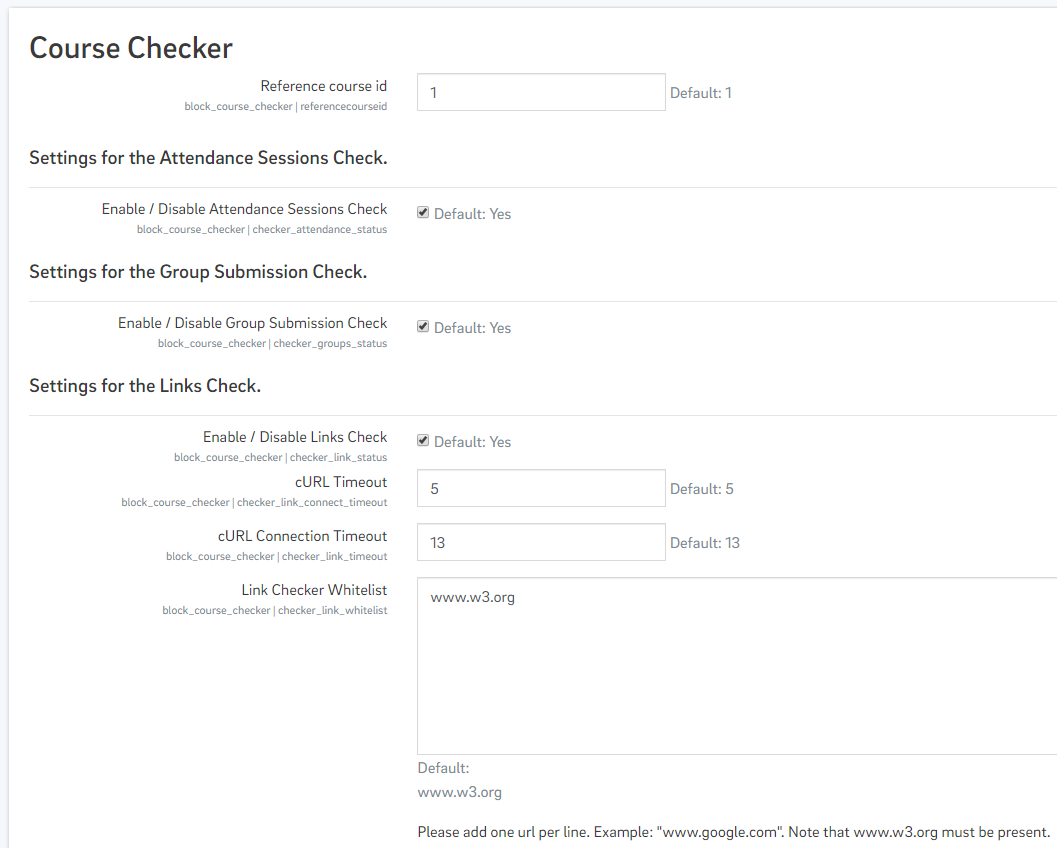
- Is the Link-Checker enabled in the plugin settings?
Thanks for reaching back out! I am testing this plugin for our Moodle system, and when I try to run the checker it says that this course is already scheduled to be checked automatically, but it also says that the automatic check has never been launched. I do not know how to launch it. When I set the manual check date, and view the detailed results, I get a message saying “this course has never been checked automatically”. I am trying to figure out how to get it to work! I know for certain that there are broken links in the course, because I put them there myself. If you have any suggestions, please let me know! Thank you so much!
When you click the "CHECK THIS COURSE" the activated checks are sheduled and then processed by your moodle-cronjob as soon as possible. At the moment the plugin doesn't provide a way to pospone oder plan the execution of the checks once you have clicked the button.
The "Set manual check date" section of the block provides a way to set a date when a human beeing made a manual check by reading the content of the course - so no automation here. The only real impact this date has, is on the "Last modified activities" on the Detail page. Here, all the activities are listed since that date.
Can you describe what you want to accomplish? Maybe I can help you.
have a nice day
you are right thanks for the hint. When turning editing on I can manually add the block "course checker" and then it remains visible. And yes, I have the rights to add blocks, I have admin rights
Thank you again for your help,
Best wishes, Herwig from sunny Austria
Are you sure you are in edit mode and you can add blocks to this course? Please click in the course settings on "Turn editing on". I think, that this problem has nothing to do with that "Course checker" plugin and if you need help you should consider contacting your Moodle administrator.
Greets,
Adrian
Thanks again for your help. What I still can't understand: I receive the course checker block only in two courses in our Moodle installation, in the other courses I simply cannot see the block in the courses nor do I see any possibility to add the block ... see screenshot of one of the many courses where the course checker block does not appear. Do you have any idea why it doesn't show up? Is it a special setting in the course?!
See here what I (do not) see: https://box.medunigraz.at/s/LLyAzrEmky9cHHA
Thanks again for any hints,
Best wishes from a partly sunny Austria,
Herwig
It doesn't show the check results if the _first_ course check is pending. After the first run, the check results should be shown.
> Cron should run in the background, as the queue of this course checks is done as adhoc tasks (https://docs.moodle.org/dev/Task_API#Adhoc_tasks).
> The php extension cURL is necessary for the
link checker.HTH,
Adrian
Ah thanks for the hint, now I succeeded at least to add the block
In one course I get all the checkable options, in the next course I am offered nothing
Furthermore you state in your doc that we have to start cron jobs - which ones exactly? php-ext-curl - this addon we have installed, do we have to do anything else?
Thanks for your kind help,
Best wishes from sunny Austria to sunny Switzerland,
Herwig
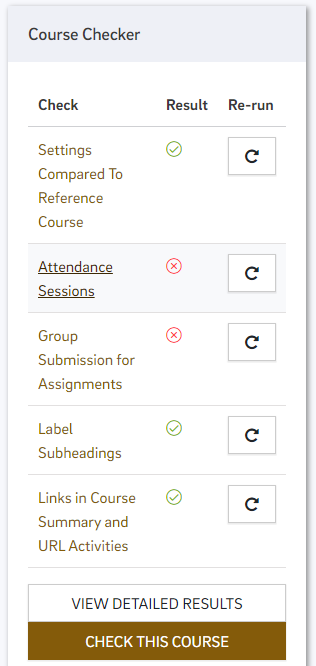
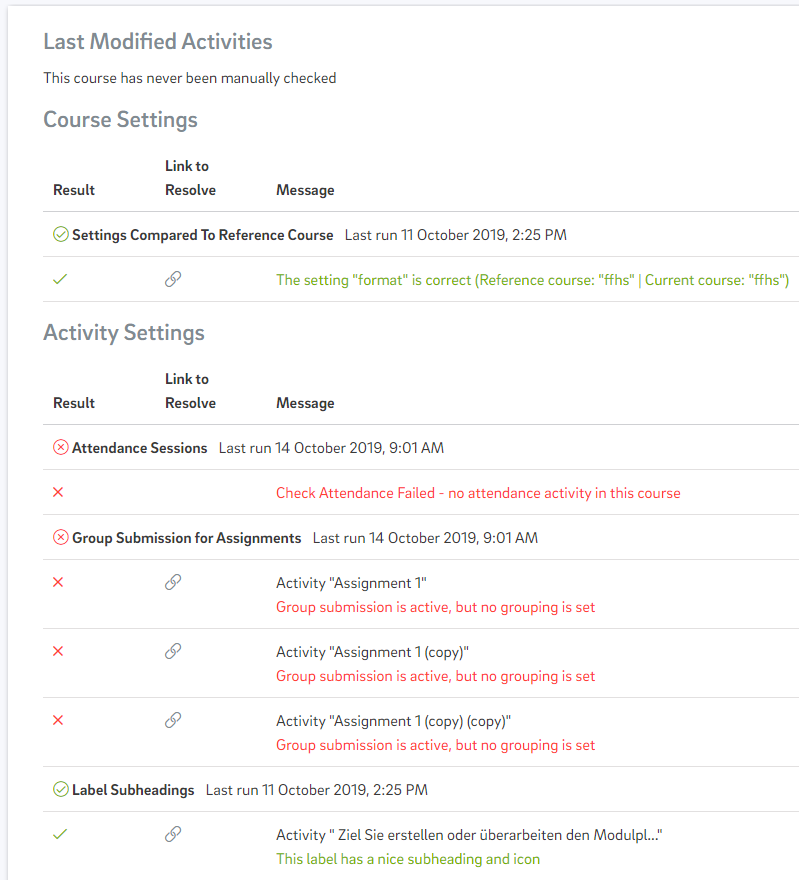
This plugin is a block. Therefore, you can add it like the others with "Add a block" to each course. Please be aware, that the global settings (screenshot 3) are related to all block instances over all courses. We don't have yet independent settings for each block instance per course.
Greets,
Adrian
first a big thank you to provide such a great plugin. I have a very basic question: we just installed the plugin at our Moodle 3.7. But how can I use the plugin now? I mean I can openb the configuration interface of the plugin, but I do not see any new menu in the courses. So how can I activate it within the course? (I cannot see screenshot 1 and 2, only 3 ...).
Thanks a lot for any hints,
Best wishes from a bright and sunny Austria,
Herwig
Thanks for your messages and your findings. The variable initiated in line #99 that you mention is only the resolution link to have a link direct to this activity on the details page.
But you're right, the book chapters are not included in this checker as only the properties "name, intro, content" of activities and "externalurl" for the activity URL are included. I'll create an issue on GitHub and I would really appreciate if you can help to add this feature.
Kind regards,
Adrian
I need to correct my previous post. We have book activity with 20-30 chapters with 15-30 links each. Looking at your code, I found in course_checker\classes\checkers\checker_link\checker.php line 99 - $url = new \moodle_url('/mod/' . $modname . '/view.php', ['id' => $mod->coursemodule]); but chapters are having additional "chapterid" - /mod/book/view.php?id=66&chapterid=45
Can you implement checking links in book activity chapters in your plugin? It is very useful, but it would be grate to have a book activity link check too.
Thank you,