Group choice
Maintained by
Nicolas Dunand
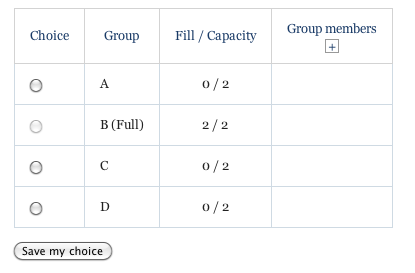
This module allows students to enrol themselves in a group within a course. The teacher can select which groups students can chose from and the maximum number of students allowed in each group.
Comments
Comments are no longer open for new posts. Existing comments remain available to read.
Thanks for the reminder. I just uploaded the new version, which you can as of now download directly from this page. Note the the current (newest) version only supports Moodle 2.7 and above – so for people interested in using the plugin on older versions of Moodle, please check the "Download versions" link near the top of this page.
No, it won't disrupt anything as the choices aren't recorded in the activity but only in the groups. As long as you don't delete any groups (in the course groups management settings), the members of each group (and hence the "choices" of the Group Choice activity) will not change.
When you mentioned:
"Edit the current activity and (using the group selection drop-down menus) set each group (choice) in the wanted order."
Does modifying the choice names and groups whilst users have already 'joined' the groups (so that a 'new inserted' choice 'appears') disrupt users?
Thanks
Simon
There is no way at this time to rearrange the order of the choices. However, this problem can be circumvented (albeit not very elegantly) by doing one of the following:
- Create a new activity and add the choices is the wanted order: the choices done so far will be "reported" into the new activity, as the group memberships are already set. Once you're happy with the new setup you can remove the original activity and replace it with the new one.
OR
- Edit the current activity and (using the group selection drop-down menus) set each group (choice) in the wanted order.
I just wanted to ask if there is a way to re-arrange the order of choices once they are created?
i.e.
choice 1
choice 2
choice 3
now if I want to add a choice called 'choice 1.2', this will appear below 'choice 3'.
I don't mind if we have to move the choices manually or if they are alphabetical, just that they can be re-arranged.
Help!
Thanks
Simon
The Activity is restored, but choice options is nil, and responses is 0 too.
I just saw from your PM that you have figured it out. Here it is for consistency's sake: the "Limit the number of responses allowed" setting has to be set.
Any tips on what I'm doing wrong?
Thanks for the feedback
Thanks, this is a great activity!
You can check the documentation about groups in Moodle here : http://docs.moodle.org/26/en/Groups
i'm trying to add this activity module to my course and i get the messag :
"Please create at least two groups in this course."
how can I create groups in a course ?
thanks.