Simple Course Creator (local_simple_course_creator)
A Moodle local plugin that lets users create courses directly from the Course Category settings menu, presenting only the essential fields needed. Ideal for teachers and busy administrators who find Moodle's default course creation form overwhelming.
Overview
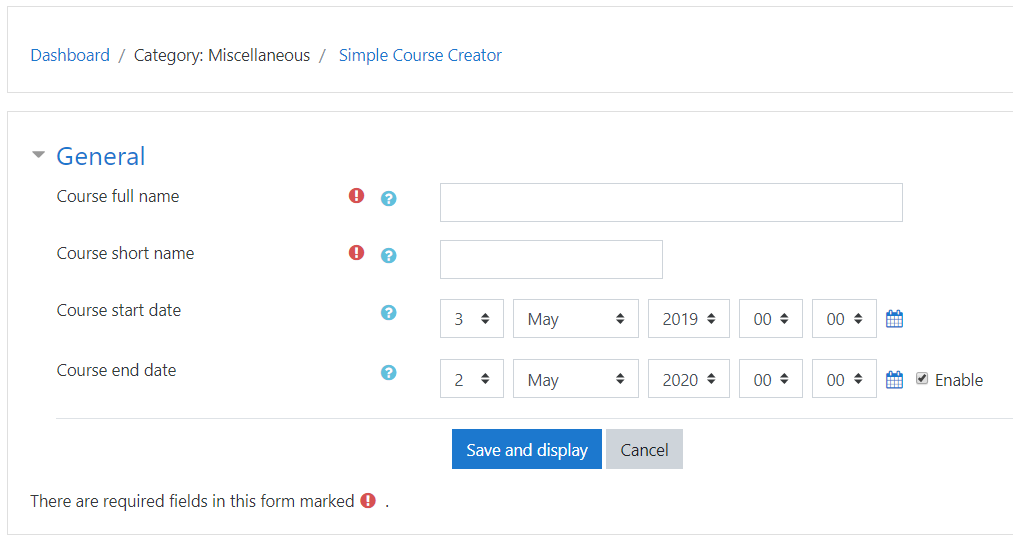
Moodle's standard course creation form has many optional sections that can confuse new or non-technical users. This plugin strips the form down to its essentials — by default only four fields are shown — while giving site administrators control over which additional sections to expose.
Key behaviours:
- After saving, the user lands directly on the course view page, skipping Moodle's enrolment step.
- If the Category field is hidden, the course is created in the category the user was browsing when they clicked the link.
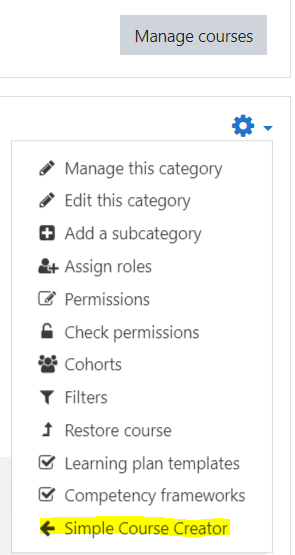
- The plugin adds a "Simple course creator" link inside the category settings navigation, visible only to users with the
moodle/course:create capability.
Features
- Minimal course creation form with only four required fields by default.
- Configurable optional sections — enable only what your users need.
- Skips the post-creation enrolment page for a faster workflow.
- Respects Moodle's existing course creation capability (
moodle/course:create).
- Available to Editing Teachers and Managers out of the box.
Compatibility
| Moodle Version | Supported |
|----------------|-----------|
| Moodle 4.5.x | Yes |
| Moodle 5.0.x | Yes |
| Moodle 5.2.x | Yes |
Installation
Via Moodle Plugin Installer
- Download the plugin ZIP package.
- Log in as a Moodle administrator.
- Navigate to Site administration ' Plugins ' Install plugins.
- Upload the ZIP file and follow the on-screen steps.
- Complete the upgrade process and save settings.
Manual Installation
- Download and extract the plugin source code.
- Copy the folder into your Moodle installation:
/local/simple_course_creator
- Navigate to Site administration ' Notifications and complete the installation.
Usage
- Browse to a course category (e.g. via
/course/index.php).
- Open the category settings (click the cog icon, or use the category navigation block).
- Click Simple course creator in the settings menu.
- Fill in the form — at minimum: Course full name, Short name, Start date, and End date.
- Click Save and display to go directly to the new course.
Boost / modern themes: Navigate to /course/index.php, select the desired category, then click the edit cog at the top right to reveal the settings navigation links.
Configuration
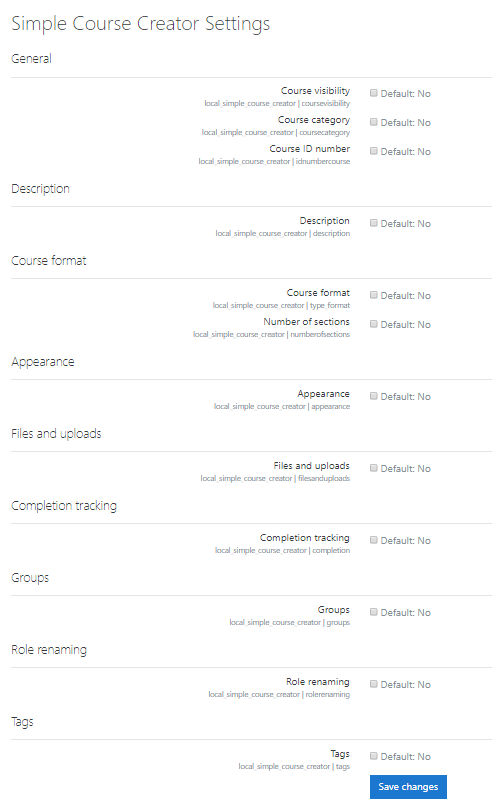
Navigate to Site administration ' Plugins ' Local plugins ' Simple course creator settings.
Each section of the course creation form can be independently enabled or disabled:
| Section | Setting key | Default |
|----------------------|----------------------|---------|
| Course visibility | coursevisibility | Off |
| Course category | coursecategory | Off |
| ID number | idnumbercourse | Off |
| Description | description | Off |
| Course format | type_format | Off |
| Number of sections | numberofsections | Off |
| Appearance | appearance | Off |
| Files and uploads | filesanduploads | Off |
| Completion tracking | completion | Off |
| Groups | groups | Off |
| Role renaming | rolerenaming | Off |
| Tags | tags | Off |
All sections are hidden by default. Enable only the ones relevant to your users.
Capabilities
| Capability | Editing Teacher | Manager |
|-------------------------------------|-----------------|---------|
| local/simple_course_creator:manage | Allow | Allow |
The plugin link is displayed to any user who holds moodle/course:create in the current category context.
Acknowledgements
This plugin originated from user requests at Moodle Moot 2019 Manchester (#mootIEUK19).
Thanks to Brett Lucas at Queen Mary University of London for refining the requirements.
Author
Shubhendra R Doiphode — doiphode.sunny@gmail.com