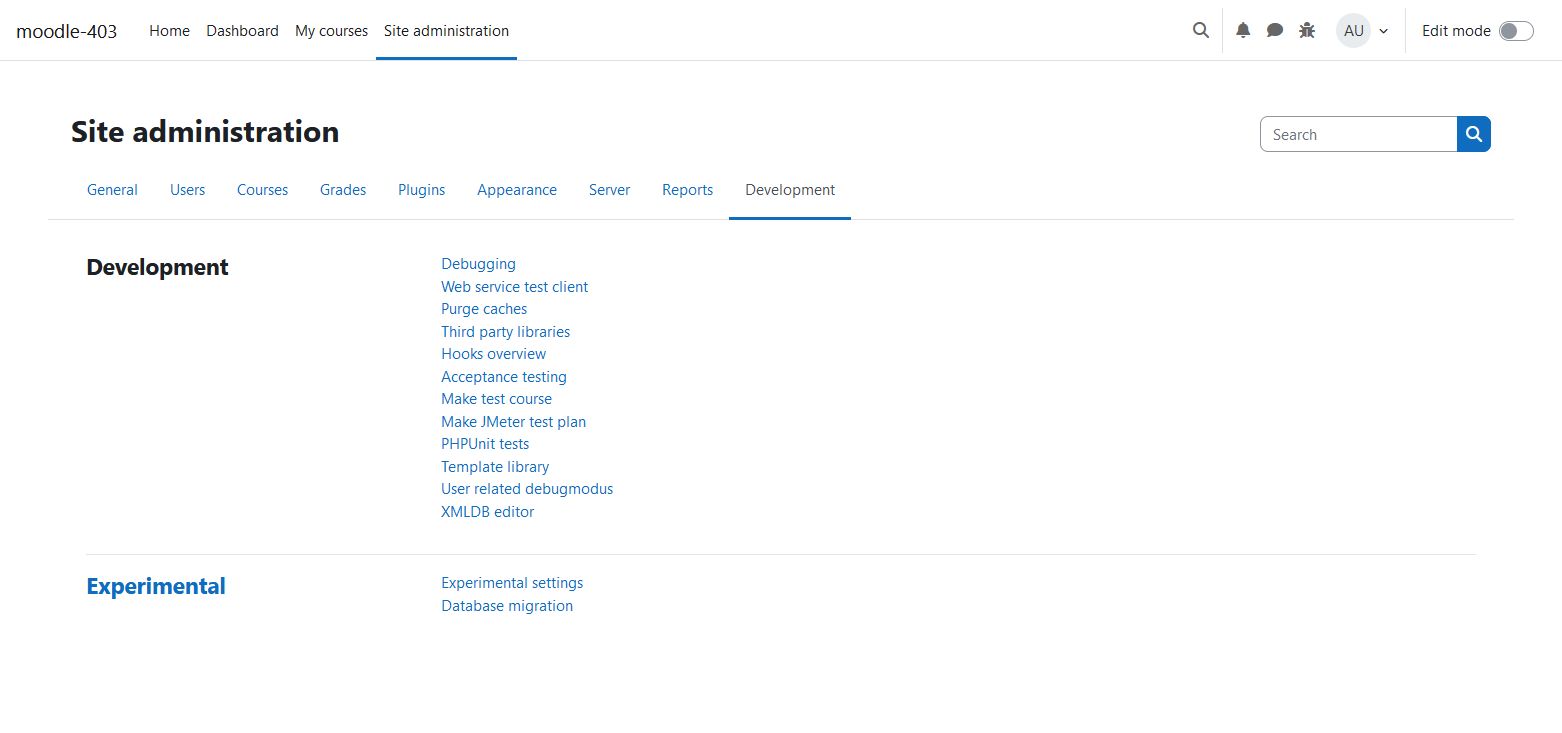
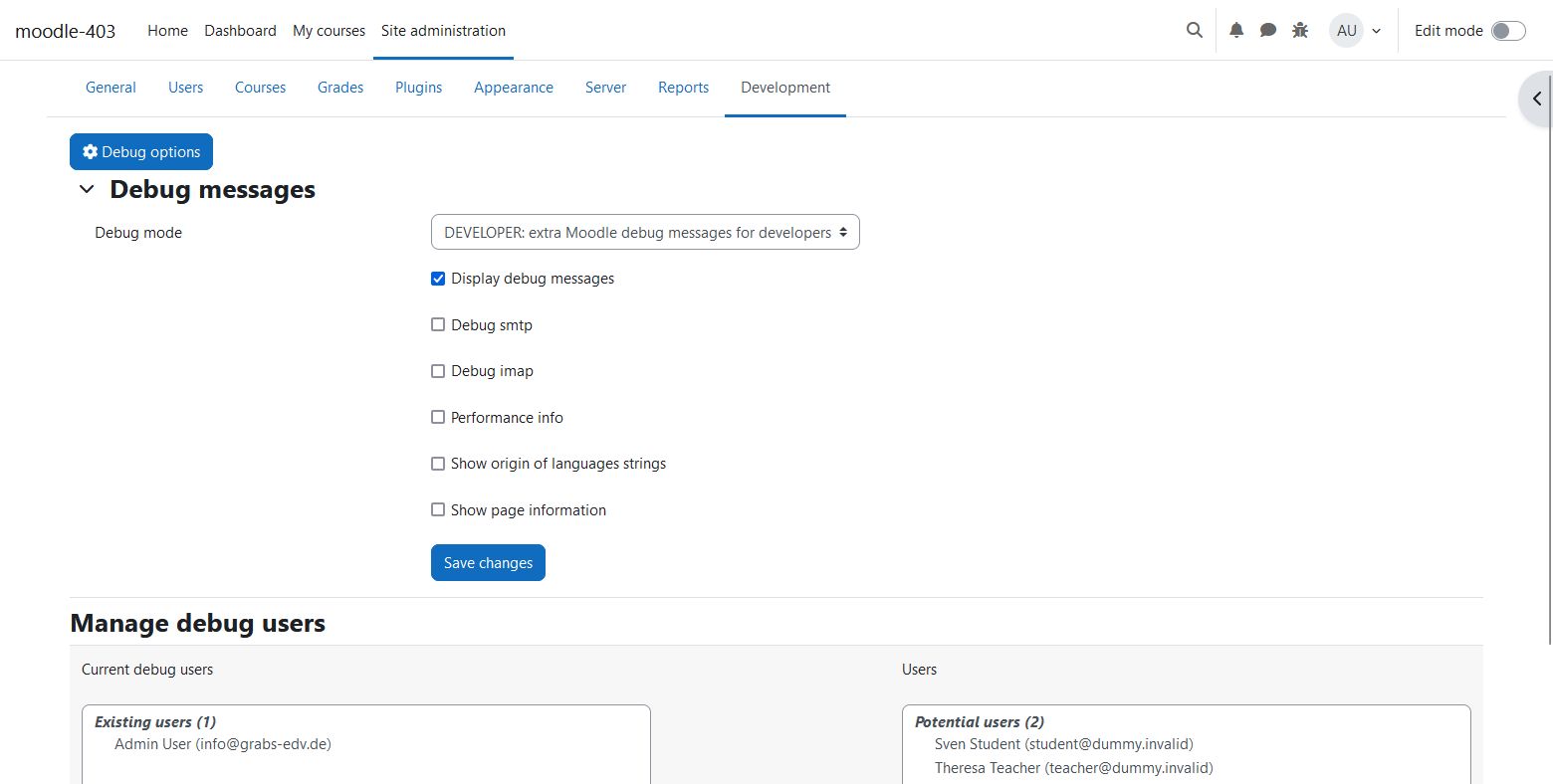
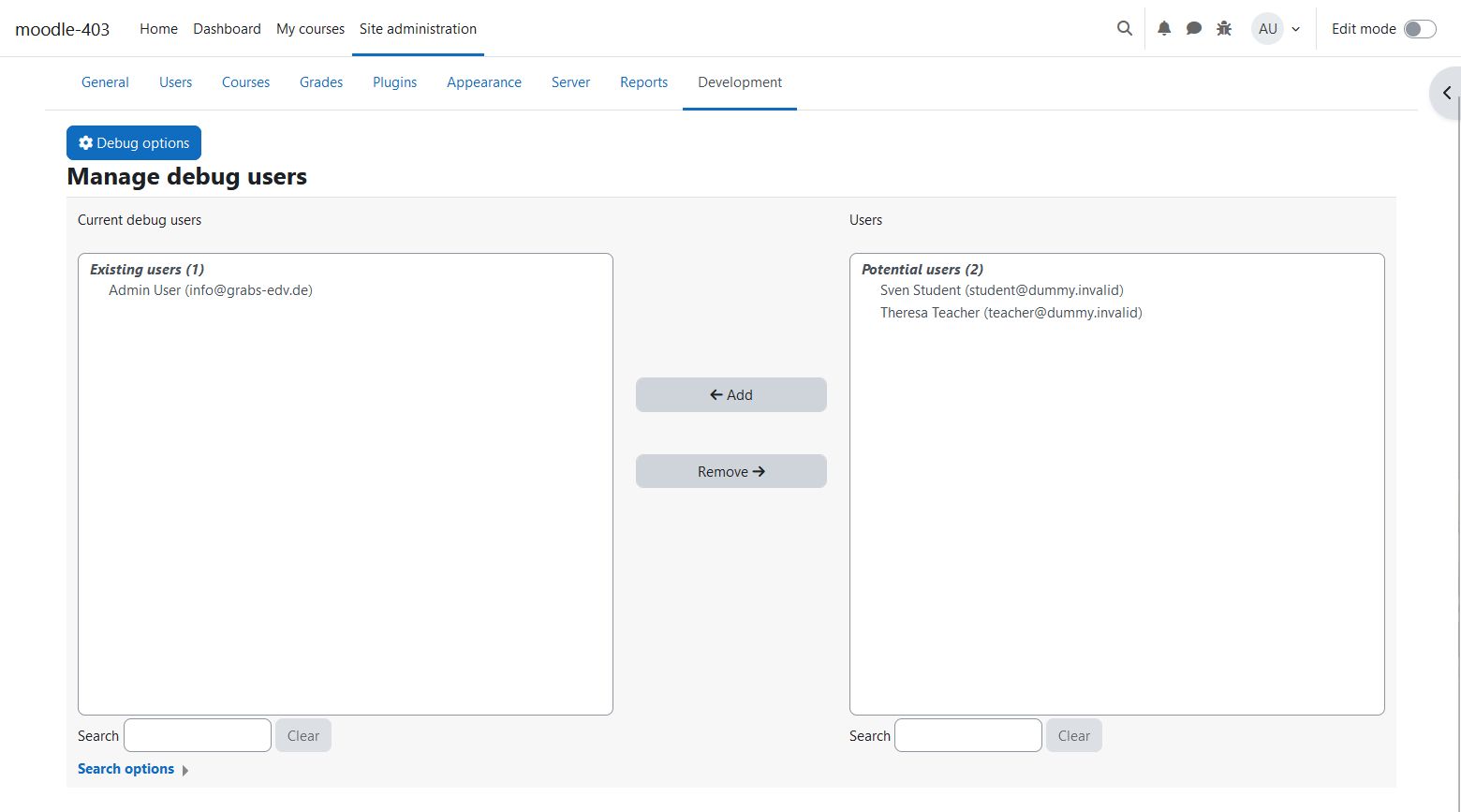
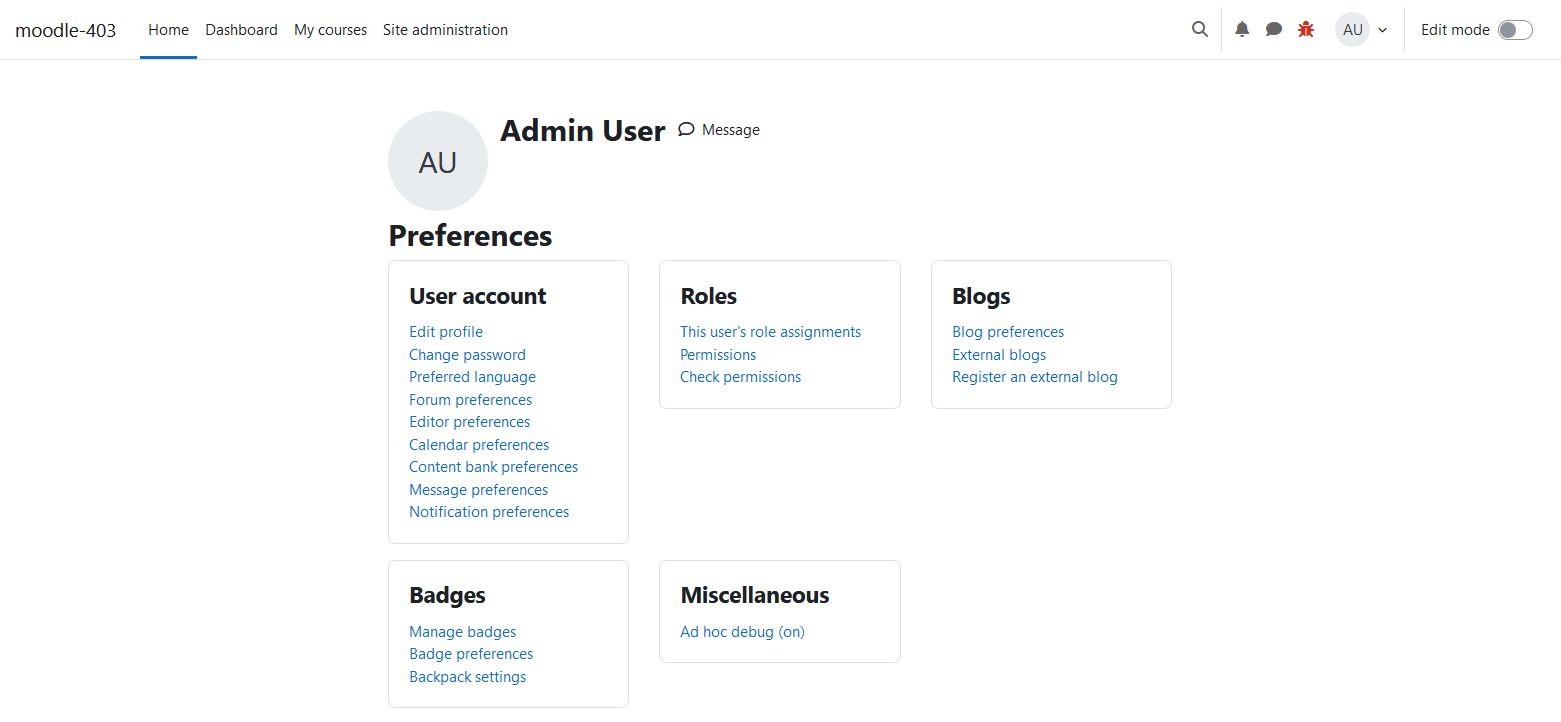
User related debugmode
Versions
Current version
v5.0.2 (2026052600) (2025070200)
v5.0.2 (2026052600)
Plugin type: Administration tools
Frankenstyle component name: tool_userdebug
Version build number: 2025070200
Version release name: v5.0.2 (2026052600)
Maturity: Stable
Supported Moodle versions: 5.0, 5.1, 5.2
Repository URL (Git): https://github.com/grabs/moodle-tool_userdebug.git
Repository branch:
Repository tag: v5.0.2
Issue/bug tracker URL: https://github.com/grabs/moodle-tools_userdebug/issues
Release notes
Release v5.0.2
- compatibility to mdl 5.2
- Optimized info box
Release v5.0.1
- Add missing capability check for menu item (#19)
Release v5.0
- Fix unit test failing (#17)
- Add new option to show deprecated styles
Release v4.5.1
- Do not show info box without real debug settings (#15)
- Add ad hoc debug button to user menu (#16)
Release v4.5
- Implement new hook api (after_config)
Release v4.4
- Move legacy style config settings to plugin config settings
- Remove toggle button for debug settings
- Show an infobox if the user debug mode is active
Release v4.3.1
- Check the realuser from \core\session\manager::get_realuser() to have debugging in "loginas" sessions too.
Release v4.3
- Add icon for ad hoc debuggin to the usernavigation on top of the page.
- Adjust new coding style rules for arrays.
Release v4.2
- Modify github actions
Release v4.1
- Put the settings in addition to the $CFG into $CFG->config_php_settings to prevent accidental saving of the settings.
- Add behat testing features
- Optimization of coding style
Release 2020081601
- Put more infos into README.txt
Version 2020081600
- Introducing ad hoc debugging mode
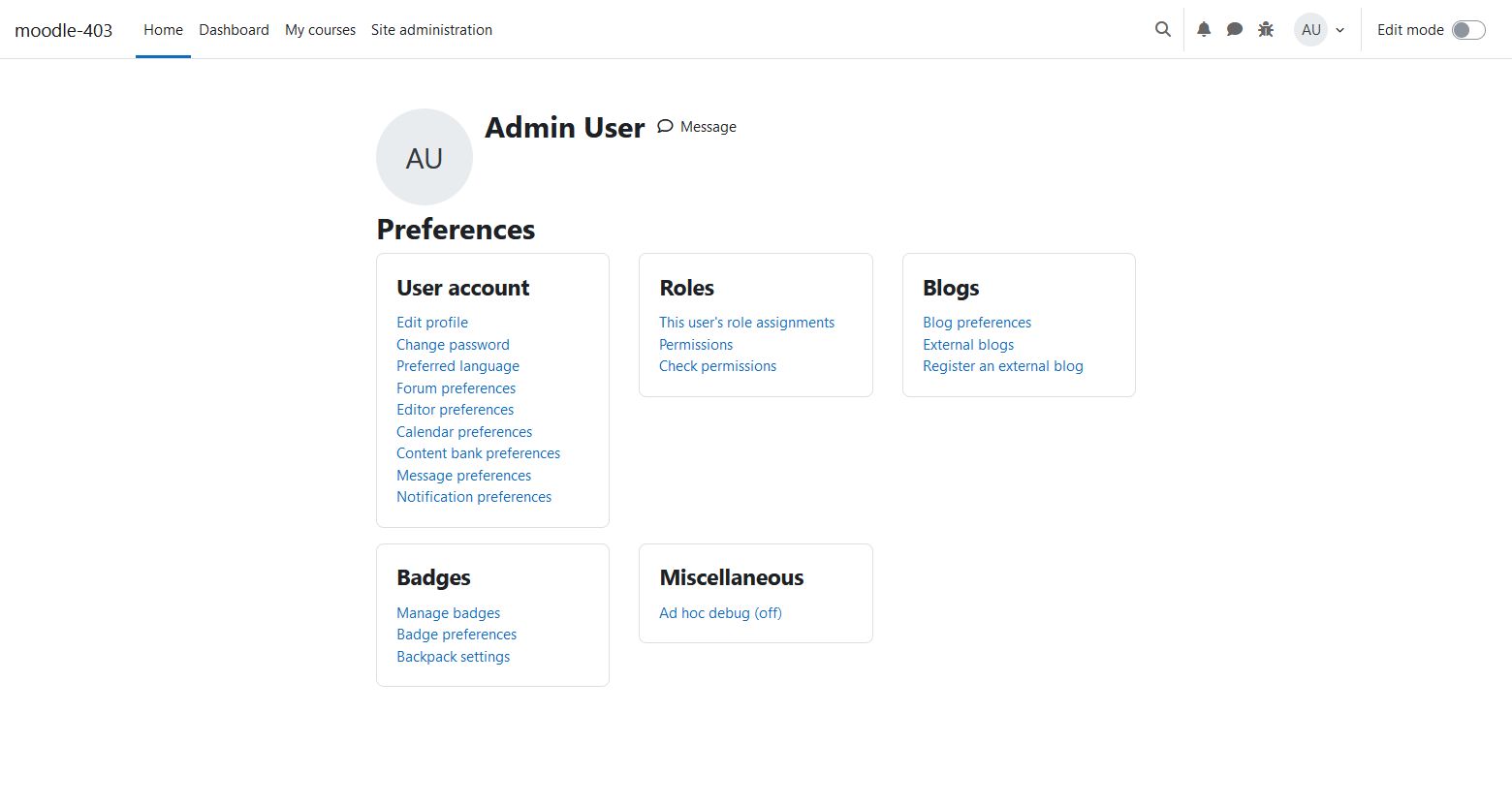
Now in the frontpage menu and in your profile settings you can find an entry to activate debugging just for the current session (ad hoc)
You also can use a url parameteruserdebug=1at any time to activate the debugging.
Site admins can do this by default. For other users you have to give them the capabilitytool/userdebug:adhocdebug
Version 2020080100
- New version without the need to modify any core files
- No it is triggered by the hook function
tool_userdebug_after_configwhich came with Moodle 3.8 - Some small bugfixes for better integrating in Moodle
v5.0.1 (2025070100) (2025070100)
v5.0.1 (2025070100)
Plugin type: Administration tools
Frankenstyle component name: tool_userdebug
Version build number: 2025070100
Version release name: v5.0.1 (2025070100)
Maturity: Stable
Supported Moodle versions: 5.0, 5.1, 5.2
Repository URL (Git): https://github.com/grabs/moodle-tool_userdebug.git
Repository branch:
Repository tag: v5.0.1
Issue/bug tracker URL: https://github.com/grabs/moodle-tools_userdebug/issues
Release notes
Release v5.0.1
- Add missing capability check for menu item (#19)
Release v5.0
- Fix unit test failing (#17)
- Add new option to show deprecated styles
Release v4.5.1
- Do not show info box without real debug settings (#15)
- Add ad hoc debug button to user menu (#16)
Release v4.5
- Implement new hook api (after_config)
Release v4.4
- Move legacy style config settings to plugin config settings
- Remove toggle button for debug settings
- Show an infobox if the user debug mode is active
Release v4.3.1
- Check the realuser from \core\session\manager::get_realuser() to have debugging in "loginas" sessions too.
Release v4.3
- Add icon for ad hoc debuggin to the usernavigation on top of the page.
- Adjust new coding style rules for arrays.
Release v4.2
- Modify github actions
Release v4.1
- Put the settings in addition to the $CFG into $CFG->config_php_settings to prevent accidental saving of the settings.
- Add behat testing features
- Optimization of coding style
Release 2020081601
- Put more infos into README.txt
Version 2020081600
- Introducing ad hoc debugging mode
Now in the frontpage menu and in your profile settings you can find an entry to activate debugging just for the current session (ad hoc)
You also can use a url parameteruserdebug=1at any time to activate the debugging.
Site admins can do this by default. For other users you have to give them the capabilitytool/userdebug:adhocdebug
Version 2020080100
- New version without the need to modify any core files
- No it is triggered by the hook function
tool_userdebug_after_configwhich came with Moodle 3.8 - Some small bugfixes for better integrating in Moodle
v4.5.3 (2025070100) (2024102001)
v4.5.3 (2025070100)
Plugin type: Administration tools
Frankenstyle component name: tool_userdebug
Version build number: 2024102001
Version release name: v4.5.3 (2025070100)
Maturity: Stable
Supported Moodle versions: 4.5
Repository URL (Git): https://github.com/grabs/moodle-tool_userdebug.git
Repository branch:
Repository tag: v4.5.3
Issue/bug tracker URL: https://github.com/grabs/moodle-tools_userdebug/issues
Release notes
Release v4.5.3
- Add missing capability check for menu item (#19)
Release v4.5.2
- Fix unit test failing (#17)
Release v4.5.1
- Do not show info box without real debug settings (#15)
- Add ad hoc debug button to user menu (#16)
Release v4.5
- Implement new hook api (after_config)
Release v4.4
- Move legacy style config settings to plugin config settings
- Remove toggle button for debug settings
- Show an infobox if the user debug mode is active
Release v4.3.1
- Check the realuser from \core\session\manager::get_realuser() to have debugging in "loginas" sessions too.
Release v4.3
- Add icon for ad hoc debuggin to the usernavigation on top of the page.
- Adjust new coding style rules for arrays.
Release v4.2
- Modify github actions
Release v4.1
- Put the settings in addition to the $CFG into $CFG->config_php_settings to prevent accidental saving of the settings.
- Add behat testing features
- Optimization of coding style
Release 2020081601
- Put more infos into README.txt
Version 2020081600
- Introducing ad hoc debugging mode
Now in the frontpage menu and in your profile settings you can find an entry to activate debugging just for the current session (ad hoc)
You also can use a url parameteruserdebug=1at any time to activate the debugging.
Site admins can do this by default. For other users you have to give them the capabilitytool/userdebug:adhocdebug
Version 2020080100
- New version without the need to modify any core files
- No it is triggered by the hook function
tool_userdebug_after_configwhich came with Moodle 3.8 - Some small bugfixes for better integrating in Moodle
v5.0 (2025041500) (2025041500)
v5.0 (2025041500)
Plugin type: Administration tools
Frankenstyle component name: tool_userdebug
Version build number: 2025041500
Version release name: v5.0 (2025041500)
Maturity: Stable
Supported Moodle versions: 5.0
Repository URL (Git): https://github.com/grabs/moodle-tool_userdebug.git
Repository branch:
Repository tag: v5.0
Issue/bug tracker URL: https://github.com/grabs/moodle-tools_userdebug/issues
Release notes
Release v5.0
- Fix unit test failing (#17)
- Add new option to show deprecated styles
Release v4.5.1
- Do not show info box without real debug settings (#15)
- Add ad hoc debug button to user menu (#16)
Release v4.5
- Implement new hook api (after_config)
Release v4.4
- Move legacy style config settings to plugin config settings
- Remove toggle button for debug settings
- Show an infobox if the user debug mode is active
Release v4.3.1
- Check the realuser from \core\session\manager::get_realuser() to have debugging in "loginas" sessions too.
Release v4.3
- Add icon for ad hoc debuggin to the usernavigation on top of the page.
- Adjust new coding style rules for arrays.
Release v4.2
- Modify github actions
Release v4.1
- Put the settings in addition to the $CFG into $CFG->config_php_settings to prevent accidental saving of the settings.
- Add behat testing features
- Optimization of coding style
Release 2020081601
- Put more infos into README.txt
Version 2020081600
- Introducing ad hoc debugging mode
Now in the frontpage menu and in your profile settings you can find an entry to activate debugging just for the current session (ad hoc)
You also can use a url parameteruserdebug=1at any time to activate the debugging.
Site admins can do this by default. For other users you have to give them the capabilitytool/userdebug:adhocdebug
Version 2020080100
- New version without the need to modify any core files
- No it is triggered by the hook function
tool_userdebug_after_configwhich came with Moodle 3.8 - Some small bugfixes for better integrating in Moodle
v4.5.2 (2025041500) (2024102000)
v4.5.2 (2025041500)
Plugin type: Administration tools
Frankenstyle component name: tool_userdebug
Version build number: 2024102000
Version release name: v4.5.2 (2025041500)
Maturity: Stable
Supported Moodle versions: 4.5
Repository URL (Git): https://github.com/grabs/moodle-tool_userdebug.git
Repository branch:
Repository tag: v4.5.2
Issue/bug tracker URL: https://github.com/grabs/moodle-tools_userdebug/issues
Release notes
Release v4.5.2
- Fix unit test failing (#17)
Release v4.5.1
- Do not show info box without real debug settings (#15)
- Add ad hoc debug button to user menu (#16)
Release v4.5
- Implement new hook api (after_config)
Release v4.4
- Move legacy style config settings to plugin config settings
- Remove toggle button for debug settings
- Show an infobox if the user debug mode is active
Release v4.3.1
- Check the realuser from \core\session\manager::get_realuser() to have debugging in "loginas" sessions too.
Release v4.3
- Add icon for ad hoc debuggin to the usernavigation on top of the page.
- Adjust new coding style rules for arrays.
Release v4.2
- Modify github actions
Release v4.1
- Put the settings in addition to the $CFG into $CFG->config_php_settings to prevent accidental saving of the settings.
- Add behat testing features
- Optimization of coding style
Release 2020081601
- Put more infos into README.txt
Version 2020081600
- Introducing ad hoc debugging mode
Now in the frontpage menu and in your profile settings you can find an entry to activate debugging just for the current session (ad hoc)
You also can use a url parameteruserdebug=1at any time to activate the debugging.
Site admins can do this by default. For other users you have to give them the capabilitytool/userdebug:adhocdebug
Version 2020080100
- New version without the need to modify any core files
- No it is triggered by the hook function
tool_userdebug_after_configwhich came with Moodle 3.8 - Some small bugfixes for better integrating in Moodle
v4.5.1 (2025031700) (2024101901)
v4.5.1 (2025031700)
Plugin type: Administration tools
Frankenstyle component name: tool_userdebug
Version build number: 2024101901
Version release name: v4.5.1 (2025031700)
Maturity: Stable
Supported Moodle versions: 4.5
Repository URL (Git): https://github.com/grabs/moodle-tool_userdebug.git
Repository branch:
Repository tag: v4.5.1
Issue/bug tracker URL: https://github.com/grabs/moodle-tools_userdebug/issues
Release notes
Release v4.5.1
- Do not show info box without real debug settings (#15)
- Add ad hoc debug button to user menu (#16)
Release v4.5
- Implement new hook api (after_config)
Release v4.4
- Move legacy style config settings to plugin config settings
- Remove toggle button for debug settings
- Show an infobox if the user debug mode is active
Release v4.3.1
- Check the realuser from \core\session\manager::get_realuser() to have debugging in "loginas" sessions too.
Release v4.3
- Add icon for ad hoc debuggin to the usernavigation on top of the page.
- Adjust new coding style rules for arrays.
Release v4.2
- Modify github actions
Release v4.1
- Put the settings in addition to the $CFG into $CFG->config_php_settings to prevent accidental saving of the settings.
- Add behat testing features
- Optimization of coding style
Release 2020081601
- Put more infos into README.txt
Version 2020081600
- Introducing ad hoc debugging mode
Now in the frontpage menu and in your profile settings you can find an entry to activate debugging just for the current session (ad hoc)
You also can use a url parameteruserdebug=1at any time to activate the debugging.
Site admins can do this by default. For other users you have to give them the capabilitytool/userdebug:adhocdebug
Version 2020080100
- New version without the need to modify any core files
- No it is triggered by the hook function
tool_userdebug_after_configwhich came with Moodle 3.8 - Some small bugfixes for better integrating in Moodle
v4.4.1 (2025031700) (2024050901)
v4.4.1 (2025031700)
Plugin type: Administration tools
Frankenstyle component name: tool_userdebug
Version build number: 2024050901
Version release name: v4.4.1 (2025031700)
Maturity: Beta
Supported Moodle versions: 4.0, 4.1, 4.2, 4.3, 4.4
Repository URL (Git): https://github.com/grabs/moodle-tool_userdebug.git
Repository branch:
Repository tag: v4.4.1
Issue/bug tracker URL: https://github.com/grabs/moodle-tools_userdebug/issues
Release notes
Release v4.4.1
- Do not show info box without real debug settings (#15)
Release v4.4
- Move legacy style config settings to plugin config settings
- Remove toggle button for debug settings
- Show an infobox if the user debug mode is active
Release v4.3.1
- Check the realuser from \core\session\manager::get_realuser() to have debugging in "loginas" sessions too.
Release v4.3
- Add icon for ad hoc debuggin to the usernavigation on top of the page.
- Adjust new coding style rules for arrays.
Release v4.2
- Modify github actions
Release v4.1
- Put the settings in addition to the $CFG into $CFG->config_php_settings to prevent accidental saving of the settings.
- Add behat testing features
- Optimization of coding style
Release 2020081601
- Put more infos into README.txt
Version 2020081600
- Introducing ad hoc debugging mode
Now in the frontpage menu and in your profile settings you can find an entry to activate debugging just for the current session (ad hoc)
You also can use a url parameteruserdebug=1at any time to activate the debugging.
Site admins can do this by default. For other users you have to give them the capabilitytool/userdebug:adhocdebug
Version 2020080100
- New version without the need to modify any core files
- No it is triggered by the hook function
tool_userdebug_after_configwhich came with Moodle 3.8 - Some small bugfixes for better integrating in Moodle
v4.5 (2024101900) (2024101900)
v4.5 (2024101900)
Plugin type: Administration tools
Frankenstyle component name: tool_userdebug
Version build number: 2024101900
Version release name: v4.5 (2024101900)
Maturity: Stable
Supported Moodle versions: 4.5
Repository URL (Git): https://github.com/grabs/moodle-tool_userdebug.git
Repository branch:
Repository tag: v4.5
Issue/bug tracker URL: https://github.com/grabs/moodle-tools_userdebug/issues
Release notes
Release v4.5
- Implement new hook api (after_config)
Release v4.4
- Move legacy style config settings to plugin config settings
- Remove toggle button for debug settings
- Show an infobox if the user debug mode is active
Release v4.3.1
- Check the realuser from \core\session\manager::get_realuser() to have debugging in "loginas" sessions too.
Release v4.3
- Add icon for ad hoc debuggin to the usernavigation on top of the page.
- Adjust new coding style rules for arrays.
Release v4.2
- Modify github actions
Release v4.1
- Put the settings in addition to the $CFG into $CFG->config_php_settings to prevent accidental saving of the settings.
- Add behat testing features
- Optimization of coding style
Release 2020081601
- Put more infos into README.txt
Version 2020081600
- Introducing ad hoc debugging mode
Now in the frontpage menu and in your profile settings you can find an entry to activate debugging just for the current session (ad hoc)
You also can use a url parameteruserdebug=1at any time to activate the debugging.
Site admins can do this by default. For other users you have to give them the capabilitytool/userdebug:adhocdebug
Version 2020080100
- New version without the need to modify any core files
- No it is triggered by the hook function
tool_userdebug_after_configwhich came with Moodle 3.8 - Some small bugfixes for better integrating in Moodle
v4.4 (2024050900) (2024050900)
v4.4 (2024050900)
Plugin type: Administration tools
Frankenstyle component name: tool_userdebug
Version build number: 2024050900
Version release name: v4.4 (2024050900)
Maturity: Beta
Supported Moodle versions: 4.0, 4.1, 4.2, 4.3, 4.4
Repository URL (Git): https://github.com/grabs/moodle-tool_userdebug.git
Repository branch:
Repository tag: v4.4
Issue/bug tracker URL: https://github.com/grabs/moodle-tools_userdebug/issues
Release notes
Release v4.4
- Move legacy style config settings to plugin config settings
- Remove toggle button for debug settings
- Show an infobox if the user debug mode is active
Release v4.3.1
- Check the realuser from \core\session\manager::get_realuser() to have debugging in "loginas" sessions too.
Release v4.3
- Add icon for ad hoc debuggin to the usernavigation on top of the page.
- Adjust new coding style rules for arrays.
Release v4.2
- Modify github actions
Release v4.1
- Put the settings in addition to the $CFG into $CFG->config_php_settings to prevent accidental saving of the settings.
- Add behat testing features
- Optimization of coding style
Release 2020081601
- Put more infos into README.txt
Version 2020081600
- Introducing ad hoc debugging mode
Now in the frontpage menu and in your profile settings you can find an entry to activate debugging just for the current session (ad hoc)
You also can use a url parameteruserdebug=1at any time to activate the debugging.
Site admins can do this by default. For other users you have to give them the capabilitytool/userdebug:adhocdebug
Version 2020080100
- New version without the need to modify any core files
- No it is triggered by the hook function
tool_userdebug_after_configwhich came with Moodle 3.8 - Some small bugfixes for better integrating in Moodle
v4.3.1 (2024010900) (2024010900)
v4.3.1 (2024010900)
Plugin type: Administration tools
Frankenstyle component name: tool_userdebug
Version build number: 2024010900
Version release name: v4.3.1 (2024010900)
Maturity: Beta
Supported Moodle versions: 4.0, 4.1, 4.2, 4.3
Repository URL (Git): https://github.com/grabs/moodle-tool_userdebug.git
Repository branch:
Repository tag: v4.3.1
Issue/bug tracker URL: https://github.com/grabs/moodle-tools_userdebug/issues
Release notes
Release v4.3.1
- Check the realuser from \core\session\manager::get_realuser() to have debugging in "loginas" sessions too.
Release v4.3
- Add icon for ad hoc debuggin to the usernavigation on top of the page.
- Adjust new coding style rules for arrays.
Release v4.2
- Modify github actions
Release v4.1
- Put the settings in addition to the $CFG into $CFG->config_php_settings to prevent accidental saving of the settings.
- Add behat testing features
- Optimization of coding style
Release 2020081601
- Put more infos into README.txt
Version 2020081600
- Introducing ad hoc debugging mode
Now in the frontpage menu and in your profile settings you can find an entry to activate debugging just for the current session (ad hoc)
You also can use a url parameteruserdebug=1at any time to activate the debugging.
Site admins can do this by default. For other users you have to give them the capabilitytool/userdebug:adhocdebug
Version 2020080100
- New version without the need to modify any core files
- No it is triggered by the hook function
tool_userdebug_after_configwhich came with Moodle 3.8 - Some small bugfixes for better integrating in Moodle
v4.3 (2023101400) (2023101400)
v4.3 (2023101400)
Plugin type: Administration tools
Frankenstyle component name: tool_userdebug
Version build number: 2023101400
Version release name: v4.3 (2023101400)
Maturity: Beta
Supported Moodle versions: 4.0, 4.1, 4.2, 4.3
Repository URL (Git): https://github.com/grabs/moodle-tool_userdebug.git
Repository branch:
Repository tag: v4.3
Issue/bug tracker URL: https://github.com/grabs/moodle-tools_userdebug/issues
Release notes
Release v4.3
- Add icon for ad hoc debuggin to the usernavigation on top of the page.
- Adjust new coding style rules for arrays.
Release v4.2
- Modify github actions
Release v4.1
- Put the settings in addition to the $CFG into $CFG->config_php_settings to prevent accidental saving of the settings.
- Add behat testing features
- Optimization of coding style
Release 2020081601
- Put more infos into README.txt
Version 2020081600
- Introducing ad hoc debugging mode
Now in the frontpage menu and in your profile settings you can find an entry to activate debugging just for the current session (ad hoc)
You also can use a url parameteruserdebug=1at any time to activate the debugging.
Site admins can do this by default. For other users you have to give them the capabilitytool/userdebug:adhocdebug
Version 2020080100
- New version without the need to modify any core files
- No it is triggered by the hook function
tool_userdebug_after_configwhich came with Moodle 3.8 - Some small bugfixes for better integrating in Moodle
v4.2 (2023042700) (2023042700)
v4.2 (2023042700)
Plugin type: Administration tools
Frankenstyle component name: tool_userdebug
Version build number: 2023042700
Version release name: v4.2 (2023042700)
Maturity: Beta
Supported Moodle versions: 3.10, 3.11, 3.7, 3.8, 3.9, 4.0, 4.1, 4.2
Repository URL (Git): https://github.com/grabs/moodle-tool_userdebug.git
Repository branch:
Repository tag: v4.2
Issue/bug tracker URL: https://github.com/grabs/moodle-tools_userdebug/issues
Release notes
Release v4.2
- Modify github actions
Release v4.1
- Put the settings in addition to the $CFG into $CFG->config_php_settings to prevent accidental saving of the settings.
- Add behat testing features
- Optimization of coding style
Release 2020081601
- Put more infos into README.txt
Version 2020081600
- Introducing ad hoc debugging mode
Now in the frontpage menu and in your profile settings you can find an entry to activate debugging just for the current session (ad hoc)
You also can use a url parameteruserdebug=1at any time to activate the debugging.
Site admins can do this by default. For other users you have to give them the capabilitytool/userdebug:adhocdebug
Version 2020080100
- New version without the need to modify any core files
- No it is triggered by the hook function
tool_userdebug_after_configwhich came with Moodle 3.8 - Some small bugfixes for better integrating in Moodle
v4.1 (2022120100) (2022120100)
v4.1 (2022120100)
Plugin type: Administration tools
Frankenstyle component name: tool_userdebug
Version build number: 2022120100
Version release name: v4.1 (2022120100)
Maturity: Beta
Supported Moodle versions: 3.10, 3.11, 3.9, 4.0, 4.1
Repository URL (Git): https://github.com/grabs/moodle-tool_userdebug.git
Repository branch:
Repository tag: v4.1
Issue/bug tracker URL: https://github.com/grabs/moodle-tools_userdebug/issues
Release notes
Release v4.1 (2022120100)
- Put the settings in addition to the $CFG into $CFG->config_php_settings to prevent accidental saving of the settings.
- Add behat testing features
- Optimization of coding style
Release 2020081601
- Put more infos into README.txt
Version 2020081600
- Introducing ad hoc debugging mode
Now in the frontpage menu and in your profile settings you can find an entry to activate debugging just for the current session (ad hoc)
You also can use a url parameteruserdebug=1at any time to activate the debugging.
Site admins can do this by default. For other users you have to give them the capabilitytool/userdebug:adhocdebug
Version 2020080100
- New version without the need to modify any core files
- No it is triggered by the hook function
tool_userdebug_after_configwhich came with Moodle 3.8 - Some small bugfixes for better integrating in Moodle
3.9 (2020081601) (2020081600)
3.9 (2020081601)
Plugin type: Administration tools
Frankenstyle component name: tool_userdebug
Version build number: 2020081600
Version release name: 3.9 (2020081601)
Maturity: Beta
Supported Moodle versions: 3.10, 3.11, 3.8, 3.9, 4.0
Repository URL (Git): https://github.com/grabs/moodle-tool_userdebug.git
Repository branch:
Repository tag:
Issue/bug tracker URL: https://github.com/grabs/moodle-tools_userdebug/issues
Release notes
Version 2020080100
- New version without the need to modify any core files
- No it is triggered by the hook function
tool_userdebug_after_configwhich came with Moodle 3.8 - Some small bugfixes for better integrating in Moodle
Version 2020081600
- Introducing ad hoc debugging mode
Now in the frontpage menu and in your profile settings you can find an entry to activate debugging just for the current session (ad hoc)
You also can use a url parameteruserdebug=1at any time to activate the debugging.
Site admins can do this by default. For other users you have to give them the capabilitytool/userdebug:adhocdebug
Release 2020081601
- Put more infos into README.txt
3.9 (2020080100) (2020080100)
3.9 (2020080100)
Plugin type: Administration tools
Frankenstyle component name: tool_userdebug
Version build number: 2020080100
Version release name: 3.9 (2020080100)
Maturity: Beta
Supported Moodle versions: 3.8, 3.9
Repository URL (Git): https://github.com/grabs/moodle-tools_userdebug.git
Repository branch:
Repository tag:
Issue/bug tracker URL: https://github.com/grabs/moodle-tools_userdebug/issues
Release notes
Version 2020080100
- New version without the need to modify any core files
- No it is triggered by the hook function "tool_userdebug_after_config" which came with Moodle 3.8
- Some small bugfixes for better integrating in Moodle