Growth report

Versions
Current version
v5.2.3 (2026031800)
v5.2.3
Plugin type: Reports
Frankenstyle component name: report_growth
Version build number: 2026031800
Version release name: v5.2.3
Maturity: Stable
Supported Moodle versions: 5.0, 5.1
Repository URL (Git): https://github.com/ewallah/moodle-report_growth
Repository branch:
Repository tag: v5.2.3
Issue/bug tracker URL: https://github.com/ewallah/moodle-report_growth/issues
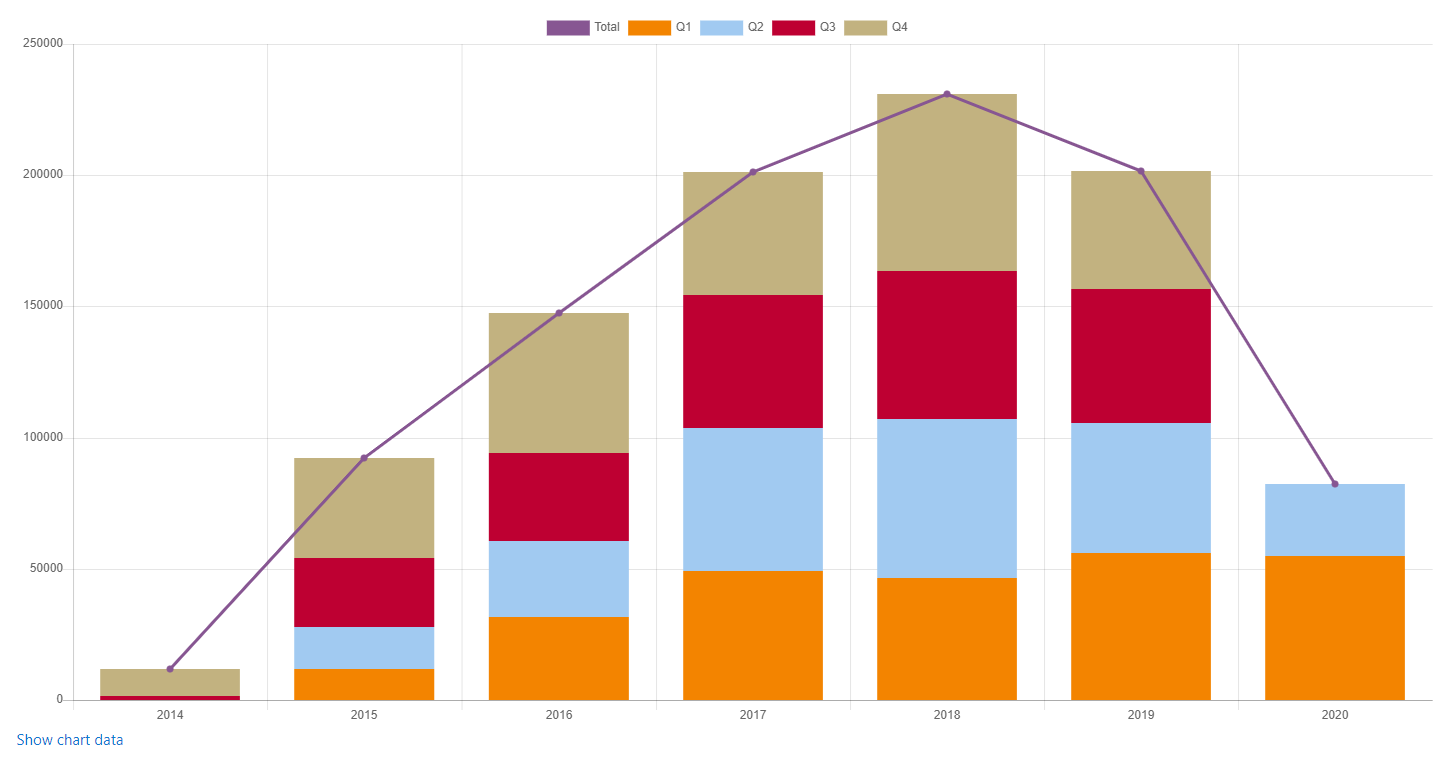
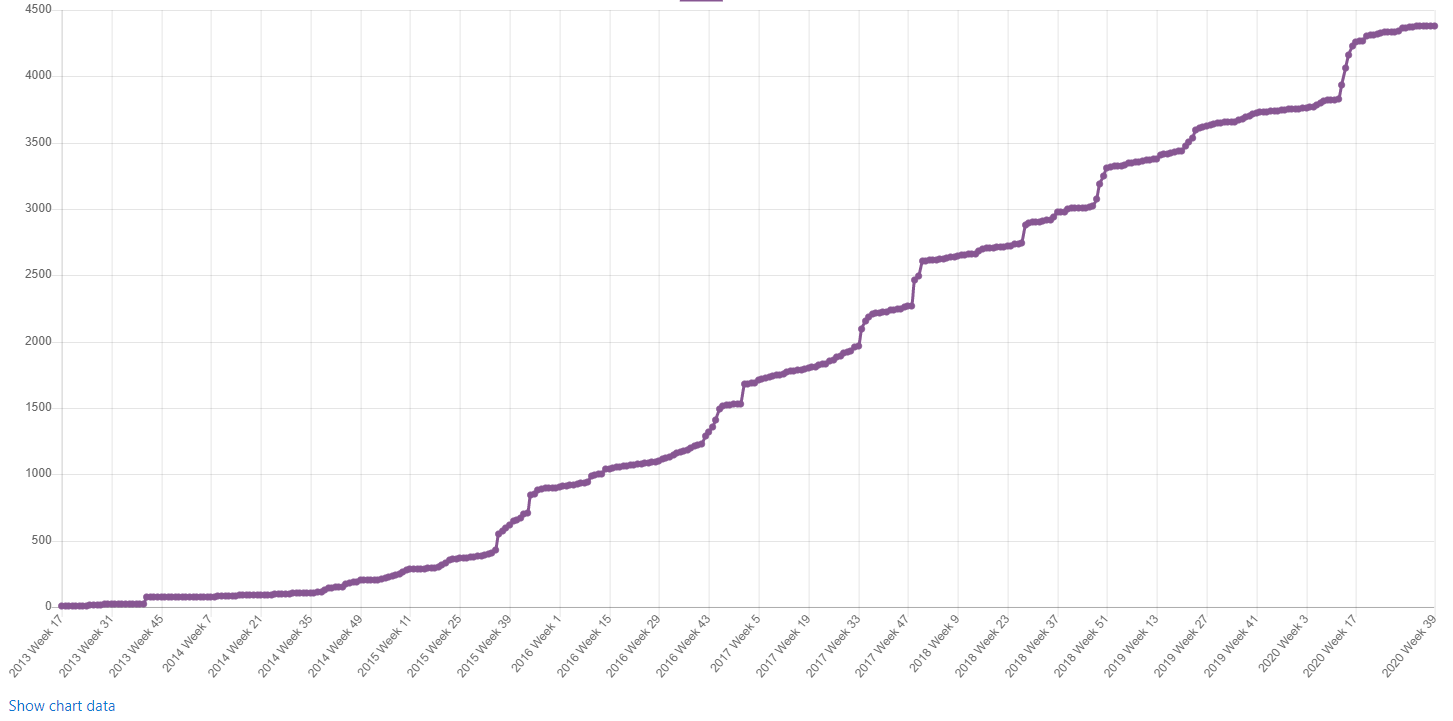
The Growth report plugin is a Moodle plugin that collects information for management.
Introduction
Ever wondered when all those users arrived at the platform? When people started to use their mobile phone?
When all those questions arrived in the question bank? The growth report shows how your Moodle has grown
using graphs.
Management can use these numbers to make decissions. But the info can also be helpfull for admins and
Moodle managers, therefore we added category based reports. But also teachers can use this report in a
course to get a better overview what happened when.
Installation
- Unzip code into the report/growth directory
- Log into Moodle as administrator.
- Visit Site admin => Notifications.
Warning
This plugin is 100% open source and has NOT been tested in Moodle Workplace, Totara, or any other proprietary software system.
As long as the latter do not reward plugin developers, you can use this plugin only in 100% open source environments.
System level
The site report is only available for admins and managers. Visit "Site Administration > Reports > Growth"
to see historical information about number of:
- Courses
- Users
- Guests
- Enrolments
- Last Access
- Activities
- Activity completions
- Course completions
- Mobile devices
- Badges
- Certificates (mod_certificate and mod_customcert and mod_coursecertificate)
- Payments
- Questions
- Resources
- Files
- Messages
- Countries
Category level
In a category admins and managers can see historical information about:
- Enrolments
- Last Access
- Activities
- Activity completions
- Course completions
- Badges
- Certificates (mod_certificate and mod_customcert and mod_coursecertificate)
- Countries
Course level
Teachers, managers and admins can see historical information about:
- Enrolments
- Last Access
- Activities
- Activity completions
- Course completions
- Badges
- Certificates (mod_certificate and mod_customcert and mod_coursecertificate)
- Countries
Supported databases
This plugin has been tested on
- MYSQL
- MariaDB
- PostgreSQL
- MSSQL
Theme support
This plugin is developed and tested on Moodle Core's Boost theme and Boost child themes, including Moodle Core's Classic theme.
Moodle release support
This plugin is maintained for the latest major releases of Moodle.
Bug Reports / Support
We try our best to deliver bug-free plugins, but we can not test the plugin for every platform, database, PHP and
Moodle version. If you find any bug please report it on GitHub: https://github.com/ewallah/moodle-report_growth/issues.
Please provide a detailed bug description, including the plugin and Moodle version and, if applicable, a screenshot.
You may also file a request for enhancement on GitHub https://github.com/ewallah/moodle-report_growth/pulls.
If we consider the request generally useful and if it can be implemented with reasonable effort we might implement it in a future version.
You may also post general questions on the plugin on GitHub, but note that we do not have the resources to provide
detailed support.
Maturity: Stable


v5.2.1 (2025100900)
v5.2.1
Plugin type: Reports
Frankenstyle component name: report_growth
Version build number: 2025100900
Version release name: v5.2.1
Maturity: Stable
Supported Moodle versions: 5.0, 5.1
Repository URL (Git): https://github.com/ewallah/moodle-report_growth
Repository branch:
Repository tag: v5.2.1
Issue/bug tracker URL: https://github.com/ewallah/moodle-report_growth/issues
The Growth report plugin is a Moodle plugin that collects information for management.
Introduction
Ever wondered when all those users arrived at the platform? When people started to use their mobile phone?
When all those questions arrived in the question bank? The growth report shows how your Moodle has grown
using graphs.
Management can use these numbers to make decissions. But the info can also be helpfull for admins and
Moodle managers, therefore we added category based reports. But also teachers can use this report in a
course to get a better overview what happened when.
Installation
- Unzip code into the report/growth directory
- Log into Moodle as administrator.
- Visit Site admin => Notifications.
Warning
This plugin is 100% open source and has NOT been tested in Moodle Workplace, Totara, or any other proprietary software system.
As long as the latter do not reward plugin developers, you can use this plugin only in 100% open source environments.
System level
The site report is only available for admins and managers. Visit "Site Administration > Reports > Growth"
to see historical information about number of:
- Courses
- Users
- Guests
- Enrolments
- Last Access
- Activities
- Activity completions
- Course completions
- Mobile devices
- Badges
- Certificates (mod_certificate and mod_customcert and mod_coursecertificate)
- Payments
- Questions
- Resources
- Files
- Messages
- Countries
Category level
In a category admins and managers can see historical information about:
- Enrolments
- Last Access
- Activities
- Activity completions
- Course completions
- Badges
- Certificates (mod_certificate and mod_customcert and mod_coursecertificate)
- Countries
Course level
Teachers, managers and admins can see historical information about:
- Enrolments
- Last Access
- Activities
- Activity completions
- Course completions
- Badges
- Certificates (mod_certificate and mod_customcert and mod_coursecertificate)
- Countries
Supported databases
This plugin has been tested on
- MYSQL
- MariaDB
- PostgreSQL
- MSSQL
Theme support
This plugin is developed and tested on Moodle Core's Boost theme and Boost child themes, including Moodle Core's Classic theme.
Moodle release support
This plugin is maintained for the latest major releases of Moodle.
Bug Reports / Support
We try our best to deliver bug-free plugins, but we can not test the plugin for every platform, database, PHP and
Moodle version. If you find any bug please report it on GitHub: https://github.com/ewallah/moodle-report_growth/issues.
Please provide a detailed bug description, including the plugin and Moodle version and, if applicable, a screenshot.
You may also file a request for enhancement on GitHub https://github.com/ewallah/moodle-report_growth/pulls.
If we consider the request generally useful and if it can be implemented with reasonable effort we might implement it in a future version.
You may also post general questions on the plugin on GitHub, but note that we do not have the resources to provide
detailed support.
Maturity: Stable
v5.1.1 (2025043000)
v5.1.1
Plugin type: Reports
Frankenstyle component name: report_growth
Version build number: 2025043000
Version release name: v5.1.1
Maturity: Stable
Supported Moodle versions: 4.5, 5.0
Repository URL (Git): https://github.com/ewallah/moodle-report_growth
Repository branch:
Repository tag: v5.1.1
Issue/bug tracker URL: https://github.com/ewallah/moodle-report_growth/issues
The Growth report plugin is a Moodle plugin that collects information for management.
Introduction
Ever wondered when all those users arrived at the platform? When people started to use their mobile phone?
When all those questions arrived in the question bank? The growth report shows how your Moodle has grown
using graphs.
Management can use these numbers to make decissions. But the info can also be helpfull for admins and
Moodle managers, therefore we added category based reports. But also teachers can use this report in a
course to get a better overview what happened when.
Installation
- Unzip code into the report/growth directory
- Log into Moodle as administrator.
- Visit Site admin => Notifications.
Warning
This plugin is 100% open source and has NOT been tested in Moodle Workplace, Totara, or any other proprietary software system.
As long as the latter do not reward plugin developers, you can use this plugin only in 100% open source environments.
System level
The site report is only available for admins and managers. Visit "Site Administration > Reports > Growth"
to see historical information about number of:
- Courses
- Users
- Guests
- Enrolments
- Last Access
- Activities
- Activity completions
- Course completions
- Mobile devices
- Badges
- Certificates (mod_certificate and mod_customcert and mod_coursecertificate)
- Payments
- Questions
- Resources
- Files
- Messages
- Countries
Category level
In a category admins and managers can see historical information about:
- Enrolments
- Last Access
- Activities
- Activity completions
- Course completions
- Badges
- Certificates (mod_certificate and mod_customcert and mod_coursecertificate)
- Countries
Course level
Teachers, managers and admins can see historical information about:
- Enrolments
- Last Access
- Activities
- Activity completions
- Course completions
- Badges
- Certificates (mod_certificate and mod_customcert and mod_coursecertificate)
- Countries
Supported databases
This plugin has been tested on
- MYSQL
- MariaDB
- PostgreSQL
- MSSQL
Theme support
This plugin is developed and tested on Moodle Core's Boost theme and Boost child themes, including Moodle Core's Classic theme.
Moodle release support
This plugin is maintained for the latest major releases of Moodle.
Bug Reports / Support
We try our best to deliver bug-free plugins, but we can not test the plugin for every platform, database, PHP and
Moodle version. If you find any bug please report it on GitHub: https://github.com/ewallah/moodle-report_growth/issues.
Please provide a detailed bug description, including the plugin and Moodle version and, if applicable, a screenshot.
You may also file a request for enhancement on GitHub https://github.com/ewallah/moodle-report_growth/pulls.
If we consider the request generally useful and if it can be implemented with reasonable effort we might implement it in a future version.
You may also post general questions on the plugin on GitHub, but note that we do not have the resources to provide
detailed support.
Maturity: Stable
v5.0.1 (2025042100)
v5.0.1
Plugin type: Reports
Frankenstyle component name: report_growth
Version build number: 2025042100
Version release name: v5.0.1
Maturity: Stable
Supported Moodle versions: 4.5, 5.0
Repository URL (Git): https://github.com/ewallah/moodle-report_growth
Repository branch:
Repository tag: v5.0.1
Issue/bug tracker URL: https://github.com/ewallah/moodle-report_growth/issues
The Growth report plugin is a Moodle plugin that collects information for management.
Introduction
Ever wondered when all those users arrived at the platform? When people started to use their mobile phone?
When all those questions arrived in the question bank? The growth report shows how your Moodle has grown
using graphs.
Management can use these numbers to make decissions. But the info can also be helpfull for admins and
Moodle managers, therefore we added category based reports. But also teachers can use this report in a
course to get a better overview what happened when.
Installation
- Unzip code into the report/growth directory
- Log into Moodle as administrator.
- Visit Site admin => Notifications.
Warning
This plugin is 100% open source and has NOT been tested in Moodle Workplace, Totara, or any other proprietary software system.
As long as the latter do not reward plugin developers, you can use this plugin only in 100% open source environments.
System level
The site report is only available for admins and managers. Visit "Site Administration > Reports > Growth"
to see historical information about number of:
- Courses
- Users
- Guests
- Enrolments
- Last Access
- Activities
- Activity completions
- Course completions
- Mobile devices
- Badges
- Certificates (mod_certificate and mod_customcert and mod_coursecertificate)
- Payments
- Questions
- Resources
- Files
- Messages
- Countries
Category level
In a category admins and managers can see historical information about:
- Enrolments
- Last Access
- Activities
- Activity completions
- Course completions
- Badges
- Certificates (mod_certificate and mod_customcert and mod_coursecertificate)
- Countries
Course level
Teachers, managers and admins can see historical information about:
- Enrolments
- Last Access
- Activities
- Activity completions
- Course completions
- Badges
- Certificates (mod_certificate and mod_customcert and mod_coursecertificate)
- Countries
Supported databases
This plugin has been tested on
- MYSQL
- MariaDB
- PostgreSQL
- MSSQL
Theme support
This plugin is developed and tested on Moodle Core's Boost theme and Boost child themes, including Moodle Core's Classic theme.
Moodle release support
This plugin is maintained for the latest major releases of Moodle.
Bug Reports / Support
We try our best to deliver bug-free plugins, but we can not test the plugin for every platform, database, PHP and
Moodle version. If you find any bug please report it on GitHub: https://github.com/ewallah/moodle-report_growth/issues.
Please provide a detailed bug description, including the plugin and Moodle version and, if applicable, a screenshot.
You may also file a request for enhancement on GitHub https://github.com/ewallah/moodle-report_growth/pulls.
If we consider the request generally useful and if it can be implemented with reasonable effort we might implement it in a future version.
You may also post general questions on the plugin on GitHub, but note that we do not have the resources to provide
detailed support.
Maturity: Stable
v4.5.3 (2025021100)
v4.5.3
Plugin type: Reports
Frankenstyle component name: report_growth
Version build number: 2025021100
Version release name: v4.5.3
Maturity: Stable
Supported Moodle versions: 4.4, 4.5
Repository URL (Git): https://github.com/ewallah/moodle-report_growth
Repository branch:
Repository tag: v4.5.3
Issue/bug tracker URL: https://github.com/ewallah/moodle-report_growth/issues
The Growth report plugin is a Moodle plugin that collects information for management.
Introduction
Ever wondered when all those users arrived at the platform? When people started to use their mobile phone?
When all those questions arrived in the question bank? The growth report shows how your Moodle has grown
using graphs.
Management can use these numbers to make decissions. But the info can also be helpfull for admins and
Moodle managers, therefore we added category based reports. But also teachers can use this report in a
course to get a better overview what happened when.
Installation
- Unzip code into the report/growth directory
- Log into Moodle as administrator.
- Visit Site admin => Notifications.
Warning
This plugin is 100% open source and has NOT been tested in Moodle Workplace, Totara, or any other proprietary software system.
As long as the latter do not reward plugin developers, you can use this plugin only in 100% open source environments.
System level
The site report is only available for admins and managers. Visit "Site Administration > Reports > Growth"
to see historical information about number of:
- Courses
- Users
- Guests
- Enrolments
- Last Access
- Activities
- Activity completions
- Course completions
- Mobile devices
- Badges
- Certificates (mod_certificate and mod_customcert and mod_coursecertificate)
- Payments
- Questions
- Resources
- Files
- Messages
- Countries
Category level
In a category admins and managers can see historical information about:
- Enrolments
- Last Access
- Activities
- Activity completions
- Course completions
- Badges
- Certificates (mod_certificate and mod_customcert and mod_coursecertificate)
- Countries
Course level
Teachers, managers and admins can see historical information about:
- Enrolments
- Last Access
- Activities
- Activity completions
- Course completions
- Badges
- Certificates (mod_certificate and mod_customcert and mod_coursecertificate)
- Countries
Supported databases
This plugin has been tested on
- MYSQL
- MariaDB
- PostgreSQL
- MSSQL
Theme support
This plugin is developed and tested on Moodle Core's Boost theme and Boost child themes, including Moodle Core's Classic theme.
Moodle release support
This plugin is maintained for the latest major releases of Moodle.
Bug Reports / Support
We try our best to deliver bug-free plugins, but we can not test the plugin for every platform, database, PHP and
Moodle version. If you find any bug please report it on GitHub: https://github.com/ewallah/moodle-report_growth/issues.
Please provide a detailed bug description, including the plugin and Moodle version and, if applicable, a screenshot.
You may also file a request for enhancement on GitHub https://github.com/ewallah/moodle-report_growth/pulls.
If we consider the request generally useful and if it can be implemented with reasonable effort we might implement it in a future version.
You may also post general questions on the plugin on GitHub, but note that we do not have the resources to provide
detailed support.
Maturity: Stable
v4.5.2 (2025020200)
v4.5.2
Plugin type: Reports
Frankenstyle component name: report_growth
Version build number: 2025020200
Version release name: v4.5.2
Maturity: Stable
Supported Moodle versions: 4.4, 4.5
Repository URL (Git): https://github.com/ewallah/moodle-report_growth
Repository branch:
Repository tag: v4.5.2
Issue/bug tracker URL: https://github.com/ewallah/moodle-report_growth/issues
The Growth report plugin is a Moodle plugin that collects information for management.
Introduction
Ever wondered when all those users arrived at the platform? When people started to use their mobile phone?
When all those questions arrived in the question bank? The growth report shows how your Moodle has grown
using graphs.
Management can use these numbers to make decissions. But the info can also be helpfull for admins and
Moodle managers, therefore we added category based reports. But also teachers can use this report in a
course to get a better overview what happened when.
Installation
- Unzip code into the report/growth directory
- Log into Moodle as administrator.
- Visit Site admin => Notifications.
Warning
This plugin is 100% open source and has NOT been tested in Moodle Workplace, Totara, or any other proprietary software system.
As long as the latter do not reward plugin developers, you can use this plugin only in 100% open source environments.
System level
The site report is only available for admins and managers. Visit "Site Administration > Reports > Growth"
to see historical information about number of:
- Courses
- Users
- Guests
- Enrolments
- Last Access
- Activities
- Activity completions
- Course completions
- Mobile devices
- Badges
- Certificates (mod_certificate and mod_customcert and mod_coursecertificate)
- Payments
- Questions
- Resources
- Files
- Messages
- Countries
Category level
In a category admins and managers can see historical information about:
- Enrolments
- Last Access
- Activities
- Activity completions
- Course completions
- Badges
- Certificates (mod_certificate and mod_customcert and mod_coursecertificate)
- Countries
Course level
Teachers, managers and admins can see historical information about:
- Enrolments
- Last Access
- Activities
- Activity completions
- Course completions
- Badges
- Certificates (mod_certificate and mod_customcert and mod_coursecertificate)
- Countries
Supported databases
This plugin has been tested on
- MYSQL
- MariaDB
- PostgreSQL
- MSSQL
- OracleDB
Theme support
This plugin is developed and tested on Moodle Core's Boost theme and Boost child themes, including Moodle Core's Classic theme.
Moodle release support
This plugin is maintained for the latest major releases of Moodle.
Bug Reports / Support
We try our best to deliver bug-free plugins, but we can not test the plugin for every platform, database, PHP and
Moodle version. If you find any bug please report it on GitHub: https://github.com/ewallah/moodle-report_growth/issues.
Please provide a detailed bug description, including the plugin and Moodle version and, if applicable, a screenshot.
You may also file a request for enhancement on GitHub https://github.com/ewallah/moodle-report_growth/pulls.
If we consider the request generally useful and if it can be implemented with reasonable effort we might implement it in a future version.
You may also post general questions on the plugin on GitHub, but note that we do not have the resources to provide
detailed support.
Maturity: Stable
v4.5.1 (2024101400)
v4.5.1
Plugin type: Reports
Frankenstyle component name: report_growth
Version build number: 2024101400
Version release name: v4.5.1
Maturity: Stable
Supported Moodle versions: 4.4, 4.5
Repository URL (Git): https://github.com/ewallah/moodle-report_growth
Repository branch:
Repository tag: v4.5.1
Issue/bug tracker URL: https://github.com/ewallah/moodle-report_growth/issues
The Growth report plugin is a Moodle plugin that collects information for management.
Introduction
Ever wondered when all those users arrived at the platform? When people started to use their mobile phone?
When all those questions arrived in the question bank? The growth report shows how your Moodle has grown
using graphs.
Management can use these numbers to make decissions. But the info can also be helpfull for admins and
Moodle managers, therefore we added category based reports. But also teachers can use this report in a
course to get a better overview what happened when.
Installation
- Unzip code into the report/growth directory
- Log into Moodle as administrator.
- Visit Site admin => Notifications.
Warning
This plugin is 100% open source and has NOT been tested in Moodle Workplace, Totara, or any other proprietary software system.
As long as the latter do not reward plugin developers, you can use this plugin only in 100% open source environments.
System level
The site report is only available for admins and managers. Visit "Site Administration > Reports > Growth"
to see historical information about number of:
- Courses
- Users
- Guests
- Enrolments
- Last Access
- Activities
- Activity completions
- Course completions
- Mobile devices
- Badges
- Certificates (mod_certificate and mod_customcert and mod_coursecertificate)
- Payments
- Questions
- Resources
- Files
- Messages
- Countries
Category level
In a category admins and managers can see historical information about:
- Enrolments
- Last Access
- Activities
- Activity completions
- Course completions
- Badges
- Certificates (mod_certificate and mod_customcert and mod_coursecertificate)
- Countries
Course level
Teachers, managers and admins can see historical information about:
- Enrolments
- Last Access
- Activities
- Activity completions
- Course completions
- Badges
- Certificates (mod_certificate and mod_customcert and mod_coursecertificate)
- Countries
Supported databases
This plugin has been tested on
- MYSQL
- MariaDB
- PostgreSQL
- MSSQL
- OracleDB
Theme support
This plugin is developed and tested on Moodle Core's Boost theme and Boost child themes, including Moodle Core's Classic theme.
Moodle release support
This plugin is maintained for the latest major releases of Moodle.
Bug Reports / Support
We try our best to deliver bug-free plugins, but we can not test the plugin for every platform, database, PHP and
Moodle version. If you find any bug please report it on GitHub: https://github.com/ewallah/moodle-report_growth/issues.
Please provide a detailed bug description, including the plugin and Moodle version and, if applicable, a screenshot.
You may also file a request for enhancement on GitHub https://github.com/ewallah/moodle-report_growth/pulls.
If we consider the request generally useful and if it can be implemented with reasonable effort we might implement it in a future version.
You may also post general questions on the plugin on GitHub, but note that we do not have the resources to provide
detailed support.
Maturity: Stable
v4.4.2 (2024071000)
v4.4.2
Plugin type: Reports
Frankenstyle component name: report_growth
Version build number: 2024071000
Version release name: v4.4.2
Maturity: Stable
Supported Moodle versions: 4.2, 4.3, 4.4
Repository URL (Git): https://github.com/ewallah/moodle-report_growth
Repository branch:
Repository tag: v4.4.2
Issue/bug tracker URL: https://github.com/ewallah/moodle-report_growth/issues
The Growth report plugin is a Moodle plugin that collects information for management.
Introduction
Ever wondered when all those users arrived at the platform? When people started to use their mobile phone?
When all those questions arrived in the question bank? The growth report shows how your Moodle has grown
using graphs.
Management can use these numbers to make decissions. But the info can also be helpfull for admins and
Moodle managers, therefore we added category based reports. But also teachers can use this report in a
course to get a better overview what happened when.
Installation
- Unzip code into the report/growth directory
- Log into Moodle as administrator.
- Visit Site admin => Notifications.
Warning
This plugin is 100% open source and has NOT been tested in Moodle Workplace, Totara, or any other proprietary software system.
As long as the latter do not reward plugin developers, you can use this plugin only in 100% open source environments.
System level
The site report is only available for admins and managers. Visit "Site Administration > Reports > Growth"
to see historical information about number of:
- Courses
- Users
- Guests
- Enrolments
- Last Access
- Activities
- Activity completions
- Course completions
- Mobile devices
- Badges
- Certificates (mod_certificate and mod_customcert and mod_coursecertificate)
- Payments
- Questions
- Resources
- Files
- Messages
- Countries
Category level
In a category admins and managers can see historical information about:
- Enrolments
- Last Access
- Activities
- Activity completions
- Course completions
- Badges
- Certificates (mod_certificate and mod_customcert and mod_coursecertificate)
- Countries
Course level
Teachers, managers and admins can see historical information about:
- Enrolments
- Last Access
- Activities
- Activity completions
- Course completions
- Badges
- Certificates (mod_certificate and mod_customcert and mod_coursecertificate)
- Countries
Supported databases
This plugin has been tested on
- MYSQL
- MariaDB
- PostgreSQL
- MSSQL
- OracleDB
Theme support
This plugin is developed and tested on Moodle Core's Boost theme and Boost child themes, including Moodle Core's Classic theme.
Moodle release support
This plugin is maintained for the latest major releases of Moodle.
Bug Reports / Support
We try our best to deliver bug-free plugins, but we can not test the plugin for every platform, database, PHP and
Moodle version. If you find any bug please report it on GitHub: https://github.com/ewallah/moodle-report_growth/issues.
Please provide a detailed bug description, including the plugin and Moodle version and, if applicable, a screenshot.
You may also file a request for enhancement on GitHub https://github.com/ewallah/moodle-report_growth/pulls.
If we consider the request generally useful and if it can be implemented with reasonable effort we might implement it in a future version.
You may also post general questions on the plugin on GitHub, but note that we do not have the resources to provide
detailed support.
Maturity: Stable
v4.4.1 (2024042100)
v4.4.1
Plugin type: Reports
Frankenstyle component name: report_growth
Version build number: 2024042100
Version release name: v4.4.1
Maturity: Stable
Supported Moodle versions: 4.2, 4.3, 4.4
Repository URL (Git): https://github.com/ewallah/moodle-report_growth
Repository branch:
Repository tag: v4.4.1
Issue/bug tracker URL: https://github.com/ewallah/moodle-report_growth/issues
The Growth report plugin is a Moodle plugin that collects information for management.
Introduction
Ever wondered when all those users arrived at the platform? When people started to use their mobile phone?
When all those questions arrived in the question bank? The growth report shows how your Moodle has grown
using graphs.
Management can use these numbers to make decissions. But the info can also be helpfull for admins and
Moodle managers, therefore we added category based reports. But also teachers can use this report in a
course to get a better overview what happened when.
Installation
- Unzip code into the report/growth directory
- Log into Moodle as administrator.
- Visit Site admin => Notifications.
System level
The site report is only available for admins and managers. Visit "Site Administration > Reports > Growth"
to see historical information about number of:
- Courses
- Users
- Guests
- Enrolments
- Last Access
- Activities
- Activity completions
- Course completions
- Mobile devices
- Badges
- Certificates (mod_certificate and mod_customcert and mod_coursecertificate)
- Payments
- Questions
- Resources
- Files
- Messages
- Countries
Category level
In a category admins and managers can see historical information about:
- Enrolments
- Last Access
- Activities
- Activity completions
- Course completions
- Badges
- Certificates (mod_certificate and mod_customcert and mod_coursecertificate)
- Countries
Course level
Teachers, managers and admins can see historical information about:
- Enrolments
- Last Access
- Activities
- Activity completions
- Course completions
- Badges
- Certificates (mod_certificate and mod_customcert and mod_coursecertificate)
- Countries
Supported databases
This plugin has been tested on
- MYSQL
- MariaDB
- PostgreSQL
- MSSQL
- OracleDB
Theme support
This plugin is developed and tested on Moodle Core's Boost theme and Boost child themes, including Moodle Core's Classic theme.
Moodle release support
This plugin is maintained for the latest major releases of Moodle.
Bug Reports / Support
We try our best to deliver bug-free plugins, but we can not test the plugin for every platform, database, PHP and
Moodle version. If you find any bug please report it on GitHub: https://github.com/ewallah/moodle-report_growth/issues.
Please provide a detailed bug description, including the plugin and Moodle version and, if applicable, a screenshot.
You may also file a request for enhancement on GitHub https://github.com/ewallah/moodle-report_growth/pulls.
If we consider the request generally useful and if it can be implemented with reasonable effort we might implement it in a future version.
You may also post general questions on the plugin on GitHub, but note that we do not have the resources to provide
detailed support.
Maturity: Stable
v4.1.55555 (2024010500)
v4.1.55555
Plugin type: Reports
Frankenstyle component name: report_growth
Version build number: 2024010500
Version release name: v4.1.55555
Maturity: Stable
Supported Moodle versions: 4.1, 4.2, 4.3
Repository URL (Git): https://github.com/ewallah/moodle-report_growth
Repository branch:
Repository tag: v4.1.5
Issue/bug tracker URL: https://github.com/ewallah/moodle-report_growth/issues
The Growth report plugin is a Moodle plugin that collects information for management.
Introduction
Ever wondered when all those users arrived at the platform? When people started to use their mobile phone?
When all those questions arrived in the question bank? The growth report shows how your Moodle has grown
using graphs.
Management can use these numbers to make decissions. But the info can also be helpfull for admins and
Moodle managers, therefore we added category based reports. But also teachers can use this report in a
course to get a better overview what happened when.
Installation
- Unzip code into the report/growth directory
- Log into Moodle as administrator.
- Visit Site admin => Notifications.
System level
The site report is only available for admins and managers. Visit "Site Administration > Reports > Growth"
to see historical information about number of:
- Courses
- Users
- Guests
- Enrolments
- Last Access
- Activities
- Activity completions
- Course completions
- Mobile devices
- Badges
- Certificates (mod_certificate and mod_customcert and mod_coursecertificate)
- Payments
- Questions
- Resources
- Files
- Messages
- Countries
Category level
In a category admins and managers can see historical information about:
- Enrolments
- Last Access
- Activities
- Activity completions
- Course completions
- Badges
- Certificates (mod_certificate and mod_customcert and mod_coursecertificate)
- Countries
Course level
Teachers, managers and admins can see historical information about:
- Enrolments
- Last Access
- Activities
- Activity completions
- Course completions
- Badges
- Certificates (mod_certificate and mod_customcert and mod_coursecertificate)
- Countries
Supported databases
This plugin has been tested on
- MYSQL
- MariaDB
- PostgreSQL
- MSSQL
- OracleDB
Theme support
This plugin is developed and tested on Moodle Core's Boost theme and Boost child themes, including Moodle Core's Classic theme.
Moodle release support
This plugin is maintained for the latest major releases of Moodle.
Bug Reports / Support
We try our best to deliver bug-free plugins, but we can not test the plugin for every platform, database, PHP and
Moodle version. If you find any bug please report it on GitHub: https://github.com/ewallah/moodle-report_growth/issues.
Please provide a detailed bug description, including the plugin and Moodle version and, if applicable, a screenshot.
You may also file a request for enhancement on GitHub https://github.com/ewallah/moodle-report_growth/pulls.
If we consider the request generally useful and if it can be implemented with reasonable effort we might implement it in a future version.
You may also post general questions on the plugin on GitHub, but note that we do not have the resources to provide
detailed support.
Maturity: Stable
v4.1.3 (2023101400)
v4.1.3
Plugin type: Reports
Frankenstyle component name: report_growth
Version build number: 2023101400
Version release name: v4.1.3
Maturity: Stable
Supported Moodle versions: 4.1, 4.2, 4.3
Repository URL (Git): https://github.com/ewallah/moodle-report_growth
Repository branch:
Repository tag: v4.1.3
Issue/bug tracker URL: https://github.com/ewallah/moodle-report_growth/issues
The Growth report plugin is a Moodle plugin that collects information for management.
Introduction
Ever wondered when all those users arrived at the platform? When people started to use their mobile phone?
When all those questions arrived in the question bank? The growth report shows how your Moodle has grown
using graphs.
Management can use these numbers to make decissions. But the info can also be helpfull for admins and
Moodle managers, therefore we added category based reports. But also teachers can use this report in a
course to get a better overview what happened when.
Installation
- Unzip code into the report/growth directory
- Log into Moodle as administrator.
- Visit Site admin => Notifications.
System level
The site report is only available for admins and managers. Visit "Site Administration > Reports > Growth"
to see historical information about number of:
- Courses
- Users
- Guests
- Enrolments
- Last Access
- Activities
- Activity completions
- Course completions
- Mobile devices
- Badges
- Certificates (mod_certificate and mod_customcert and mod_coursecertificate)
- Payments
- Questions
- Resources
- Files
- Messages
- Countries
Category level
In a category admins and managers can see historical information about:
- Enrolments
- Last Access
- Activities
- Activity completions
- Course completions
- Badges
- Certificates (mod_certificate and mod_customcert and mod_coursecertificate)
- Countries
Course level
Teachers, managers and admins can see historical information about:
- Enrolments
- Last Access
- Activities
- Activity completions
- Course completions
- Badges
- Certificates (mod_certificate and mod_customcert and mod_coursecertificate)
- Countries
Supported databases
This plugin has been tested on
- MYSQL
- MariaDB
- PostgreSQL
- MSSQL
- OracleDB
Theme support
This plugin is developed and tested on Moodle Core's Boost theme and Boost child themes, including Moodle Core's Classic theme.
Moodle release support
This plugin is maintained for the latest major releases of Moodle.
Bug Reports / Support
We try our best to deliver bug-free plugins, but we can not test the plugin for every platform, database, PHP and
Moodle version. If you find any bug please report it on GitHub: https://github.com/ewallah/moodle-report_growth/issues.
Please provide a detailed bug description, including the plugin and Moodle version and, if applicable, a screenshot.
You may also file a request for enhancement on GitHub https://github.com/ewallah/moodle-report_growth/pulls.
If we consider the request generally useful and if it can be implemented with reasonable effort we might implement it in a future version.
You may also post general questions on the plugin on GitHub, but note that we do not have the resources to provide
detailed support.
Maturity: Stable
v4.1.2 (2023081000)
v4.1.2
Plugin type: Reports
Frankenstyle component name: report_growth
Version build number: 2023081000
Version release name: v4.1.2
Maturity: Stable
Supported Moodle versions: 4.1, 4.2
Repository URL (Git): https://github.com/ewallah/moodle-report_growth
Repository branch:
Repository tag: v4.1.2
Issue/bug tracker URL: https://github.com/ewallah/moodle-report_growth/issues
The Growth report plugin is a Moodle plugin that collects information for management.
Introduction
Ever wondered when all those users arrived at the platform? When people started to use their mobile phone?
When all those questions arrived in the question bank? The growth report shows how your Moodle has grown
using graphs.
Management can use these numbers to make decissions. But the info can also be helpfull for admins and
Moodle managers, therefore we added category based reports. But also teachers can use this report in a
course to get a better overview what happened when.
Installation
- Unzip code into the report/growth directory
- Log into Moodle as administrator.
- Visit Site admin => Notifications.
System level
The site report is only available for admins and managers. Visit "Site Administration > Reports > Growth"
to see historical information about number of:
- Courses
- Users
- Guests
- Enrolments
- Last Access
- Activities
- Activity completions
- Course completions
- Mobile devices
- Badges
- Certificates (mod_certificate and mod_customcert and mod_coursecertificate)
- Payments
- Questions
- Resources
- Files
- Messages
- Countries
Category level
In a category admins and managers can see historical information about:
- Enrolments
- Last Access
- Activities
- Activity completions
- Course completions
- Badges
- Certificates (mod_certificate and mod_customcert and mod_coursecertificate)
- Countries
Course level
Teachers, managers and admins can see historical information about:
- Enrolments
- Last Access
- Activities
- Activity completions
- Course completions
- Badges
- Certificates (mod_certificate and mod_customcert and mod_coursecertificate)
- Countries
Supported databases
This plugin has been tested on
- MYSQL
- MariaDB
- PostgreSQL
- MSSQL
- OracleDB
Theme support
This plugin is developed and tested on Moodle Core's Boost theme and Boost child themes, including Moodle Core's Classic theme.
Moodle release support
This plugin is maintained for the latest major releases of Moodle.
Bug Reports / Support
We try our best to deliver bug-free plugins, but we can not test the plugin for every platform, database, PHP and
Moodle version. If you find any bug please report it on GitHub: https://github.com/ewallah/moodle-report_growth/issues.
Please provide a detailed bug description, including the plugin and Moodle version and, if applicable, a screenshot.
You may also file a request for enhancement on GitHub https://github.com/ewallah/moodle-report_growth/pulls.
If we consider the request generally useful and if it can be implemented with reasonable effort we might implement it in a future version.
You may also post general questions on the plugin on GitHub, but note that we do not have the resources to provide
detailed support.
Maturity: Stable
v4.1.1 (2023070900)
v4.1.1
Plugin type: Reports
Frankenstyle component name: report_growth
Version build number: 2023070900
Version release name: v4.1.1
Maturity: Stable
Supported Moodle versions: 4.1, 4.2
Repository URL (Git): https://github.com/ewallah/moodle-report_growth
Repository branch:
Repository tag: v4.1.1
Issue/bug tracker URL: https://github.com/ewallah/moodle-report_growth/issues
The Growth report plugin is a Moodle plugin that collects information for management.
Introduction
Ever wondered when all those users arrived at the platform? When people started to use their mobile phone?
When all those questions arrived in the question bank? The growth report shows how your Moodle has grown
using graphs.
Management can use these numbers to make decissions. But the info can also be helpfull for admins and
Moodle managers, therefore we added category based reports. But also teachers can use this report in a
course to get a better overview what happened when.
Installation
- Unzip code into the report/growth directory
- Log into Moodle as administrator.
- Visit Site admin => Notifications.
System level
The site report is only available for admins and managers. Visit "Site Administration > Reports > Growth"
to see historical information about number of:
- Courses
- Users
- Guests
- Enrolments
- Last Access
- Activities
- Activity completions
- Course completions
- Mobile devices
- Badges
- Certificates (mod_certificate and mod_customcert and mod_coursecertificate)
- Payments
- Questions
- Resources
- Files
- Messages
- Countries
Category level
In a category admins and managers can see historical information about:
- Enrolments
- Last Access
- Activities
- Activity completions
- Course completions
- Badges
- Certificates (mod_certificate and mod_customcert and mod_coursecertificate)
- Countries
Course level
Teachers, managers and admins can see historical information about:
- Enrolments
- Last Access
- Activities
- Activity completions
- Course completions
- Badges
- Certificates (mod_certificate and mod_customcert and mod_coursecertificate)
- Countries
Supported databases
This plugin has been tested on
- MYSQL
- MariaDB
- PostgreSQL
- MSSQL
- OracleDB
Theme support
This plugin is developed and tested on Moodle Core's Boost theme and Boost child themes, including Moodle Core's Classic theme.
Moodle release support
This plugin is maintained for the latest major releases of Moodle.
Bug Reports / Support
We try our best to deliver bug-free plugins, but we can not test the plugin for every platform, database, PHP and
Moodle version. If you find any bug please report it on GitHub: https://github.com/ewallah/moodle-report_growth/issues.
Please provide a detailed bug description, including the plugin and Moodle version and, if applicable, a screenshot.
You may also file a request for enhancement on GitHub https://github.com/ewallah/moodle-report_growth/pulls.
If we consider the request generally useful and if it can be implemented with reasonable effort we might implement it in a future version.
You may also post general questions on the plugin on GitHub, but note that we do not have the resources to provide
detailed support.
Maturity: Stable
v4.0.2 (2023010601)
v4.0.2
Plugin type: Reports
Frankenstyle component name: report_growth
Version build number: 2023010601
Version release name: v4.0.2
Maturity: Stable
Supported Moodle versions: 4.0, 4.1, 4.2
Repository URL (Git): https://github.com/ewallah/moodle-report_growth
Repository branch:
Repository tag:
Issue/bug tracker URL: https://github.com/ewallah/moodle-report_growth/issues
The Growth report plugin is a Moodle plugin that collects information for management.
Introduction
Ever wondered when all those users arrived at the platform? When people started to use their mobile phone?
When all those questions arrived in the question bank? The growth report shows how your Moodle has grown
using graphs.
Installation
- Unzip code into the report/growth directory
- Log into Moodle as administrator.
- Visit Site admin => Notifications.
Use
This is a site report only available for admins and managers. Visit "Site Administration > Reports > Growth"
to see historical information about number of:
- Users
- Guests
- Mobile devices
- Badges
- Course completions
- Certificates (mod_certificate and mod_customcert and mod_coursecertificate)
- Courses
- Enrolments
- Payments
- Questions
- Resources
- Files
- Messages
- Countries
Supported databases
This plugin has been tested on
- MYSQL
- MariaDB
- PostgreSQL
- MSSQL
- OracleDB
Theme support
This plugin is developed and tested on Moodle Core's Boost theme and Boost child themes, including Moodle Core's Classic theme.
Moodle release support
This plugin is maintained for the latest major releases of Moodle.
Bug Reports / Support
We try our best to deliver bug-free plugins, but we can not test the plugin for every platform, database, PHP and
Moodle version. If you find any bug please report it on GitHub: https://github.com/ewallah/moodle-report_growth/issues.
Please provide a detailed bug description, including the plugin and Moodle version and, if applicable, a screenshot.
You may also file a request for enhancement on GitHub https://github.com/ewallah/moodle-report_growth/pulls.
If we consider the request generally useful and if it can be implemented with reasonable effort we might implement it in a future version.
You may also post general questions on the plugin on GitHub, but note that we do not have the resources to provide
detailed support.
Maturity: Stable
v4.0.1 (2022111900)
v4.0.1
Plugin type: Reports
Frankenstyle component name: report_growth
Version build number: 2022111900
Version release name: v4.0.1
Maturity: Stable
Supported Moodle versions: 3.11, 4.0, 4.1
Repository URL (Git): https://github.com/ewallah/moodle-report_growth
Repository branch:
Repository tag: v4.0.1
Issue/bug tracker URL: https://github.com/ewallah/moodle-report_growth/issues
The Growth report plugin is a Moodle plugin that collects information for management.
Introduction
Ever wondered when all those users arrived at the platform? When people started to use their mobile phone?
When all those questions arrived in the question bank? The growth report shows how your Moodle has grown
using graphs.
Installation
- Unzip code into the report/growth directory
- Log into Moodle as administrator.
- Visit Site admin => Notifications.
Use
This is a site report only available for admins and managers. Visit "Site Administration > Reports > Growth"
to see historical information about number of:
- Users
- Guests
- Mobile devices
- Badges
- Course completions
- Certificates (mod_certificate and mod_customcert and mod_coursecertificate)
- Courses
- Enrolments
- Questions
- Resources
- Files
- Messages
- Countries
Supported databases
This plugin has been tested on
- MYSQL
- MariaDB
- PostgreSQL
- MSSQL
- OracleDB
Theme support
This plugin is developed and tested on Moodle Core's Boost theme and Boost child themes, including Moodle Core's Classic theme.
Moodle release support
This plugin is maintained for the latest major releases of Moodle.
Bug Reports / Support
We try our best to deliver bug-free plugins, but we can not test the plugin for every platform, database, PHP and
Moodle version. If you find any bug please report it on GitHub: https://github.com/ewallah/moodle-report_growth/issues.
Please provide a detailed bug description, including the plugin and Moodle version and, if applicable, a screenshot.
You may also file a request for enhancement on GitHub https://github.com/ewallah/moodle-report_growth/pulls.
If we consider the request generally useful and if it can be implemented with reasonable effort we might implement it in a future version.
You may also post general questions on the plugin on GitHub, but note that we do not have the resources to provide
detailed support.
Maturity: Stable
v4.0.0 (2022042000)
v4.0.0
Plugin type: Reports
Frankenstyle component name: report_growth
Version build number: 2022042000
Version release name: v4.0.0
Maturity: Stable
Supported Moodle versions: 3.11, 4.0
Repository URL (Git): https://github.com/ewallah/moodle-report_growth
Repository branch:
Repository tag: v4.0.0
Issue/bug tracker URL: https://github.com/ewallah/moodle-report_growth/issues
The Growth report plugin is a Moodle plugin that collects information for management.
Introduction
Ever wondered when all those users arrived at the platform? When people started to use their mobile phone?
When all those questions arrived in the question bank? The growth report shows how your Moodle has grown
in the last 7 years using graphs.
Installation
- Unzip code into the report/growth directory
- Log into Moodle as administrator.
- Visit Site admin => Notifications.
Use
This is a site report only available for admins and managers. Visit "Site Administration > Reports > Growth"
to see historical information about number of:
- Users
- Guests
- Mobile devices
- Badges
- Course completions
- Certificates (mod_certificate and mod_customcert and mod_coursecertificate)
- Courses
- Enrolments
- Questions
- Resources
- Files
- Messages
- Countries
Supported databases
This plugin has been tested on
- MYSQL
- MariaDB
- PostgreSQL
- MSSQL
- OracleDB
Bug Reports / Support
We try our best to deliver bug-free plugins, but we can not test the plugin for every platform, database, PHP and
Moodle version. If you find any bug please report it on GitHub. Please provide a detailed bug description, including
the plugin and Moodle version and, if applicable, a screenshot.
You may also file a request for enhancement on GitHub. If we consider the request generally useful and if it can be
implemented with reasonable effort we might implement it in a future version.
You may also post general questions on the plugin on GitHub, but note that we do not have the resources to provide
detailed support.
v3.9.4 (2022040600)
v3.9.4
Plugin type: Reports
Frankenstyle component name: report_growth
Version build number: 2022040600
Version release name: v3.9.4
Maturity: Stable
Supported Moodle versions: 3.10, 3.11, 3.9, 4.0
Repository URL (Git): https://github.com/ewallah/moodle-report_growth
Repository branch:
Repository tag: v3.9.4
Issue/bug tracker URL: https://github.com/ewallah/moodle-report_growth/issues
The Growth report plugin is a Moodle plugin that collects information for management.
Introduction
Ever wondered when all those users arrived at the platform? When people started to use their mobile phone?
When all those questions arrived in the question bank? The growth report shows how your Moodle has grown
in the last 7 years using graphs.
Installation
- Unzip code into the report/growth directory
- Log into Moodle as administrator.
- Visit Site admin => Notifications.
Use
This is a site report only available for admins and managers. Visit "Site Administration > Reports > Growth"
to see historical information about number of:
- Users
- Guests
- Mobile devices
- Badges
- Course completions
- Certificates (mod_certificate and mod_customcert and mod_coursecertificate)
- Courses
- Enrolments
- Questions
- Resources
- Files
- Messages
- Countries
Supported databases
This plugin has been tested on
- MYSQL
- MariaDB
- PostgreSQL
- MSSQL
- OracleDB
Bug Reports / Support
We try our best to deliver bug-free plugins, but we can not test the plugin for every platform, database, PHP and
Moodle version. If you find any bug please report it on GitHub. Please provide a detailed bug description, including
the plugin and Moodle version and, if applicable, a screenshot.
You may also file a request for enhancement on GitHub. If we consider the request generally useful and if it can be
implemented with reasonable effort we might implement it in a future version.
You may also post general questions on the plugin on GitHub, but note that we do not have the resources to provide
detailed support.
v3.9.3 (2022030400)
v3.9.3
Plugin type: Reports
Frankenstyle component name: report_growth
Version build number: 2022030400
Version release name: v3.9.3
Maturity: Stable
Supported Moodle versions: 3.10, 3.11, 3.9, 4.0
Repository URL (Git): https://github.com/ewallah/moodle-report_growth
Repository branch:
Repository tag: v3.9.3
Issue/bug tracker URL: https://github.com/ewallah/moodle-report_growth/issues
The Growth report plugin is a Moodle plugin that collects information for management.
Introduction
Ever wondered when all those users arrived at the platform? When people started to use their mobile phone?
When all those questions arrived in the question bank? The growth report shows how your Moodle has grown
in the last 7 years using graphs.
Installation
- Unzip code into the report/growth directory
- Log into Moodle as administrator.
- Visit Site admin => Notifications.
Use
This is a site report only available for admins and managers. Visit "Site Administration > Reports > Growth"
to see historical information about number of:
- Users
- Guests
- Mobile devices
- Badges
- Course completions
- Certificates (mod_certificate and mod_customcert and mod_coursecertificate)
- Courses
- Enrolments
- Questions
- Resources
- Files
- Messages
- Countries
Supported databases
This plugin has been tested on
- MYSQL
- MariaDB
- PostgreSQL
- MSSQL
- OracleDB
Bug Reports / Support
We try our best to deliver bug-free plugins, but we can not test the plugin for every platform, database, PHP and
Moodle version. If you find any bug please report it on GitHub. Please provide a detailed bug description, including
the plugin and Moodle version and, if applicable, a screenshot.
You may also file a request for enhancement on GitHub. If we consider the request generally useful and if it can be
implemented with reasonable effort we might implement it in a future version.
You may also post general questions on the plugin on GitHub, but note that we do not have the resources to provide
detailed support.
v3.9.2 (2022011400)
v3.9.2
Plugin type: Reports
Frankenstyle component name: report_growth
Version build number: 2022011400
Version release name: v3.9.2
Maturity: Stable
Supported Moodle versions: 3.10, 3.11, 3.9
Repository URL (Git): https://github.com/ewallah/moodle-report_growth
Repository branch:
Repository tag: v3.9.2
Issue/bug tracker URL: https://github.com/ewallah/moodle-report_growth/issues
The Growth report plugin is a Moodle plugin that collects information for management.
Introduction
Ever wondered when all those users arrived at the platform? When people started to use their mobile phone?
When all those questions arrived in the question bank? The growth report shows how your Moodle has grown
in the last 7 years using graphs.
Installation
- Unzip code into the report/growth directory
- Log into Moodle as administrator.
- Visit Site admin => Notifications.
Use
This is a site report only available for admins and managers. Visit "Site Administration > Reports > Growth"
to see historical information about:
- Users
- Guests
- Mobile devices
- Badges
- Course completions
- Certificates (mod_certificate and mod_customcert)
- Courses
- Enrolments
- Questions
- Resources
- Countries
Bug Reports / Support
We try our best to deliver bug-free plugins, but we can not test the plugin for every platform, database, PHP and
Moodle version. If you find any bug please report it on GitHub. Please provide a detailed bug description, including
the plugin and Moodle version and, if applicable, a screenshot.
You may also file a request for enhancement on GitHub. If we consider the request generally useful and if it can be
implemented with reasonable effort we might implement it in a future version.
You may also post general questions on the plugin on GitHub, but note that we do not have the resources to provide detailed support.
3.9+ (2021120900)
3.9+
Plugin type: Reports
Frankenstyle component name: report_growth
Version build number: 2021120900
Version release name: 3.9+
Maturity: Stable
Supported Moodle versions: 3.10, 3.11, 3.9
Repository URL (Git): https://github.com/ewallah/moodle-report_growth
Repository branch:
Repository tag: v3.9.1
Issue/bug tracker URL: https://github.com/ewallah/moodle-report_growth/issues
The Growth report plugin is a Moodle plugin that collects information for management.
Introduction
Ever wondered when all those users arrived at the platform? When people started to use their mobile phone?
When all those questions arrived in the question bank? The growth report shows how your Moodle has grown
in the last 7 years.
Use
The report shows historical information using graphs about:
- Users
- Guests
- Mobile devices
- Badges
- Course completions
- Certificates (mod_certificate and mod_customcert)
- Courses
- Enrolments
- Questions
- Resources
- Countries
3.9+ (2021071700)
3.9+
Plugin type: Reports
Frankenstyle component name: report_growth
Version build number: 2021071700
Version release name: 3.9+
Maturity: Stable
Supported Moodle versions: 3.10, 3.11, 3.9
Repository URL (Git): https://github.com/ewallah/moodle-report_growth
Repository branch:
Repository tag: v3.9.0
Issue/bug tracker URL: https://github.com/ewallah/moodle-report_growth/issues
The Growth report plugin is a Moodle plugin that collects information for management.
Introduction
Ever wondered when all those users arrived at the platform? When people started to use their mobile phone?
When all those questions arrived in the question bank? The growth report shows how your Moodle has grown
in the last 7 years.
Use
The report shows historical information using graphs about:
- Users
- Guests
- Mobile devices
- Badges
- Course completions
- Certificates (mod_certificate and mod_customcert)
- Courses
- Enrolments
- Questions
- Resources
- Countries
3.9+ (2021051300)
3.9+
Plugin type: Reports
Frankenstyle component name: report_growth
Version build number: 2021051300
Version release name: 3.9+
Maturity: Stable
Supported Moodle versions: 3.10, 3.11, 3.9
Repository URL (Git): https://github.com/ewallah/moodle-report_growth
Repository branch: main
Repository tag:
Issue/bug tracker URL: https://github.com/ewallah/moodle-report_growth/issues
The Growth report plugin is a Moodle plugin that collects information for management.
Introduction
Ever wondered when all those users arrived at the platform? When people started to use their mobile phone?
When all those questions arrived in the question bank? The growth report shows how your Moodle has grown
in the last 7 years.
Use
The report shows historical information using graphs about:
- Users
- Guests
- Mobile devices
- Badges
- Course completions
- Certificates (mod_certificate and mod_customcert)
- Courses
- Enrolments
- Questions
- Resources
- Countries
3.8+ (2020102400)
3.8+
Plugin type: Reports
Frankenstyle component name: report_growth
Version build number: 2020102400
Version release name: 3.8+
Maturity: Release Candidate
Supported Moodle versions: 3.10, 3.8, 3.9
Repository URL (Git): https://github.com/ewallah/moodle-report_growth
Repository branch: main
Repository tag:
Issue/bug tracker URL: https://github.com/ewallah/moodle-report_growth/issues
The Growth report plugin is a Moodle plugin that collects information for management.
Introduction
Ever wondered when all those users arrived at the platform? When people started to use their mobile phone?
When all those questions arrived in the question bank? The growth report shows how your Moodle has grown
in the last 7 years.
Use
The report shows historical information using graphs about:
- Users
- Guests
- Mobile devices
- Badges
- Course completions
- Certificates (mod_certificate and mod_customcert)
- Courses
- Enrolments
- Questions
- Resources
- Countries
3.8+ (2020091400)
3.8+
Plugin type: Reports
Frankenstyle component name: report_growth
Version build number: 2020091400
Version release name: 3.8+
Maturity: Release Candidate
Supported Moodle versions: 3.8, 3.9
Repository URL (Git): https://github.com/ewallah/moodle-report_growth
Repository branch: master
Repository tag:
Issue/bug tracker URL: https://github.com/ewallah/moodle-report_growth/issues
The Growth report plugin is a Moodle plugin that collects information for management.
Introduction
Ever wondered when all those users arrived at the platform? When people started to use their mobile phone?
When all those questions arrived in the question bank? The growth report shows how your Moodle has grown
in the last 7 years.
Use
The report shows historical information using graphs about:
- Users
- Guests
- Mobile devices
- Badges
- Course completions
- Certificates (mod_certificate and mod_customcert)
- Courses
- Enrolments
- Questions
- Resources
- Countries