
Rocket.Chat
Versions
Current version
1.8.0 (2025021900)
1.8.0
Plugin type: Activities
Frankenstyle component name: mod_rocketchat
Version build number: 2025021900
Version release name: 1.8.0
Maturity: Stable
Supported Moodle versions: 4.5
Repository URL (Git): https://github.com/EsupPortail/esup-mod_rocketchat
Repository branch: MOODLE_405_STABLE
Repository tag: 1.8.0
Issue/bug tracker URL: https://github.com/EsupPortail/esup-mod_rocketchat/issues
1.3.0 : rocketchat retention simplifications
1.5.0 : new moodle 4 version
1.5.1 : new validationgroupnameregex setting to enable characters replacement in group names.
1.8.0 : adapt unit tests and function tests to moodle 4.5 core version
1.7.1 (2024052400)
1.7.1
Plugin type: Activities
Frankenstyle component name: mod_rocketchat
Version build number: 2024052400
Version release name: 1.7.1
Maturity: Stable
Supported Moodle versions: 4.1, 4.2, 4.3
Repository URL (Git): https://github.com/EsupPortail/esup-mod_rocketchat
Repository branch: MOODLE_401_STABLE
Repository tag: 1.7.1
Issue/bug tracker URL: https://github.com/EsupPortail/esup-mod_rocketchat/issues
1.3.0 : rocketchat retention simplifications
1.5.0 : new moodle 4 version
1.5.1 : new validationgroupnameregex setting to enable characters replacement in group names.
1.7.1 : Moodle manual accounts are now possible adding Rocket.Chat parameters to generate password, force pasword change and send email dependng of Moodle authentication method
1.6.5 (2024010900)
1.6.5
Plugin type: Activities
Frankenstyle component name: mod_rocketchat
Version build number: 2024010900
Version release name: 1.6.5
Maturity: Stable
Supported Moodle versions: 4.1, 4.2
Repository URL (Git): https://github.com/EsupPortail/esup-mod_rocketchat
Repository branch: MOODLE_410_STABLE
Repository tag: 1.6.5
Issue/bug tracker URL: https://github.com/EsupPortail/esup-mod_rocketchat/issues
1.3.0 : rocketchat retention simplifications
1.5.0 : new moodle 4 version
1.5.1 : new validationgroupnameregex setting to enable characters replacement in group names.
1.6.5 : fix bugs
1.6.4 (2023100400)
1.6.4
Plugin type: Activities
Frankenstyle component name: mod_rocketchat
Version build number: 2023100400
Version release name: 1.6.4
Maturity: Stable
Supported Moodle versions: 4.1, 4.2
Repository URL (Git): https://github.com/EsupPortail/esup-mod_rocketchat
Repository branch: MOODLE_401_STABLE
Repository tag: 1.6.4
Issue/bug tracker URL: https://github.com/EsupPortail/esup-mod_rocketchat/issues
- 1.3.0 : rocketchat retention simplifications
- 1.5.0 : new moodle 4 version
- 1.5.1 : new validationgroupnameregex setting to enable characters replacement in group names.
1.4.5 (2022070300)
1.4.5
Plugin type: Activities
Frankenstyle component name: mod_rocketchat
Version build number: 2022070300
Version release name: 1.4.5
Maturity: Stable
Supported Moodle versions: 3.10, 3.11, 3.5, 3.6, 3.7, 3.8, 3.9, 4.0
Repository URL (Git): https://github.com/EsupPortail/esup-mod_rocketchat
Repository branch:
Repository tag:
Issue/bug tracker URL: https://github.com/EsupPortail/esup-mod_rocketchat/issues
- empty vendor/bin directory removed
1.4.4 (2022061601)
1.4.4
Plugin type: Activities
Frankenstyle component name: mod_rocketchat
Version build number: 2022061601
Version release name: 1.4.4
Maturity: Stable
Supported Moodle versions: 3.10, 3.11, 3.5, 3.6, 3.7, 3.8, 3.9, 4.0
Repository URL (Git): https://github.com/EsupPortail/esup-mod_rocketchat
Repository branch:
Repository tag:
Issue/bug tracker URL: https://github.com/EsupPortail/esup-mod_rocketchat/issues
1.4.3 (2022061600)
1.4.3
Plugin type: Activities
Frankenstyle component name: mod_rocketchat
Version build number: 2022061600
Version release name: 1.4.3
Maturity: Stable
Supported Moodle versions: 3.10, 3.11, 3.5, 3.6, 3.7, 3.8, 3.9, 4.0
Repository URL (Git): https://github.com/EsupPortail/esup-mod_rocketchat
Repository branch: main
Repository tag: 1.4.3
Issue/bug tracker URL: https://github.com/EsupPortail/esup-mod_rocketchat/issues
1.4.3 : css correction
1.4.1 (2022053000)
1.4.1
Plugin type: Activities
Frankenstyle component name: mod_rocketchat
Version build number: 2022053000
Version release name: 1.4.1
Maturity: Stable
Supported Moodle versions: 3.10, 3.11, 3.5, 3.6, 3.7, 3.8, 3.9, 4.0
Repository URL (Git): https://github.com/EsupPortail/esup-mod_rocketchat
Repository branch:
Repository tag:
Issue/bug tracker URL: https://github.com/EsupPortail/esup-mod_rocketchat/issues
1.4.1 : Admin tools
1.4.0 (2022042900)
1.4.0
Plugin type: Activities
Frankenstyle component name: mod_rocketchat
Version build number: 2022042900
Version release name: 1.4.0
Maturity: Stable
Supported Moodle versions: 3.10, 3.11, 3.5, 3.6, 3.7, 3.8, 3.9, 4.0
Repository URL (Git): https://github.com/EsupPortail/esup-mod_rocketchat
Repository branch: main
Repository tag: 1.4.0
Issue/bug tracker URL: https://github.com/EsupPortail/esup-mod_rocketchat/issues
1.4.0 : Administration tools
1.3.0 : rocketchat retention simplifications
1.3.3 (2021072600)
1.3.3
Plugin type: Activities
Frankenstyle component name: mod_rocketchat
Version build number: 2021072600
Version release name: 1.3.3
Maturity: Stable
Supported Moodle versions: 3.10, 3.11, 3.5, 3.6, 3.7, 3.8, 3.9
Repository URL (Git): https://github.com/EsupPortail/esup-mod_rocketchat
Repository branch: main
Repository tag: 1.3.3
Issue/bug tracker URL: https://github.com/EsupPortail/esup-mod_rocketchat/issues
Corrections of a bug on module instance form due to retention limit and default maxe age
Correction of a bug on files and prune message checkbox
Cleaning code from old overrideglobal moodle parameter
1.3.2 (2021070501)
1.3.2
Plugin type: Activities
Frankenstyle component name: mod_rocketchat
Version build number: 2021070501
Version release name: 1.3.2
Maturity: Stable
Supported Moodle versions: 3.10, 3.11, 3.5, 3.6, 3.7, 3.8, 3.9
Repository URL (Git): https://github.com/EsupPortail/esup-mod_rocketchat
Repository branch:
Repository tag: 1.3.2
Issue/bug tracker URL: https://github.com/EsupPortail/esup-mod_rocketchat/issues
1.3.0 : rocketchat retention simplifications
1.3.1 (2021070500)
1.3.1
Plugin type: Activities
Frankenstyle component name: mod_rocketchat
Version build number: 2021070500
Version release name: 1.3.1
Maturity: Stable
Supported Moodle versions: 3.10, 3.5, 3.6, 3.7, 3.8, 3.9
Repository URL (Git): https://github.com/EsupPortail/esup-mod_rocketchat
Repository branch:
Repository tag: 1.3.1
Issue/bug tracker URL: https://github.com/EsupPortail/esup-mod_rocketchat/issues
1.3.1 : when a username contains a not supported character by Rocket.Chat, error will be logged and sync resume normally
1.3.0 : rocketchat retention simplifications
1.3.0 (2021061400)
1.3.0
Plugin type: Activities
Frankenstyle component name: mod_rocketchat
Version build number: 2021061400
Version release name: 1.3.0
Maturity: Stable
Supported Moodle versions: 3.10, 3.11, 3.5, 3.6, 3.7, 3.8, 3.9
Repository URL (Git): https://github.com/EsupPortail/esup-mod_rocketchat
Repository branch: main
Repository tag: 1.3.0
Issue/bug tracker URL: https://github.com/EsupPortail/esup-mod_rocketchat/issues
1.3.0 : rocketchat retention simplifications
1.2.9 (2021022400)
1.2.9
Plugin type: Activities
Frankenstyle component name: mod_rocketchat
Version build number: 2021022400
Version release name: 1.2.9
Maturity: Stable
Supported Moodle versions: 3.5, 3.8, 3.9
Repository URL (Git): https://github.com/EsupPortail/esup-mod_rocketchat
Repository branch:
Repository tag: 1.2.9
Issue/bug tracker URL: https://github.com/EsupPortail/esup-mod_rocketchat/issues
Rocket.Chat activity for Moodle
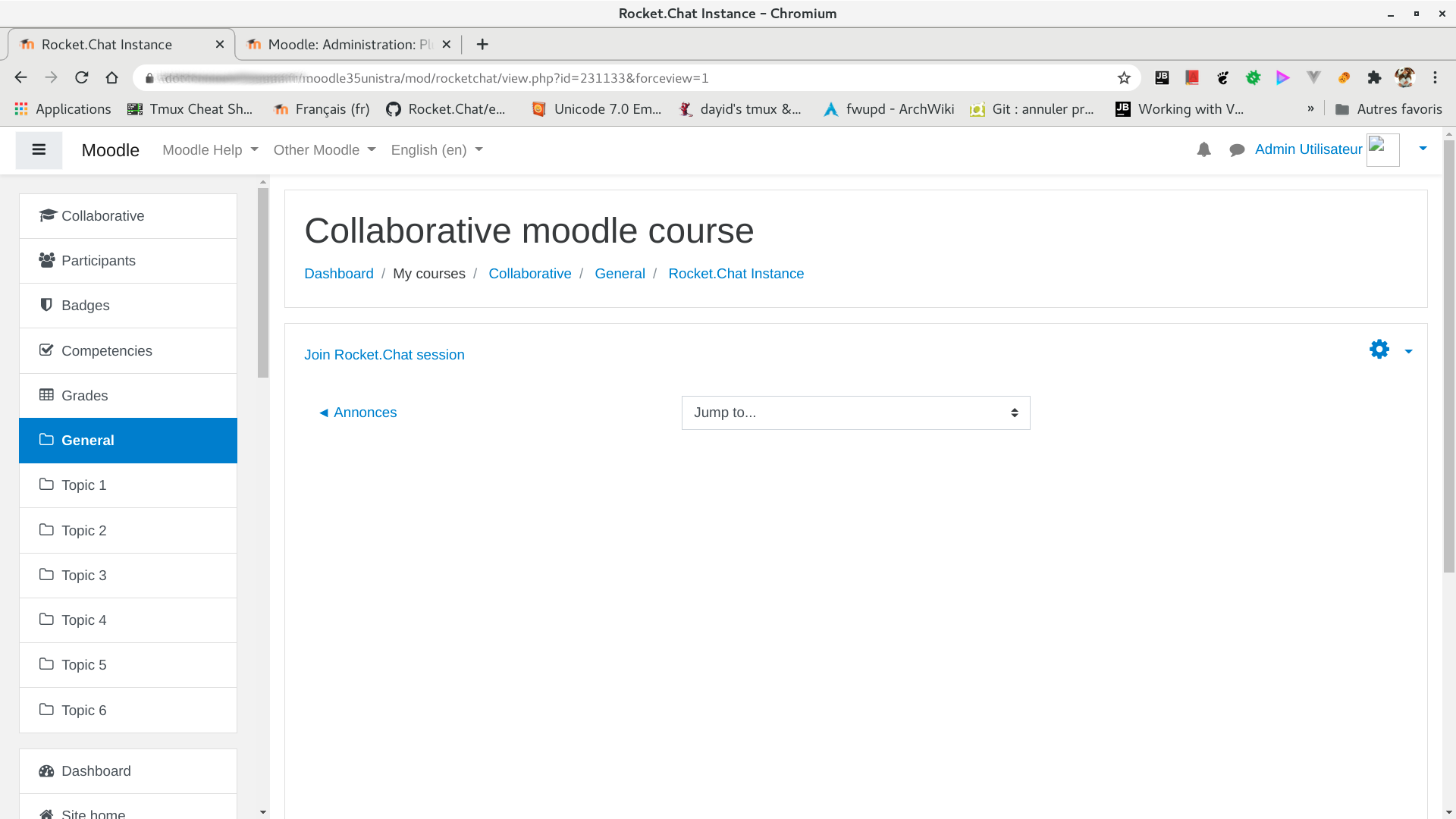
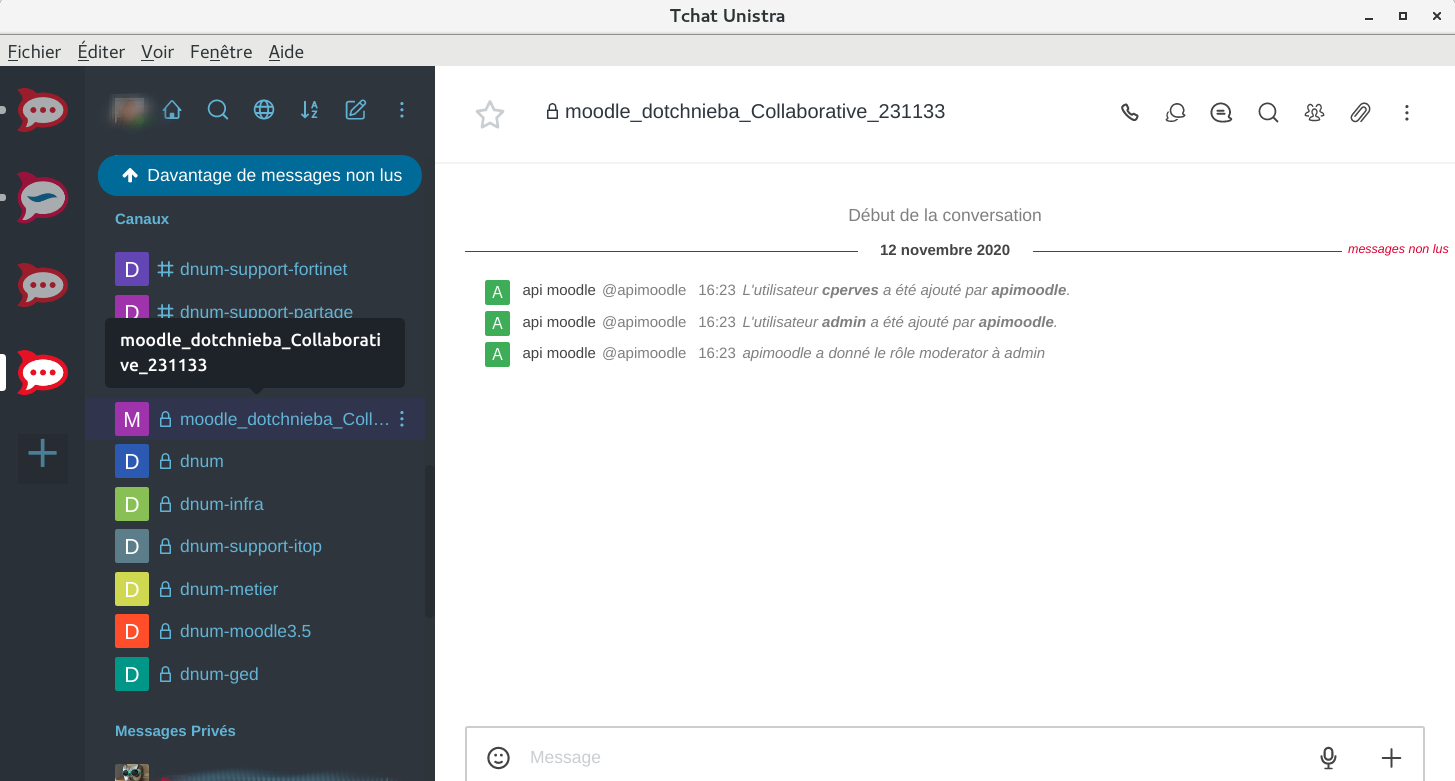
This plugin allows teachers to keep synchronized users enrolled in a Moodle course into a dedicated Rocket.Chat private channel.
Main feature
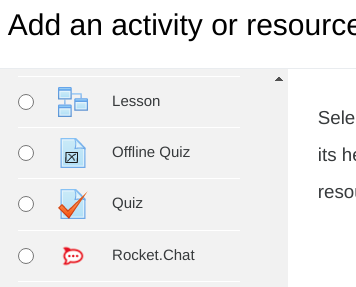
Adding this activity to a Moodle course will create a private channel in Rocket.Chat and push Moodle users associated to this activity as members of this newly created channel. The list of members will then be kept up to date.
It will be possible to access to this Rocket.Chat channel directly from Moodle or through any autonomous Rocket.Chat client.
Rocket.Chat settings requirements
Authentication
- LDAP and CAS account fusion is adviced when moodle user account creation is activated
for moodle Rocket.Chat account
Moodle API account creation
- create a RocketChat local account
- other authentification account such like CAS will work
- confirm it (verified button) through Rocket.Chat administration
Roles and permissions
- Give the created user user and admin role (further tests will enable to prevent for using admin role)
- view-room-administration
- create-personal-access-tokens
- api-bypass-rate-limit to prevent request limit
- CAS authentication
- In case of user account creation in Rocket.Chat through moodle plugin you must activate following settings
- Trust CAS username
- Authorize user creation
- In case of user account creation in Rocket.Chat through moodle plugin you must activate following settings
Create a personal token for this account
Through Visual interface
- logged as the Moodle api account, though My Account -> Personal Access Tokens
- create a new personal access token with
Ignore Two Factor Authentificationchecked
through command lines
- Retrieve auth token based on login/passowrd
curl https://chat.univ.fr/api/v1/login -d "username=superadmin&password=superpassword" | cut -d\" -f7-14

# {"userId":"XXXUserIDXXX","authToken":"XXXAuthTokenXXX"}
- Generate personal access token
curl -H "X-Auth-Token: XXXAuthTokenXXX" -H "X-User-Id: XXXUserIDXXX" -H "Content-type:application/json" https://chat.univ.fr/api/v1/users.generatePersonalAccessToken -d '{"tokenName": "moodletoken"}'

# {"token":"XXXPersonalTokenXXX","success":true}
- If you want to verify, you can list personal tokens
curl -H "X-Auth-Token: XXXAuthTokenXXX" -H "X-User-Id: XXXUserIDXXX" -H t-type:application/json" https://chat.univ.fr/api/v1/users.getPersonalAccessTokens

# {"tokens":[{"name":"moodletoken","createdAt":"2021-02-09T10:35:38.564Z","lastTokenPart":"XXX"}],"success":true}
- Generate a new token in case of lost
curl -H "X-Auth-Token: XXXAuthTokenXXX" -H "X-User-Id: XXXUserIDXXX" -H "Content-type:application/json" https://chat.univ.fr/api/v1/users.regeneratePersonalAccessToken -d '{"tokenName": "moodletoken"}'

# {"token":"XXXNewPersonalTokenXXX","success":true}
Installation
Moodle plugin
- Copy the Rocket.Chat plugin to the
moddirectory of your Moodle instance:
git clone https://github.com/EsupPortail/esup-mod_rocketchat MOODLE_ROOT_DIRECTORY/mod/rocketchat
- Visit the notifications page to complete the installation process
Settings
- recyclebin_patch check this if patch is applied to core moodle file admin/tool/recyclebin/classes/course_bin.php
- patch is available in patch subdirectory
- you can apply it with patch command
patch -p1 /moodlepath/admin/tool/recyclebin/classes/course_bin.php < /moodlepath//mod/rocketchat/patch/admin_tool_recyclebin_classes_course_bin.patch

patch -p1 /moodlepath/admin/tool/recyclebin/classes/category_bin.php < /moodlepath/mod/rocketchat/patch/admin_tool_recyclebin_classes_category_bin.patch

patch -p1 /moodlepath/user/classes/output/user_roles_editable.php  < /moodlepath/mod/rocketchat/patch/user_classes_output_user_roles_editable.patch
Authentication settings
- apiuser will be rocket-chat userid
- apitoken a token generated on Rocket.Chat for the apiuser
- can be generated on Rocket.Chat for apiuser on Profile -> My Account -> Security -> Personal Access Tokens menu
- don't forget to enable create-personal-access-tokens permission for the apiuser through its role
Backup settings
On moodle 3.5 versions backup_auto_activities backup settings must be checked otherwise Rocket.Chat module restoration from recycle bin will not work.
See MDL-6621 tracker ticket for more informations
Specials capabilities
- mod/rocketchat:change_embedded_display_mode : enable a user to choose embbeded Rocket.Chat web client display mode while eidting the module instance
- mod/rocketchat:candefineroles : enable a user to change defaults roles mapping while editing the module instance
Unit tests
settings
- in Rocket.Chat you must adjust the Rate Limiter to enable unit tests large amount of requests
- to run unit tests that involved Rocket.Chat remote server just create a config-test.php file into the module rocketchat root directory
- fill in with following parameters
<?php

set_config('instanceurl','https://rocketchat-server_url','mod_rocketchat');

set_config('restapiroot','/api/v1/','mod_rocketchat');

set_config('apiuser','your_user_on_rocket.chat','mod_rocketchat');

set_config('apitoken','#############','mod_rocketchat');

// fake config test to avoird email domain troubles

set_config('domainmail','your_domain_mail_if_necessary','mod_rocketchat'); // Optional argument.line.
requirements
Provided tests
- don't forget to init phpunit moodle tests environment (requirements)
cd /www_moodle_path

/www_moodle_path/vendor/bin/phpunit "mod_rocketchat_background_enrolments_testcase" mod/rocketchat/tests/backup_enrolments_test.php

/www_moodle_path/vendor/bin/phpunit "mod_rocketchat_backup_restore_testcase" mod/rocketchat/tests/backup_restore_test.php

/www_moodle_path/vendor/bin/phpunit "mod_rocketchat_course_reset_testcase" mod/rocketchat/tests/course_reset_test.php

/www_moodle_path/vendor/bin/phpunit "mod_rocketchat_observer_testcase" mod/rocketchat/tests/observer_test.php

/www_moodle_path/vendor/bin/phpunit "mod_rocketchat_api_manager_testcase" mod/rocketchat/tests/rocket_chat_api_manager_test.php

/www_moodle_path/vendor/bin/phpunit "mod_rocketchat_recyclebin_category_testcase" mod/rocketchat/tests/recyclebin_category_test.php

/www_moodle_path/vendor/bin/phpunit "mod_rocketchat_recyclebin_testcase" mod/rocketchat/tests/recyclebin_test.php

/www_moodle_path/vendor/bin/phpunit "mod_rocketchat_privacy_testcase" mod/rocketchat/tests/privacy_provider_test.php

/www_moodle_path/vendor/bin/phpunit "mod_rocketchat_tools_testcase" mod/rocketchat/tests/mod_rocketchat_tools_test.php

/www_moodle_path/vendor/bin/phpunit "mod_rocketchat_moderator_and_user_roles_testcase" mod/rocketchat/tests/moderator_and_user_roles_test.php

/www_moodle_path/vendor/bin/phpunit "mod_rocketchat_retention_testcase" mod/rocketchat/tests/retention_test.php
Functional tests with behat
Requirements
Settings
- see phpunit settings section
Provided tests
- don't forget to init behat moodle tests environment (requirements)
cd /www_moodle_path

vendor/bin/behat --config /datas/mdlfarm/behat_datas/behatrun/behat/behat.yml --tags mod_rocketchat
for behat funcitonal tests by file
cd /www_moodle_path

vendor/bin/behat --config /datas/mdlfarm/behat_datas/behatrun/behat/behat.yml  /www_moodle_path/mod/rocketchat/tests/behat/rocketchat_activity_creation.feature

vendor/bin/behat --config /datas/mdlfarm/behat_datas/behatrun/behat/behat.yml  /www_moodle_path/mod/rocketchat/tests/behat/rocketchat_create_deletion.feature
License
2020 ESUP-Portail (https://www.esup-portail.org)
This program is free software: you can redistribute it and/or modify it under
the terms of the GNU General Public License as published by the Free Software
Foundation, either version 3 of the License, or (at your option) any later
version.
This program is distributed in the hope that it will be useful, but WITHOUT ANY
WARRANTY; without even the implied warranty of MERCHANTABILITY or FITNESS FOR A
PARTICULAR PURPOSE. See the GNU General Public License for more details.
You should have received a copy of the GNU General Public License along with
this program. If not, see http://www.gnu.org/licenses/.
Rocket.Chat moodle module ESUP team
- The Rocket.Chat moodle Esup team is composed of people from various places and from differents working domains.
- Pedagocical engineer
- System administrators
- Developpers
- Institutions
- Centrale Marseille
- Université de Lorraine
- Université de Strasbourg
- Université de technologie de Troyes
If you need some help, you can contact us via this email address : mod-rocketchat-contact AT esup-portail.org
1.2.8 (2021022200)
1.2.8
Plugin type: Activities
Frankenstyle component name: mod_rocketchat
Version build number: 2021022200
Version release name: 1.2.8
Maturity: Stable
Supported Moodle versions: 3.5, 3.8, 3.9
Repository URL (Git): https://github.com/EsupPortail/esup-mod_rocketchat
Repository branch:
Repository tag: 1.2.8
Issue/bug tracker URL: https://github.com/EsupPortail/esup-mod_rocketchat/issues
Rocket.Chat activity for Moodle
This plugin allows teachers to keep synchronized users enrolled in a Moodle course into a dedicated Rocket.Chat private channel.
Main feature
Adding this activity to a Moodle course will create a private channel in Rocket.Chat and push Moodle users associated to this activity as members of this newly created channel. The list of members will then be kept up to date.
It will be possible to access to this Rocket.Chat channel directly from Moodle or through any autonomous Rocket.Chat client.
Rocket.Chat settings requirements
Authentication
- LDAP and CAS account fusion is adviced when moodle user account creation is activated
for moodle Rocket.Chat account
Moodle API account creation
- create a RocketChat local account
- other authentification account such like CAS will work
- confirm it (verified button) through Rocket.Chat administration
Roles and permissions
- Give the created user user and admin role (further tests will enable to prevent for using admin role)
- view-room-administration
- create-personal-access-tokens
- api-bypass-rate-limit to prevent request limit
- CAS authentication
- In case of user account creation in Rocket.Chat through moodle plugin you must activate following settings
- Trust CAS username
- Authorize user creation
- In case of user account creation in Rocket.Chat through moodle plugin you must activate following settings
Create a personal token for this account
Through Visual interface
- logged as the Moodle api account, though My Account -> Personal Access Tokens
- create a new personal access token with
Ignore Two Factor Authentificationchecked
through command lines
- Retrieve auth token based on login/passowrd
curl https://chat.univ.fr/api/v1/login -d "username=superadmin&password=superpassword" | cut -d\" -f7-14

# {"userId":"XXXUserIDXXX","authToken":"XXXAuthTokenXXX"}
- Generate personal access token
curl -H "X-Auth-Token: XXXAuthTokenXXX" -H "X-User-Id: XXXUserIDXXX" -H "Content-type:application/json" https://chat.univ.fr/api/v1/users.generatePersonalAccessToken -d '{"tokenName": "moodletoken"}'

# {"token":"XXXPersonalTokenXXX","success":true}
- If you want to verify, you can list personal tokens
curl -H "X-Auth-Token: XXXAuthTokenXXX" -H "X-User-Id: XXXUserIDXXX" -H t-type:application/json" https://chat.univ.fr/api/v1/users.getPersonalAccessTokens

# {"tokens":[{"name":"moodletoken","createdAt":"2021-02-09T10:35:38.564Z","lastTokenPart":"XXX"}],"success":true}
- Generate a new token in case of lost
curl -H "X-Auth-Token: XXXAuthTokenXXX" -H "X-User-Id: XXXUserIDXXX" -H "Content-type:application/json" https://chat.univ.fr/api/v1/users.regeneratePersonalAccessToken -d '{"tokenName": "moodletoken"}'

# {"token":"XXXNewPersonalTokenXXX","success":true}
Installation
Moodle plugin
- Copy the Rocket.Chat plugin to the
moddirectory of your Moodle instance:
git clone https://github.com/EsupPortail/esup-mod_rocketchat MOODLE_ROOT_DIRECTORY/mod/rocketchat
- Visit the notifications page to complete the installation process
Settings
- recyclebin_patch check this if patch is applied to core moodle file admin/tool/recyclebin/classes/course_bin.php
- patch is available in patch subdirectory
- you can apply it with patch command
patch -p1 /moodlepath/admin/tool/recyclebin/classes/course_bin.php < /moodlepath//mod/rocketchat/patch/admin_tool_recyclebin_classes_course_bin.patch

patch -p1 /moodlepath/admin/tool/recyclebin/classes/category_bin.php < /moodlepath/mod/rocketchat/patch/admin_tool_recyclebin_classes_category_bin.patch

patch -p1 /moodlepath/user/classes/output/user_roles_editable.php  < /moodlepath/mod/rocketchat/patch/user_classes_output_user_roles_editable.patch
Authentication settings
- apiuser will be rocket-chat userid
- apitoken a token generated on Rocket.Chat for the apiuser
- can be generated on Rocket.Chat for apiuser on Profile -> My Account -> Security -> Personal Access Tokens menu
- don't forget to enable create-personal-access-tokens permission for the apiuser through its role
Backup settings
On moodle 3.5 versions backup_auto_activities backup settings must be checked otherwise Rocket.Chat module restoration from recycle bin will not work.
See MDL-6621 tracker ticket for more informations
Specials capabilities
- mod/rocketchat:change_embedded_display_mode : enable a user to choose embbeded Rocket.Chat web client display mode while eidting the module instance
- mod/rocketchat:candefineroles : enable a user to change defaults roles mapping while editing the module instance
Unit tests
settings
- in Rocket.Chat you must adjust the Rate Limiter to enable unit tests large amount of requests
- to run unit tests that involved Rocket.Chat remote server just create a config-test.php file into the module rocketchat root directory
- fill in with following parameters
<?php

set_config('instanceurl','https://rocketchat-server_url','mod_rocketchat');

set_config('restapiroot','/api/v1/','mod_rocketchat');

set_config('apiuser','your_user_on_rocket.chat','mod_rocketchat');

set_config('apitoken','#############','mod_rocketchat');

// fake config test to avoird email domain troubles

set_config('domainmail','your_domain_mail_if_necessary','mod_rocketchat'); // Optional argument.line.
requirements
Provided tests
- don't forget to init phpunit moodle tests environment (requirements)
cd /www_moodle_path

/www_moodle_path/vendor/bin/phpunit "mod_rocketchat_background_enrolments_testcase" mod/rocketchat/tests/backup_enrolments_test.php

/www_moodle_path/vendor/bin/phpunit "mod_rocketchat_backup_restore_testcase" mod/rocketchat/tests/backup_restore_test.php

/www_moodle_path/vendor/bin/phpunit "mod_rocketchat_course_reset_testcase" mod/rocketchat/tests/course_reset_test.php

/www_moodle_path/vendor/bin/phpunit "mod_rocketchat_observer_testcase" mod/rocketchat/tests/observer_test.php

/www_moodle_path/vendor/bin/phpunit "mod_rocketchat_api_manager_testcase" mod/rocketchat/tests/rocket_chat_api_manager_test.php

/www_moodle_path/vendor/bin/phpunit "mod_rocketchat_recyclebin_category_testcase" mod/rocketchat/tests/recyclebin_category_test.php

/www_moodle_path/vendor/bin/phpunit "mod_rocketchat_recyclebin_testcase" mod/rocketchat/tests/recyclebin_test.php

/www_moodle_path/vendor/bin/phpunit "mod_rocketchat_privacy_testcase" mod/rocketchat/tests/privacy_provider_test.php

/www_moodle_path/vendor/bin/phpunit "mod_rocketchat_tools_testcase" mod/rocketchat/tests/mod_rocketchat_tools_test.php

/www_moodle_path/vendor/bin/phpunit "mod_rocketchat_moderator_and_user_roles_testcase" mod/rocketchat/tests/moderator_and_user_roles_test.php

/www_moodle_path/vendor/bin/phpunit "mod_rocketchat_retention_testcase" mod/rocketchat/tests/retention_test.php
Functional tests with behat
Requirements
Settings
- see phpunit settings section
Provided tests
- don't forget to init behat moodle tests environment (requirements)
cd /www_moodle_path

vendor/bin/behat --config /datas/mdlfarm/behat_datas/behatrun/behat/behat.yml --tags mod_rocketchat
for behat funcitonal tests by file
cd /www_moodle_path

vendor/bin/behat --config /datas/mdlfarm/behat_datas/behatrun/behat/behat.yml  /www_moodle_path/mod/rocketchat/tests/behat/rocketchat_activity_creation.feature

vendor/bin/behat --config /datas/mdlfarm/behat_datas/behatrun/behat/behat.yml  /www_moodle_path/mod/rocketchat/tests/behat/rocketchat_create_deletion.feature
License
2020 ESUP-Portail (https://www.esup-portail.org)
This program is free software: you can redistribute it and/or modify it under
the terms of the GNU General Public License as published by the Free Software
Foundation, either version 3 of the License, or (at your option) any later
version.
This program is distributed in the hope that it will be useful, but WITHOUT ANY
WARRANTY; without even the implied warranty of MERCHANTABILITY or FITNESS FOR A
PARTICULAR PURPOSE. See the GNU General Public License for more details.
You should have received a copy of the GNU General Public License along with
this program. If not, see http://www.gnu.org/licenses/.
Rocket.Chat moodle module ESUP team
- The Rocket.Chat moodle Esup team is composed of people from various places and from differents working domains.
- Pedagocical engineer
- System administrators
- Developpers
- Institutions
- Centrale Marseille
- Université de Lorraine
- Université de Strasbourg
- Université de technologie de Troyes
If you need some help, you can contact us via this email address : mod-rocketchat-contact AT esup-portail.org
1.2.7 (2021021500)
1.2.7
Plugin type: Activities
Frankenstyle component name: mod_rocketchat
Version build number: 2021021500
Version release name: 1.2.7
Maturity: Stable
Supported Moodle versions: 3.5, 3.8, 3.9
Repository URL (Git): https://github.com/EsupPortail/esup-mod_rocketchat
Repository branch:
Repository tag: 1.2.7
Issue/bug tracker URL: https://github.com/EsupPortail/esup-mod_rocketchat/issues
Rocket.Chat activity for Moodle
This plugin allows teachers to keep synchronized users enrolled in a Moodle course into a dedicated Rocket.Chat private channel.
Main feature
Adding this activity to a Moodle course will create a private channel in Rocket.Chat and push Moodle users associated to this activity as members of this newly created channel. The list of members will then be kept up to date.
It will be possible to access to this Rocket.Chat channel directly from Moodle or through any autonomous Rocket.Chat client.
Rocket.Chat settings requirements
Authentication
- LDAP and CAS account fusion is adviced when moodle user account creation is activated
for moodle Rocket.Chat account
Moodle API account creation
- create a RocketChat local account
- other authentification account such like CAS will work
- confirm it (verified button) through Rocket.Chat administration
Roles and permissions
- Give the created user user and admin role (further tests will enable to prevent for using admin role)
- view-room-administration
- create-personal-access-tokens
- api-bypass-rate-limit to prevent request limit
- CAS authentication
- In case of user account creation in Rocket.Chat through moodle plugin you must activate following settings
- Trust CAS username
- Authorize user creation
- In case of user account creation in Rocket.Chat through moodle plugin you must activate following settings
Create a personal token for this account
Through Visual interface
- logged as the Moodle api account, though My Account -> Personal Access Tokens
- create a new personal access token with
Ignore Two Factor Authentificationchecked
through command lines
- Retrieve auth token based on login/passowrd
curl https://chat.univ.fr/api/v1/login -d "username=superadmin&password=superpassword" | cut -d\" -f7-14

# {"userId":"XXXUserIDXXX","authToken":"XXXAuthTokenXXX"}
- Generate personal access token
curl -H "X-Auth-Token: XXXAuthTokenXXX" -H "X-User-Id: XXXUserIDXXX" -H "Content-type:application/json" https://chat.univ.fr/api/v1/users.generatePersonalAccessToken -d '{"tokenName": "moodletoken"}'

# {"token":"XXXPersonalTokenXXX","success":true}
- If you want to verify, you can list personal tokens
curl -H "X-Auth-Token: XXXAuthTokenXXX" -H "X-User-Id: XXXUserIDXXX" -H t-type:application/json" https://chat.univ.fr/api/v1/users.getPersonalAccessTokens

# {"tokens":[{"name":"moodletoken","createdAt":"2021-02-09T10:35:38.564Z","lastTokenPart":"XXX"}],"success":true}
- Generate a new token in case of lost
curl -H "X-Auth-Token: XXXAuthTokenXXX" -H "X-User-Id: XXXUserIDXXX" -H "Content-type:application/json" https://chat.univ.fr/api/v1/users.regeneratePersonalAccessToken -d '{"tokenName": "moodletoken"}'

# {"token":"XXXNewPersonalTokenXXX","success":true}
Installation
Moodle plugin
- Copy the Rocket.Chat plugin to the
moddirectory of your Moodle instance:
git clone https://github.com/EsupPortail/esup-mod_rocketchat MOODLE_ROOT_DIRECTORY/mod/rocketchat
- Visit the notifications page to complete the installation process
Settings
- recyclebin_patch check this if patch is applied to core moodle file admin/tool/recyclebin/classes/course_bin.php
- patch is available in patch subdirectory
- you can apply it with patch command
patch -p1 /moodlepath/admin/tool/recyclebin/classes/course_bin.php < /moodlepath//mod/rocketchat/patch/admin_tool_recyclebin_classes_course_bin.patch

patch -p1 /moodlepath/admin/tool/recyclebin/classes/category_bin.php < /moodlepath/mod/rocketchat/patch/admin_tool_recyclebin_classes_category_bin.patch

patch -p1 /moodlepath/user/classes/output/user_roles_editable.php  < /moodlepath/mod/rocketchat/patch/user_classes_output_user_roles_editable.patch
Authentication settings
- apiuser will be rocket-chat userid
- apitoken a token generated on Rocket.Chat for the apiuser
- can be generated on Rocket.Chat for apiuser on Profile -> My Account -> Security -> Personal Access Tokens menu
- don't forget to enable create-personal-access-tokens permission for the apiuser through its role
Backup settings
On moodle 3.5 versions backup_auto_activities backup settings must be checked otherwise Rocket.Chat module restoration from recycle bin will not work.
See MDL-6621 tracker ticket for more informations
Specials capabilities
- mod/rocketchat:change_embedded_display_mode : enable a user to choose embbeded Rocket.Chat web client display mode while eidting the module instance
- mod/rocketchat:candefineroles : enable a user to change defaults roles mapping while editing the module instance
Unit tests
settings
- in Rocket.Chat you must adjust the Rate Limiter to enable unit tests large amount of requests
- to run unit tests that involved Rocket.Chat remote server just create a config-test.php file into the module rocketchat root directory
- fill in with following parameters
<?php

set_config('instanceurl','https://rocketchat-server_url','mod_rocketchat');

set_config('restapiroot','/api/v1/','mod_rocketchat');

set_config('apiuser','your_user_on_rocket.chat','mod_rocketchat');

set_config('apitoken','#############','mod_rocketchat');

// fake config test to avoird email domain troubles

set_config('domainmail','your_domain_mail_if_necessary','mod_rocketchat'); // Optional argument.line.
requirements
Provided tests
- don't forget to init phpunit moodle tests environment (requirements)
cd /www_moodle_path

/www_moodle_path/vendor/bin/phpunit "mod_rocketchat_background_enrolments_testcase" mod/rocketchat/tests/backup_enrolments_test.php

/www_moodle_path/vendor/bin/phpunit "mod_rocketchat_backup_restore_testcase" mod/rocketchat/tests/backup_restore_test.php

/www_moodle_path/vendor/bin/phpunit "mod_rocketchat_course_reset_testcase" mod/rocketchat/tests/course_reset_test.php

/www_moodle_path/vendor/bin/phpunit "mod_rocketchat_observer_testcase" mod/rocketchat/tests/observer_test.php

/www_moodle_path/vendor/bin/phpunit "mod_rocketchat_api_manager_testcase" mod/rocketchat/tests/rocket_chat_api_manager_test.php

/www_moodle_path/vendor/bin/phpunit "mod_rocketchat_recyclebin_category_testcase" mod/rocketchat/tests/recyclebin_category_test.php

/www_moodle_path/vendor/bin/phpunit "mod_rocketchat_recyclebin_testcase" mod/rocketchat/tests/recyclebin_test.php

/www_moodle_path/vendor/bin/phpunit "mod_rocketchat_privacy_testcase" mod/rocketchat/tests/privacy_provider_test.php

/www_moodle_path/vendor/bin/phpunit "mod_rocketchat_tools_testcase" mod/rocketchat/tests/mod_rocketchat_tools_test.php

/www_moodle_path/vendor/bin/phpunit "mod_rocketchat_moderator_and_user_roles_testcase" mod/rocketchat/tests/moderator_and_user_roles_test.php

/www_moodle_path/vendor/bin/phpunit "mod_rocketchat_retention_testcase" mod/rocketchat/tests/retention_test.php
Functional tests with behat
Requirements
Settings
- see phpunit settings section
Provided tests
- don't forget to init behat moodle tests environment (requirements)
cd /www_moodle_path

vendor/bin/behat --config /datas/mdlfarm/behat_datas/behatrun/behat/behat.yml --tags mod_rocketchat
for behat funcitonal tests by file
cd /www_moodle_path

vendor/bin/behat --config /datas/mdlfarm/behat_datas/behatrun/behat/behat.yml  /www_moodle_path/mod/rocketchat/tests/behat/rocketchat_activity_creation.feature

vendor/bin/behat --config /datas/mdlfarm/behat_datas/behatrun/behat/behat.yml  /www_moodle_path/mod/rocketchat/tests/behat/rocketchat_create_deletion.feature
License
2020 ESUP-Portail (https://www.esup-portail.org)
This program is free software: you can redistribute it and/or modify it under
the terms of the GNU General Public License as published by the Free Software
Foundation, either version 3 of the License, or (at your option) any later
version.
This program is distributed in the hope that it will be useful, but WITHOUT ANY
WARRANTY; without even the implied warranty of MERCHANTABILITY or FITNESS FOR A
PARTICULAR PURPOSE. See the GNU General Public License for more details.
You should have received a copy of the GNU General Public License along with
this program. If not, see http://www.gnu.org/licenses/.
Rocket.Chat moodle module ESUP team
- The Rocket.Chat moodle Esup team is composed of people from various places and from differents working domains.
- Pedagocical engineer
- System administrators
- Developpers
- Institutions
- Centrale Marseille
- Université de Lorraine
- Université de Strasbourg
- Université de technologie de Troyes
If you need some help, you can contact us via this email address : mod-rocketchat-contact AT esup-portail.org
1.2.6 (2021021200)
1.2.6
Plugin type: Activities
Frankenstyle component name: mod_rocketchat
Version build number: 2021021200
Version release name: 1.2.6
Maturity: Stable
Supported Moodle versions: 3.5, 3.8, 3.9
Repository URL (Git): https://github.com/EsupPortail/esup-mod_rocketchat
Repository branch:
Repository tag:
Issue/bug tracker URL: https://github.com/EsupPortail/esup-mod_rocketchat/issues
Rocket.Chat activity for Moodle
This plugin allows teachers to keep synchronized users enrolled in a Moodle course into a dedicated Rocket.Chat private channel.
Main feature
Adding this activity to a Moodle course will create a private channel in Rocket.Chat and push Moodle users associated to this activity as members of this newly created channel. The list of members will then be kept up to date.
It will be possible to access to this Rocket.Chat channel directly from Moodle or through any autonomous Rocket.Chat client.
Rocket.Chat settings requirements
Authentication
- LDAP and CAS account fusion is adviced when moodle user account creation is activated
for moodle Rocket.Chat account
Moodle API account creation
- create a RocketChat local account
- other authentification account such like CAS will work
- confirm it (verified button) through Rocket.Chat administration
Roles and permissions
- Give the created user user and admin role (further tests will enable to prevent for using admin role)
- view-room-administration
- create-personal-access-tokens
- api-bypass-rate-limit to prevent request limit
- CAS authentication
- In case of user account creation in Rocket.Chat through moodle plugin you must activate following settings
- Trust CAS username
- Authorize user creation
- In case of user account creation in Rocket.Chat through moodle plugin you must activate following settings
Create a personal token for this account
Through Visual interface
- logged as the Moodle api account, though My Account -> Personal Access Tokens
- create a new personal access token with
Ignore Two Factor Authentificationchecked
through command lines
- Retrieve auth token based on login/passowrd
curl https://chat.univ.fr/api/v1/login -d "username=superadmin&password=superpassword" | cut -d\" -f7-14

# {"userId":"XXXUserIDXXX","authToken":"XXXAuthTokenXXX"}
- Generate personal access token
curl -H "X-Auth-Token: XXXAuthTokenXXX" -H "X-User-Id: XXXUserIDXXX" -H "Content-type:application/json" https://chat.univ.fr/api/v1/users.generatePersonalAccessToken -d '{"tokenName": "moodletoken"}'

# {"token":"XXXPersonalTokenXXX","success":true}
- If you want to verify, you can list personal tokens
curl -H "X-Auth-Token: XXXAuthTokenXXX" -H "X-User-Id: XXXUserIDXXX" -H t-type:application/json" https://chat.univ.fr/api/v1/users.getPersonalAccessTokens

# {"tokens":[{"name":"moodletoken","createdAt":"2021-02-09T10:35:38.564Z","lastTokenPart":"XXX"}],"success":true}
- Generate a new token in case of lost
curl -H "X-Auth-Token: XXXAuthTokenXXX" -H "X-User-Id: XXXUserIDXXX" -H "Content-type:application/json" https://chat.univ.fr/api/v1/users.regeneratePersonalAccessToken -d '{"tokenName": "moodletoken"}'

# {"token":"XXXNewPersonalTokenXXX","success":true}
Installation
Moodle plugin
- Copy the Rocket.Chat plugin to the
moddirectory of your Moodle instance:
git clone https://github.com/EsupPortail/esup-mod_rocketchat MOODLE_ROOT_DIRECTORY/mod/rocketchat
- Visit the notifications page to complete the installation process
Settings
- recyclebin_patch check this if patch is applied to core moodle file admin/tool/recyclebin/classes/course_bin.php
- patch is available in patch subdirectory
- you can apply it with patch command
patch -p1 /moodlepath/admin/tool/recyclebin/classes/course_bin.php < /moodlepath//mod/rocketchat/patch/admin_tool_recyclebin_classes_course_bin.patch

patch -p1 /moodlepath/admin/tool/recyclebin/classes/category_bin.php < /moodlepath/mod/rocketchat/patch/admin_tool_recyclebin_classes_category_bin.patch

patch -p1 /moodlepath/user/classes/output/user_roles_editable.php  < /moodlepath/mod/rocketchat/patch/user_classes_output_user_roles_editable.patch
Authentication settings
- apiuser will be rocket-chat userid
- apitoken a token generated on Rocket.Chat for the apiuser
- can be generated on Rocket.Chat for apiuser on Profile -> My Account -> Security -> Personal Access Tokens menu
- don't forget to enable create-personal-access-tokens permission for the apiuser through its role
Backup settings
On moodle 3.5 versions backup_auto_activities backup settings must be checked otherwise Rocket.Chat module restoration from recycle bin will not work.
See MDL-6621 tracker ticket for more informations
Specials capabilities
- mod/rocketchat:change_embedded_display_mode : enable a user to choose embbeded Rocket.Chat web client display mode while eidting the module instance
- mod/rocketchat:candefineroles : enable a user to change defaults roles mapping while editing the module instance
Unit tests
settings
- in Rocket.Chat you must adjust the Rate Limiter to enable unit tests large amount of requests
- to run unit tests that involved Rocket.Chat remote server just create a config-test.php file into the module rocketchat root directory
- fill in with following parameters
<?php

set_config('instanceurl','https://rocketchat-server_url','mod_rocketchat');

set_config('restapiroot','/api/v1/','mod_rocketchat');

set_config('apiuser','your_user_on_rocket.chat','mod_rocketchat');

set_config('apitoken','#############','mod_rocketchat');

// fake config test to avoird email domain troubles

set_config('domainmail','your_domain_mail_if_necessary','mod_rocketchat'); // Optional argument.line.
requirements
Provided tests
- don't forget to init phpunit moodle tests environment (requirements)
cd /www_moodle_path

/www_moodle_path/vendor/bin/phpunit "mod_rocketchat_background_enrolments_testcase" mod/rocketchat/tests/backup_enrolments_test.php

/www_moodle_path/vendor/bin/phpunit "mod_rocketchat_backup_restore_testcase" mod/rocketchat/tests/backup_restore_test.php

/www_moodle_path/vendor/bin/phpunit "mod_rocketchat_course_reset_testcase" mod/rocketchat/tests/course_reset_test.php

/www_moodle_path/vendor/bin/phpunit "mod_rocketchat_observer_testcase" mod/rocketchat/tests/observer_test.php

/www_moodle_path/vendor/bin/phpunit "mod_rocketchat_api_manager_testcase" mod/rocketchat/tests/rocket_chat_api_manager_test.php

/www_moodle_path/vendor/bin/phpunit "mod_rocketchat_recyclebin_category_testcase" mod/rocketchat/tests/recyclebin_category_test.php

/www_moodle_path/vendor/bin/phpunit "mod_rocketchat_recyclebin_testcase" mod/rocketchat/tests/recyclebin_test.php

/www_moodle_path/vendor/bin/phpunit "mod_rocketchat_privacy_testcase" mod/rocketchat/tests/privacy_provider_test.php

/www_moodle_path/vendor/bin/phpunit "mod_rocketchat_tools_testcase" mod/rocketchat/tests/mod_rocketchat_tools_test.php

/www_moodle_path/vendor/bin/phpunit "mod_rocketchat_moderator_and_user_roles_testcase" mod/rocketchat/tests/moderator_and_user_roles_test.php

/www_moodle_path/vendor/bin/phpunit "mod_rocketchat_retention_testcase" mod/rocketchat/tests/retention_test.php
Functional tests with behat
Requirements
Settings
- see phpunit settings section
Provided tests
- don't forget to init behat moodle tests environment (requirements)
cd /www_moodle_path

vendor/bin/behat --config /datas/mdlfarm/behat_datas/behatrun/behat/behat.yml --tags mod_rocketchat
for behat funcitonal tests by file
cd /www_moodle_path

vendor/bin/behat --config /datas/mdlfarm/behat_datas/behatrun/behat/behat.yml  /www_moodle_path/mod/rocketchat/tests/behat/rocketchat_activity_creation.feature

vendor/bin/behat --config /datas/mdlfarm/behat_datas/behatrun/behat/behat.yml  /www_moodle_path/mod/rocketchat/tests/behat/rocketchat_create_deletion.feature
License
2020 ESUP-Portail (https://www.esup-portail.org)
This program is free software: you can redistribute it and/or modify it under
the terms of the GNU General Public License as published by the Free Software
Foundation, either version 3 of the License, or (at your option) any later
version.
This program is distributed in the hope that it will be useful, but WITHOUT ANY
WARRANTY; without even the implied warranty of MERCHANTABILITY or FITNESS FOR A
PARTICULAR PURPOSE. See the GNU General Public License for more details.
You should have received a copy of the GNU General Public License along with
this program. If not, see http://www.gnu.org/licenses/.
Rocket.Chat moodle module ESUP team
- The Rocket.Chat moodle Esup team is composed of people from various places and from differents working domains.
- Pedagocical engineer
- System administrators
- Developpers
- Institutions
- Centrale Marseille
- Université de Lorraine
- Université de Strasbourg
- Université de technologie de Troyes
1.2.5 (2021020800)
1.2.5
Plugin type: Activities
Frankenstyle component name: mod_rocketchat
Version build number: 2021020800
Version release name: 1.2.5
Maturity: Stable
Supported Moodle versions: 3.5, 3.8, 3.9
Repository URL (Git): https://github.com/EsupPortail/esup-mod_rocketchat
Repository branch:
Repository tag:
Issue/bug tracker URL: https://github.com/EsupPortail/esup-mod_rocketchat/issues
Rocket.Chat activity for Moodle
This plugin allows teachers to keep synchronized users enrolled in a Moodle course into a dedicated Rocket.Chat private channel.
Main feature
Adding this activity to a Moodle course will create a private channel in Rocket.Chat and push Moodle users associated to this activity as members of this newly created channel. The list of members will then be kept up to date.
It will be possible to access to this Rocket.Chat channel directly from Moodle or through any autonomous Rocket.Chat client.
Rocket.Chat settings requirements
Authentication
- LDAP and CAS account fusion is adviced when moodle user account creation is activated
for moodle Rocket.Chat account
Moodle API account creation
- create a RocketChat local account
- other authentification account such like CAS will work
- confirm it (verified button) through Rocket.Chat administration
Roles and permissions
- Give the created user user and admin role (further tests will enable to prevent for using admin role)
- view-room-administration
- create-personal-access-tokens
- api-bypass-rate-limit to prevent request limit
- CAS authentication
- In case of user account creation in Rocket.Chat through moodle plugin you must activate following settings
- Trust CAS username
- Authorize user creation
- In case of user account creation in Rocket.Chat through moodle plugin you must activate following settings
Create a personal token for this account
Through Visual interface
- logged as the Moodle api account, though My Account -> Personal Access Tokens
- create a new personal access token with
Ignore Two Factor Authentificationchecked
through command lines
- Retrieve auth token based on login/passowrd
curl https://chat.univ.fr/api/v1/login -d "username=superadmin&password=superpassword" | cut -d\" -f7-14

# {"userId":"XXXUserIDXXX","authToken":"XXXAuthTokenXXX"}
- Generate personal access token
curl -H "X-Auth-Token: XXXAuthTokenXXX" -H "X-User-Id: XXXUserIDXXX" -H "Content-type:application/json" https://chat.univ.fr/api/v1/users.generatePersonalAccessToken -d '{"tokenName": "moodletoken"}'

# {"token":"XXXPersonalTokenXXX","success":true}
- If you want to verify, you can list personal tokens
curl -H "X-Auth-Token: XXXAuthTokenXXX" -H "X-User-Id: XXXUserIDXXX" -H t-type:application/json" https://chat.univ.fr/api/v1/users.getPersonalAccessTokens

# {"tokens":[{"name":"moodletoken","createdAt":"2021-02-09T10:35:38.564Z","lastTokenPart":"XXX"}],"success":true}
- Generate a new token in case of lost
curl -H "X-Auth-Token: XXXAuthTokenXXX" -H "X-User-Id: XXXUserIDXXX" -H "Content-type:application/json" https://chat.univ.fr/api/v1/users.regeneratePersonalAccessToken -d '{"tokenName": "moodletoken"}'

# {"token":"XXXNewPersonalTokenXXX","success":true}
Installation
Moodle plugin
- Copy the Rocket.Chat plugin to the
moddirectory of your Moodle instance:
git clone https://github.com/EsupPortail/esup-mod_rocketchat MOODLE_ROOT_DIRECTORY/mod/rocketchat
- Visit the notifications page to complete the installation process
Settings
- recyclebin_patch check this if patch is applied to core moodle file admin/tool/recyclebin/classes/course_bin.php
- patch is available in patch subdirectory
- you can apply it with patch command
patch -p1 /moodlepath/admin/tool/recyclebin/classes/course_bin.php < /moodlepath//mod/rocketchat/patch/admin_tool_recyclebin_classes_course_bin.patch

patch -p1 /moodlepath/admin/tool/recyclebin/classes/category_bin.php < /moodlepath/mod/rocketchat/patch/admin_tool_recyclebin_classes_category_bin.patch

patch -p1 /moodlepath/user/classes/output/user_roles_editable.php  < /moodlepath/mod/rocketchat/patch/user_classes_output_user_roles_editable.patch
Authentication settings
- apiuser will be rocket-chat userid
- apitoken a token generated on Rocket.Chat for the apiuser
- can be generated on Rocket.Chat for apiuser on Profile -> My Account -> Security -> Personal Access Tokens menu
- don't forget to enable create-personal-access-tokens permission for the apiuser through its role
Backup settings
On moodle 3.5 versions backup_auto_activities backup settings must be checked otherwise Rocket.Chat module restoration from recycle bin will not work.
See MDL-6621 tracker ticket for more informations
Specials capabilities
- mod/rocketchat:change_embedded_display_mode : enable a user to choose embbeded Rocket.Chat web client display mode while eidting the module instance
- mod/rocketchat:candefineroles : enable a user to change defaults roles mapping while editing the module instance
Unit tests
settings
- in Rocket.Chat you must adjust the Rate Limiter to enable unit tests large amount of requests
- to run unit tests that involved Rocket.Chat remote server just create a config-test.php file into the module rocketchat root directory
- fill in with following parameters
<?php

set_config('instanceurl','https://rocketchat-server_url','mod_rocketchat');

set_config('restapiroot','/api/v1/','mod_rocketchat');

set_config('apiuser','your_user_on_rocket.chat','mod_rocketchat');

set_config('apitoken','#############','mod_rocketchat');

// fake config test to avoird email domain troubles

set_config('domainmail','your_domain_mail_if_necessary','mod_rocketchat'); // Optional argument.line.
requirements
Provided tests
- don't forget to init phpunit moodle tests environment (requirements)
cd /www_moodle_path

/www_moodle_path/vendor/bin/phpunit "mod_rocketchat_background_enrolments_testcase" mod/rocketchat/tests/backup_enrolments_test.php

/www_moodle_path/vendor/bin/phpunit "mod_rocketchat_backup_restore_testcase" mod/rocketchat/tests/backup_restore_test.php

/www_moodle_path/vendor/bin/phpunit "mod_rocketchat_course_reset_testcase" mod/rocketchat/tests/course_reset_test.php

/www_moodle_path/vendor/bin/phpunit "mod_rocketchat_observer_testcase" mod/rocketchat/tests/observer_test.php

/www_moodle_path/vendor/bin/phpunit "mod_rocketchat_api_manager_testcase" mod/rocketchat/tests/rocket_chat_api_manager_test.php

/www_moodle_path/vendor/bin/phpunit "mod_rocketchat_recyclebin_category_testcase" mod/rocketchat/tests/recyclebin_category_test.php

/www_moodle_path/vendor/bin/phpunit "mod_rocketchat_recyclebin_testcase" mod/rocketchat/tests/recyclebin_test.php

/www_moodle_path/vendor/bin/phpunit "mod_rocketchat_privacy_testcase" mod/rocketchat/tests/privacy_provider_test.php

/www_moodle_path/vendor/bin/phpunit "mod_rocketchat_tools_testcase" mod/rocketchat/tests/mod_rocketchat_tools_test.php

/www_moodle_path/vendor/bin/phpunit "mod_rocketchat_moderator_and_user_roles_testcase" mod/rocketchat/tests/moderator_and_user_roles_test.php

/www_moodle_path/vendor/bin/phpunit "mod_rocketchat_retention_testcase" mod/rocketchat/tests/retention_test.php
Functional tests with behat
Requirements
Settings
- see phpunit settings section
Provided tests
- don't forget to init behat moodle tests environment (requirements)
cd /www_moodle_path

vendor/bin/behat --config /datas/mdlfarm/behat_datas/behatrun/behat/behat.yml --tags mod_rocketchat
for behat funcitonal tests by file
cd /www_moodle_path

vendor/bin/behat --config /datas/mdlfarm/behat_datas/behatrun/behat/behat.yml  /www_moodle_path/mod/rocketchat/tests/behat/rocketchat_activity_creation.feature

vendor/bin/behat --config /datas/mdlfarm/behat_datas/behatrun/behat/behat.yml  /www_moodle_path/mod/rocketchat/tests/behat/rocketchat_create_deletion.feature
License
2020 ESUP-Portail (https://www.esup-portail.org)
This program is free software: you can redistribute it and/or modify it under
the terms of the GNU General Public License as published by the Free Software
Foundation, either version 3 of the License, or (at your option) any later
version.
This program is distributed in the hope that it will be useful, but WITHOUT ANY
WARRANTY; without even the implied warranty of MERCHANTABILITY or FITNESS FOR A
PARTICULAR PURPOSE. See the GNU General Public License for more details.
You should have received a copy of the GNU General Public License along with
this program. If not, see http://www.gnu.org/licenses/.
Rocket.Chat moodle module ESUP team
- The Rocket.Chat moodle Esup team is composed of people from various places and from differents working domains.
- Pedagocical engineer
- System administrators
- Developpers
- Institutions
- Centrale Marseille
- Université de Lorraine
- Université de Strasbourg
- Université de technologie de Troyes
1.2.1 (2020120900)
1.2.1
Plugin type: Activities
Frankenstyle component name: mod_rocketchat
Version build number: 2020120900
Version release name: 1.2.1
Maturity: Stable
Supported Moodle versions: 3.5, 3.8, 3.9
Repository URL (Git): https://github.com/EsupPortail/esup-mod_rocketchat
Repository branch: main
Repository tag: 1.2.1
Issue/bug tracker URL: https://github.com/EsupPortail/esup-mod_rocketchat/issues
Rocket.Chat activity for Moodle
This plugin allows teachers to push students from Moodle into a dedicated Rocket.Chat channel.
Main feature
Adding this activity to a Moodle course will create a channel in Rocket.Chat and push Moodle users associated to this activity as members of this newly created channel. The list of members will then be kept up to date.
Rocket.Chat settings requirements
- create a local RocketChat account
- other authentification account will not work
- confirm it (verified button) through Rocket.Chat administration
permissions
for moodle Rocket.Chat account
- view-room-administration
Authentication
- LDAP and CAS account fusion is adviced when moodle user account creation is activated
Installation
Moodle plugin
- Copy the Rocket.Chat plugin to the
moddirectory of your Moodle instance:
git clone https://github.com/EsupPortail/esup-mod_rocketchat MOODLE_ROOT_DIRECTORY/mod/rocketchat
- Visit the notifications page to complete the installation process
Settings
- recyclebin_patch check this if patch is applied to core moodle file admin/tool/recyclebin/classes/course_bin.php
- patch is available in patch subdirectory
- you can apply it with patch command
patch -p1 /moodlepath/admin/tool/recyclebin/classes/course_bin.php < /moodlepath//mod/rocketchat/patch/admin_tool_recyclebin_classes_course_bin.patch

patch -p1 /moodlepath/admin/tool/recyclebin/classes/category_bin.php < /moodlepath/mod/rocketchat/patch/admin_tool_recyclebin_classes_category_bin.patch

patch -p1 /moodlepath/user/classes/output/user_roles_editable.php  < /moodlepath/mod/rocketchat/patch/user_classes_output_user_roles_editable.patch
Authentication settings
user/password mode
- apiuser is the RocketChat account username
- apipassword is the password (do not put any generated token here)
token mode
- if token mode is checked
- apiuser will be rocket-chat userid
- apipassword a token generated on Rocket.Chat for the apiuser
- can be generated on Rocket.Chat for apiuser on Profile -> My Account -> Security -> Personal Access Tokens menu
- don't forget to enable create-personal-access-tokens permission for the apiuser through its role
Specials capabilities
- mod/rocketchat:change_embedded_display_mode : enable a user to choose embbeded Rocket.Chat web client display mode while eidting the module instance
- mod/rocketchat:candefineroles : enable a user to change defaults roles mapping while editing the module instance
Unit tests
settings
- in Rocket.Chat you must adjust the Rate Limiter to enable unit tests large amount of requests
- to run unit tests that involved Rocket.Chat remote server just create a config-test.php file into the module rocketchat root directory
- fill in with following parameters
<?php

set_config('instanceurl','https://rocketchat-server_url','mod_rocketchat');

set_config('restapiroot','/api/v1/','mod_rocketchat');

set_config('apiuser','your_user_on_rocket.chat','mod_rocketchat');

set_config('apipassword','#############','mod_rocketchat');

// fake config test to avoird email domain troubles

set_config('domainmail','your_domain_mail_if_necessary','mod_rocketchat'); // Optional argument.line.
requirements
Provided tests
- don't forget to init phpunit moodle tests environment (requirements)
cd /www_moodle_path

/www_moodle_path/vendor/bin/phpunit "mod_rocketchat_background_enrolments_testcase" mod/rocketchat/tests/backup_enrolments_test.php

/www_moodle_path/vendor/bin/phpunit "backup_restore_testcase" mod/rocketchat/tests/backup_restore_test.php

/www_moodle_path/vendor/bin/phpunit "course_reset_testcase" mod/rocketchat/tests/course_reset_test.php

/www_moodle_path/vendor/bin/phpunit "observer_testcase" mod/rocketchat/tests/observer_test.php

/www_moodle_path/vendor/bin/phpunit   "mod_rocketchat_api_manager_testcase" mod/rocketchat/tests/rocket_chat_api_manager_test.php

/www_moodle_path/vendor/bin/phpunit "recyclebin_category_testcase" mod/rocketchat/tests/recyclebin_category_test.php

/www_moodle_path/vendor/bin/phpunit "recyclebin_testcase" mod/rocketchat/tests/recyclebin_test.php

/www_moodle_path/vendor/bin/phpunit "mod_rocketchat_privacy_testcase" mod/rocketchat/tests/privacy_provider_test.php

/www_moodle_path/vendor/bin/phpunit "mod_rocketchat_tools_testcase" mod/rocketchat/tests/mod_rocketchat_tools_test.php

/www_moodle_path/vendor/bin/phpunit "mod_rocketchat_moderator_and_user_roles_testcase" mod/rocketchat/tests/moderator_and_user_roles_test.php
Functional tests with behat
Requirements
Settings
- see phpunit settings section
Provided tests
- don't forget to init behat moodle tests environment (requirements)
cd /www_moodle_path

vendor/bin/behat --config /datas/mdlfarm/behat_datas/behatrun/behat/behat.yml --tags mod_rocketchat
for behat funcitonal tests by file
cd /www_moodle_path

vendor/bin/behat --config /datas/mdlfarm/behat_datas/behatrun/behat/behat.yml  /www_moodle_path/mod/rocketchat/tests/behat/rocketchat_activity_creation.feature

vendor/bin/behat --config /datas/mdlfarm/behat_datas/behatrun/behat/behat.yml  /www_moodle_path/mod/rocketchat/tests/behat/rocketchat_create_deletion.feature
License
2020 ESUP-Portail (https://www.esup-portail.org)
This program is free software: you can redistribute it and/or modify it under
the terms of the GNU General Public License as published by the Free Software
Foundation, either version 3 of the License, or (at your option) any later
version.
This program is distributed in the hope that it will be useful, but WITHOUT ANY
WARRANTY; without even the implied warranty of MERCHANTABILITY or FITNESS FOR A
PARTICULAR PURPOSE. See the GNU General Public License for more details.
You should have received a copy of the GNU General Public License along with
this program. If not, see http://www.gnu.org/licenses/.
Rocket.Chat moodle module ESUP team
- The Rocket.Chat moodle Esup team is composed of people from various places and from differents working domains.
- Pedagocical engineer
- System administrators
- Developpers
- Institutions
- Centrale Marseille
- Université de Lorraine
- Université de Strasbourg
- Université de technologie de Troyes
1.0.0 (2020101300)
1.0.0
Plugin type: Activities
Frankenstyle component name: mod_rocketchat
Version build number: 2020101300
Version release name: 1.0.0
Maturity: Release Candidate
Supported Moodle versions: 3.5, 3.9
Repository URL (Git): https://github.com/EsupPortail/esup-mod_rocketchat
Repository branch: devel
Repository tag: 1.0.1
Issue/bug tracker URL: https://github.com/EsupPortail/esup-mod_rocketchat/issues
Rocket.Chat activity for Moodle
This plugin allows teachers to push students from Moodle into a dedicated Rocket.Chat channel.
Main feature
Adding this activity to a Moodle course will create a channel in Rocket.Chat and push Moodle users associated to this activity as members of this newly created channel. The list of members will then be kept up to date.
Installation
Moodle plugin
- Copy the Rocket.Chat plugin to the
moddirectory of your Moodle instance:
git clone https://github.com/EsupPortail/esup-mod_rocketchat MOODLE_ROOT_DIRECTORY/mod/rocketchat
- Visit the notifications page to complete the installation process
Settings
- recyclebin_patch check this if patch is applied to core moodle file admin/tool/recyclebin/classes/course_bin.php
- patch is available in patch subdirectory
- you can apply it with patch command
patch -p1 /moodlepath/admin/tool/recyclebin/classes/course_bin.php < /moodlepath/patch/admin_tool_recyclebin_classes_course_bin.patch

patch -p1 /moodlepath/admin/tool/recyclebin/classes/category_bin.php < /moodlepath/patch/admin_tool_recyclebin_classes_category_bin.patch

patch -p1 /datas/dev/moodle/moodle_gitworkspaces/moodle35/moodle2_version/user/classes/output/user_roles_editable.php  < /datas/dev/moodle/moodle_gitworkspaces/moodle35/moodle2_uds/patch/user_classes_output_user_roles_editable.patch
Specials capabilities
- mod/rocketchat:change_embedded_display_mode : enable a user to choose embbeded Rocket.Chat web client display mode while eidting the module instance
- mod/rocketchat:candefineroles : enable a user to change defaults roles mapping while editing th emodule instance
Unit tests
- to run unit tests that involved Rocket.Chat remote server just create a config-test.php file into the module rocketchat root dorectory
- fill in with following parameters
<?php

set_config('instanceurl','https://rocketchat-server_url','mod_rocketchat');

set_config('restapiroot','/api/v1/','mod_rocketchat');

set_config('apiuser','your_user_on_rocket.chat','mod_rocketchat');

set_config('apipassword','#############','mod_rocketchat');

// fake config test to avoird email domain troubles

set_config('domainmail','your_domain_mail_if_necessary','mod_rocketchat'); // Optional argument.line.
Rocket.Chat settings
permissions
for moodle Rocket.Chat account
- view-room-administration
Authentication
- LDAP and CAS account fusion is adviced when moodle user account creation is activated
License
2020 ESUP-Portail (https://www.esup-portail.org)
This program is free software: you can redistribute it and/or modify it under
the terms of the GNU General Public License as published by the Free Software
Foundation, either version 3 of the License, or (at your option) any later
version.
This program is distributed in the hope that it will be useful, but WITHOUT ANY
WARRANTY; without even the implied warranty of MERCHANTABILITY or FITNESS FOR A
PARTICULAR PURPOSE. See the GNU General Public License for more details.
You should have received a copy of the GNU General Public License along with
this program. If not, see http://www.gnu.org/licenses/.
Rocket.Chat moodle module ESUP team
- The Rocket.Chat moodle Esup team is composed of people from various places and from differents working domains.
- Pedagocical engineers
- System administrators
- Developpers
- Institutions
- Centrale Marseille
- Université de Lorraine
- Université de Strasbourg
- Université de technologie de Troyes