
Checklist
Maintained by
Davo Smith
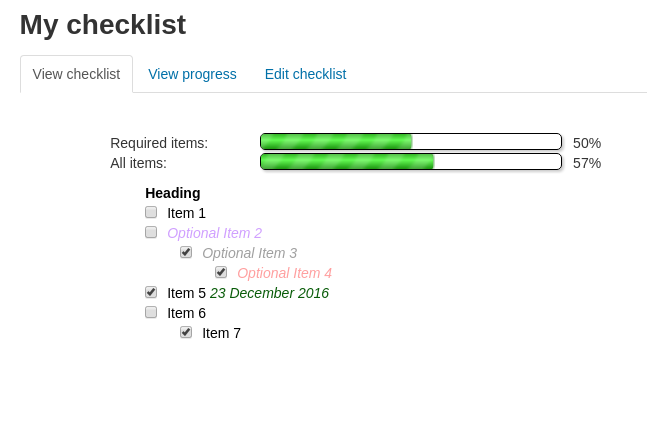
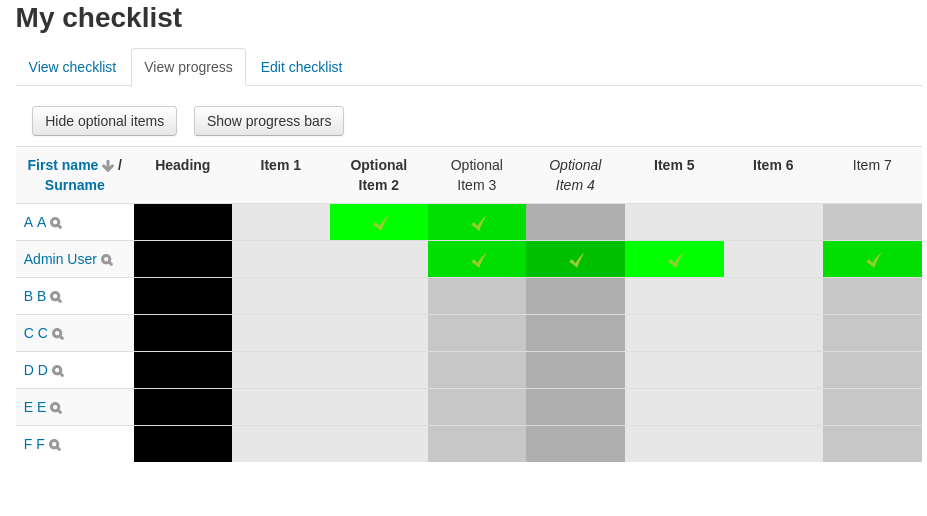
A checklist can be created by a teacher (or generated from the activities in a course) and then the students or teachers can check-off each item as they are completed.
Comments
Comments are no longer open for new posts. Existing comments remain available to read.
Maybe someday I could add something to the form to set the number of users per page, but I'm not going to promise to do so in the near future.
First up, Loving the plugin. I use it for my sports club to allow me (as a coach) to set up different skills (each one being a checklist) and I then go in and tick their checklist once I have seen them demonstrate the skill.
As there are about 50 girls to mark off, and i have used 3 seperate check list instances - one for each skill level, it would be great if I could display all of their names when I click the "edit checks". Is there a way I can extend the view to show more names.
Any other people using this in this way that could share ideas. Happy to write a breakdown of how I am using it, as it really does work well.
Thanks so much to one and all.
Darren
I would like to ask if check lists can be used collaboratively with students working on a group project? I would like the students to break down the project into tasks that they can all see on their shared checklist, agree on tasks and prioritise work. Is this possible?
There isn't a feature that allows you to include an activity, without a link. You could, however, just create a manual item in the list and use that instead of an activity (as that wouldn't have a link - although it also wouldn't automatically check-off when the activity is completed).
I'm afraid there is no existing setting to control the default view on the report page. If you really want progress bars to be the default, then look in checklist/locallib.php for function get_report_settings() and change $settings->showprogressbars = false to $settings->showprogressbars = true - but you'll need to make that change after any upgrades.
Alternatively, if you have a developer who can make a small patch to create a global setting for that option, then I'd be happy to integrate it into my code.
And THANKS... This plugin is excellent!
Any advice is appreciated!
(Sorry for double-posting - I also reported this in one of your recent forum threads: https://moodle.org/mod/forum/discuss.php?d=340444#p1427052)
I just now updated our Checklist module - from 2016052000 to 2017060500. Moodle 3.1.5+ (Build: 20170407)
With debugging on
Add a new Checklist
Save and return to course
The first visit to the new checklist - by me or a student account - gives the following:
Warning: mysqli::real_escape_string() expects parameter 1 to be string, array given in /usr/share/moodle/lib/dml/mysqli_native_moodle_database.php on line 1042
After reloading the page or leaving and returning, the warning is gone. Everything seems to be working correctly otherwise. I'm asking our server admin to role the site back to the snapshot taken just before the update.
I don't know that this warning is connected to the Checklist update or not. Any advice is appreciated.
Thanks for a great and well-used plugin!
David
If it is of any help, when the first student is loaded there is information regarding session key etc in the URL (ie: https://our domain/mod/checklist/report.php?id=43073&sesskey=aff1j4a9Ax&studentid=1647). When it moves onto the second student the URL is only https://our domain/mod/checklist/report.php
Can you help identify what is going on please? We are running the latest 3.2.3 version of Moodle and the latest plugin version. 2.7+ (Build: 2017051202)