
Checklist
Maintained by
Davo Smith
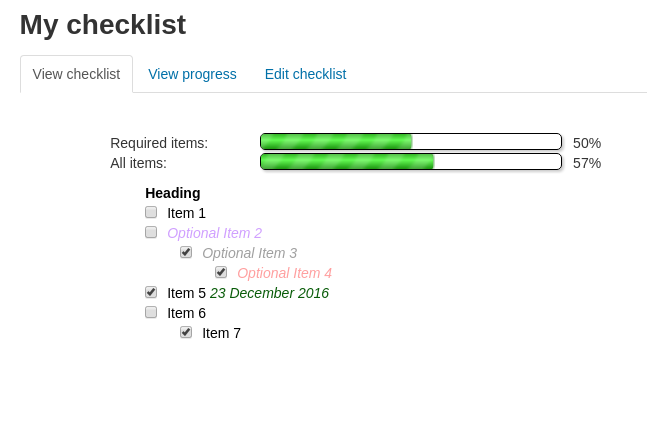
A checklist can be created by a teacher (or generated from the activities in a course) and then the students or teachers can check-off each item as they are completed.
Comments
Comments are no longer open for new posts. Existing comments remain available to read.
Let's say I have 5 activities added to checklist. If maximum grade is set at 100 points, does it mean that student gets 20 points for every completed activity?
Or maybe maximum grade should be equal to the sum of all the points possible to get in all activities from checklist? For example, for 5 mentioned activities the sum should be 2+2+2+5+10=21 points?
I am asking beacause I would like to set access to certificate based on checklist grade but I need to understand how the grade is beeing calculated.
It's a decision I took many years ago and I can see arguments that it could/should have been done differently.
If that isn't it, then I'm not really sure what to suggest - I've not come across any compatibility issues when testing the checklist with Moodle 3.11 (and there are a lot of different sites using this plugin, as well as a full set of automated tests, so I'd be surprised if there was a major compatibility issue that no one else had reported).
Moodle 3.11.2.
Plugin version 3.9.0.2 (2021063000)
I have create the checklist, all seems ok, the students mark their ticks and the plugin reports 0% no matter how many ticks they mark.
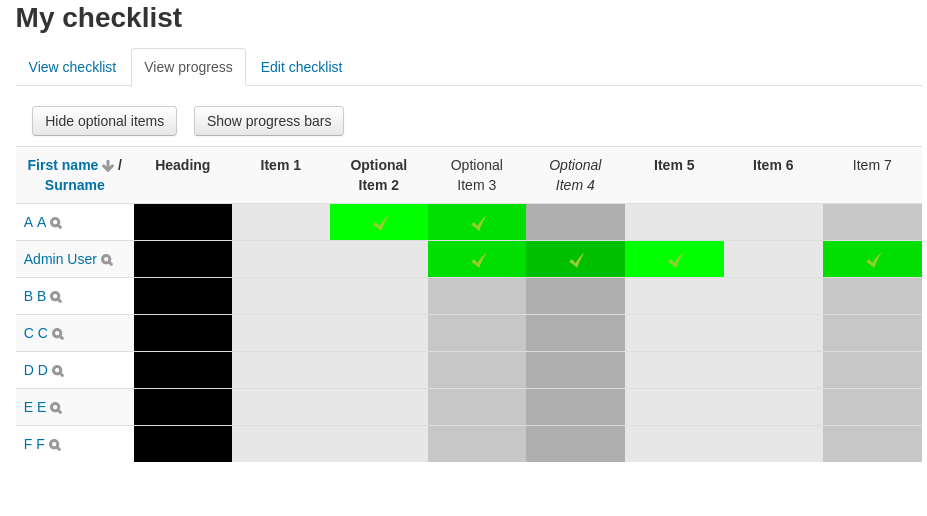
I go to the "View progress" tab and all ticks are unmarked for all users, but if I enter the profile of a user and go to "complete reports" and there I find the checklist report of the user, the ticks are there..... but greyed and the bar displays 0% even for a user with all the ticks of all activities marked.
I just thought about another example. Consider a quiz that might have essay questions that require manual grading by the instructor. The student completes the quiz and wants to check off that they have finished. So they go to Checklist and clicks a check (let's say it gets a BLUE check.) But this quiz is really not done because it still requires grading by the instructor. After the instructor grades the essay question, the system wants to provide a check. With only BLUE, the student doesn't know that this item is really complete. This is where the "check" might change to a BLACK, meaning that the student said they were done, and the system also thinks they are done.
Incidentally, right now, in Moodle3.11, this kind of situation exists in the Activity Completion Report. You will see me mention this on Tracker. The AC Report does use two different colors, BLUE and GREEN. (This issue was brought to attention by Leon's Moodle.org post.) I think BLUE means that the quiz still requires manual grading; GREEN means that grading has been completed.
Yep, this "Activity Completion" is getting a bit messy.
I hope that you understand what I have portrayed. At this point, I am still planning to continue my use of your Checklist plugins because I believe they do a better job at allowing my students to mark activities that they have completed manually.
* Checked by student (or not) - controlled by automatic completion rules as well, if checklist is configured that way - available for student / student + teacher checklists
* Teacher marks the item as yes / no / not marked (the default) - available for teacher / student + teacher checklists
There is nothing recorded about the reason why the checklist item was updated, there is absolutely no distinction in the code between an item that was checked-off automatically and one which was checked off by the student (indeed, I cannot figure out how an item could be checked off automatically and then be still available for a student to be able to manually check it off).
If you want to develop some new features for the checklist, then feel free to submit a well-written patch, with good automated test coverage (and making sure it isn't going to break the plugin for anyone who doesn't want the new features). I have no current plans to add new features in my spare time (over and above that which is needed for Moodle release compatibility).
Another question that I have for you is about the various ways an activity can be checked off. 1) By meeting the course completion events, 2) Manually, and 3) Both. From what I notice, your Checklist plugin supports 1, 2, and then also 3. Have you ever thought about using different color "checks" to designate how a checkbox is checked? For example, use Blue when a student checks off a task, Green for when the system checks off a task, and Black when both the student and the system has checked off a task? (Colors are just examples and I am not sure what is best.)
As an example, the student takes a quiz that contains an essay question. The student is "done" and checks the box, it turns Blue. After the instructor grades the essay question and a grade is provided, Checklist changes the color to Black. Of course, the presence of any check in the checkbox means that "the student is done."
As far as I am aware, Moodle stopped supporting linking activities to groups (or, more accurately "groupings") many years ago. Instead it supports arbitrarily-complex combinations of rules to hide activities under certain conditions. This is easy to manage for a single user (there are cached + efficient functions to cover that case), but impractical to handle across potentially thousands of users enrolled on a courses (e.g. when the checklist needs to update everyone simultaneously when a checklist's settings change, or when a new activity is detected or when the teacher is viewing a report of all student's progress).
I can think of no way to efficiently support Moodle's availability rules within the checklist, but if someone out there wants to submit a patch that demonstrably scales to courses with large numbers of enrolments, then I'm very happy to review it.
Yes, I've seen the complaints about the improvements to the display of activity completion within a course. I'm glad that the checklist is helpful to some people who happen to not like this new layout.
I have been experimenting with the way Checklist can auto-create its list, including adapting to hidden activities and hidden topics. I notice is that Checklist does not seem to honor "groups," meaning that if the activity is not available to a student who is not in a group and thereby not visible, the activity still shows in Checklist. Is this true, or is there something that I am missing?
Incidentally, maybe you saw my Tracker item, MDL-71856, and discussion posts about Moodle 3.11 removing checkboxes. I have used your Checklist plugin for many years, and if Moodle continues not to show checkboxes, your Checklist plugin becomes even more valuable. Of course, thanks.
Alternatively, it should be possible to extend the code to display checklist progress within the course, but I don't have any spare time to take this on in the evenings, so would need someone to pay for me to undertake this during my working day (or I'll accept a well-written patch, with behat test coverage, from another developer).
As for the icon, graphic design is not my strong point - I'm more than happy to accept an alternative icon from someone who can create something better.
i.e. At the moment, it seems that they can only see the progress bar by clicking once on the name of the checklist that appears on their course, then they will see the progress bar in the next view. It could be more motivating for them to see it at the top of the page as soon as they log in. (Related to this, the current icon could be slightly misleading, as it seems to indicate a state of progress but is in fact static.)
Thanks,
Julian
We use the checklist to assign one of three predefined tasks (A,B,C) after each lesson in our course. We have created an item for each lesson and we note A, B, C for each student in the comment section which works fine.
Currently, we are using a link to a page in which the tasks are described shortly. We would prefer the task descriptions to occur below each lesson as some students could get loose the overview. That’s why we have tried to add one item per task (A,B,C) as indented “headlines”. Now we have the following questions: Would it possible to have text that is not written in bold or is there any other possibility to add text that can be formatted in an item in the checklist? As we have three tasks the headlines would also occupy quite a lot of space in the progress of each student. Is there any work around for that?