
Checklist
Maintained by
Davo Smith
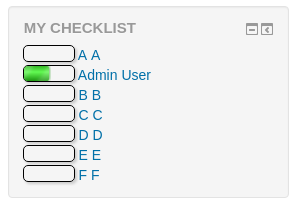
This is a block which works with the checklist module and displays progress bars for a single checklist.
Comments
Comments are no longer open for new posts. Existing comments remain available to read.
I used your checklist on numerous course without having any problem.
I am trying to use it now for a course with a cohort cync. used as a method of enrolment. The checklist does not display any student who has been enrolled via the cohort cync. I can get students to mark off their progress but the checklist has items that are supposed to be marked off by teachers to confirm their competency. Unfortunately students are not showing in the view progress tab.
Even when we removed cohort sync from the choices and enrolled students manually, I was unable to see any student in one site but on the other site I was able to get all students who have been enrolled manually.
Would this be a compatibility issue? any suggestion from your end?
* Started, but incomplete checklists (ordered from least complete, to most complete), then
* Unstarted checklists (0%), then
* Completed checklists (100%)
A maximum of 20 checklists are shown and the ordering of checklists that have the same completion % is undefined (for MySQL it is likely to be the order they were created, for other DB systems, it may not be).
As the overview works across multiple courses, there is no simple way to order the checklists with identical completion % in the same order that they would appear within a course.
Accueil / CFP Québec / Zone d'essais (CFPQ) / Checklists
Thank you
The checklist activity itself displays the activities it finds in the course in the same order that they are found in the course.
Thank you
Daniel
I've swapped the strings on github and it will be fixed next time I push a new version out to the plugins list here.
The capability label for adding the block to the My Home page -- block/checklist:myaddinstance -- is currently "Add new Checklist block"
The capability label for adding the block to a course page -- block/checklist:addinstance -- is currently "Add Checklist block to My Moodle page"
I think this should be the other way around.
Thanks for the plugin and block -- they're very nice. -- Brian
You may be able to do something with a CSS3 selector to override the styling of collapsing regions within an overview div with '_checklist' in the id.
Would not it be nice to celebrate the Moodle 3.0 release by adding some screenshot here?