
Custom Mailing
Versions
Current version
v1.5.1.1 (2025050901)
v1.5.1.1
Plugin type: Activities
Frankenstyle component name: mod_custommailing
Version build number: 2025050901
Version release name: v1.5.1.1
Maturity: Stable
Supported Moodle versions: 5.1
Repository URL (Git): https://github.com/cbluesprl/moodle-mod_custommailing
Repository branch:
Repository tag:
Issue/bug tracker URL: https://github.com/cbluesprl/moodle-mod_custommailing/issues
Custom mailing activity
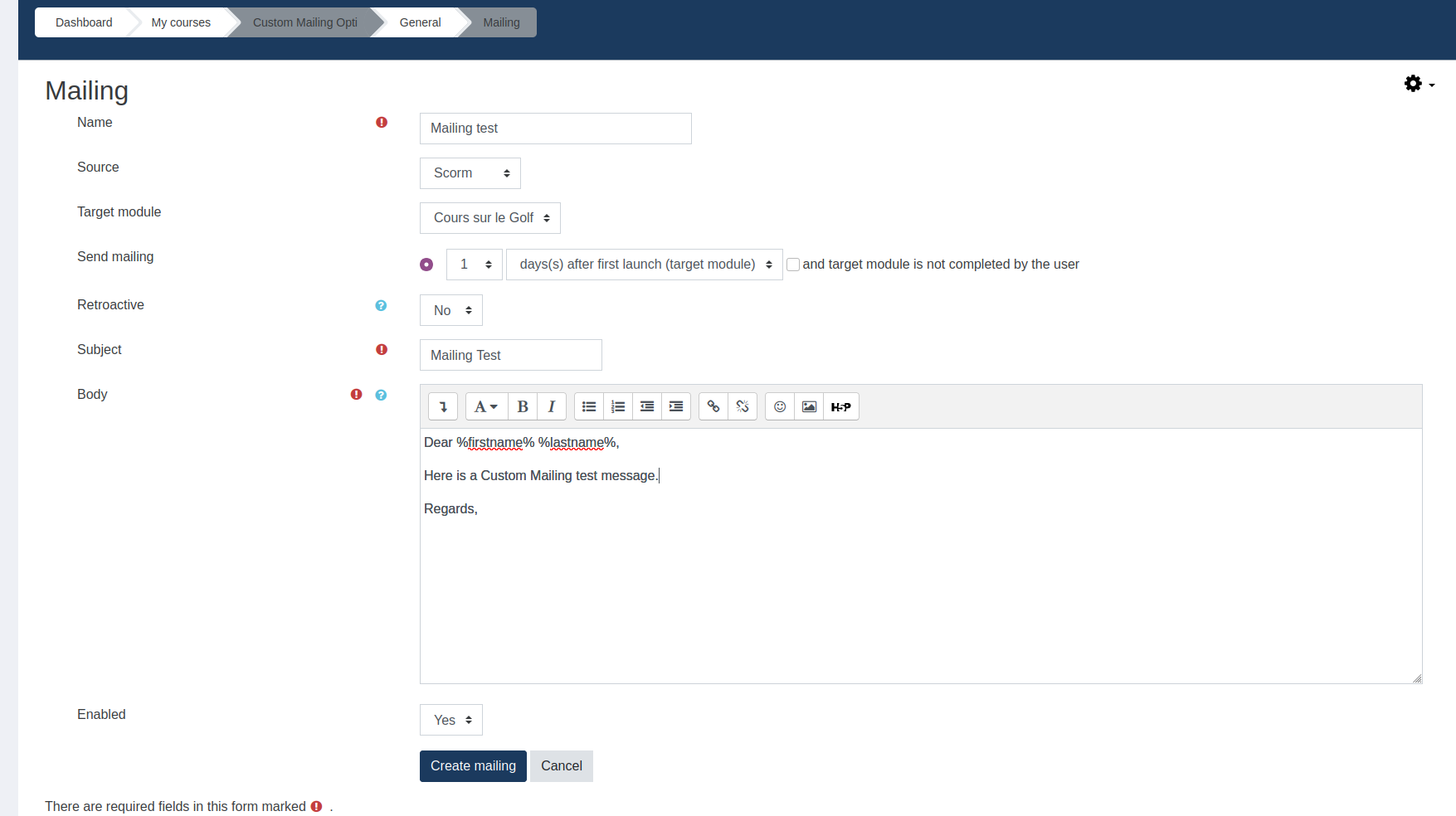
This activity allows custom mailing creation with following parameters :
Send an email to each user enrolled in the course :
at course enrol
x days(s) after first access of the course
x days(s) after last access of the course
x days(s) after first launch of a scorm (optional scorm completion status)
x days(s) after last launch of a scorm (optional scorm completion status)
to (a) specific group(s)
Retroactive mode available for each mailing
This plugin can also generate and send a PDF certificate linked to the mailing when conditions are met.
This feature requires Mod customcert plugin https://moodle.org/plugins/mod_customcert
You can create more than one mailing by activity but each user can only receive one email per mailing.
Diagram
Installation
There are two installation methods available.
Follow one of these, then log into your Moodle site as an administrator and visit the notifications page to complete the install.
Git
This requires Git being installed. If you do not have Git installed, please visit the Git website.
Once you have Git installed, simply visit your Moodle mod directory and clone the repository using the following command.
git clone https://github.com/cbluesprl/moodle-mod_custommailing.git public/mod/custommailing
Or add it with submodule command if you use submodules.
git submodule add https://github.com/cbluesprl/moodle-mod_custommailing.git public/mod/custommailing


### Download the zip


Visit the [Moodle plugins website](https://moodle.org/plugins/mod_custommailing "Moodle plugins website") and download the zip corresponding to the version of Moodle you are using. Extract the zip and place the 'custommailing' folder in the public/mod folder in your Moodle directory.


## License


Licensed under the [GNU GPL License](http://www.gnu.org/copyleft/gpl.html).


## Data Privacy


Despite the fact that the plugin can send emails, user email addresses are not stored by the plugin.

When a user is deleted by Moodle then user data in this plugin will be deleted.


## Test


* Log in as admin

* Create a course

* Enable course completion

* Add an activity of type 'scorm' with completion on 'Student must view this activity to complete it'

* Add an activity of type 'custommailing'

* Enrol 1 user with the teacher role to the course

* Enrol 2 users with the student role to the course

* In administration > Plugins > Activity Modules > Custom mailing : Enable debug mode (so you won't have to wait an hour)

* Log in as teacher

* In the Custommailing activity, create a mailing. Parameter it.

  * Send the mail 1 day after first launch

    * This will be displayed as 1 day but will in fact be 1 minute if the debug mode is activated for the plugin (see previous steps)

  * and target module is not completed by the user (yes)

* Log in as first student and complete the scorm

* Wait 1 minute

* Launch the cron task manually (\mod_custommailing\task\cron_task)

* Check the table mdl_custommailing_logs : only the second student has been targeted

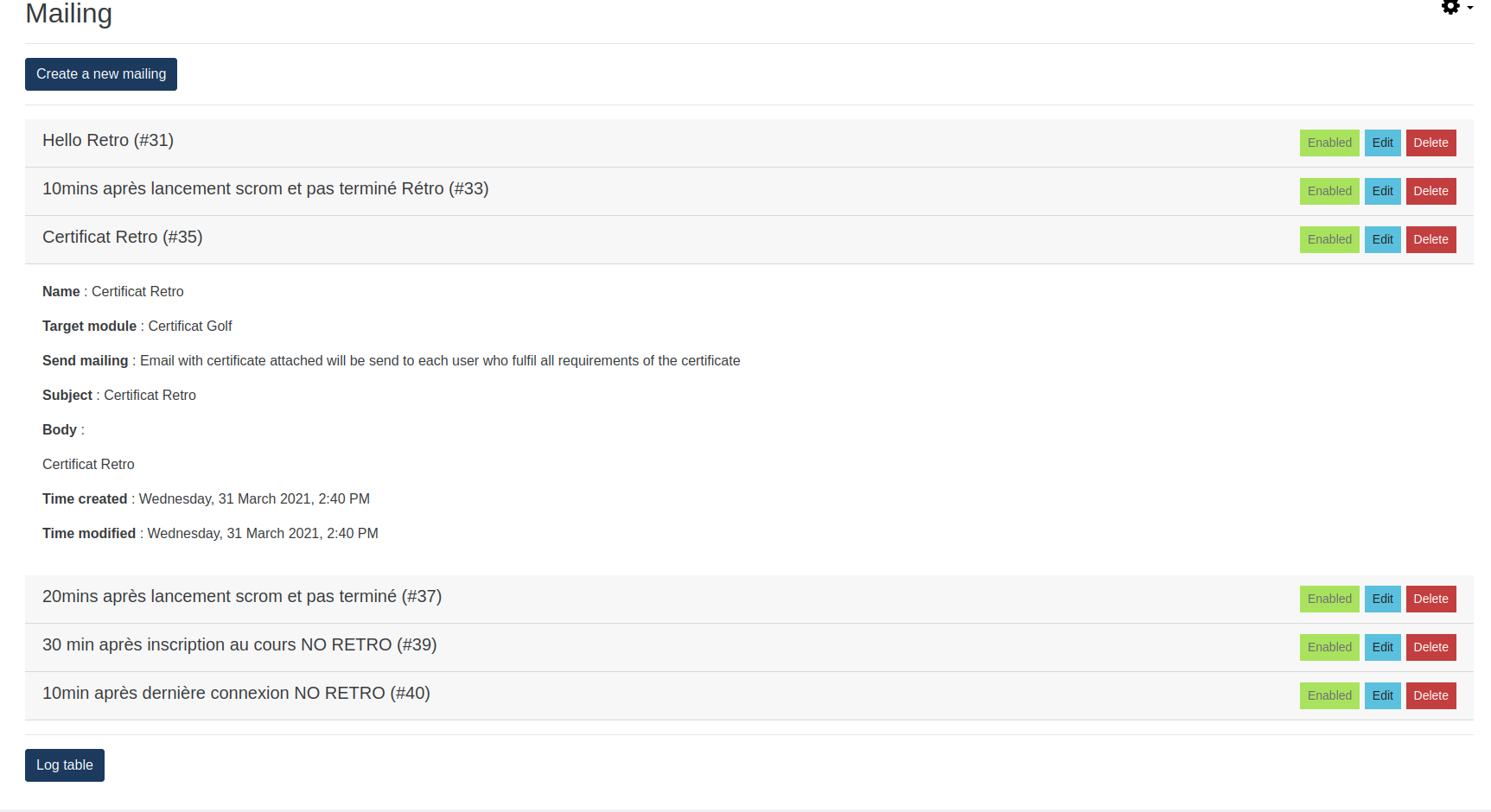
* Check disabling a mailing in interface by consulting the custommailing activity as teacher or admin

* Check deletion a mailing in interface by consulting the custommailing activity as teacher or admin
v1.5.0 (2025050900)
v1.5.0
Plugin type: Activities
Frankenstyle component name: mod_custommailing
Version build number: 2025050900
Version release name: v1.5.0
Maturity: Stable
Supported Moodle versions: 5.0
Repository URL (Git): https://github.com/cbluesprl/moodle-mod_custommailing
Repository branch:
Repository tag:
Issue/bug tracker URL: https://github.com/cbluesprl/moodle-mod_custommailing/issues
Custom mailing activity
This activity allows custom mailing creation with following parameters :
Send an email to each user enrolled in the course :
at course enrol
x days(s) after first access of the course
x days(s) after last access of the course
x days(s) after first launch of a scorm (optional scorm completion status)
x days(s) after last launch of a scorm (optional scorm completion status)
to (a) specific group(s)
Retroactive mode available for each mailing
This plugin can also generate and send a PDF certificate linked to the mailing when conditions are met.
This feature requires Mod customcert plugin https://moodle.org/plugins/mod_customcert
You can create more than one mailing by activity but each user can only receive one email per mailing.
Diagram
Installation
There are two installation methods available.
Follow one of these, then log into your Moodle site as an administrator and visit the notifications page to complete the install.
Git
This requires Git being installed. If you do not have Git installed, please visit the Git website.
Once you have Git installed, simply visit your Moodle mod directory and clone the repository using the following command.
git clone https://github.com/cbluesprl/moodle-mod_custommailing.git custommailing
Or add it with submodule command if you use submodules.
git submodule add https://github.com/cbluesprl/moodle-mod_custommailing.git mod/custommailing
Download the zip
Visit the Moodle plugins website and download the zip corresponding to the version of Moodle you are using. Extract the zip and place the 'custommailing' folder in the mod folder in your Moodle directory.
License
Licensed under the GNU GPL License.
Data Privacy
Despite the fact that the plugin can send emails, user email addresses are not stored by the plugin.
When a user is deleted by Moodle then user data in this plugin will be deleted.
Test
- Log in as admin
- Create a course
- Enable course completion
- Add an activity of type 'scorm' with completion on 'Student must view this activity to complete it'
- Add an activity of type 'custommailing'
- Enrol 1 user with the teacher role to the course
- Enrol 2 users with the student role to the course
- In administration > Plugins > Activity Modules > Custom mailing : Enable debug mode (so you won't have to wait an hour)
- Log in as teacher
- In the Custommailing activity, create a mailing. Parameter it.
- Send the mail 1 day after first launch
- This will be displayed as 1 day but will in fact be 1 minute if the debug mode is activated for the plugin (see previous steps)
- and target module is not completed by the user (yes)
- Send the mail 1 day after first launch
- Log in as first student and complete the scorm
- Wait 1 minute
- Launch the cron task manually (\mod_custommailing\task\cron_task)
- Check the table mdl_custommailing_logs : only the second student has been targeted
- Check disabling a mailing in interface by consulting the custommailing activity as teacher or admin
- Check deletion a mailing in interface by consulting the custommailing activity as teacher or admin
v1.4.5.1 (2024110601)
v1.4.5.1
Plugin type: Activities
Frankenstyle component name: mod_custommailing
Version build number: 2024110601
Version release name: v1.4.5.1
Maturity: Stable
Supported Moodle versions: 4.5
Repository URL (Git): https://github.com/cbluesprl/moodle-mod_custommailing
Repository branch:
Repository tag:
Issue/bug tracker URL: https://github.com/cbluesprl/moodle-mod_custommailing/issues
Custom mailing activity
This activity allows custom mailing creation with following parameters :
Send an email to each user enrolled in the course :
at course enrol
x days(s) after first access of the course
x days(s) after last access of the course
x days(s) after first launch of a scorm (optional scorm completion status)
x days(s) after last launch of a scorm (optional scorm completion status)
to (a) specific group(s)
Retroactive mode available for each mailing
This plugin can also generate and send a PDF certificate linked to the mailing when conditions are met.
This feature requires Mod customcert plugin https://moodle.org/plugins/mod_customcert
You can create more than one mailing by activity but each user can only receive one email per mailing.
Diagram
Installation
There are two installation methods available.
Follow one of these, then log into your Moodle site as an administrator and visit the notifications page to complete the install.
Git
This requires Git being installed. If you do not have Git installed, please visit the Git website.
Once you have Git installed, simply visit your Moodle mod directory and clone the repository using the following command.
git clone https://github.com/cbluesprl/moodle-mod_custommailing.git custommailing
Or add it with submodule command if you use submodules.
git submodule add https://github.com/cbluesprl/moodle-mod_custommailing.git mod/custommailing
Download the zip
Visit the Moodle plugins website and download the zip corresponding to the version of Moodle you are using. Extract the zip and place the 'custommailing' folder in the mod folder in your Moodle directory.
License
Licensed under the GNU GPL License.
Data Privacy
Despite the fact that the plugin can send emails, user email addresses are not stored by the plugin.
When a user is deleted by Moodle then user data in this plugin will be deleted.
Test
- Log in as admin
- Create a course
- Enable course completion
- Add an activity of type 'scorm' with completion on 'Student must view this activity to complete it'
- Add an activity of type 'custommailing'
- Enrol 1 user with the teacher role to the course
- Enrol 2 users with the student role to the course
- In administration > Plugins > Activity Modules > Custom mailing : Enable debug mode (so you won't have to wait an hour)
- Log in as teacher
- In the Custommailing activity, create a mailing. Parameter it.
- Send the mail 1 day after first launch
- This will be displayed as 1 day but will in fact be 1 minute if the debug mode is activated for the plugin (see previous steps)
- and target module is not completed by the user (yes)
- Send the mail 1 day after first launch
- Log in as first student and complete the scorm
- Wait 1 minute
- Launch the cron task manually (\mod_custommailing\task\cron_task)
- Check the table mdl_custommailing_logs : only the second student has been targeted
- Check disabling a mailing in interface by consulting the custommailing activity as teacher or admin
- Check deletion a mailing in interface by consulting the custommailing activity as teacher or admin
v1.3.0 (2024070500)
v1.3.0
Plugin type: Activities
Frankenstyle component name: mod_custommailing
Version build number: 2024070500
Version release name: v1.3.0
Maturity: Stable
Supported Moodle versions: 3.10, 3.11, 3.9, 4.0, 4.1, 4.2, 4.3, 4.4
Repository URL (Git): https://github.com/cbluesprl/moodle-mod_custommailing
Repository branch:
Repository tag: v1.3.0
Issue/bug tracker URL: https://github.com/cbluesprl/moodle-mod_custommailing/issues
Custom mailing activity
This activity allows custom mailing creation with following parameters :
Send an email to each user enrolled in the course :
- at course enrol
- x days(s) after first access of the course
- x days(s) after last access of the course
- x days(s) after first launch of a scorm (optional scorm completion status)
- x days(s) after last launch of a scorm (optional scorm completion status)
- to (a) specific group(s)
- to (a) specific cohorts(s)
- respect activity restrictions
- Retroactive mode available for each mailing
This plugin can also generate and send a PDF certificate linked to the mailing when conditions are met.
This feature requires Mod customcert plugin https://moodle.org/plugins/mod_customcert
You can create more than one mailing by activity but each user can only receive one email per mailing.
Diagram
Installation
There are two installation methods available.
Follow one of these, then log into your Moodle site as an administrator and visit the notifications page to complete the install.
Git
This requires Git being installed. If you do not have Git installed, please visit the Git website.
Once you have Git installed, simply visit your Moodle mod directory and clone the repository using the following command.
git clone https://github.com/cbluesprl/moodle-mod_custommailing.git custommailing
Or add it with submodule command if you use submodules.
git submodule add https://github.com/cbluesprl/moodle-mod_custommailing.git mod/custommailing
Download the zip
Visit the Moodle plugins website and download the zip corresponding to the version of Moodle you are using. Extract the zip and place the 'custommailing' folder in the mod folder in your Moodle directory.
License
Licensed under the GNU GPL License.
Data Privacy
Despite the fact that the plugin can send emails, user email addresses are not stored by the plugin.
When a user is deleted by Moodle then user data in this plugin will be deleted.
Test
- Log in as admin
- Create a course
- Enable course completion
- Add an activity of type 'scorm' with completion on 'Student must view this activity to complete it'
- Add an activity of type 'custommailing'
- Enrol 1 user with the teacher role to the course
- Enrol 2 users with the student role to the course
- In administration > Plugins > Activity Modules > Custom mailing : Enable debug mode (so you won't have to wait an hour)
- Log in as teacher
- In the Custommailing activity, create a mailing. Parameter it.
- Send the mail 1 day after first launch
- This will be displayed as 1 day but will in fact be 1 minute if the debug mode is activated for the plugin (see previous steps)
- and target module is not completed by the user (yes)
- Send the mail 1 day after first launch
- Log in as first student and complete the scorm
- Wait 1 minute
- Launch the cron task manually (\mod_custommailing\task\cron_task)
- Check the table mdl_custommailing_logs : only the second student has been targeted
- Check disabling a mailing in interface by consulting the custommailing activity as teacher or admin
- Check deletion a mailing in interface by consulting the custommailing activity as teacher or admin
v1.1.3 (2023082101)
v1.1.3
Plugin type: Activities
Frankenstyle component name: mod_custommailing
Version build number: 2023082101
Version release name: v1.1.3
Maturity: Stable
Supported Moodle versions: 3.10, 3.11, 3.9, 4.0, 4.1, 4.2, 4.3
Repository URL (Git): https://github.com/cbluesprl/moodle-mod_custommailing
Repository branch:
Repository tag:
Issue/bug tracker URL: https://github.com/cbluesprl/moodle-mod_custommailing/issues
Custom mailing activity
This activity allows custom mailing creation with following parameters :
Send an email to each user enrolled in the course :
at course enrol
x days(s) after first access of the course
x days(s) after last access of the course
x days(s) after first launch of a scorm (optional scorm completion status)
x days(s) after last launch of a scorm (optional scorm completion status)
Retroactive mode available for each mailing
This plugin can also generate and send a PDF certificate linked to the mailing when conditions are met.
This feature requires Mod customcert plugin https://moodle.org/plugins/mod_customcert
You can create more than one mailing by activity but each user can only receive one email per mailing.
Diagram
Installation
There are two installation methods available.
Follow one of these, then log into your Moodle site as an administrator and visit the notifications page to complete the install.
Git
This requires Git being installed. If you do not have Git installed, please visit the Git website.
Once you have Git installed, simply visit your Moodle mod directory and clone the repository using the following command.
git clone https://github.com/cbluesprl/moodle-mod_custommailing.git custommailing
Or add it with submodule command if you use submodules.
git submodule add https://github.com/cbluesprl/moodle-mod_custommailing.git mod/custommailing
Download the zip
Visit the Moodle plugins website and download the zip corresponding to the version of Moodle you are using. Extract the zip and place the 'custommailing' folder in the mod folder in your Moodle directory.
License
Licensed under the GNU GPL License.
Data Privacy
Despite the fact that the plugin can send emails, user email addresses are not stored by the plugin.
When a user is deleted by Moodle then user data in this plugin will be deleted.
Test
- Log in as admin
- Create a course
- Enable course completion
- Add an activity of type 'scorm' with completion on 'Student must view this activity to complete it'
- Add an activity of type 'custommailing'
- Enrol 1 user with the teacher role to the course
- Enrol 2 users with the student role to the course
- In administration > Plugins > Activity Modules > Custom mailing : Enable debug mode (so you won't have to wait an hour)
- Log in as teacher
- In the Custommailing activity, create a mailing. Parameter it.
- Send the mail 1 day after first launch
- This will be displayed as 1 day but will in fact be 1 minute if the debug mode is activated for the plugin (see previous steps)
- and target module is not completed by the user (yes)
- Send the mail 1 day after first launch
- Log in as first student and complete the scorm
- Wait 1 minute
- Launch the cron task manually (\mod_custommailing\task\cron_task)
- Check the table mdl_custommailing_logs : only the second student has been targeted
- Check disabling a mailing in interface by consulting the custommailing activity as teacher or admin
- Check deletion a mailing in interface by consulting the custommailing activity as teacher or admin
v1.1.2 (2023082100)
v1.1.2
Plugin type: Activities
Frankenstyle component name: mod_custommailing
Version build number: 2023082100
Version release name: v1.1.2
Maturity: Stable
Supported Moodle versions: 3.10, 3.11, 3.9, 4.0, 4.1, 4.2
Repository URL (Git): https://github.com/cbluesprl/moodle-mod_custommailing
Repository branch:
Repository tag:
Issue/bug tracker URL: https://github.com/cbluesprl/moodle-mod_custommailing/issues
Custom mailing activity
This activity allows custom mailing creation with following parameters :
Send an email to each user enrolled in the course :
at course enrol
x days(s) after first access of the course
x days(s) after last access of the course
x days(s) after first launch of a scorm (optional scorm completion status)
x days(s) after last launch of a scorm (optional scorm completion status)
Retroactive mode available for each mailing
This plugin can also generate and send a PDF certificate linked to the mailing when conditions are met.
This feature requires Mod customcert plugin https://moodle.org/plugins/mod_customcert
You can create more than one mailing by activity but each user can only receive one email per mailing.
Diagram
Installation
There are two installation methods available.
Follow one of these, then log into your Moodle site as an administrator and visit the notifications page to complete the install.
Git
This requires Git being installed. If you do not have Git installed, please visit the Git website.
Once you have Git installed, simply visit your Moodle mod directory and clone the repository using the following command.
git clone https://github.com/cbluesprl/moodle-mod_custommailing.git custommailing
Or add it with submodule command if you use submodules.
git submodule add https://github.com/cbluesprl/moodle-mod_custommailing.git mod/custommailing
Download the zip
Visit the Moodle plugins website and download the zip corresponding to the version of Moodle you are using. Extract the zip and place the 'custommailing' folder in the mod folder in your Moodle directory.
License
Licensed under the GNU GPL License.
Data Privacy
Despite the fact that the plugin can send emails, user email addresses are not stored by the plugin.
When a user is deleted by Moodle then user data in this plugin will be deleted.
Test
- Log in as admin
- Create a course
- Enable course completion
- Add an activity of type 'scorm' with completion on 'Student must view this activity to complete it'
- Add an activity of type 'custommailing'
- Enrol 1 user with the teacher role to the course
- Enrol 2 users with the student role to the course
- In administration > Plugins > Activity Modules > Custom mailing : Enable debug mode (so you won't have to wait an hour)
- Log in as teacher
- In the Custommailing activity, create a mailing. Parameter it.
- Send the mail 1 day after first launch
- This will be displayed as 1 day but will in fact be 1 minute if the debug mode is activated for the plugin (see previous steps)
- and target module is not completed by the user (yes)
- Send the mail 1 day after first launch
- Log in as first student and complete the scorm
- Wait 1 minute
- Launch the cron task manually (\mod_custommailing\task\cron_task)
- Check the table mdl_custommailing_logs : only the second student has been targeted
- Check disabling a mailing in interface by consulting the custommailing activity as teacher or admin
- Check deletion a mailing in interface by consulting the custommailing activity as teacher or admin
v1.1.0 (2023062700)
v1.1.0
Plugin type: Activities
Frankenstyle component name: mod_custommailing
Version build number: 2023062700
Version release name: v1.1.0
Maturity: Stable
Supported Moodle versions: 3.10, 3.11, 3.9, 4.0, 4.1, 4.2
Repository URL (Git): https://github.com/cbluesprl/moodle-mod_custommailing
Repository branch: MOODLE_39_STABLE
Repository tag:
Issue/bug tracker URL: https://github.com/cbluesprl/moodle-mod_custommailing/issues
Custom mailing activity
This activity allows custom mailing creation with following parameters :
Send an email to each user enrolled in the course :
at course enrol
x days(s) after first access of the course
x days(s) after last access of the course
x days(s) after first launch of a scorm (optional scorm completion status)
x days(s) after last launch of a scorm (optional scorm completion status)
Retroactive mode available for each mailing
This plugin can also generate and send a PDF certificate linked to the mailing when conditions are met.
This feature requires Mod customcert plugin https://moodle.org/plugins/mod_customcert
You can create more than one mailing by activity but each user can only receive one email per mailing.
Diagram
Installation
There are two installation methods available.
Follow one of these, then log into your Moodle site as an administrator and visit the notifications page to complete the install.
Git
This requires Git being installed. If you do not have Git installed, please visit the Git website.
Once you have Git installed, simply visit your Moodle mod directory and clone the repository using the following command.
git clone https://github.com/cbluesprl/moodle-mod_custommailing.git custommailing
Or add it with submodule command if you use submodules.
git submodule add https://github.com/cbluesprl/moodle-mod_custommailing.git mod/custommailing
Download the zip
Visit the Moodle plugins website and download the zip corresponding to the version of Moodle you are using. Extract the zip and place the 'custommailing' folder in the mod folder in your Moodle directory.
License
Licensed under the GNU GPL License.
Data Privacy
Despite the fact that the plugin can send emails, user email addresses are not stored by the plugin.
When a user is deleted by Moodle then user data in this plugin will be deleted.
Test
- Log in as admin
- Create a course
- Enable course completion
- Add an activity of type 'scorm' with completion on 'Student must view this activity to complete it'
- Add an activity of type 'custommailing'
- Enrol 1 user with the teacher role to the course
- Enrol 2 users with the student role to the course
- In administration > Plugins > Activity Modules > Custom mailing : Enable debug mode (so you won't have to wait an hour)
- Log in as teacher
- In the Custommailing activity, create a mailing. Parameter it.
- Send the mail 1 day after first launch
- This will be displayed as 1 day but will in fact be 1 minute if the debug mode is activated for the plugin (see previous steps)
- and target module is not completed by the user (yes)
- Send the mail 1 day after first launch
- Log in as first student and complete the scorm
- Launch the cron task manually (\mod_custommailing\task\cron_task)
- Check the table mal_custommailing_logs : only the second student has been targeted
- Check disabling a mailing in interface by consulting the custommailing activity as teacher or admin
- Check deletion a mailing in interface by consulting the custommailing activity as teacher or admin
v1.1.2 (2023030700)
v1.1.2
Plugin type: Activities
Frankenstyle component name: mod_custommailing
Version build number: 2023030700
Version release name: v1.1.2
Maturity: Stable
Supported Moodle versions: 3.10, 3.11, 3.9, 4.0, 4.1
Repository URL (Git): https://github.com/cbluesprl/moodle-mod_custommailing
Repository branch:
Repository tag:
Issue/bug tracker URL: https://github.com/cbluesprl/moodle-mod_custommailing/issues
Custom mailing activity
This activity allows custom mailing creation with following parameters :
Send an email to each user enrolled in the course :
at course enrol
x days(s) after first access of the course
x days(s) after last access of the course
x days(s) after first launch of a scorm (optional scorm completion status)
x days(s) after last launch of a scorm (optional scorm completion status)
Retroactive mode available for each mailing
This plugin can also generate and send a PDF certificate linked to the mailing when conditions are met.
This feature requires Mod customcert plugin https://moodle.org/plugins/mod_customcert
You can create more than one mailing by activity but each user can only receive one email per mailing.
Diagram
Installation
There are two installation methods available.
Follow one of these, then log into your Moodle site as an administrator and visit the notifications page to complete the install.
Git
This requires Git being installed. If you do not have Git installed, please visit the Git website.
Once you have Git installed, simply visit your Moodle mod directory and clone the repository using the following command.
git clone https://github.com/cbluesprl/moodle-mod_custommailing.git custommailing
Or add it with submodule command if you use submodules.
git submodule add https://github.com/cbluesprl/moodle-mod_custommailing.git mod/custommailing
Download the zip
Visit the Moodle plugins website and download the zip corresponding to the version of Moodle you are using. Extract the zip and place the 'custommailing' folder in the mod folder in your Moodle directory.
License
Licensed under the GNU GPL License.
Data Privacy
Despite the fact that the plugin can send emails, user email addresses are not stored by the plugin.
When a user is deleted by Moodle then user data in this plugin will be deleted.
Test
- Log in as admin
- Create a course
- Enable course completion
- Add an activity of type 'scorm' with completion on 'Student must view this activity to complete it'
- Add an activity of type 'custommailing'
- Enrol 1 user with the teacher role to the course
- Enrol 2 users with the student role to the course
- In administration > Plugins > Activity Modules > Custom mailing : Enable debug mode (so you won't have to wait an hour)
- Log in as teacher
- In the Custommailing activity, create a mailing. Parameter it.
- Send the mail 1 day after first launch
- This will be displayed as 1 day but will in fact be 1 minute if the debug mode is activated for the plugin (see previous steps)
- and target module is not completed by the user (yes)
- Send the mail 1 day after first launch
- Log in as first student and complete the scorm
- Wait 1 minute
- Launch the cron task manually (\mod_custommailing\task\cron_task)
- Check the table mdl_custommailing_logs : only the second student has been targeted
- Check disabling a mailing in interface by consulting the custommailing activity as teacher or admin
- Check deletion a mailing in interface by consulting the custommailing activity as teacher or admin
v1.1.1 (2022051600)
v1.1.1
Plugin type: Activities
Frankenstyle component name: mod_custommailing
Version build number: 2022051600
Version release name: v1.1.1
Maturity: Stable
Supported Moodle versions: 3.10, 3.11, 3.9, 4.0
Repository URL (Git): https://github.com/cbluesprl/moodle-mod_custommailing
Repository branch:
Repository tag: v1.1.1
Issue/bug tracker URL: https://github.com/cbluesprl/moodle-mod_custommailing/issues
Custom mailing activity
This activity allows custom mailing creation with following parameters :
Send an email to each user enrolled in the course :
at course enrol
x days(s) after first access of the course
x days(s) after last access of the course
x days(s) after first launch of a scorm (optional scorm completion status)
x days(s) after last launch of a scorm (optional scorm completion status)
Retroactive mode available for each mailing
This plugin can also generate and send a PDF certificate linked to the mailing when conditions are met.
This feature requires Mod customcert plugin https://moodle.org/plugins/mod_customcert
You can create more than one mailing by activity but each user can only receive one email per mailing.
Diagram
Installation
There are two installation methods available.
Follow one of these, then log into your Moodle site as an administrator and visit the notifications page to complete the install.
Git
This requires Git being installed. If you do not have Git installed, please visit the Git website.
Once you have Git installed, simply visit your Moodle mod directory and clone the repository using the following command.
git clone https://github.com/cbluesprl/moodle-mod_custommailing.git custommailing
Or add it with submodule command if you use submodules.
git submodule add https://github.com/cbluesprl/moodle-mod_custommailing.git mod/custommailing
Download the zip
Visit the Moodle plugins website and download the zip corresponding to the version of Moodle you are using. Extract the zip and place the 'custommailing' folder in the mod folder in your Moodle directory.
License
Licensed under the GNU GPL License.
Data Privacy
Despite the fact that the plugin can send emails, user email addresses are not stored by the plugin.
When a user is deleted by Moodle then user data in this plugin will be deleted.
Test
- Log in as admin
- Create a course
- Enable course completion
- Add an activity of type 'scorm' with completion on 'Student must view this activity to complete it'
- Add an activity of type 'custommailing'
- Enrol 1 user with the teacher role to the course
- Enrol 2 users with the student role to the course
- In administration > Plugins > Activity Modules > Custom mailing : Enable debug mode (so you won't have to wait an hour)
- Log in as teacher
- In the Custommailing activity, create a mailing. Parameter it.
- Send the mail 1 day after first launch
- This will be displayed as 1 day but will in fact be 1 minute if the debug mode is activated for the plugin (see previous steps)
- and target module is not completed by the user (yes)
- Send the mail 1 day after first launch
- Log in as first student and complete the scorm
- Wait 1 minute
- Launch the cron task manually (\mod_custommailing\task\cron_task)
- Check the table mdl_custommailing_logs : only the second student has been targeted
- Check disabling a mailing in interface by consulting the custommailing activity as teacher or admin
- Check deletion a mailing in interface by consulting the custommailing activity as teacher or admin
v1.1.0 (2022040800)
v1.1.0
Plugin type: Activities
Frankenstyle component name: mod_custommailing
Version build number: 2022040800
Version release name: v1.1.0
Maturity: Release Candidate
Supported Moodle versions: 3.10, 3.11, 3.9
Repository URL (Git): https://github.com/cbluesprl/moodle-mod_custommailing
Repository branch:
Repository tag:
Issue/bug tracker URL: https://github.com/cbluesprl/moodle-mod_custommailing/issues
Custom mailing activity
This activity allows custom mailing creation with following parameters :
Send an email to each user enrolled in the course :
at course enrol
x days(s) after first access of the course
x days(s) after last access of the course
x days(s) after first launch of a scorm (optional scorm completion status)
x days(s) after last launch of a scorm (optional scorm completion status)
Retroactive mode available for each mailing
This plugin can also generate and send a PDF certificate linked to the mailing when conditions are met.
This feature requires Mod customcert plugin https://moodle.org/plugins/mod_customcert
You can create more than one mailing by activity but each user can only receive one email per mailing.
Diagram
Installation
There are two installation methods available.
Follow one of these, then log into your Moodle site as an administrator and visit the notifications page to complete the install.
Git
This requires Git being installed. If you do not have Git installed, please visit the Git website.
Once you have Git installed, simply visit your Moodle mod directory and clone the repository using the following command.
git clone https://github.com/cbluesprl/moodle-mod_custommailing.git custommailing
Or add it with submodule command if you use submodules.
git submodule add https://github.com/cbluesprl/moodle-mod_custommailing.git mod/custommailing
Download the zip
Visit the Moodle plugins website and download the zip corresponding to the version of Moodle you are using. Extract the zip and place the 'custommailing' folder in the mod folder in your Moodle directory.
License
Licensed under the GNU GPL License.
Data Privacy
Despite the fact that the plugin can send emails, user email addresses are not stored by the plugin.
When a user is deleted by Moodle then user data in this plugin will be deleted.
Test
- Log in as admin
- Create a course
- Enable course completion
- Add an activity of type 'scorm' with completion on 'Student must view this activity to complete it'
- Add an activity of type 'custommailing'
- Enrol 1 user with the teacher role to the course
- Enrol 2 users with the student role to the course
- In administration > Plugins > Activity Modules > Custom mailing : Enable debug mode (so you won't have to wait an hour)
- Log in as teacher
- In the Custommailing activity, create a mailing. Parameter it.
- Send the mail 1 day after first launch
- This will be displayed as 1 day but will in fact be 1 minute if the debug mode is activated for the plugin (see previous steps)
- and target module is not completed by the user (yes)
- Send the mail 1 day after first launch
- Log in as first student and complete the scorm
- Wait 1 minute
- Launch the cron task manually (\mod_custommailing\task\cron_task)
- Check the table mdl_custommailing_logs : only the second student has been targeted
- Check disabling a mailing in interface by consulting the custommailing activity as teacher or admin
- Check deletion a mailing in interface by consulting the custommailing activity as teacher or admin
v1.1.0 (2022033100)
v1.1.0
Plugin type: Activities
Frankenstyle component name: mod_custommailing
Version build number: 2022033100
Version release name: v1.1.0
Maturity: Stable
Supported Moodle versions: 3.10, 3.11, 3.9
Repository URL (Git): https://github.com/cbluesprl/moodle-mod_custommailing
Repository branch:
Repository tag:
Issue/bug tracker URL: https://github.com/cbluesprl/moodle-mod_custommailing/issues
Custom mailing activity
This activity allows custom mailing creation with following parameters :
Send an email to each user enrolled in the course :
at course enrol
x days(s) after first access of the course
x days(s) after last access of the course
x days(s) after first launch of a scorm (optional scorm completion status)
x days(s) after last launch of a scorm (optional scorm completion status)
Retroactive mode available for each mailing
This plugin can also generate and send a PDF certificate linked to the mailing when conditions are met.
This feature requires Mod customcert plugin https://moodle.org/plugins/mod_customcert
You can create more than one mailing by activity but each user can only receive one email per mailing.
Diagram
Installation
There are two installation methods available.
Follow one of these, then log into your Moodle site as an administrator and visit the notifications page to complete the install.
Git
This requires Git being installed. If you do not have Git installed, please visit the Git website.
Once you have Git installed, simply visit your Moodle mod directory and clone the repository using the following command.
git clone https://github.com/cbluesprl/moodle-mod_custommailing.git custommailing
Or add it with submodule command if you use submodules.
git submodule add https://github.com/cbluesprl/moodle-mod_custommailing.git mod/custommailing
Download the zip
Visit the Moodle plugins website and download the zip corresponding to the version of Moodle you are using. Extract the zip and place the 'custommailing' folder in the mod folder in your Moodle directory.
License
Licensed under the GNU GPL License.
Data Privacy
Despite the fact that the plugin can send emails, user email addresses are not stored by the plugin.
When a user is deleted by Moodle then user data in this plugin will be deleted.
Test
- Log in as admin
- Create a course
- Enable course completion
- Add an activity of type 'scorm' with completion on 'Student must view this activity to complete it'
- Add an activity of type 'custommailing'
- Enrol 1 user with the teacher role to the course
- Enrol 2 users with the student role to the course
- In administration > Plugins > Activity Modules > Custom mailing : Enable debug mode (so you won't have to wait an hour)
- Log in as teacher
- In the Custommailing activity, create a mailing. Parameter it.
- Send the mail 1 day after first launch
- This will be displayed as 1 day but will in fact be 1 minute if the debug mode is activated for the plugin (see previous steps)
- and target module is not completed by the user (yes)
- Send the mail 1 day after first launch
- Log in as first student and complete the scorm
- Wait 1 minute
- Launch the cron task manually (\mod_custommailing\task\cron_task)
- Check the table mdl_custommailing_logs : only the second student has been targeted
- Check disabling a mailing in interface by consulting the custommailing activity as teacher or admin
- Check deletion a mailing in interface by consulting the custommailing activity as teacher or admin
v1.1.0 (2022032300)
v1.1.0
Plugin type: Activities
Frankenstyle component name: mod_custommailing
Version build number: 2022032300
Version release name: v1.1.0
Maturity: Release Candidate
Supported Moodle versions: 3.10, 3.11, 3.9
Repository URL (Git): https://github.com/cbluesprl/moodle-mod_custommailing
Repository branch:
Repository tag:
Issue/bug tracker URL: https://github.com/cbluesprl/moodle-mod_custommailing/issues
Custom mailing activity
This activity allows custom mailing creation with following parameters :
Send an email to each user enrolled in the course :
at course enrol
x days(s) after first access of the course
x days(s) after last access of the course
x days(s) after first launch of a scorm (optional scorm completion status)
x days(s) after last launch of a scorm (optional scorm completion status)
Retroactive mode available for each mailing
This plugin can also generate and send a PDF certificate linked to the mailing when conditions are met.
This feature requires Mod customcert plugin https://moodle.org/plugins/mod_customcert
You can create more than one mailing by activity but each user can only receive one email per mailing.
Diagram
Installation
There are two installation methods available.
Follow one of these, then log into your Moodle site as an administrator and visit the notifications page to complete the install.
Git
This requires Git being installed. If you do not have Git installed, please visit the Git website.
Once you have Git installed, simply visit your Moodle mod directory and clone the repository using the following command.
git clone https://github.com/cbluesprl/moodle-mod_custommailing.git custommailing
Or add it with submodule command if you use submodules.
git submodule add https://github.com/cbluesprl/moodle-mod_custommailing.git mod/custommailing
Download the zip
Visit the Moodle plugins website and download the zip corresponding to the version of Moodle you are using. Extract the zip and place the 'custommailing' folder in the mod folder in your Moodle directory.
License
Licensed under the GNU GPL License.
Data Privacy
Despite the fact that the plugin can send emails, user email addresses are not stored by the plugin.
When a user is deleted by Moodle then user data in this plugin will be deleted.
Test
- Log in as admin
- Create a course
- Enable course completion
- Add an activity of type 'scorm' with completion on 'Student must view this activity to complete it'
- Add an activity of type 'custommailing'
- Enrol 1 user with the teacher role to the course
- Enrol 2 users with the student role to the course
- In administration > Plugins > Activity Modules > Custom mailing : Enable debug mode (so you won't have to wait an hour)
- Log in as teacher
- In the Custommailing activity, create a mailing. Parameter it.
- Send the mail 1 day after first launch
- This will be displayed as 1 day but will in fact be 1 minute if the debug mode is activated for the plugin (see previous steps)
- and target module is not completed by the user (yes)
- Send the mail 1 day after first launch
- Log in as first student and complete the scorm
- Launch the cron task manually (\mod_custommailing\task\cron_task)
- Check the table mal_custommailing_logs : only the second student has been targeted
- Check disabling a mailing in interface by consulting the custommailing activity as teacher or admin
- Check deletion a mailing in interface by consulting the custommailing activity as teacher or admin
v1.1.0 (2022013100)
v1.1.0
Plugin type: Activities
Frankenstyle component name: mod_custommailing
Version build number: 2022013100
Version release name: v1.1.0
Maturity: Stable
Supported Moodle versions: 3.10, 3.11, 3.9
Repository URL (Git): https://github.com/cbluesprl/moodle-mod_custommailing
Repository branch:
Repository tag: v1.1.0
Issue/bug tracker URL: https://github.com/cbluesprl/moodle-mod_custommailing/issues
Custom mailing activity
This activity allows custom mailing creation with following parameters :
Send an email to each user enrolled in the course :
at course enrol
x days(s) after first access of the course
x days(s) after last access of the course
x days(s) after first launch of a scorm (optional scorm completion status)
x days(s) after last launch of a scorm (optional scorm completion status)
Retroactive mode available for each mailing
This plugin can also generate and send a PDF certificate linked to the mailing when conditions are met.
This feature requires Mod customcert plugin https://moodle.org/plugins/mod_customcert
You can create more than one mailing by activity but each user can only receive one email per mailing.
Diagram
Installation
There are two installation methods available.
Follow one of these, then log into your Moodle site as an administrator and visit the notifications page to complete the install.
Git
This requires Git being installed. If you do not have Git installed, please visit the Git website.
Once you have Git installed, simply visit your Moodle mod directory and clone the repository using the following command.
git clone https://github.com/cbluesprl/moodle-mod_custommailing.git custommailing
Or add it with submodule command if you use submodules.
git submodule add https://github.com/cbluesprl/moodle-mod_custommailing.git mod/custommailing
Download the zip
Visit the Moodle plugins website and download the zip corresponding to the version of Moodle you are using. Extract the zip and place the 'custommailing' folder in the mod folder in your Moodle directory.
License
Licensed under the GNU GPL License.
Data Privacy
Despite the fact that the plugin can send emails, user email addresses are not stored by the plugin.
When a user is deleted by Moodle then user data in this plugin will be deleted.
v1.0.3 (2021051001)
v1.0.3
Plugin type: Activities
Frankenstyle component name: mod_custommailing
Version build number: 2021051001
Version release name: v1.0.3
Maturity: Stable
Supported Moodle versions: 3.10, 3.9
Repository URL (Git): https://github.com/cbluesprl/moodle-mod_custommailing
Repository branch: master
Repository tag: v1.0.3
Issue/bug tracker URL: https://github.com/cbluesprl/moodle-mod_custommailing/issues
Custom mailing activity
This activity allows custom mailing creation with following parameters :
Send an email to each user enrolled in the course :
at course enrol
x days(s) after first access of the course
x days(s) after last access of the course
x days(s) after first launch of a scorm (optional scorm completion status)
x days(s) after last launch of a scorm (optional scorm completion status)
Retroactive mode available for each mailing
This plugin can also generate and send a PDF certificate linked to the mailing when conditions are met.
This feature requires Mod customcert plugin https://moodle.org/plugins/mod_customcert
You can create more than one mailing by activity but each user can only receive one email per mailing.
Installation
There are two installation methods available.
Follow one of these, then log into your Moodle site as an administrator and visit the notifications page to complete the install.
Git
This requires Git being installed. If you do not have Git installed, please visit the Git website.
Once you have Git installed, simply visit your Moodle mod directory and clone the repository using the following command.
git clone https://github.com/cbluesprl/moodle-mod_custommailing.git custommailing
Or add it with submodule command if you use submodules.
git submodule add https://github.com/cbluesprl/moodle-mod_custommailing.git mod/custommailing
Download the zip
Visit the Moodle plugins website and download the zip corresponding to the version of Moodle you are using. Extract the zip and place the 'custommailing' folder in the mod folder in your Moodle directory.
License
Licensed under the GNU GPL License.
Data Privacy
Despite the fact that the plugin can send emails, user email addresses are not stored by the plugin.
When a user is deleted by Moodle then user data in this plugin will be deleted.
v1.0.2 (2021040901)
v1.0.2
Plugin type: Activities
Frankenstyle component name: mod_custommailing
Version build number: 2021040901
Version release name: v1.0.2
Maturity: Stable
Supported Moodle versions: 3.10, 3.9
Repository URL (Git): https://github.com/cbluesprl/moodle-mod_custommailing.git
Repository branch: master
Repository tag: v1.0.2
Issue/bug tracker URL: https://github.com/cbluesprl/moodle-mod_custommailing/issues
Custom mailing activity
This activity allows custom mailing creation with following parameters :
Send an email to each user enrolled in the course :
at course enrol
x days(s) after first access of the course
x days(s) after last access of the course
x days(s) after first launch of a scorm (optional scorm completion status)
x days(s) after last launch of a scorm (optional scorm completion status)
Retroactive mode available for each mailing
This plugin can also generate and send a PDF certificate linked to the mailing when conditions are met.
This feature requires Mod customcert plugin https://moodle.org/plugins/mod_customcert
You can create more than one mailing by activity but each user can only receive one email per mailing.
Installation
There are two installation methods available.
Follow one of these, then log into your Moodle site as an administrator and visit the notifications page to complete the install.
Git
This requires Git being installed. If you do not have Git installed, please visit the Git website.
Once you have Git installed, simply visit your Moodle mod directory and clone the repository using the following command.
git clone https://github.com/cbluesprl/moodle-mod_custommailing.git custommailing
Or add it with submodule command if you use submodules.
git submodule add https://github.com/cbluesprl/moodle-mod_custommailing.git mod/custommailing
Download the zip
Visit the Moodle plugins website and download the zip corresponding to the version of Moodle you are using. Extract the zip and place the 'custommailing' folder in the mod folder in your Moodle directory.
License
Licensed under the GNU GPL License.
Data Privacy
Despite the fact that the plugin can send emails, user email addresses are not stored by the plugin.
When a user is deleted by Moodle then user data in this plugin will be deleted.