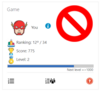
Availability Block Game by level
Versions
Current version
1.1.0 (2022042610)
1.1.0
Plugin type: Availability restriction
Frankenstyle component name: availability_game
Version build number: 2022042610
Version release name: 1.1.0
Maturity: Stable
Supported Moodle versions: 3.10, 3.11, 3.4, 3.5, 3.6, 3.7, 3.8, 3.9, 4.0, 4.1, 4.2, 4.3, 4.4, 4.5, 5.0
Repository URL (Git): https://github.com/JotaDF/moodle-availability_game
Repository branch: main
Repository tag:
Issue/bug tracker URL: https://github.com/JotaDF/moodle-availability_game/issues
moodle-availability_game
Changes
Changes Version 1.1.0 Version for Moodle 3.4 onwards
- 2022-04-26 - Compatibility with moodle 4.0
- 2022-04-26 - Adaptation to 15 levels
Changes Version 1.0.0 for Moodle 3.4 onwards (2021042124)
- 2021-04-08 - Change plugin version and release scheme to the scheme promoted by moodle.org, no functionality change
- 2021-01-05 - Initial version
1.1.0 (2022042600)
1.1.0
Plugin type: Availability restriction
Frankenstyle component name: availability_game
Version build number: 2022042600
Version release name: 1.1.0
Maturity: Stable
Supported Moodle versions: 3.10, 3.11, 3.4, 3.5, 3.6, 3.7, 3.8, 3.9, 4.0
Repository URL (Git): https://github.com/JotaDF/moodle-availability_game
Repository branch: main
Repository tag:
Issue/bug tracker URL: https://github.com/JotaDF/moodle-availability_game/issues
moodle-availability_game
Changes
Changes Version 1.1.0 Version for Moodle 3.4 onwards
- 2022-04-26 - Compatibility with moodle 4.0
- 2022-04-26 - Adaptation to 15 levels
Changes Version 1.0.0 for Moodle 3.4 onwards (2021042124)
- 2021-04-08 - Change plugin version and release scheme to the scheme promoted by moodle.org, no functionality change
- 2021-01-05 - Initial version
1.0.0 (2021042124)
1.0.0
Plugin type: Availability restriction
Frankenstyle component name: availability_game
Version build number: 2021042124
Version release name: 1.0.0
Maturity: Stable
Supported Moodle versions: 3.10, 3.11, 3.4, 3.5, 3.6, 3.7, 3.8, 3.9
Repository URL (Git): https://github.com/JotaDF/moodle-availability_game
Repository branch: main
Repository tag:
Issue/bug tracker URL: https://github.com/JotaDF/moodle-availability_game/issues
Block Game Availability (availability_game)
Moodle plugin to limit the access to course content according to the user level in Block Game.
Features
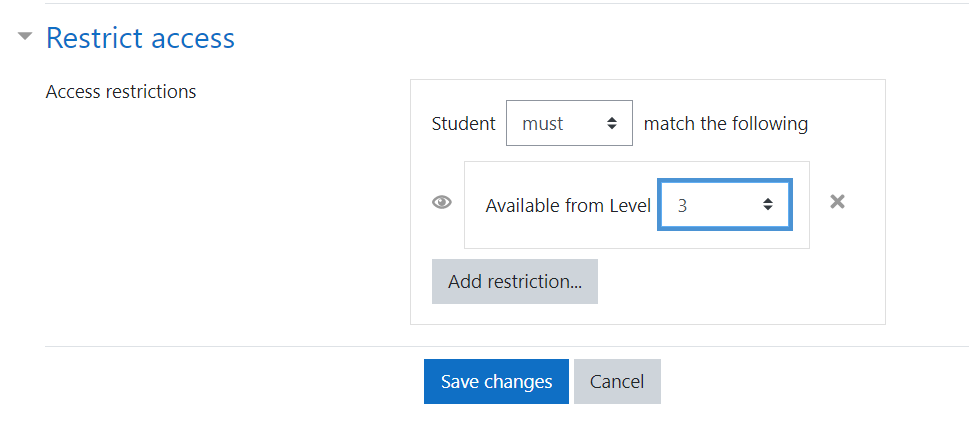
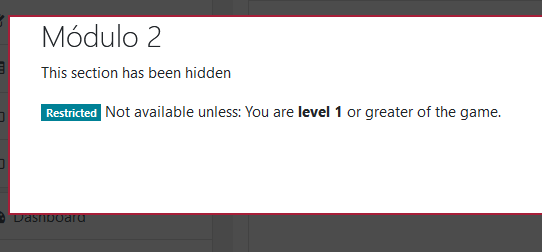
- Restrict access to users with a level greater than or equal to a certain level.
Requirements
- Moodle 3.4 or greater.
- Block Game
How to use
- Install the block Block Game
- Install this plugin
- Add the Block Game to a course
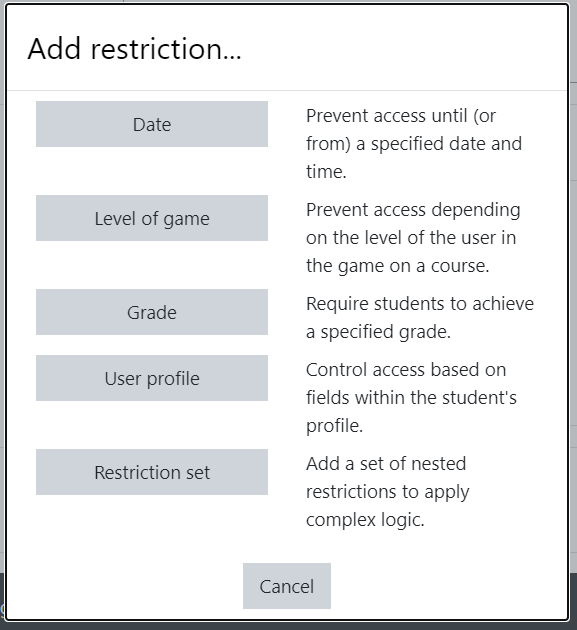
- Find the new 'Level of game' restriction under 'Restrict access' in activity/section settings
Installation
Zip upload
If you have configured Moodle to allow plugin installation from the user interface, and you received a zip of the plugin, follow the following steps. If not, refer to the manual process.
- Visit the Install plugins admin page (Site administration > Plugins > Install plugins)
- Drag & drop the plugin in the Zip package area
- Click Install plugin from the ZIP file and follow the process
That's it!
Manual process
- Place the content of this plugin in the folder
availability/condition/game. - Visit your admin's Notifications page (Site administration > Notifications)
- Follow the upgrade process
That's it!
License
Licensed under the GNU GPL License
1.0.0 (2021042123)
1.0.0
Plugin type: Availability restriction
Frankenstyle component name: availability_game
Version build number: 2021042123
Version release name: 1.0.0
Maturity: Stable
Supported Moodle versions: 3.10, 3.11, 3.4, 3.5, 3.6, 3.7, 3.8, 3.9
Repository URL (Git): https://github.com/JotaDF/moodle-availability_game
Repository branch: main
Repository tag:
Issue/bug tracker URL: https://github.com/JotaDF/moodle-availability_game/issues
Block Game Availability (availability_game)
Moodle plugin to limit the access to course content according to the user level in Block Game.
Features
- Restrict access to users with a level greater than or equal to a certain level.
Requirements
- Moodle 3.4 or greater.
- Block Game
How to use
- Install the block Block Game
- Install this plugin
- Add the Block Game to a course
- Find the new 'Level of game' restriction under 'Restrict access' in activity/section settings
Installation
Zip upload
If you have configured Moodle to allow plugin installation from the user interface, and you received a zip of the plugin, follow the following steps. If not, refer to the manual process.
- Visit the Install plugins admin page (Site administration > Plugins > Install plugins)
- Drag & drop the plugin in the Zip package area
- Click Install plugin from the ZIP file and follow the process
That's it!
Manual process
- Place the content of this plugin in the folder
availability/condition/game. - Visit your admin's Notifications page (Site administration > Notifications)
- Follow the upgrade process
That's it!
License
Licensed under the GNU GPL License
1.0.0 (2021042122)
1.0.0
Plugin type: Availability restriction
Frankenstyle component name: availability_game
Version build number: 2021042122
Version release name: 1.0.0
Maturity: Stable
Supported Moodle versions: 3.10, 3.11, 3.4, 3.5, 3.6, 3.7, 3.8, 3.9
Repository URL (Git): https://github.com/JotaDF/moodle-availability_game
Repository branch: main
Repository tag:
Issue/bug tracker URL: https://github.com/JotaDF/moodle-availability_game/issues
Block Game Availability (availability_game)
Moodle plugin to limit the access to course content according to the user level in Block Game.
Features
- Restrict access to users with a level greater than or equal to a certain level.
Requirements
- Moodle 3.4 or greater.
- Block Game
How to use
- Install the block Block Game
- Install this plugin
- Add the Block Game to a course
- Find the new 'Level of game' restriction under 'Restrict access' in activity/section settings
Installation
Zip upload
If you have configured Moodle to allow plugin installation from the user interface, and you received a zip of the plugin, follow the following steps. If not, refer to the manual process.
- Visit the Install plugins admin page (Site administration > Plugins > Install plugins)
- Drag & drop the plugin in the Zip package area
- Click Install plugin from the ZIP file and follow the process
That's it!
Manual process
- Place the content of this plugin in the folder
availability/condition/game. - Visit your admin's Notifications page (Site administration > Notifications)
- Follow the upgrade process
That's it!
License
Licensed under the GNU GPL License
1.0.0 (2021042121)
1.0.0
Plugin type: Availability restriction
Frankenstyle component name: availability_game
Version build number: 2021042121
Version release name: 1.0.0
Maturity: Stable
Supported Moodle versions: 3.10, 3.4, 3.5, 3.6, 3.7, 3.8, 3.9
Repository URL (Git): https://github.com/JotaDF/moodle-availability_game
Repository branch: main
Repository tag:
Issue/bug tracker URL: https://github.com/JotaDF/moodle-availability_game/issues
Block Game Availability (availability_game)
Moodle plugin to limit the access to course content according to the user level in Block Game.
Features
- Restrict access to users with a level greater than or equal to a certain level.
Requirements
- Moodle 3.4 or greater.
- Block Game
How to use
- Install the block Block Game
- Install this plugin
- Add the Block Game to a course
- Find the new 'Level of game' restriction under 'Restrict access' in activity/section settings
Installation
Zip upload
If you have configured Moodle to allow plugin installation from the user interface, and you received a zip of the plugin, follow the following steps. If not, refer to the manual process.
- Visit the Install plugins admin page (Site administration > Plugins > Install plugins)
- Drag & drop the plugin in the Zip package area
- Click Install plugin from the ZIP file and follow the process
That's it!
Manual process
- Place the content of this plugin in the folder
availability/condition/game. - Visit your admin's Notifications page (Site administration > Notifications)
- Follow the upgrade process
That's it!
License
Licensed under the GNU GPL License
1.0.0 (2021042120)
1.0.0
Plugin type: Availability restriction
Frankenstyle component name: availability_game
Version build number: 2021042120
Version release name: 1.0.0
Maturity: Stable
Supported Moodle versions: 3.10, 3.4, 3.5, 3.6, 3.7, 3.8, 3.9
Repository URL (Git): https://github.com/JotaDF/moodle-availability_game
Repository branch: main
Repository tag:
Issue/bug tracker URL: https://github.com/JotaDF/moodle-availability_game/issues
Block Game Availability (availability_game)
Moodle plugin to limit the access to course content according to the user level in Block Game.
Features
- Restrict access to users with a level greater than or equal to a certain level.
Requirements
- Moodle 3.4 or greater.
- Block Game
How to use
- Install the block Block Game
- Install this plugin
- Add the Block Game to a course
- Find the new 'Level of game' restriction under 'Restrict access' in activity/section settings
Installation
Zip upload
If you have configured Moodle to allow plugin installation from the user interface, and you received a zip of the plugin, follow the following steps. If not, refer to the manual process.
- Visit the Install plugins admin page (Site administration > Plugins > Install plugins)
- Drag & drop the plugin in the Zip package area
- Click Install plugin from the ZIP file and follow the process
That's it!
Manual process
- Place the content of this plugin in the folder
availability/condition/game. - Visit your admin's Notifications page (Site administration > Notifications)
- Follow the upgrade process
That's it!
License
Licensed under the GNU GPL License
1.0.0 (2021042119)
1.0.0
Plugin type: Availability restriction
Frankenstyle component name: availability_game
Version build number: 2021042119
Version release name: 1.0.0
Maturity: Stable
Supported Moodle versions: 3.10, 3.4, 3.5, 3.6, 3.7, 3.8, 3.9
Repository URL (Git): https://github.com/JotaDF/moodle-availability_game
Repository branch: main
Repository tag:
Issue/bug tracker URL: https://github.com/JotaDF/moodle-availability_game/issues
Block Game Availability (availability_game)
Moodle plugin to limit the access to course content according to the user level in Block Game.
Features
- Restrict access to users with a level greater than or equal to a certain level.
Requirements
- Moodle 3.4 or greater.
- Block Game
How to use
- Install the block Block Game
- Install this plugin
- Add the Block Game to a course
- Find the new 'Level of game' restriction under 'Restrict access' in activity/section settings
Installation
Zip upload
If you have configured Moodle to allow plugin installation from the user interface, and you received a zip of the plugin, follow the following steps. If not, refer to the manual process.
- Visit the Install plugins admin page (Site administration > Plugins > Install plugins)
- Drag & drop the plugin in the Zip package area
- Click Install plugin from the ZIP file and follow the process
That's it!
Manual process
- Place the content of this plugin in the folder
availability/condition/game. - Visit your admin's Notifications page (Site administration > Notifications)
- Follow the upgrade process
That's it!
License
Licensed under the GNU GPL License
1.0.0 (2021042118)
1.0.0
Plugin type: Availability restriction
Frankenstyle component name: availability_game
Version build number: 2021042118
Version release name: 1.0.0
Maturity: Stable
Supported Moodle versions: 3.10, 3.4, 3.5, 3.6, 3.7, 3.8, 3.9
Repository URL (Git): https://github.com/JotaDF/moodle-availability_game
Repository branch: main
Repository tag:
Issue/bug tracker URL: https://github.com/JotaDF/moodle-availability_game/issues
Block Game Availability (availability_game)
Moodle plugin to limit the access to course content according to the user level in Block Game.
Features
- Restrict access to users with a level greater than or equal to a certain level.
Requirements
- Moodle 3.4 or greater.
- Block Game
How to use
- Install the block Block Game
- Install this plugin
- Add the Block Game to a course
- Find the new 'Level of game' restriction under 'Restrict access' in activity/section settings
Installation
Zip upload
If you have configured Moodle to allow plugin installation from the user interface, and you received a zip of the plugin, follow the following steps. If not, refer to the manual process.
- Visit the Install plugins admin page (Site administration > Plugins > Install plugins)
- Drag & drop the plugin in the Zip package area
- Click Install plugin from the ZIP file and follow the process
That's it!
Manual process
- Place the content of this plugin in the folder
availability/condition/game. - Visit your admin's Notifications page (Site administration > Notifications)
- Follow the upgrade process
That's it!
License
Licensed under the GNU GPL License
1.0.0 (2021042113)
1.0.0
Plugin type: Availability restriction
Frankenstyle component name: availability_game
Version build number: 2021042113
Version release name: 1.0.0
Maturity: Stable
Supported Moodle versions: 3.10, 3.4, 3.5, 3.6, 3.7, 3.8, 3.9
Repository URL (Git): https://github.com/JotaDF/moodle-availability_game
Repository branch: main
Repository tag:
Issue/bug tracker URL: https://github.com/JotaDF/moodle-availability_game/issues
Block Game Availability (availability_game)
Moodle plugin to limit the access to course content according to the user level in Block Game.
Features
- Restrict access to users with a level greater than or equal to a certain level.
Requirements
- Moodle 3.4 or greater.
- Block Game
How to use
- Install the block Block Game
- Install this plugin
- Add the Block Game to a course
- Find the new 'Level of game' restriction under 'Restrict access' in activity/section settings
Installation
Zip upload
If you have configured Moodle to allow plugin installation from the user interface, and you received a zip of the plugin, follow the following steps. If not, refer to the manual process.
- Visit the Install plugins admin page (Site administration > Plugins > Install plugins)
- Drag & drop the plugin in the Zip package area
- Click Install plugin from the ZIP file and follow the process
That's it!
Manual process
- Place the content of this plugin in the folder
availability/condition/game. - Visit your admin's Notifications page (Site administration > Notifications)
- Follow the upgrade process
That's it!
License
Licensed under the GNU GPL License
1.0.0 (2021042111)
1.0.0
Plugin type: Availability restriction
Frankenstyle component name: availability_game
Version build number: 2021042111
Version release name: 1.0.0
Maturity: Stable
Supported Moodle versions: 3.10, 3.4, 3.5, 3.6, 3.7, 3.8, 3.9
Repository URL (Git): https://github.com/JotaDF/moodle-availability_game
Repository branch: main
Repository tag:
Issue/bug tracker URL: https://github.com/JotaDF/moodle-availability_game/issues
Block Game Availability (availability_game)
Moodle plugin to limit the access to course content according to the user level in Block Game.
Features
- Restrict access to users with a level greater than or equal to a certain level.
Requirements
- Moodle 3.4 or greater.
- Block Game
How to use
- Install the block Block Game
- Install this plugin
- Add the Block Game to a course
- Find the new 'Level of game' restriction under 'Restrict access' in activity/section settings
Installation
Zip upload
If you have configured Moodle to allow plugin installation from the user interface, and you received a zip of the plugin, follow the following steps. If not, refer to the manual process.
- Visit the Install plugins admin page (Site administration > Plugins > Install plugins)
- Drag & drop the plugin in the Zip package area
- Click Install plugin from the ZIP file and follow the process
That's it!
Manual process
- Place the content of this plugin in the folder
availability/condition/game. - Visit your admin's Notifications page (Site administration > Notifications)
- Follow the upgrade process
That's it!
License
Licensed under the GNU GPL License
1.0.0 (2021042110)
1.0.0
Plugin type: Availability restriction
Frankenstyle component name: availability_game
Version build number: 2021042110
Version release name: 1.0.0
Maturity: Stable
Supported Moodle versions: 3.10, 3.4, 3.5, 3.6, 3.7, 3.8, 3.9
Repository URL (Git): https://github.com/JotaDF/moodle-availability_game
Repository branch: main
Repository tag:
Issue/bug tracker URL: https://github.com/JotaDF/moodle-availability_game/issues
Block Game Availability (availability_game)
Moodle plugin to limit the access to course content according to the user level in Block Game.
Features
- Restrict access to users with a level greater than or equal to a certain level.
Requirements
- Moodle 3.4 or greater.
- Block Game
How to use
- Install the block Block Game
- Install this plugin
- Add the Block Game to a course
- Find the new 'Level of game' restriction under 'Restrict access' in activity/section settings
Installation
Zip upload
If you have configured Moodle to allow plugin installation from the user interface, and you received a zip of the plugin, follow the following steps. If not, refer to the manual process.
- Visit the Install plugins admin page (Site administration > Plugins > Install plugins)
- Drag & drop the plugin in the Zip package area
- Click Install plugin from the ZIP file and follow the process
That's it!
Manual process
- Place the content of this plugin in the folder
availability/condition/game. - Visit your admin's Notifications page (Site administration > Notifications)
- Follow the upgrade process
That's it!
License
Licensed under the GNU GPL License
1.0.0 (2021033054)
1.0.0
Plugin type: Availability restriction
Frankenstyle component name: availability_game
Version build number: 2021033054
Version release name: 1.0.0
Maturity: Stable
Supported Moodle versions: 3.10, 3.4, 3.5, 3.6, 3.7, 3.8, 3.9
Repository URL (Git): https://github.com/JotaDF/moodle-availability_game
Repository branch: main
Repository tag:
Issue/bug tracker URL: https://github.com/JotaDF/moodle-availability_game/issues
Block Game Availability (availability_game)
Moodle plugin to limit the access to course content according to the user level in Block Game.
Features
- Restrict access to users with a level greater than or equal to a certain level.
Requirements
- Moodle 3.4 or greater.
- Block Game
How to use
- Install the block Block Game
- Install this plugin
- Add the Block Game to a course
- Find the new 'Level of game' restriction under 'Restrict access' in activity/section settings
Installation
Zip upload
If you have configured Moodle to allow plugin installation from the user interface, and you received a zip of the plugin, follow the following steps. If not, refer to the manual process.
- Visit the Install plugins admin page (Site administration > Plugins > Install plugins)
- Drag & drop the plugin in the Zip package area
- Click Install plugin from the ZIP file and follow the process
That's it!
Manual process
- Place the content of this plugin in the folder
availability/condition/game. - Visit your admin's Notifications page (Site administration > Notifications)
- Follow the upgrade process
That's it!
License
Licensed under the GNU GPL License
1.0.0 (2021033051)
1.0.0
Plugin type: Availability restriction
Frankenstyle component name: availability_game
Version build number: 2021033051
Version release name: 1.0.0
Maturity: Stable
Supported Moodle versions: 3.10, 3.4, 3.5, 3.6, 3.7, 3.8, 3.9
Repository URL (Git): https://github.com/JotaDF/moodle-availability_game
Repository branch: main
Repository tag:
Issue/bug tracker URL: https://github.com/JotaDF/moodle-availability_game/issues
Block Game Availability (availability_game)
Moodle plugin to limit the access to course content according to the user level in Block Game.
Features
- Restrict access to users with a level greater than or equal to a certain level.
Requirements
- Moodle 3.4 or greater.
- Block Game
How to use
- Install the block Block Game
- Install this plugin
- Add the Block Game to a course
- Find the new 'Level of game' restriction under 'Restrict access' in activity/section settings
Installation
Zip upload
If you have configured Moodle to allow plugin installation from the user interface, and you received a zip of the plugin, follow the following steps. If not, refer to the manual process.
- Visit the Install plugins admin page (Site administration > Plugins > Install plugins)
- Drag & drop the plugin in the Zip package area
- Click Install plugin from the ZIP file and follow the process
That's it!
Manual process
- Place the content of this plugin in the folder
availability/condition/game. - Visit your admin's Notifications page (Site administration > Notifications)
- Follow the upgrade process
That's it!
License
Licensed under the GNU GPL License
1.0.0 (2021033050)
1.0.0
Plugin type: Availability restriction
Frankenstyle component name: availability_game
Version build number: 2021033050
Version release name: 1.0.0
Maturity: Stable
Supported Moodle versions: 3.10, 3.4, 3.5, 3.6, 3.7, 3.8, 3.9
Repository URL (Git): https://github.com/JotaDF/moodle-availability_game
Repository branch: main
Repository tag:
Issue/bug tracker URL: https://github.com/JotaDF/moodle-availability_game/issues
Block Game Availability (availability_game)
Moodle plugin to limit the access to course content according to the user level in Block Game.
Features
- Restrict access to users with a level greater than or equal to a certain level.
Requirements
- Moodle 3.4 or greater.
- Block Game
How to use
- Install the block Block Game
- Install this plugin
- Add the Block Game to a course
- Find the new 'Level of game' restriction under 'Restrict access' in activity/section settings
Installation
Zip upload
If you have configured Moodle to allow plugin installation from the user interface, and you received a zip of the plugin, follow the following steps. If not, refer to the manual process.
- Visit the Install plugins admin page (Site administration > Plugins > Install plugins)
- Drag & drop the plugin in the Zip package area
- Click Install plugin from the ZIP file and follow the process
That's it!
Manual process
- Place the content of this plugin in the folder
availability/condition/game. - Visit your admin's Notifications page (Site administration > Notifications)
- Follow the upgrade process
That's it!
License
Licensed under the GNU GPL License
1.0.0 (2021033045)
1.0.0
Plugin type: Availability restriction
Frankenstyle component name: availability_game
Version build number: 2021033045
Version release name: 1.0.0
Maturity: Stable
Supported Moodle versions: 3.10, 3.4, 3.5, 3.6, 3.7, 3.8, 3.9
Repository URL (Git): https://github.com/JotaDF/moodle-availability_game
Repository branch: main
Repository tag:
Issue/bug tracker URL: https://github.com/JotaDF/moodle-availability_game/issues
Block Game Availability (availability_game)
Moodle plugin to limit the access to course content according to the user level in Block Game.
Features
- Restrict access to users with a level greater than or equal to a certain level.
Requirements
- Moodle 3.4 or greater.
- Block Game
How to use
- Install the block Block Game
- Install this plugin
- Add the Block Game to a course
- Find the new 'Level of game' restriction under 'Restrict access' in activity/section settings
Installation
Zip upload
If you have configured Moodle to allow plugin installation from the user interface, and you received a zip of the plugin, follow the following steps. If not, refer to the manual process.
- Visit the Install plugins admin page (Site administration > Plugins > Install plugins)
- Drag & drop the plugin in the Zip package area
- Click Install plugin from the ZIP file and follow the process
That's it!
Manual process
- Place the content of this plugin in the folder
availability/condition/game. - Visit your admin's Notifications page (Site administration > Notifications)
- Follow the upgrade process
That's it!
License
Licensed under the GNU GPL License
1.0.0 (2021033044)
1.0.0
Plugin type: Availability restriction
Frankenstyle component name: availability_game
Version build number: 2021033044
Version release name: 1.0.0
Maturity: Stable
Supported Moodle versions: 3.10, 3.4, 3.5, 3.6, 3.7, 3.8, 3.9
Repository URL (Git): https://github.com/JotaDF/moodle-availability_game
Repository branch: main
Repository tag:
Issue/bug tracker URL: https://github.com/JotaDF/moodle-availability_game/issues
Block Game Availability (availability_game)
Moodle plugin to limit the access to course content according to the user level in Block Game.
Features
- Restrict access to users with a level greater than or equal to a certain level.
Requirements
- Moodle 3.4 or greater.
- Block Game
How to use
- Install the block Block Game
- Install this plugin
- Add the Block Game to a course
- Find the new 'Level of game' restriction under 'Restrict access' in activity/section settings
Installation
Zip upload
If you have configured Moodle to allow plugin installation from the user interface, and you received a zip of the plugin, follow the following steps. If not, refer to the manual process.
- Visit the Install plugins admin page (Site administration > Plugins > Install plugins)
- Drag & drop the plugin in the Zip package area
- Click Install plugin from the ZIP file and follow the process
That's it!
Manual process
- Place the content of this plugin in the folder
availability/condition/game. - Visit your admin's Notifications page (Site administration > Notifications)
- Follow the upgrade process
That's it!
License
Licensed under the GNU GPL License
1.0.0 (2021033043)
1.0.0
Plugin type: Availability restriction
Frankenstyle component name: availability_game
Version build number: 2021033043
Version release name: 1.0.0
Maturity: Stable
Supported Moodle versions: 3.10, 3.4, 3.5, 3.6, 3.7, 3.8, 3.9
Repository URL (Git): https://github.com/JotaDF/moodle-availability_game
Repository branch: main
Repository tag:
Issue/bug tracker URL: https://github.com/JotaDF/moodle-availability_game/issues
Block Game Availability (availability_game)
Moodle plugin to limit the access to course content according to the user level in Block Game.
Features
- Restrict access to users with a level greater than or equal to level X..
Requirements
- Moodle 3.4 or greater.
- Block Game
How to use
- Install the block Block Game
- Install this plugin
- Add the Block Game to a course
- Find the new 'Level of game' restriction under 'Restrict access' in activity/section settings
Installation
Zip upload
If you have configured Moodle to allow plugin installation from the user interface, and you received a zip of the plugin, follow the following steps. If not, refer to the manual process.
- Visit the Install plugins admin page (Site administration > Plugins > Install plugins)
- Drag & drop the plugin in the Zip package area
- Click Install plugin from the ZIP file and follow the process
That's it!
Manual process
- Place the content of this plugin in the folder
availability/condition/game. - Visit your admin's Notifications page (Site administration > Notifications)
- Follow the upgrade process
That's it!
License
Licensed under the GNU GPL License
1.0.0 (2021033042)
1.0.0
Plugin type: Availability restriction
Frankenstyle component name: availability_game
Version build number: 2021033042
Version release name: 1.0.0
Maturity: Stable
Supported Moodle versions: 3.10, 3.4, 3.5, 3.6, 3.7, 3.8, 3.9
Repository URL (Git): https://github.com/JotaDF/moodle-availability_game
Repository branch: main
Repository tag:
Issue/bug tracker URL: https://github.com/JotaDF/moodle-availability_game/issues
Block Game Availability (availability_game)
Moodle plugin to limit the access to course content according to the user level in Block Game.
Features
- Restrict access to users with a level greater than or equal to level X..
Requirements
- Moodle 3.4 or greater.
- Block Game
How to use
- Install the block Block Game
- Install this plugin
- Add the Block Game to a course
- Find the new 'Level of game' restriction under 'Restrict access' in activity/section settings
Installation
Zip upload
If you have configured Moodle to allow plugin installation from the user interface, and you received a zip of the plugin, follow the following steps. If not, refer to the manual process.
- Visit the Install plugins admin page (Site administration > Plugins > Install plugins)
- Drag & drop the plugin in the Zip package area
- Click Install plugin from the ZIP file and follow the process
That's it!
Manual process
- Place the content of this plugin in the folder
availability/condition/game. - Visit your admin's Notifications page (Site administration > Notifications)
- Follow the upgrade process
That's it!
License
Licensed under the GNU GPL License
1.0.0 (2021033041)
1.0.0
Plugin type: Availability restriction
Frankenstyle component name: availability_game
Version build number: 2021033041
Version release name: 1.0.0
Maturity: Stable
Supported Moodle versions: 3.10, 3.4, 3.5, 3.6, 3.7, 3.8, 3.9
Repository URL (Git): https://github.com/JotaDF/moodle-availability_game
Repository branch: main
Repository tag:
Issue/bug tracker URL: https://github.com/JotaDF/moodle-availability_game/issues
Block Game Availability (availability_game)
Moodle plugin to limit the access to course content according to the user level in Block Game.
Features
- Restrict access to users with a level greater than or equal to level X..
Requirements
- Moodle 3.4 or greater.
- Block Game
How to use
- Install the block Block Game
- Install this plugin
- Add the Block Game to a course
- Find the new 'Level of game' restriction under 'Restrict access' in activity/section settings
Installation
Zip upload
If you have configured Moodle to allow plugin installation from the user interface, and you received a zip of the plugin, follow the following steps. If not, refer to the manual process.
- Visit the Install plugins admin page (Site administration > Plugins > Install plugins)
- Drag & drop the plugin in the Zip package area
- Click Install plugin from the ZIP file and follow the process
That's it!
Manual process
- Place the content of this plugin in the folder
availability/condition/game. - Visit your admin's Notifications page (Site administration > Notifications)
- Follow the upgrade process
That's it!
License
Licensed under the GNU GPL License
1.0.0 (2021033040)
1.0.0
Plugin type: Availability restriction
Frankenstyle component name: availability_game
Version build number: 2021033040
Version release name: 1.0.0
Maturity: Stable
Supported Moodle versions: 3.10, 3.4, 3.5, 3.6, 3.7, 3.8, 3.9
Repository URL (Git): https://github.com/JotaDF/moodle-availability_game
Repository branch: main
Repository tag:
Issue/bug tracker URL: https://github.com/JotaDF/moodle-availability_game/issues
Block Game Availability (availability_game)
Moodle plugin to limit the access to course content according to the user level in Block Game.
Features
- Restrict access to users with a level greater than or equal to level X..
Requirements
- Moodle 3.4 or greater.
- Block Game
How to use
- Install the block Block Game
- Install this plugin
- Add the Block Game to a course
- Find the new 'Level of game' restriction under 'Restrict access' in activity/section settings
Installation
Zip upload
If you have configured Moodle to allow plugin installation from the user interface, and you received a zip of the plugin, follow the following steps. If not, refer to the manual process.
- Visit the Install plugins admin page (Site administration > Plugins > Install plugins)
- Drag & drop the plugin in the Zip package area
- Click Install plugin from the ZIP file and follow the process
That's it!
Manual process
- Place the content of this plugin in the folder
availability/condition/game. - Visit your admin's Notifications page (Site administration > Notifications)
- Follow the upgrade process
That's it!
License
Licensed under the GNU GPL License
1.0.0 (2021033039)
1.0.0
Plugin type: Availability restriction
Frankenstyle component name: availability_game
Version build number: 2021033039
Version release name: 1.0.0
Maturity: Stable
Supported Moodle versions: 3.10, 3.4, 3.5, 3.6, 3.7, 3.8, 3.9
Repository URL (Git): https://github.com/JotaDF/moodle-availability_game
Repository branch: main
Repository tag:
Issue/bug tracker URL: https://github.com/JotaDF/moodle-availability_game/issues
Block Game Availability (availability_game)
Moodle plugin to limit the access to course content according to the user level in Block Game.
Features
- Restrict access to users with a level greater than or equal to level X..
Requirements
- Moodle 3.4 or greater.
- Block Game
How to use
- Install the block Block Game
- Install this plugin
- Add the Block Game to a course
- Find the new 'Level of game' restriction under 'Restrict access' in activity/section settings
Installation
Zip upload
If you have configured Moodle to allow plugin installation from the user interface, and you received a zip of the plugin, follow the following steps. If not, refer to the manual process.
- Visit the Install plugins admin page (Site administration > Plugins > Install plugins)
- Drag & drop the plugin in the Zip package area
- Click Install plugin from the ZIP file and follow the process
That's it!
Manual process
- Place the content of this plugin in the folder
availability/condition/game. - Visit your admin's Notifications page (Site administration > Notifications)
- Follow the upgrade process
That's it!
License
Licensed under the GNU GPL License
1.0.0 (2021033038)
1.0.0
Plugin type: Availability restriction
Frankenstyle component name: availability_game
Version build number: 2021033038
Version release name: 1.0.0
Maturity: Stable
Supported Moodle versions: 3.10, 3.4, 3.5, 3.6, 3.7, 3.8, 3.9
Repository URL (Git): https://github.com/JotaDF/moodle-availability_game
Repository branch: main
Repository tag:
Issue/bug tracker URL: https://github.com/JotaDF/moodle-availability_game/issues
Block Game Availability (availability_game)
Moodle plugin to limit the access to course content according to the user level in Block Game.
Features
- Restrict access to users with a level greater than or equal to level X..
Requirements
- Moodle 3.4 or greater.
- Block Game
How to use
- Install the block Block Game
- Install this plugin
- Add the Block Game to a course
- Find the new 'Level of game' restriction under 'Restrict access' in activity/section settings
Installation
Zip upload
If you have configured Moodle to allow plugin installation from the user interface, and you received a zip of the plugin, follow the following steps. If not, refer to the manual process.
- Visit the Install plugins admin page (Site administration > Plugins > Install plugins)
- Drag & drop the plugin in the Zip package area
- Click Install plugin from the ZIP file and follow the process
That's it!
Manual process
- Place the content of this plugin in the folder
availability/condition/game. - Visit your admin's Notifications page (Site administration > Notifications)
- Follow the upgrade process
That's it!
License
Licensed under the GNU GPL License