Stefan-Alexander Scholz
Lead maintainer

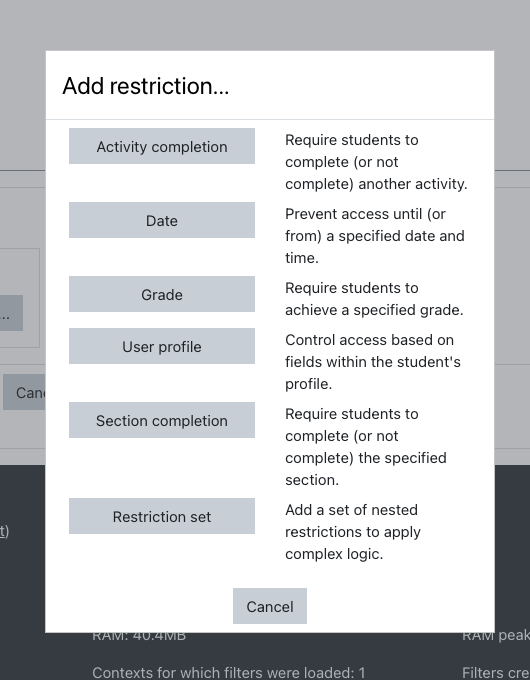
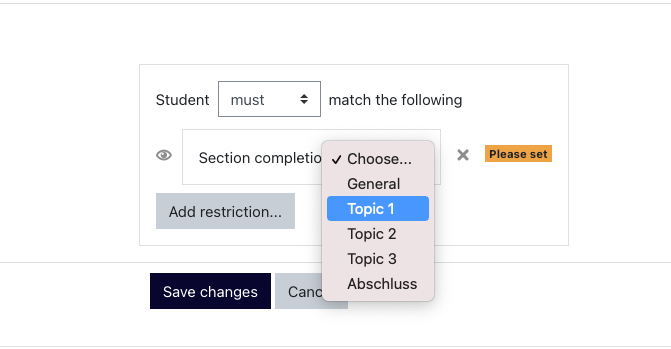

This plugin was built to enable teachers to easily restrict activities or sections to students that have completed another, usually the previous section. This is currently already possible by adding several restrictions; this plugin simplifies that for the teacher – and has also the nice and intended side effect that it looks better for the student.
Installation
Install the plugin like any other plugin to folder /availability/condition/sectioncompleted
See http://docs.moodle.org/en/Installing_plugins for details on installing Moodle plugins
Usage & Settings
After installing the plugin, it is ready to use without the need for any configuration.
Teachers (and other users with editing rights) can add the "Section Completed" availability condition to activities / resources / sections in their courses. While adding the condition, they have to pick the section the student is required to complete before accessing the activity / resource / section.
If you want to learn more about using availability plugins in Moodle, please see https://docs.moodle.org/en/Restrict_access
You can see the plugin in action on our test site: bdecent.io


