Ad-hoc database queries
Maintained by
Tim Hunt, Mahmoud Kassaei, Hieu Vu Van
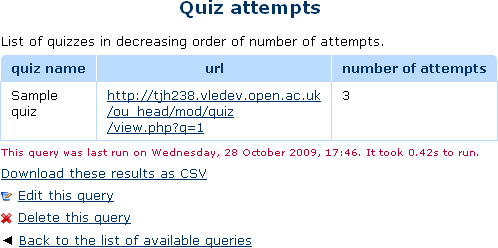
This report plugin allows Administrators to set up arbitrary database queries
to act as ad-hoc reports. Reports can be of two types, either run on demand,
or scheduled to run automatically. Other users with the right capability can
go in and see a list of queries that they have access to. Results can be viewed
on-screen or downloaded as CSV.
Comments
Comments are no longer open for new posts. Existing comments remain available to read.
You may be able to work round the problem by loading the CSV into Excel (or similar) and re-saving it. Or, making a simple script to re-format the CSV after you have downloaded it.
Thanks for this useful and great plugin, however, I have one issues if you could help.
CSV file exported from this plugin (unlike from Configurable Reports ) contains double quotes " in every data in the colum (For example, "xy@yahoo.com", "Fred", "Smith"). Is there anywhere I can set it to omit that? The exported CSV wouldn't work with our SMS due to that.
Thanks for your time responding to this.
Kind Regards,
Tifano
So, doing what you tried: breaking up the string in the SQL query, is probably the best way to do this if that is what you want. I am surpised that the same SQL would work differently in PHPMyAdmin and in the report. The only think I can think of is that in the way that Moodle handles database queries, { and } are special characters. That is probably what is cusing the problem. Try replacing them with CHR(NN).
Thank you for providing this useful plugin, I created the below query to get number of students enrollment per course but it looks like the multi-lang filter is not applied so I got the course name as {mlang en} Hyperledger Fabric Chaincode {mlang} {mlang ar} الشفرة المسلسلة للـهايبرليدجر فابريك {mlang}
SELECT c.fullname AS 'Course Name',
,COUNT(u.username) AS 'Number of Students'
FROM {role_assignments} AS r
JOIN {user} AS u on r.userid = u.id
JOIN {role} AS rn on r.roleid = rn.id
JOIN {context} AS ctx on r.contextid = ctx.id
JOIN {course} AS c on ctx.instanceid = c.id
WHERE rn.shortname = 'student'
GROUP BY c.fullname, rn.shortname
So I created the below query which remove multilang tags and When I tried it in PHPMYADMIN and I got it work correctly but when I use it in the plugin I got a wrong course name as
English:
Hyperledger Fabric Chaincode {mlang} {mlang ar} الشفرة المسلسلة للـهايبرليدجر فابريك {mlang}
Arabic:
الشفرة المسلسلة للـهايبرليدجر فابريك {mlang}
SELECT SUBSTRING_INDEX(SUBSTRING_INDEX(c.fullname, '{mlang en}',-1),'{mlang}',1) as 'Course Name EN',
SUBSTRING_INDEX(SUBSTRING_INDEX(c.fullname, '{mlang ar}', -1),'{mlang}',1) as 'Course Name AR',
c.shortname as 'Short Name'
,COUNT(u.username) AS 'Number of Students'
FROM {role_assignments} AS r
JOIN {user} AS u on r.userid = u.id
JOIN {role} AS rn on r.roleid = rn.id
JOIN {context} AS ctx on r.contextid = ctx.id
JOIN {course} AS c on ctx.instanceid = c.id
WHERE rn.shortname = 'student'
GROUP BY c.fullname, rn.shortname
Is it possible to execute a stored procedure and pass in a variable? I am trying to implement some custom reports by querying the database. We have moodle 3.6 and using the Adaptable Theme. I have a NavBar tool menu named Reports, and my plan is to put the custom reports in as drop down options for the Teachers. I am successful with putting simple queries in the menu but I was thinking it would be better to put complex reports in using stored procedures. I am very comfortable with writing SQL scripts but new to Moodle.
I am using: Exec [dbo].[usp_MoodleTimeReport] @userid=13. I tried removing the variable and hard coding it in the report for testing but I always get the below error.
Error when executing the query: Error reading from database SQLState: 42000
Error Code: 156
Message: [Microsoft][ODBC Driver 17 for SQL Server][SQL Server]Incorrect syntax near the keyword 'ORDER'.
SQLState: 42000
Error Code: 153
Message: [Microsoft][ODBC Driver 17 for SQL Server][SQL Server]Invalid usage of the option NEXT in the FETCH statement.
Exec [dbo].[usp_MoodleTimeReport] ORDER BY 1 OFFSET 0 ROWS FETCH NEXT 2 ROWS ONLY [array
I don't see any way to attach a pic to this post.
Any help would be appreciated!
Thanks,
Lisa
Without going into too much detail, the error you mentioned is probably caused because the Word version you're using doesn't use XML, so consider saving your Word file (.doc) as a more recent version (.docx) and try using it again.
The type of the file you selected (application/msword) does not match the type expected by this import format (application/vnd.openxmlformats-officedocument.wordprocessingml.document).
i use .doc file type.
really need help
At least, that is what we hope to do. Sometimes I get too busy, and don't have time to review proposed changes as soon as they are permitted. You may have to be patient, in which case I apologies in advice. Still, do get your suggested changes onto github as a pull request.
Yes, the bom was produced elsewhere than moodle in the end.
Sorry. I have no idea at the moment.