Ad-hoc database queries
Maintained by
Tim Hunt, Mahmoud Kassaei, Hieu Vu Van
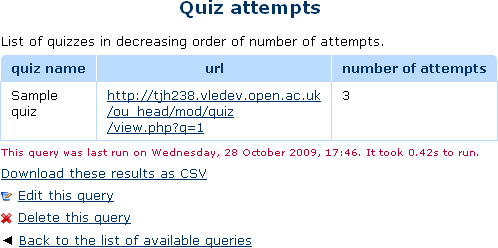
This report plugin allows Administrators to set up arbitrary database queries
to act as ad-hoc reports. Reports can be of two types, either run on demand,
or scheduled to run automatically. Other users with the right capability can
go in and see a list of queries that they have access to. Results can be viewed
on-screen or downloaded as CSV.
Comments
Comments are no longer open for new posts. Existing comments remain available to read.
For debugging, other than enabling $CFG->showcronsql and $CFG->showcrondebugging, what else would help? My complicating factor is we only have email enabled on our production system. So I can't enable debugging for too long.
Thanks,
Richard
Thanks,
Richard
You can do this manually if you have access to the server. The archived reports are stored in [moodledata]/admin_report_customsql, in folders named for the report id (which you can get from the URL) and the filename clearly includes the date and the time. You can just delete those files from the server.
Of course, it might be nice for someone to code a new feature for this report to automatically delete old reports after a certain amount of time.
For sorting (or any other more complex processing) any report can be downloaded as CSV, and then manipulated in a spreadsheet program like Excel or Libre Office.
thanks for this very useful plugin, we use it to communicate weekly reports of participants on security trainings in our plants.
As I can see, the plugin creates automatically an archive of the queries. My question: Is there a chance to delete the archived Versions without deleting the whole query?
Or is the archive a result of the SQL query?
Any help would be greatly appreciated.
CR Andreas
Email from my server works. I've set up two users: 1 a site admin, and 1 with `report/customsql:view`, and set these usernames as the recipients of a weekly report. I can see that the report is running: It tells me the latest time it ran and shows me the previous outputs that it generated, yet I get no emails. In the standard log for the report_customsql component there are entries for viewed and edited but none for notification.
How do I test that a scheduled weekly or monthly report runs? - I'd like a "run now" sort of option so I don't have to wait a week to find out that my query was actually buggy.
What is the first day of the week? Is that a Sunday or a Monday? The accepted answer is different depending on where you live. Here people respond "Monday".
I'm confused by the `%%STARTTIME%%` and `%%ENDTIME%%` settings. There's no explanation of how this relates to the date it runs in the interface and even the code seems a little confusing to me. Is the start time the beginning of the *previous* week and the end the end of the day before the report runs again? That's what I expect, so I could report on things that happened in the last week up until right now. I can't test these in a normal on-demand report since they don't get replaced.
Minor niggle: If I set up a report as "on demand" then run it, then change its type to "daily", I see "this report was run on (date)" in the text next to it. If I then open the report, the screen then says "This query has not yet been run.".
Plugin "report_customsql" is installed in incorrect location "$CFG->dirroot/blocks/customsql", expected location is "$CFG->dirroot/report/customsql"
More information about this error
×Debug info:
Error code: detectedmisplacedplugin
×Stack trace:
line 835 of /lib/upgradelib.php: plugin_misplaced_exception thrown
line 446 of /lib/upgradelib.php: call to upgrade_plugins_blocks()
line 1754 of /lib/upgradelib.php: call to upgrade_plugins()
line 699 of /admin/index.php: call to upgrade_noncore()
[Error] Write access check [/opt/bitnami/apps/moodle/htdocs/report]
Installation aborted due to validation failure
For the error above, if you execute the commands below, the installation will go through.
I wondering why need to run the command below though.
sudo chown -R bitnami:daemon /opt/bitnami/apps/moodle/htdocs/report
sudo chmod -R g+w /opt/bitnami/apps/moodle/htdocs/report