Ad-hoc database queries

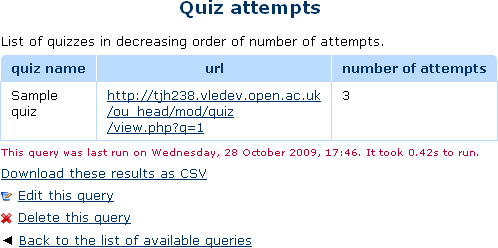
This report plugin allows Administrators to set up arbitrary database queries to act as ad-hoc reports. Reports can be of two types, either run on demand, or scheduled to run automatically. Other users with the right capability can go in and see a list of queries that they have access to. Results can be viewed on-screen or downloaded as CSV.
Price option: Free

Supports Moodle 1.9-5.1 See all versions
Latest release: 2 weeks ago
Installations: 4762
Downloads (last 90 days): 670

Frankenstyle name: report_customsql
Reports

Comments

Comments are no longer open for new posts. Existing comments remain available to read.

Note that typically a teacher is only a teacher within a particular course. These reports are outside courses, at the system-wide level. That is the wrong way round for permission inheritance to work.
You will need to make a new role "View reports" which give that capability, and which you assign at site-level.
(Alternatively, you could call the role something more meaningful like "Teaching staff" in case you need to use it for other purposes in the future.)
When I set the Teacher capability to view reports to 'Allow' and check any Teacher users' permissions, even though I've selected 'Allow' in Define roles, the user's capabilities don't say 'Allow'. Any idea why? When I log in as a Teacher I am not getting any 'Ad-hoc...' option under Reports under Course Admin either. It looks like it's being set at role level but the user isn't inheriting it ... Any help appreciated.
Right, I now see the problem. Someone added an upper-case $USER. Changing that one occurrence ot lower-case was the correct fix. Fix pushed to github and I am about to release it here.
I agree with Lester that changing all to upper case $USER in file: locallib.php allows emailed reports, cant set as email report otherwise. Tim, you said it yourself, PHP is case sensitive, on all platforms. You have to have proper case for it to work.
Debugging error code says 'cant find $USER at line xxx'. This is because it is written as '$user'. Unlike Windows, Linux thinks this is a different variable. Updating the code fixes the problem. I raise this to help other users of this brilliant module who may have similar problems. Everyone knows that Linux files are case sensitive and Windows files are not. This file needs updating in future release.
PHP syntax works the same on both Windows and Linux. It is case sensitive, on all platforms. Replacing $user with $USER throught a method will make no difference to how the code works. I don't know why making that change makes the code work. Are you sure you did not change something else at the same time? Try changing them all back ot lower case. I bet it will still work.
Hi Tim. Whether you think this is incorrect or not, this was picked up by debugging and changing the case has fixed the problem. Now I can get scheduled reports emailed out. This may not be an issue on Windows servers where case is ignored. Fixed my problem and I would recommend this to others using Linux server.
The previous comment is not correct.
Problem getting reports emailed resolved by correcting file locallib.php. Variable $USER is used in upper and lowercase throughout. Change to uppercase on lines: 433, 439, 547, 548. (5 changes in all). Maybe noticeable only on Linux servers.
I am using customsql 2014020700.
Yes, I originally tried without the single quotes. Just tried again and got same error message...
Error when executing the query: ERROR: Incorrect number of query parameters. Expected 1, got 0.
Debug info:
Error code: queryfailed
Stack trace:
line 476 of /lib/setuplib.php: moodle_exception thrown
line 102 of /report/customsql/view.php: call to print_error()
Using Moodle 2.5.2+ (Build: 20131101), plugin version 2013062400, running on MAMP (PHP Version 5.3.28) and MySQL 5.0.8.
Placeholders should not have single quotes.
AND mgi.courseid = :course_id
I'm struggling with the placeholder functionality sad
This query works, and returns results for courseid=32...
SELECT DISTINCT firstname, lastname
FROM prefix_user m
INNER JOIN prefix_grade_grades_history mgh
ON m.id =mgh.userid
INNER JOIN prefix_grade_items mgi
ON mgi.id = mgh.itemid
WHERE m.deleted = '0'
AND mgh.source = 'userdelete'
AND mgi.courseid = '32'
ORDER BY m.lastname, m.firstname
But if I try to put a placeholder so that the person running the report can choose the courseid, by replacing
AND mgi.courseid = '32'
with
AND mgi.courseid = ':course_id'
it does give me a placeholder text box on the edit screen, but it returns an error when the query is executed:
Error when executing the query: ERROR: Incorrect number of query parameters. Expected 1, got 0.
Debug info:
Error code: queryfailed
Stack trace:
line 476 of /lib/setuplib.php: moodle_exception thrown
line 102 of /report/customsql/view.php: call to print_error()
So, what am I missing/doing wrong?
It uses Moodle's usedate function to display dates, which should display them in your own language. I don't know why it is not working.
Hi, and thank you for this great plugin!
A stupid question maybe. I make a query on course completion dates, and give me results in english lang (like "monday 5th May"): is there any way to have results in other languages, such as mine? My DB, as far as i know, and my Moodle have NON ENGLISH lang settings, so I can't figure out how to solve this problem.
I need a query to count the number of students and Non-editing teachers who are enrolled per course. The final report must have Country, course's name, Number of students, Number of Non editing teachers. That's all. Can someone help me?