Ad-hoc database queries

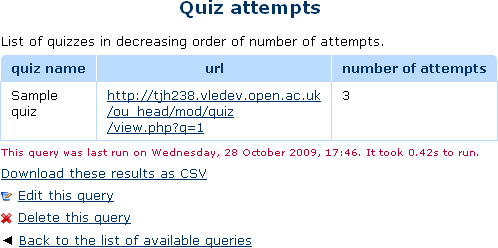
This report plugin allows Administrators to set up arbitrary database queries to act as ad-hoc reports. Reports can be of two types, either run on demand, or scheduled to run automatically. Other users with the right capability can go in and see a list of queries that they have access to. Results can be viewed on-screen or downloaded as CSV.
Price option: Free

Supports Moodle 1.9-5.1 See all versions
Latest release: 2 weeks ago
Installations: 4762
Downloads (last 90 days): 625

Frankenstyle name: report_customsql
Reports

Comments

Comments are no longer open for new posts. Existing comments remain available to read.

Hi! I installed this block in moodle 2.5 with oracle database and queries fail me. Can I confirm that you can work with oracle?
Thanks, a greeting
There is probably an earlier upgrade step missing. Have a look in the install.xml file, and see what columns should exist in the report_customsql_queries table, then manually edit the table in your database to match that. Then it should work.
does not work... tried to install it on a clean 2.5.2+ version and this is what I get
Debug info: Unknown column 'queryparams' in 'mdl_report_customsql_queries'
ALTER TABLE mdl_report_customsql_queries ADD querylimit BIGINT(10) NOT NULL DEFAULT 5000 AFTER queryparams
This is a wonderful plugin. I would suggest to add a "clone" query feature in case that we need to modify or test out the existing query but want to keep the original copy. I think this would be very helpful. Thanks Tim!
Hi Tim,
This is my favourite Moodle plugin. Do the reports run concurrently or one by one? Thanks, Andrew
Having the same problem with the Clean theme, namely,
Coding error detected, it must be fixed by a programmer: Trying to reference an unknown block region side-pre
I switched to Essential and [Add a new query] is available. Fortunately I'm doing this on a sandbox server -- I could not change the site wide theme on the fly for our Production server.
Thanks Tim. Will do that.
Your question is more about the badges DB tables than about this report. I suggest you post here: https://moodle.org/mod/forum/view.php?id=8085
Hi Tim,
First of all thanks for this great plugin. Makes life a lot easier.
I am creating a custom report page with all students ranked as per their grades in a course. I want to be able to show their earned badges as well but just need to know if that's possible.
I am not a SQL guy so please don't mind if this is a dumb question.
I can access their badgeid from mdl_badge_issued table which is working fine right now with a LEFT JOIN. but not able to find a way to show badge images there.
The other way of doing it, is maybe taking the badge id and using it as a part of an img link. But will need to get these data to a separate page for that.
Any help is really appreciated.
I am using 2.5.1+
Thanks,
Sumanta
Hi Mike - is there anything further on the 'side-pre' issue? We're getting this as well. Thanks - Andrea smile
I have installed this module but cannot find out how to use it. I cannot find it anywhere on any menu. I am using v2.5.1.
FWIW, I've been able to recreate Dave's issue using Moodle 2.5 and the Clean Theme when attempting to add a new query. It seems that the columns1.php file used for layout when adding a new query in this theme doesn't play nicely because it doesn't have the 'side-pre' region. I'm investigating that now smile
This report works with any theme. The error you are seeing is unrelated to this plug-in. There is no mention of 'side-pre' anywhere in the code.
Does this require an Open University theme? I'm getting an error that it's looking for a block region called side-pre