Panopto Student Submission

Versions
Current version
2026060300 Release (2026060300)
2026060300 Release
Plugin type: Activities
Frankenstyle component name: mod_panoptosubmission
Version build number: 2026060300
Version release name: 2026060300 Release
Maturity: Stable
Supported Moodle versions: 4.5, 5.0, 5.1
Repository URL (Git): https://github.com/Panopto/moodle-mod_panoptosubmission
Repository branch:
Repository tag: 2026060300
Issue/bug tracker URL: https://github.com/Panopto/moodle-mod_panoptosubmission/issues
Moodle Panopto Student Submission Activity
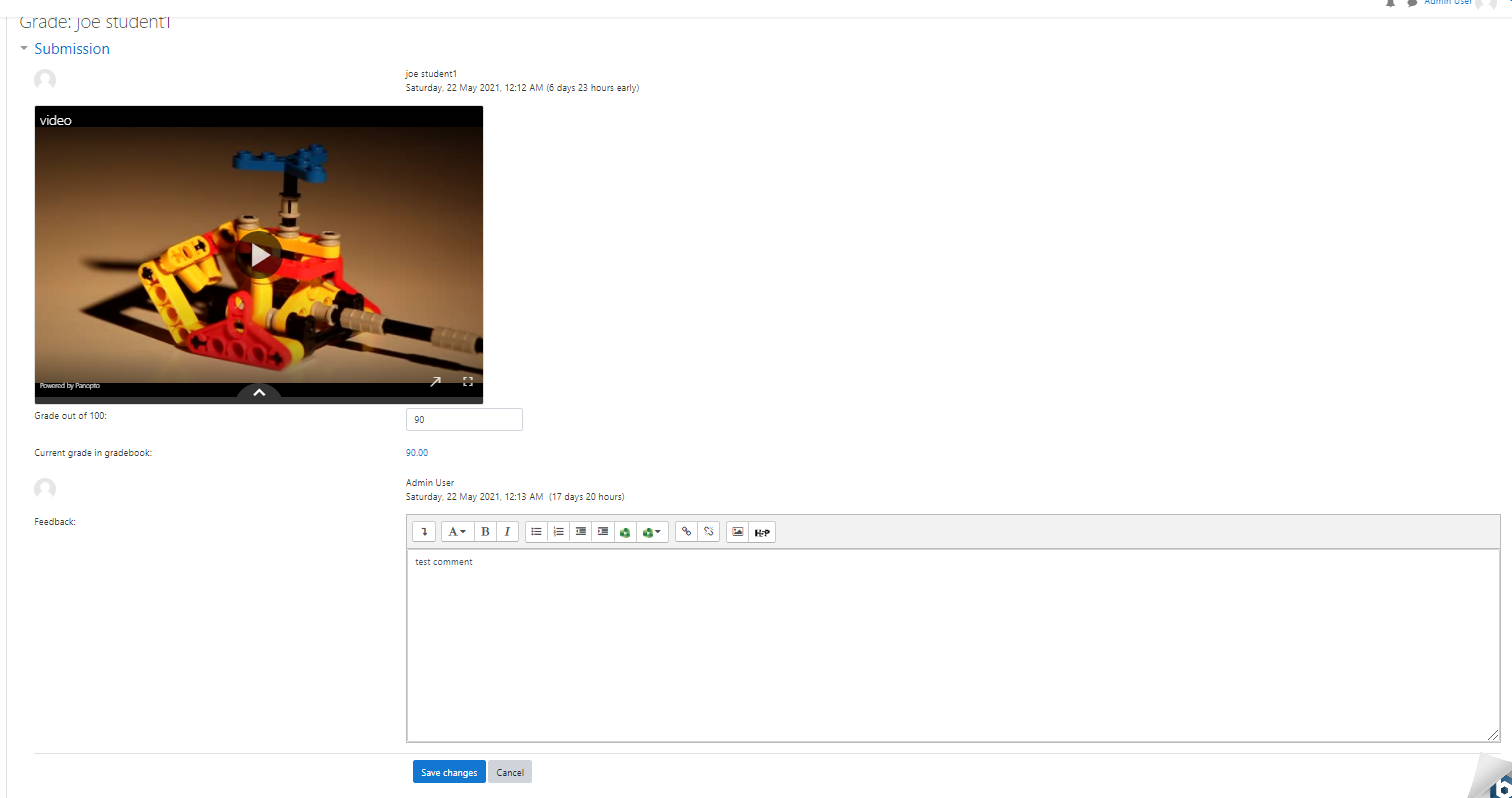
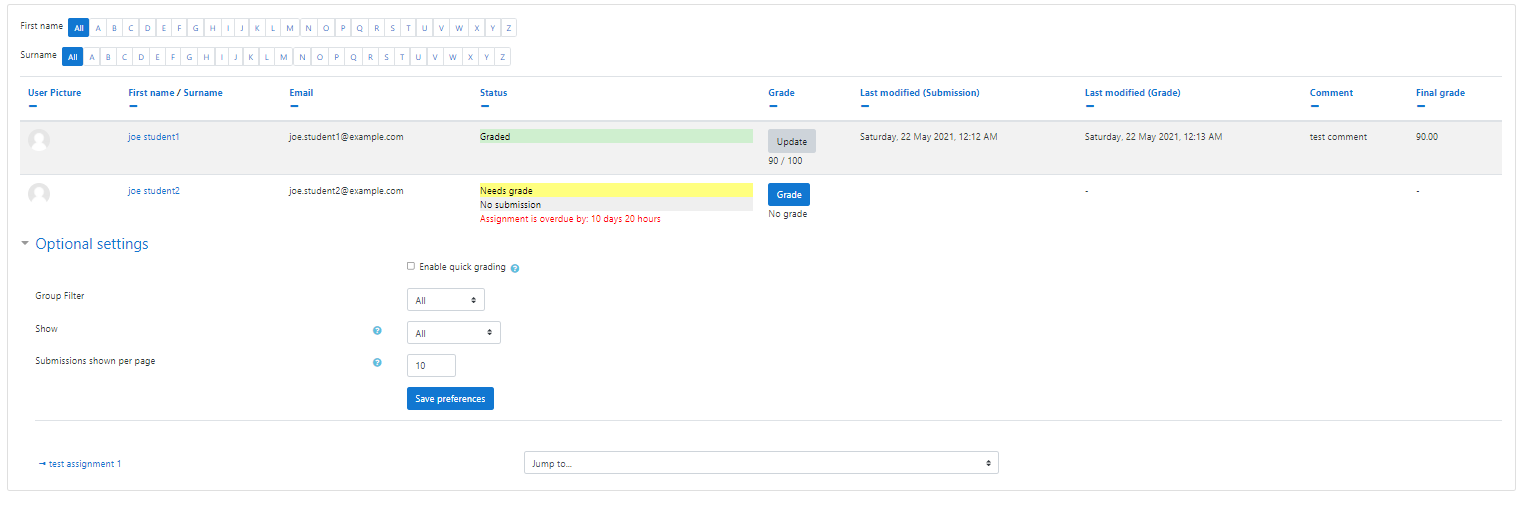
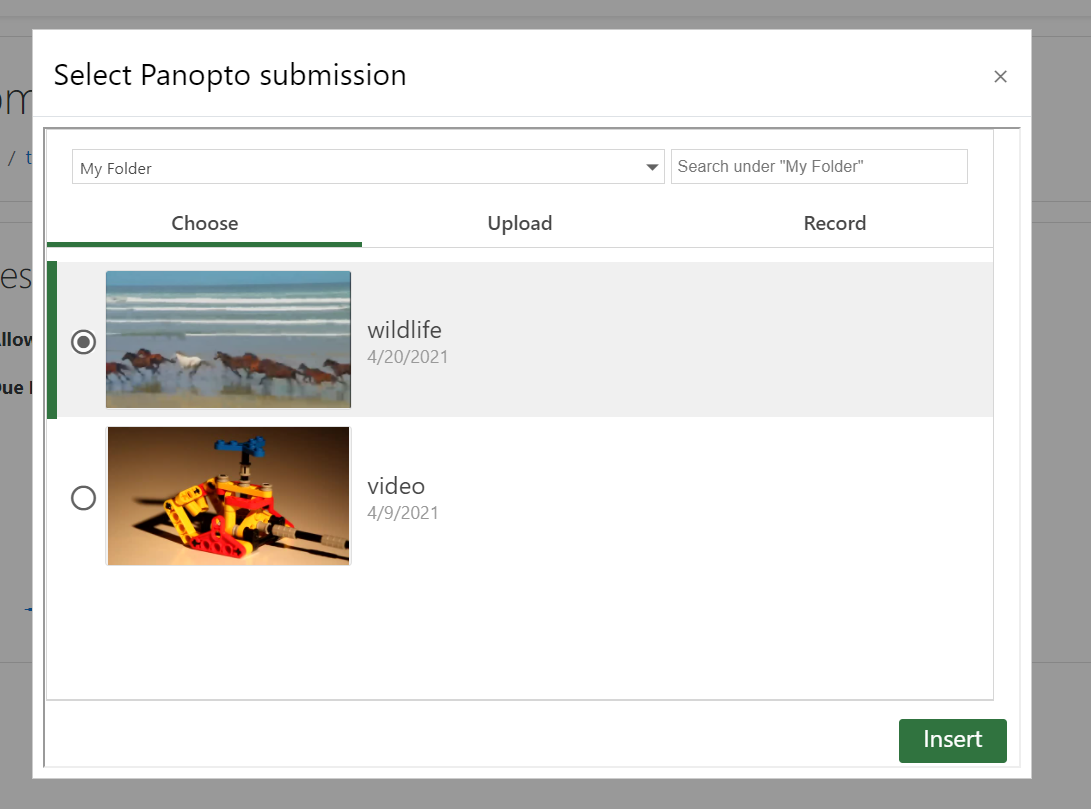
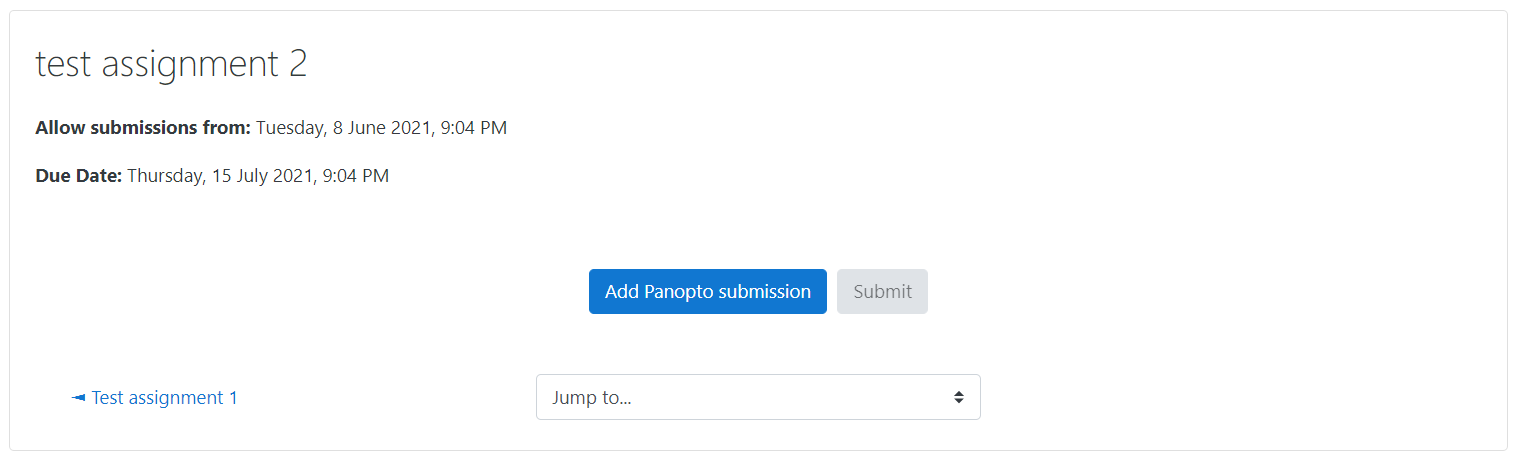
This plugin adds a Panopto Student Submission activity to Moodle. This tool can be used to create activities that will allow students to submit Panopto Content to be graded by graders for the course.
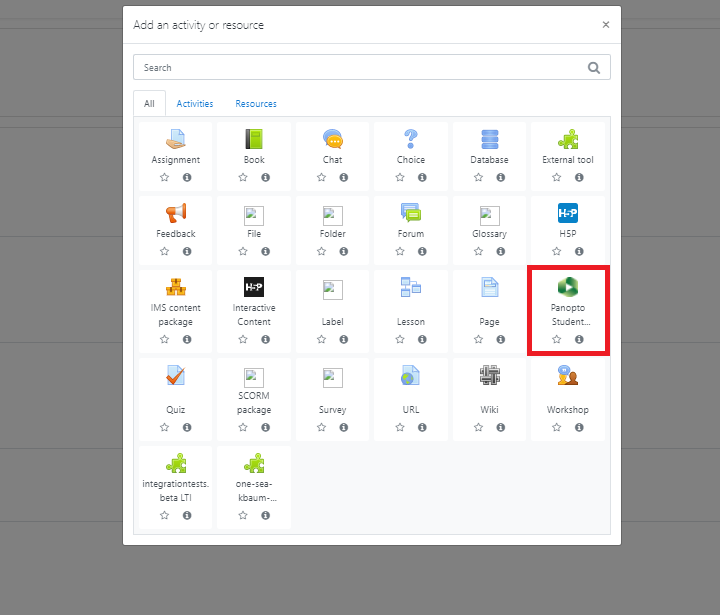
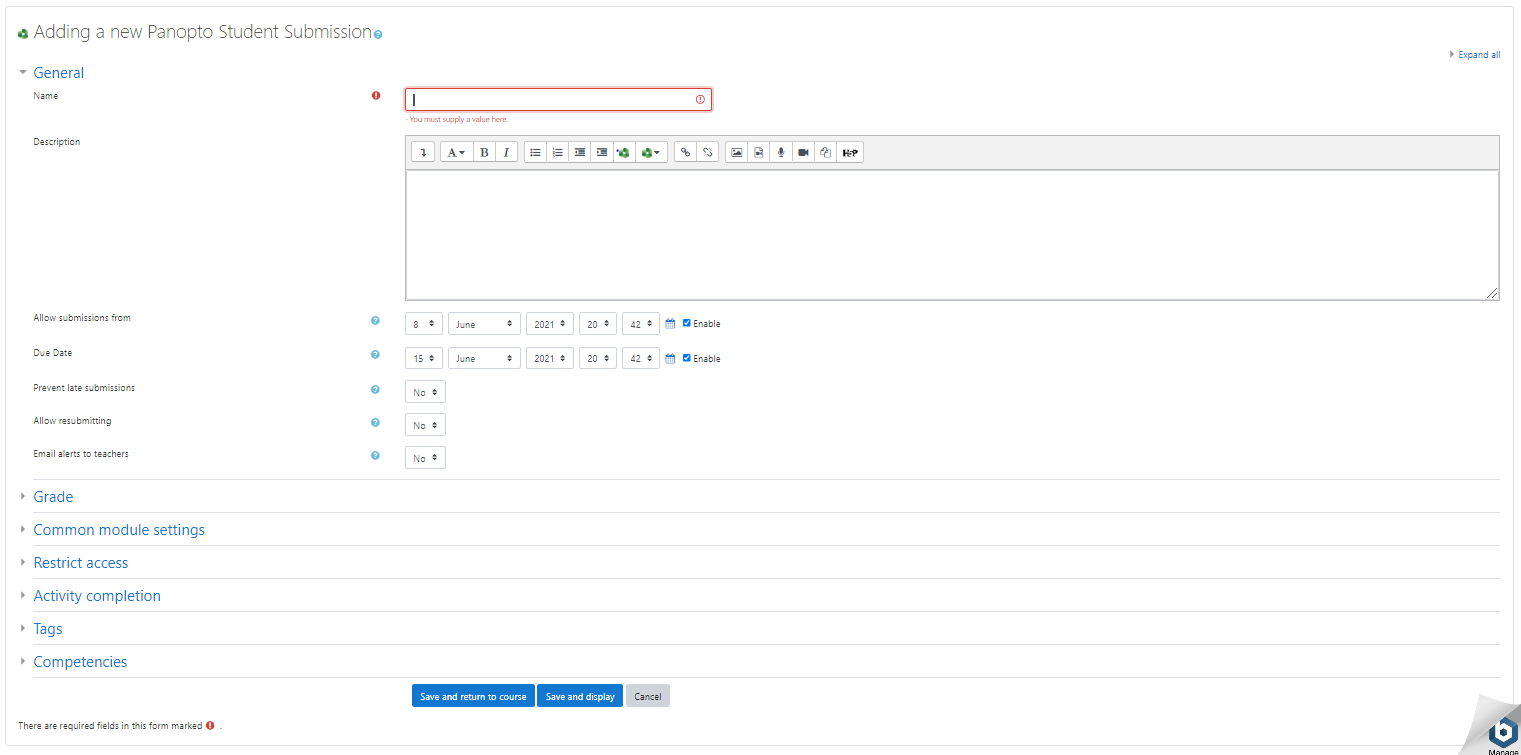
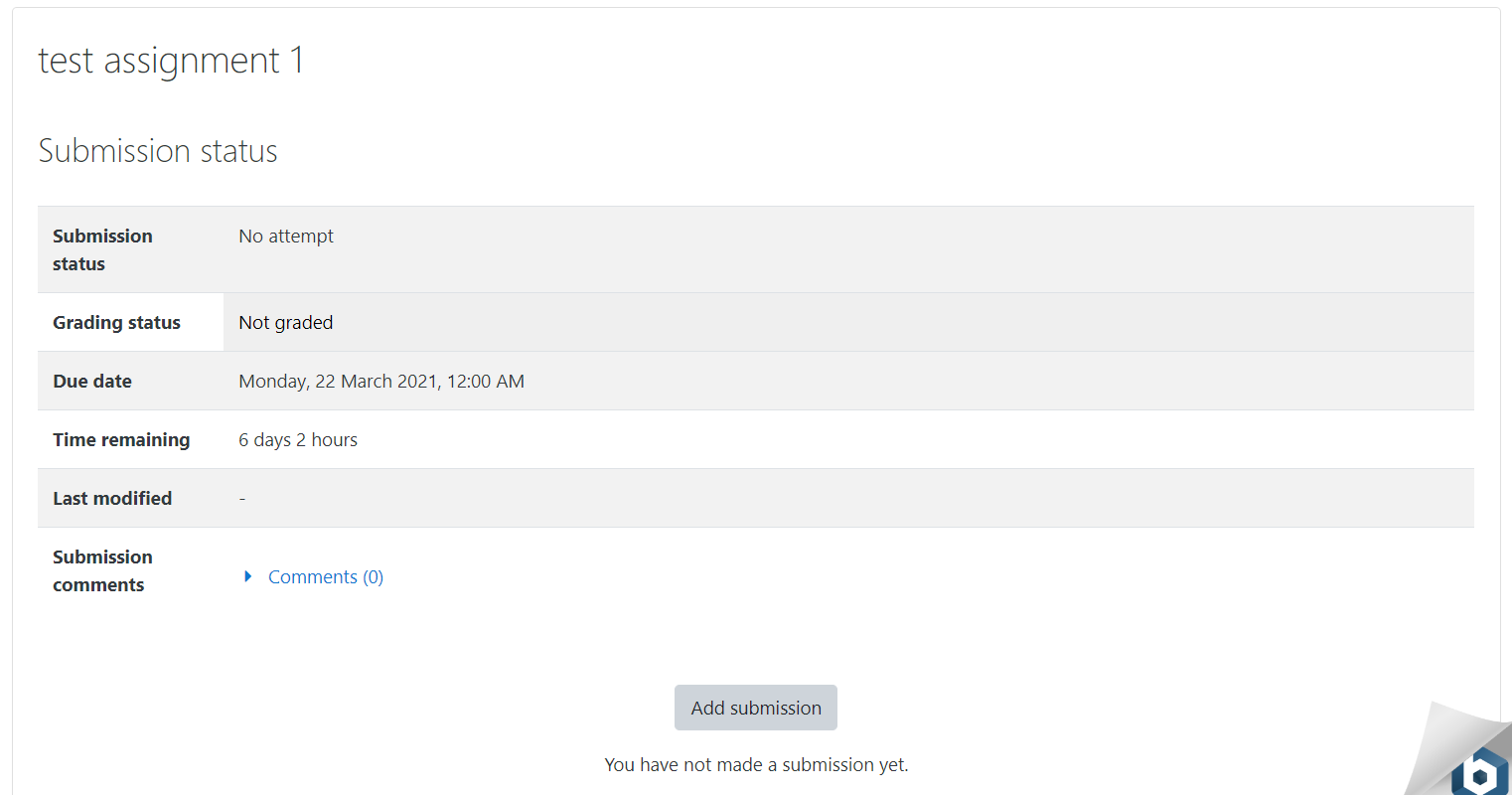
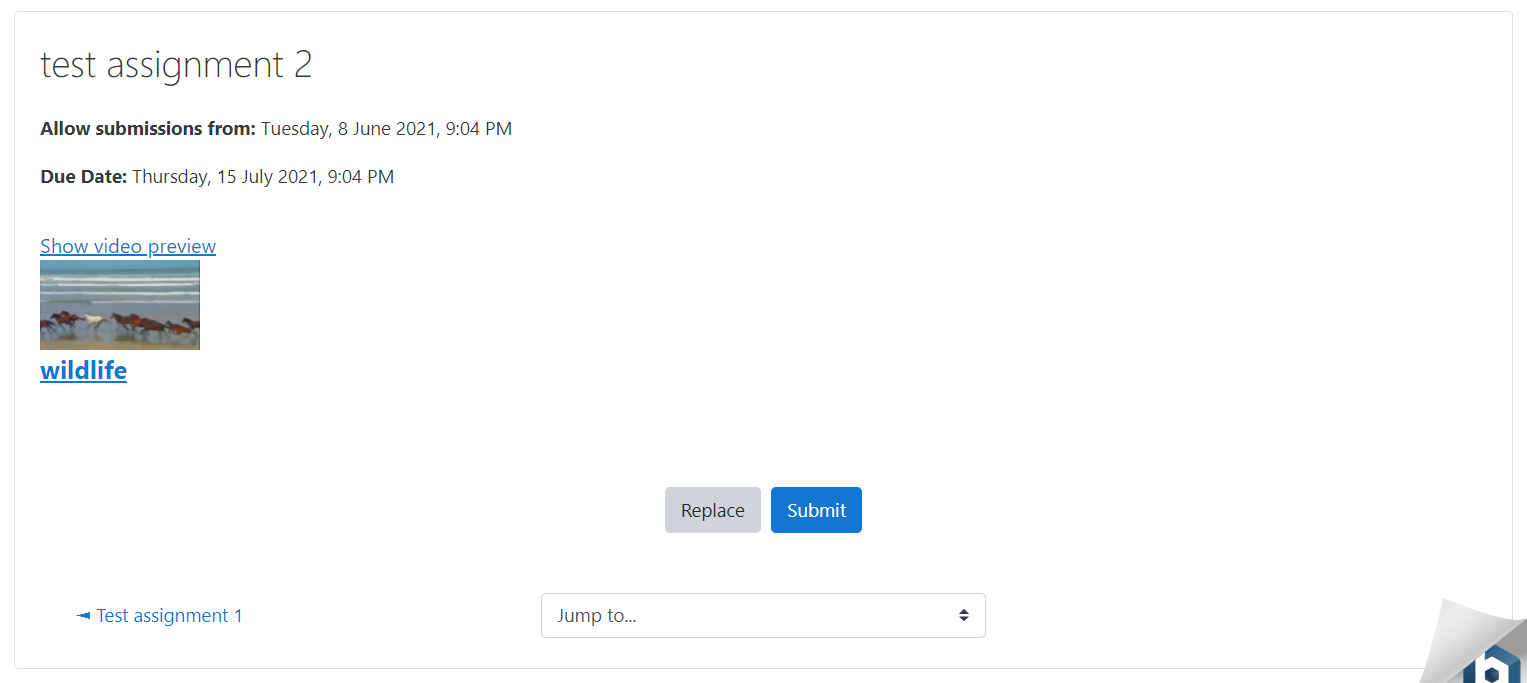
This is the current stable release version of the Panopto Student Submission Activity for Moodle. Once installed, this plugin will add a new Panopto Student Submission Activity to the Activity or Resources section of a course. The new activity allows instructors to create assignments, view the student submissions, and grade them. It also allows students to submit their Panopto videos to be graded.
This version supports (a) Moodle 4.5, 5.0, 5.1 running with PHP 7.4, 8.0, 8.1, 8.2 and (b) Panopto version 10.6.1 or later.
Updating the Panopto Student Submission Activity for Moodle plugin to this version also required that you update the Panopto Moodle Block plugin to version 2022122000 or higher.
Below is the list of updates from the previous release (2025112600).
🛠️ Bug Fixes
- LTI Integration: Resolved a login loop that occurred when selecting Panopto content via LTI across different domains. Implemented a cross-site repost handshake to ensure Moodle session cookies are correctly transmitted under modern SameSite=Lax policies.
- User Interface: Fixed a CSS issue where plugin styles were inadvertently interfering with global Moodle stylesheets, ensuring the core Moodle UI remains unaffected.
Documentation
For the most up to date documentation for the Panopto Student Submission plugin please see our online documentation at Panopto.
Installation
Download the Moodle Panopto Student Submission zip file from the github repository. You can also download this plugin from the official moodle.org page.
Navigate to the target Moodle site and log in as an administrator
Navigate to
Site Administration -> Plugins -> Install Plugins
Drag the zip file into the drag & drop box and go through the installation process.
An LTI Tool for the Panopto server must be configured on the Moodle site. If one does not already exist for your Panopto site please navigate to
Site Administration -> Plugins -> Activity modules -> External tool -> Manage preconfigured tools
Click
Add Preconfigured tool
Input the following information
- For LTI 1.1:
- Tool Name:
[panoptoServer] Course Embed Tool - Tool Url:
https://[panoptoServer]/Panopto/LTI/LTI.aspx - Consumer Key:
[Identity Provider > Instance Name] - Shared secret:
[Identity Provided > Application Key] - Custom Parameters:
panopto_student_submission_tool=true

panopto_single_selection=true

panopto_assignment_submission_content_item=true

use_panopto_sandbox=true

    - This custom parameter will give students personal folders regardless of IdP setting.
- Tool Name:
- For LTI 1.3:
- Tool Name:
[panoptoServer] Course Embed Tool - Url:
https://[panoptoServer]/Panopto/LTI/LTI.aspx - LTI version:
LTI 1.3 - Client ID:
[Identity Provider > LTI 1.3 Client Identifier] - Public key type:
Keyset URL - Public keyset:
[Identity Provider > LTI 1.3 Tool JWKS URL] - Initiate login URL:
[Identity Provider > LTI 1.3 Tool Login URL] - Redirection URI(s):
[Identity Provider > LTI 1.3 Tool Redirection URL]
- Tool Name:
- For LTI 1.1:
Save the LTI Tool
Pre-Requisites
- The Panopto block for Moodle is installed on the Moodle site with at least version 2022122000.
- The target course must be provisioned with Panopto.
2025112600 Release (2025112600)
2025112600 Release
Plugin type: Activities
Frankenstyle component name: mod_panoptosubmission
Version build number: 2025112600
Version release name: 2025112600 Release
Maturity: Stable
Supported Moodle versions: 4.1, 4.2, 4.3, 4.4, 4.5, 5.0, 5.1
Repository URL (Git): https://github.com/Panopto/moodle-mod_panoptosubmission
Repository branch:
Repository tag: 2025112600
Issue/bug tracker URL: https://github.com/Panopto/moodle-mod_panoptosubmission/issues
Moodle Panopto Student Submission Activity
This plugin adds a Panopto Student Submission activity to Moodle. This tool can be used to create activities that will allow students to submit Panopto Content to be graded by graders for the course.
This is the current stable release version of the Panopto Student Submission Activity for Moodle. Once installed, this plugin will add a new Panopto Student Submission Activity to the Activity or Resources section of a course. The new activity allows instructors to create assignments, view the student submissions, and grade them. It also allows students to submit their Panopto videos to be graded.
This version supports (a) Moodle 4.1, 4.2, 4.3, 4.4, 4.5, 5.0, 5.1 running with PHP 7.4, 8.0, 8.1, 8.2 and (b) Panopto version 10.6.1 or later.
Updating the Panopto Student Submission Activity for Moodle plugin to this version also required that you update the Panopto Moodle Block plugin to version 2022122000 or higher.
Below is the list of updates from the previous release (2024120600).
" New Features & Compatibility
- Moodle 5.0 & 5.1 Support: The Student Submission activity is now fully compatible with Moodle 5.0 and 5.1 versions
- Responsive Upload Window: The video upload interface has been refactored to be more responsive. It now adjusts to different screen sizes, providing a much better experience for students submitting assignments via tablets or mobile devices
🛠️Bug Fixes & Maintenance
- Plugin Deletion Process: Fixed a critical error logic that caused the uninstall process to fail or throw exceptions when attempting to delete the plugin from Moodle. The cleanup routine now handles database table removal and dependency checks correctly
Documentation
For the most up to date documentation for the Panopto Student Submission plugin please see our online documentation at Panopto.
Installation
Download the Moodle Panopto Student Submission zip file from the github repository. You can also download this plugin from the official moodle.org page.
Navigate to the target Moodle site and log in as an administrator
Navigate to
Site Administration -> Plugins -> Install Plugins
Drag the zip file into the drag & drop box and go through the installation process.
An LTI Tool for the Panopto server must be configured on the Moodle site. If one does not already exist for your Panopto site please navigate to
Site Administration -> Plugins -> Activity modules -> External tool -> Manage preconfigured tools
Click
Add Preconfigured tool
Input the following information
- For LTI 1.1:
- Tool Name:
[panoptoServer] Course Embed Tool - Tool Url:
https://[panoptoServer]/Panopto/LTI/LTI.aspx - Consumer Key:
[Identity Provider > Instance Name] - Shared secret:
[Identity Provided > Application Key] - Custom Parameters:
panopto_student_submission_tool=true

panopto_single_selection=true

panopto_assignment_submission_content_item=true

use_panopto_sandbox=true

    - This custom parameter will give students personal folders regardless of IdP setting.
- Tool Name:
- For LTI 1.3:
- Tool Name:
[panoptoServer] Course Embed Tool - Url:
https://[panoptoServer]/Panopto/LTI/LTI.aspx - LTI version:
LTI 1.3 - Client ID:
[Identity Provider > LTI 1.3 Client Identifier] - Public key type:
Keyset URL - Public keyset:
[Identity Provider > LTI 1.3 Tool JWKS URL] - Initiate login URL:
[Identity Provider > LTI 1.3 Tool Login URL] - Redirection URI(s):
[Identity Provider > LTI 1.3 Tool Redirection URL]
- Tool Name:
- For LTI 1.1:
Save the LTI Tool
Pre-Requisites
- The Panopto block for Moodle is installed on the Moodle site with at least version 2022122000.
- The target course must be provisioned with Panopto.
2024120600 Release (2024120600)
2024120600 Release
Plugin type: Activities
Frankenstyle component name: mod_panoptosubmission
Version build number: 2024120600
Version release name: 2024120600 Release
Maturity: Stable
Supported Moodle versions: 4.1, 4.2, 4.3, 4.4, 4.5
Repository URL (Git): https://github.com/Panopto/moodle-mod_panoptosubmission
Repository branch:
Repository tag: 2024120600
Issue/bug tracker URL: https://github.com/Panopto/moodle-mod_panoptosubmission/issues
Moodle Panopto Student Submission Activity
This plugin adds a Panopto Student Submission activity to Moodle. This tool can be used to create activities that will allow students to submit Panopto Content to be graded by graders for the course.
This is the latest release of the Panopto Student Submission Activity for Moodle. Once installed, this plugin will add a new Panopto Student Submission Activity to the Activity or Resources section of a course. The new activity allows instructors to create assignments, view the student submissions, and grade them. It also allows students to submit their Panopto videos to be graded.
This version supports (a) Moodle 4.1, 4.2, 4.3, 4.4, 4.5 running with PHP 7.4, 8.0, and 8.1 and (b) Panopto version 10.6.1 or later
Updating the Panopto Student Submission Activity for Moodle plugin to this version also requires that you update the Panopto Moodle Block plugin to version 2022122000 or higher.
Below is the list of updates from the previous release (2024070900).
- Added support for Moodle 4.5
Documentation
For the most up to date documentation for the Panopto Student Submission plugin please see our online documentation at Panopto.
Installation
Download the Moodle Panopto Student Submission zip file from the github repository. You can also download this plugin from the official moodle.org page.
Navigate to the target Moodle site and log in as an administrator
Navigate to
Site Administration -> Plugins -> Install Plugins
Drag the zip file into the drag & drop box and go through the installation process.
An LTI Tool for the Panopto server must be configured on the Moodle site. If one does not already exist for your Panopto site please navigate to
Site Administration -> Plugins -> Activity modules -> External tool -> Manage preconfigured tools
Click
Add Preconfigured tool
Input the following information
- For LTI 1.1:
- Tool Name:
[panoptoServer] Course Embed Tool - Tool Url:
https://[panoptoServer]/Panopto/LTI/LTI.aspx - Consumer Key:
[Identity Provider > Instance Name] - Shared secret:
[Identity Provided > Application Key] - Custom Parameters:
panopto_student_submission_tool=true

panopto_single_selection=true

panopto_assignment_submission_content_item=true

use_panopto_sandbox=true

    - This custom parameter will give students personal folders regardless of IdP setting.
- Tool Name:
- For LTI 1.3:
- Tool Name:
[panoptoServer] Course Embed Tool - Url:
https://[panoptoServer]/Panopto/LTI/LTI.aspx - LTI version:
LTI 1.3 - Client ID:
[Identity Provider > LTI 1.3 Client Identifier] - Public key type:
Keyset URL - Public keyset:
[Identity Provider > LTI 1.3 Tool JWKS URL] - Initiate login URL:
[Identity Provider > LTI 1.3 Tool Login URL] - Redirection URI(s):
[Identity Provider > LTI 1.3 Tool Redirection URL]
- Tool Name:
- For LTI 1.1:
Save the LTI Tool
Pre-Requisites
- The Panopto block for Moodle is installed on the Moodle site with at least version 2022122000.
- The target course must be provisioned with Panopto.
2024070900 Release (2024070900)
2024070900 Release
Plugin type: Activities
Frankenstyle component name: mod_panoptosubmission
Version build number: 2024070900
Version release name: 2024070900 Release
Maturity: Stable
Supported Moodle versions: 4.1, 4.2, 4.3, 4.4
Repository URL (Git): https://github.com/Panopto/moodle-mod_panoptosubmission
Repository branch:
Repository tag: 2024070900
Issue/bug tracker URL: https://github.com/Panopto/moodle-mod_panoptosubmission/issues
Moodle Panopto Student Submission Activity
This plugin adds a Panopto Student Submission activity to Moodle. This tool can be used to create activities that will allow students to submit Panopto Content to be graded by graders for the course.
This is the latest stable release of the Panopto Student Submission Activity for Moodle. Once installed, this plugin will add a new Panopto Student Submission Activity to the Activity or Resources section of a course. The new activity allows instructors to create assignments, view the student submissions, and grade them. It also allows students to submit their Panopto videos to be graded.
This version supports (a) Moodle 4.1, 4.2, 4.3, 4.4 running with PHP 7.4 and 8.0 and (b) Panopto version 10.6.1 or later
Updating the Panopto Student Submission Activity for Moodle plugin to this version also required that you update the Panopto Moodle Block plugin to version 2022122000 or higher.
Below is the list of updates from the previous release (2024012500).
- Added support for Moodle 4.4
- Added the Record RTC button to the Panopto Student Submission plugins when an instructor provides feedback during assignment grading.
Documentation
For the most up to date documentation for the Panopto Student Submission plugin please see our online documentation at Panopto.
Installation
Download the Moodle Panopto Student Submission zip file from the github repository. You can also download this plugin from the official moodle.org page.
Navigate to the target Moodle site and log in as an administrator
Navigate to
Site Administration -> Plugins -> Install Plugins
Drag the zip file into the drag & drop box and go through the installation process.
An LTI Tool for the Panopto server must be configured on the Moodle site. If one does not already exist for your Panopto site please navigate to
Site Administration -> Plugins -> Activity modules -> External tool -> Manage preconfigured tools
Click
Add Preconfigured tool
Input the following information
- For LTI 1.1:
- Tool Name:
[panoptoServer] Course Embed Tool - Tool Url:
https://[panoptoServer]/Panopto/LTI/LTI.aspx - Consumer Key:
[Identity Provider > Instance Name] - Shared secret:
[Identity Provided > Application Key] - Custom Parameters:
panopto_student_submission_tool=true

panopto_single_selection=true

panopto_assignment_submission_content_item=true

use_panopto_sandbox=true

    - This custom parameter will give students personal folders regardless of IdP setting.
- Tool Name:
- For LTI 1.3:
- Tool Name:
[panoptoServer] Course Embed Tool - Url:
https://[panoptoServer]/Panopto/LTI/LTI.aspx - LTI version:
LTI 1.3 - Client ID:
[Identity Provider > LTI 1.3 Client Identifier] - Public key type:
Keyset URL - Public keyset:
[Identity Provider > LTI 1.3 Tool JWKS URL] - Initiate login URL:
[Identity Provider > LTI 1.3 Tool Login URL] - Redirection URI(s):
[Identity Provider > LTI 1.3 Tool Redirection URL]
- Tool Name:
- For LTI 1.1:
Save the LTI Tool
Pre-Requisites
- The Panopto block for Moodle is installed on the Moodle site with at least version 2022122000.
- The target course must be provisioned with Panopto.
2024012500 Release (2024012500)
2024012500 Release
Plugin type: Activities
Frankenstyle component name: mod_panoptosubmission
Version build number: 2024012500
Version release name: 2024012500 Release
Maturity: Stable
Supported Moodle versions: 4.1, 4.2, 4.3
Repository URL (Git): https://github.com/Panopto/moodle-mod_panoptosubmission
Repository branch:
Repository tag: 2024012500
Issue/bug tracker URL: https://github.com/Panopto/moodle-mod_panoptosubmission/issues
Moodle Panopto Student Submission Activity
This plugin adds a Panopto Student Submission activity to Moodle. This tool can be used to create activities that will allow students to submit Panopto Content to be graded by graders for the course.
This is the latest stable release of the Panopto Student Submission Activity for Moodle. Once installed, this plugin will add a new Panopto Student Submission Activity to the Activity or Resources section of a course. The new activity allows instructors to create assignments, view the student submissions, and grade them. It also allows students to submit their Panopto videos to be graded.
This version supports (a) Moodle 4.1, 4.2, 4.3 running with PHP 7.4 and 8.0 and (b) Panopto version 10.6.1 or later
Updating the Panopto Student Submission Activity for Moodle plugin to this version also required that you update the Panopto Moodle Block plugin to version 2022122000 or higher.
Below is the list of updates from the previous release (2024012500).
- Added support for Moodle 4.3
- Enabled student notifications for Panopto Student Submission activity
Documentation
For the most up to date documentation for the Panopto Student Submission plugin please see our online documentation at Panopto.
Installation
- Navigate to the target Moodle site and log in as an administrator
- Navigate to Site Administration -> Plugins -> Install Plugins
- Drag the zip file into the drag & drop box and go through the installation process.
- An LTI Tool for the Panopto server must be configured on the Moodle site. If one does not already exist for your Panopto site please navigate to Site administration -> Plugins -> Activity modules -> External tool -> Manage preconfigured tools
- Click Add Preconfigured tool.
- For LTI 1.3 please follow this guide: https://support.panopto.com/s/article/How-to-Set-Up-LTI-1-3-Links-in-Moodle-Courses
- For LTI 1.1 Input the following information
- Tool Name: [panoptoServer] Student Submission Tool
- Tool Url: https://[panoptoServer]/Panopto/LTI/LTI.aspx
- Consumer Key:[Identity Provider instance name]
- Shared secret: [Identity Provided application key]
- Custom Parameters:
panopto_student_submission_tool=true

panopto_single_selection=true

panopto_assignment_submission_content_item=true

use_panopto_sandbox=true

    - This custom parameter will give students personal folders regardless of IdP setting.
- Save the LTI Tool
Pre-Requisites
- The Panopto block for Moodle is installed on the Moodle site.
- The target course must be provisioned with Panopto.
2023083100 Release (2023083100)
2023083100 Release
Plugin type: Activities
Frankenstyle component name: mod_panoptosubmission
Version build number: 2023083100
Version release name: 2023083100 Release
Maturity: Stable
Supported Moodle versions: 3.11, 3.9, 4.0, 4.1, 4.2
Repository URL (Git): https://github.com/Panopto/moodle-mod_panoptosubmission
Repository branch:
Repository tag: 2023083100
Issue/bug tracker URL: https://github.com/Panopto/moodle-mod_panoptosubmission/issues
Moodle Panopto Student Submission Activity
This plugin adds a Panopto Student Submission activity to Moodle. This tool can be used to create activities that will allow students to submit Panopto Content to be graded by graders for the course.
This is the latest stable release of the Panopto Student Submission Activity for Moodle. Once installed, this plugin will add a new Panopto Student Submission Activity to the Activity or Resources section of a course. The new activity allows instructors to create assignments, view the student submissions, and grade them. It also allows students to submit their Panopto videos to be graded.
This version supports (a) Moodle 3.9, 3.11, 4.0, 4.1, 4.2 running with PHP 7.4 and 8.0 and (b) Panopto version 10.6.1 or later
Updating the Panopto Student Submission Activity for Moodle plugin to this version also required that you update the Panopto Moodle Block plugin to version 2022122000 or higher.
Below is the list of updates from the previous release (2023031400).
- Added support for Moodle 4.2
- Fixed an issue where the Student Submission Assignment would not show up on the course page after an instructor creates a Panopto Student Submission Activity assignment.
- Fixed an issue when viewing submitted Panopto Student Submission Assignments that would not allow filtering the list to students who had not yet submitted the assignment.
- Added the grading summary view to the Panopto Student Submission Activity.
- Fixed an issue where the description for an assignment created with the Panopto Student Submission Activity could duplicate the description.
- Removed the Group work settings when creating a new Panopto Student Submission assignment, as the Panopto Student Submission activity does not support group work.
- Fixed a number of minor warnings that may be displayed if debugging was enabled on a Moodle server.
Documentation
For the most up to date documentation for the Panopto Student Submission plugin please see our online documentation at Panopto.
Installation
- Download the Moodle Panopto Student Submission zip file from the github repository. We will work with Moodle.org to add this into the app directory. Until then please use our github as the official release site.
- Navigate to the target Moodle site and log in as an administrator
- Navigate to Site Administration -> Plugins -> Install Plugins
- Drag the zip file into the drag & drop box and go through the installation process.
- An LTI Tool for the Panopto server must be configured on the Moodle site. If one does not already exist for your Panopto site please navigate to Site administration -> Plugins -> Activity modules -> External tool -> Manage preconfigured tools
- Click Add Preconfigured tool.
- Input the following information
- Tool Name: [panoptoServer] Student Submission Tool
- Tool Url: https://[panoptoServer]/Panopto/LTI/LTI.aspx
- Consumer Key:[Identity Provider instance name]
- Shared secret: [Identity Provided application key]
- Custom Parameters:
panopto_student_submission_tool=true

panopto_single_selection=true

panopto_assignment_submission_content_item=true

use_panopto_sandbox=true

    - This custom parameter will give students personal folders regardless of IdP setting.
- Save the LTI Tool
Pre-Requisites
- The Panopto block for Moodle is installed on the Moodle site.
- The target course must be provisioned with Panopto.
(2023031400)
Plugin type: Activities
Frankenstyle component name: mod_panoptosubmission
Version build number: 2023031400
Version release name:
Maturity: Stable
Supported Moodle versions: 3.11, 3.9, 4.0, 4.1
Repository URL (Git): https://github.com/Panopto/moodle-mod_panoptosubmission
Repository branch:
Repository tag: 2023031400
Issue/bug tracker URL: https://github.com/Panopto/moodle-mod_panoptosubmission/issues
Moodle Panopto Student Submission Activity
This plugin adds a Panopto Student Submission activity to Moodle. This tool can be used to create activities that will allow students to submit Panopto Content to be graded by graders for the course.
This is the latest stable release of the Panopto Student Submission Activity for Moodle. Once installed, this plugin will add a new Panopto Student Submission Activity to the Activity or Resources section of a course. The new activity allows instructors to create assignments, view the student submissions, and grade them. It also allows students to submit their Panopto videos to be graded.
This version supports (a) Moodle 3.9, 3.11, 4.0, 4.1 running with PHP 7.4 and 8.0 and (b) Panopto version 10.6.1 or later
Updating the Panopto Student Submission Activity for Moodle plugin to this version also required that you update the Panopto Moodle Block plugin to version 2022122000 or higher.
Below is the list of updates from the previous beta release (2023012400).
- Added support for Moodle 4.1
Documentation
For the most up to date documentation for the Panopto Student Submission plugin please see our online documentation at Panopto.
Installation
- Download the Moodle Panopto Student Submission zip file from the github repository. We will work with Moodle.org to add this into the app directory. Until then please use our github as the official release site.
- Navigate to the target Moodle site and log in as an administrator
- Navigate to Site Administration -> Plugins -> Install Plugins
- Drag the zip file into the drag & drop box and go through the installation process.
- An LTI Tool for the Panopto server must be configured on the Moodle site. If one does not already exist for your Panopto site please navigate to Site administration -> Plugins -> Activity modules -> External tool -> Manage preconfigured tools
- Click Add Preconfigured tool.
- Input the following information
- Tool Name: [panoptoServer] Student Submission Tool
- Tool Url: https://[panoptoServer]/Panopto/LTI/LTI.aspx
- Consumer Key:[Identity Provider instance name]
- Shared secret: [Identity Provided application key]
- Custom Parameters:
panopto_student_submission_tool=true

panopto_single_selection=true

panopto_assignment_submission_content_item=true

use_panopto_sandbox=true

    - This custom parameter will give students personal folders regardless of IdP setting.
- Save the LTI Tool
Pre-Requisites
- The Panopto block for Moodle is installed on the Moodle site.
- The target course must be provisioned with Panopto.
2023012400 Release (2023012400)
2023012400 Release
Plugin type: Activities
Frankenstyle component name: mod_panoptosubmission
Version build number: 2023012400
Version release name: 2023012400 Release
Maturity: Stable
Supported Moodle versions: 3.11, 3.9, 4.0
Repository URL (Git): https://github.com/Panopto/moodle-mod_panoptosubmission
Repository branch:
Repository tag: 2023012400
Issue/bug tracker URL: https://github.com/Panopto/moodle-mod_panoptosubmission/issues
Moodle Panopto Student Submission Activity
This plugin adds a Panopto Student Submission activity to Moodle. This tool can be used to create activities that will allow students to submit Panopto Content to be graded by graders for the course.
This is the latest stable release of the Panopto Student Submission Activity for Moodle. Once installed, this plugin will add a new Panopto Student Submission Activity to the Activity or Resources section of a course. The new activity allows instructors to create assignments, view the student submissions, and grade them. It also allows students to submit their Panopto videos to be graded.
This version supports (a) Moodle 3.9, 3.11, 4.0 running with PHP 7.4 and 8.0 and (b) Panopto version 10.6.1 or later
Updating the Panopto Student Submission Activity for Moodle plugin to this version also required that you update the Panopto Moodle Block plugin to version 2022122000 or higher.
Below is the list of updates from the previous release (2022122000).
- Fixed an issue when updating from version 2022090700 of the Panopto Student Submission Activity that could cause an error when using the Student Submission Activity.
- Panopto Student Submission Activity for Moodle is now also available on the Moodle.org plugins page (https://moodle.org/plugins/mod_panoptosubmission)
Documentation
For the most up to date documentation for the Panopto Student Submission plugin please see our online documentation at Panopto.
Installation
- Download the Moodle Panopto Student Submission zip file from the github repository. We will work with Moodle.org to add this into the app directory. Until then please use our github as the official release site.
- Navigate to the target Moodle site and log in as an administrator
- Navigate to Site Administration -> Plugins -> Install Plugins
- Drag the zip file into the drag & drop box and go through the installation process.
- An LTI Tool for the Panopto server must be configured on the Moodle site. If one does not already exist for your Panopto site please navigate to Site administration -> Plugins -> Activity modules -> External tool -> Manage preconfigured tools
- Click Add Preconfigured tool.
- Input the following information
- Tool Name: [panoptoServer] Student Submission Tool
- Tool Url: https://[panoptoServer]/Panopto/LTI/LTI.aspx
- Consumer Key:[Identity Provider instance name]
- Shared secret: [Identity Provided application key]
- Custom Parameters:
panopto_student_submission_tool=true

panopto_single_selection=true

panopto_assignment_submission_content_item=true

use_panopto_sandbox=true

    - This custom parameter will give students personal folders regardless of IdP setting.
- Save the LTI Tool
Pre-Requisites
- The Panopto block for Moodle is installed on the Moodle site.
- The target course must be provisioned with Panopto.
2022122000 Release (2022122000)
2022122000 Release
Plugin type: Activities
Frankenstyle component name: mod_panoptosubmission
Version build number: 2022122000
Version release name: 2022122000 Release
Maturity: Stable
Supported Moodle versions: 3.11, 3.9, 4.0
Repository URL (Git): https://github.com/Panopto/moodle-mod_panoptosubmission
Repository branch:
Repository tag: 2022122000
Issue/bug tracker URL: https://github.com/Panopto/moodle-mod_panoptosubmission/issues
Moodle Panopto Student Submission Activity
This is the latest stable release of the Panopto Student Submission Activity for Moodle. Once installed, this plugin will add a new Panopto Student Submission Activity to the Activity or Resources section of a course. The new activity allows instructors to create assignments, view the student submissions, and grade them. It also allows students to submit their Panopto videos to be graded.
This version supports (a) Moodle 3.9, 3.11, 4.0 running with PHP 7.4 and 8.0 and (b) Panopto version 10.6.1 or later
Updating the Panopto Student Submission Activity for Moodle plugin to this version also required that you update the Panopto Moodle Block plugin to version 2022122000 or higher.
Below is the list of updates from the previous release (2022090700).
- Fixed an issue that could cause grades to fail to be inserted in the gradebook when using rubrics for grading.
- Fixed an issue that could cause an error when submitting or updating a grade from the Panopto Student Submission Activity in some rare cases.
- Fixed an issue that could display an incorrect error if the Moodle course was not provisioned to Panopto when a student would try to submit an assignment. We will now attempt to automatically provision the course at that time, or display the correct error message if the configuration data is missing.
- Fixed an issue that could result in an error in the Panopto Student Submission Activity due to using a case-sensitive check on the Panopto server FQDN. This check has now been made case-insensitive.
- Added the "Cut-Off" date option to the Panopto Student Submission Activity, to match other Moodle assignments.
- Minor changes to meet Moodle coding standards.
- Implemented GitHub actions to automatically run Moodle tests when changes are made to the plugin.
Documentation
For the most up to date documentation for the Panopto Student Submission plugin please see our online documentation at Panopto.
Installation
- Download the Moodle Panopto Student Submission zip file from the github repository. We will work with Moodle.org to add this into the app directory. Until then please use our github as the official release site.
- Navigate to the target Moodle site and log in as an administrator
- Navigate to Site Administration -> Plugins -> Install Plugins
- Drag the zip file into the drag & drop box and go through the installation process.
- An LTI Tool for the Panopto server must be configured on the Moodle site. If one does not already exist for your Panopto site please navigate to Site administration -> Plugins -> Activity modules -> External tool -> Manage preconfigured tools
- Click Add Preconfigured tool.
- Input the following information
- Tool Name: [panoptoServer] Student Submission Tool
- Tool Url: https://[panoptoServer]/Panopto/LTI/LTI.aspx
- Consumer Key:[Identity Provider instance name]
- Shared secret: [Identity Provided application key]
- Custom Parameters:
panopto_student_submission_tool=true

panopto_single_selection=true

panopto_assignment_submission_content_item=true

use_panopto_sandbox=true

    - This custom parameter will give students personal folders regardless of IdP setting.
- Save the LTI Tool
Pre-Requisites
- The Panopto block for Moodle is installed on the Moodle site.
- The target course must be provisioned with Panopto.
2022022300 Release (2022022300)
2022022300 Release
Plugin type: Activities
Frankenstyle component name: mod_panoptosubmission
Version build number: 2022022300
Version release name: 2022022300 Release
Maturity: Stable
Supported Moodle versions: 3.10, 3.11, 3.9
Repository URL (Git): https://github.com/Panopto/Moodle-Panopto-Student-Submission
Repository branch:
Repository tag:
Issue/bug tracker URL: https://github.com/Panopto/moodle-mod_panoptosubmission/issues
Moodle Panopto Student Submission Activity
This plugin adds a Panopto Student Submission activity to Moodle. This tool can be used to create activities that will allow students to submit Panopto Content to be graded by graders for the course.
Documentation
For the most up to date documentation for the Panopto Student Submission plugin please see our online documentation at Panopto.
Installation
- Download the Moodle Panopto Student Submission zip file from the github repository. We will work with Moodle.org to add this into the app directory. Until then please use our github as the official release site.
- Navigate to the target Moodle site and log in as an administrator
- Navigate to Site Administration -> Plugins -> Install Plugins
- Drag the zip file into the drag & drop box and go through the installation process.
- An LTI Tool for the Panopto server must be configured on the Moodle site. If one does not already exist for your Panopto site please navigate to Site administration -> Plugins -> Activity modules -> External tool -> Manage preconfigured tools
- Click Add Preconfigured tool.
- Input the following information
- Tool Name: [panoptoServer] Student Submission Tool
- Tool Url: https://[panoptoServer]/Panopto/LTI/LTI.aspx
- Consumer Key:[Identity Provider instance name]
- Shared secret: [Identity Provided application key]
- Custom Parameters:
panopto_student_submission_tool=true

panopto_single_selection=true

panopto_assignment_submission_content_item=true

use_panopto_sandbox=true

    - This custom parameter will give students personal folders regardless of IdP setting.
- Save the LTI Tool
Pre-Requisites
- The Panopto block for Moodle is installed on the Moodle site.
- The target course must be provisioned with Panopto.