Plugindescription:
deprecated: ATTO will be removed from moodle so this plugin will not get updates for new moodleversions.
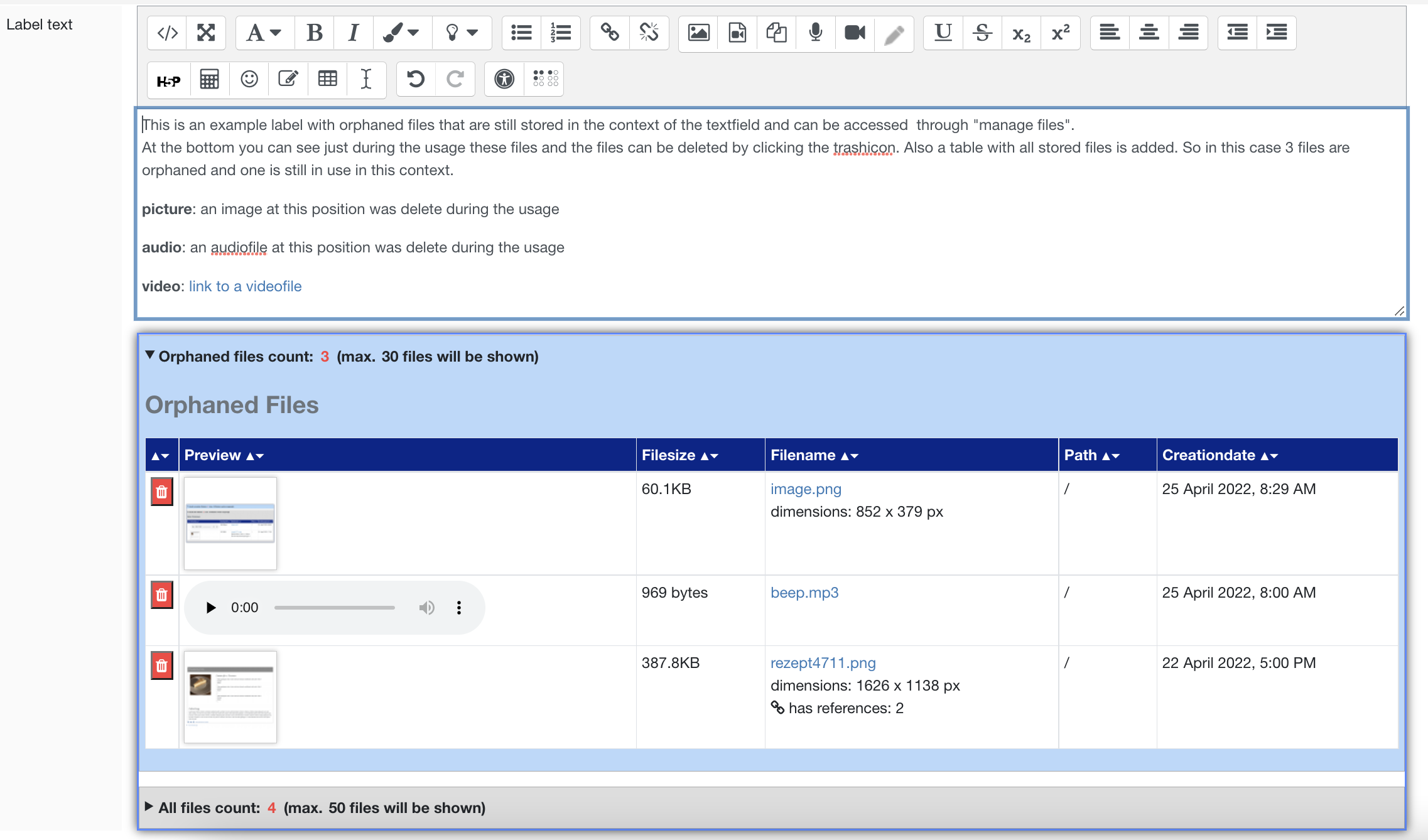
This plugin adds a table below the editor and while editing the text each image or file that is deleted and not referenced any more in this context will be added to the table. Thus the user can see which files are still stored in the context of the label but not referenced. If needed the user can delete orphaned files by clicking at the trashicon.
Attention: The deletion will be finished bei clicking on the Save-button. The cancel-button will discard the deletions and the files will still be stored.
![example label to show the functionality of the plugin]()
After installing
1. To activate this plugin add "orphaned'' to the "Atto toolbar settings"
2. For version 1.1.2 and 1.1.3 the report by default is only enabled for siteadmins because of the following default settings.
atto_orphaned | enableplugin is not activated and
atto_orphaned | isactiveforsiteadmin is activated
To make the report accessible to all users with capability atto_orphaned:view please activate atto_orphaned | enableplugin
(Attention: from version 1.1.4 the defaults will change to
atto_orphaned | enableplugin is activated and
atto_orphaned | isactiveforsiteadmin is not activated
Pluginsettings in websiteadministration:
![Screenshot of some configurations]()
![screenshot of some settings]()
Tracker: https://tracker.moodle.org/browse/MDL-74277