Sync Webservice
Versions
Current version
(2024061800)
Plugin type: Local plugins
Frankenstyle component name: local_sync_service
Version build number: 2024061800
Version release name:
Maturity: Alpha
Supported Moodle versions: 3.11, 4.0, 4.1, 4.2
Repository URL (Git): https://github.com/MoodleSync/sync-plugin
Repository branch:
Repository tag: v3.0.5
Issue/bug tracker URL: https://github.com/MoodleSync/sync-plugin
Moodle Plugin "sync_service"
Since version 3.0.5: The setting "restrictedusers" is now disabled and the webservice will now be available for all users.
This plugin for Moodle (type: local) adds serveral functions to the Moodle Web Service API.
Those fuctions allow users and external services to remotely create and move new course modules.
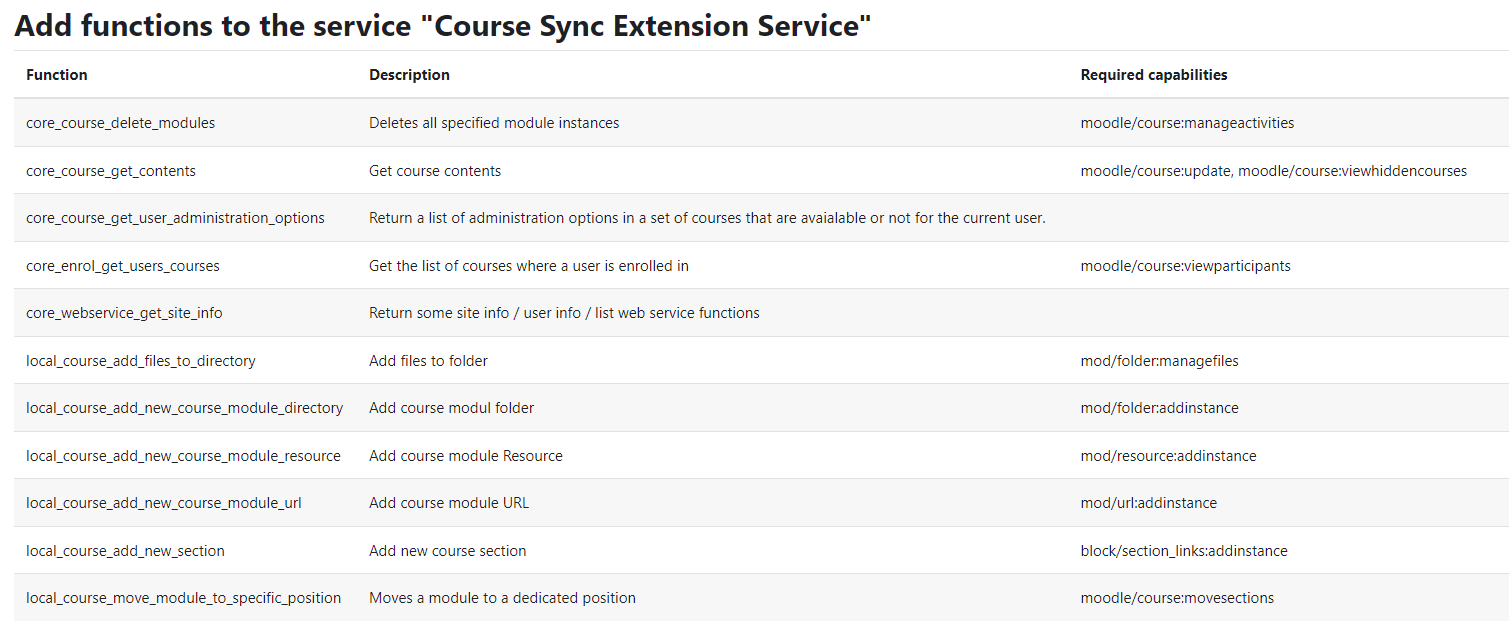
Furthermore an external service (called "Course Sync Extension Service") containing the newly added functions and other core web service functions, which are helpful to use the added functions, is added.
The plugin is developed to work with the desktop application MoodleSync, used for file synchronization between a local directory and the learning platform Moodle.
Following functions are added:
Function | Description | Note
-------- | -------- | --------
local_course_add_new_course_module_url |Add course module URL |
local_course_add_new_course_module_resource | Add course module Resource | File needs to be uploaded with "/webservice/upload.php" web service call.
local_course_add_new_course_module_directory | Add course modul Folder | Files need to be uploaded with "/webservice/upload.php" web service call.
local_course_add_files_to_directory | Add files to existing folders | Files need to be uploaded with "/webservice/upload.php" web service call; since version 3.0.0
local_course_move_module_to_specific_position | Move a module to a dedicated position |
local_course_add_new_section | Create and position a new course section | Since version 2.0.0
Usage:
- Tested on Moodle versions 3.11.4, 4.0.2, 4.1.2. and 4.2.2.
- Usage of the "REST (returning JSON)"- web service protocol.
- To install the plugin, you may use the in-build plugin installation interface. Or you can unzip the archive and copy the folder "sync_service" into the directory "\server\moodle\local". Afterwards restart Moodle, log-in as an admin and follow the installation process.
- To use the added fuctions, either enable and use the added external service (file upload and file download must be allowed) or create a new external service.
(2023100800)
Plugin type: Local plugins
Frankenstyle component name: local_sync_service
Version build number: 2023100800
Version release name:
Maturity: Alpha
Supported Moodle versions: 3.11, 4.0, 4.1, 4.2
Repository URL (Git): https://github.com/MoodleSync/sync-plugin
Repository branch:
Repository tag: v3.0.4
Issue/bug tracker URL: https://github.com/MoodleSync/sync-plugin
Moodle Plugin "sync_service"
This plugin for Moodle (type: local) adds serveral functions to the Moodle Web Service API.
Those fuctions allow users and external services to remotely create and move new course modules.
Furthermore an external service (called "Course Sync Extension Service") containing the newly added functions and other core web service functions, which are helpful to use the added functions, is added.
The plugin is developed to work with the desktop application MoodleSync, used for file synchronization between a local directory and the learning platform Moodle.
Following functions are added:
Function | Description | Note
-------- | -------- | --------
local_course_add_new_course_module_url |Add course module URL |
local_course_add_new_course_module_resource | Add course module Resource | File needs to be uploaded with "/webservice/upload.php" web service call.
local_course_add_new_course_module_directory | Add course modul Folder | Files need to be uploaded with "/webservice/upload.php" web service call.
local_course_add_files_to_directory | Add files to existing folders | Files need to be uploaded with "/webservice/upload.php" web service call; since version 3.0.0
local_course_move_module_to_specific_position | Move a module to a dedicated position |
local_course_add_new_section | Create and position a new course section | Since version 2.0.0
Usage:
- Tested on Moodle versions 3.11.4, 4.0.2, 4.1.2. and 4.2.2
- Usage of the "REST (returning JSON)"- web service protocol.
- To install the plugin, you may use the in-build plugin installation interface. Or you can unzip the archive and copy the folder "sync_service" into the directory "\server\moodle\local". Afterwards restart Moodle, log-in as an admin and follow the installation process.
- To use the added fuctions, either enable and use the added external service (file upload and file download must be allowed) or create a new external service.
(2023062900)
Plugin type: Local plugins
Frankenstyle component name: local_sync_service
Version build number: 2023062900
Version release name:
Maturity: Alpha
Supported Moodle versions: 3.11, 4.0, 4.1
Repository URL (Git): https://github.com/MoodleSync/sync-plugin
Repository branch:
Repository tag:
Issue/bug tracker URL: https://github.com/MoodleSync/sync-plugin
Moodle Plugin "sync_service"
This plugin for Moodle (type: local) adds serveral functions to the Moodle Web Service API.
Those fuctions allow users and external services to remotely create and move new course modules.
Furthermore an external service (called "Course Sync Extension Service") containing the newly added functions and other core web service functions, which are helpful to use the added functions, is added.
The plugin is developed to work with the desktop application MoodleSync, used for file synchronization between a local directory and the learning platform Moodle.
Following functions are added:
Function | Description | Note
-------- | -------- | --------
local_course_add_new_course_module_url |Add course module URL |
local_course_add_new_course_module_resource | Add course module Resource | File needs to be uploaded with "/webservice/upload.php" web service call.
local_course_add_new_course_module_directory | Add course modul Folder | Files need to be uploaded with "/webservice/upload.php" web service call.
local_course_add_files_to_directory | Add files to existing folders | Files need to be uploaded with "/webservice/upload.php" web service call; since version 3.0.0
local_course_move_module_to_specific_position | Move a module to a dedicated position |
local_course_add_new_section | Create and position a new course section | Since version 2.0.0
Usage:
- Tested on Moodle versions 3.11.4, 4.0.2 and 4.1.2.
- Usage of the "REST (returning JSON)"- web service protocol.
- To install the plugin, you may use the in-build plugin installation interface. Or you can unzip the archive and copy the folder "sync_service" into the directory "\server\moodle\local". Afterwards restart Moodle, log-in as an admin and follow the installation process.
- To use the added fuctions, either enable and use the added external service (file upload and file download must be allowed) or create a new external service.
(2023013000)
Plugin type: Local plugins
Frankenstyle component name: local_sync_service
Version build number: 2023013000
Version release name:
Maturity: Alpha
Supported Moodle versions: 3.11, 4.0, 4.1
Repository URL (Git): https://github.com/MoodleSync/sync-plugin
Repository branch:
Repository tag:
Issue/bug tracker URL: https://github.com/MoodleSync/sync-plugin
Moodle Plugin "sync_service"
This plugin for Moodle (type: local) adds serveral functions to the Moodle Web Service API.
Those fuctions allow users and external services to remotely create and move new course modules.
Furthermore an external service (called "Course Sync Extension Service") containing the newly added functions and other core web service functions, which are helpful to use the added functions, is added.
The plugin is developed to work with the desktop application MoodleSync, used for file synchronization between a local directory and the learning platform Moodle.
Following functions are added:
Function | Description | Note
-------- | -------- | --------
local_course_add_new_course_module_url |Add course module URL |
local_course_add_new_course_module_resource | Add course module Resource | File needs to be uploaded with "/webservice/upload.php" web service call.
local_course_add_new_course_module_directory | Add course modul Folder | Files need to be uploaded with "/webservice/upload.php" web service call.
local_course_add_files_to_directory | Add files to an existing folder | Files need to be uploaded with "/webservice/upload.php" web service call.
local_course_move_module_to_specific_position | Move a module to a dedicated position |
local_course_add_new_section | Create and position a new course section | Since version 2.0.0
Usage:
- Tested on Moodle version 3.11.4. and 4.0.2.
- Usage of the "REST (returning JSON)"- web service protocol.
- To install the plugin, you may use the in-build plugin installation interface. Or you can unzip the archive and copy the folder "sync_service" into the directory "\server\moodle\local". Afterwards restart Moodle, log-in as an admin and follow the installation process.
- To use the added fuctions, either enable and use the added external service (file upload and file download must be allowed) or create a new external service.
(2022083100)
Plugin type: Local plugins
Frankenstyle component name: local_sync_service
Version build number: 2022083100
Version release name:
Maturity: Alpha
Supported Moodle versions: 3.11, 4.0
Repository URL (Git): https://github.com/MoodleSync/sync-plugin
Repository branch:
Repository tag: v2.0.0
Issue/bug tracker URL: https://github.com/MoodleSync/sync-plugin
Moodle Plugin "sync_service"
This plugin for Moodle (type: local) adds serveral functions to the Moodle Web Service API.
Those fuctions allow users and external services to remotely create and move new course modules.
Furthermore an external service (called "Course Sync Extension Service") containing the newly added functions and other core web service functions, which are helpful to use the added functions, is added.
The plugin is developed to work with the desktop application MoodleSync, used for file synchronization between a local directory and the learning platform Moodle.
Following functions are added:
Function | Description | Note
-------- | -------- | --------
local_course_add_new_course_module_url |Add course module URL | Since version 2.0.0: added parameter "visible" and "availability" (->time).
local_course_add_new_course_module_resource | Add course module Resource | File needs to be uploaded with "/webservice/upload.php" web service call. Since version 2.0.0: added parameter "visible" and "availability" (->time).
local_course_add_new_course_module_directory | Add course modul Folder | Files need to be uploaded with "/webservice/upload.php" web service call.
local_course_add_files_to_directory | Add files to folder | Work in progress - not working yet
local_course_move_module_to_specific_position | Move a module to a dedicated position |
local_course_add_new_section | Create and position a new course section | Since version 2.0.0
Usage:
- Tested on Moodle version 3.11.4. and 4.0.2.
- Usage of the "REST (returning JSON)"- web service protocol.
- To install the plugin, you may use the in-build plugin installation interface. Or you can unzip the archive and copy the folder "sync_service" into the directory "\server\moodle\local". Afterwards restart Moodle, log-in as an admin and follow the installation process.
- To use the added fuctions, either enable and use the added external service (file upload and file download must be allowed) or create a new external service.
(2022070700)
Plugin type: Local plugins
Frankenstyle component name: local_sync_service
Version build number: 2022070700
Version release name:
Maturity: Alpha
Supported Moodle versions: 3.11, 4.0
Repository URL (Git): https://github.com/lectureStudio/moodle-local_sync_service
Repository branch:
Repository tag:
Issue/bug tracker URL: https://github.com/MoodleSync/sync-plugin
Moodle Plugin "sync_service"
This plugin for Moodle (type: local) adds serveral functions to the Moodle Web Service API.
Those fuctions allow users and external services to remotely create and move new course modules.
Furthermore an external service (called "Course Sync Extension Service") containing the newly added functions and other core web service functions, which are helpful to use the added functions, is added.
The plugin is developed to work with the desktop application MoodleSync, used for file synchronization between a local directory and the learning platform Moodle.
Following functions are added:
Function | Description | Note
-------- | -------- | --------
local_course_add_new_course_module_url |Add course module URL |
local_course_add_new_course_module_resource | Add course module Resource | File needs to be uploaded with "/webservice/upload.php" web service call.
local_course_add_new_course_module_directory | Add course modul Folder | Files need to be uploaded with "/webservice/upload.php" web service call.
local_course_add_files_to_directory | Add files to folder | Work in progress - not working yet
local_course_move_module_to_specific_position | Move a module to a dedicated position |
Usage:
- Tested on Moodle version 3.11.4. and 4.0.2.
- Usage of the "REST (returning JSON)"- web service protocol.
- To install the plugin, you may use the in-build plugin installation interface. Or you can unzip the archive and copy the folder "sync_service" into the directory "\server\moodle\local". Afterwards restart Moodle, log-in as an admin and follow the installation process.
- To use the added fuctions, either enable and use the added external service (file upload and file download must be allowed) or create a new external service.