Cards format
Versions
Current version
v1.5.1 (2025042200)
v1.5.1
Plugin type: Course formats
Frankenstyle component name: format_cards
Version build number: 2025042200
Version release name: v1.5.1
Maturity: Stable
Supported Moodle versions: 4.1, 4.2, 4.3, 4.4, 4.5, 5.0
Repository URL (Git): https://github.com/Vidalia/moodle-format_cards
Repository branch:
Repository tag: v1.5.1
Issue/bug tracker URL: https://github.com/Vidalia/moodle-format_cards/issues
Change Notes
v1.5.1
- #21 Fixed a PHP undefined array index warning that would appear in courses containing empty subsections
- #23 Fixed an issue with subsections placed in the general section / section #0
Full Changelog: v1.5.0...v1.5.1
v1.5.0
Full Changelog: v1.4.3...v1.5.0
v1.4.3
- Adds Moodle 4.5 support
- Adds PHP8.3 support
v1.4.1
- #16 Fixed an issue where card images would disappear whenever a section was updated
- #17 Fixed an issue on Moodle 4.4 and later where it wasn't possible to modify the card using the header actions
Full Changelog: v1.4.0...v1.4.1
v1.4.0
This version drops support for Moodle 4.0 and earlier
- #10 Section breaks are backed up
- #13 Course home page button can be added as a link to the section navigation, if enabled
- #14 Added support for Moodle 4.4
- Improved size of cards on larger devices
- Modernised the look of the section navigation and section selectors
- Moved the /cards backup element to /cardimage under a best practice plugin-specific backup element
- Updated github-actions to use moodle-plugin-ci v4
- Updated copyright notice
Moodle Cards format
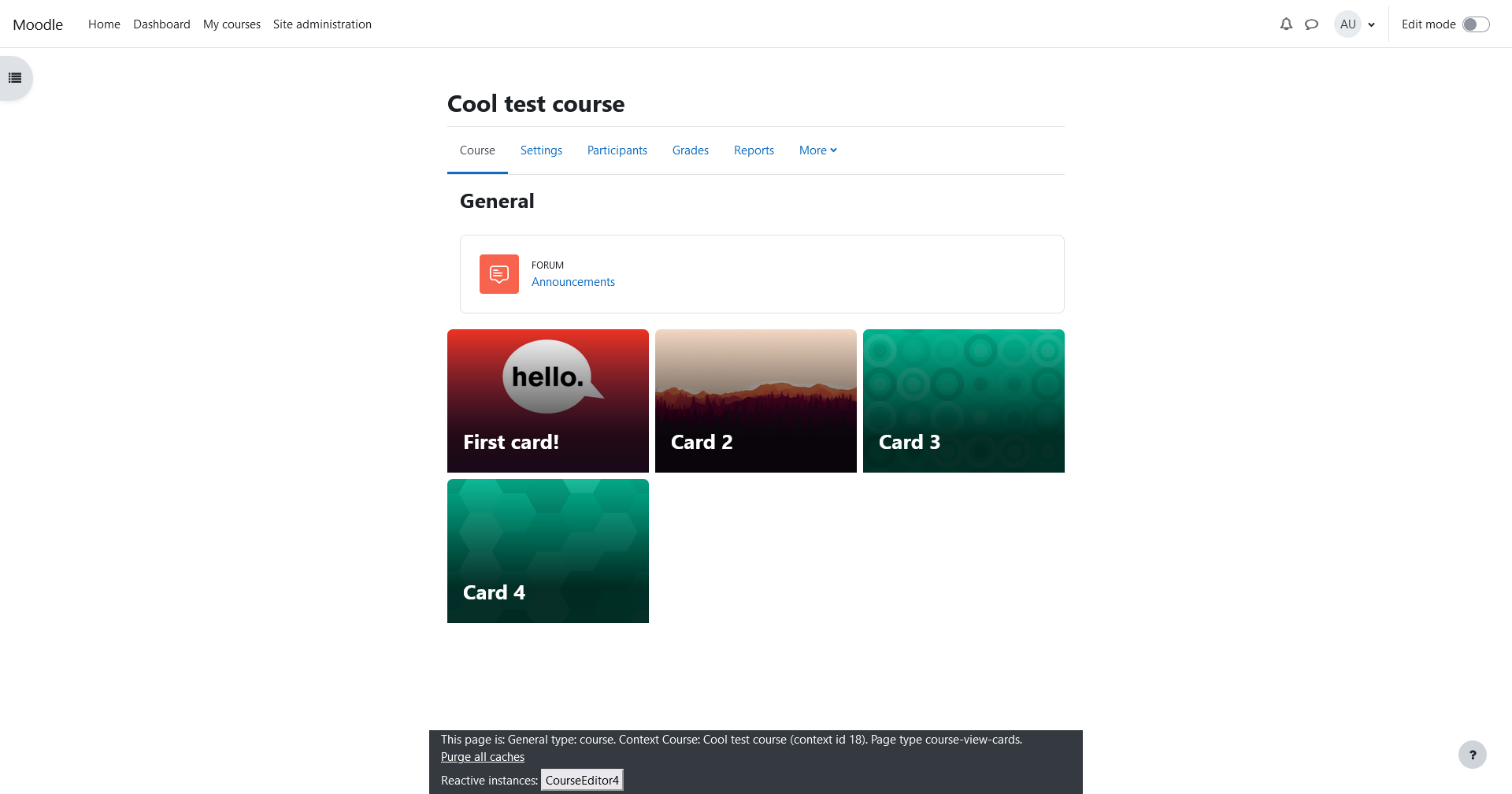
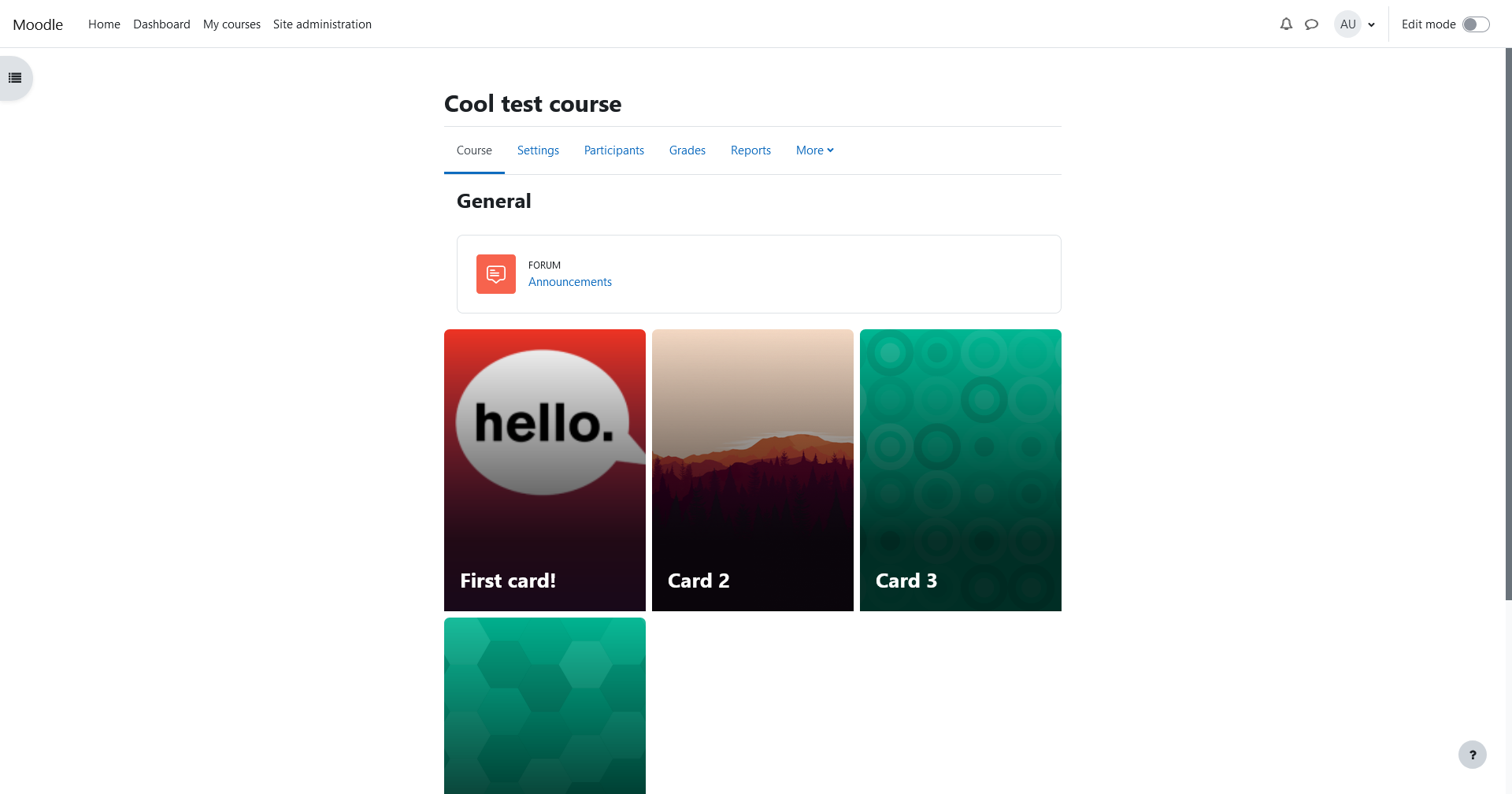
A format which displays sections of your courses as cards with images, similar to format_grid or format_tiles.
The cards format is an extension of the default Topics format to make it easier to maintain.
Features
- Large cards with user configurable background images
- Responsive cards scale down for mobile devices
- Choose between horizontal and vertical cards, or square grids
- Cards can display a user's completion progress for each section
- Easily import images used in the grid format
Installation
The cards format only requires a version of Moodle still receiving general or security support. You can check whether
your version of Moodle is supported by looking at the release calendar https://moodledev.io/general/releases
You must still have the default topics format installed on your site. There are no special installation steps, just
install as you would any other plugin.
Install from Moodle.org
- Download .zip file from https://moodle.org/plugins/format_cards
- Navigate to
/moodle/root/course/format - Extract the .zip to the current directory
- Go to your Moodle admin control panel, or
php /moodle/root/admin/cli/upgrade.php
Install with Composer
- Navigate to
/moodle/root/ composer require vidalia/moodle-format_cards
Install from git
- Navigate to your Moodle root folder
git clone https://github.com/Vidalia/moodle-format_cards.git course/format/cards- Make sure that user:group ownership and permissions are correct
- Go to your Moodle admin control panel, or
php /moodle/root/admin/cli/upgrade.php
Install from .zip
- Download .zip file from GitHub
- Navigate to
/moodle/root/course/format - Extract the .zip to the current directory
- Rename the
moodle-format_cards-masterdirectory tocards - Go to your Moodle admin control panel, or
php /moodle/root/admin/cli/upgrade.php
v1.5.0 (2025041400)
v1.5.0
Plugin type: Course formats
Frankenstyle component name: format_cards
Version build number: 2025041400
Version release name: v1.5.0
Maturity: Stable
Supported Moodle versions: 4.1, 4.2, 4.3, 4.4, 4.5, 5.0
Repository URL (Git): https://github.com/Vidalia/moodle-format_cards
Repository branch:
Repository tag: v1.5.0
Issue/bug tracker URL: https://github.com/Vidalia/moodle-format_cards/issues
Moodle Cards format
A format which displays sections of your courses as cards with images, similar to format_grid or format_tiles.
The cards format is an extension of the default Topics format to make it easier to maintain.
Features
- Large cards with user configurable background images
- Responsive cards scale down for mobile devices
- Choose between horizontal and vertical cards, or square grids
- Cards can display a user's completion progress for each section
- Easily import images used in the grid format
Installation
The cards format only requires a version of Moodle still receiving general or security support. You can check whether
your version of Moodle is supported by looking at the release calendar https://moodledev.io/general/releases
You must still have the default topics format installed on your site. There are no special installation steps, just
install as you would any other plugin.
Install from Moodle.org
- Download .zip file from https://moodle.org/plugins/format_cards
- Navigate to
/moodle/root/course/format - Extract the .zip to the current directory
- Go to your Moodle admin control panel, or
php /moodle/root/admin/cli/upgrade.php
Install with Composer
- Navigate to
/moodle/root/ composer require vidalia/moodle-format_cards
Install from git
- Navigate to your Moodle root folder
git clone https://github.com/Vidalia/moodle-format_cards.git course/format/cards- Make sure that user:group ownership and permissions are correct
- Go to your Moodle admin control panel, or
php /moodle/root/admin/cli/upgrade.php
Install from .zip
- Download .zip file from GitHub
- Navigate to
/moodle/root/course/format - Extract the .zip to the current directory
- Rename the
moodle-format_cards-masterdirectory tocards - Go to your Moodle admin control panel, or
php /moodle/root/admin/cli/upgrade.php
v1.4.3 (2025040201)
v1.4.3
Plugin type: Course formats
Frankenstyle component name: format_cards
Version build number: 2025040201
Version release name: v1.4.3
Maturity: Stable
Supported Moodle versions: 4.1, 4.2, 4.3, 4.4, 4.5
Repository URL (Git): https://github.com/Vidalia/moodle-format_cards
Repository branch:
Repository tag: v1.4.3
Issue/bug tracker URL: https://github.com/Vidalia/moodle-format_cards/issues
Moodle Cards format
A format which displays sections of your courses as cards with images, similar to format_grid or format_tiles.
The cards format is an extension of the default Topics format to make it easier to maintain.
Features
- Large cards with user configurable background images
- Responsive cards scale down for mobile devices
- Choose between horizontal and vertical cards, or square grids
- Cards can display a user's completion progress for each section
- Easily import images used in the grid format
Installation
The cards format only requires a version of Moodle still receiving general or security support. You can check whether
your version of Moodle is supported by looking at the release calendar https://moodledev.io/general/releases
You must still have the default topics format installed on your site. There are no special installation steps, just
install as you would any other plugin.
Install from Moodle.org
- Download .zip file from https://moodle.org/plugins/format_cards
- Navigate to
/moodle/root/course/format - Extract the .zip to the current directory
- Go to your Moodle admin control panel, or
php /moodle/root/admin/cli/upgrade.php
Install with Composer
- Navigate to
/moodle/root/ composer require vidalia/moodle-format_cards
Install from git
- Navigate to your Moodle root folder
git clone https://github.com/Vidalia/moodle-format_cards.git course/format/cards- Make sure that user:group ownership and permissions are correct
- Go to your Moodle admin control panel, or
php /moodle/root/admin/cli/upgrade.php
Install from .zip
- Download .zip file from GitHub
- Navigate to
/moodle/root/course/format - Extract the .zip to the current directory
- Rename the
moodle-format_cards-masterdirectory tocards - Go to your Moodle admin control panel, or
php /moodle/root/admin/cli/upgrade.php
v1.4.1 (2024081900)
v1.4.1
Plugin type: Course formats
Frankenstyle component name: format_cards
Version build number: 2024081900
Version release name: v1.4.1
Maturity: Stable
Supported Moodle versions: 4.1, 4.2, 4.3, 4.4
Repository URL (Git): https://github.com/Vidalia/moodle-format_cards
Repository branch:
Repository tag: v1.4.1
Issue/bug tracker URL: https://github.com/Vidalia/moodle-format_cards/issues
Moodle Cards format
A format which displays sections of your courses as cards with images, similar to format_grid or format_tiles.
The cards format is an extension of the default Topics format to make it easier to maintain.
Features
- Large cards with user configurable background images
- Responsive cards scale down for mobile devices
- Choose between horizontal and vertical cards, or square grids
- Cards can display a user's completion progress for each section
- Easily import images used in the grid format
Installation
The cards format requires Moodle 4.0 or later, and for the default topics format to be present on your site.
There's no special installation steps or instructions, just install it as you would any other plugin
Install from Moodle.org
- Download .zip file from https://moodle.org/plugins/format_cards
- Navigate to
/moodle/root/course/format - Extract the .zip to the current directory
- Go to your Moodle admin control panel, or
php /moodle/root/admin/cli/upgrade.php
Install from git
- Navigate to your Moodle root folder
git clone https://github.com/Vidalia/moodle-format_cards.git course/format/cards- Make sure that user:group ownership and permissions are correct
- Go to your Moodle admin control panel, or
php /moodle/root/admin/cli/upgrade.php
Install from .zip
- Download .zip file from GitHub
- Navigate to
/moodle/root/course/format - Extract the .zip to the current directory
- Rename the
moodle-format_cards-masterdirectory tocards - Go to your Moodle admin control panel, or
php /moodle/root/admin/cli/upgrade.php
v1.4.0 (2024052100)
v1.4.0
Plugin type: Course formats
Frankenstyle component name: format_cards
Version build number: 2024052100
Version release name: v1.4.0
Maturity: Stable
Supported Moodle versions: 4.1, 4.2, 4.3, 4.4
Repository URL (Git): https://github.com/Vidalia/moodle-format_cards
Repository branch:
Repository tag: v1.4.0
Issue/bug tracker URL: https://github.com/Vidalia/moodle-format_cards/issues
Moodle Cards format
A format which displays sections of your courses as cards with images, similar to format_grid or format_tiles.
The cards format is an extension of the default Topics format to make it easier to maintain.
Features
- Large cards with user configurable background images
- Responsive cards scale down for mobile devices
- Choose between horizontal and vertical cards, or square grids
- Cards can display a user's completion progress for each section
- Easily import images used in the grid format
Installation
The cards format requires Moodle 4.1 or later, and for the default topics format to be present on your site.
There's no special installation steps or instructions, just install it as you would any other plugin
Install from Moodle.org
- Download .zip file from https://moodle.org/plugins/format_cards
- Navigate to
/moodle/root/course/format - Extract the .zip to the current directory
- Go to your Moodle admin control panel, or
php /moodle/root/admin/cli/upgrade.php
Install from git
- Navigate to your Moodle root folder
git clone https://github.com/Vidalia/moodle-format_cards.git course/format/cards- Make sure that user:group ownership and permissions are correct
- Go to your Moodle admin control panel, or
php /moodle/root/admin/cli/upgrade.php
Install from .zip
- Download .zip file from GitHub
- Navigate to
/moodle/root/course/format - Extract the .zip to the current directory
- Rename the
moodle-format_cards-masterdirectory tocards - Go to your Moodle admin control panel, or
php /moodle/root/admin/cli/upgrade.php
v1.3.3 (2023090601)
v1.3.3
Plugin type: Course formats
Frankenstyle component name: format_cards
Version build number: 2023090601
Version release name: v1.3.3
Maturity: Stable
Supported Moodle versions: 4.0, 4.1, 4.2, 4.3
Repository URL (Git): https://github.com/Vidalia/moodle-format_cards
Repository branch:
Repository tag: v1.3.3
Issue/bug tracker URL: https://github.com/Vidalia/moodle-format_cards/issues
Moodle Cards format
A format which displays sections of your courses as cards with images, similar to format_grid or format_tiles.
The cards format is an extension of the default Topics format to make it easier to maintain.
Features
- Large cards with user configurable background images
- Responsive cards scale down for mobile devices
- Choose between horizontal and vertical cards, or square grids
- Cards can display a user's completion progress for each section
- Easily import images used in the grid format
Installation
The cards format requires Moodle 4.0 or later, and for the default topics format to be present on your site.
There's no special installation steps or instructions, just install it as you would any other plugin
Install from Moodle.org
- Download .zip file from https://moodle.org/plugins/format_cards
- Navigate to
/moodle/root/course/format - Extract the .zip to the current directory
- Go to your Moodle admin control panel, or
php /moodle/root/admin/cli/upgrade.php
Install from git
- Navigate to your Moodle root folder
git clone https://github.com/Vidalia/moodle-format_cards.git course/format/cards- Make sure that user:group ownership and permissions are correct
- Go to your Moodle admin control panel, or
php /moodle/root/admin/cli/upgrade.php
Install from .zip
- Download .zip file from GitHub
- Navigate to
/moodle/root/course/format - Extract the .zip to the current directory
- Rename the
moodle-format_cards-masterdirectory tocards - Go to your Moodle admin control panel, or
php /moodle/root/admin/cli/upgrade.php
v1.3.2 (2023081600)
v1.3.2
Plugin type: Course formats
Frankenstyle component name: format_cards
Version build number: 2023081600
Version release name: v1.3.2
Maturity: Stable
Supported Moodle versions: 4.0, 4.1, 4.2
Repository URL (Git): https://github.com/Vidalia/moodle-format_cards
Repository branch:
Repository tag: v1.3.2
Issue/bug tracker URL: https://github.com/Vidalia/moodle-format_cards/issues
Moodle Cards format
A format which displays sections of your courses as cards with images, similar to format_grid or format_tiles.
The cards format is an extension of the default Topics format to make it easier to maintain.
Features
- Large cards with user configurable background images
- Responsive cards scale down for mobile devices
- Choose between horizontal and vertical cards, or square grids
- Cards can display a user's completion progress for each section
- Easily import images used in the grid format
Installation
The cards format requires Moodle 4.0 or later, and for the default topics format to be present on your site.
There's no special installation steps or instructions, just install it as you would any other plugin
Install from Moodle.org
- Download .zip file from https://moodle.org/plugins/format_cards
- Navigate to
/moodle/root/course/format - Extract the .zip to the current directory
- Go to your Moodle admin control panel, or
php /moodle/root/admin/cli/upgrade.php
Install from git
- Navigate to your Moodle root folder
git clone https://github.com/Vidalia/moodle-format_cards.git course/format/cards- Make sure that user:group ownership and permissions are correct
- Go to your Moodle admin control panel, or
php /moodle/root/admin/cli/upgrade.php
Install from .zip
- Download .zip file from GitHub
- Navigate to
/moodle/root/course/format - Extract the .zip to the current directory
- Rename the
moodle-format_cards-masterdirectory tocards - Go to your Moodle admin control panel, or
php /moodle/root/admin/cli/upgrade.php
v1.3.1 (2023081000)
v1.3.1
Plugin type: Course formats
Frankenstyle component name: format_cards
Version build number: 2023081000
Version release name: v1.3.1
Maturity: Stable
Supported Moodle versions: 4.0, 4.1, 4.2
Repository URL (Git): https://github.com/Vidalia/moodle-format_cards
Repository branch: master
Repository tag: v1.3.1
Issue/bug tracker URL: https://github.com/Vidalia/moodle-format_cards/issues
Moodle Cards format
A format which displays sections of your courses as cards with images, similar to format_grid or format_tiles.
The cards format is an extension of the default Topics format to make it easier to maintain.
Features
- Large cards with user configurable background images
- Responsive cards scale down for mobile devices
- Choose between horizontal and vertical cards, or square grids
- Cards can display a user's completion progress for each section
- Break up the cards with section breaks
- Easily import images used in the grid format
Installation
The cards format requires Moodle 4.0 or later, and for the default topics format to be present on your site.
There's no special installation steps or instructions, just install it as you would any other plugin
Install from Moodle.org
- Download .zip file from https://moodle.org/plugins/format_cards
- Navigate to
/moodle/root/course/format - Extract the .zip to the current directory
- Go to your Moodle admin control panel, or
php /moodle/root/admin/cli/upgrade.php
Install from git
- Navigate to your Moodle root folder
git clone https://github.com/Vidalia/moodle-format_cards.git course/format/cards- Make sure that user:group ownership and permissions are correct
- Go to your Moodle admin control panel, or
php /moodle/root/admin/cli/upgrade.php
Install from .zip
- Download .zip file from GitHub
- Navigate to
/moodle/root/course/format - Extract the .zip to the current directory
- Rename the
moodle-format_cards-masterdirectory tocards - Go to your Moodle admin control panel, or
php /moodle/root/admin/cli/upgrade.php
v1.3.0 (2023052500)
v1.3.0
Plugin type: Course formats
Frankenstyle component name: format_cards
Version build number: 2023052500
Version release name: v1.3.0
Maturity: Stable
Supported Moodle versions: 4.0, 4.1, 4.2
Repository URL (Git): https://github.com/Vidalia/moodle-format_cards
Repository branch:
Repository tag: v1.3.0
Issue/bug tracker URL: https://github.com/Vidalia/moodle-format_cards/issues
Moodle Cards format
A format which displays sections of your courses as cards with images, similar to format_grid or format_tiles.
The cards format is an extension of the default Topics format to make it easier to maintain.
Features
- Large cards with user configurable background images
- Responsive cards scale down for mobile devices
- Choose between horizontal and vertical cards, or square grids
- Cards can display a user's completion progress for each section
- Easily import images used in the grid format
Installation
The cards format requires Moodle 4.0 or later, and for the default topics format to be present on your site.
There's no special installation steps or instructions, just install it as you would any other plugin
Install from Moodle.org
- Download .zip file from https://moodle.org/plugins/format_cards
- Navigate to
/moodle/root/course/format - Extract the .zip to the current directory
- Go to your Moodle admin control panel, or
php /moodle/root/admin/cli/upgrade.php
Install from git
- Navigate to your Moodle root folder
git clone https://github.com/Vidalia/moodle-format_cards.git course/format/cards- Make sure that user:group ownership and permissions are correct
- Go to your Moodle admin control panel, or
php /moodle/root/admin/cli/upgrade.php
Install from .zip
- Download .zip file from GitHub
- Navigate to
/moodle/root/course/format - Extract the .zip to the current directory
- Rename the
moodle-format_cards-masterdirectory tocards - Go to your Moodle admin control panel, or
php /moodle/root/admin/cli/upgrade.php
v1.2.0 (2023040600)
v1.2.0
Plugin type: Course formats
Frankenstyle component name: format_cards
Version build number: 2023040600
Version release name: v1.2.0
Maturity: Stable
Supported Moodle versions: 4.0, 4.1, 4.2
Repository URL (Git): https://github.com/Vidalia/moodle-format_cards
Repository branch:
Repository tag: v1.2.0
Issue/bug tracker URL: https://github.com/Vidalia/moodle-format_cards/issues
Moodle Cards format
A format which displays sections of your courses as cards with images, similar to format_grid or format_tiles.
The cards format is an extension of the default Topics format to make it easier to maintain.
Features
- Large cards with user configurable background images
- Responsive cards scale down for mobile devices
- Choose between horizontal and vertical cards
- Easily import images used in the grid format
Installation
The cards format requires Moodle 4.0 or later, and for the default topics format to be present on your site.
There's no special installation steps or instructions, just install it as you would any other plugin
Install from git
- Navigate to your Moodle root folder
git clone https://github.com/Vidalia/moodle-format_cards.git course/format/cards- Make sure that user:group ownership and permissions are correct
- Go to your Moodle admin control panel, or
php /moodle/root/admin/cli/upgrade.php
Install from .zip
- Download .zip file from GitHub
- Navigate to
/moodle/root/course/format - Extract the .zip to the current directory
- Rename the
moodle-format_cards-masterdirectory tocards - Go to your Moodle admin control panel, or
php /moodle/root/admin/cli/upgrade.php
v1.1.0 (2023020800)
v1.1.0
Plugin type: Course formats
Frankenstyle component name: format_cards
Version build number: 2023020800
Version release name: v1.1.0
Maturity: Stable
Supported Moodle versions: 4.0
Repository URL (Git): https://github.com/Vidalia/moodle-format_cards
Repository branch:
Repository tag: v1.1.0
Issue/bug tracker URL: https://github.com/Vidalia/moodle-format_cards/issues
Moodle Cards format
A format which displays sections of your courses as cards with images, similar to format_grid or format_tiles.
The cards format is an extension of the default Topics format to make it easier to maintain.
Features
- Large cards with user configurable background images
- Responsive cards scale down for mobile devices
- Choose between horizontal and vertical cards
- Easily import images used in the grid format
Installation
The cards format requires Moodle 4.0 or later, and for the default topics format to be present on your site.
There's no special installation steps or instructions, just install it as you would any other plugin
Install from git
- Navigate to your Moodle root folder
git clone https://github.com/Vidalia/moodle-format_cards.git course/format/cards- Make sure that user:group ownership and permissions are correct
- Go to your Moodle admin control panel, or
php /moodle/root/admin/cli/upgrade.php
Install from .zip
- Download .zip file from GitHub
- Navigate to
/moodle/root/course/format - Extract the .zip to the current directory
- Rename the
moodle-format_cards-masterdirectory tocards - Go to your Moodle admin control panel, or
php /moodle/root/admin/cli/upgrade.php
v1.0.8 (2022120500)
v1.0.8
Plugin type: Course formats
Frankenstyle component name: format_cards
Version build number: 2022120500
Version release name: v1.0.8
Maturity: Stable
Supported Moodle versions: 4.0
Repository URL (Git): https://github.com/Vidalia/moodle-format_cards
Repository branch:
Repository tag: v1.0.8
Issue/bug tracker URL: https://github.com/Vidalia/moodle-format_cards/issues
Moodle Cards format
A format which displays sections of your courses as cards with images, similar to format_grid or format_tiles.
The cards format is an extension of the default Topics format to make it easier to maintain.
Features
- Large cards with user configurable background images
- Responsive cards scale down for mobile devices
- Choose between horizontal and vertical cards
- Easily import images used in the grid format
Installation
The cards format requires Moodle 4.0 or later, and for the default topics format to be present on your site.
There's no special installation steps or instructions, just install it as you would any other plugin
Install from git
- Navigate to your Moodle root folder
git clone https://github.com/Vidalia/moodle-format_cards.git course/format/cards- Make sure that user:group ownership and permissions are correct
- Go to your Moodle admin control panel, or
php /moodle/root/admin/cli/upgrade.php
Install from .zip
- Download .zip file from GitHub
- Navigate to
/moodle/root/course/format - Extract the .zip to the current directory
- Rename the
moodle-format_cards-masterdirectory tocards - Go to your Moodle admin control panel, or
php /moodle/root/admin/cli/upgrade.php
v1.0.7 (2022120200)
v1.0.7
Plugin type: Course formats
Frankenstyle component name: format_cards
Version build number: 2022120200
Version release name: v1.0.7
Maturity: Stable
Supported Moodle versions: 4.0
Repository URL (Git): https://github.com/Vidalia/moodle-format_cards
Repository branch:
Repository tag: v1.0.7
Issue/bug tracker URL: https://github.com/Vidalia/moodle-format_cards/issues
Moodle Cards format
A format which displays sections of your courses as cards with images, similar to format_grid or format_tiles.
The cards format is an extension of the default Topics format to make it easier to maintain.
Features
- Large cards with user configurable background images
- Responsive cards scale down for mobile devices
- Choose between horizontal and vertical cards
- Easily import images used in the grid format
Installation
The cards format requires Moodle 4.0 or later, and for the default topics format to be present on your site.
There's no special installation steps or instructions, just install it as you would any other plugin
Install from git
- Navigate to your Moodle root folder
git clone https://github.com/Vidalia/moodle-format_cards.git course/format/cards- Make sure that user:group ownership and permissions are correct
- Go to your Moodle admin control panel, or
php /moodle/root/admin/cli/upgrade.php
Install from .zip
- Download .zip file from GitHub
- Navigate to
/moodle/root/course/format - Extract the .zip to the current directory
- Rename the
moodle-format_cards-masterdirectory tocards - Go to your Moodle admin control panel, or
php /moodle/root/admin/cli/upgrade.php
v1.0.4 (2022083102)
v1.0.4
Plugin type: Course formats
Frankenstyle component name: format_cards
Version build number: 2022083102
Version release name: v1.0.4
Maturity: Stable
Supported Moodle versions: 4.0
Repository URL (Git): https://github.com/Vidalia/moodle-format_cards
Repository branch:
Repository tag: v1.0.4
Issue/bug tracker URL: https://github.com/Vidalia/moodle-format_cards/issues
- Fixed "editsection_form missing" error when editing a section
- Fixed phpcs and stylelint errors
v1.0.3 (2022083100)
v1.0.3
Plugin type: Course formats
Frankenstyle component name: format_cards
Version build number: 2022083100
Version release name: v1.0.3
Maturity: Stable
Supported Moodle versions: 4.0
Repository URL (Git): https://github.com/Vidalia/moodle-format_cards
Repository branch: master
Repository tag: v1.0.3
Issue/bug tracker URL: https://github.com/Vidalia/moodle-format_cards/issues
Moodle Cards format
A format which displays sections of your courses as cards with images, similar to format_grid or format_tiles.
The cards format is an extension of the default Topics format to make it easier to maintain.
Features
- Large cards with user configurable background images
- Responsive cards scale down for mobile devices
- Choose between horizontal and vertical cards
- Easily import images used in the grid format
Installation
The cards format requires Moodle 4.0 or later, and for the default topics format to be present on your site.
There's no special installation steps or instructions, just install it as you would any other plugin
Install from git
- Navigate to your Moodle root folder
git clone https://github.com/Vidalia/moodle-format_cards.git course/format/cards- Make sure that user:group ownership and permissions are correct
- Go to your Moodle admin control panel, or
php /moodle/root/admin/cli/upgrade.php
Install from .zip
- Download .zip file from GitHub
- Navigate to
/moodle/root/course/format - Extract the .zip to the current directory
- Rename the
moodle-format_cards-masterdirectory tocards - Go to your Moodle admin control panel, or
php /moodle/root/admin/cli/upgrade.php