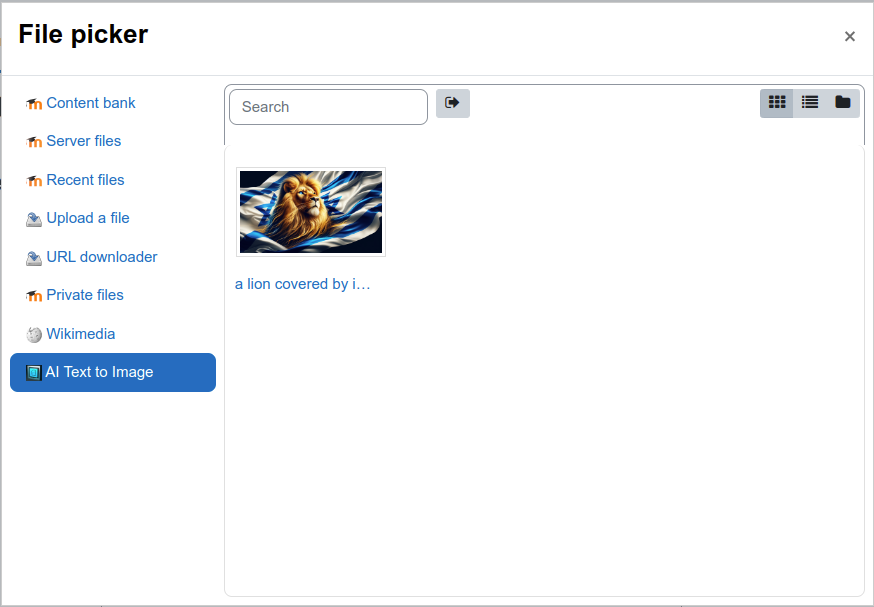
moodle-repository_txttoimg
This is a repository plugin for Moodle that generates images from text using Moodle's internal AI subsystem.
This plugin is not limited to the rich text editor. Because it is a repository, it is available anywhere Moodle uses the file picker.
Examples include:
- Course image files in course settings.
- Activity or resource images when the file picker is available.
- Any other Moodle form field that supports repository-based file selection.
Supported engines
This repository uses Moodle AI providers configured at site level (for example OpenAI, Azure AI, or other providers supporting image generation).
Provider credentials and model details are managed in Moodle AI provider settings.
Installing plugin
- Download the plugin and extract/clone it to [moodle_root]/repository/
- Go to your Moodle admin page and install it.
- Go to Admin -> Plugins -> Repository then enable and setup the repo.
Configuring repository
- Enable and configure at least one AI provider in Moodle: Site administration -> Plugins -> AI -> Providers. (including image generation model and settings)
- Enable this repository in Site administration -> Plugins -> Repositories.
- This repository no longer stores provider keys, model versions, or model parameters.
- The repository sends generation requests through Moodle core AI actions.
Using
- This repository appears in Moodle file picker locations.
- You can generate an AI image and insert/select it from those locations.
- This means it works beyond the rich text editor, for example when setting a course image.
Enjoy !