Enrol by Category (enrol_self + waiting list + x)
Maintained by
Matthias Tykowski
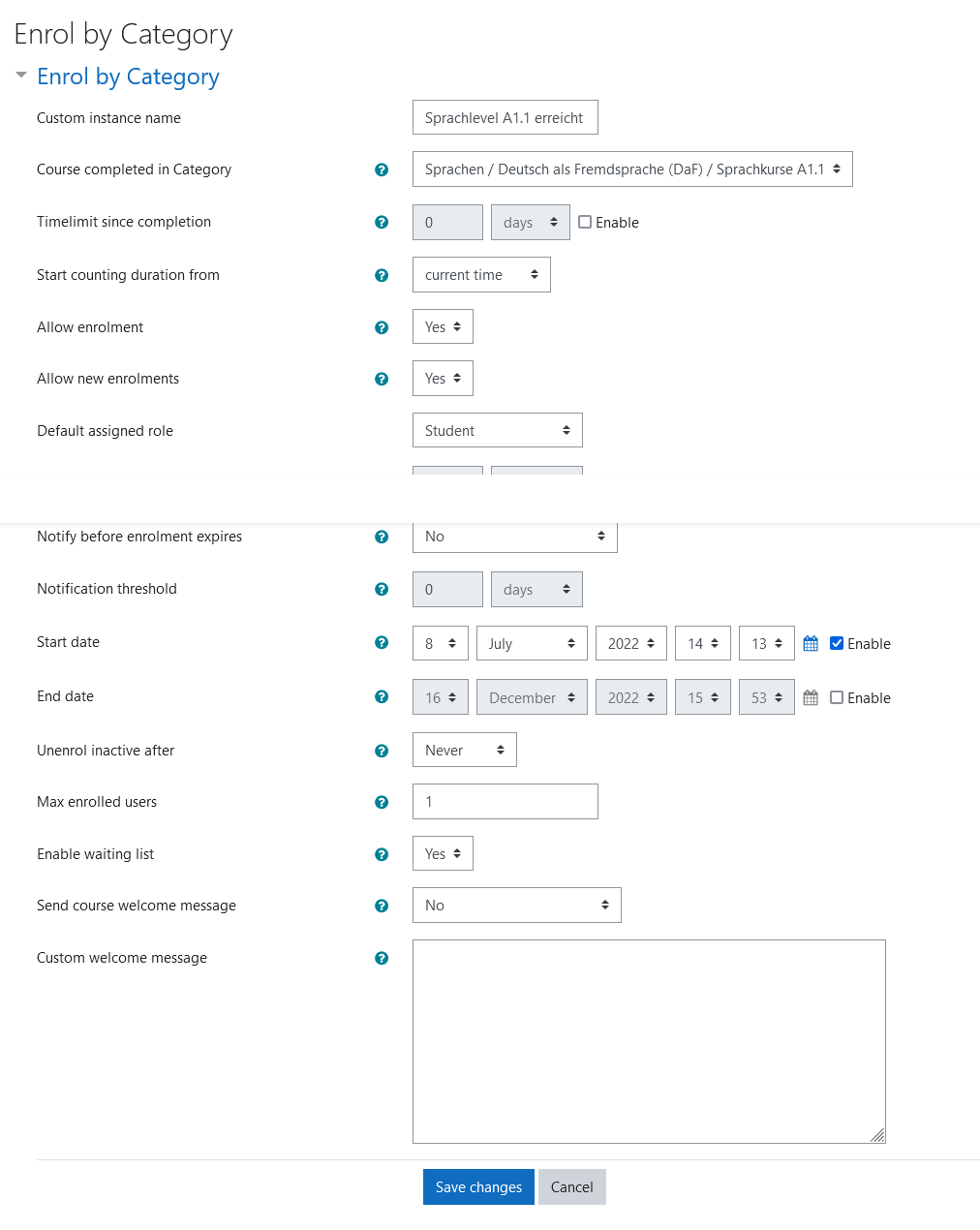
Allows users to enrol themselves into a course if they finished a course in a specific category previously. This plugin was inspired by the enrol_self plugin and can be used in the same way. Additionally it offers a waiting list feature and autoenrolment into a specific group.
Comments
Comments are no longer open for new posts. Existing comments remain available to read.
Tasks are handled outside of the plugin. You can find them under "Site Administration -> Server -> Tasks -> Scheduled Tasks" there are multiple Tasks if you search for enrol_bycategory. The one you are looking for is called "send_waitlist_notifications"
Regards, Matthias
Is there a way to change the time of day the message goes out to the ones on the waiting list?
The description mentions a scheduled task that runs at 2pm, but I can't find a setting to change the time of this task.
Regards, Knut
the simplest solution I can think of is to copy the course and unenrol the "graduates" from the original course and manually enrol them into the copied one. Then they can access the modules fro reference and in the original course you always only have the 14 active students and benefit from the funktionality of this plugin.
Regards, Matthias
Basically our case involves a training course with a first-come first-serve basis with a limit of 14 students given present instructors capacity. Unlike college style courses, the course is not based on a semester or anything like that, we have around 16 modules in the course and instructors would select from the list of active students and work with each student independently until the student finishes the modules. Once a student completes the course another can be enrolled to take their slot. I hope that makes sense.
Your plugin is ideal for managing our enrolment, but we were wondering what is the best way to automatically make a slot available without and students in the waiting list enrol themselves once a slot becomes available. As I mentioned, students tend to continue to want access to the course modules for reference purposes as this course is one of a 3-part course curriculum to achieve a certification, and each course builds on the one before it.
Thanks again,
Mustafa
Students often like to reference course material after they have completed the course, so most probably we will get students requesting access to the course again after they have completed it.
Best,
Mustafa
as far as I know students which complete a course are still enrolled. They have to be unenrolled for slots to become available. They can also unenrol themselves. Maybe it can be combined with the "unenrol inactive after" option. Students which completed the course will probably not be active in it anymore.
Could you tell me more about your use case? It looks like you have a continous course. But since you limit the amount of paticipants it is not a self learn course. Why are you not doing new courses every term?
Regards,
Matthias
Regarding slots becoming available for students, when you say "leave the course", do you mean when the student achieves course completion (marked as completed by Moodle) or un-enroled or both?
Best,
Mustafa
thank you for bringing this bug to my attention. It is fixed now.
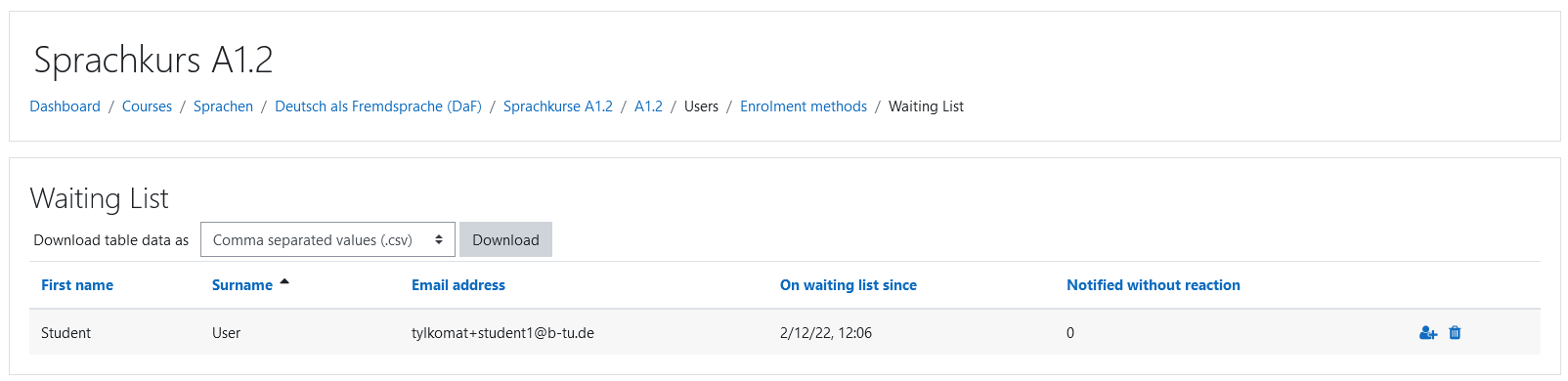
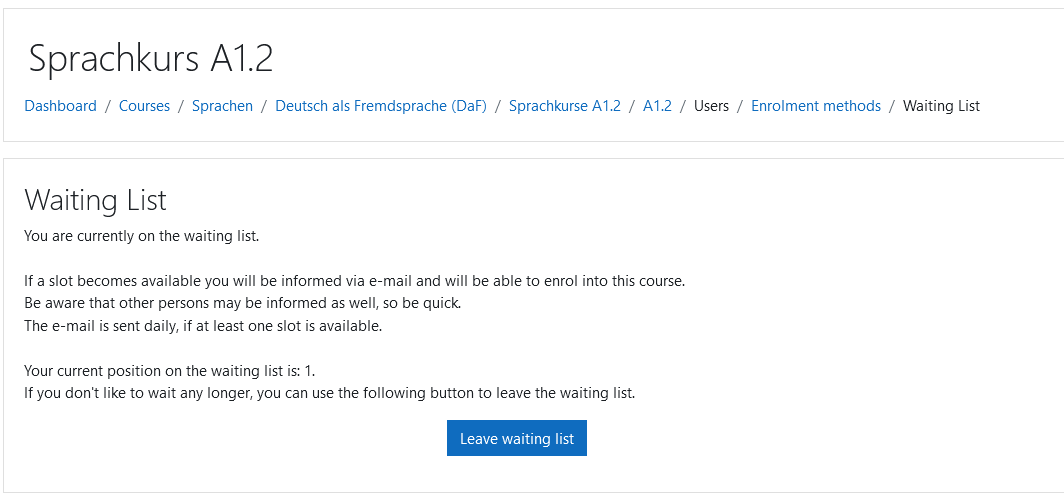
The student can see his own position on the waiting list. For privacy reasons we don't show the complete waiting list, even just names only, to students. Only the teacher has access to the complete waiting list.
Regarding your other question: There is no global course members count. Each enrolment method handles the users that have enroled with it. If you enrol users via manual enrolment those don't count for the enrol by category plugin. For existing courses there would only be the option to limit max enroled users to 1 or you clone the course and only use enrol by category enrolment, except for the teacher which should be manually enroled. Then you can set your limit and everything should be working as expected.
A slot becomes available when users which have been enroled via the enrol my category enrolment method leave the course or if the max enrolled users limit is increased.
Regards,
Matthias
First off, thanks for the quick response. As for how a student manages to join multiple times; if that same student revisits the main course page where they initially enrolled, they can still see the enrolment section with the message "Maximum number of users allowed to self-enrol was already reached. You can join the waiting list..." and the [Join waiting list] button, and if the student clicks on it thinking they were not added the first time, another record is created in the waiting list and a new position.
For the second point; the idea here is for transparency we currently have a list (Google spreadsheet) accessible to all candidates (readonly) so see where they are on the list, similar to screenshot 3 but with position and name only. This is not a big requirement if it is too much to implement.
I have another question regarding waitlisting in general if you don't mind. How do notifications work when a slot becomes available? Does the course administrator need to increase the 'Max enrolled users'? Our course enrolment is set to Manual now and we have 14 student limit. I tried entering 14 in the 'Max enrolled users', but 14 more students can enrol right away before waitlisting kicks in, is there a way around this for existing fully occupied courses?
Thanks again,
Mustafa
thank you.
Can you elaborate more on the last two bullet points and explain how a student managed to join multiple times?
For the second point students land on a waiting page (screenshot 2) where they can leave the waiting list if they want to. What do you mean by "no emails listed"?
Is it possible to add the following features:
- clean up task or some way so deleted students are removed from the list
- student view-only access to the waitlist w/ the ability to remove oneself from waitlist (no emails listed)
- add sequence column to the waitlist
Bug:
- a student is allowed to join the waitlist as many times as they want resulting in duplicate records and exception errors displayed if Developer mode is enabled for 'Debug messages'
Thanks,
Mustafa
Don't see a contact request from you. Tried to send you a Friend request on Facebook.
Joe
I'm unable as well. I suppose we have to be contacts. You should have contact request from me.
Regards,
Matthias
I am unable to PM you. Please PM me.
Thanks,
Joe