Enrol by Category (enrol_self + waiting list + x)
Versions
Current version
1.4.2 (2026072300)
1.4.2
Plugin type: Enrolment
Frankenstyle component name: enrol_bycategory
Version build number: 2026072300
Version release name: 1.4.2
Maturity: Stable
Supported Moodle versions: 4.4, 4.5, 5.0, 5.1, 5.2
Repository URL (Git): https://github.com/btucs/moodle-enrol_bycategory
Repository branch:
Repository tag: 1.4.1
Issue/bug tracker URL: https://github.com/btucs/moodle-enrol_bycategory/issues
1.4.1 (2025092200)
1.4.1
Plugin type: Enrolment
Frankenstyle component name: enrol_bycategory
Version build number: 2025092200
Version release name: 1.4.1
Maturity: Stable
Supported Moodle versions: 4.4, 4.5, 5.0
Repository URL (Git): https://github.com/btucs/moodle-enrol_bycategory
Repository branch:
Repository tag: 1.4.1
Issue/bug tracker URL: https://github.com/btucs/moodle-enrol_bycategory/issues
Enrol by Category
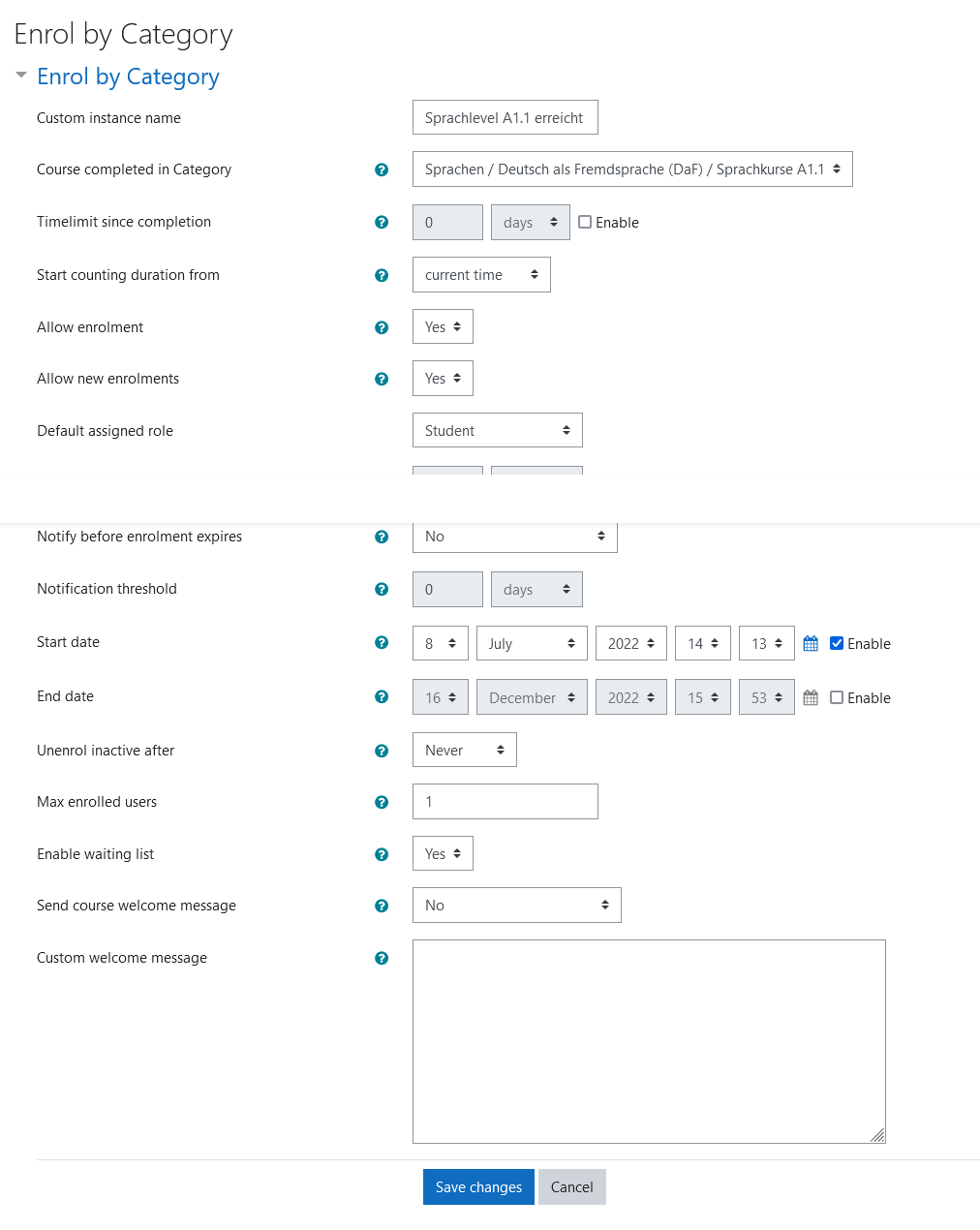
The plugin allows users to enrol into a course if they finished a course in a specific category previously.
The plugin is inspired by the enrol_self and can be used in the same way. Additionally a waiting list can be enabled and a category can be specified as requirement to join.
Category restriction
When a category is selected as requirement participants can only enrol if they finished a course in that specified category before. Additionally a timelimit can be set to limit the course to participants which for example have finished a course in the specified category at most 6 month earlier. The timelimit can be configured to count from when the course starts or when the course was created.
Waiting List
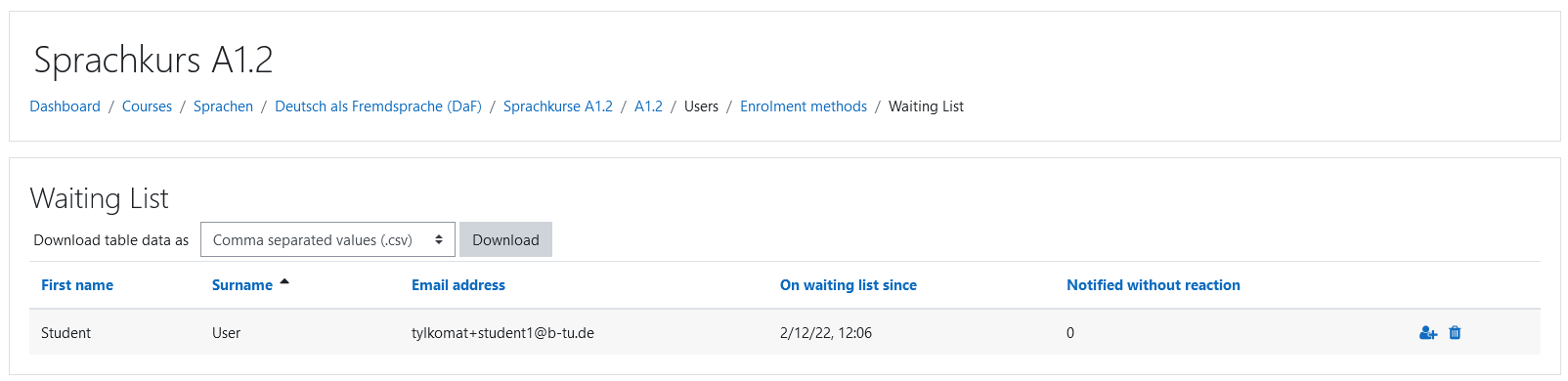
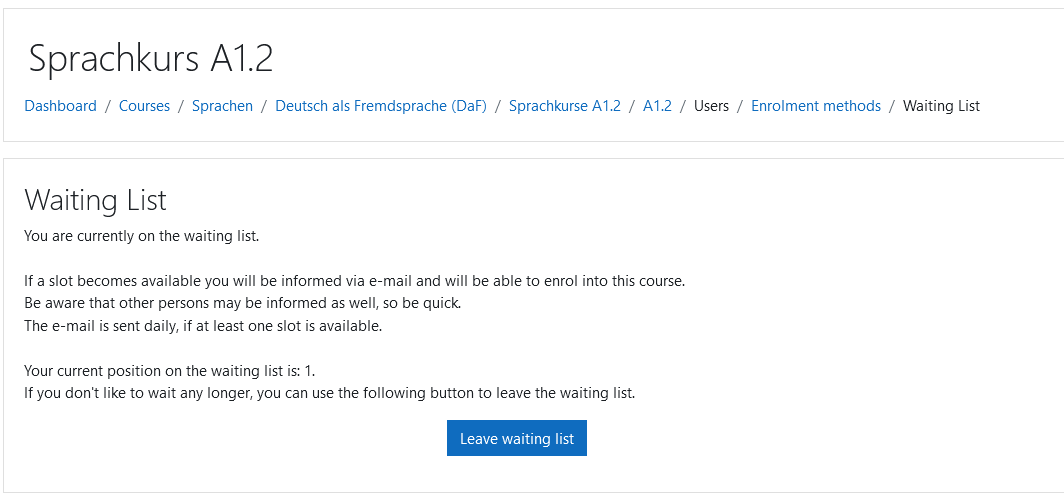
A waiting list feature can be enabled. When the maximum amount of participants is reached, additional participants can join the waiting list.
Participants on the waiting list are informed about open spots by a scheduled task running daily, which runs by default at 2pm server time. The amount of participants to be informed at once can be configured and is 5 by default. The fastest participant(s) will receive the spot(s). Participants which don't react to the email will only be informed 5 times to avoid inactive users blocking spots in the course.
The teacher can manually enrol participants from the waiting list into the course bypassing the maximum participants limit. Using a bulk enrol feature, multiple participants from the waiting list can be enroled into another/the current course at once.
Automatically join group
If the course uses groups, a group can be selected in the enrol configuration. Users which enrol via this enrolement method will then be automatically added as members to the selected group
This is useful if the course has multiple enrolment methods and also uses groups to show different content to different users.
License
2022 Matthias Tylkowski matthias.tylkowski@b-tu.de
This program is free software: you can redistribute it and/or modify it under
the terms of the GNU General Public License as published by the Free Software
Foundation, either version 3 of the License, or (at your option) any later
version.
This program is distributed in the hope that it will be useful, but WITHOUT ANY
WARRANTY; without even the implied warranty of MERCHANTABILITY or FITNESS FOR A
PARTICULAR PURPOSE. See the GNU General Public License for more details.
You should have received a copy of the GNU General Public License along with
this program. If not, see http://www.gnu.org/licenses/.
1.4.0 (2025080100)
1.4.0
Plugin type: Enrolment
Frankenstyle component name: enrol_bycategory
Version build number: 2025080100
Version release name: 1.4.0
Maturity: Stable
Supported Moodle versions: 4.4, 4.5, 5.0
Repository URL (Git): https://github.com/btucs/moodle-enrol_bycategory
Repository branch:
Repository tag: 1.4.0
Issue/bug tracker URL: https://github.com/btucs/moodle-enrol_bycategory/issues
Enrol by Category
The plugin allows users to enrol into a course if they finished a course in a specific category previously.
The plugin is inspired by the enrol_self and can be used in the same way. Additionally a waiting list can be enabled and a category can be specified as requirement to join.
Since version 1.4.0 support for cohort enrolement and enrolment keys has been added.
Category restriction
When a category is selected as requirement participants can only enrol if they finished a course in that specified category before. Additionally a timelimit can be set to limit the course to participants which for example have finished a course in the specified category at most 6 month earlier. The timelimit can be configured to count from when the course starts or when the course was created.
Waiting List
A waiting list feature can be enabled. When the maximum amount of participants is reached, additional participants can join the waiting list.
Participants on the waiting list are informed about open spots by a scheduled task running daily, which runs by default at 2pm server time. The amount of participants to be informed at once can be configured and is 5 by default. The fastest participant(s) will receive the spot(s). Participants which don't react to the email will only be informed 5 times to avoid inactive users blocking spots in the course.
The teacher can manually enrol participants from the waiting list into the course bypassing the maximum participants limit. Using a bulk enrol feature, multiple participants from the waiting list can be enroled into another/the current course at once.
Automatically join group
If the course uses groups, a group can be selected in the enrol configuration. Users which enrol via this enrolement method will then be automatically added as members to the selected group
This is useful if the course has multiple enrolment methods and also uses groups to show different content to different users.
License
2025 Matthias Tylkowski matthias.tylkowski@b-tu.de
This program is free software: you can redistribute it and/or modify it under
the terms of the GNU General Public License as published by the Free Software
Foundation, either version 3 of the License, or (at your option) any later
version.
This program is distributed in the hope that it will be useful, but WITHOUT ANY
WARRANTY; without even the implied warranty of MERCHANTABILITY or FITNESS FOR A
PARTICULAR PURPOSE. See the GNU General Public License for more details.
You should have received a copy of the GNU General Public License along with
this program. If not, see http://www.gnu.org/licenses/.
1.3.1 (2025040700)
1.3.1
Plugin type: Enrolment
Frankenstyle component name: enrol_bycategory
Version build number: 2025040700
Version release name: 1.3.1
Maturity: Stable
Supported Moodle versions: 4.0, 4.1, 4.2, 4.3, 4.4, 4.5
Repository URL (Git): https://github.com/btucs/moodle-enrol_bycategory
Repository branch:
Repository tag: 1.3.1
Issue/bug tracker URL: https://github.com/btucs/moodle-enrol_bycategory/issues
Enrol by Category
The plugin allows users to enrol into a course if they finished a course in a specific category previously.
The plugin is inspired by the enrol_self and can be used in the same way. Additionally a waiting list can be enabled and a category can be specified as requirement to join.
Category restriction
When a category is selected as requirement participants can only enrol if they finished a course in that specified category before. Additionally a timelimit can be set to limit the course to participants which for example have finished a course in the specified category at most 6 month earlier. The timelimit can be configured to count from when the course starts or when the course was created.
Waiting List
A waiting list feature can be enabled. When the maximum amount of participants is reached, additional participants can join the waiting list.
Participants on the waiting list are informed about open spots by a scheduled task running daily, which runs by default at 2pm server time. The amount of participants to be informed at once can be configured and is 5 by default. The fastest participant(s) will receive the spot(s). Participants which don't react to the email will only be informed 5 times to avoid inactive users blocking spots in the course.
The teacher can manually enrol participants from the waiting list into the course bypassing the maximum participants limit. Using a bulk enrol feature, multiple participants from the waiting list can be enroled into another/the current course at once.
Automatically join group
If the course uses groups, a group can be selected in the enrol configuration. Users which enrol via this enrolement method will then be automatically added as members to the selected group
This is useful if the course has multiple enrolment methods and also uses groups to show different content to different users.
License
2022 Matthias Tylkowski matthias.tylkowski@b-tu.de
This program is free software: you can redistribute it and/or modify it under
the terms of the GNU General Public License as published by the Free Software
Foundation, either version 3 of the License, or (at your option) any later
version.
This program is distributed in the hope that it will be useful, but WITHOUT ANY
WARRANTY; without even the implied warranty of MERCHANTABILITY or FITNESS FOR A
PARTICULAR PURPOSE. See the GNU General Public License for more details.
You should have received a copy of the GNU General Public License along with
this program. If not, see http://www.gnu.org/licenses/.
1.2.2 (2023092601)
1.2.2
Plugin type: Enrolment
Frankenstyle component name: enrol_bycategory
Version build number: 2023092601
Version release name: 1.2.2
Maturity: Stable
Supported Moodle versions: 3.10, 3.11, 4.0, 4.1, 4.2, 4.3, 4.4
Repository URL (Git): https://github.com/btucs/moodle-enrol_bycategory
Repository branch:
Repository tag: 1.2.2
Issue/bug tracker URL: https://github.com/btucs/moodle-enrol_bycategory/issues
Enrol by Category
The plugin allows users to enrol into a course if they finished a course in a specific category previously.
The plugin is inspired by the enrol_self and can be used in the same way. Additionally a waiting list can be enabled and a category can be specified as requirement to join.
Category restriction
When a category is selected as requirement participants can only enrol if they finished a course in that specified category before. Additionally a timelimit can be set to limit the course to participants which for example have finished a course in the specified category at most 6 month earlier. The timelimit can be configured to count from when the course starts or when the course was created.
Waiting List
A waiting list feature can be enabled. When the maximum amount of participants is reached, additional participants can join the waiting list.
Participants on the waiting list are informed about open spots by a scheduled task running daily, which runs by default at 2pm server time. The amount of participants to be informed at once can be configured and is 5 by default. The fastest participant(s) will receive the spot(s). Participants which don't react to the email will only be informed 5 times to avoid inactive users blocking spots in the course.
The teacher can manually enrol participants from the waiting list into the course bypassing the maximum participants limit. Using a bulk enrol feature, multiple participants from the waiting list can be enroled into another/the current course at once.
Automatically join group
If the course uses groups, a group can be selected in the enrol configuration. Users which enrol via this enrolement method will then be automatically added as members to the selected group
This is useful if the course has multiple enrolment methods and also uses groups to show different content to different users.
License
2022 Matthias Tylkowski matthias.tylkowski@b-tu.de
This program is free software: you can redistribute it and/or modify it under
the terms of the GNU General Public License as published by the Free Software
Foundation, either version 3 of the License, or (at your option) any later
version.
This program is distributed in the hope that it will be useful, but WITHOUT ANY
WARRANTY; without even the implied warranty of MERCHANTABILITY or FITNESS FOR A
PARTICULAR PURPOSE. See the GNU General Public License for more details.
You should have received a copy of the GNU General Public License along with
this program. If not, see http://www.gnu.org/licenses/.
1.2.1 (2023091801)
1.2.1
Plugin type: Enrolment
Frankenstyle component name: enrol_bycategory
Version build number: 2023091801
Version release name: 1.2.1
Maturity: Stable
Supported Moodle versions: 3.10, 3.11, 4.0, 4.1, 4.2
Repository URL (Git): https://github.com/btucs/moodle-enrol_bycategory
Repository branch:
Repository tag: 1.2.1
Issue/bug tracker URL: https://github.com/btucs/moodle-enrol_bycategory/issues
Enrol by Category
The plugin allows users to enrol into a course if they finished a course in a specific category previously.
The plugin is inspired by the enrol_self and can be used in the same way. Additionally a waiting list can be enabled and a category can be specified as requirement to join.
Category restriction
When a category is selected as requirement participants can only enrol if they finished a course in that specified category before. Additionally a timelimit can be set to limit the course to participants which for example have finished a course in the specified category at most 6 month earlier. The timelimit can be configure to count from when the course starts or when the course was created.
Waiting List
A waiting list feature can be enabled. When the maximum amount of participants is reached, additional participants can join the waiting list.
Participants on the waiting list are informed about open spots by a scheduled task running daily, which runs by default at 2pm server time. The amount of participants to be informed at once can be configured and is 5 by default. The fastest participant(s) will receive the spot(s). Participants which don't react to the email will only be informed 5 times to avoid inactive users blocking spots in the course.
The teacher can manually enrol participants from the waiting list into the course bypassing the maximum participants limit. Using a bulk enrol feature, multiple participants from the waiting list can be enroled into another/the current course at once.
License
2022 Matthias Tylkowski matthias.tylkowski@b-tu.de
This program is free software: you can redistribute it and/or modify it under
the terms of the GNU General Public License as published by the Free Software
Foundation, either version 3 of the License, or (at your option) any later
version.
This program is distributed in the hope that it will be useful, but WITHOUT ANY
WARRANTY; without even the implied warranty of MERCHANTABILITY or FITNESS FOR A
PARTICULAR PURPOSE. See the GNU General Public License for more details.
You should have received a copy of the GNU General Public License along with
this program. If not, see http://www.gnu.org/licenses/.
1.2.0 (2023051500)
1.2.0
Plugin type: Enrolment
Frankenstyle component name: enrol_bycategory
Version build number: 2023051500
Version release name: 1.2.0
Maturity: Stable
Supported Moodle versions: 3.10, 3.11, 4.0, 4.1, 4.2
Repository URL (Git): https://github.com/btucs/moodle-enrol_bycategory
Repository branch:
Repository tag: 1.2.0
Issue/bug tracker URL: https://github.com/btucs/moodle-enrol_bycategory/issues
Enrol by Category
The plugin allows users to enrol into a course if they finished a course in a specific category previously.
The plugin is inspired by the enrol_self and can be used in the same way. Additionally a waiting list can be enabled and a category can be specified as requirement to join.
Category restriction
When a category is selected as requirement participants can only enrol if they finished a course in that specified category before. Additionally a timelimit can be set to limit the course to participants which for example have finished a course in the specified category at most 6 month earlier. The timelimit can be configured to count from when the course starts or when the course was created.
Waiting List
A waiting list feature can be enabled. When the maximum amount of participants is reached, additional participants can join the waiting list.
Participants on the waiting list are informed about open spots by a scheduled task running daily, which runs by default at 2pm server time. The amount of participants to be informed at once can be configured and is 5 by default. The fastest participant(s) will receive the spot(s). Participants which don't react to the email will only be informed 5 times to avoid inactive users blocking spots in the course.
The teacher can manually enrol participants from the waiting list into the course bypassing the maximum participants limit. Using a bulk enrol feature, multiple participants from the waiting list can be enroled into another/the current course at once.
Automatically join group
If the course uses groups, a group can be selected in the enrol configuration. Users which enrol via this enrolement method will then be automatically added as members to the selected group
This is useful if the course has multiple enrolment methods and also uses groups to show different content to different users.
License
2022 Matthias Tylkowski
This program is free software: you can redistribute it and/or modify it under
the terms of the GNU General Public License as published by the Free Software
Foundation, either version 3 of the License, or (at your option) any later
version.
This program is distributed in the hope that it will be useful, but WITHOUT ANY
WARRANTY; without even the implied warranty of MERCHANTABILITY or FITNESS FOR A
PARTICULAR PURPOSE. See the GNU General Public License for more details.
You should have received a copy of the GNU General Public License along with
this program. If not, see .
1.1.5 (2023042100)
1.1.5
Plugin type: Enrolment
Frankenstyle component name: enrol_bycategory
Version build number: 2023042100
Version release name: 1.1.5
Maturity: Stable
Supported Moodle versions: 3.10, 3.11, 4.0, 4.1, 4.2
Repository URL (Git): https://github.com/btucs/moodle-enrol_bycategory
Repository branch:
Repository tag: 1.1.5
Issue/bug tracker URL: https://github.com/btucs/moodle-enrol_bycategory/issues
Enrol by Category
The plugin allows users to enrol into a course if they finished a course in a specific category previously.
The plugin is inspired by the enrol_self and can be used in the same way. Additionally a waiting list can be enabled and a category can be specified as requirement to join.
Category restriction
When a category is selected as requirement participants can only enrol if they finished a course in that specified category before. Additionally a timelimit can be set to limit the course to participants which for example have finished a course in the specified category at most 6 month earlier. The timelimit can be configure to count from when the course starts or when the course was created.
Waiting List
A waiting list feature can be enabled. When the maximum amount of participants is reached, additional participants can join the waiting list.
Participants on the waiting list are informed about open spots by a scheduled task running daily, which runs by default at 2pm server time. The amount of participants to be informed at once can be configured and is 5 by default. The fastest participant(s) will receive the spot(s). Participants which don't react to the email will only be informed 5 times to avoid inactive users blocking spots in the course.
The teacher can manually enrol participants from the waiting list into the course bypassing the maximum participants limit. Using a bulk enrol feature, multiple participants from the waiting list can be enroled into another/the current course at once.
License
2022 Matthias Tylkowski matthias.tylkowski@b-tu.de
This program is free software: you can redistribute it and/or modify it under
the terms of the GNU General Public License as published by the Free Software
Foundation, either version 3 of the License, or (at your option) any later
version.
This program is distributed in the hope that it will be useful, but WITHOUT ANY
WARRANTY; without even the implied warranty of MERCHANTABILITY or FITNESS FOR A
PARTICULAR PURPOSE. See the GNU General Public License for more details.
You should have received a copy of the GNU General Public License along with
this program. If not, see http://www.gnu.org/licenses/.
1.1.3 (2023040600)
1.1.3
Plugin type: Enrolment
Frankenstyle component name: enrol_bycategory
Version build number: 2023040600
Version release name: 1.1.3
Maturity: Stable
Supported Moodle versions: 3.10, 3.11, 4.0, 4.1
Repository URL (Git): https://github.com/btucs/moodle-enrol_bycategory
Repository branch:
Repository tag: 1.1.3
Issue/bug tracker URL: https://github.com/btucs/moodle-enrol_bycategory/issues
Enrol by Category
The plugin allows users to enrol into a course if they finished a course in a specific category previously.
The plugin is inspired by the enrol_self and can be used in the same way. Additionally a waiting list can be enabled and a category can be specified as requirement to join.
Category restriction
When a category is selected as requirement participants can only enrol if they finished a course in that specified category before. Additionally a timelimit can be set to limit the course to participants which for example have finished a course in the specified category at most 6 month earlier. The timelimit can be configure to count from when the course starts or when the course was created.
Waiting List
A waiting list feature can be enabled. When the maximum amount of participants is reached, additional participants can join the waiting list.
Participants on the waiting list are informed about open spots by a scheduled task running daily, which runs by default at 2pm server time. The amount of participants to be informed at once can be configured and is 5 by default. The fastest participant(s) will receive the spot(s). Participants which don't react to the email will only be informed 5 times to avoid inactive users blocking spots in the course.
The teacher can manually enrol participants from the waiting list into the course bypassing the maximum participants limit. Using a bulk enrol feature, multiple participants from the waiting list can be enroled into another/the current course at once.
License
2022 Matthias Tylkowski matthias.tylkowski@b-tu.de
This program is free software: you can redistribute it and/or modify it under
the terms of the GNU General Public License as published by the Free Software
Foundation, either version 3 of the License, or (at your option) any later
version.
This program is distributed in the hope that it will be useful, but WITHOUT ANY
WARRANTY; without even the implied warranty of MERCHANTABILITY or FITNESS FOR A
PARTICULAR PURPOSE. See the GNU General Public License for more details.
You should have received a copy of the GNU General Public License along with
this program. If not, see http://www.gnu.org/licenses/.
1.1.2 (2023010602)
1.1.2
Plugin type: Enrolment
Frankenstyle component name: enrol_bycategory
Version build number: 2023010602
Version release name: 1.1.2
Maturity: Stable
Supported Moodle versions: 3.10, 3.11, 3.9, 4.0, 4.1
Repository URL (Git): https://github.com/btucs/moodle-enrol_bycategory
Repository branch:
Repository tag: 1.1.2
Issue/bug tracker URL: https://github.com/btucs/moodle-enrol_bycategory/issues
Enrol by Category
The plugin allows users to enrol into a course if they finished a course in a specific category previously.
The plugin is inspired by the enrol_self and can be used in the same way. Additionally a waiting list can be enabled and a category can be specified as requirement to join.
Category restriction
When a category is selected as requirement participants can only enrol if they finished a course in that specified category before. Additionally a timelimit can be set to limit the course to participants which for example have finished a course in the specified category at most 6 month earlier. The timelimit can be configure to count from when the course starts or when the course was created.
Waiting List
A waiting list feature can be enabled. When the maximum amount of participants is reached, additional participants can join the waiting list.
Participants on the waiting list are informed about open spots by a scheduled task running daily, which runs by default at 2pm server time. The amount of participants to be informed at once can be configured and is 5 by default. The fastest participant(s) will receive the spot(s). Participants which don't react to the email will only be informed 5 times to avoid inactive users blocking spots in the course.
The teacher can manually enrol participants from the waiting list into the course bypassing the maximum participants limit. Using a bulk enrol feature, multiple participants from the waiting list can be enroled into another/the current course at once.
License
2022 Matthias Tylkowski matthias.tylkowski@b-tu.de
This program is free software: you can redistribute it and/or modify it under
the terms of the GNU General Public License as published by the Free Software
Foundation, either version 3 of the License, or (at your option) any later
version.
This program is distributed in the hope that it will be useful, but WITHOUT ANY
WARRANTY; without even the implied warranty of MERCHANTABILITY or FITNESS FOR A
PARTICULAR PURPOSE. See the GNU General Public License for more details.
You should have received a copy of the GNU General Public License along with
this program. If not, see http://www.gnu.org/licenses/.
1.0.1 (2022122000)
1.0.1
Plugin type: Enrolment
Frankenstyle component name: enrol_bycategory
Version build number: 2022122000
Version release name: 1.0.1
Maturity: Stable
Supported Moodle versions: 3.10, 3.11, 3.9, 4.0, 4.1
Repository URL (Git): https://github.com/btucs/moodle-enrol_bycategory
Repository branch:
Repository tag: 1.0.1
Issue/bug tracker URL: https://github.com/btucs/moodle-enrol_bycategory/issues
Enrol by Category
Allows users to enrol into a course if they finished a course in a specific category previously.
License
2022 Matthias Tylkowski
This program is free software: you can redistribute it and/or modify it under
the terms of the GNU General Public License as published by the Free Software
Foundation, either version 3 of the License, or (at your option) any later
version.
This program is distributed in the hope that it will be useful, but WITHOUT ANY
WARRANTY; without even the implied warranty of MERCHANTABILITY or FITNESS FOR A
PARTICULAR PURPOSE. See the GNU General Public License for more details.
You should have received a copy of the GNU General Public License along with
this program. If not, see .
1.0.0 (2022121600)
1.0.0
Plugin type: Enrolment
Frankenstyle component name: enrol_bycategory
Version build number: 2022121600
Version release name: 1.0.0
Maturity: Stable
Supported Moodle versions: 3.10, 3.11, 3.9, 4.0, 4.1
Repository URL (Git): https://github.com/btucs/moodle-enrol_bycategory
Repository branch:
Repository tag: 1.0.0
Issue/bug tracker URL: https://github.com/btucs/moodle-enrol_bycategory/issues
Enrol by Category
Allows users to enrol into a course if they finished a course in a specific category previously.
License
2022 Matthias Tylkowski matthias.tylkowski@b-tu.de
This program is free software: you can redistribute it and/or modify it under
the terms of the GNU General Public License as published by the Free Software
Foundation, either version 3 of the License, or (at your option) any later
version.
This program is distributed in the hope that it will be useful, but WITHOUT ANY
WARRANTY; without even the implied warranty of MERCHANTABILITY or FITNESS FOR A
PARTICULAR PURPOSE. See the GNU General Public License for more details.
You should have received a copy of the GNU General Public License along with
this program. If not, see http://www.gnu.org/licenses/.