Luca Bösch
Maintainer

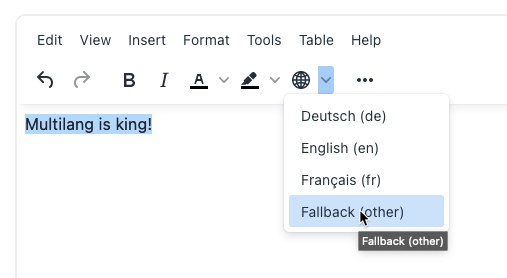
The plugin is developed to work with the optionally installed Iñaki Arenaza's multilang2 filter, and this plugin is the adaption on his plugin for TinyMCE editor. It will work with TinyMCE 6 that is included in Moodle ≥ 4.1.
After the installation there is a new Button (with a globe icon) and a menu entry in the Format section where you can select a language. Clicking on a language entry adds a language opening and closing tag to your text at the current cursor position. If there is a selection then the language tags are places around the selection. In case you use the highlighting option and see the yellow language tags, you may click one of these tags then select a new language from the menu and that will change the language of the existing tag. You may also remove it by hitting the backspace or delete key. This will remove the tag, and it's counterpart in case the formatting is correct.
Before version 0.3 the plugin filter_multilang2 must be installed and enabled. Since 0.3 this is not an requirement anymore. In this case the plugin creates the default multilangage elements that are built in in Moodle core.
/lib/editor/tiny/plugins.If the language selection does not appear in the editor:
fallbackspantag is active.addlanguage option and set a few language iso codes in the languageoptions setting.If your language tags are saved correctly but all language content is displayed, no matter which user language is selected, then check that you have the language tags for a certain phrase within the same block element (e.g. paragraph). See details at the Moodle documentation.
This does not apply if you use the multilang2 filter because there is a strict filtering even though elements (referring to the same content in different languages) span via multiple paragraphs.


