
Contact Form
Maintained by
Michael Milette
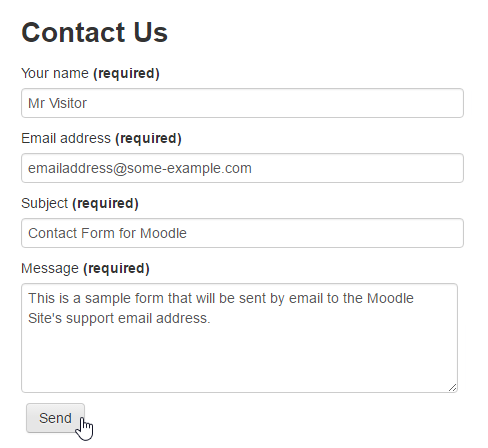
Contact Form is a Moodle plugin that allows your site to process and send information submitted through HTML web forms to the site's support email address or primary administrator if the support email address is not defined.
Comments
Comments are no longer open for new posts. Existing comments remain available to read.
Thank you for your quick responses. For some reason I did not notice it until now. I will check out the new version. And will place the usercase/suggestion into the bugtracker.
Gemma
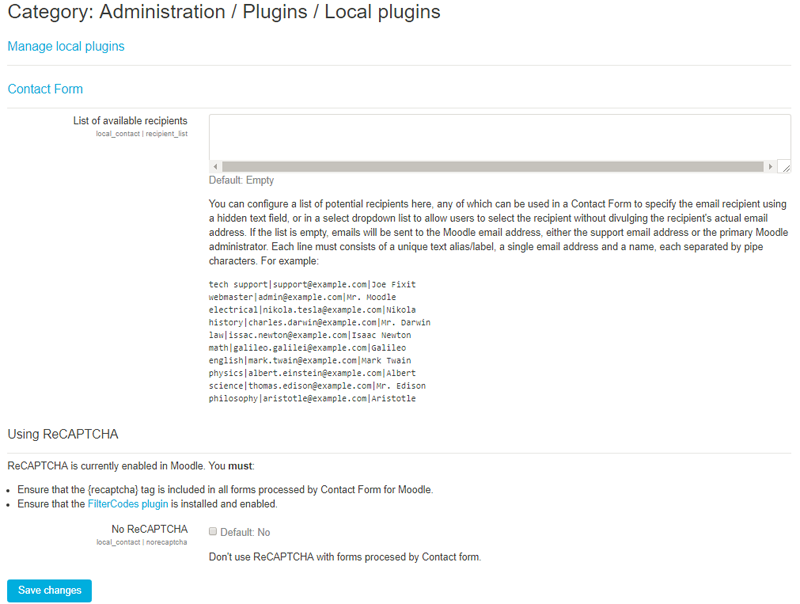
As requested, I added an option to change the recipient according to a drop-down list. Alternatively, you can use a hidden 'recipient' field to specify the recipient. Be sure to consult the documentation on how to do this as it is a two step process. If you don't include a 'recipient' field in your form or you did not complete the two step process correctly, form submissions will still be sent to the site's support email address by default.
Hope this helps. I have some additional work to do with the plugin before it is released on moodle.org but feel free to download it from GitHub. The Source Control URL link on the plugin's page on Moodle.org will take you there. Please give this new version a try and let me know if you have any problems in the Discussion forum or the Bug Tracker. Both links are on the plugin's page on Moodle.org.
Best regards,
Michael
There is a new version of the plugin available on GitHub that may be of interest to you. This latest version no longer requires the name and email address if the user is logged-in. While this doesn't insert the information into the form fields as you were hoping for, you can now just eliminate the two fields from your form instead. Hope this helps. I have some additional work to do with the plugin before it is released on moodle.org but feel free to download it from GitHub. You'll find a link for this on the plugin's page on Moodle.org called "Source control URL" which will take you there.
Unfortunately this is not possible to insert this information into the form using this plugin since the form itself is just HTML. However, let me give your question some thought and get back to you. I have a couple of ideas that might work for your situation which I will need to develop.
To ensure that this doesn't get forgotten, please add your suggestions to the bug tracker.
Best regards,
Michael
I really like this plug-in. I am wondering.
Right now the fields name and email are required.
I know I will get questions regarding this, since users are already logged in.
I am wondering if there is a way to fill these fields automatically with the users profile details.
(maybe in away they can change it if they want).
Gemma
Hopefully the explanation will help others in setting this up as well
Can I suggest to add an option that directs the emails generated by the created contact forms to someone other than the Moodle admin?
It would be great if they were sent to a specific email address, i.e. the correct person in the department, rather than admin (especially as this one would be coming from parents). I can't really set up an office admin to get the Moodle admin mail!!
Thanks for the help
Regards
bobby
This plugin is for administrators with a little knowledge of HTML forms. As you've already noticed, there is no special activity, resource or block for this plugin. It just uses a regular Moodle page or HTML block. Until I update the documentation to make the setup process a little clearer, the following steps should hopefully get you started:
1. Use the "More documentation on this plugin" link on the plugin's page to access the documentation. A copy of the documentation is also included with the plugin.
2. Scroll down to the "Usage & Settings" section. There you will find an example of HTML code for a Contact Us form. Copy this to your clipboard.
3. Create a new Moodle page or HTML block on your Moodle site where you will want the form to appear.
4. IMPORTANT: Switch to the Source Code view in the editor and then paste the form code you copied in step 2 above.
5. Save your changes.
That's it. Additional examples of forms are available on the plugin's GitHub Wiki. You can of course customize it to suit your particular requirements but be sure to do so in the Source Code view in the editor. Consult the plugin's documentation as there are certain elements of the form that must be present in order for it to work. The documentation also includes helpful troubleshooting information.
Please feel free to follow up with questions using the recently added forum "Discussion" link available on the plugin's page.
Best regards,
Michael
I've installed it on our Moodle, but it's not an Activity/Resource or a Block....
We are setting up a new course and this plugin would be ideal for the parents of the kids to use the Contact Form.
Cheers
bobby
I am going to review your plugin to see if it is ready to be published.
Thanks!