LabNBook

Versions
Current version
1.1.6 (2025080100)
1.1.6
Plugin type: Activities
Frankenstyle component name: mod_labnbook
Version build number: 2025080100
Version release name: 1.1.6
Maturity: Stable
Supported Moodle versions: 3.10, 3.11, 3.7, 3.8, 3.9, 4.0, 4.1, 4.2, 4.3, 4.4, 4.5
Repository URL (Git): https://gricad-gitlab.univ-grenoble-alpes.fr/labnbook/moodle-labnbook
Repository branch:
Repository tag:
Issue/bug tracker URL: https://gricad-gitlab.univ-grenoble-alpes.fr/labnbook/moodle-labnbook/-/issues
LabNbook
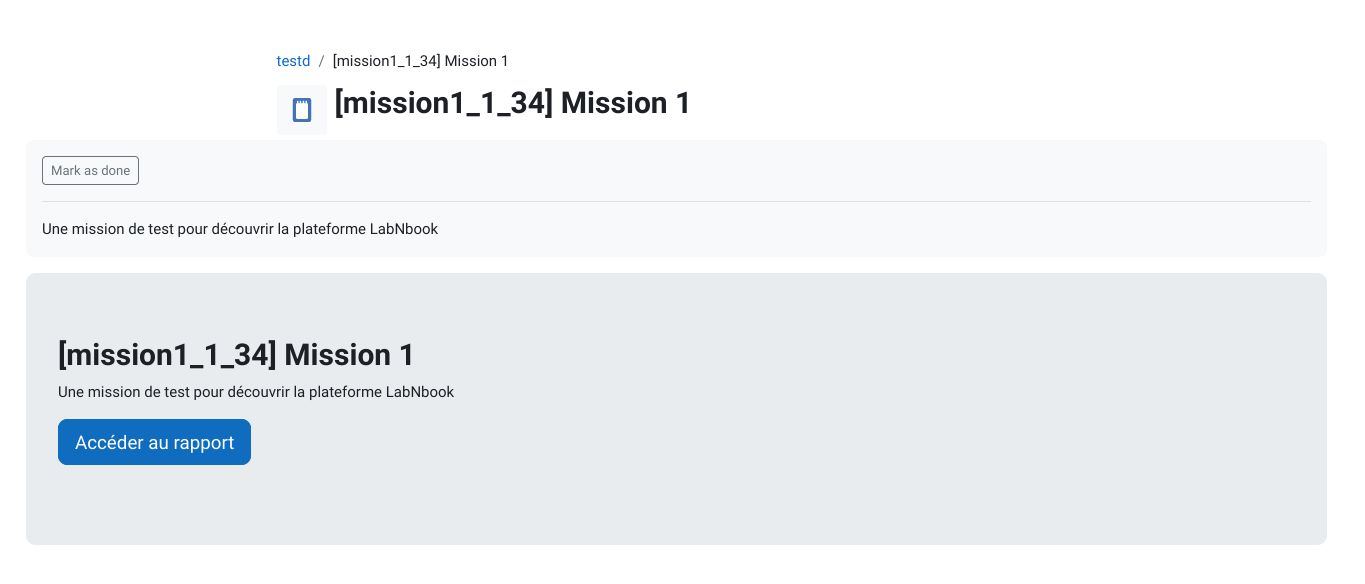
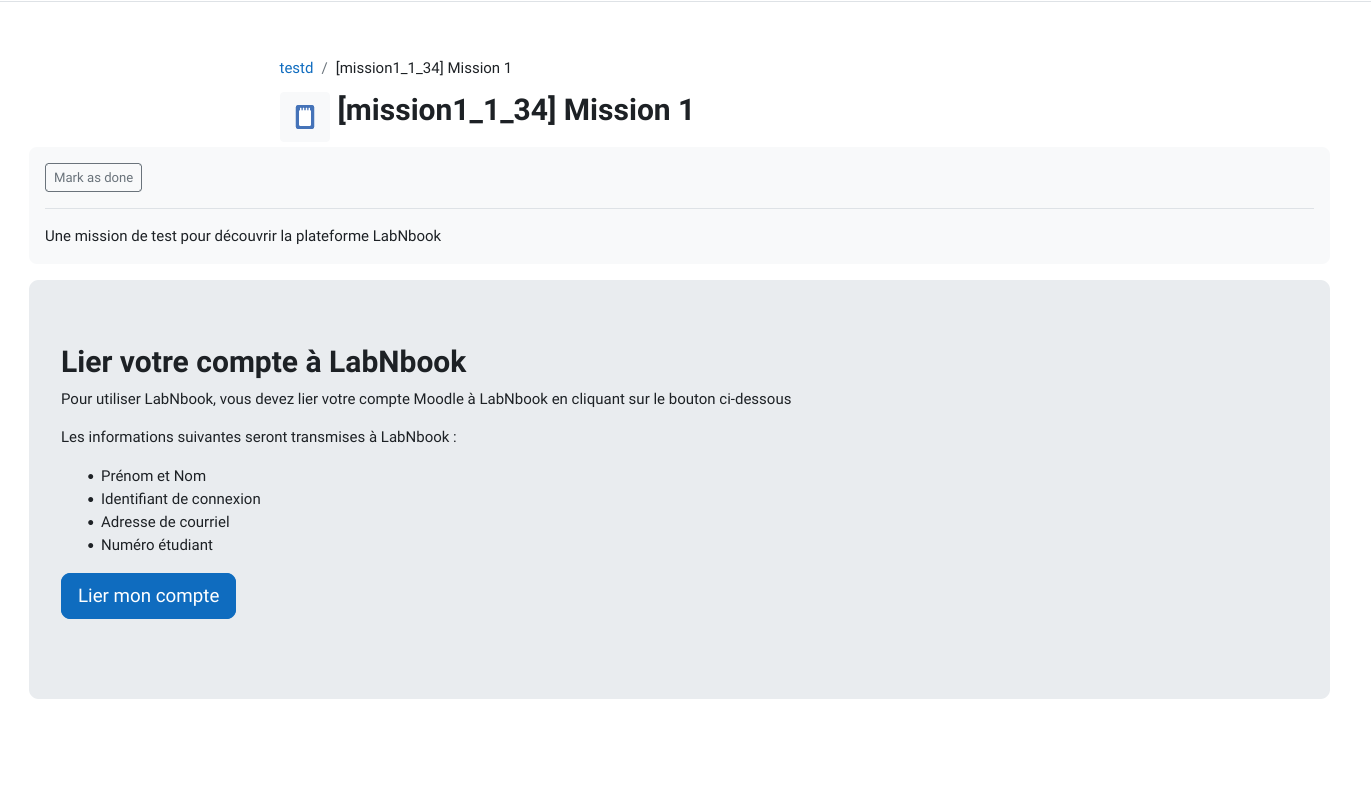
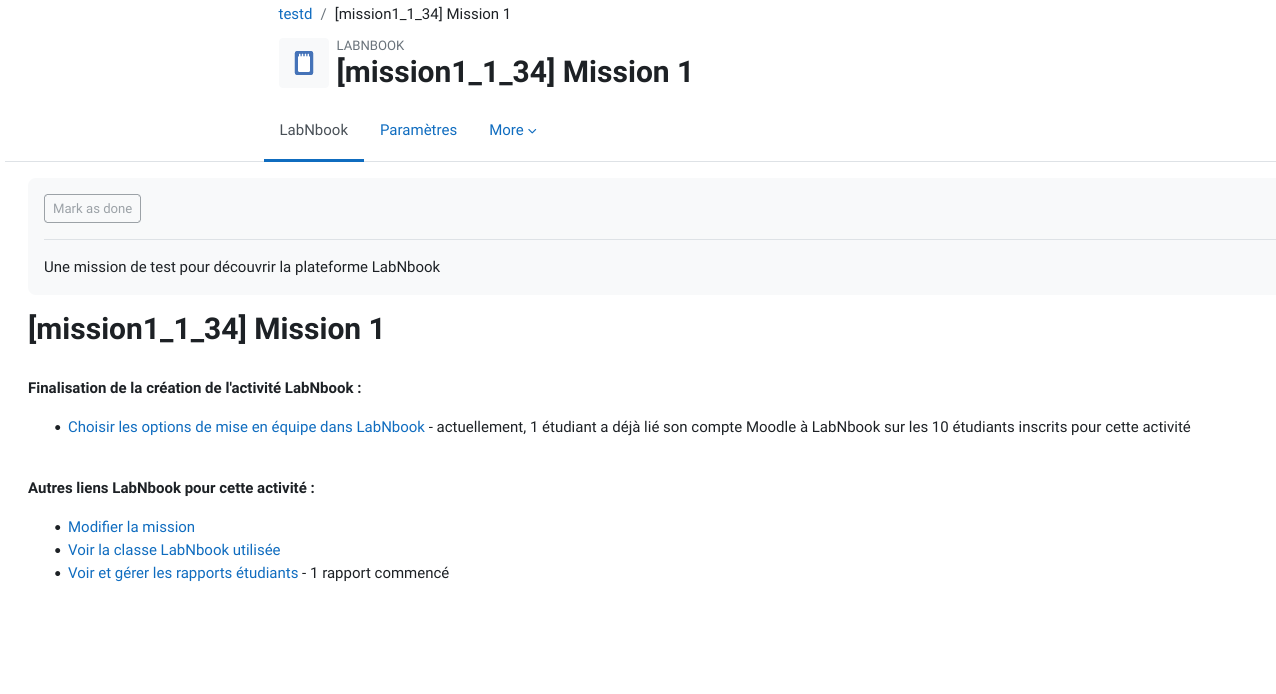
This Moodle plugin provides access to LabNbook through a Moodle activity.
After installation, this plugin must be configured to exchange with a LabnBook instance.
Then the editing teacher will have access to a new activity type: "LabNbook".
The students that enter such an activity will work on the Labnbook site,
without the need to authenticate separately.
Install
LabNbook must be installed separately.
You must have an admin access to LabNbook,
in order to create an institution that will be linked to this Moodle instance.
Install this module like any Moodle activity.
If deploying from Git, use composer to install the PHP dependencies.
cd /path/to/moodle

git clone https://gricad-gitlab.univ-grenoble-alpes.fr/labnbook/moodle-labnbook mod/labnbook

php admin/cli/upgrade.php
Then login into Moodle with an admin account.
You will be prompted for the new plugin configuration.
Input the URL of the LabNbook web API and other settings displayed in the LnB admin view.
Important note
Your server must be able to communicate via HTTPS to the API endpoint configured in the previous step, please ensure that :
- If your server is behind a firewall, it allows https calls to the LaBNbook API server
- If your server must communicate through a proxy, this proxy is correctly configured in https://yourmoodle.FQDN/admin/settings.php?section=http
Compile javascript
To compile the javascript file run :
cd mod/labnbook

npm install

# If grunt is not installed on your machine

npm install -g grunt-cli

# In the plugin directory

grunt amd
For developpment
composer global config minimum-stability dev

composer global config prefer-stable true

composer global require moodlehq/moodle-cs
Ensure your IDE uses phpcs for checking the coding style
To compile the javascript file run :
cd mod/labnbook

npm install

# If grunt is not installed on your machine

npm install -g grunt-cli

# In the plugin directory

grunt amd
Or if you are using the dockerized moodle from labnbook sources
docker-compose exec moodle bash

cd mod/labnbook

grunt amd

``


## Upgrade


Like any Moodle plugin:


1. update the source code in `mod/labnbook/`

2. apply the migration,

   through CLI with `php admin/cli/upgrade.php`,

   or through web by connecting as as an admin on the "Administration" page.


## License


Copyright 2019 Université Grenoble Alpes


License GPLv3


This program is free software: you can redistribute it and/or modify it under

the terms of the GNU General Public License as published by the Free Software

Foundation, either version 3 of the License, or (at your option) any later

version.


This program is distributed in the hope that it will be useful, but WITHOUT ANY

WARRANTY; without even the implied warranty of MERCHANTABILITY or FITNESS FOR A

PARTICULAR PURPOSE.  See the GNU General Public License for more details.


You should have received a copy of the GNU General Public License along with

this program.  If not, see <http://www.gnu.org/licenses/>.
1.1.5 (2025022100)
1.1.5
Plugin type: Activities
Frankenstyle component name: mod_labnbook
Version build number: 2025022100
Version release name: 1.1.5
Maturity: Stable
Supported Moodle versions: 3.10, 3.11, 3.7, 3.8, 3.9, 4.0, 4.1, 4.2, 4.3
Repository URL (Git): https://gricad-gitlab.univ-grenoble-alpes.fr/labnbook/moodle-labnbook
Repository branch:
Repository tag:
Issue/bug tracker URL: https://gricad-gitlab.univ-grenoble-alpes.fr/labnbook/moodle-labnbook/-/issues
LabNbook
This Moodle plugin provides access to LabNbook through a Moodle activity.
After installation, this plugin must be configured to exchange with a LabnBook instance.
Then the editing teacher will have access to a new activity type: "LabNbook".
The students that enter such an activity will work on the Labnbook site,
without the need to authenticate separately.
Install
LabNbook must be installed separately.
You must have an admin access to LabNbook,
in order to create an institution that will be linked to this Moodle instance.
Install this module like any Moodle activity.
If deploying from Git, use composer to install the PHP dependencies.
cd /path/to/moodle

git clone https://gricad-gitlab.univ-grenoble-alpes.fr/labnbook/moodle-labnbook mod/labnbook

php admin/cli/upgrade.php
Then login into Moodle with an admin account.
You will be prompted for the new plugin configuration.
Input the URL of the LabNbook web API and other settings displayed in the LnB admin view.
Important note
Your server must be able to communicate via HTTPS to the API endpoint configured in the previous step, please ensure that :
- If your server is behind a firewall, it allows https calls to the LaBNbook API server
- If your server must communicate through a proxy, this proxy is correctly configured in https://yourmoodle.FQDN/admin/settings.php?section=http
Compile javascript
To compile the javascript file run :
cd mod/labnbook

npm install

# If grunt is not installed on your machine

npm install -g grunt-cli

# In the plugin directory

grunt amd
For developpment
composer global config minimum-stability dev

composer global config prefer-stable true

composer global require moodlehq/moodle-cs
Ensure your IDE uses phpcs for checking the coding style
To compile the javascript file run :
cd mod/labnbook

npm install

# If grunt is not installed on your machine

npm install -g grunt-cli

# In the plugin directory

grunt amd
Or if you are using the dockerized moodle from labnbook sources
docker-compose exec moodle bash

cd mod/labnbook

grunt amd

``


## Upgrade


Like any Moodle plugin:


1. update the source code in `mod/labnbook/`

2. apply the migration,

   through CLI with `php admin/cli/upgrade.php`,

   or through web by connecting as as an admin on the "Administration" page.


## License


Copyright 2019 Université Grenoble Alpes


License GPLv3


This program is free software: you can redistribute it and/or modify it under

the terms of the GNU General Public License as published by the Free Software

Foundation, either version 3 of the License, or (at your option) any later

version.


This program is distributed in the hope that it will be useful, but WITHOUT ANY

WARRANTY; without even the implied warranty of MERCHANTABILITY or FITNESS FOR A

PARTICULAR PURPOSE.  See the GNU General Public License for more details.


You should have received a copy of the GNU General Public License along with

this program.  If not, see <http://www.gnu.org/licenses/>.
1.1.4 (2024101700)
1.1.4
Plugin type: Activities
Frankenstyle component name: mod_labnbook
Version build number: 2024101700
Version release name: 1.1.4
Maturity: Stable
Supported Moodle versions: 3.10, 3.11, 3.7, 3.8, 3.9, 4.0, 4.1, 4.2, 4.3
Repository URL (Git): https://gricad-gitlab.univ-grenoble-alpes.fr/labnbook/moodle-labnbook
Repository branch:
Repository tag:
Issue/bug tracker URL: https://gricad-gitlab.univ-grenoble-alpes.fr/labnbook/moodle-labnbook/-/issues
LabNbook
This Moodle plugin provides access to LabNbook through a Moodle activity.
After installation, this plugin must be configured to exchange with a LabnBook instance.
Then the editing teacher will have access to a new activity type: "LabNbook".
The students that enter such an activity will work on the Labnbook site,
without the need to authenticate separately.
Install
LabNbook must be installed separately.
You must have an admin access to LabNbook,
in order to create an institution that will be linked to this Moodle instance.
Install this module like any Moodle activity.
If deploying from Git, use composer to install the PHP dependencies.
cd /path/to/moodle

git clone https://gricad-gitlab.univ-grenoble-alpes.fr/labnbook/moodle-labnbook mod/labnbook

php admin/cli/upgrade.php
Then login into Moodle with an admin account.
You will be prompted for the new plugin configuration.
Input the URL of the LabNbook web API and other settings displayed in the LnB admin view.
Compile javascript
To compile the javascript file run :
cd mod/labnbook

npm install

# If grunt is not installed on your machine

npm install -g grunt-cli

# In the plugin directory

grunt amd
For developpment
composer global config minimum-stability dev

composer global config prefer-stable true

composer global require moodlehq/moodle-cs
Ensure your IDE uses phpcs for checking the coding style
To compile the javascript file run :
cd mod/labnbook

npm install

# If grunt is not installed on your machine

npm install -g grunt-cli

# In the plugin directory

grunt amd
Or if you are using the dockerized moodle from labnbook sources
docker-compose exec moodle bash

cd mod/labnbook

grunt amd

``


## Upgrade


Like any Moodle plugin:


1. update the source code in `mod/labnbook/`

2. apply the migration,

   through CLI with `php admin/cli/upgrade.php`,

   or through web by connecting as as an admin on the "Administration" page.


## License


Copyright 2019 Université Grenoble Alpes


License GPLv3


This program is free software: you can redistribute it and/or modify it under

the terms of the GNU General Public License as published by the Free Software

Foundation, either version 3 of the License, or (at your option) any later

version.


This program is distributed in the hope that it will be useful, but WITHOUT ANY

WARRANTY; without even the implied warranty of MERCHANTABILITY or FITNESS FOR A

PARTICULAR PURPOSE.  See the GNU General Public License for more details.


You should have received a copy of the GNU General Public License along with

this program.  If not, see <http://www.gnu.org/licenses/>.
1.1.3 (2024090500)
1.1.3
Plugin type: Activities
Frankenstyle component name: mod_labnbook
Version build number: 2024090500
Version release name: 1.1.3
Maturity: Stable
Supported Moodle versions: 3.10, 3.11, 3.7, 3.8, 3.9, 4.0, 4.1, 4.2, 4.3
Repository URL (Git): https://gricad-gitlab.univ-grenoble-alpes.fr/labnbook/moodle-labnbook
Repository branch:
Repository tag:
Issue/bug tracker URL: https://gricad-gitlab.univ-grenoble-alpes.fr/labnbook/moodle-labnbook/-/issues
LabNbook
This Moodle plugin provides access to LabNbook through a Moodle activity.
After installation, this plugin must be configured to exchange with a LabnBook instance.
Then the editing teacher will have access to a new activity type: "LabNbook".
The students that enter such an activity will work on the Labnbook site,
without the need to authenticate separately.
Install
LabNbook must be installed separately.
You must have an admin access to LabNbook,
in order to create an institution that will be linked to this Moodle instance.
Install this module like any Moodle activity.
If deploying from Git, use composer to install the PHP dependencies.
cd /path/to/moodle

git clone https://gricad-gitlab.univ-grenoble-alpes.fr/labnbook/moodle-labnbook mod/labnbook

php admin/cli/upgrade.php
Then login into Moodle with an admin account.
You will be prompted for the new plugin configuration.
Input the URL of the LabNbook web API and other settings displayed in the LnB admin view.
Compile javascript
To compile the javascript file run :
cd mod/labnbook

npm install

# If grunt is not installed on your machine

npm install -g grunt-cli

# In the plugin directory

grunt amd
For developpment
composer global config minimum-stability dev

composer global config prefer-stable true

composer global require moodlehq/moodle-cs
Ensure your IDE uses phpcs for checking the coding style
To compile the javascript file run :
cd mod/labnbook

npm install

# If grunt is not installed on your machine

npm install -g grunt-cli

# In the plugin directory

grunt amd
Or if you are using the dockerized moodle from labnbook sources
docker-compose exec moodle bash

cd mod/labnbook

grunt amd

``


## Upgrade


Like any Moodle plugin:


1. update the source code in `mod/labnbook/`

2. apply the migration,

   through CLI with `php admin/cli/upgrade.php`,

   or through web by connecting as as an admin on the "Administration" page.


## License


Copyright 2019 Université Grenoble Alpes


License GPLv3


This program is free software: you can redistribute it and/or modify it under

the terms of the GNU General Public License as published by the Free Software

Foundation, either version 3 of the License, or (at your option) any later

version.


This program is distributed in the hope that it will be useful, but WITHOUT ANY

WARRANTY; without even the implied warranty of MERCHANTABILITY or FITNESS FOR A

PARTICULAR PURPOSE.  See the GNU General Public License for more details.


You should have received a copy of the GNU General Public License along with

this program.  If not, see <http://www.gnu.org/licenses/>.
1.1.3 (2024082200)
1.1.3
Plugin type: Activities
Frankenstyle component name: mod_labnbook
Version build number: 2024082200
Version release name: 1.1.3
Maturity: Stable
Supported Moodle versions: 3.10, 3.11, 3.7, 3.8, 3.9, 4.0, 4.1, 4.2, 4.3
Repository URL (Git): https://gricad-gitlab.univ-grenoble-alpes.fr/labnbook/moodle-labnbook
Repository branch:
Repository tag:
Issue/bug tracker URL: https://gricad-gitlab.univ-grenoble-alpes.fr/labnbook/moodle-labnbook/-/issues
LabNbook
This Moodle plugin provides access to LabNbook through a Moodle activity.
After installation, this plugin must be configured to exchange with a LabnBook instance.
Then the editing teacher will have access to a new activity type: "LabNbook".
The students that enter such an activity will work on the Labnbook site,
without the need to authenticate separately.
Install
LabNbook must be installed separately.
You must have an admin access to LabNbook,
in order to create an institution that will be linked to this Moodle instance.
Install this module like any Moodle activity.
If deploying from Git, use composer to install the PHP dependencies.
cd /path/to/moodle

git clone https://gricad-gitlab.univ-grenoble-alpes.fr/labnbook/moodle-labnbook mod/labnbook

php admin/cli/upgrade.php
Then login into Moodle with an admin account.
You will be prompted for the new plugin configuration.
Input the URL of the LabNbook web API and other settings displayed in the LnB admin view.
Compile javascript
To compile the javascript file run :
cd mod/labnbook

npm install

# If grunt is not installed on your machine

npm install -g grunt-cli

# In the plugin directory

grunt amd
For developpment
composer global config minimum-stability dev

composer global config prefer-stable true

composer global require moodlehq/moodle-cs
Ensure your IDE uses phpcs for checking the coding style
To compile the javascript file run :
cd mod/labnbook

npm install

# If grunt is not installed on your machine

npm install -g grunt-cli

# In the plugin directory

grunt amd
Or if you are using the dockerized moodle from labnbook sources
docker-compose exec moodle bash

cd mod/labnbook

grunt amd

``


## Upgrade


Like any Moodle plugin:


1. update the source code in `mod/labnbook/`

2. apply the migration,

   through CLI with `php admin/cli/upgrade.php`,

   or through web by connecting as as an admin on the "Administration" page.


## License


Copyright 2019 Université Grenoble Alpes


License GPLv3


This program is free software: you can redistribute it and/or modify it under

the terms of the GNU General Public License as published by the Free Software

Foundation, either version 3 of the License, or (at your option) any later

version.


This program is distributed in the hope that it will be useful, but WITHOUT ANY

WARRANTY; without even the implied warranty of MERCHANTABILITY or FITNESS FOR A

PARTICULAR PURPOSE.  See the GNU General Public License for more details.


You should have received a copy of the GNU General Public License along with

this program.  If not, see <http://www.gnu.org/licenses/>.
1.1.3 (2024072600)
1.1.3
Plugin type: Activities
Frankenstyle component name: mod_labnbook
Version build number: 2024072600
Version release name: 1.1.3
Maturity: Stable
Supported Moodle versions: 3.10, 3.11, 3.7, 3.8, 3.9, 4.0, 4.1, 4.2, 4.3
Repository URL (Git): https://gricad-gitlab.univ-grenoble-alpes.fr/labnbook/moodle-labnbook
Repository branch:
Repository tag:
Issue/bug tracker URL: https://gricad-gitlab.univ-grenoble-alpes.fr/labnbook/moodle-labnbook/-/issues
LabNbook
This Moodle plugin provides access to LabNbook through a Moodle activity.
After installation, this plugin must be configured to exchange with a LabnBook instance.
Then the editing teacher will have access to a new activity type: "LabNbook".
The students that enter such an activity will work on the Labnbook site,
without the need to authenticate separately.
Install
LabNbook must be installed separately.
You must have an admin access to LabNbook,
in order to create an institution that will be linked to this Moodle instance.
Install this module like any Moodle activity.
If deploying from Git, use composer to install the PHP dependencies.
cd /path/to/moodle

git clone https://gricad-gitlab.univ-grenoble-alpes.fr/labnbook/moodle-labnbook mod/labnbook

php admin/cli/upgrade.php
Then login into Moodle with an admin account.
You will be prompted for the new plugin configuration.
Input the URL of the LabNbook web API and other settings displayed in the LnB admin view.
Compile javascript
To compile the javascript file run :
cd mod/labnbook

npm install

# If grunt is not installed on your machine

npm install -g grunt-cli

# In the plugin directory

grunt amd
For developpment
composer global config minimum-stability dev

composer global config prefer-stable true

composer global require moodlehq/moodle-cs
Ensure your IDE uses phpcs for checking the coding style
To compile the javascript file run :
cd mod/labnbook

npm install

# If grunt is not installed on your machine

npm install -g grunt-cli

# In the plugin directory

grunt amd
Or if you are using the dockerized moodle from labnbook sources
docker-compose exec moodle bash

cd mod/labnbook

grunt amd

``


## Upgrade


Like any Moodle plugin:


1. update the source code in `mod/labnbook/`

2. apply the migration,

   through CLI with `php admin/cli/upgrade.php`,

   or through web by connecting as as an admin on the "Administration" page.


## License


Copyright 2019 Université Grenoble Alpes


License GPLv3


This program is free software: you can redistribute it and/or modify it under

the terms of the GNU General Public License as published by the Free Software

Foundation, either version 3 of the License, or (at your option) any later

version.


This program is distributed in the hope that it will be useful, but WITHOUT ANY

WARRANTY; without even the implied warranty of MERCHANTABILITY or FITNESS FOR A

PARTICULAR PURPOSE.  See the GNU General Public License for more details.


You should have received a copy of the GNU General Public License along with

this program.  If not, see <http://www.gnu.org/licenses/>.
1.1.3 (2024062800)
1.1.3
Plugin type: Activities
Frankenstyle component name: mod_labnbook
Version build number: 2024062800
Version release name: 1.1.3
Maturity: Stable
Supported Moodle versions: 3.10, 3.11, 3.7, 3.8, 3.9, 4.0, 4.1, 4.2, 4.3
Repository URL (Git): https://gricad-gitlab.univ-grenoble-alpes.fr/labnbook/moodle-labnbook
Repository branch: v1.1.3
Repository tag:
Issue/bug tracker URL: https://gricad-gitlab.univ-grenoble-alpes.fr/labnbook/moodle-labnbook/-/issues
LabNbook
This Moodle plugin provides access to LabNbook through a Moodle activity.
After installation, this plugin must be configured to exchange with a LabnBook instance.
Then the editing teacher will have access to a new activity type: "LabNbook".
The students that enter such an activity will work on the Labnbook site,
without the need to authenticate separately.
Install
LabNbook must be installed separately.
You must have an admin access to LabNbook,
in order to create an institution that will be linked to this Moodle instance.
Install this module like any Moodle activity.
If deploying from Git, use composer to install the PHP dependencies.
cd /path/to/moodle

git clone https://gricad-gitlab.univ-grenoble-alpes.fr/labnbook/moodle-labnbook mod/labnbook

php admin/cli/upgrade.php
Then login into Moodle with an admin account.
You will be prompted for the new plugin configuration.
Input the URL of the LabNbook web API and other settings displayed in the LnB admin view.
Compile javascript
To compile the javascript file run :
cd mod/labnbook

npm install

# If grunt is not installed on your machine

npm install -g grunt-cli

# In the plugin directory

grunt amd
For developpment
composer global config minimum-stability dev

composer global config prefer-stable true

composer global require moodlehq/moodle-cs
Ensure your IDE uses phpcs for checking the coding style
To compile the javascript file run :
cd mod/labnbook

npm install

# If grunt is not installed on your machine

npm install -g grunt-cli

# In the plugin directory

grunt amd
Or if you are using the dockerized moodle from labnbook sources
docker-compose exec moodle bash

cd mod/labnbook

grunt amd

``


## Upgrade


Like any Moodle plugin:


1. update the source code in `mod/labnbook/`

2. apply the migration,

   through CLI with `php admin/cli/upgrade.php`,

   or through web by connecting as as an admin on the "Administration" page.


## License


Copyright 2019 Université Grenoble Alpes


License GPLv3


This program is free software: you can redistribute it and/or modify it under

the terms of the GNU General Public License as published by the Free Software

Foundation, either version 3 of the License, or (at your option) any later

version.


This program is distributed in the hope that it will be useful, but WITHOUT ANY

WARRANTY; without even the implied warranty of MERCHANTABILITY or FITNESS FOR A

PARTICULAR PURPOSE.  See the GNU General Public License for more details.


You should have received a copy of the GNU General Public License along with

this program.  If not, see <http://www.gnu.org/licenses/>.
1.1.3 (2024051400)
1.1.3
Plugin type: Activities
Frankenstyle component name: mod_labnbook
Version build number: 2024051400
Version release name: 1.1.3
Maturity: Stable
Supported Moodle versions: 3.10, 3.11, 3.7, 3.8, 3.9, 4.0, 4.1, 4.2, 4.3
Repository URL (Git): https://gricad-gitlab.univ-grenoble-alpes.fr/labnbook/moodle-labnbook
Repository branch: v1.1.3
Repository tag:
Issue/bug tracker URL: https://gricad-gitlab.univ-grenoble-alpes.fr/labnbook/moodle-labnbook/-/issues
LabNbook
This Moodle plugin provides access to LabNbook through a Moodle activity.
After installation, this plugin must be configured to exchange with a LabnBook instance.
Then the editing teacher will have access to a new activity type: "LabNbook".
The students that enter such an activity will work on the Labnbook site,
without the need to authenticate separately.
Install
LabNbook must be installed separately.
You must have an admin access to LabNbook,
in order to create an institution that will be linked to this Moodle instance.
Install this module like any Moodle activity.
If deploying from Git, use composer to install the PHP dependencies.
cd /path/to/moodle

git clone https://gricad-gitlab.univ-grenoble-alpes.fr/labnbook/moodle-labnbook mod/labnbook

php admin/cli/upgrade.php
Then login into Moodle with an admin account.
You will be prompted for the new plugin configuration.
Input the URL of the LabNbook web API and other settings displayed in the LnB admin view.
Compile javascript
To compile the javascript file run :
cd mod/labnbook

npm install

# If grunt is not installed on your machine

npm install -g grunt-cli

# In the plugin directory

grunt amd
For developpment
composer global config minimum-stability dev

composer global config prefer-stable true

composer global require moodlehq/moodle-cs
Ensure your IDE uses phpcs for checking the coding style
To compile the javascript file run :
cd mod/labnbook

npm install

# If grunt is not installed on your machine

npm install -g grunt-cli

# In the plugin directory

grunt amd
Or if you are using the dockerized moodle from labnbook sources
docker-compose exec moodle bash

cd mod/labnbook

grunt amd

``


## Upgrade


Like any Moodle plugin:


1. update the source code in `mod/labnbook/`

2. apply the migration,

   through CLI with `php admin/cli/upgrade.php`,

   or through web by connecting as as an admin on the "Administration" page.


## License


Copyright 2019 Université Grenoble Alpes


License GPLv3


This program is free software: you can redistribute it and/or modify it under

the terms of the GNU General Public License as published by the Free Software

Foundation, either version 3 of the License, or (at your option) any later

version.


This program is distributed in the hope that it will be useful, but WITHOUT ANY

WARRANTY; without even the implied warranty of MERCHANTABILITY or FITNESS FOR A

PARTICULAR PURPOSE.  See the GNU General Public License for more details.


You should have received a copy of the GNU General Public License along with

this program.  If not, see <http://www.gnu.org/licenses/>.
1.1.2 (2023020600)
1.1.2
Plugin type: Activities
Frankenstyle component name: mod_labnbook
Version build number: 2023020600
Version release name: 1.1.2
Maturity: Stable
Supported Moodle versions: 3.10, 3.11, 3.7, 3.8, 3.9, 4.0, 4.1, 4.2
Repository URL (Git): https://gricad-gitlab.univ-grenoble-alpes.fr/labnbook/moodle-labnbook
Repository branch:
Repository tag:
Issue/bug tracker URL: https://gricad-gitlab.univ-grenoble-alpes.fr/labnbook/moodle-labnbook/-/issues
LabNbook
This Moodle plugin provides access to LabNbook through a Moodle activity.
After installation, this plugin must be configured to exchange with a LabnBook instance.
Then the editing teacher will have access to a new activity type: "LabNbook".
The students that enter such an activity will work on the Labnbook site,
without the need to authenticate separately.
Install
LabNbook must be installed separately.
You must have an admin access to LabNbook,
in order to create an institution that will be linked to this Moodle instance.
Install this module like any Moodle activity.
If deploying from Git, use composer to install the PHP dependencies.
cd /path/to/moodle

git clone https://gricad-gitlab.univ-grenoble-alpes.fr/labnbook/moodle-labnbook mod/labnbook

(cd mod/labnbook && composer install --no-dev)

php admin/cli/upgrade.php
Then login into Moodle with an admin account.
You will be prompted for the new plugin configuration.
Input the URL of the LabNbook web API and other settings displayed in the LnB admin view.
Upgrade
Like any Moodle plugin:
- update the source code in
mod/labnbook/ - apply the migration,
through CLI withphp admin/cli/upgrade.php,
or through web by connecting as as an admin on the "Administration" page.
License
Copyright 2019 Université Grenoble Alpes
License GPLv3
This program is free software: you can redistribute it and/or modify it under
the terms of the GNU General Public License as published by the Free Software
Foundation, either version 3 of the License, or (at your option) any later
version.
This program is distributed in the hope that it will be useful, but WITHOUT ANY
WARRANTY; without even the implied warranty of MERCHANTABILITY or FITNESS FOR A
PARTICULAR PURPOSE. See the GNU General Public License for more details.
You should have received a copy of the GNU General Public License along with
this program. If not, see http://www.gnu.org/licenses/.
1.1.2 (2023081100)
1.1.2
Plugin type: Activities
Frankenstyle component name: mod_labnbook
Version build number: 2023081100
Version release name: 1.1.2
Maturity: Stable
Supported Moodle versions: 3.7, 3.8, 3.9, 4.0, 4.1, 4.2
Repository URL (Git): https://gricad-gitlab.univ-grenoble-alpes.fr/labnbook/moodle-labnbook
Repository branch:
Repository tag:
Issue/bug tracker URL: https://gricad-gitlab.univ-grenoble-alpes.fr/labnbook/moodle-labnbook/-/issues
LabNbook
This Moodle plugin provides access to LabNbook through a Moodle activity.
After installation, this plugin must be configured to exchange with a LabnBook instance.
Then the editing teacher will have access to a new activity type: "LabNbook".
The students that enter such an activity will work on the Labnbook site,
without the need to authenticate separately.
Install
LabNbook must be installed separately.
You must have an admin access to LabNbook,
in order to create an institution that will be linked to this Moodle instance.
Install this module like any Moodle activity.
If deploying from Git, use composer to install the PHP dependencies.
cd /path/to/moodle

git clone https://gricad-gitlab.univ-grenoble-alpes.fr/labnbook/moodle-labnbook mod/labnbook

(cd mod/labnbook && composer install --no-dev)

php admin/cli/upgrade.php
Then login into Moodle with an admin account.
You will be prompted for the new plugin configuration.
Input the URL of the LabNbook web API and other settings displayed in the LnB admin view.
Upgrade
Like any Moodle plugin:
- update the source code in
mod/labnbook/ - apply the migration,
through CLI withphp admin/cli/upgrade.php,
or through web by connecting as as an admin on the "Administration" page.
License
Copyright 2019 Université Grenoble Alpes
License GPLv3
This program is free software: you can redistribute it and/or modify it under
the terms of the GNU General Public License as published by the Free Software
Foundation, either version 3 of the License, or (at your option) any later
version.
This program is distributed in the hope that it will be useful, but WITHOUT ANY
WARRANTY; without even the implied warranty of MERCHANTABILITY or FITNESS FOR A
PARTICULAR PURPOSE. See the GNU General Public License for more details.
You should have received a copy of the GNU General Public License along with
this program. If not, see http://www.gnu.org/licenses/.
1.1.1 (2023081000)
1.1.1
Plugin type: Activities
Frankenstyle component name: mod_labnbook
Version build number: 2023081000
Version release name: 1.1.1
Maturity: Stable
Supported Moodle versions: 3.7, 3.8, 3.9, 4.0, 4.1, 4.2
Repository URL (Git): https://gricad-gitlab.univ-grenoble-alpes.fr/labnbook/moodle-labnbook
Repository branch: master
Repository tag:
Issue/bug tracker URL: https://gricad-gitlab.univ-grenoble-alpes.fr/labnbook/moodle-labnbook/-/issues
LabNbook
This Moodle plugin provides access to LabNbook through a Moodle activity.
After installation, this plugin must be configured to exchange with a LabNbook instance.
Then the editing teacher will have access to a new activity type: "LabNbook".
The students that enter such an activity will work on the Labnbook site,
without the need to authenticate separately.
Install
LabNbook must be installed separately.
You must have an admin access to LabNbook,
in order to create an institution that will be linked to this Moodle instance.
Install this module like any Moodle activity.
If deploying from Git, use composer to install the PHP dependencies.
cd /path/to/moodle

git clone https://gricad-gitlab.univ-grenoble-alpes.fr/labnbook/moodle-labnbook mod/labnbook

(cd mod/labnbook && composer install --no-dev)

php admin/cli/upgrade.php
Then login into Moodle with an admin account.
You will be prompted for the new plugin configuration.
Input the URL of the LabNbook web API and other settings displayed in the LnB admin view.
Upgrade
Like any Moodle plugin:
- update the source code in
mod/labnbook/ - apply the migration,
through CLI withphp admin/cli/upgrade.php,
or through web by connecting as as an admin on the "Administration" page.
License
Copyright 2019 Université Grenoble Alpes
License GPLv3
This program is free software: you can redistribute it and/or modify it under
the terms of the GNU General Public License as published by the Free Software
Foundation, either version 3 of the License, or (at your option) any later
version.
This program is distributed in the hope that it will be useful, but WITHOUT ANY
WARRANTY; without even the implied warranty of MERCHANTABILITY or FITNESS FOR A
PARTICULAR PURPOSE. See the GNU General Public License for more details.
You should have received a copy of the GNU General Public License along with
this program. If not, see http://www.gnu.org/licenses/.