
Exabis Competencies - Competence grids
Maintained by
Andreas Riepl
Transform Your Moodle Experience with Exabis Suite: Empower Learners through Competency-Based, Personalized, and Adaptive Learning.
#Competence #PersonalizedLearning #AdaptiveLearning

Comments
Comments are no longer open for new posts. Existing comments remain available to read.
sorry für die späte Rückmeldung.
Gut dann freue ich mich darauf, euer Modul auszuprobieren.
LG
Steffen
auch als Admin sehe ich im Kurs im Block "Kompetenzraster" nur die Möglichkeit "Import/Export", aber ich finde nirgends die Möglichkeit ein Kompetenzraster einzugeben (also keine Datei hochzuladen, sondern das Kompetenzraster direkt in Moodle zu erstellen).
Grüße
Steffen
wo genau finde ich den Punkt "Kompetenzraster erstellen"?
Im Block "Kompetenzraster" steht nur "Vorauswahl der Kompetenzen durch den Administrator notwendig" und als Administrator habe ich nur die Konfigurationsseite für das Plugin (oder habe ich etwas übersehen)?
Klicke ich auf die Einstellungen des Blocks (Zahnrad) bekomme ich nur Einstellungen, die die Position des Blocks usw. betreffen.
Grüße
Steffen
ich werde weder aus der Anleitung für Admins, als auch aus der für Lehrer nicht schlau
In der Beschreibung des Plugins steht:
"Competence grids can be created ... but also within Moodle."
Wie genau mach ich das in Moodle?
Als Admin finde ich nur die Seite mit den Einstellungen, als Lehrer steht im Block folgendes:
"Vorauswahl der Kompetenzen durch den Administrator notwendig"
Wenn man den Haken bei "Angepasste Bewertung" setzt, sollte nach Anleitung ...
"Course-specific (adapted) grading
If a check mark is set here, the grading can be set specifically for every course."
..möglich sein. Im Kurs ändert sich überhaupt nichts. Wo sind die Einstellungen für Kurs-spezifische Bewertungen?
>> see a progress bar within competence fields now
Is it a Grid View?
Is there an admin manual of exacomp ver 4.5 ?
I upgraded exacomp 3.0.1 to 4.5.
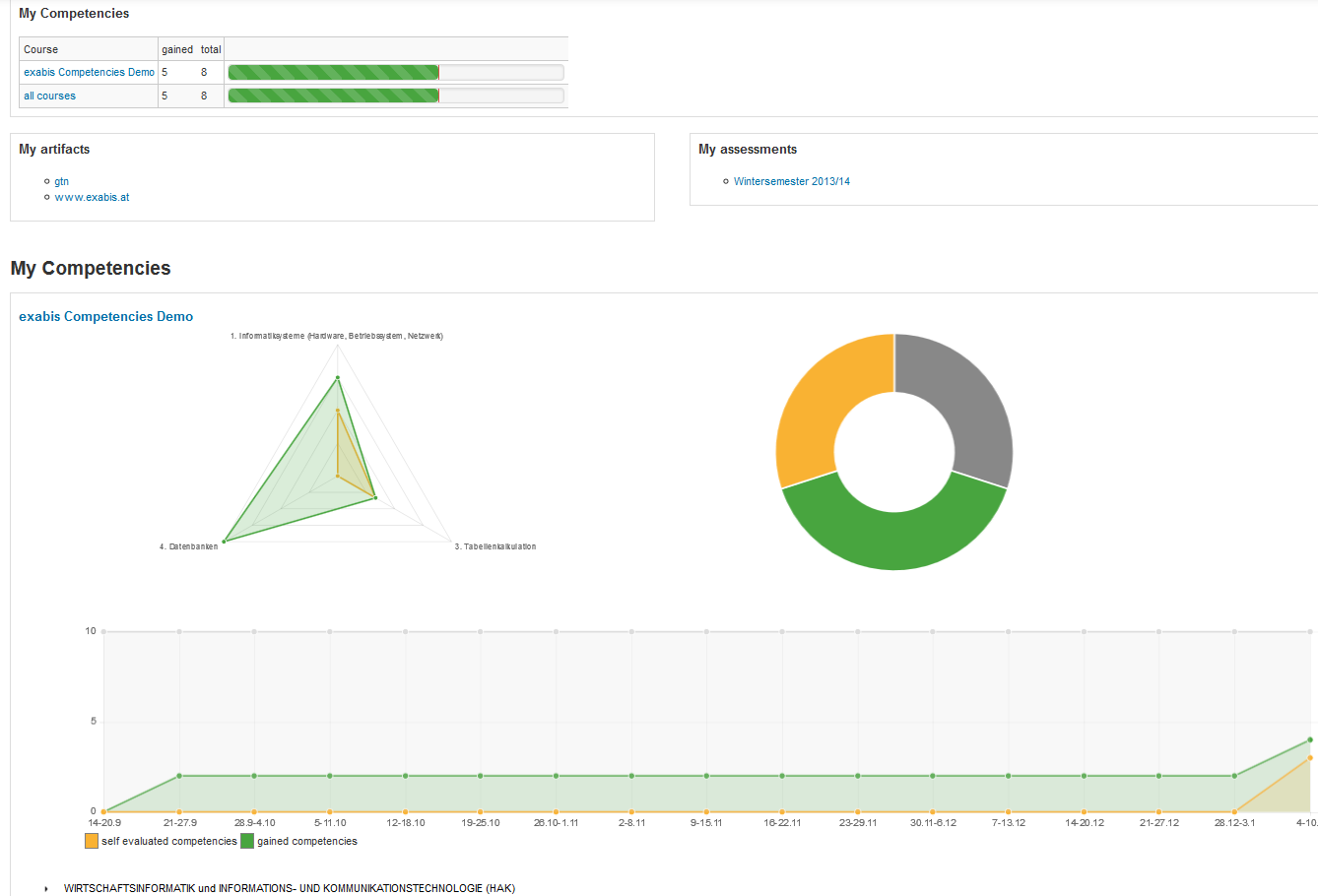
The radar chart is not displayed.
4.5.0 (2016081702) Moodle 3.0, 3.1
thank you for exabis modules, they are very helpful. We have been using them for some time but two weeks ago we upgraded moodle to version 3.05+ and eversince we are not able to get graphical interpretation of overal competences gained/self evaluated/not started as it was available before in a form of pie chart and line chart. Was this feature taken out from current version of exabis competences, or should we put more effort in proper setup of competence module? Many thanks for your answer.
Best Reards,
Honza
Best regards
Andreas
Looks like an interesting plugin. Unfortunately I cannot make it work (version 3.01 with Moodle 2.9).
The step "subject selection" produces an error:
Debug info: ERROR: for SELECT DISTINCT, ORDER BY expressions must appear in select list
LINE 5: ORDER BY s.sorting, s.title
^
SELECT DISTINCT s.id, s.title, s.source, s.sourceid
FROM mdl_block_exacompschooltypes s
JOIN mdl_block_exacompmdltype_mm m ON m.stid = s.id AND m.courseid = $1
ORDER BY s.sorting, s.title
[array (
0 => 0,
)]
Error code: dmlreadexception
Stack trace:
line 445 of /lib/dml/moodle_database.php: dml_read_exception thrown
line 244 of /lib/dml/pgsql_native_moodle_database.php: call to moodle_database->query_end()
line 785 of /lib/dml/pgsql_native_moodle_database.php: call to pgsql_native_moodle_database->query_end()
line 320 of /blocks/exacomp/lib/lib.php: call to pgsql_native_moodle_database->get_records_sql()
line 3725 of /blocks/exacomp/lib/lib.php: call to block_exacomp_get_schooltypes_by_course()
line 79 of /blocks/exacomp/courseselection.php: call to block_exacomp_build_schooltype_tree_for_courseselection()
How can I fix this?
Thanks for any help & best regards,
Pascal