Accessibility Overview
Maintained by
Brickfield Education Labs
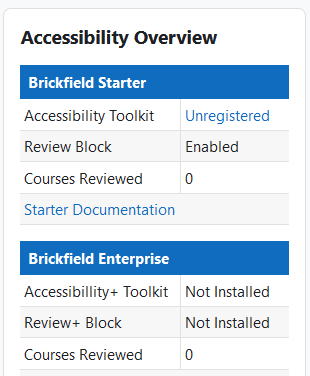
The purpose of the Accessibility Overview Block is to provide a concise overview of the Moodle site's accessibility features and their statuses.
What is included in the block are the useful summary points of the Brickfield Accessibility Toolkit and other accessibility offerings as a concise listing, with go-to links.
Comments
Comments are no longer open for new posts. Existing comments remain available to read.
As mentioned in this plugin's description, the purpose of the Accessibility Overview Block is to show you what various Accessibility features are possible on your Moodle site.
It provides links to help a site administration to register for the free Accessibility Toolkit (in core Moodle), or to do further research on the Accessibility+ Toolkit, which is a commercial version with many more features and added services.
Ultimately though, improving accessibility compliance for users comes down to technology, culture, and skills, and an organisation's available capacity, as our CEO Gavin Henrick outlines here in a recent LinkedIn Post: https://www.linkedin.com/posts/gavinhenrick_meet-gavin-henrick-from-brickfield-education-activity-7370742735609163776-xgfF