Learning Goal Widget
Learning Goal Widget |
Type |
Activity Module |
Plugins directory entry |
mod_learniggoalwidget |
Discussion |
- |
Maintainer(s) |
Simone Franza |
This plugin allows lecturers to enter the learning goals and topics of a course/lecture.
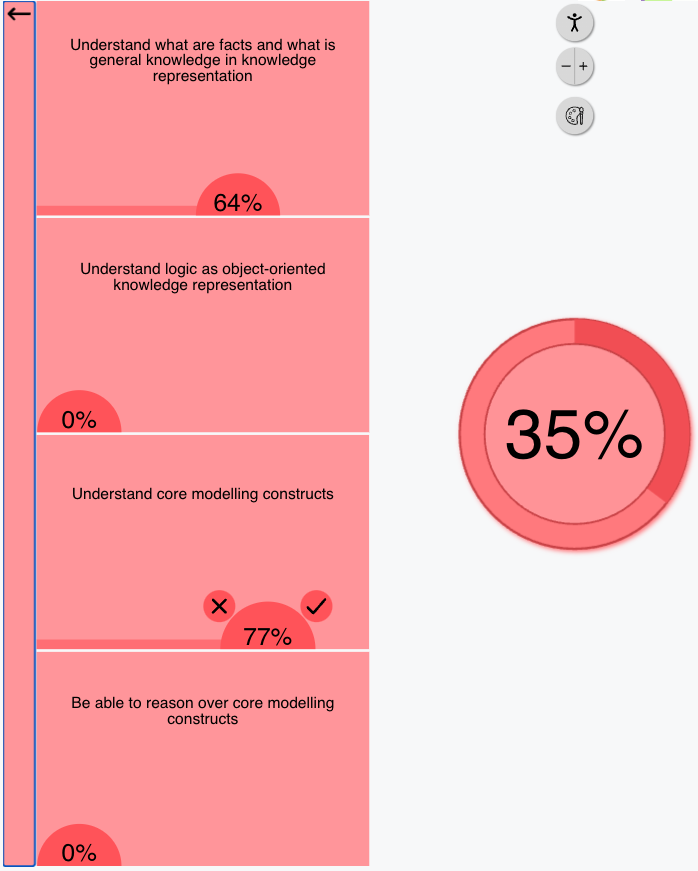
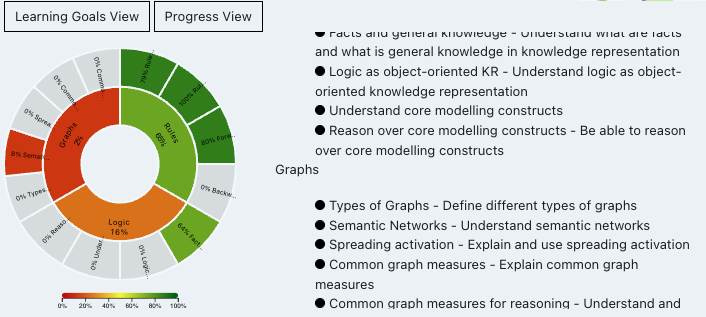
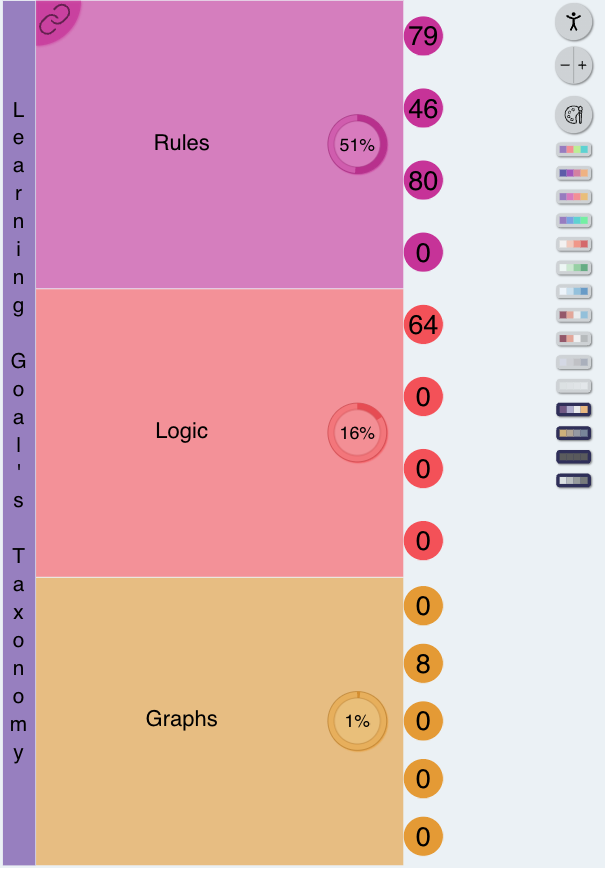
The students can choose between the sunburst and the treemap view and use the
plugin to track their learning progress on the different topics.
Each topic contains one or multiple learning goals and the lecturer can
provide external URLs to lecture or supplementary material. The 'taxonomy'
(e.g. the list of topics and learning goals) can be entered manually via the settings
or via a JSON file (see JSON structure).
Treemap View with expanded colorscheme menu

Sunburst View

Table of contents
- Installation
- Features
- JSON Structure
- How to Report a Bug
- License
Installation
ZIP file
- Log in to your Moodle site as an admin and go to Site administration >
Plugins > Install plugins.
- Upload the ZIP file with the plugin code. You should only be prompted to add
extra details if your plugin type is not automatically detected.
- Check the plugin validation report and finish the installation.
Manually
The plugin can be also installed by putting the contents of this directory to
{your/moodle/dirroot}/mod/learninggoalwidget
Afterwards, log in to your Moodle site as an admin and go to Site administration >
Notifications to complete the installation.
Alternatively, you can run
$ php admin/cli/upgrade.php
to complete the installation from the command line.
Features
The users can move sliders to track their learning progress on each goal as
well as open URLs to supplementary material or anything related to the topic/learning goal.

The treemap view allows the users to choose the preferred colorscheme, which is then
saved in the local storage of the browser. Accessible color schemes suitable for
individuals with color vision differences are provided. Furthermore, it is possible
to change the font size. Finally, for individuals who rely on screen readers,
the treemap view has been optimized to work with the Google Chrome
extension
Screen Reader.
JSON Structure
Here is a starting template for the JSON taxonomy:
{

  "name": "Learning Goal's taxonomy",

  "children": [

    {

      "name": "First Topic",

      "shortname": "This is the description of the First Topic",

      "url": "https://www.example.com",

      "children": [

        {

          "name": "Learning Goal 1-1",

          "shortname": "This is the description of the First Learning Goal of the First Topic",

          "url": "https://www.example.com"

        },

        {

          "name": "Learning Goal 1-2",

          "shortname": "This is the description of the Second Learning Goal of the First Topic",

          "url": "https://www.example.com"

        }

      ]

    },

    {

      "name": "Second Topic",

      "shortname": "This is the description of the Second Topic",

      "url": "https://www.example.com",

      "children": [

        {

          "name": "Learning Goal 2-1",

          "shortname": "This is the description of the First Learning Goal of the Second Topic",

          "url": "https://www.example.com"

        },

        {

          "name": "Learning Goal 2-2",

          "shortname": "This is the description of the Second Learning Goal of the Second Topic",

          "url": "https://www.example.com"

        }

      ]

    }

  ]

}
The JSON object contains the two properties:
| Property | Type | Description |
|----------|----------------|---------------------------------------|
| name | string | Name of the taxonomy (unused for now) |
| children | Array of Topic | List of topics of the taxonomy |
The Topic object has the following structure:
| Property | Type | Description |
|------------|----------------|---------------------------------------------|
| name | string | Name of the Topic |
| shortname | string | Description of the Topic |
| url | string | Url to supplementary material, slides, etc |
| children | Array of Learning Goal | List of Learning Goals of this Topic|
The Learning Goal object has the following structure:
| Property | Type | Description |
|------------|----------------|---------------------------------------------|
| name | string | Name of the Learning Goal |
| shortname | string | Description of the Learning Goal |
| url | string | Url to supplementary material, slides, etc |
How to Report a Bug
Please, create an issue on the
Github repository
of the plugin.
License
This program is free software: you can redistribute it and/or modify
it under the terms of the GNU General Public License as published by
the Free Software Foundation, either version 3 of the License, or
(at your option) any later version.
This program is distributed in the hope that it will be useful,
but WITHOUT ANY WARRANTY; without even the implied warranty of
MERCHANTABILITY or FITNESS FOR A PARTICULAR PURPOSE. See the
GNU General Public License for more details.
You should have received a copy of the GNU General Public License
along with this program. If not, see https://www.gnu.org/licenses/.