Description
This plugin integrates TextMagic's SMS gateway service with Moodle, allowing SMS messages to users through the TextMagic API. It provides a reliable and efficient way to send notifications and alerts via SMS.
Features
- Integration with TextMagic's SMS API
- Support for international phone numbers
- Easy setup and configuration
- Supports Multi-Factor Authentication (MFA)
- High delivery rates through TextMagic's network
Requirements
- Moodle 4.5 or later
- A TextMagic account and API credentials
Installation and Configuration
Step 1: Install the Plugin
- Go to Site administration > Plugins > Install plugins
- Upload the plugin file
- Follow the installation wizard
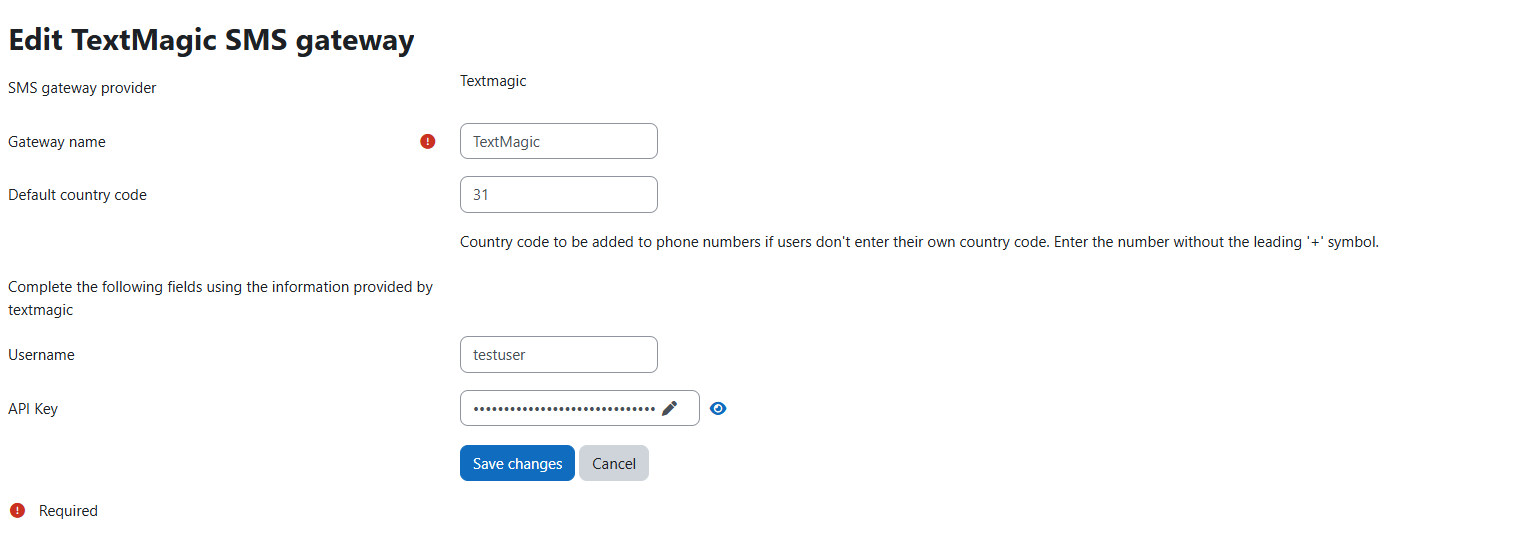
Step 2: Configure the SMS Gateway
- Go to Site administration > Plugins > Message outputs > Manage SMS gateways
- Click "Create new SMS gateway"
- Select "TextMagic" from the list of providers
- Fill in the required configuration:
- Username
- API Key
- Other required settings
- Click "Save changes"