Miguël Dhyne
Lead maintainer
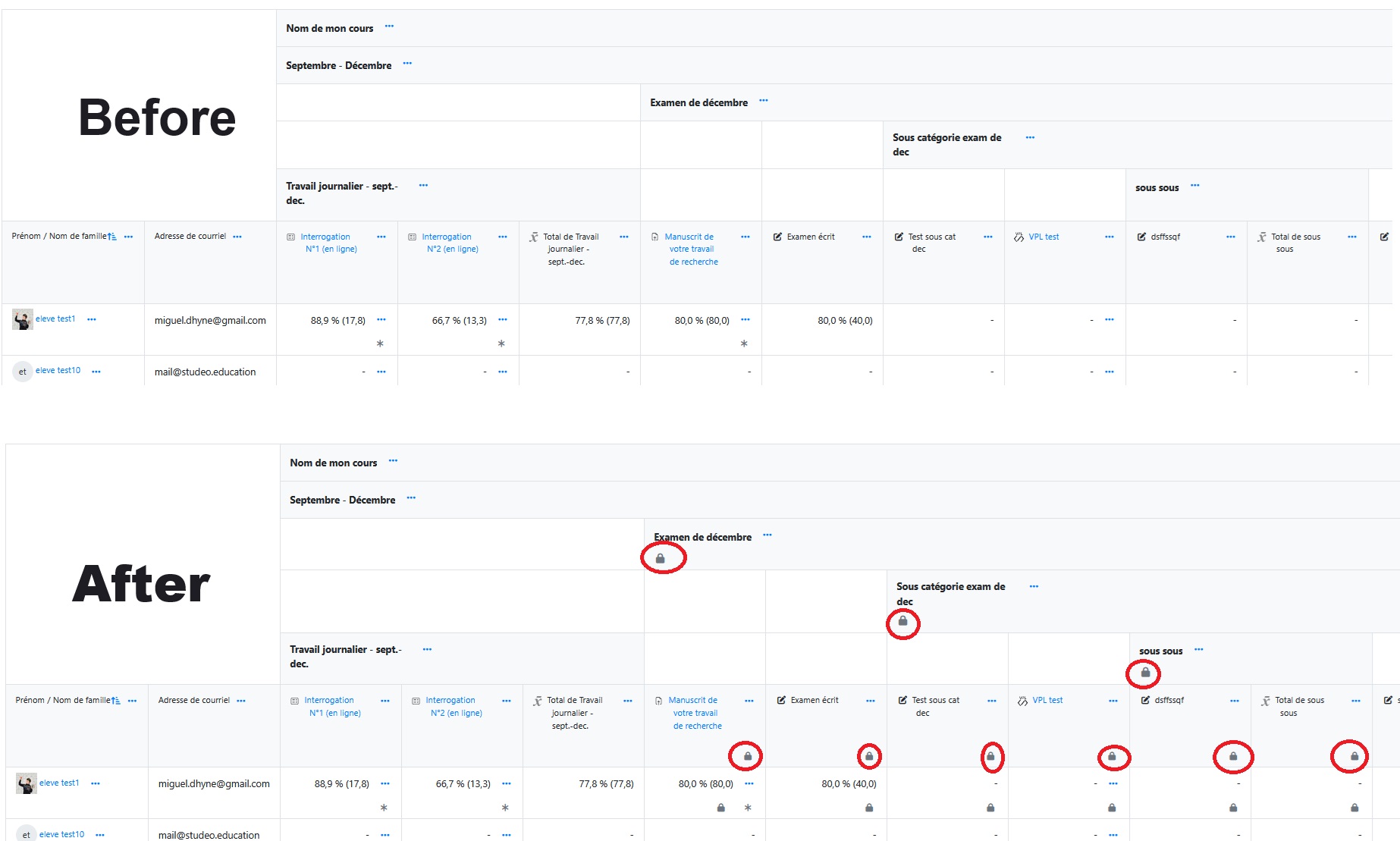
local_lockgrades)local_lockgrades is a local Moodle plugin that allows administrators to recursively lock or unlock a grade category, including all its subcategories and associated grade items, based on a unique idnumber identifier.
This plugin is particularly useful for institutions that manage grade locking during reporting periods or final grading stages, ensuring consistency and security of grade data across courses.
⏰ Action scheduling:
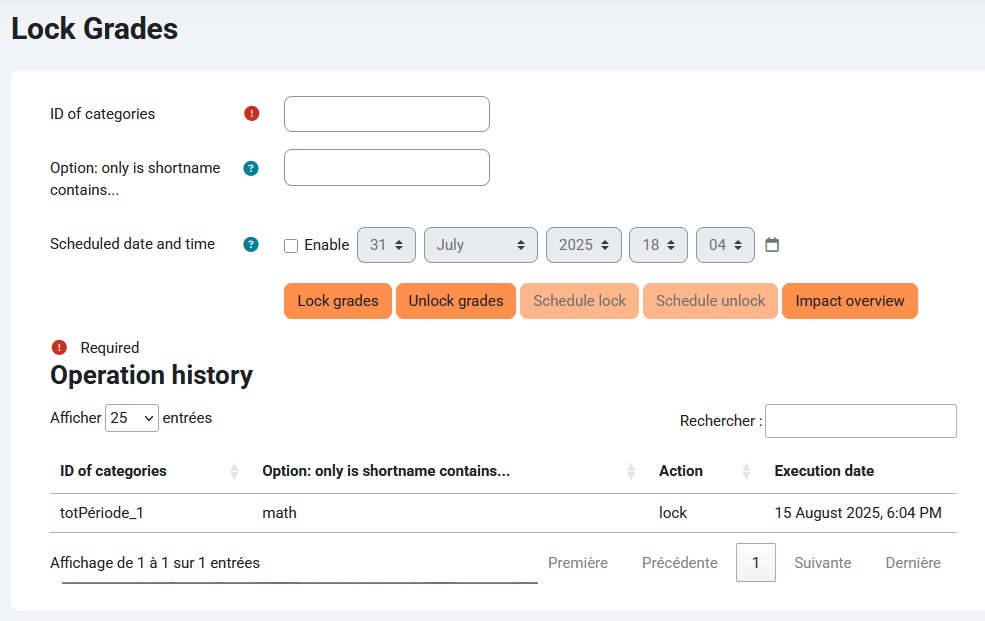
Schedule locking or unlocking actions for a specific date and time. Tasks are executed automatically by Moodle’s cron (NEW).
'️ Dry-run preview:
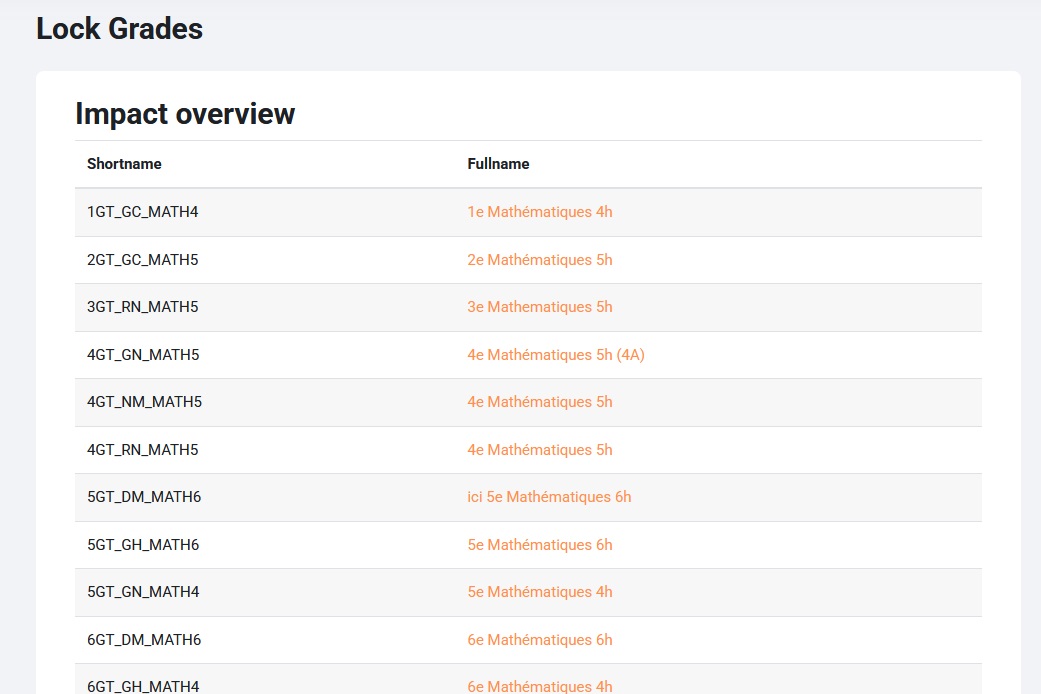
Preview all courses and grade items that would be affected by a lock or unlock operation before applying or scheduling the action (NEW).
📅 Task management table:
View, edit, duplicate, or delete scheduled actions in a unified, sortable table before execution (NEW).
" Ancestral lock inheritance:
Newly created or updated grade items or categories automatically inherit the locked status if any ancestor category is locked (NEW).
" Unified action history:
All actions—immediate and scheduled—are logged in a single, filterable, expandable table, with details on affected categories and items (NEW).
🛡️ Enhanced security:
Access now restricted to users with the local/lockgrades:manage capability (NEW, replaces previous reliance on moodle/site:config).
' Recursive locking:
Updates the locked, timemodified, and locktime fields for all grade items under the selected category.
🔓 Recursive unlocking:
Resets locked and locktime to 0, preserving timemodified timestamps. Cannot unlock a subcategory if any ancestor category remains locked.
🎯 Course filtering:
Optionally restrict actions to courses whose shortname contains a specified pattern.
-️ Simple interface:
A user-friendly admin form for entering the idnumber, optional course filter, scheduling options, and selecting the desired action (lock, unlock, schedule, or preview).
🔐 Secure access:
Only users with the local/lockgrades:manage capability (typically site administrators) can use the plugin.
' Data integrity:
Uses database transactions to ensure all updates are applied consistently.
Log in as a Moodle administrator (with local/lockgrades:manage capability).
Open the plugin interface at:https://your-moodle-site.local/local/lockgrades/index.php
Enter the idnumber of the grade category you wish to lock or unlock (e.g., term1_finalgrades).
Optionally, enter a course shortname filter to limit the scope.
Click Preview to see affected courses before proceeding (recommended).
Click Lock Grades or Unlock Grades to perform the action immediately, or schedule it for later.
Manage all pending and historical actions at the bottom of the page—edit, duplicate, or delete as needed.
A success message will confirm your action.
Moodle 4.2 or higher
SSH or FTP access to upload files to the server
Administrator rights on the Moodle platform
Copy the lockgrades folder into your Moodle installation’s local/ directory.
Set permissions so files are readable by the web server user (e.g., www-data).
Log in as a Moodle administrator. Moodle will prompt for a database update.
Go to Site administration > Plugins > Local plugins to verify installation.
Restrict access by modifying capability requirements in the code and updating access.php.
Customize user messages in lang/en/local_lockgrades.php or lang/fr/local_lockgrades.php.
The course filter is optional. Leave blank to affect all matching idnumber items across all courses.
Distributed under the GNU GPL v3 license. See the LICENSE file for details.

