Lock Grades
Versions
Current version
1.7 (Build 2025070800) (2025102301)
1.7 (Build 2025070800)
Plugin type: Local plugins
Frankenstyle component name: local_lockgrades
Version build number: 2025102301
Version release name: 1.7 (Build 2025070800)
Maturity: Stable
Supported Moodle versions: 4.0, 4.1, 4.2, 4.3, 4.4, 4.5, 5.0, 5.1
Repository URL (Git): https://github.com/migueldhyne/moodle-local_lockgrades
Repository branch:
Repository tag:
Issue/bug tracker URL: https://github.com/migueldhyne/moodle-local_lockgrades/issues
Lock Grades (local_lockgrades)
Description
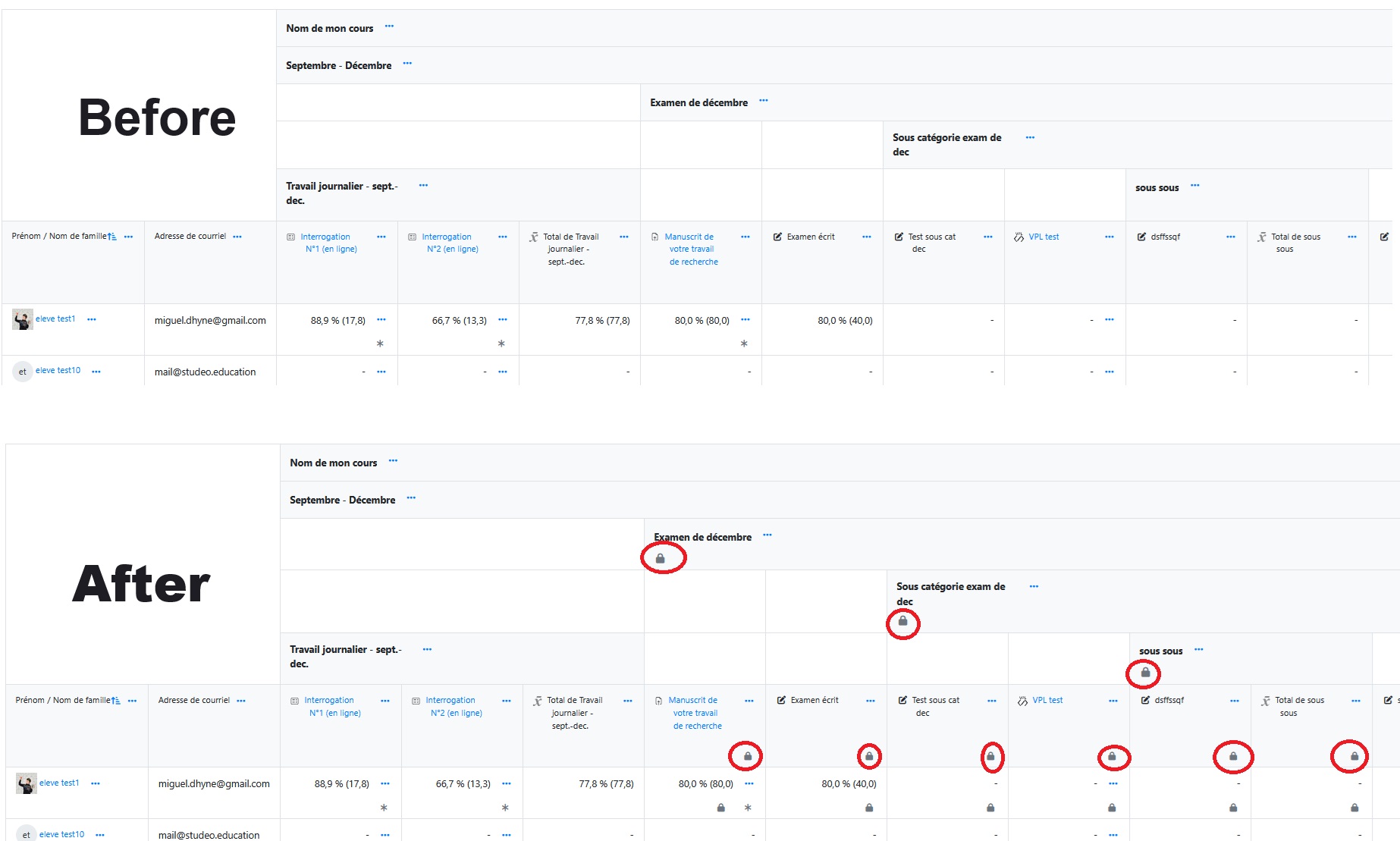
local_lockgrades is a Moodle plugin that allows administrators to recursively lock or unlock a grade category (grade items) along with all its subcategories and associated items, using an idnumber field as the identifier. Additionally, you can optionally filter which courses to affect by specifying a substring that must appear in the course shortname.
Features
- Recursive locking: Lock a parent category and all its subcategories, updating the
locked,timemodified, andlocktimefields in themdl_grade_itemstable. - Recursive unlocking: Unlock the same items by resetting
lockedandlocktimeto0while preserving the modification timestamp (timemodified). - Course filtering: Optionally enter a pattern to only (un)lock grades in courses whose
shortnamecontains that pattern. - Action scheduling: New! Schedule locking or unlocking actions for a specific date and time. The task will be executed automatically by Moodle's cron.
- Task overview and management: New! See a table of all scheduled (pending) lock/unlock actions, with execution time and action type. Each scheduled task can be modified, duplicated or deleted from the interface before execution.
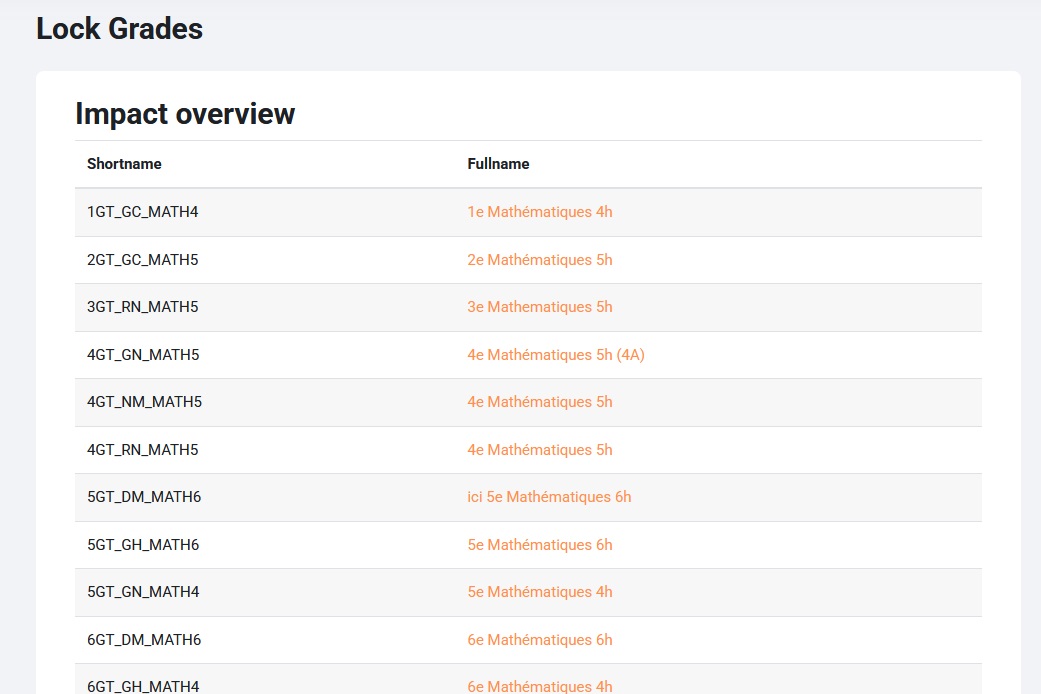
- Previsualization ("dry-run"): New! Preview the list of courses that would be affected by a lock/unlock action before applying or scheduling it.
- Ancestral lock inheritance: New! Automatically applies locking rules to any newly created or updated grade item or category when at least one ancestor category is already locked. Ensures that inheritance-based locks propagate through deep category hierarchies without manual intervention.
- Unlock constraints: You cannot unlock a subcategory if any of its ancestor categories remain locked; to unlock a subcategory, all its parent categories must first be unlocked.
- Simple interface**: An admin form lets you enter the category
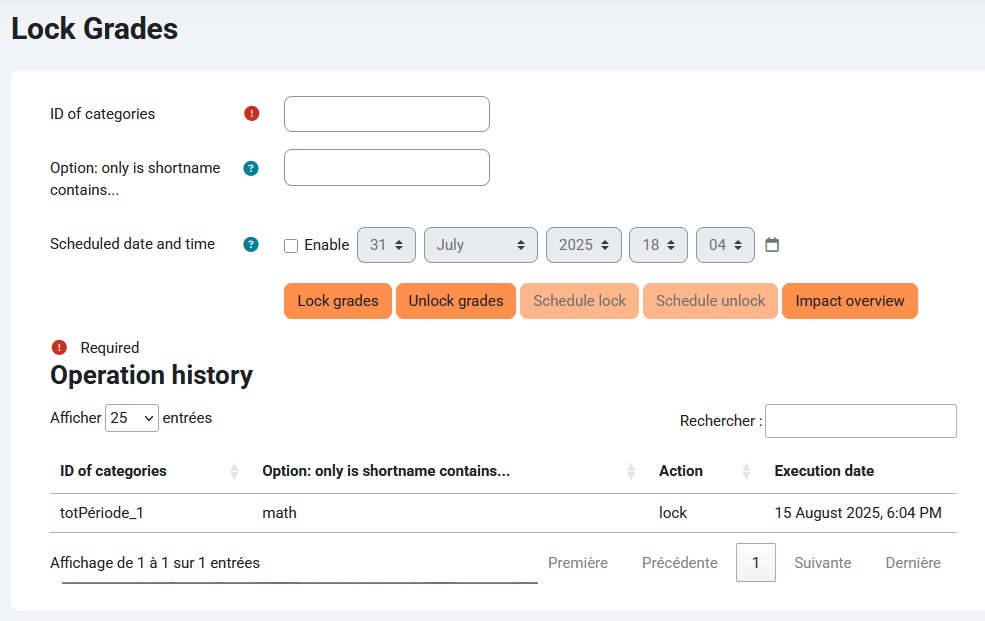
idnumber, an optional courseshortnamefilter, select the date and time for scheduling, and choose the action (lock, unlock, schedule lock, schedule unlock, or preview). - Unified history log: New!
- All actions (executed or scheduled) are listed in a single table, with a status badge (green = executed, grey = scheduled).
- Sort, filter, and search on every column (id, shortname, action, dates, status…).
- Expandable details for each operation (showing impacted items).
- Edit, duplicate, or delete actions for scheduled tasks directly from the table.
- Security: Access is restricted to users with the
local/lockgrades:managecapability (by default administrators). - Data integrity: Uses database transactions to ensure consistent updates.
Requirements
- Moodle 3.5 or higher
- SSH or FTP access to copy files to the server
- Administrator rights on the Moodle platform
Installation
Copy the files
Place the
lockgradesfolder inside thelocal/directory of your Moodle installation, so the full path is:
moodle/local/lockgrades/
Check permissions
Make sure files and directories have appropriate permissions (readable by the web server):
chown -R www-data:www-data moodle/local/lockgrades

chmod -R 755 moodle/local/lockgrades
Database update
Log in as an administrator on your Moodle site. Moodle will automatically detect the new plugin and prompt you to update the database.
Verification
Go to Site administration > Plugins > Local plugins and check that
Lock Gradesappears in the list.
Usage
Log in with an account that has the
local/lockgrades:managecapability.
Navigate to:
https://your-moodle-site.local/local/lockgrades/index.php
Fill in the Category ID number of the grade item you wish to (un)lock (e.g.,
totPeriode_1).
Optionally fill in the Course shortname filter. Leave empty to affect all courses.
Preview the impact using the "Preview" button, which will list all impacted courses before you proceed.
To lock or unlock immediately, click Lock grades or Unlock grades.
To schedule a lock or unlock at a future date and time, fill the date/time field and click Schedule Lock or Schedule Unlock.
Scheduled actions will be executed automatically by Moodle's cron.
Review and manage scheduled tasks at the bottom of the page, where you will see a table of all pending actions with their details (category, filter, type, execution time). You can delete any pending task before it is executed.
After any action, a notification will confirm the success, and an informational box will explain the "Recalculate anyway" behavior in the gradebook UI.
Customization
- Adjust capabilities: To restrict access to other roles, modify
require_capability('local/lockgrades:manage', ...)inindex.phpand adjustaccess.phpaccordingly. - Edit messages: Modify the language strings in
lang/en/local_lockgrades.phporlang/fr/local_lockgrades.php. - Default behavior: The course filter is optional—leaving it empty will (un)lock all matching
idnumberitems across all courses.
License
This plugin is distributed under the GNU GPL v3 license. See the LICENSE file for details.
Authors and Support
- Author: Miguël Dhyne
- Contact: miguel.dhyne@gmail.com
For questions or contributions, please open an issue or submit a pull request on the project’s GitHub repository.
1.7 (Build 2025070800) (2025102300)
1.7 (Build 2025070800)
Plugin type: Local plugins
Frankenstyle component name: local_lockgrades
Version build number: 2025102300
Version release name: 1.7 (Build 2025070800)
Maturity: Stable
Supported Moodle versions: 4.2, 4.3, 4.4, 4.5, 5.0
Repository URL (Git): https://github.com/migueldhyne/moodle-local_lockgrades
Repository branch:
Repository tag:
Issue/bug tracker URL: https://github.com/migueldhyne/moodle-local_lockgrades/issues
Lock Grades (local_lockgrades)
Description
local_lockgrades is a Moodle plugin that allows administrators to recursively lock or unlock a grade category (grade items) along with all its subcategories and associated items, using an idnumber field as the identifier. Additionally, you can optionally filter which courses to affect by specifying a substring that must appear in the course shortname.
Features
- Recursive locking: Lock a parent category and all its subcategories, updating the
locked,timemodified, andlocktimefields in themdl_grade_itemstable. - Recursive unlocking: Unlock the same items by resetting
lockedandlocktimeto0while preserving the modification timestamp (timemodified). - Course filtering: Optionally enter a pattern to only (un)lock grades in courses whose
shortnamecontains that pattern. - Action scheduling: New! Schedule locking or unlocking actions for a specific date and time. The task will be executed automatically by Moodle's cron.
- Task overview and management: New! See a table of all scheduled (pending) lock/unlock actions, with execution time and action type. Each scheduled task can be modified, duplicated or deleted from the interface before execution.
- Previsualization ("dry-run"): New! Preview the list of courses that would be affected by a lock/unlock action before applying or scheduling it.
- Ancestral lock inheritance: New! Automatically applies locking rules to any newly created or updated grade item or category when at least one ancestor category is already locked. Ensures that inheritance-based locks propagate through deep category hierarchies without manual intervention.
- Unlock constraints: You cannot unlock a subcategory if any of its ancestor categories remain locked; to unlock a subcategory, all its parent categories must first be unlocked.
- Simple interface**: An admin form lets you enter the category
idnumber, an optional courseshortnamefilter, select the date and time for scheduling, and choose the action (lock, unlock, schedule lock, schedule unlock, or preview). - Unified history log: New!
- All actions (executed or scheduled) are listed in a single table, with a status badge (green = executed, grey = scheduled).
- Sort, filter, and search on every column (id, shortname, action, dates, status…).
- Expandable details for each operation (showing impacted items).
- Edit, duplicate, or delete actions for scheduled tasks directly from the table.
- Security: Access is restricted to users with the
local/lockgrades:managecapability (by default administrators). - Data integrity: Uses database transactions to ensure consistent updates.
Requirements
- Moodle 3.5 or higher
- SSH or FTP access to copy files to the server
- Administrator rights on the Moodle platform
Installation
Copy the files
Place the
lockgradesfolder inside thelocal/directory of your Moodle installation, so the full path is:
moodle/local/lockgrades/
Check permissions
Make sure files and directories have appropriate permissions (readable by the web server):
chown -R www-data:www-data moodle/local/lockgrades

chmod -R 755 moodle/local/lockgrades
Database update
Log in as an administrator on your Moodle site. Moodle will automatically detect the new plugin and prompt you to update the database.
Verification
Go to Site administration > Plugins > Local plugins and check that
Lock Gradesappears in the list.
Usage
Log in with an account that has the
local/lockgrades:managecapability.
Navigate to:
https://your-moodle-site.local/local/lockgrades/index.php
Fill in the Category ID number of the grade item you wish to (un)lock (e.g.,
totPeriode_1).
Optionally fill in the Course shortname filter. Leave empty to affect all courses.
Preview the impact using the "Preview" button, which will list all impacted courses before you proceed.
To lock or unlock immediately, click Lock grades or Unlock grades.
To schedule a lock or unlock at a future date and time, fill the date/time field and click Schedule Lock or Schedule Unlock.
Scheduled actions will be executed automatically by Moodle's cron.
Review and manage scheduled tasks at the bottom of the page, where you will see a table of all pending actions with their details (category, filter, type, execution time). You can delete any pending task before it is executed.
After any action, a notification will confirm the success, and an informational box will explain the "Recalculate anyway" behavior in the gradebook UI.
Customization
- Adjust capabilities: To restrict access to other roles, modify
require_capability('local/lockgrades:manage', ...)inindex.phpand adjustaccess.phpaccordingly. - Edit messages: Modify the language strings in
lang/en/local_lockgrades.phporlang/fr/local_lockgrades.php. - Default behavior: The course filter is optional—leaving it empty will (un)lock all matching
idnumberitems across all courses.
License
This plugin is distributed under the GNU GPL v3 license. See the LICENSE file for details.
Authors and Support
- Author: Miguël Dhyne
- Contact: miguel.dhyne@gmail.com
For questions or contributions, please open an issue or submit a pull request on the project’s GitHub repository.
1.6 (Build 2025070800) (2025070800)
1.6 (Build 2025070800)
Plugin type: Local plugins
Frankenstyle component name: local_lockgrades
Version build number: 2025070800
Version release name: 1.6 (Build 2025070800)
Maturity: Stable
Supported Moodle versions: 4.2, 4.4, 4.5, 5.0
Repository URL (Git): https://github.com/migueldhyne/moodle-local_lockgrades
Repository branch:
Repository tag:
Issue/bug tracker URL: https://github.com/migueldhyne/moodle-local_lockgrades/issues
Release Notes — Lock Grades (local_lockgrades)
Overview
Lock Grades is a Moodle plugin that enables administrators to recursively lock or unlock a grade category (including all its subcategories and items) using the idnumber field as an identifier. The plugin also allows filtering by course shortname and offers advanced scheduling and management features.
New in This Release
- Action Scheduling: Schedule locking or unlocking for a specific date and time. Actions are executed automatically by Moodle’s cron.
- Dry-run Preview: Preview the list of courses that would be affected before applying or scheduling an action.
- Advanced Task Management: View, edit, duplicate, or delete scheduled actions in a unified table before execution.
- Ancestral Lock Inheritance: New grade items or categories automatically inherit the locked status if any ancestor category is locked.
- Unified Action History: All actions (immediate or scheduled) are shown in a single sortable, filterable table with expandable details.
- Enhanced Security: Access restricted to users with the
local/lockgrades:managecapability.
Key Features
- Recursive Lock/Unlock: Automatically updates the
lockedstatus of all child grade items and subcategories, using database transactions for data integrity. - Course Filtering: Optionally limit actions to courses whose shortname contains a specific substring.
- Unlock Constraints: A subcategory cannot be unlocked if any of its ancestor categories remains locked.
- Simple Interface: Admin form for entering the category
idnumber, optional course filter, selecting the date/time, and choosing the action (lock, unlock, schedule, preview). - Detailed Logging: All actions (executed or scheduled) are recorded, with status, filters, dates, and affected items visible.
- Transactional Integrity: All changes use database transactions to guarantee consistency.
Requirements
- Moodle 4.2 or higher
- SSH or FTP access to copy files to the server
- Administrator rights on the Moodle platform
Installation
Copy the files:
Place thelockgradesfolder inside thelocal/directory of your Moodle installation.
Check permissions:
Ensure the files and folders are readable by the web server user (usuallywww-data).
Database update:
Log in as a Moodle administrator. Moodle will detect the new plugin and prompt you to update the database.
Verification:
Go to Site administration > Plugins > Local plugins to check thatLock Gradesappears in the list.
Usage
- Log in with a user account that has the
local/lockgrades:managecapability. - Go to
/local/lockgrades/index.phpon your Moodle site. - Enter the category ID number of the grade item to (un)lock (e.g.,
totPeriode_1). - Optionally, enter a course shortname filter (leave blank to affect all courses).
- Use the Preview button to see which courses would be affected before proceeding.
- To lock or unlock immediately, click Lock grades or Unlock grades.
- To schedule a lock or unlock, select the desired date and time, then click Schedule Lock or Schedule Unlock. Actions will be executed by Moodle’s cron.
- Review and manage all scheduled actions at the bottom of the page. You can edit, duplicate, or delete any pending task before execution.
- After each action, a confirmation and an informational message will be displayed.
Customization
- Adjust capabilities:
To restrict access to other roles, modify the capability requirement in the plugin code and adjustaccess.php. - Edit messages:
Modify language strings inlang/en/local_lockgrades.phporlang/fr/local_lockgrades.php. - Default behavior:
The course filter is optional. If left blank, actions affect all courses containing the matchingidnumber.
License
This plugin is distributed under the GNU GPL v3 license. See the LICENSE file for details.
Author and Support
- Author: Miguël Dhyne
- Contact: miguel.dhyne@gmail.com
For questions or contributions, please open an issue or submit a pull request on the project’s GitHub repository.
1.1 (Build 2025-05-31) (2025061001)
1.1 (Build 2025-05-31)
Plugin type: Local plugins
Frankenstyle component name: local_lockgrades
Version build number: 2025061001
Version release name: 1.1 (Build 2025-05-31)
Maturity: Stable
Supported Moodle versions: 4.2, 4.3, 4.4, 4.5, 5.0
Repository URL (Git): https://github.com/migueldhyne/moodle-local_lockgrades
Repository branch:
Repository tag:
Issue/bug tracker URL: https://github.com/migueldhyne/moodle-local_lockgrades/issues
Lock Grades (local_lockgrades)
Description
local_lockgrades is a Moodle plugin that allows administrators to recursively lock or unlock a grade category (grade items) along with all its subcategories and associated items, using an idnumber field as the identifier.
Features
- Recursive locking: Locks a parent category and all its subcategories, updating the
locked,timemodified, andlocktimefields in themdl_grade_itemstable. - Recursive unlocking: Unlocks the same items by resetting
lockedandlocktimeto 0 while preserving the modification timestamp (timemodified). - Simple interface: A form is available in the Moodle administration to enter the
idnumberand choose the action (lock or unlock). - Security: Access is restricted to users with the
moodle/site:configcapability (administrators). - Data integrity: Uses transactions to ensure consistent updates.
Requirements
- Moodle 3.5 or higher
- SSH or FTP access to copy files to the server
- Administrator rights on the Moodle platform
Installation
Copy the files
Place the
lockgradesfolder inside thelocal/directory of your Moodle installation, so the full path is:
moodle/local/lockgrades/
Check permissions
Make sure files and directories have appropriate permissions (readable by the web server):
chown -R www-data:www-data moodle/local/lockgrades

chmod -R 755 moodle/local/lockgrades
Database update
Log in as an administrator on your Moodle site. Moodle will automatically detect the new plugin and prompt you to update the database.
Usage
Log in with an administrator account (with
moodle/site:configcapability).
In your browser, open the URL:
https://your-moodle-site.local/local/lockgrades/index.php
Enter the idnumber of the main category whose grades you want to lock or unlock (e.g.,
totPeriode_1).
Click on Lock grades or Unlock grades.
A notification will confirm the success of the operation.
Customization
- Adjust capabilities: To restrict access to other roles, modify the capability used in
index.php(moodle/site:config). - Edit messages: Modify the language strings in
lang/en/local_lockgrades.php.
License
This plugin is distributed under the GNU GPL v3 license. See the LICENSE file for details.
Authors and support
- Author name: Miguël Dhyne
- Contact: miguel.dhyne@gmail.com
For any questions or contributions, please open an issue or submit a pull request on the project’s GitHub repository.
1.1 (Build 2025-05-31) (2025061000)
1.1 (Build 2025-05-31)
Plugin type: Local plugins
Frankenstyle component name: local_lockgrades
Version build number: 2025061000
Version release name: 1.1 (Build 2025-05-31)
Maturity: Stable
Supported Moodle versions: 4.2, 4.3, 4.4, 4.5, 5.0
Repository URL (Git): https://github.com/migueldhyne/moodle-local_lockgrades
Repository branch:
Repository tag:
Issue/bug tracker URL: https://github.com/migueldhyne/moodle-local_lockgrades/issues
Lock Grades (local_lockgrades)
Description
local_lockgrades is a Moodle plugin that allows administrators to recursively lock or unlock a grade category (grade items) along with all its subcategories and associated items, using an idnumber field as the identifier.
Features
- Recursive locking: Locks a parent category and all its subcategories, updating the
locked,timemodified, andlocktimefields in themdl_grade_itemstable. - Recursive unlocking: Unlocks the same items by resetting
lockedandlocktimeto 0 while preserving the modification timestamp (timemodified). - Simple interface: A form is available in the Moodle administration to enter the
idnumberand choose the action (lock or unlock). - Security: Access is restricted to users with the
moodle/site:configcapability (administrators). - Data integrity: Uses transactions to ensure consistent updates.
Requirements
- Moodle 3.5 or higher
- SSH or FTP access to copy files to the server
- Administrator rights on the Moodle platform
Installation
Copy the files
Place the
lockgradesfolder inside thelocal/directory of your Moodle installation, so the full path is:
moodle/local/lockgrades/
Check permissions
Make sure files and directories have appropriate permissions (readable by the web server):
chown -R www-data:www-data moodle/local/lockgrades

chmod -R 755 moodle/local/lockgrades
Database update
Log in as an administrator on your Moodle site. Moodle will automatically detect the new plugin and prompt you to update the database.
Usage
Log in with an administrator account (with
moodle/site:configcapability).
In your browser, open the URL:
https://your-moodle-site.local/local/lockgrades/index.php
Enter the idnumber of the main category whose grades you want to lock or unlock (e.g.,
totPeriode_1).
Click on Lock grades or Unlock grades.
A notification will confirm the success of the operation.
Customization
- Adjust capabilities: To restrict access to other roles, modify the capability used in
index.php(moodle/site:config). - Edit messages: Modify the language strings in
lang/en/local_lockgrades.php.
License
This plugin is distributed under the GNU GPL v3 license. See the LICENSE file for details.
Authors and support
- Author name: Miguël Dhyne
- Contact: miguel.dhyne@gmail.com
For any questions or contributions, please open an issue or submit a pull request on the project’s GitHub repository.
1.1 (Build 2025-05-31) (2025060606)
1.1 (Build 2025-05-31)
Plugin type: Local plugins
Frankenstyle component name: local_lockgrades
Version build number: 2025060606
Version release name: 1.1 (Build 2025-05-31)
Maturity: Stable
Supported Moodle versions: 4.2, 4.3, 4.4, 4.5, 5.0
Repository URL (Git): https://github.com/migueldhyne/moodle-local_lockgrades
Repository branch:
Repository tag:
Issue/bug tracker URL: https://github.com/migueldhyne/moodle-local_lockgrades/issues
Lock Grades (local_lockgrades)
Description
local_lockgrades is a Moodle plugin that allows administrators to recursively lock or unlock a grade category (grade items) along with all its subcategories and associated items, using an idnumber field as the identifier.
Features
- Recursive locking: Locks a parent category and all its subcategories, updating the
locked,timemodified, andlocktimefields in themdl_grade_itemstable. - Recursive unlocking: Unlocks the same items by resetting
lockedandlocktimeto 0 while preserving the modification timestamp (timemodified). - Simple interface: A form is available in the Moodle administration to enter the
idnumberand choose the action (lock or unlock). - Security: Access is restricted to users with the
moodle/site:configcapability (administrators). - Data integrity: Uses transactions to ensure consistent updates.
Requirements
- Moodle 3.5 or higher
- SSH or FTP access to copy files to the server
- Administrator rights on the Moodle platform
Installation
Copy the files
Place the
lockgradesfolder inside thelocal/directory of your Moodle installation, so the full path is:
moodle/local/lockgrades/
Check permissions
Make sure files and directories have appropriate permissions (readable by the web server):
chown -R www-data:www-data moodle/local/lockgrades

chmod -R 755 moodle/local/lockgrades
Database update
Log in as an administrator on your Moodle site. Moodle will automatically detect the new plugin and prompt you to update the database.
Verification
Go to Site administration > Plugins > Local plugins and check that
Lock Gradesappears in the list.
Usage
Log in with an administrator account (with
moodle/site:configcapability).
In your browser, open the URL:
https://your-moodle-site.local/local/lockgrades/index.php
Enter the idnumber of the main category whose grades you want to lock or unlock (e.g.,
totPeriode_1).
Click on Lock grades or Unlock grades.
A notification will confirm the success of the operation.
Customization
- Adjust capabilities: To restrict access to other roles, modify the capability used in
index.php(moodle/site:config). - Edit messages: Modify the language strings in
lang/en/local_lockgrades.php.
License
This plugin is distributed under the GNU GPL v3 license. See the LICENSE file for details.
Authors and support
- Author name: Miguël Dhyne
- Contact: miguel.dhyne@gmail.com
For any questions or contributions, please open an issue or submit a pull request on the project’s GitHub repository.
1.0 (Build 2025-05-31) (2025053100)
1.0 (Build 2025-05-31)
Plugin type: Local plugins
Frankenstyle component name: local_lockgrades
Version build number: 2025053100
Version release name: 1.0 (Build 2025-05-31)
Maturity: Stable
Supported Moodle versions: 4.2, 4.4, 4.5, 5.0
Repository URL (Git):
Repository branch:
Repository tag:
Issue/bug tracker URL: https://github.com/migueldhyne/moodle-local_lockgrades/issues
Lock Grades (local_lockgrades)
Description
local_lockgrades is a Moodle plugin that allows administrators to recursively lock or unlock a grade category (grade items) along with all its subcategories and associated items, using an idnumber field as the identifier.
Features
- Recursive locking: Locks a parent category and all its subcategories, updating the
locked,timemodified, andlocktimefields in themdl_grade_itemstable. - Recursive unlocking: Unlocks the same items by resetting
lockedandlocktimeto 0 while preserving the modification timestamp (timemodified). - Simple interface: A form is available in the Moodle administration to enter the
idnumberand choose the action (lock or unlock). - Security: Access is restricted to users with the
moodle/site:configcapability (administrators). - Data integrity: Uses transactions to ensure consistent updates.
Requirements
- Moodle 3.5 or higher
- SSH or FTP access to copy files to the server
- Administrator rights on the Moodle platform
Installation
Copy the files
Place the
lockgradesfolder inside thelocal/directory of your Moodle installation, so the full path is:
moodle/local/lockgrades/
Check permissions
Make sure files and directories have appropriate permissions (readable by the web server):
chown -R www-data:www-data moodle/local/lockgrades

chmod -R 755 moodle/local/lockgrades
Database update
Log in as an administrator on your Moodle site. Moodle will automatically detect the new plugin and prompt you to update the database.
Verification
Go to Site administration > Plugins > Local plugins and check that
Lock Gradesappears in the list.
Usage
Log in with an administrator account (with
moodle/site:configcapability).
In your browser, open the URL:
https://your-moodle-site.local/local/lockgrades/index.php
Enter the idnumber of the main category whose grades you want to lock or unlock (e.g.,
totPeriode_1).
Click on Lock grades or Unlock grades.
A notification will confirm the success of the operation.
Customization
- Adjust capabilities: To restrict access to other roles, modify the capability used in
index.php(moodle/site:config). - Edit messages: Modify the language strings in
lang/en/local_lockgrades.php.
License
This plugin is distributed under the GNU GPL v3 license. See the LICENSE file for details.
Authors and support
- Author name: Miguël Dhyne
- Contact: miguel.dhyne@gmail.com
For any questions or contributions, please open an issue or submit a pull request on the project’s GitHub repository.