Individual ZIP Download Activity
Versions
Current version
v1.0 (2025072703)
v1.0
Plugin type: Activities
Frankenstyle component name: mod_zipdownload
Version build number: 2025072703
Version release name: v1.0
Maturity: Stable
Supported Moodle versions: 4.1, 4.2, 4.3, 4.4, 4.5, 5.0
Repository URL (Git): https://github.com/TangatBaktybergen/moodle-activity_zipdownload
Repository branch:
Repository tag:
Issue/bug tracker URL: https://github.com/TangatBaktybergen/moodle-activity_zipdownload/issues
ZIP Download Activity Plugin for Moodle
Personalized Code Distribution for Lab-Based Programming Courses
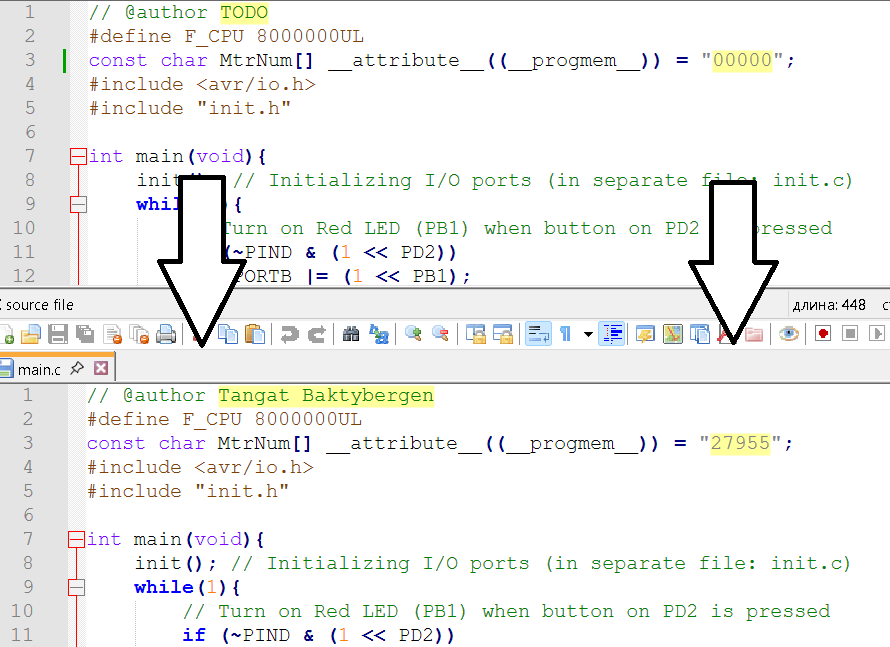
This Moodle activity plugin allows teachers to upload a ZIP template containing .c and .h files (including subfolders) and one or more Makefiles. When a student accesses the activity, a personalized ZIP file is generated and downloaded. The plugin automatically replaces placeholders like @author and 00000 with the student’s full name and ID.
It is ideal for courses that require distributing lab starter code, such as embedded systems, robotics, or microcontroller programming.
What It Does
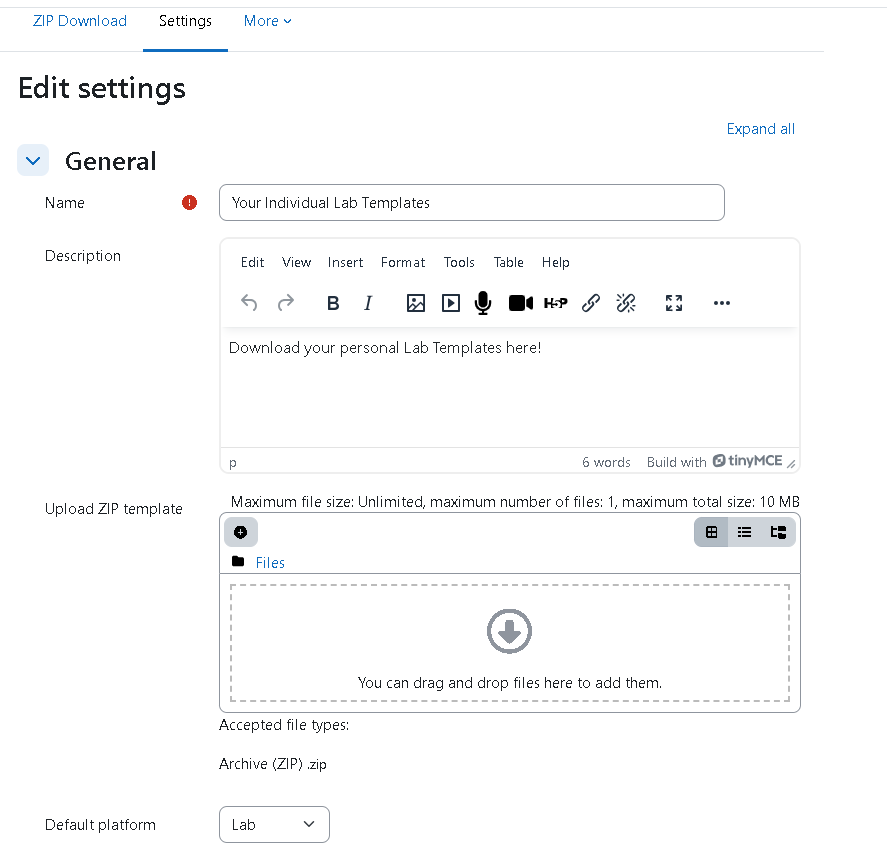
- Teachers upload a ZIP template when creating the activity.
- The ZIP may include subfolders,
.c/.hfiles, and one or moreMakefiles. - On student access:
@ Firstname Lastnameis inserted where@Author TODOwas used."00000"is replaced with the student’s ID.Makefiles are modified based on the student’s platform selection.- A personalized ZIP is generated instantly for download.
Platform Selection
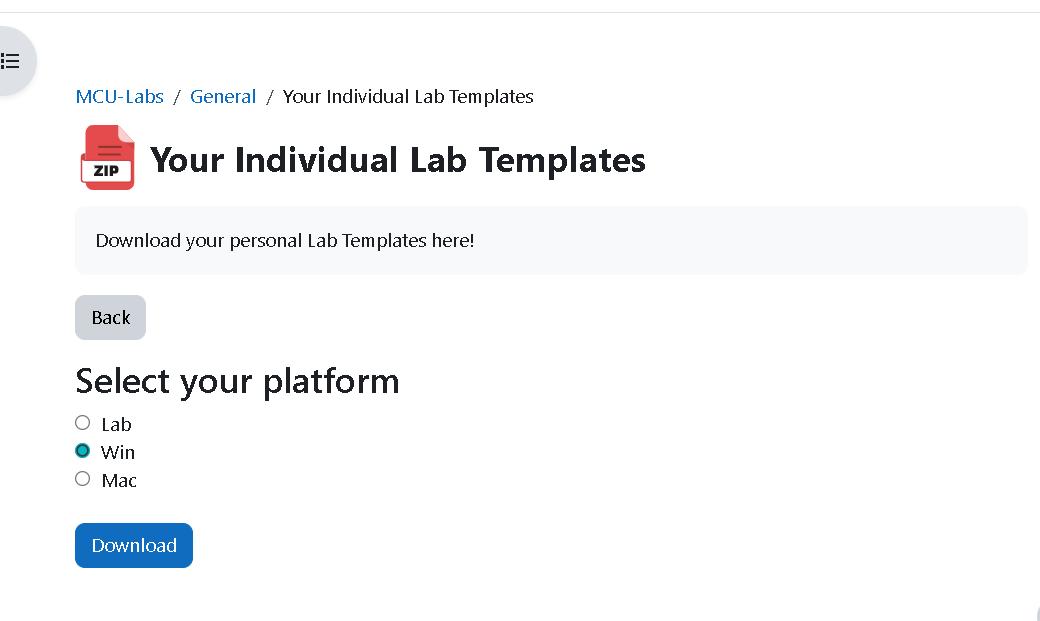
When the student clicks the activity:
- They are prompted to select their platform:
- Lab '
PORT=/dev/ttyUSB_MySmartUSB - Windows '
PORT=COM3 - Mac '
PORT=/dev/tty.SLAB_USBtoUART
- Lab '
- All
Makefilefiles are automatically updated with the selectedPORTvalue. - The generated ZIP file is renamed to reflect the student and platform:
Templates-12345-Lab.zipTemplates-12345-Win.zipTemplates-12345-Mac.zip
Installation
- Unzip this plugin into the
moddirectory of your Moodle installation: /path/to/moodle/mod/zipdownload - Visit Site Administration > Notifications to complete installation.
Creating the Activity
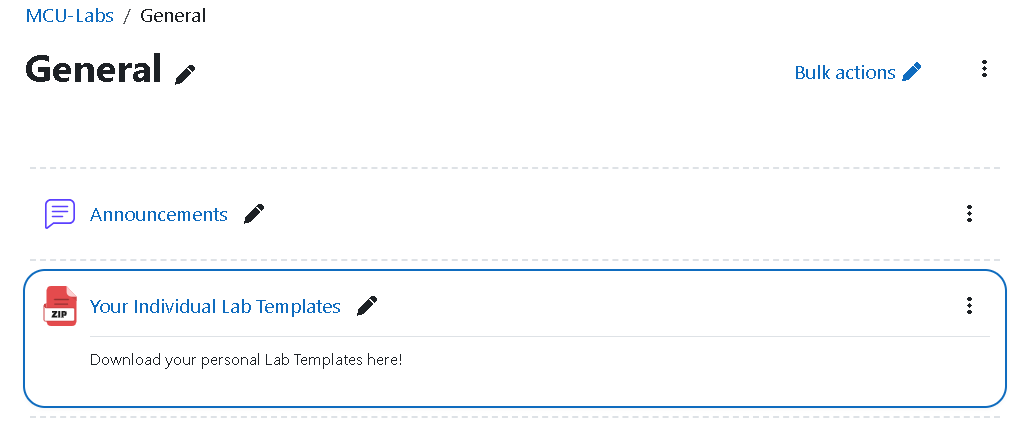
- In your Moodle course, turn editing on and Add an activity.
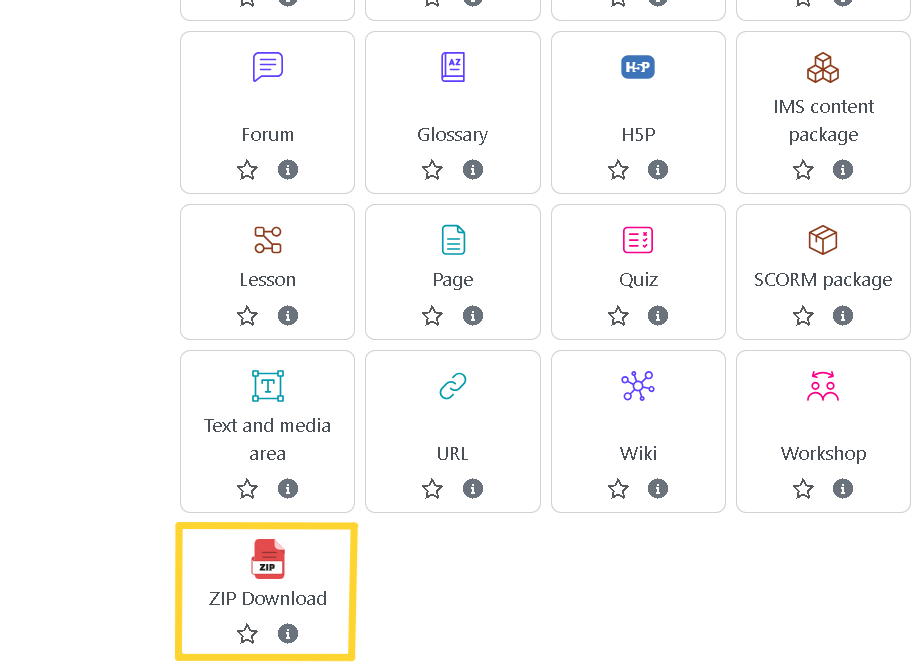
- Choose ZIP Download.
- Upload your ZIP template containing
.c/.hfiles andMakefiles. - Save and return to the course.
Student View
- Students click the activity and select their platform.
- The plugin processes the uploaded ZIP template:
- Replaces author and ID placeholders
- Edits
Makefiles with platform-specific ports - A personalized ZIP file is downloaded immediately.
Authors
Ivan Volosyak
Tangat Baktybergen
License
GNU GPL v3 or later
Developed at Rhine-Waal University of Applied Sciences (HSRW), Kleve, Germany.
v1.0 (2025072702)
v1.0
Plugin type: Activities
Frankenstyle component name: mod_zipdownload
Version build number: 2025072702
Version release name: v1.0
Maturity: Stable
Supported Moodle versions: 4.1, 4.2, 4.3, 4.4, 4.5, 5.0
Repository URL (Git): https://github.com/TangatBaktybergen/moodle-activity_zipdownload
Repository branch:
Repository tag:
Issue/bug tracker URL: https://github.com/TangatBaktybergen/moodle-activity_zipdownload/issues
ZIP Download Activity Plugin for Moodle
Personalized Code Distribution for Lab-Based Programming Courses
This Moodle activity plugin allows teachers to upload a ZIP template containing .c and .h files (including subfolders) and one or more Makefiles. When a student accesses the activity, a personalized ZIP file is generated and downloaded. The plugin automatically replaces placeholders like @author and 00000 with the student’s full name and ID.
It is ideal for courses that require distributing lab starter code, such as embedded systems, robotics, or microcontroller programming.
What It Does
- Teachers upload a ZIP template when creating the activity.
- The ZIP may include subfolders,
.c/.hfiles, and one or moreMakefiles. - On student access:
@ Firstname Lastnameis inserted where@Author TODOwas used."00000"is replaced with the student’s ID.Makefiles are modified based on the student’s platform selection.- A personalized ZIP is generated instantly for download.
Platform Selection
When the student clicks the activity:
- They are prompted to select their platform:
- Lab '
PORT=/dev/ttyUSB_MySmartUSB - Windows '
PORT=COM3 - Mac '
PORT=/dev/tty.SLAB_USBtoUART
- Lab '
- All
Makefilefiles are automatically updated with the selectedPORTvalue. - The generated ZIP file is renamed to reflect the student and platform:
Templates-12345-Lab.zipTemplates-12345-Win.zipTemplates-12345-Mac.zip
Installation
- Unzip this plugin into the
moddirectory of your Moodle installation: /path/to/moodle/mod/zipdownload - Visit Site Administration > Notifications to complete installation.
Creating the Activity
- In your Moodle course, turn editing on and Add an activity.
- Choose ZIP Download.
- Upload your ZIP template containing
.c/.hfiles andMakefiles. - Save and return to the course.
Student View
- Students click the activity and select their platform.
- The plugin processes the uploaded ZIP template:
- Replaces author and ID placeholders
- Edits
Makefiles with platform-specific ports - A personalized ZIP file is downloaded immediately.
Authors
Ivan Volosyak
Tangat Baktybergen
License
GNU GPL v3 or later
Developed at Rhine-Waal University of Applied Sciences (HSRW), Kleve, Germany.
v1.0 (2025072701)
v1.0
Plugin type: Activities
Frankenstyle component name: mod_zipdownload
Version build number: 2025072701
Version release name: v1.0
Maturity: Stable
Supported Moodle versions: 4.1, 4.2, 4.3, 4.4, 4.5, 5.0
Repository URL (Git): https://github.com/TangatBaktybergen/moodle-activity_zipdownload
Repository branch:
Repository tag:
Issue/bug tracker URL: https://github.com/TangatBaktybergen/moodle-activity_zipdownload/issues
ZIP Download Activity Plugin for Moodle
Personalized Code Distribution for Lab-Based Programming Courses
This Moodle activity plugin allows teachers to upload a ZIP template containing .c and .h files (including subfolders) and one or more Makefiles. When a student accesses the activity, a personalized ZIP file is generated and downloaded. The plugin automatically replaces placeholders like @author and 00000 with the student’s full name and ID.
It is ideal for courses that require distributing lab starter code, such as embedded systems, robotics, or microcontroller programming.
What It Does
- Teachers upload a ZIP template when creating the activity.
- The ZIP may include subfolders,
.c/.hfiles, and one or moreMakefiles. - On student access:
@ Firstname Lastnameis inserted where@Author TODOwas used."00000"is replaced with the student’s ID.Makefiles are modified based on the student’s platform selection.- A personalized ZIP is generated instantly for download.
Platform Selection
When the student clicks the activity:
- They are prompted to select their platform:
- Lab '
PORT=/dev/ttyUSB_MySmartUSB - Windows '
PORT=COM3 - Mac '
PORT=/dev/tty.SLAB_USBtoUART
- Lab '
- All
Makefilefiles are automatically updated with the selectedPORTvalue. - The generated ZIP file is renamed to reflect the student and platform:
Templates-12345-Lab.zipTemplates-12345-Win.zipTemplates-12345-Mac.zip
Installation
- Unzip this plugin into the
moddirectory of your Moodle installation: /path/to/moodle/mod/zipdownload - Visit Site Administration > Notifications to complete installation.
Creating the Activity
- In your Moodle course, turn editing on and Add an activity.
- Choose ZIP Download.
- Upload your ZIP template containing
.c/.hfiles andMakefiles. - Save and return to the course.
Student View
- Students click the activity and select their platform.
- The plugin processes the uploaded ZIP template:
- Replaces author and ID placeholders
- Edits
Makefiles with platform-specific ports - A personalized ZIP file is downloaded immediately.
Authors
Ivan Volosyak
Tangat Baktybergen
License
GNU GPL v3 or later
Developed at Rhine-Waal University of Applied Sciences (HSRW), Kleve, Germany.
v1.0 (2025072700)
v1.0
Plugin type: Activities
Frankenstyle component name: mod_zipdownload
Version build number: 2025072700
Version release name: v1.0
Maturity: Stable
Supported Moodle versions: 4.1, 4.2, 4.3, 4.4, 4.5, 5.0
Repository URL (Git): https://github.com/TangatBaktybergen/moodle-activity_zipdownload
Repository branch:
Repository tag:
Issue/bug tracker URL: https://github.com/TangatBaktybergen/moodle-activity_zipdownload/issues
ZIP Download Activity Plugin for Moodle
Personalized Code Distribution for Lab-Based Programming Courses
This Moodle activity plugin allows teachers to upload a ZIP template containing .c and .h files (including subfolders) and one or more Makefiles. When a student accesses the activity, a personalized ZIP file is generated and downloaded. The plugin automatically replaces placeholders like @author and 00000 with the student’s full name and ID.
It is ideal for courses that require distributing lab starter code, such as embedded systems, robotics, or microcontroller programming.
What It Does
- Teachers upload a ZIP template when creating the activity.
- The ZIP may include subfolders,
.c/.hfiles, and one or moreMakefiles. - On student access:
@ Firstname Lastnameis inserted where@Author TODOwas used."00000"is replaced with the student’s ID.Makefiles are modified based on the student’s platform selection.- A personalized ZIP is generated instantly for download.
Platform Selection
When the student clicks the activity:
- They are prompted to select their platform:
- Lab '
PORT=/dev/ttyUSB_MySmartUSB - Windows '
PORT=COM3 - Mac '
PORT=/dev/tty.SLAB_USBtoUART
- Lab '
- All
Makefilefiles are automatically updated with the selectedPORTvalue. - The generated ZIP file is renamed to reflect the student and platform:
Templates-12345-Lab.zipTemplates-12345-Win.zipTemplates-12345-Mac.zip
Installation
- Unzip this plugin into the
moddirectory of your Moodle installation: /path/to/moodle/mod/zipdownload - Visit Site Administration > Notifications to complete installation.
Creating the Activity
- In your Moodle course, turn editing on and Add an activity.
- Choose ZIP Download.
- Upload your ZIP template containing
.c/.hfiles andMakefiles. - Save and return to the course.
Student View
- Students click the activity and select their platform.
- The plugin processes the uploaded ZIP template:
- Replaces author and ID placeholders
- Edits
Makefiles with platform-specific ports - A personalized ZIP file is downloaded immediately.
Authors
Ivan Volosyak
Tangat Baktybergen
License
GNU GPL v3 or later
Developed at Rhine-Waal University of Applied Sciences (HSRW), Kleve, Germany.
v1.0 (2025071708)
v1.0
Plugin type: Activities
Frankenstyle component name: mod_zipdownload
Version build number: 2025071708
Version release name: v1.0
Maturity: Stable
Supported Moodle versions: 4.1, 4.2, 4.3, 4.4, 4.5, 5.0
Repository URL (Git): https://github.com/TangatBaktybergen/moodle-activity_zipdownload
Repository branch:
Repository tag:
Issue/bug tracker URL: https://github.com/TangatBaktybergen/moodle-activity_zipdownload/issues
ZIP Download Activity Plugin for Moodle
Personalized Code Distribution for Lab-Based Programming Courses
This Moodle activity plugin allows teachers to upload a ZIP template containing .c and .h files (including subfolders) and one or more Makefiles. When a student accesses the activity, a personalized ZIP file is generated and downloaded. The plugin automatically replaces placeholders like @author and 00000 with the student’s full name and ID.
It is ideal for courses that require distributing lab starter code, such as embedded systems, robotics, or microcontroller programming.
What It Does
- Teachers upload a ZIP template when creating the activity.
- The ZIP may include subfolders,
.c/.hfiles, and one or moreMakefiles. - On student access:
@ Firstname Lastnameis inserted where@Author TODOwas used."00000"is replaced with the student’s ID.- Each
Makefileis modified based on the student’s platform selection. - A personalized ZIP is generated instantly for download.
Platform Selection
When the student clicks the activity:
- They are prompted to select their platform:
- Lab '
PORT=/dev/ttyUSB_MySmartUSB - Windows '
PORT=COM3 - Mac '
PORT=/dev/tty.SLAB_USBtoUART
- Lab '
- All
Makefilefiles are automatically updated with the selectedPORTvalue. - The generated ZIP file is renamed to reflect the student and platform:
Templates-12345-Lab.zipTemplates-12345-Win.zipTemplates-12345-Mac.zip
Installation
- Unzip this plugin into the
moddirectory of your Moodle installation: /path/to/moodle/mod/zipdownload - Visit Site Administration > Notifications to complete installation.
Creating the Activity
- In your Moodle course, turn editing on and Add an activity.
- Choose ZIP Download.
- Upload your ZIP template containing
.c/.hfiles andMakefiles. - Save and return to the course.
Student View
- Students click the activity and select their platform.
- The plugin processes the uploaded ZIP template:
- Replaces author and ID placeholders
- Edits
Makefiles with platform-specific ports - A personalized ZIP file is downloaded immediately.
Authors
Ivan Volosyak
Tangat Baktybergen
License
GNU GPL v3 or later
Developed at Rhine-Waal University of Applied Sciences (HSRW), Kleve, Germany.
v1.0 (2025071706)
v1.0
Plugin type: Activities
Frankenstyle component name: mod_zipdownload
Version build number: 2025071706
Version release name: v1.0
Maturity: Stable
Supported Moodle versions: 4.1, 4.2, 4.3, 4.4, 4.5, 5.0
Repository URL (Git): https://github.com/TangatBaktybergen/mod-individual-zip
Repository branch:
Repository tag:
Issue/bug tracker URL: https://github.com/TangatBaktybergen/moodle-activity_zipdownload/issues
ZIP Download Activity Plugin for Moodle
This Moodle activity plugin allows teachers to upload a ZIP template containing .c files. When a student opens the activity, a personalized ZIP file is generated and downloaded. The plugin automatically replaces specific placeholders in .c files with the student's personal information.
What It Does
- Teacher uploads a ZIP template when creating the activity.
- ZIP may contain one or more
.csource files and aMakefile. - The plugin searches each
.cfile and replaces:
@author TODO'@ Firstname Lastname"00000"'"StudentID"(from Moodle ID number or user ID)
- It also edits the
Makefileto update thePORTvalue depending on student selection.
Platform Selection
When the student clicks the activity:
- They are prompted to select their platform:
- Lab '
PORT=/dev/ttyUSB_MySmartUSB - Win '
PORT=COM3 - Mac '
PORT=/dev/tty.SLAB_USBtoUART
- Lab '
- The plugin edits the
PORT=line in theMakefileaccordingly. - The generated ZIP is renamed to:
Templates-12345-Lab.zipTemplates-12345-Win.zipTemplates-12345-Mac.zip
Installation
- Unzip this plugin into the
moddirectory of your Moodle installation:
/path/to/moodle/mod/zipdownload
- Go to Site Administration > Notifications to complete the installation.
Creating the Activity
- In a course, turn editing on and Add an activity.
- Choose ZIP Download.
- Upload your
.ziptemplate containing.cfiles and aMakefile. - Save and return to course.
Student View
- When a student clicks the activity:
- They are asked to choose their platform (Lab/Win/Mac).
- The ZIP is extracted.
.cfiles andMakefileare processed.- A personalized ZIP is downloaded instantly.
Authors
Ivan Volosyak, Tangat Baktybergen
License
GNU GPL v3 or later
Developed for Hochschule Rhein-Waal (HSRW) PDF form automation project.
v1.0 (2025071705)
v1.0
Plugin type: Activities
Frankenstyle component name: mod_zipdownload
Version build number: 2025071705
Version release name: v1.0
Maturity: Stable
Supported Moodle versions: 4.1, 4.2, 4.3, 4.4, 4.5, 5.0
Repository URL (Git): https://github.com/TangatBaktybergen/mod-individual-zip
Repository branch:
Repository tag:
Issue/bug tracker URL: https://github.com/TangatBaktybergen/moodle-activity_zipdownload/issues
ZIP Download Activity Plugin for Moodle
This Moodle activity plugin allows teachers to upload a ZIP template containing .c files. When a student opens the activity, a personalized ZIP file is generated and downloaded. The plugin automatically replaces specific placeholders in .c files with the student's personal information.
What It Does
- Teacher uploads a ZIP template when creating the activity.
- ZIP may contain one or more
.csource files and aMakefile. - The plugin searches each
.cfile and replaces:
@author TODO'@ Firstname Lastname"00000"'"StudentID"(from Moodle ID number or user ID)
- It also edits the
Makefileto update thePORTvalue depending on student selection.
Platform Selection
When the student clicks the activity:
- They are prompted to select their platform:
- Lab '
PORT=/dev/ttyUSB_MySmartUSB - Win '
PORT=COM3 - Mac '
PORT=/dev/tty.SLAB_USBtoUART
- Lab '
- The plugin edits the
PORT=line in theMakefileaccordingly. - The generated ZIP is renamed to:
Templates-12345-Lab.zipTemplates-12345-Win.zipTemplates-12345-Mac.zip
Installation
- Unzip this plugin into the
moddirectory of your Moodle installation:
/path/to/moodle/mod/zipdownload
- Go to Site Administration > Notifications to complete the installation.
Creating the Activity
- In a course, turn editing on and Add an activity.
- Choose ZIP Download.
- Upload your
.ziptemplate containing.cfiles and aMakefile. - Save and return to course.
Student View
- When a student clicks the activity:
- They are asked to choose their platform (Lab/Win/Mac).
- The ZIP is extracted.
.cfiles andMakefileare processed.- A personalized ZIP is downloaded instantly.
Authors
Ivan Volosyak, Tangat Baktybergen
License
GNU GPL v3 or later
Developed for Hochschule Rhein-Waal (HSRW) PDF form automation project.
v1.0 (2025071704)
v1.0
Plugin type: Activities
Frankenstyle component name: mod_zipdownload
Version build number: 2025071704
Version release name: v1.0
Maturity: Stable
Supported Moodle versions: 4.1, 4.2, 4.3, 4.4, 4.5, 5.0
Repository URL (Git): https://github.com/TangatBaktybergen/mod-individual-zip
Repository branch:
Repository tag:
Issue/bug tracker URL: https://github.com/TangatBaktybergen/moodle-activity_zipdownload/issues
ZIP Download Activity Plugin for Moodle
This Moodle activity plugin allows teachers to upload a ZIP template containing .c files. When a student opens the activity, a personalized ZIP file is generated and downloaded. The plugin automatically replaces specific placeholders in .c files with the student's personal information.
What It Does
- Teacher uploads a ZIP template when creating the activity.
- ZIP may contain one or more
.csource files and aMakefile. - The plugin searches each
.cfile and replaces:
@author TODO'@ Firstname Lastname"00000"'"StudentID"(from Moodle ID number or user ID)
- It also edits the
Makefileto update thePORTvalue depending on student selection.
Platform Selection
When the student clicks the activity:
- They are prompted to select their platform:
- Lab '
PORT=/dev/ttyUSB_MySmartUSB - Win '
PORT=COM3 - Mac '
PORT=/dev/tty.SLAB_USBtoUART
- Lab '
- The plugin edits the
PORT=line in theMakefileaccordingly. - The generated ZIP is renamed to:
Templates-12345-Lab.zipTemplates-12345-Win.zipTemplates-12345-Mac.zip
Installation
- Unzip this plugin into the
moddirectory of your Moodle installation:
/path/to/moodle/mod/zipdownload
- Go to Site Administration > Notifications to complete the installation.
Creating the Activity
- In a course, turn editing on and Add an activity.
- Choose ZIP Download.
- Upload your
.ziptemplate containing.cfiles and aMakefile. - Save and return to course.
Student View
- When a student clicks the activity:
- They are asked to choose their platform (Lab/Win/Mac).
- The ZIP is extracted.
.cfiles andMakefileare processed.- A personalized ZIP is downloaded instantly.
Authors
Ivan Volosyak, Tangat Baktybergen
License
GNU GPL v3 or later
Developed for Hochschule Rhein-Waal (HSRW) PDF form automation project.
v1.0 (2025071703)
v1.0
Plugin type: Activities
Frankenstyle component name: mod_zipdownload
Version build number: 2025071703
Version release name: v1.0
Maturity: Stable
Supported Moodle versions: 4.1, 4.2, 4.3, 4.4, 4.5, 5.0
Repository URL (Git): https://github.com/TangatBaktybergen/mod-individual-zip
Repository branch:
Repository tag:
Issue/bug tracker URL: https://github.com/TangatBaktybergen/moodle-activity_zipdownload/issues
ZIP Download Activity Plugin for Moodle
This Moodle activity plugin allows teachers to upload a ZIP template containing .c files. When a student opens the activity, a personalized ZIP file is generated and downloaded. The plugin automatically replaces specific placeholders in .c files with the student's personal information.
What It Does
- Teacher uploads a ZIP template when creating the activity.
- ZIP may contain one or more
.csource files and aMakefile. - The plugin searches each
.cfile and replaces:
@author TODO'@ Firstname Lastname"00000"'"StudentID"(from Moodle ID number or user ID)
- It also edits the
Makefileto update thePORTvalue depending on student selection.
Platform Selection
When the student clicks the activity:
- They are prompted to select their platform:
- Lab '
PORT=/dev/ttyUSB_MySmartUSB - Win '
PORT=COM3 - Mac '
PORT=/dev/tty.SLAB_USBtoUART
- Lab '
- The plugin edits the
PORT=line in theMakefileaccordingly. - The generated ZIP is renamed to:
Templates-12345-Lab.zipTemplates-12345-Win.zipTemplates-12345-Mac.zip
Installation
- Unzip this plugin into the
moddirectory of your Moodle installation:
/path/to/moodle/mod/zipdownload
- Go to Site Administration > Notifications to complete the installation.
Creating the Activity
- In a course, turn editing on and Add an activity.
- Choose ZIP Download.
- Upload your
.ziptemplate containing.cfiles and aMakefile. - Save and return to course.
Student View
- When a student clicks the activity:
- They are asked to choose their platform (Lab/Win/Mac).
- The ZIP is extracted.
.cfiles andMakefileare processed.- A personalized ZIP is downloaded instantly.
Authors
Ivan Volosyak, Tangat Baktybergen
License
GNU GPL v3 or later
Developed for Hochschule Rhein-Waal (HSRW) PDF form automation project.
v1.0 (2025071702)
v1.0
Plugin type: Activities
Frankenstyle component name: mod_zipdownload
Version build number: 2025071702
Version release name: v1.0
Maturity: Stable
Supported Moodle versions: 4.1, 4.2, 4.3, 4.4, 4.5, 5.0
Repository URL (Git): https://github.com/TangatBaktybergen/mod-individual-zip
Repository branch:
Repository tag:
Issue/bug tracker URL: https://github.com/TangatBaktybergen/moodle-activity_zipdownload/issues
ZIP Download Activity Plugin for Moodle
This Moodle activity plugin allows teachers to upload a ZIP template containing .c files. When a student opens the activity, a personalized ZIP file is generated and downloaded. The plugin automatically replaces specific placeholders in .c files with the student's personal information.
What It Does
- Teacher uploads a ZIP template when creating the activity.
- ZIP may contain one or more
.csource files and aMakefile. - The plugin searches each
.cfile and replaces:
@author TODO'@ Firstname Lastname"00000"'"StudentID"(from Moodle ID number or user ID)
- It also edits the
Makefileto update thePORTvalue depending on student selection.
Platform Selection
When the student clicks the activity:
- They are prompted to select their platform:
- Lab '
PORT=/dev/ttyUSB_MySmartUSB - Win '
PORT=COM3 - Mac '
PORT=/dev/tty.SLAB_USBtoUART
- Lab '
- The plugin edits the
PORT=line in theMakefileaccordingly. - The generated ZIP is renamed to:
Templates-12345-Lab.zipTemplates-12345-Win.zipTemplates-12345-Mac.zip
Installation
- Unzip this plugin into the
moddirectory of your Moodle installation:
/path/to/moodle/mod/zipdownload
- Go to Site Administration > Notifications to complete the installation.
Creating the Activity
- In a course, turn editing on and Add an activity.
- Choose ZIP Download.
- Upload your
.ziptemplate containing.cfiles and aMakefile. - Save and return to course.
Student View
- When a student clicks the activity:
- They are asked to choose their platform (Lab/Win/Mac).
- The ZIP is extracted.
.cfiles andMakefileare processed.- A personalized ZIP is downloaded instantly.
Authors
Ivan Volosyak, Tangat Baktybergen
License
GNU GPL v3 or later
Developed for Hochschule Rhein-Waal (HSRW) PDF form automation project.
v1.0 (2025071701)
v1.0
Plugin type: Activities
Frankenstyle component name: mod_zipdownload
Version build number: 2025071701
Version release name: v1.0
Maturity: Stable
Supported Moodle versions: 4.1, 4.2, 4.3, 4.4, 4.5, 5.0
Repository URL (Git): https://github.com/TangatBaktybergen/mod-individual-zip
Repository branch:
Repository tag:
Issue/bug tracker URL: https://github.com/TangatBaktybergen/moodle-activity_zipdownload/issues
ZIP Download Activity Plugin for Moodle
This Moodle activity plugin allows teachers to upload a ZIP template containing .c files. When a student opens the activity, a personalized ZIP file is generated and downloaded. The plugin automatically replaces specific placeholders in .c files with the student's personal information.
What It Does
- Teacher uploads a ZIP template when creating the activity.
- ZIP may contain one or more
.csource files and aMakefile. - The plugin searches each
.cfile and replaces:
@author TODO'@ Firstname Lastname"00000"'"StudentID"(from Moodle ID number or user ID)
- It also edits the
Makefileto update thePORTvalue depending on student selection.
Platform Selection
When the student clicks the activity:
- They are prompted to select their platform:
- Lab '
PORT=/dev/ttyUSB_MySmartUSB - Win '
PORT=COM3 - Mac '
PORT=/dev/tty.SLAB_USBtoUART
- Lab '
- The plugin edits the
PORT=line in theMakefileaccordingly. - The generated ZIP is renamed to:
Templates-12345-Lab.zipTemplates-12345-Win.zipTemplates-12345-Mac.zip
Installation
- Unzip this plugin into the
moddirectory of your Moodle installation:
/path/to/moodle/mod/zipdownload
- Go to Site Administration > Notifications to complete the installation.
Creating the Activity
- In a course, turn editing on and Add an activity.
- Choose ZIP Download.
- Upload your
.ziptemplate containing.cfiles and aMakefile. - Save and return to course.
Student View
- When a student clicks the activity:
- They are asked to choose their platform (Lab/Win/Mac).
- The ZIP is extracted.
.cfiles andMakefileare processed.- A personalized ZIP is downloaded instantly.
Authors
Ivan Volosyak, Tangat Baktybergen
License
GNU GPL v3 or later
Developed for Hochschule Rhein-Waal (HSRW) PDF form automation project.
v1.0 (2025071700)
v1.0
Plugin type: Activities
Frankenstyle component name: mod_zipdownload
Version build number: 2025071700
Version release name: v1.0
Maturity: Stable
Supported Moodle versions: 4.1, 4.2, 4.3, 4.4, 4.5, 5.0
Repository URL (Git): https://github.com/TangatBaktybergen/mod-individual-zip
Repository branch:
Repository tag:
Issue/bug tracker URL: https://github.com/TangatBaktybergen/moodle-activity_zipdownload/issues
ZIP Download Activity Plugin for Moodle
This Moodle activity plugin allows teachers to upload a ZIP template containing .c files. When a student opens the activity, a personalized ZIP file is generated and downloaded. The plugin automatically replaces specific placeholders in .c files with the student's personal information.
What It Does
- Teacher uploads a ZIP template when creating the activity.
- ZIP may contain one or more
.csource files and aMakefile. - The plugin searches each
.cfile and replaces:
@author TODO'@ Firstname Lastname"00000"'"StudentID"(from Moodle ID number or user ID)
- It also edits the
Makefileto update thePORTvalue depending on student selection.
Platform Selection
When the student clicks the activity:
- They are prompted to select their platform:
- Lab '
PORT=/dev/ttyUSB_MySmartUSB - Win '
PORT=COM3 - Mac '
PORT=/dev/tty.SLAB_USBtoUART
- Lab '
- The plugin edits the
PORT=line in theMakefileaccordingly. - The generated ZIP is renamed to:
Templates-12345-Lab.zipTemplates-12345-Win.zipTemplates-12345-Mac.zip
Installation
- Unzip this plugin into the
moddirectory of your Moodle installation:
/path/to/moodle/mod/zipdownload
- Go to Site Administration > Notifications to complete the installation.
Creating the Activity
- In a course, turn editing on and Add an activity.
- Choose ZIP Download.
- Upload your
.ziptemplate containing.cfiles and aMakefile. - Save and return to course.
Student View
- When a student clicks the activity:
- They are asked to choose their platform (Lab/Win/Mac).
- The ZIP is extracted.
.cfiles andMakefileare processed.- A personalized ZIP is downloaded instantly.
Authors
Ivan Volosyak, Tangat Baktybergen
License
GNU GPL v3 or later
Developed for Hochschule Rhein-Waal (HSRW) PDF form automation project.
v1.0 (2025071501)
v1.0
Plugin type: Activities
Frankenstyle component name: mod_zipdownload
Version build number: 2025071501
Version release name: v1.0
Maturity: Stable
Supported Moodle versions: 4.1, 4.2, 4.3, 4.4, 4.5, 5.0
Repository URL (Git): https://github.com/TangatBaktybergen/mod-individual-zip
Repository branch:
Repository tag:
Issue/bug tracker URL: https://github.com/TangatBaktybergen/moodle-activity_zipdownload/issues
ZIP Download Activity Plugin for Moodle
This Moodle activity plugin allows teachers to upload a ZIP template containing .c files. When a student opens the activity, a personalized ZIP file is generated and downloaded. The plugin automatically replaces specific placeholders in .c files with the student's personal information.
What It Does
- Teacher uploads a ZIP template when creating the activity.
- ZIP may contain one or more
.csource files and aMakefile. - The plugin searches each
.cfile and replaces:
//@author TODO'//@author Firstname Lastname"00000"'"StudentID"(from Moodle ID number or user ID)
- It also edits the
Makefileto update thePORTvalue depending on student selection.
Platform Selection
When the student clicks the activity:
- They are prompted to select their platform:
- Lab '
PORT=/dev/ttyUSB_MySmartUSB - Win '
PORT=COM3 - Mac '
PORT=/dev/tty.SLAB_USBtoUART
- Lab '
- The plugin edits the
PORT=line in theMakefileaccordingly. - The generated ZIP is renamed to:
Templates-12345-Lab.zipTemplates-12345-Win.zipTemplates-12345-Mac.zip
📦 Installation
- Unzip this plugin into the
moddirectory of your Moodle installation:
/path/to/moodle/mod/zipdownload
- Go to Site Administration > Notifications to complete the installation.
Creating the Activity
- In a course, turn editing on and Add an activity.
- Choose ZIP Download.
- Upload your
.ziptemplate containing.cfiles and aMakefile. - Save and return to course.
Student View
- When a student clicks the activity:
- They are asked to choose their platform (Lab/Win/Mac).
- The ZIP is extracted.
.cfiles andMakefileare processed.- A personalized ZIP is downloaded instantly.
Authors
Ivan Volosyak, Tangat Baktybergen
License
GNU GPL v3 or later
Developed for Hochschule Rhein-Waal (HSRW) PDF form automation project.
v1.0 (2025071500)
v1.0
Plugin type: Activities
Frankenstyle component name: mod_zipdownload
Version build number: 2025071500
Version release name: v1.0
Maturity: Stable
Supported Moodle versions: 4.1, 4.2, 4.3, 4.4, 4.5, 5.0
Repository URL (Git): https://github.com/TangatBaktybergen/mod-individual-zip
Repository branch:
Repository tag:
Issue/bug tracker URL: https://github.com/TangatBaktybergen/moodle-activity_zipdownload/issues
Individual ZIP Download Activity Plugin for Moodle
Short description:
Moodle plugin for generating individual zip templates, automatically replacing @author and student ID placeholders in C code with personalized student data. It was designed specifically for the Microcontroller course utilizing the ATmega microcontrollers programmed in C. With typically over 50 small programs to be created during the semester by each student, this plugin will save significant time by automating the inclusion of student IDs and their names in each file.
Designed as an activity module, this plugin allows teachers to upload a ZIP template containing placeholders (@author to be replaced by the full name of each student and 00000 to be replaced by the student ID). Students can download a personalized ZIP with their name and ID automatically filled across over 50 files of source code and specific Makefiles depending on the operating system selection.
This Moodle activity plugin allows teachers to upload a ZIP template containing many subfolders containing C files (.c and .h) and a Makefile. When a student opens the activity and selects the platform, a personalized ZIP file is generated on-the-fly and downloaded.
What It Does
- Teacher uploads a ZIP template when creating the activity.
- ZIP may contain subfolders with one or more
.csource files and aMakefile. - The plugin searches each
.cfile and replaces:
//@author TODO'//@FirstnameLastname"00000"'"StudentID"(from Moodle ID number or user ID)
- It also edits each available
Makefileto update thePORTvalue based on student platform selection.
Platform Selection
When students click the activity, they are prompted to select their platform (operating system)
to modify all makefiles as follows:
- Lab '
PORT=/dev/ttyUSB_MySmartUSB(default selection) - Win '
PORT=COM3 - Mac '
PORT=/dev/tty.SLAB_USBtoUART
Depending on this selection, the plugin automatically edits all the PORT= lines accordingly.
This selection is also directly visible in the filename of the generated ZIP offered for download:
Templates-12345-Lab.zipTemplates-12345-Win.zipTemplates-12345-Mac.zip
📦 Installation
- Unzip this plugin into the
moddirectory of your Moodle installation:
/path/to/moodle/mod/zipdownload
- Go to Site Administration > Notifications to complete the installation.
Creating the Activity
- In a course, turn editing on and Add an activity.
- Choose ZIP Download.
- Upload your
.ziptemplate containing.cfiles and aMakefile. - Save and return to course.
Student View
- When a student clicks the activity:
- They are asked to choose their platform (Lab/Win/Mac).
- On the moodle side the ZIP file submitted by the teacher is automatically extracted.
.cfiles andMakefileare processed.- A personalized ZIP is downloaded instantly.
Authors
Ivan Volosyak, Tangat Baktybergen
License
GNU GPL v3 or later
Developed at Rhine-Waal University of Applied Sciences (Hochschule Rhein-Waal, HSRW) in Kleve, Germany.
v1.0 (2025070401)
v1.0
Plugin type: Activities
Frankenstyle component name: mod_zipdownload
Version build number: 2025070401
Version release name: v1.0
Maturity: Stable
Supported Moodle versions: 4.1, 4.2, 4.3, 4.4, 4.5, 5.0
Repository URL (Git):
Repository branch:
Repository tag:
Issue/bug tracker URL: https://github.com/TangatBaktybergen/moodle-activity_zipdownload/issues
ZIP Download Activity Plugin for Moodle
Short description:
An activity module that allows teachers to upload a ZIP template. Students can download a personalized ZIP with their name and ID automatically filled in source code and Makefiles.
This Moodle activity plugin allows teachers to upload a ZIP template containing .c files and a Makefile. When a student opens the activity, a personalized ZIP file is generated and downloaded. The plugin automatically replaces placeholders in .c files and the Makefile with the student's information.
What It Does
- Teacher uploads a ZIP template when creating the activity.
- ZIP may contain one or more
.csource files and aMakefile. - The plugin searches each
.cfile and replaces:
@author TODO'@ Firstname Lastname"00000"'"StudentID"(from Moodle ID number or user ID)
- It also edits the
Makefileto update thePORTvalue based on student platform selection.
Platform Selection
When the student clicks the activity:
- They are prompted to select their platform:
- Lab '
PORT=/dev/ttyUSB_MySmartUSB - Win '
PORT=COM3 - Mac '
PORT=/dev/tty.SLAB_USBtoUART
- Lab '
- The plugin edits the
PORT=line in the Makefile accordingly. - The generated ZIP is renamed to reflect the student and platform, for example:
Templates-12345-Lab.zipTemplates-12345-Win.zipTemplates-12345-Mac.zip
Installation
- Unzip this plugin into the
moddirectory of your Moodle installation: - Go to Site Administration > Notifications to complete the installation.
Creating the Activity
- In a course, turn editing on and Add an activity.
- Choose ZIP Download.
- Upload your
.ziptemplate containing.cfiles and aMakefile. - Save and return to course.
Student View
- When a student clicks the activity:
- They are asked to choose their platform (Lab/Win/Mac).
- The ZIP is extracted and processed.
- A personalized ZIP is downloaded instantly.
Authors
Ivan Volosyak, Tangat Baktybergen
License
GNU GPL v3 or later
Developed for Hochschule Rhein-Waal (HSRW) PDF form automation project.